DiscoverOrg vs Hunter: Which B2B Data Tool Wins in 2026?
DiscoverOrg became ZoomInfo, and Hunter stayed a lean email finder. One asks for a five-figure annual contract, the other starts at $49/mo. Here's which one actually fits your outbound motion.
TL;DR
- DiscoverOrg no longer exists as a standalone product. It merged with ZoomInfo in 2019 and the technology, data, and org charts now ship inside ZoomInfo Sales. If a rep says "we use DiscoverOrg," they mean ZoomInfo.
- Hunter is a focused email finder and verifier built around domain search. It does one job, publishes its pricing, and starts free.
- The real decision is not "which tool is better" — it is whether you need an enterprise intelligence platform with intent data, org charts, and phone coverage, or you need accurate work emails at a credit price that does not require procurement.
- Cost gap is roughly 10-30x. ZoomInfo deals are annual, seat-based, and typically land in five figures. Hunter's Starter plan is $49/mo self-serve.
- If you want ZoomInfo-grade email accuracy without the contract, a credit-based finder like Tomba covers the email and phone layer at $49/mo with a free tier to test first.
What happened to DiscoverOrg?#
DiscoverOrg was a B2B contact database known for human-verified org charts, IT install data, and deep coverage of enterprise buying committees. In February 2019 it acquired ZoomInfo, and in 2020 the combined company rebranded entirely under the ZoomInfo name and went public.
That matters for this comparison in three ways:
- You cannot buy DiscoverOrg separately. There is no DiscoverOrg pricing page, no DiscoverOrg free trial, and no DiscoverOrg-only plan. You buy ZoomInfo Sales (or Copilot, their AI layer) and inherit what DiscoverOrg used to be.
- The human-verification DNA survived. ZoomInfo's research-team model, org-chart hierarchy data, and technographic install signals trace directly back to DiscoverOrg. That is still the strongest part of the product.
- Pricing moved upmarket. DiscoverOrg was already enterprise-priced. Post-merger, seat minimums and annual commitments hardened. Reviews on G2 consistently flag cost and contract rigidity as the top complaint, alongside praise for coverage depth.
So when people search "DiscoverOrg vs Hunter" in 2026, the honest framing is: enterprise sales intelligence platform vs lean email-finding utility. Those are different categories that happen to overlap on one field — the work email address.

What does Hunter actually do?#
Hunter built its reputation on one workflow: type a company domain, get the email addresses associated with it, plus the pattern the company uses (first.last@, flast@, and so on). Around that core it added an email verifier, a bulk finder, a lightweight campaign sender, and a Chrome extension.
What Hunter is good at:
- Domain-first prospecting. You have a list of 400 company websites and need contacts. Hunter's domain search is genuinely fast for this.
- Pattern confidence. It shows sources and a confidence score, so you can judge a guess instead of trusting a black box.
- Transparent pricing. Free tier, then published monthly plans. No sales call required.
- Verification hygiene. The verifier catches obvious dead mailboxes before you burn sender reputation.
What Hunter does not do:
- No direct-dial phone numbers.
- No org charts or reporting-line data.
- No intent or technographic signals.
- Thin coverage on personal-email-only prospects and on companies with almost no public web footprint.
Hunter is a tool. ZoomInfo is a platform. That distinction drives nearly every trade-off below.
DiscoverOrg vs Hunter: how do they compare feature by feature?#
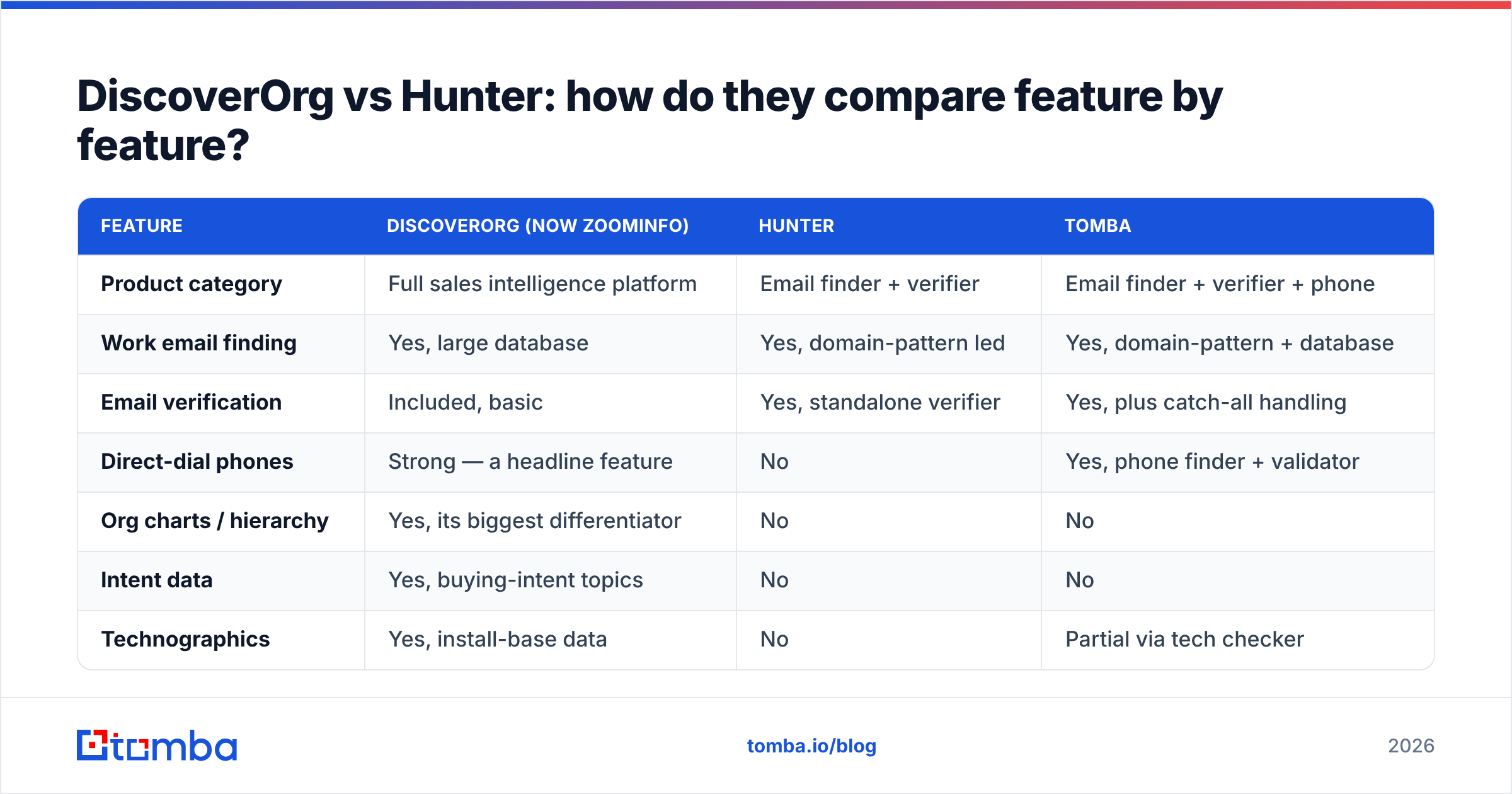
| Feature | DiscoverOrg (now ZoomInfo) | Hunter | Tomba |
|---|---|---|---|
| Product category | Full sales intelligence platform | Email finder + verifier | Email finder + verifier + phone |
| Work email finding | Yes, large database | Yes, domain-pattern led | Yes, domain-pattern + database |
| Email verification | Included, basic | Yes, standalone verifier | Yes, plus catch-all handling |
| Direct-dial phones | Strong — a headline feature | No | Yes, phone finder + validator |
| Org charts / hierarchy | Yes, its biggest differentiator | No | No |
| Intent data | Yes, buying-intent topics | No | No |
| Technographics | Yes, install-base data | No | Partial via tech checker |
| Free tier | No — demo only | Yes (limited monthly credits) | Yes, 25 searches/mo |
| Entry price | Annual contract, typically five figures | $49/mo Starter | $49/mo Starter |
| Contract length | Annual, often multi-year | Monthly or annual | Monthly or annual |
| Time to first email | Days (demo, quote, legal) | Minutes | Minutes |
| API access | Yes, credit-metered add-on | Yes | Yes, on all paid plans |
| CRM sync | Deep native Salesforce/HubSpot | Basic | Native HubSpot, Salesforce, Pipedrive |

The table makes the split obvious. If the rows you care about are org charts, intent, and direct dials, Hunter is not in the running and never was. If the rows you care about are email accuracy, price, and speed to value, ZoomInfo is a very expensive way to get a mailbox address.
How accurate is each one on email?#
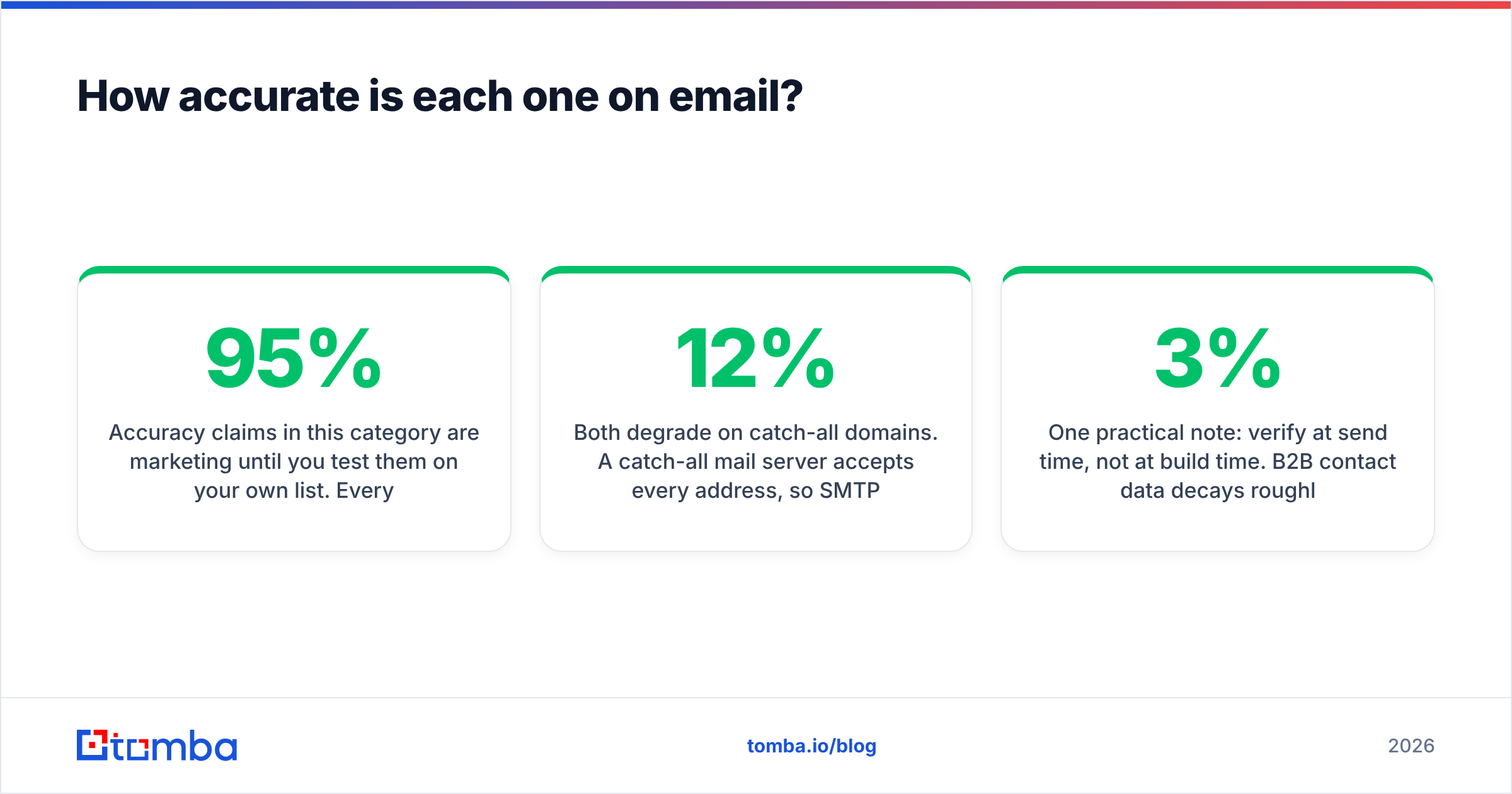
Accuracy claims in this category are marketing until you test them on your own list. Every vendor quotes 95%+ on a sample they chose. What actually varies is which segment each tool is accurate on.

Patterns that hold up across independent tests:
- ZoomInfo is strongest on mid-market and enterprise North America. Companies with 200+ employees, established web presence, and formal titles. Its human-research heritage shows here.
- Hunter is strongest where the email pattern is discoverable. SaaS companies, agencies, media, anything with public bylines and team pages. Weakest on stealth startups and non-English domains.
- Both degrade on catch-all domains. A catch-all mail server accepts every address, so SMTP verification returns "valid" for garbage. Neither ZoomInfo nor Hunter resolves this cleanly. If a meaningful slice of your ICP runs catch-all — common in finance, legal, and healthcare — you need a dedicated catch-all verifier or you will report a clean list and still see 8-12% bounces.
- Bounce rate is the only metric that matters. Run 200 contacts through each tool, send to both cohorts from a warmed domain, compare hard bounces. That test costs you a week and settles the argument permanently.
One practical note: verify at send time, not at build time. B2B contact data decays roughly 2-3% per month as people change jobs. A list you scraped in January and mail in July is meaningfully worse than the vendor's advertised accuracy, no matter whose logo is on it. Re-running your list through an email verifier before each send recovers most of that gap.
What do they really cost?#
This is where the comparison stops being close.
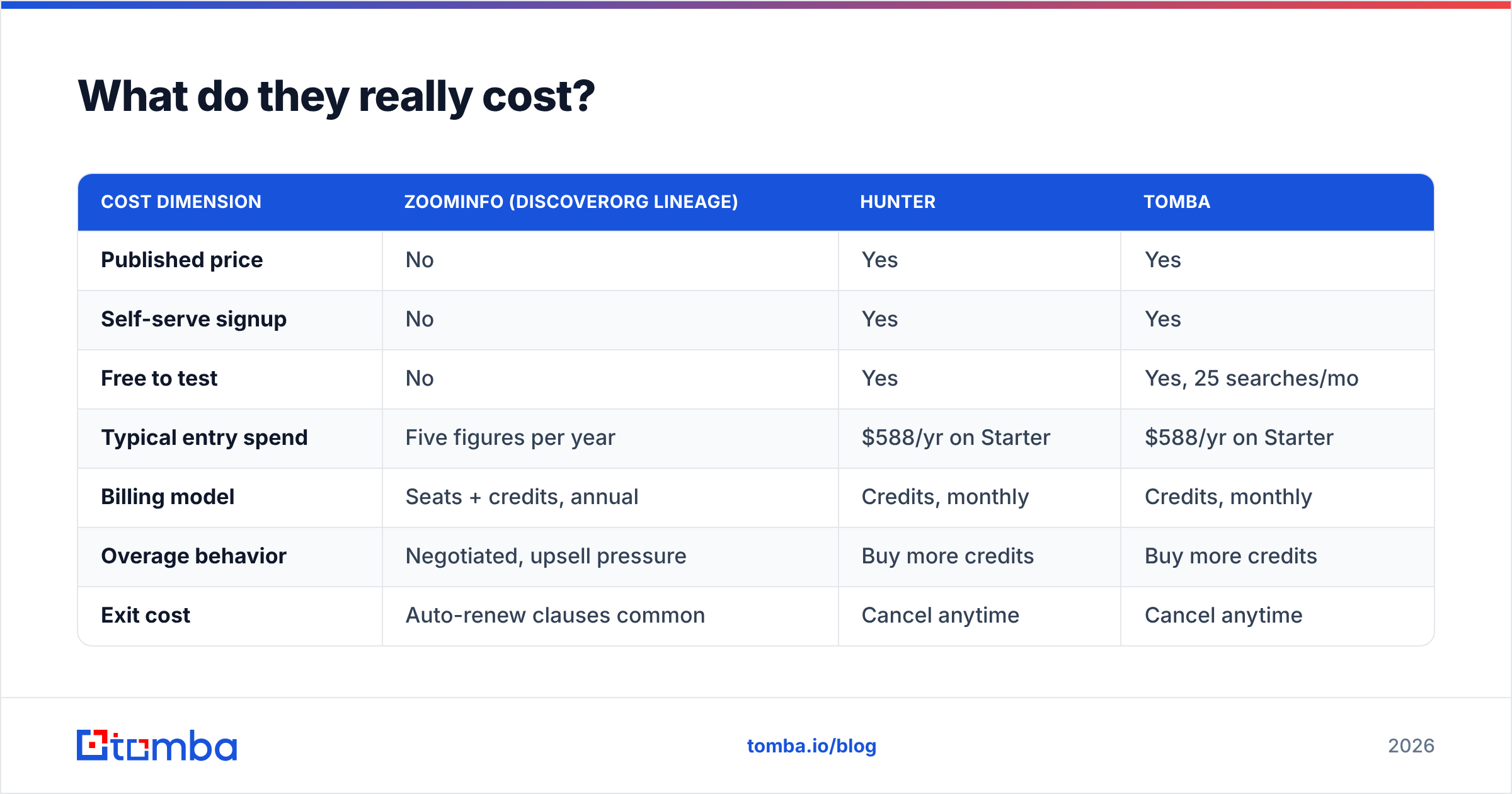
| Cost dimension | ZoomInfo (DiscoverOrg lineage) | Hunter | Tomba |
|---|---|---|---|
| Published price | No | Yes | Yes |
| Self-serve signup | No | Yes | Yes |
| Free to test | No | Yes | Yes, 25 searches/mo |
| Typical entry spend | Five figures per year | $588/yr on Starter | $588/yr on Starter |
| Billing model | Seats + credits, annual | Credits, monthly | Credits, monthly |
| Overage behavior | Negotiated, upsell pressure | Buy more credits | Buy more credits |
| Exit cost | Auto-renew clauses common | Cancel anytime | Cancel anytime |
ZoomInfo does not publish list pricing, and quotes vary widely by seat count, data modules, and negotiation leverage. Buyer reports on G2 and Capterra cluster entry deals in the low-to-mid five figures annually, with intent data, Copilot, and enrichment sold as separate lines. Treat any specific number you read online — including here — as directional, not a quote.
Hunter publishes plans starting at $49/mo for Starter, scaling through Growth and Business tiers as your monthly search and verification volume grows. Tomba pricing mirrors that structure: free at 25 searches/mo, $49/mo Starter, $99/mo Growth, $249/mo Pro, custom Enterprise.
The uncomfortable math for most teams: if you are a 5-person sales team sending 2,000 emails a month, you are choosing between roughly $600/year and roughly $25,000/year for a workflow where the only field you touch daily is the email address. The extra $24,400 buys org charts and intent signals. Those are real, valuable things — for an enterprise ABM motion with a dedicated ops person to operationalize them. They are shelf-ware for a seed-stage team doing founder-led outbound.

Which one should you pick?#
Pick based on your motion, not on feature-count.
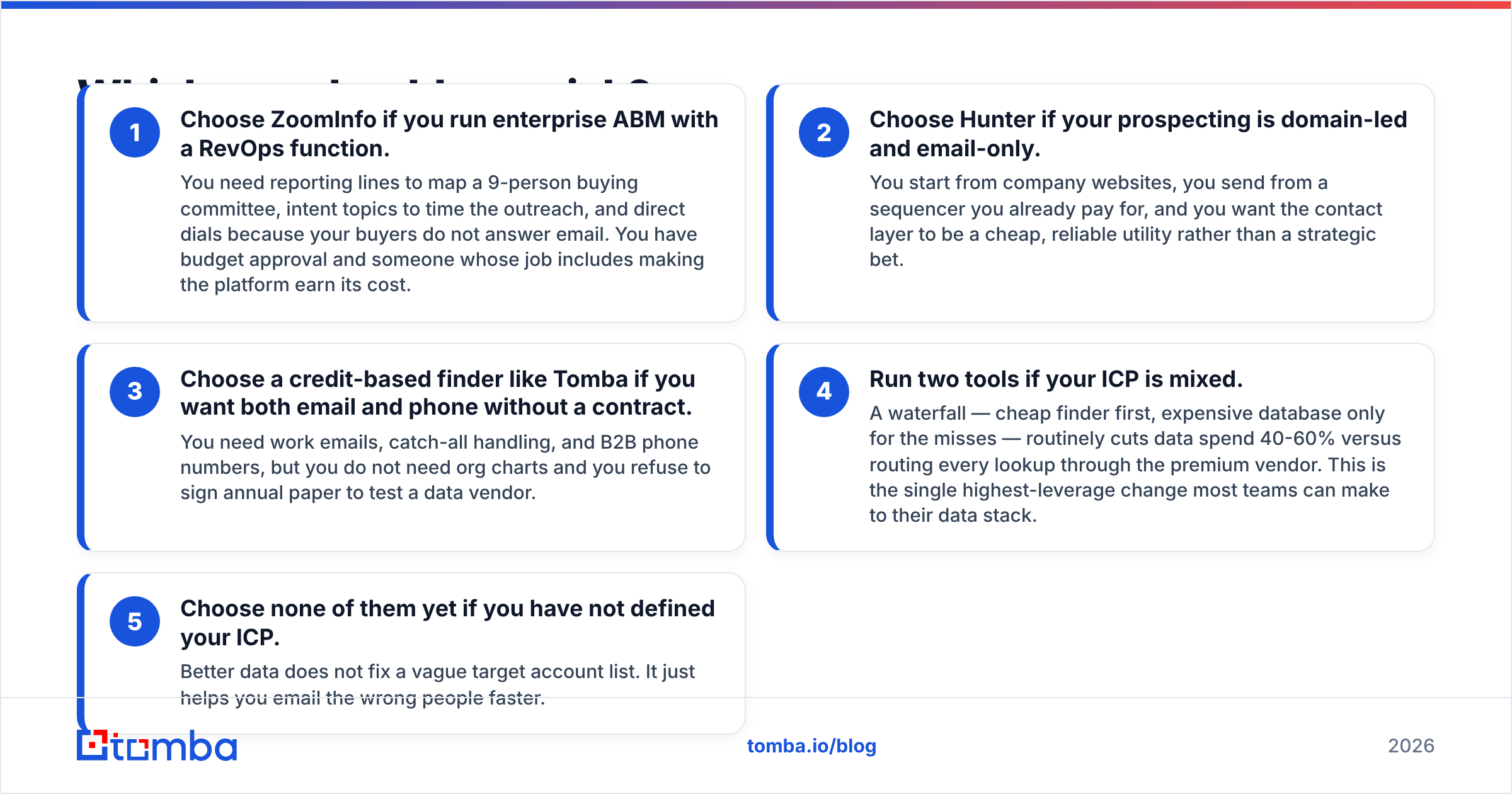
Choose ZoomInfo if you run enterprise ABM with a RevOps function. You need reporting lines to map a 9-person buying committee, intent topics to time the outreach, and direct dials because your buyers do not answer email. You have budget approval and someone whose job includes making the platform earn its cost.
Choose Hunter if your prospecting is domain-led and email-only. You start from company websites, you send from a sequencer you already pay for, and you want the contact layer to be a cheap, reliable utility rather than a strategic bet.
Choose a credit-based finder like Tomba if you want both email and phone without a contract. You need work emails, catch-all handling, and B2B phone numbers, but you do not need org charts and you refuse to sign annual paper to test a data vendor.
Run two tools if your ICP is mixed. A waterfall — cheap finder first, expensive database only for the misses — routinely cuts data spend 40-60% versus routing every lookup through the premium vendor. This is the single highest-leverage change most teams can make to their data stack.
Choose none of them yet if you have not defined your ICP. Better data does not fix a vague target account list. It just helps you email the wrong people faster.
What about the DiscoverOrg features Hunter can't match?#
Be honest about the gap, because it is real:
- Org charts. Knowing that the VP of Engineering reports to a CTO who reports to a COO changes your multi-threading strategy. No email finder gives you this. If your ACV is $100k+ and your deals involve 6+ stakeholders, this alone can justify the platform.
- Intent data. ZoomInfo's intent topics surface accounts researching your category. Imperfect, noisy, and still better than cold-guessing timing. Hunter has no equivalent.
- Direct dials at scale. ZoomInfo's phone coverage is a genuine strength. Hunter has none. If cold calling is a channel for you, this is disqualifying for Hunter — though a standalone phone finder closes the gap for a fraction of the cost.
- Integrated workflow. ZoomInfo enriches, scores, routes, and writes back to your CRM in one system. Stitching that from parts takes real ops work.
The question is not whether those features exist. It is whether you will use them in month three, after the onboarding excitement fades. Most teams that buy the platform for intent data end up using it as an expensive email finder. That is the most common and most avoidable procurement mistake in this category.
How do you test both without wasting a quarter?#
A clean bake-off takes about a week:
- Build one control list of 200 accounts that genuinely represents your ICP — same industries, same company sizes, same geographies you actually sell into. Do not use a list of famous logos; every vendor covers those.
- Run Hunter's free tier and Tomba's free 25 searches on a subset immediately. You will get a directional read on coverage in under an hour, at zero cost.
- Ask ZoomInfo for a scoped trial on the same list. Push for a data sample against your accounts, not a canned demo. If they will only show you their sample data, that is information too.
- Compare four numbers per tool: found rate, verified-deliverable rate, actual hard-bounce rate after sending, and cost per usable contact. The last one is the only number that should drive the decision.
- Use domain search for the bulk pass and reserve manual lookups for named strategic accounts. Bulk-first is faster and cheaper than one-by-one for any list over ~50 accounts.
Log the results in a shared sheet. When someone reopens the debate in six months, you will have data instead of opinions.
The verdict#
For most teams under 50 reps, Hunter wins on value and ZoomInfo wins on depth — and the depth is not worth 20x unless you are running committee-based enterprise deals with an ops team behind it. DiscoverOrg's best qualities live on inside ZoomInfo, but they are bundled into a contract that punishes small teams and rewards mature ABM programs.
If your bottleneck is simply "I need accurate work emails and phone numbers for the accounts on my list, today, without procurement," the platform is the wrong shape for the problem.
That is exactly the slot the Tomba Email Finder fills: domain-level and name-level lookups, built-in verification with real catch-all handling, B2B phone numbers alongside the emails, an API and CLI for engineering-led workflows, and pricing that starts free and tops out at $249/mo on Pro. Test it on 25 accounts from your own list before you spend a cent — then compare the found rate and the bounce rate against whatever quote is sitting in your inbox. Start at tomba.io/email-finder.
Related guides#
Ready to find emails that actually work?
Join 150,000+ professionals who stopped guessing and started sending. Free credits on signup — no credit card required.
Get the Tomba newsletter
Practical outbound tactics and product updates — once every two weeks.
About the author