Disposable Email Domains List: 2026 Guide to Blocking Them
A copy-pasted disposable email domains list catches yesterday's throwaways, not today's. Here's the 2026 domain landscape, why static blocklists rot, and the layered checks that actually keep temp inboxes out of your CRM.
TL;DR
- A disposable email domains list is a blocklist of throwaway inbox providers (mailinator.com, yopmail.com, temp-mail.org and thousands of rotating siblings). It's useful, and it's never complete.
- The big open-source lists carry tens of thousands of domains, but operators spin up fresh subdomains and aliases faster than any list gets merged. Treat a list as a first filter, not a verdict.
- Disposable is not the same as catch-all, role-based, or free-consumer. Each needs a different rule, and conflating them silently deletes good leads.
- The real cost isn't the fake signup — it's the bounce rate. Temp inboxes expire, hard-bounce weeks later, and drag your sender reputation with them.
- The workable stack: static list at the form, MX and SMTP-level checks before import, live verification before send. Anything less leaks.
What is a disposable email domain?#
A disposable email domain is any domain that hands out inboxes with no identity, no password, and no expectation of permanence. You visit the site, an address appears, you use it once, and it evaporates — sometimes in ten minutes, sometimes after the browser tab closes.
Think of it like a hotel key card. It opens a door today and is demagnetized tomorrow, and nobody at the front desk can tell you who used it. That's exactly what a throwaway address gives someone signing up for your gated ebook: access without accountability.
The category has a formal write-up on Wikipedia, where it's usually called a DEA. In practice you'll see four flavors:
- Public inbox services — mailinator.com is the archetype. Any address at the domain is readable by anyone. No password, no privacy, no expiry guarantee.
- Timed inboxes — 10minutemail.com, tempmail-style services. The address dies on a countdown, typically 10 minutes to 24 hours.
- Forwarding aliases — the address routes to a real inbox but is trivially burnable. Some of these are legitimate privacy tools, not spam vectors.
- Domain-farm rotators — services that own hundreds of throwaway domains and rotate them specifically to dodge blocklists. These are the ones that break your static list.
That fourth group is why the phrase "disposable email domains list" is slightly misleading. There is no list. There are many lists, all partial, all lagging reality by days or weeks.
Which disposable email domains show up most in 2026?#
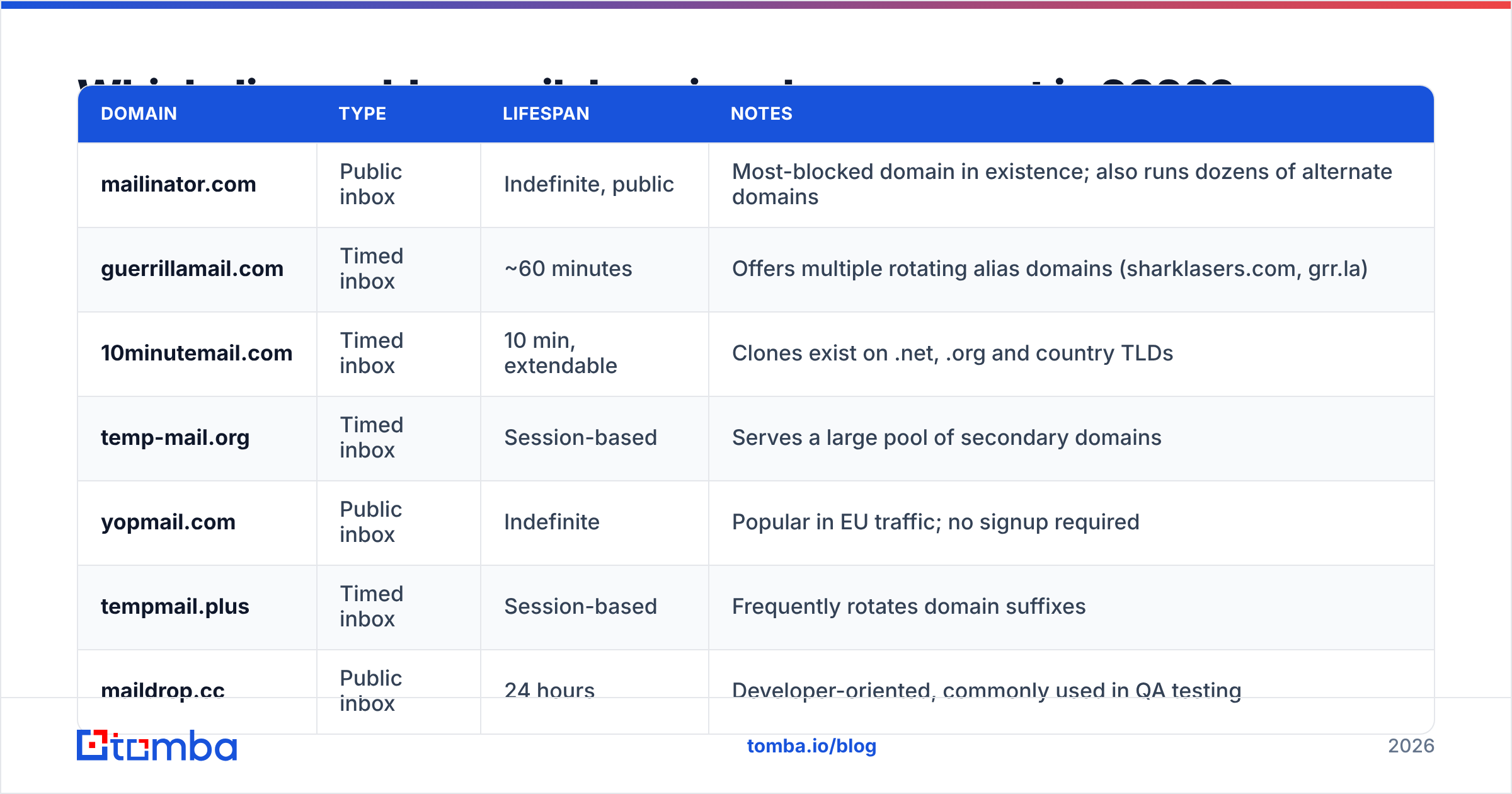
The table below covers the domains that appear most often in B2B signup logs. Availability shifts constantly — several long-running services have shut down and been replaced by clones on new TLDs — so treat this as a starting seed, not a maintained source of truth.
| Domain | Type | Lifespan | Notes |
|---|---|---|---|
| mailinator.com | Public inbox | Indefinite, public | Most-blocked domain in existence; also runs dozens of alternate domains |
| guerrillamail.com | Timed inbox | ~60 minutes | Offers multiple rotating alias domains (sharklasers.com, grr.la) |
| 10minutemail.com | Timed inbox | 10 min, extendable | Clones exist on .net, .org and country TLDs |
| temp-mail.org | Timed inbox | Session-based | Serves a large pool of secondary domains |
| yopmail.com | Public inbox | Indefinite | Popular in EU traffic; no signup required |
| tempmail.plus | Timed inbox | Session-based | Frequently rotates domain suffixes |
| maildrop.cc | Public inbox | 24 hours | Developer-oriented, commonly used in QA testing |
| moakt.com | Timed inbox | 60 min default | Rotates aggressively across TLDs |
| dispostable.com | Public inbox | Indefinite | Long-lived, low volume |
| trashmail.com | Forwarding alias | User-defined | Legitimate privacy use case as well as abuse |
| mailnesia.com | Public inbox | Indefinite | Auto-clicks confirmation links — defeats double opt-in |
| emailondeck.com | Timed inbox | Session-based | Captcha-gated, so it evades naive scrapers |
Two things to notice. First, the "type" column matters more than the domain name — a forwarding alias like trashmail.com may belong to a real buyer protecting their primary inbox, while a mailnesia.com address will never convert because the service auto-confirms every link it receives. Second, half of these operate secondary domain pools that never make it into a public list until someone reports them.
If you want a maintained seed file, the community-run disposable-email-domains repository is the most widely used starting point. It's genuinely good, updated by pull request, and free. It is also, by design, always behind.

Why does a static disposable email domains list stop working?#
Because blocking a domain is a one-line change for you and a one-line change for them.
A rotator service registers a batch of cheap domains, points MX records at the same mail server, and cycles through them. Your list has domain #14. They're already serving domain #61. The lag between "new domain goes live" and "domain appears in a public blocklist" is typically measured in weeks, and by then the domain has already done its damage.
There's a second failure mode nobody talks about: false positives. Aggressive blocklists sweep in domains that aren't disposable at all — small ESPs, regional providers, privacy-forward alias services that real buyers use. Every one of those is a qualified lead you rejected at the form. In a B2B funnel where a demo request is worth hundreds of dollars, over-blocking costs more than under-blocking.
And a third: subdomain and plus-addressing tricks. user+throwaway@gmail.com isn't on any disposable list — it's Gmail. But it behaves like a burner. Domain-level matching can't see it.
So the honest framing is: a disposable email domains list is a cheap, fast, high-precision filter for known-bad domains. It is not a validity check. Those are two different jobs, and confusing them is where most teams go wrong.
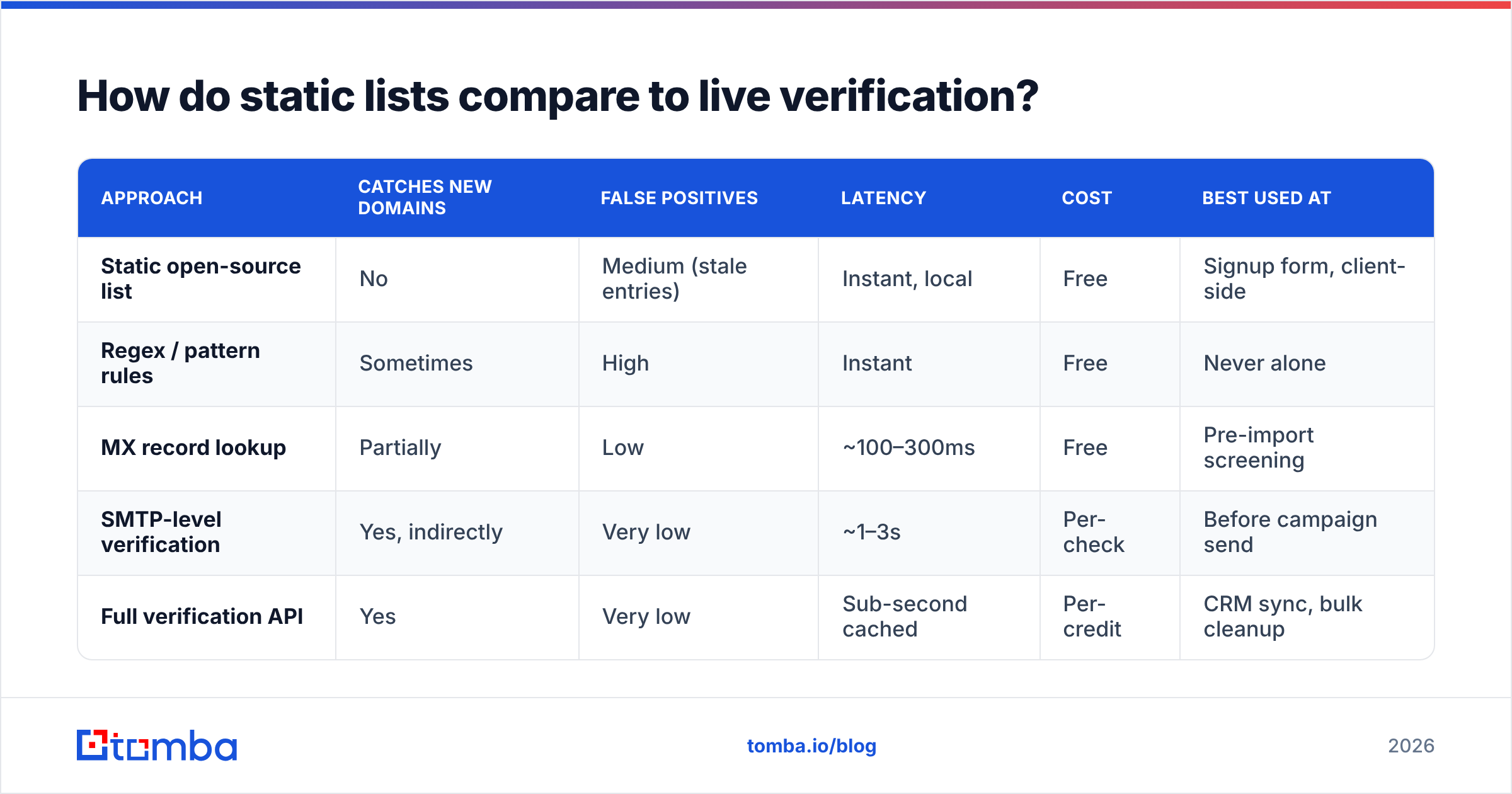
How do static lists compare to live verification?#
| Approach | Catches new domains | False positives | Latency | Cost | Best used at |
|---|---|---|---|---|---|
| Static open-source list | No | Medium (stale entries) | Instant, local | Free | Signup form, client-side |
| Regex / pattern rules | Sometimes | High | Instant | Free | Never alone |
| MX record lookup | Partially | Low | ~100–300ms | Free | Pre-import screening |
| SMTP-level verification | Yes, indirectly | Very low | ~1–3s | Per-check | Before campaign send |
| Full verification API | Yes | Very low | Sub-second cached | Per-credit | CRM sync, bulk cleanup |
The pattern that works is layered, not either/or. Use the free list where speed matters and the stakes are low (a marketing form), and use real email verification where the stakes are high (a 40,000-address cold sequence that will burn your domain if 12% of it bounces).
Live verification catches what lists can't because it doesn't care about the domain's reputation — it checks whether the mailbox actually accepts mail right now. A brand-new throwaway domain that no blocklist has ever seen still fails an SMTP check the moment its inbox expires.
Is disposable the same as catch-all, role-based, or free-provider?#
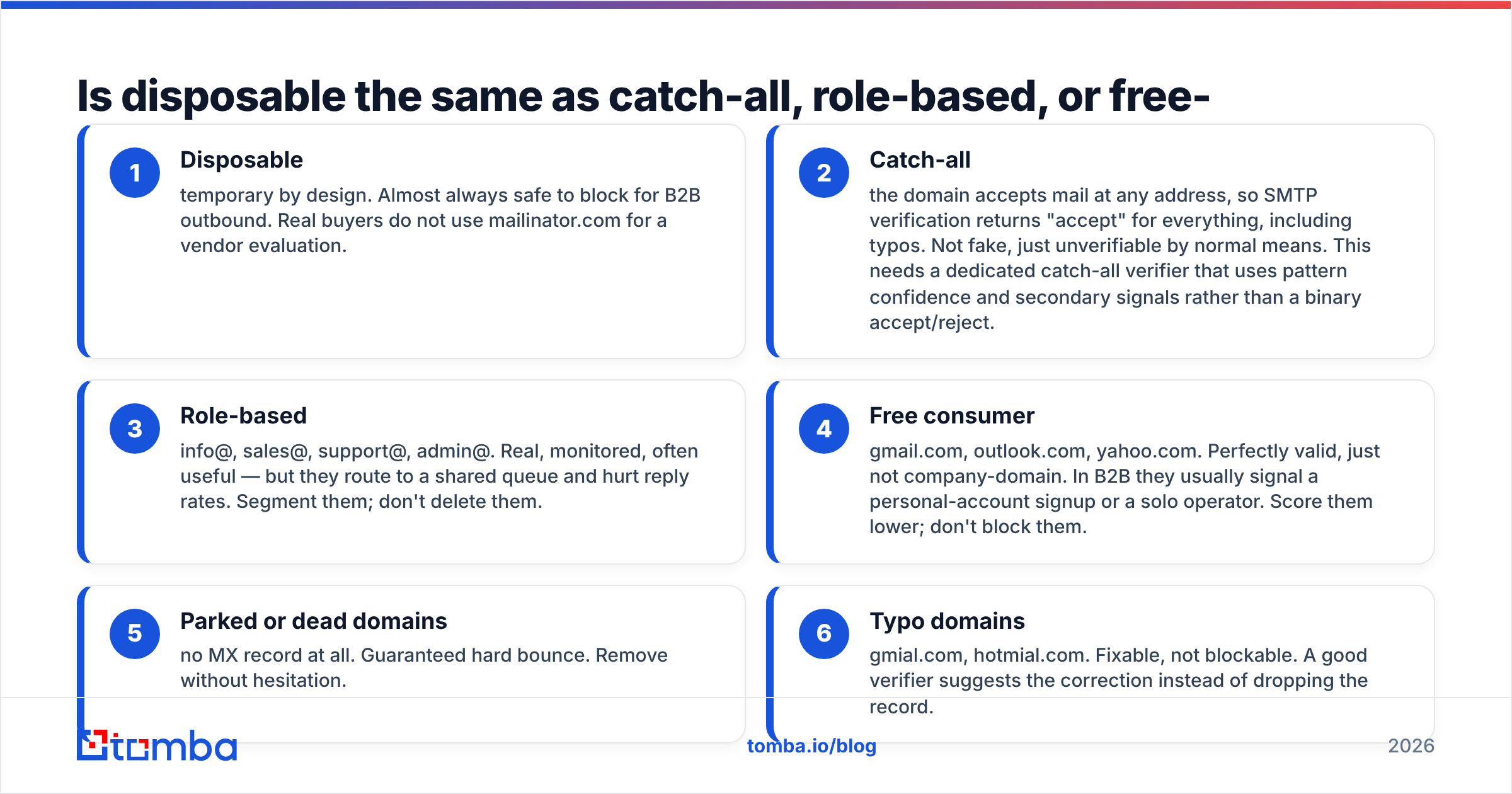
No, and this is the most expensive mix-up in list hygiene. Four distinct categories, four different rules:
- Disposable — temporary by design. Almost always safe to block for B2B outbound. Real buyers do not use mailinator.com for a vendor evaluation.
- Catch-all — the domain accepts mail at any address, so SMTP verification returns "accept" for everything, including typos. Not fake, just unverifiable by normal means. This needs a dedicated catch-all verifier that uses pattern confidence and secondary signals rather than a binary accept/reject.
- Role-based — info@, sales@, support@, admin@. Real, monitored, often useful — but they route to a shared queue and hurt reply rates. Segment them; don't delete them.
- Free consumer — gmail.com, outlook.com, yahoo.com. Perfectly valid, just not company-domain. In B2B they usually signal a personal-account signup or a solo operator. Score them lower; don't block them.
- Parked or dead domains — no MX record at all. Guaranteed hard bounce. Remove without hesitation.
- Typo domains — gmial.com, hotmial.com. Fixable, not blockable. A good verifier suggests the correction instead of dropping the record.
If your import rule is a single "is it on the bad list" boolean, categories 2 through 6 all get handled wrong. Split them, and your usable list gets bigger while your bounce rate gets smaller.

What does letting disposable addresses through actually cost you?#
The signup itself is nearly free. The consequences are not.
Bounce rate compounds. A temp address is live when it's captured and dead when you send. That's a hard bounce, and hard bounces are the single loudest negative signal to inbox providers. Google's sender guidelines are explicit that senders need to keep spam complaints and invalid recipients low to stay in the inbox — and once you're throttled, every clean address in your database pays for the dirty ones.
Your metrics lie. If 8% of a list is disposable, your open rate is calculated against a denominator that includes inboxes nobody reads. You'll optimize subject lines against noise.
Your CRM rots. Sales reps work leads that were never people. Attribution reports credit channels that delivered nothing. Forecasting drifts.
Your credits burn. Every enrichment, verification, and sequence step spent on a throwaway is spend with a guaranteed zero return.
The fix is unglamorous: filter at capture, verify before send, and re-verify anything older than about 90 days. B2B data decays continuously as people change jobs — a list that was 97% valid in January is measurably worse by summer.
How should you actually implement this?#
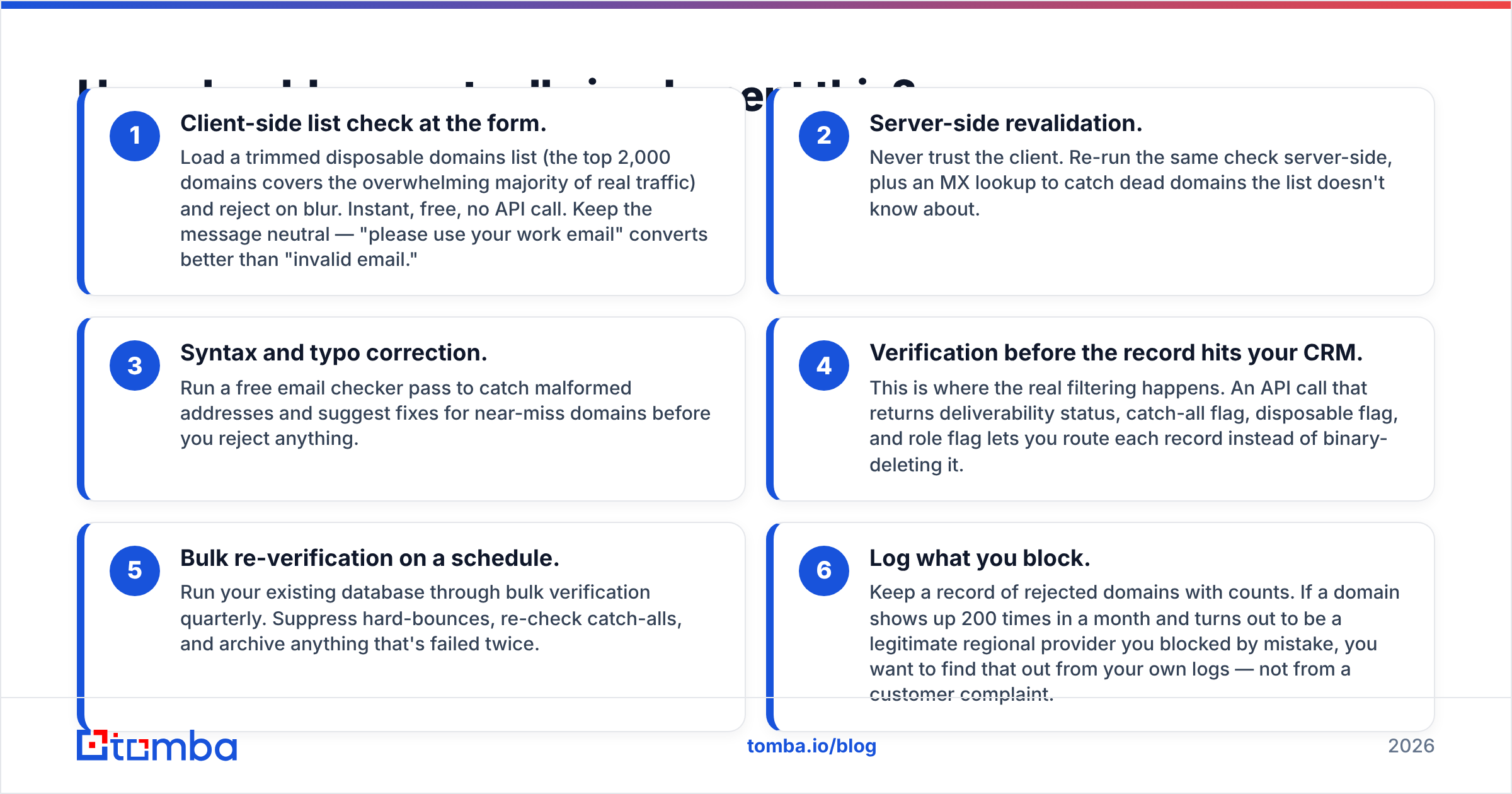
Here's the layered setup, cheapest layer first:
- Client-side list check at the form. Load a trimmed disposable domains list (the top 2,000 domains covers the overwhelming majority of real traffic) and reject on blur. Instant, free, no API call. Keep the message neutral — "please use your work email" converts better than "invalid email."
- Server-side revalidation. Never trust the client. Re-run the same check server-side, plus an MX lookup to catch dead domains the list doesn't know about.
- Syntax and typo correction. Run a free email checker pass to catch malformed addresses and suggest fixes for near-miss domains before you reject anything.
- Verification before the record hits your CRM. This is where the real filtering happens. An API call that returns deliverability status, catch-all flag, disposable flag, and role flag lets you route each record instead of binary-deleting it.
- Bulk re-verification on a schedule. Run your existing database through bulk verification quarterly. Suppress hard-bounces, re-check catch-alls, and archive anything that's failed twice.
- Log what you block. Keep a record of rejected domains with counts. If a domain shows up 200 times in a month and turns out to be a legitimate regional provider you blocked by mistake, you want to find that out from your own logs — not from a customer complaint.
Step 6 is the one teams skip, and it's the only one that tells you whether your list is over-blocking.
Should you maintain your own disposable domains list?#
For most teams, no — maintain a diff instead.
Pull the community list as your base, then keep a small local override file with two sections: added (domains you've seen abuse your forms that aren't upstream yet) and allowed (domains the upstream list flags that you've confirmed are real). Regenerate the merged list on a weekly cron. Total maintenance: a few minutes a month.
What you should not do is fork a 60,000-domain list and hand-edit it. It goes stale in a quarter, nobody remembers why entries were added, and the allow-list exceptions get lost on the next update.
If you're building this into a product or an internal pipeline, the Tomba API exposes the disposable, catch-all, webmail, and role flags as separate fields on the verification response, so you can write your own routing logic instead of accepting someone else's block/allow decision. That separation matters — the same address that's a reject for a cold sequence might be an accept for a support ticket.
What's the practical takeaway?#
A disposable email domains list is a doorman, not a background check. It stops the obvious cases at the entrance for free, and it should absolutely be in your stack. But it can't tell you whether the address behind a domain it's never seen will accept mail tomorrow, and it can't distinguish a burner from a privacy-conscious buyer using an alias.
Pair the list with real verification and the problem mostly disappears: known-bad domains die at the form, unknown-bad addresses die at the verification step, and everything that survives is worth a send. Compare Tomba plans if you need volume — the free tier covers 25 searches a month for testing the flow, Starter runs $49/mo, and Growth is $99/mo once you're verifying at list scale.
Ready to stop guessing which addresses are real? Start with the Tomba Email Finder to source verified work emails at the point of capture — so disposable domains never enter your database in the first place, and your blocklist becomes a backstop instead of a bandage.
Related guides#
Ready to find emails that actually work?
Join 150,000+ professionals who stopped guessing and started sending. Free credits on signup — no credit card required.
Get the Tomba newsletter
Practical outbound tactics and product updates — once every two weeks.
About the author