Distribute Pricing Review 2026: Real Costs, Pros and Cons
Distribute's free plan is generous, but the per-seat math changes fast once your whole AE bench is on it. Here's what each tier really covers, where the costs hide, and when a cheaper stack wins.
TL;DR
- Distribute is a digital sales room / buyer-enablement tool: it turns calls, decks, and follow-ups into shareable landing pages, mutual action plans, and business cases.
- The free plan is unusually generous for a solo AE. The pain starts at team scale, because pricing is per seat, per month — 12 reps costs 12× one rep, whether or not they all send pages.
- The real cost drivers are seats, branding/custom-domain unlocks, analytics depth, and integration/API access — not the headline number.
- Distribute is a conversion-stage tool. It does nothing for the top of your funnel. If your pipeline problem is "not enough qualified contacts," a sales room won't fix it.
- Best fit: AE-led teams with real deal volume and long, multi-threaded cycles. Worst fit: 2-person outbound teams still hunting for contact data.
Prices below reflect published list pricing at the time of writing. Vendors in this category change tiers often — confirm current numbers on distribute.so before you build a budget around them.
What is Distribute and who actually uses it?#
Distribute is a buyer-enablement platform. Think of it as a landing-page builder that has been rebuilt around a single job: everything a rep sends after a call.
Instead of emailing a 40-slide PDF and a Loom link that nobody opens, a rep spins up a branded page containing the recording summary, next steps, pricing, security docs, and a mutual action plan. The buyer gets one link. The rep gets a view log showing who opened it, how long they stayed, and which section they scrolled back to.
The everyday analogy: a PDF attachment is a letter you mail and forget. A digital sales room is a shop window you can watch people browse. Technically, it's a hosted micro-site per deal with engagement telemetry piped back into your CRM.
Typical users:
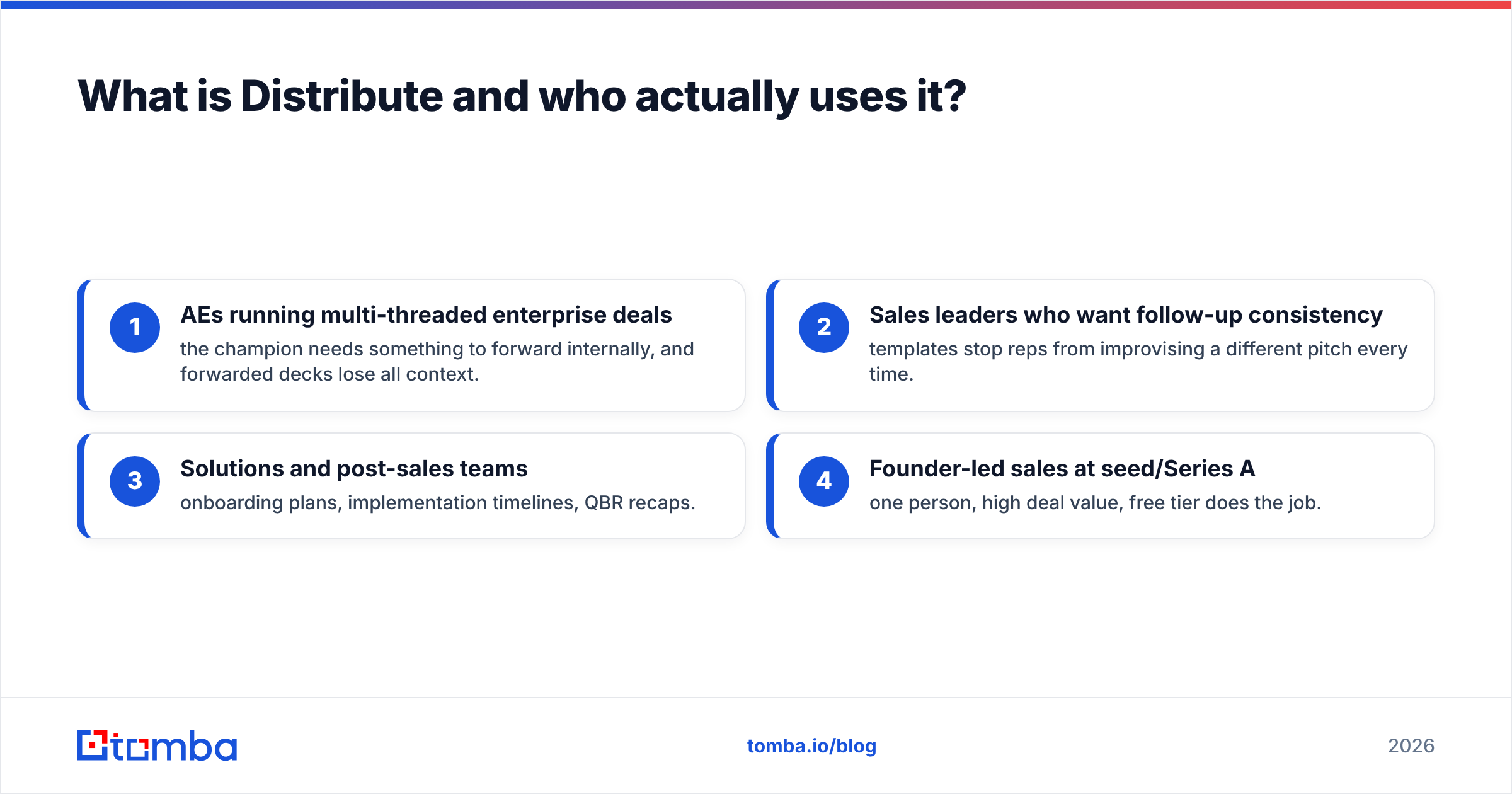
- AEs running multi-threaded enterprise deals — the champion needs something to forward internally, and forwarded decks lose all context.
- Sales leaders who want follow-up consistency — templates stop reps from improvising a different pitch every time.
- Solutions and post-sales teams — onboarding plans, implementation timelines, QBR recaps.
- Founder-led sales at seed/Series A — one person, high deal value, free tier does the job.
What it is not: a prospecting tool, a data provider, or a sequencer. Distribute assumes you already have the meeting. Getting the meeting is a different budget line entirely.
How does Distribute pricing actually work?#
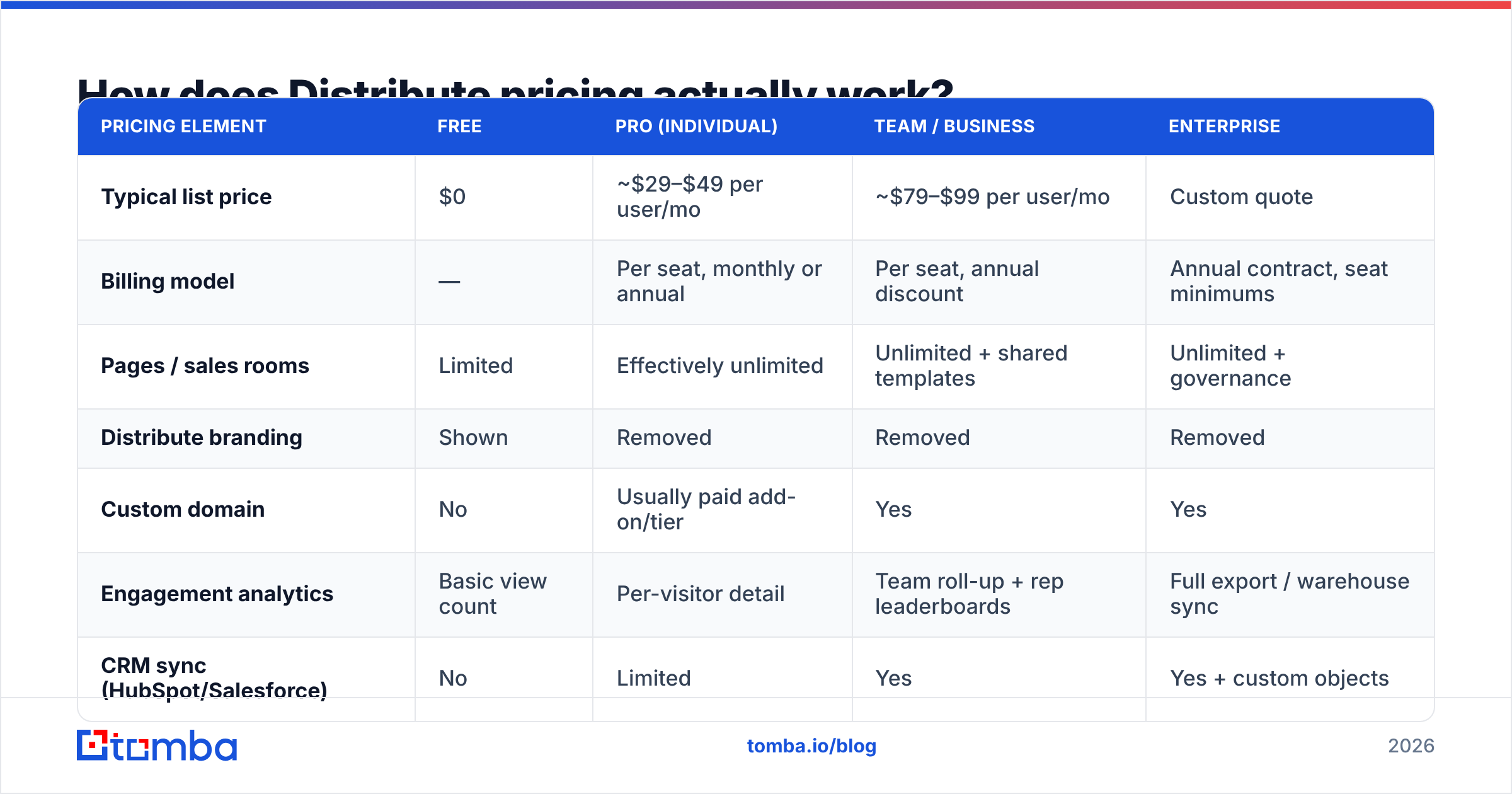
Distribute follows the standard PLG shape for this category: a free forever plan to get individual reps hooked, then per-seat paid tiers that unlock branding, analytics, and admin controls, then a custom enterprise tier for security review and SSO.
| Pricing element | Free | Pro (individual) | Team / Business | Enterprise |
|---|---|---|---|---|
| Typical list price | $0 | ~$29–$49 per user/mo | ~$79–$99 per user/mo | Custom quote |
| Billing model | — | Per seat, monthly or annual | Per seat, annual discount | Annual contract, seat minimums |
| Pages / sales rooms | Limited | Effectively unlimited | Unlimited + shared templates | Unlimited + governance |
| Distribute branding | Shown | Removed | Removed | Removed |
| Custom domain | No | Usually paid add-on/tier | Yes | Yes |
| Engagement analytics | Basic view count | Per-visitor detail | Team roll-up + rep leaderboards | Full export / warehouse sync |
| CRM sync (HubSpot/Salesforce) | No | Limited | Yes | Yes + custom objects |
| SSO / SAML, security review | No | No | Sometimes add-on | Yes |
| Support | Community/docs | Priority + onboarding | CSM + SLA |
Two things matter more than the headline price:
Seats are counted by creators, not viewers. Buyers never pay and never log in — that's the point. So your cost scales with headcount on the sales floor, not with pipeline. A 20-rep team on a mid tier is a five-figure annual line item before you've measured a single incremental win.
Annual billing is where the discount lives. Like most tools in this space, monthly billing carries a 20–25% premium. That's fine if you're confident. It's expensive if you're piloting and half your seats go dormant in month four.
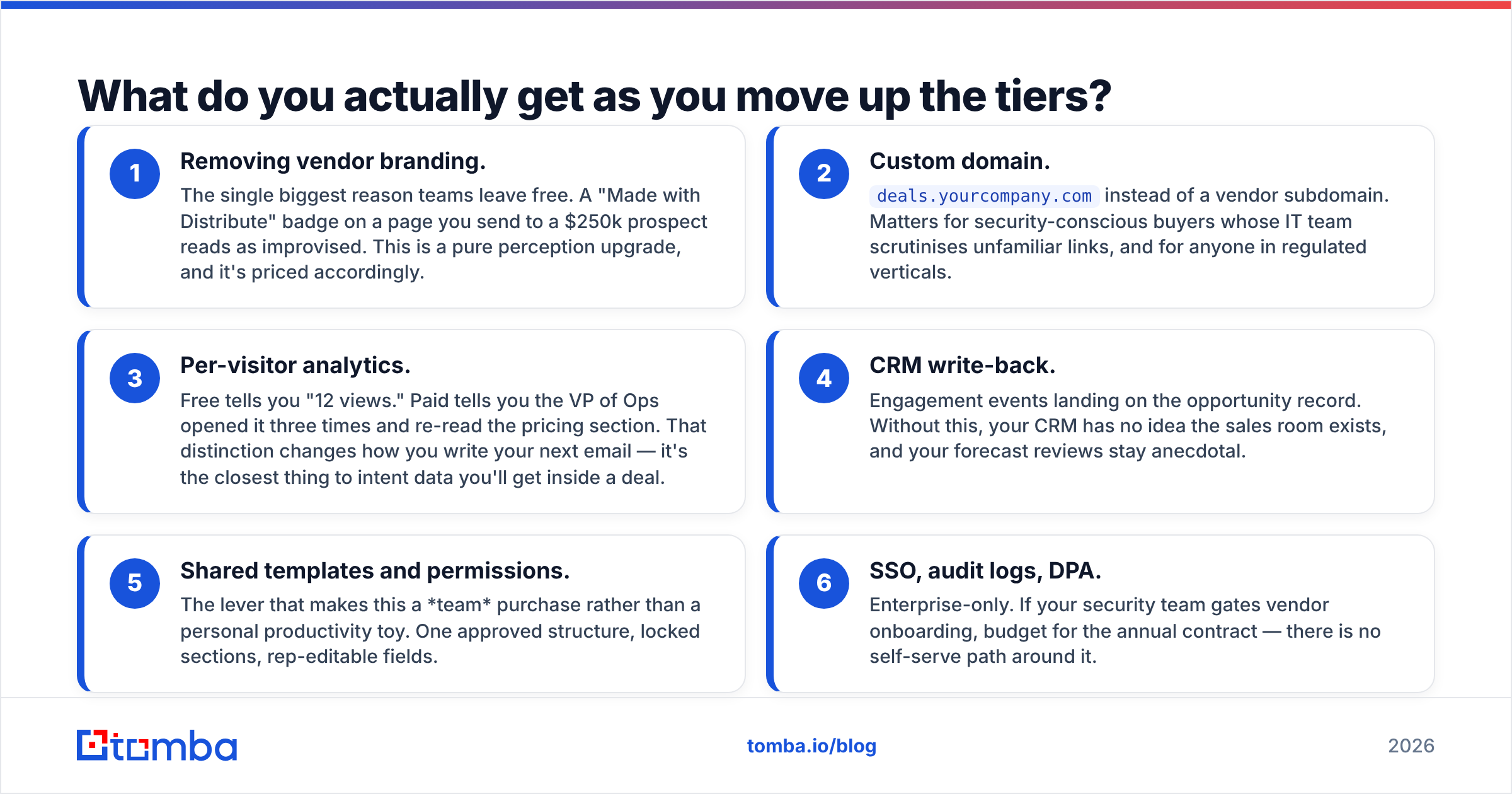
What do you actually get as you move up the tiers?#
Here's the honest breakdown of what each step buys, in order of how much it tends to matter:
- Removing vendor branding. The single biggest reason teams leave free. A "Made with Distribute" badge on a page you send to a $250k prospect reads as improvised. This is a pure perception upgrade, and it's priced accordingly.
- Custom domain.
deals.yourcompany.cominstead of a vendor subdomain. Matters for security-conscious buyers whose IT team scrutinises unfamiliar links, and for anyone in regulated verticals. - Per-visitor analytics. Free tells you "12 views." Paid tells you the VP of Ops opened it three times and re-read the pricing section. That distinction changes how you write your next email — it's the closest thing to intent data you'll get inside a deal.
- CRM write-back. Engagement events landing on the opportunity record. Without this, your CRM has no idea the sales room exists, and your forecast reviews stay anecdotal.
- Shared templates and permissions. The lever that makes this a team purchase rather than a personal productivity toy. One approved structure, locked sections, rep-editable fields.
- SSO, audit logs, DPA. Enterprise-only. If your security team gates vendor onboarding, budget for the annual contract — there is no self-serve path around it.
If you only need items 1 and 2, the individual tier is the whole purchase. If you need 4 and 5, you're in team-tier territory and should model the cost across your full roster, not your pilot group.
Where do the hidden costs show up?#
The list price is rarely the number you end up paying. Four places the bill quietly grows:
Dormant seats. Sales rooms are used by reps who genuinely change their follow-up habit. In most rollouts, 30–50% of seats go cold within a quarter. You're still paying for them until renewal. Buy seats for confirmed adopters, then expand.
The content tax. A sales room is a container. Someone has to fill it with case studies, security one-pagers, ROI models, and pricing explainers. If marketing doesn't own that, your reps will spend the time instead — and rep hours cost more than the software. Budget for enablement work alongside the licence.
Integration and API access. Pushing engagement data into a warehouse, or triggering sequences off page views, usually requires the higher tier or an API allowance. Check whether the API is included or metered before you design a workflow around it.
Migration friction at churn. Pages live on the vendor's infrastructure. If you leave, links break unless you've been using a custom domain with a redirect plan. That's a small switching cost that gets bigger every quarter you stay.
None of this is unique to Distribute — it's the shape of the whole digital sales room category. But it means the honest cost of a 15-seat team tier is materially higher than 15 × list price once you include the enablement time.
What are the pros of Distribute?#
Speed to first page. This is the strongest thing about the product. A rep can turn a call recording into a shareable follow-up in minutes rather than assembling a doc. Low friction is what drives actual adoption.
AI-assisted drafting that isn't a gimmick. Meeting transcript in, structured recap out. It won't write your value prop, but it kills the blank-page problem that makes reps skip follow-ups entirely.
Genuinely useful free tier. Rare in B2B. A founder or solo AE can run real deals on it. That also means you can pilot honestly before spending anything — do that.
Buyer-side experience is clean. One link, mobile-friendly, no login wall, no 30MB attachment. Champions forward it because it's easy to forward. That forwarding behaviour is the entire ROI thesis.
Engagement data changes rep behaviour. Knowing which stakeholder read which section is the kind of signal that improves the next touch. Teams that act on it see better multi-threading; teams that ignore it get a prettier PDF.
What are the cons?#
Per-seat pricing punishes broad rollouts. The tool's value is concentrated in your top third of reps. The pricing model assumes everyone gets equal value. Those two facts fight each other.
It's a bottom-funnel tool sold with top-funnel excitement. No pipeline is created here. If your problem is that reps aren't booking enough meetings, a sales room improves the deals you already have and does nothing for the ones you don't.
Attribution is genuinely hard. "Deals with a sales room close at a higher rate" is almost always confounded — reps build rooms for deals they already believe in. Be skeptical of that stat in the vendor pitch and in your own QBR.
Category is crowded and converging. Dock, Trumpet, Recapped, Aligned, and HubSpot's own native tooling all overlap heavily. Feature moats here are thin, and a CRM vendor bundling a "good enough" version into a tier you already own is a real risk to your renewal logic. Cross-check current positioning on G2 before signing multi-year.
Yet another surface to maintain. Templates go stale. Pricing pages drift from reality. Someone has to own it, or year two is full of rooms citing last year's packaging.
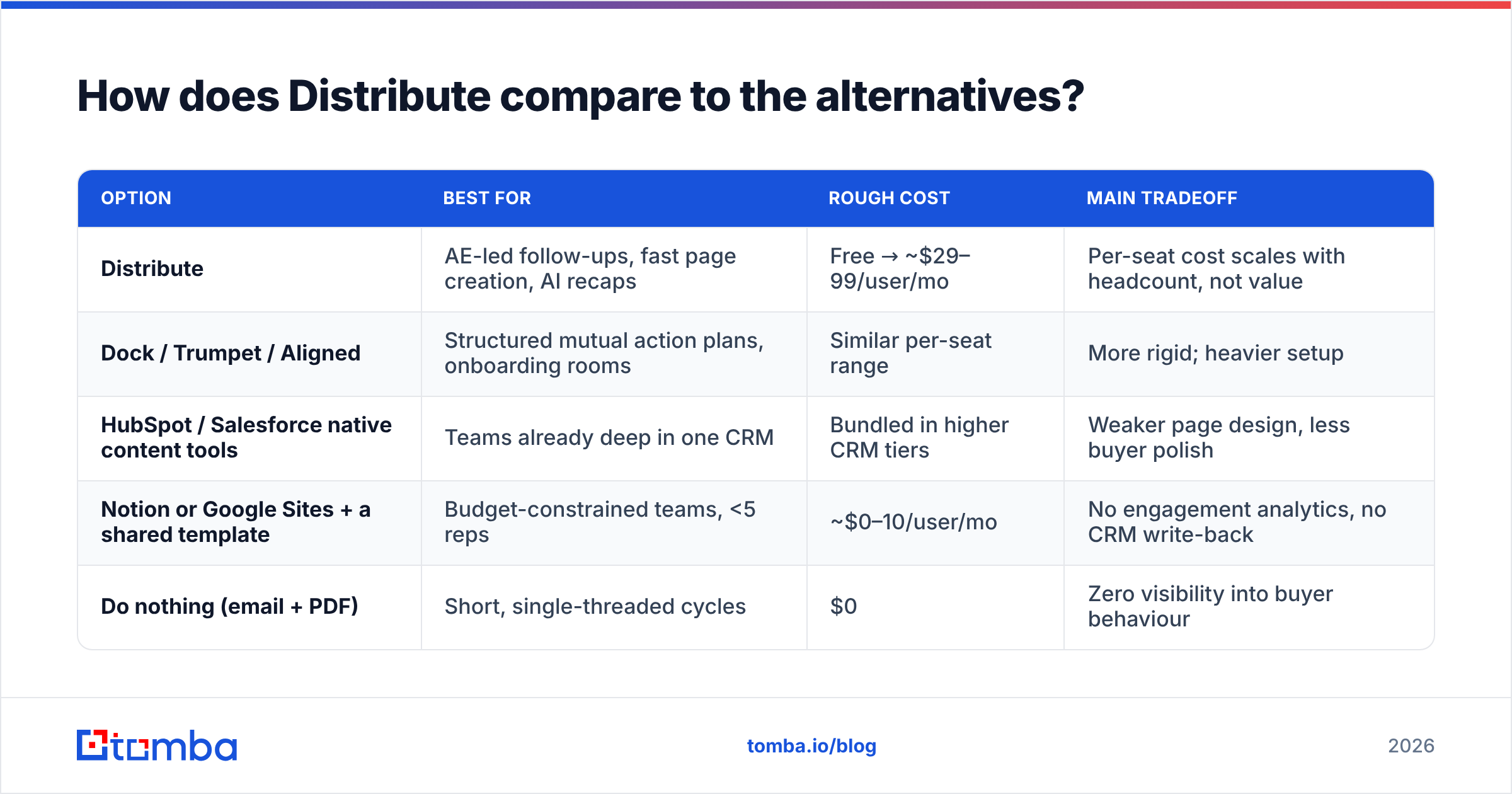
How does Distribute compare to the alternatives?#
| Option | Best for | Rough cost | Main tradeoff |
|---|---|---|---|
| Distribute | AE-led follow-ups, fast page creation, AI recaps | Free → ~$29–99/user/mo | Per-seat cost scales with headcount, not value |
| Dock / Trumpet / Aligned | Structured mutual action plans, onboarding rooms | Similar per-seat range | More rigid; heavier setup |
| HubSpot / Salesforce native content tools | Teams already deep in one CRM | Bundled in higher CRM tiers | Weaker page design, less buyer polish |
| Notion or Google Sites + a shared template | Budget-constrained teams, <5 reps | ~$0–10/user/mo | No engagement analytics, no CRM write-back |
| Do nothing (email + PDF) | Short, single-threaded cycles | $0 | Zero visibility into buyer behaviour |
The honest read: if your average deal is under $5k and closes in two calls, the "do nothing" row is competitive and you should stop reading. If your deals involve five stakeholders and a procurement review, the analytics alone justify a paid tier for the reps who'll use them.
Also see HubSpot's own research on buyer behaviour if you want third-party framing on why forwarded content beats attachments.
Is Distribute worth it for your team?#
Run this test before you buy:
- Under 5 reps, founder-led: stay on free. Upgrade one seat when the branding badge starts costing you credibility.
- 5–15 reps, mid-market deals: buy seats for your top performers only. Measure follow-up-to-next-meeting conversion for one quarter against a control group.
- 15+ reps, enterprise cycles: the team tier is defensible, but negotiate. Seat minimums and annual commits are where discounts live, and this category has plenty of competitors to quote against.
- Any team whose real bottleneck is meeting volume: don't buy it yet. Spend the same money on data and outbound capacity first.
That last point is the one most teams get backwards. A sales room raises the conversion rate of meetings you already booked. If you're booking six meetings a month, a 15% lift on six is one extra opportunity — which will not pay for twelve seats.
What should you fix before buying a sales room?#
Buyer-enablement software sits on top of a pipeline. If the pipeline is thin, you're polishing an empty shop window. The cheaper sequencing usually looks like this:
- Fix contact coverage. You can't multi-thread a deal if you only have one email address at the account. Pull the full buying committee — champion, economic buyer, security, and finance — before you build a room for them.
- Verify before you send. Bounce rates poison the domain you'll later use to send those sales room links. Run lists through an email verifier as a standing step, not a cleanup project.
- Enrich the accounts you already have. Job changes, new titles, and new domains quietly kill re-engagement campaigns. Routine data enrichment is cheaper than net-new sourcing.
- Then buy the conversion-stage tooling, once there's enough volume flowing through it to measure.
For most teams, step 1 through 3 costs a fraction of a full sales-room rollout and moves a bigger number. A Tomba plan starts at $49/mo for the Starter tier, with a free tier at 25 searches/mo to test coverage on your actual ICP before committing — cheaper than two seats of most tools in this category, and it feeds every downstream tool you own.
FAQ#
Does Distribute have a free plan? Yes, and it's usable for real deals. Vendor branding and limited analytics are the main constraints.
Is Distribute pricing per seat or per room? Per seat, per creator. Buyers view for free and never need an account.
Can I get a custom domain? On paid tiers. Confirm which tier includes it — this is a common upsell boundary.
Is it worth it for a 3-person startup? Usually not as a paid purchase. Run the free tier and spend the budget on pipeline generation.
What's the cheapest credible alternative? A shared Notion or Google Sites template. You lose analytics and CRM sync, which is exactly what you're paying for at the paid tiers.
Where to spend the next $49#
If your follow-up process is the constraint, Distribute's paid tier is a reasonable buy for the reps who'll actually use it — just size seats to adopters, not headcount, and commit annually only after a measured quarter.
If your constraint is that there aren't enough qualified conversations to follow up on, start upstream. Use the Tomba Email Finder to build the full buying committee at every target account — verified, deduplicated, and ready to import into your CRM. Get the meetings first. Then buy the room to close them in.
Related guides#
// get started
Find, verify and enrich your first contacts today
Start on the free plan with 25 searches a month, then scale when your team is ready.
Free plan · No credit card required · GDPR & CCPA
// about the author