DMARC Explained: How to Set Up DMARC Without Breaking Email
DMARC is the record that decides whether spoofed mail using your domain gets delivered or dropped. Here's how alignment actually works, how to read the XML reports, and how to reach p=reject without killing your own campaigns.
TL;DR
- DMARC is a DNS TXT record that tells inbox providers what to do with mail that claims to be from your domain but fails SPF and DKIM alignment: nothing (
p=none), quarantine, or reject. - The part everyone misses is alignment. A message can pass SPF and still fail DMARC, because the domain SPF checked isn't the domain in the From: header.
- Since February 2024, Google and Yahoo require a DMARC record on any domain sending bulk mail.
p=nonetechnically satisfies it — but it gives you zero spoofing protection. - Move
none → quarantine → rejectover 4–8 weeks, reading aggregate reports at every step. Jumping straight top=rejectis how companies silently kill their invoicing, ticketing, and newsletter mail. - DMARC protects your domain's reputation. It does not fix bad lists, bad copy, or bad targeting — those are separate problems with separate fixes.
What is DMARC, in plain English?#
DMARC (Domain-based Message Authentication, Reporting and Conformance) is a published instruction that says: "If a message claims to come from my domain but can't prove it, here's what I want you to do about it — and email me a report either way."
Think of it like the bouncer's instruction card at a private club. SPF is the guest list (which IP addresses may send for this domain). DKIM is the wristband (a cryptographic signature proving the message wasn't forged or altered). DMARC is the card that tells the bouncer what to do when someone shows up with no wristband and isn't on the list — wave them through, send them to a holding room, or turn them away — plus a nightly log of everyone who tried.
Technically, DMARC is defined in RFC 7489 and published as a TXT record at _dmarc.yourdomain.com. A minimal one looks like this:
v=DMARC1; p=none; rua=mailto:dmarc@yourdomain.comThat's it. Three tags: version, policy, and where to send aggregate reports. Everything else is tuning.
DMARC sits on top of SPF and DKIM — it does not replace them. If you have neither, DMARC has nothing to evaluate and every message fails. Publish an SPF record and DKIM keys first, then layer DMARC on top.
Why did DMARC suddenly become mandatory?#
Because Google and Yahoo made it a delivery requirement in February 2024, and Microsoft followed with its own bulk-sender rules for Outlook.com in 2025.
If you send more than roughly 5,000 messages a day to Gmail addresses, Google's bulk sender guidelines require SPF, DKIM, a DMARC record, one-click unsubscribe, and a spam complaint rate under 0.3%. Yahoo's rules are near-identical. Below the 5,000/day threshold the requirements are softer, but the enforcement trend is one-directional — thresholds drop, they don't rise.
Here's the uncomfortable detail: a bare p=none record satisfies the letter of those requirements while providing no protection at all. p=none means "observe and report, take no action." Plenty of domains published p=none in early 2024, ticked the compliance box, and never looked at a report again. Their domain is still fully spoofable.
How does DMARC alignment actually work?#
This is the concept that trips up most people setting DMARC up for the first time: passing SPF is not the same as passing DMARC.
DMARC only counts an SPF or DKIM pass if the domain that passed aligns with the domain in the visible From: header — the one your recipient actually sees.
Walk through a concrete failure. You send from you@yourcompany.com through a marketing platform. The platform uses its own bounce domain, bounces.platform.net, as the envelope sender. SPF checks bounces.platform.net, finds the sending IP listed there, and passes. But the From: header says yourcompany.com. Those two domains don't match, so SPF alignment fails. If DKIM isn't signing with your domain either, DMARC fails outright — and your policy decides what happens next.
DMARC passes when at least one of these holds:
- SPF alignment — the envelope-from domain matches the
From:header domain, and SPF passes. - DKIM alignment — the
d=domain in the DKIM signature matches theFrom:header domain, and the signature validates.
Two alignment modes control the strictness:
- Relaxed (
aspf=r,adkim=r) — the default. Subdomains count as a match, somail.yourcompany.comaligns withyourcompany.com. This is what almost everyone should use. - Strict (
aspf=s,adkim=s) — the domains must match exactly. Useful for high-value financial or government domains, painful for everyone else because every ESP subdomain breaks.
Practical consequence: DKIM alignment is what saves you. SPF alignment breaks constantly with third-party senders, forwarders, and mailing lists. DKIM signatures survive forwarding. When you onboard a new sending tool, the single most important setup step is authenticating your own domain so its DKIM signature carries d=yourcompany.com — not the vendor's domain.
What do the DMARC tags mean?#
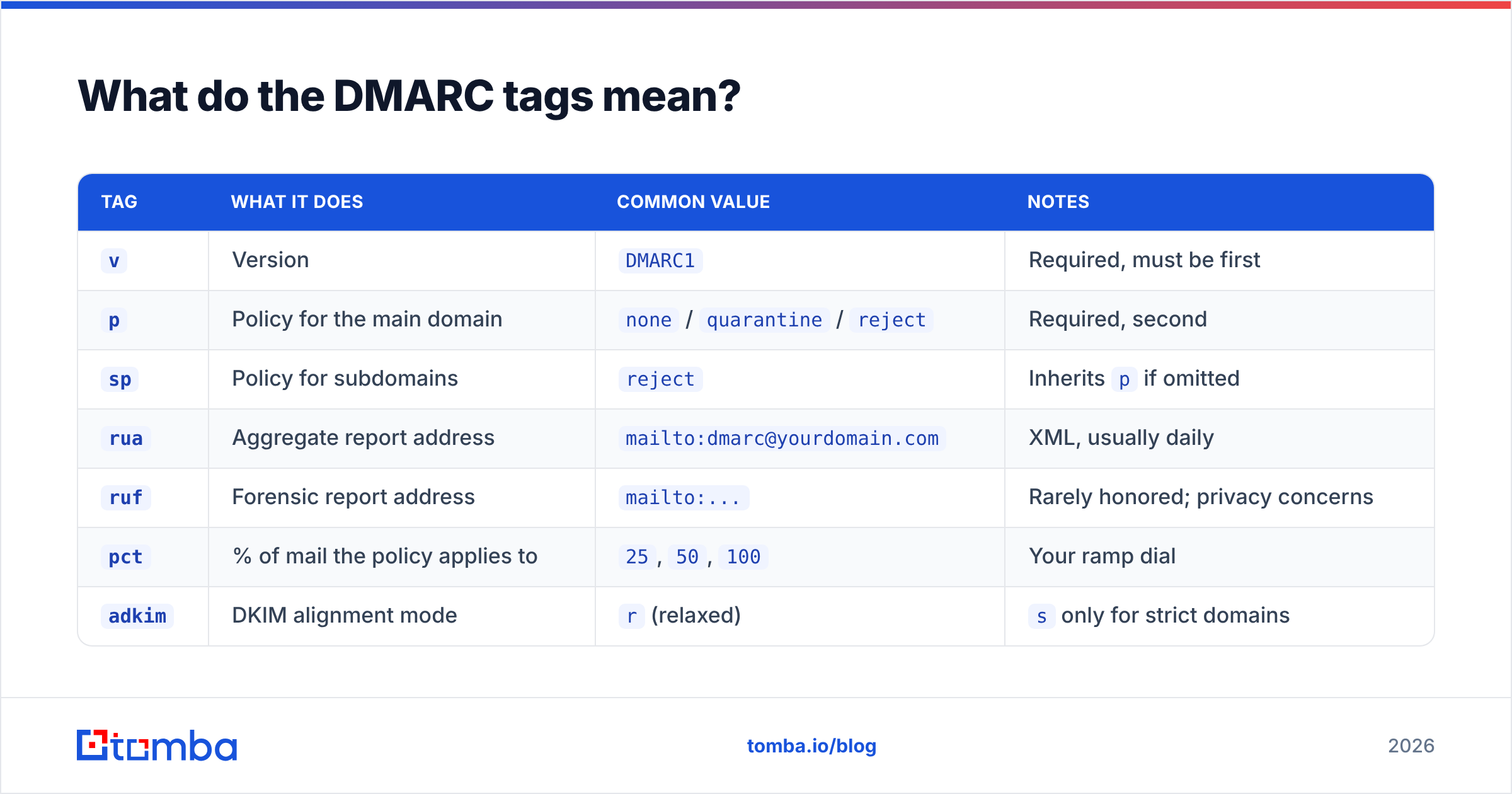
| Tag | What it does | Common value | Notes |
|---|---|---|---|
v |
Version | DMARC1 |
Required, must be first |
p |
Policy for the main domain | none / quarantine / reject |
Required, second |
sp |
Policy for subdomains | reject |
Inherits p if omitted |
rua |
Aggregate report address | mailto:dmarc@yourdomain.com |
XML, usually daily |
ruf |
Forensic report address | mailto:... |
Rarely honored; privacy concerns |
pct |
% of mail the policy applies to | 25, 50, 100 |
Your ramp dial |
adkim |
DKIM alignment mode | r (relaxed) |
s only for strict domains |
aspf |
SPF alignment mode | r (relaxed) |
Same |
fo |
Forensic options | 1 |
Report on any failure |
A realistic mid-rollout record:
v=DMARC1; p=quarantine; pct=50; sp=reject; adkim=r; aspf=r; rua=mailto:dmarc@yourcompany.comThat says: quarantine half the failing mail from the root domain, reject all failing mail from subdomains, use relaxed alignment, and send me aggregate reports.
One warning on ruf (forensic reports): most large providers stopped sending them years ago over GDPR and privacy concerns, because forensic reports contain message content. Don't build your process around data that won't arrive.
What's the difference between p=none, quarantine, and reject?#
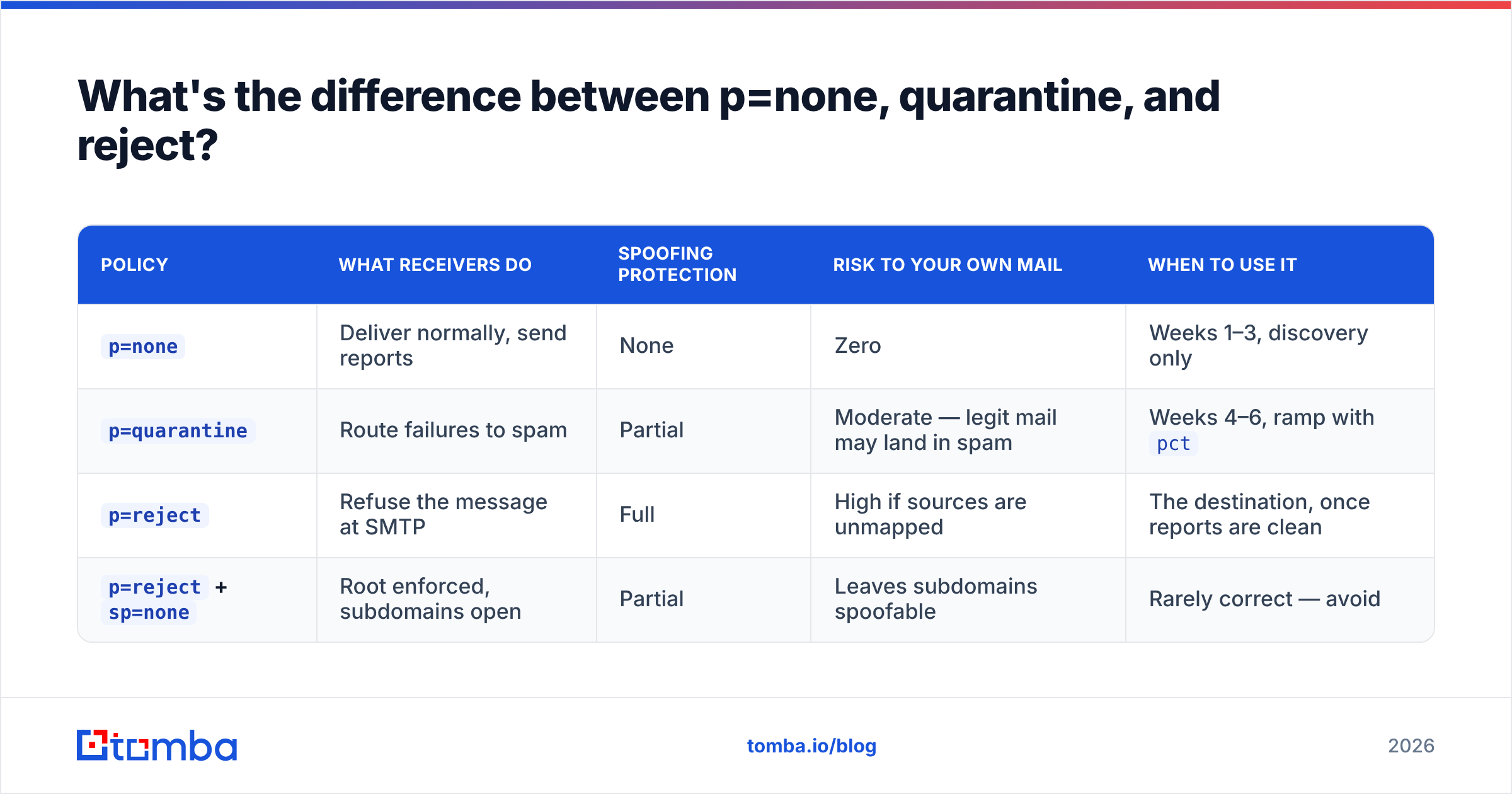
| Policy | What receivers do | Spoofing protection | Risk to your own mail | When to use it |
|---|---|---|---|---|
p=none |
Deliver normally, send reports | None | Zero | Weeks 1–3, discovery only |
p=quarantine |
Route failures to spam | Partial | Moderate — legit mail may land in spam | Weeks 4–6, ramp with pct |
p=reject |
Refuse the message at SMTP | Full | High if sources are unmapped | The destination, once reports are clean |
p=reject + sp=none |
Root enforced, subdomains open | Partial | Leaves subdomains spoofable | Rarely correct — avoid |
The mistake pattern is predictable. A security team reads that p=reject is "best practice," publishes it on Monday, and by Wednesday the finance team's invoicing system, the HR onboarding tool, and the support desk's notification mail have all stopped arriving — because nobody knew those systems sent as the corporate domain.
DMARC failures at p=reject are silent from the sender's side. The receiving server refuses the message; your internal tool logs a bounce nobody reads. Ramp deliberately.
How do you roll out DMARC without breaking anything?#
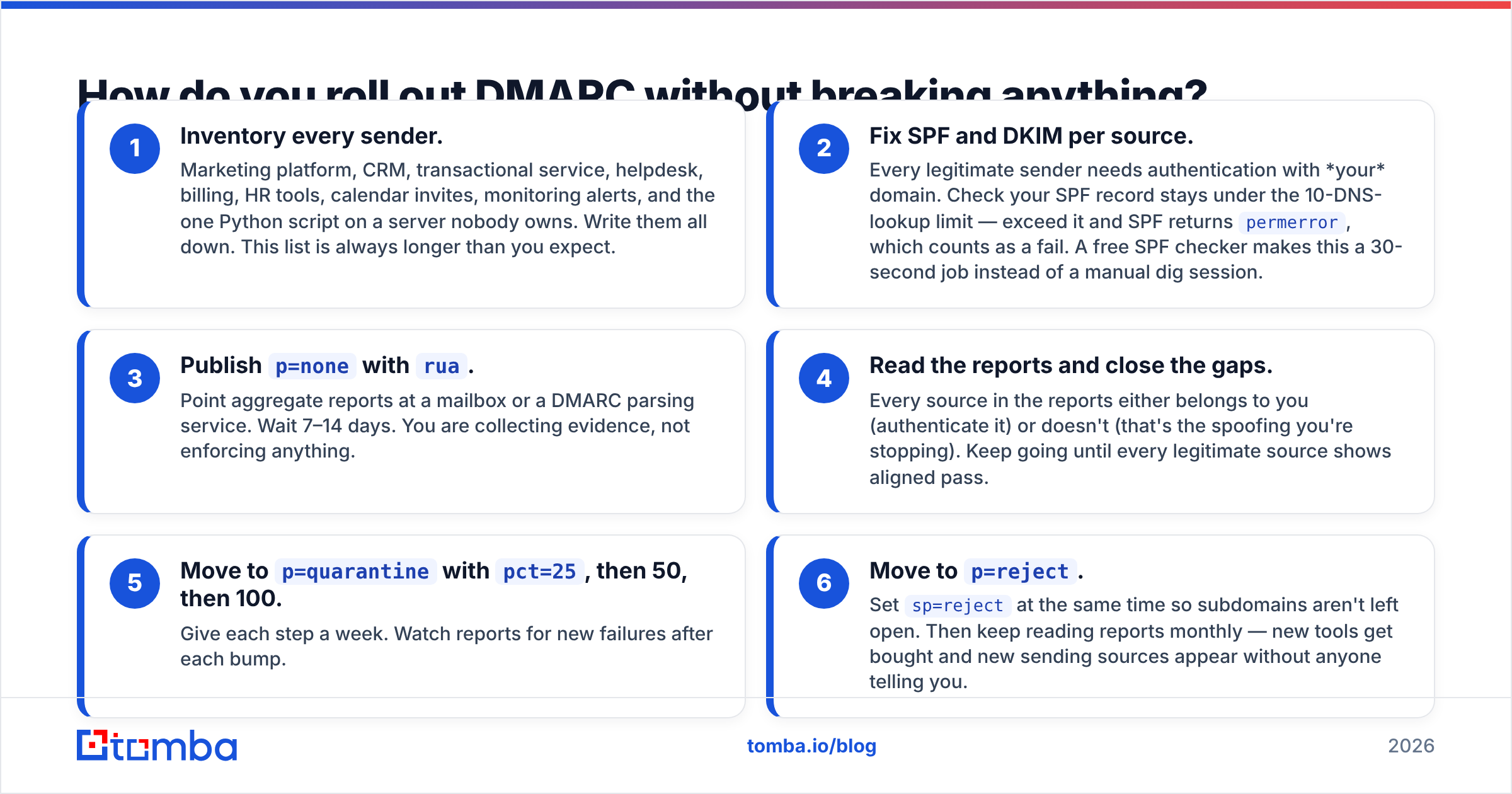
Six steps, roughly 4–8 weeks depending on how many sending systems you have.
- Inventory every sender. Marketing platform, CRM, transactional service, helpdesk, billing, HR tools, calendar invites, monitoring alerts, and the one Python script on a server nobody owns. Write them all down. This list is always longer than you expect.
- Fix SPF and DKIM per source. Every legitimate sender needs authentication with your domain. Check your SPF record stays under the 10-DNS-lookup limit — exceed it and SPF returns
permerror, which counts as a fail. A free SPF checker makes this a 30-second job instead of a manual dig session. - Publish
p=nonewithrua. Point aggregate reports at a mailbox or a DMARC parsing service. Wait 7–14 days. You are collecting evidence, not enforcing anything. - Read the reports and close the gaps. Every source in the reports either belongs to you (authenticate it) or doesn't (that's the spoofing you're stopping). Keep going until every legitimate source shows aligned pass.
- Move to
p=quarantinewithpct=25, then 50, then 100. Give each step a week. Watch reports for new failures after each bump. - Move to
p=reject. Setsp=rejectat the same time so subdomains aren't left open. Then keep reading reports monthly — new tools get bought and new sending sources appear without anyone telling you.
Budget the calendar time. Rushing steps 3 and 4 is what causes the breakage that gets DMARC rolled back entirely.
How do you read a DMARC aggregate report?#
Aggregate reports are gzipped XML files, one per receiving provider per day. Raw, they look like this per record:
<record>
  <row>
    <source_ip>198.51.100.24</source_ip>
    <count>412</count>
    <policy_evaluated>
      <disposition>none</disposition>
      <dkim>fail</dkim>
      <spf>pass</spf>
    </policy_evaluated>
  </row>
  <identifiers>
    <header_from>yourcompany.com</header_from>
  </identifiers>
</record>
Read it as: 412 messages from that IP claimed to be from yourcompany.com, SPF aligned and passed, DKIM did not. DMARC passes overall (one aligned pass is enough), but the DKIM gap is worth fixing — because that mail will fail the moment it's forwarded.
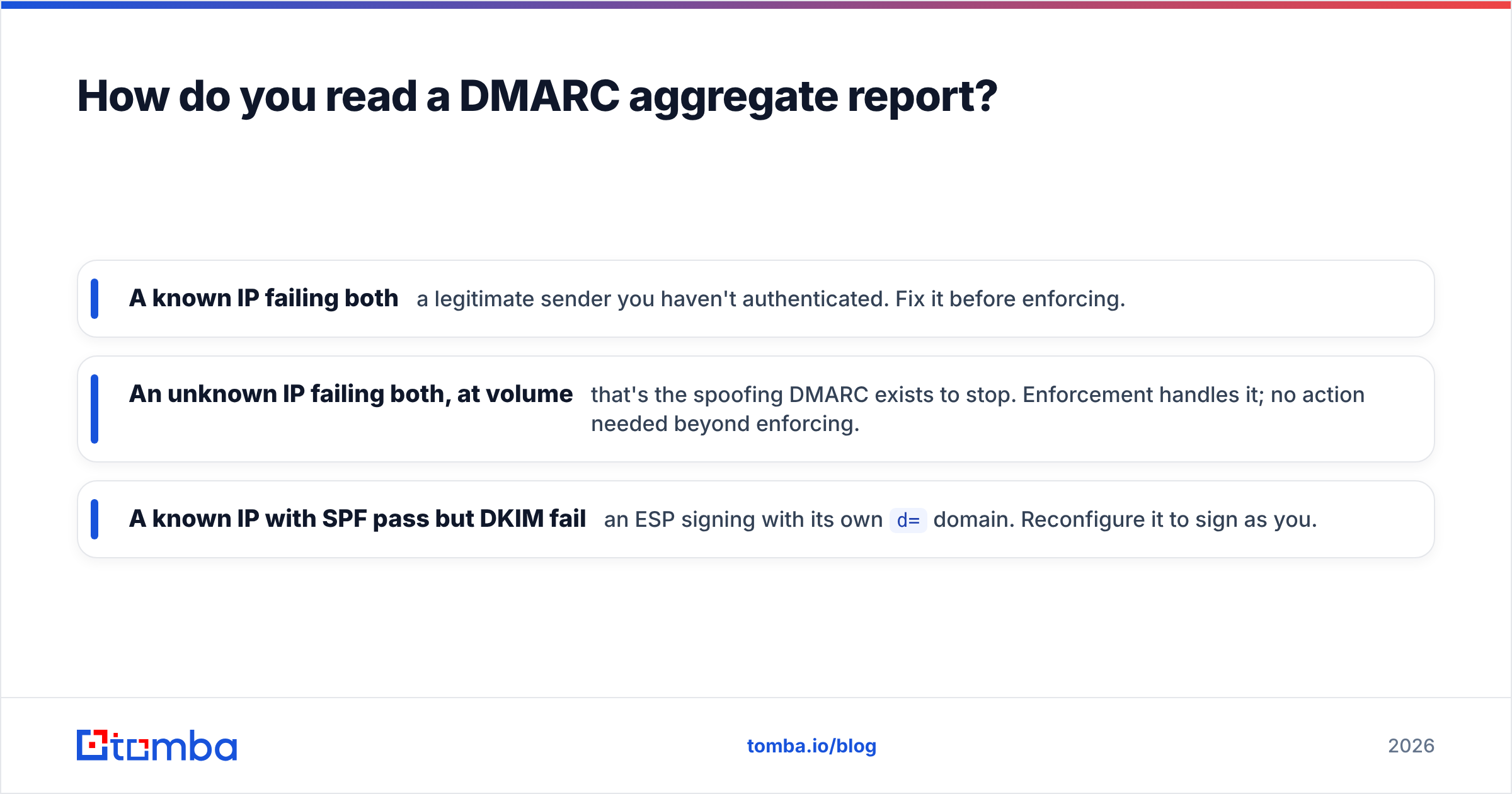
Three things to look for:
- A known IP failing both — a legitimate sender you haven't authenticated. Fix it before enforcing.
- An unknown IP failing both, at volume — that's the spoofing DMARC exists to stop. Enforcement handles it; no action needed beyond enforcing.
- A known IP with SPF pass but DKIM fail — an ESP signing with its own
d=domain. Reconfigure it to sign as you.
Parsing raw XML by hand stops scaling past a handful of sources. Dedicated DMARC report platforms (dmarcian, Postmark's free analyzer, Valimail, and others) turn it into a source-by-source dashboard. dmarc.org maintains a vendor-neutral list of deployment tools if you want to compare.

Does DMARC actually improve your deliverability?#
Yes — but indirectly, and less than most vendors imply.
DMARC's direct benefit is that nobody else can send mail that appears to come from your domain and land in inboxes. That protects the sender reputation you've built. Without it, a spoofing campaign against your domain generates spam complaints attributed to you, and your legitimate mail suffers for someone else's abuse.
What DMARC does not do:
- It doesn't make cold email land in the primary tab. Authentication proves identity, not relevance.
- It doesn't offset a high bounce rate. Sending to dead addresses damages reputation regardless of a perfect DMARC record.
- It doesn't compensate for spam complaints. A 0.5% complaint rate will sink you at
p=rejectjust as fast as atp=none. - It doesn't unblock a blacklisted IP. That's a separate remediation path — check your status with a blacklist checker if inbox rates dropped suddenly.
The honest framing: DMARC is table stakes. It moves you from "provider is suspicious of you" to "provider is neutral about you." Everything past neutral is earned by list quality, sending volume discipline, and reply rates.
That last point is where most outbound teams actually lose. Perfect authentication paired with a 22% bounce rate is still a reputation problem. Bounces come from stale, scraped, or guessed addresses — which is a data problem, not a DNS one. Running your list through an email verifier before a send does more for inbox placement than any DMARC tag you can set, and the two together are what a healthy program looks like. Broader context on how the pieces fit sits in our guide to email deliverability.
What are the most common DMARC mistakes?#
- Publishing
p=rejecton day one. The single most expensive mistake. Legitimate mail dies silently. - Ignoring subdomains.
p=rejectwith nosptag inherits to subdomains — good. Butp=reject; sp=noneleavesmail.yourcompany.comfully spoofable. Attackers check for this. - Exceeding the SPF 10-lookup limit. Every
include:costs lookups. Eleven of them meanspermerrorand universal SPF failure. Flatten or consolidate. - Multiple DMARC records on one host. Two TXT records at
_dmarcmeans neither applies. Providers treat it as no record at all. - Setting up
ruaand never reading it. Reports with no reader are compliance theater. - Forgetting parked domains. Domains you own but don't send from should carry
v=DMARC1; p=reject;with a null SPF (v=spf1 -all). Unused domains are the easiest spoofing targets you own. - Assuming DMARC covers display-name spoofing. It doesn't.
"Your CEO" <attacker@gmail.com>passes DMARC perfectly — because the attacker's domain is authenticated. DMARC protects your domain, not your name. That's a user-training and inbound-filtering problem.
What should you do next?#
Publish p=none with a working rua address today — it takes ten minutes and starts the data collection you'll need for everything after. Spend two weeks reading reports and authenticating every source you find. Then ramp through quarantine to reject with pct. Re-check reports monthly forever, because your sending stack keeps changing.
And once authentication is solid, put the same rigor into the data going through it. Clean domain-verified contacts beat scraped lists on every metric that DMARC can't influence: bounce rate, complaint rate, reply rate. Tomba's Email Finder returns verified, source-cited professional addresses by name and domain, with a free tier at 25 searches a month and paid plans starting at $49/mo — see Tomba pricing for the full breakdown. Authenticate your domain properly, then send it mail worth authenticating.
Related guides#
Ready to find emails that actually work?
Join 150,000+ professionals who stopped guessing and started sending. Free credits on signup — no credit card required.
Get the Tomba newsletter
Practical outbound tactics and product updates — once every two weeks.
About the author