DMARC Generator: How to Build a DMARC Record in 2026
A DMARC generator writes your record in 30 seconds. Choosing the right policy, alignment mode, and rollout path is what actually stops spoofing without killing your legitimate mail.
TL;DR
- A DMARC generator is a form that outputs one TXT record. The hard part is not generating it — it's picking the policy, the alignment mode, and the reporting address you'll actually monitor.
- Every domain that sends mail should publish DMARC. Since 2024, Google and Yahoo require it for bulk senders, and by 2026 it's effectively table stakes for any B2B sender.
- Start at
p=nonewithrua=pointed at a mailbox or reporting service, read reports for 2–4 weeks, then move toquarantine, thenreject. - Free generators (EasyDMARC, dmarcian, MXToolbox, Postmark) all produce a valid record. They differ on report parsing, hosted DMARC, subdomain handling, and price at scale.
- DMARC protects your domain from spoofing. It does not fix bounce rates — dirty lists and unverified addresses still wreck sender reputation.
What is a DMARC generator, and what does it actually do?#
A DMARC generator is a web form that turns your choices — policy, reporting addresses, alignment strictness, percentage rollout — into a single DNS TXT record you paste at _dmarc.yourdomain.com.
Think of it like a will template. The template makes sure the wording is legally valid; it doesn't decide who inherits the house. A generator guarantees your syntax parses. It has no opinion on whether p=reject will silently kill the invoices your billing vendor sends on your behalf.
The output looks like this:
v=DMARC1; p=none; rua=mailto:dmarc@yourdomain.com; ruf=mailto:forensics@yourdomain.com; fo=1; adkim=r; aspf=r; pct=100One line. Thirty seconds of work. And yet a large share of domains that publish DMARC never leave p=none, which means they get the reports and none of the protection. That's the real problem a generator can't solve for you.
DMARC itself sits on top of SPF and DKIM. It answers a question neither of them answers alone: what should a receiving mail server do when a message claiming to be from your domain fails authentication, and who should be told about it? The official DMARC specification site is still the cleanest reference for the underlying mechanics.
What does a DMARC record actually contain?#
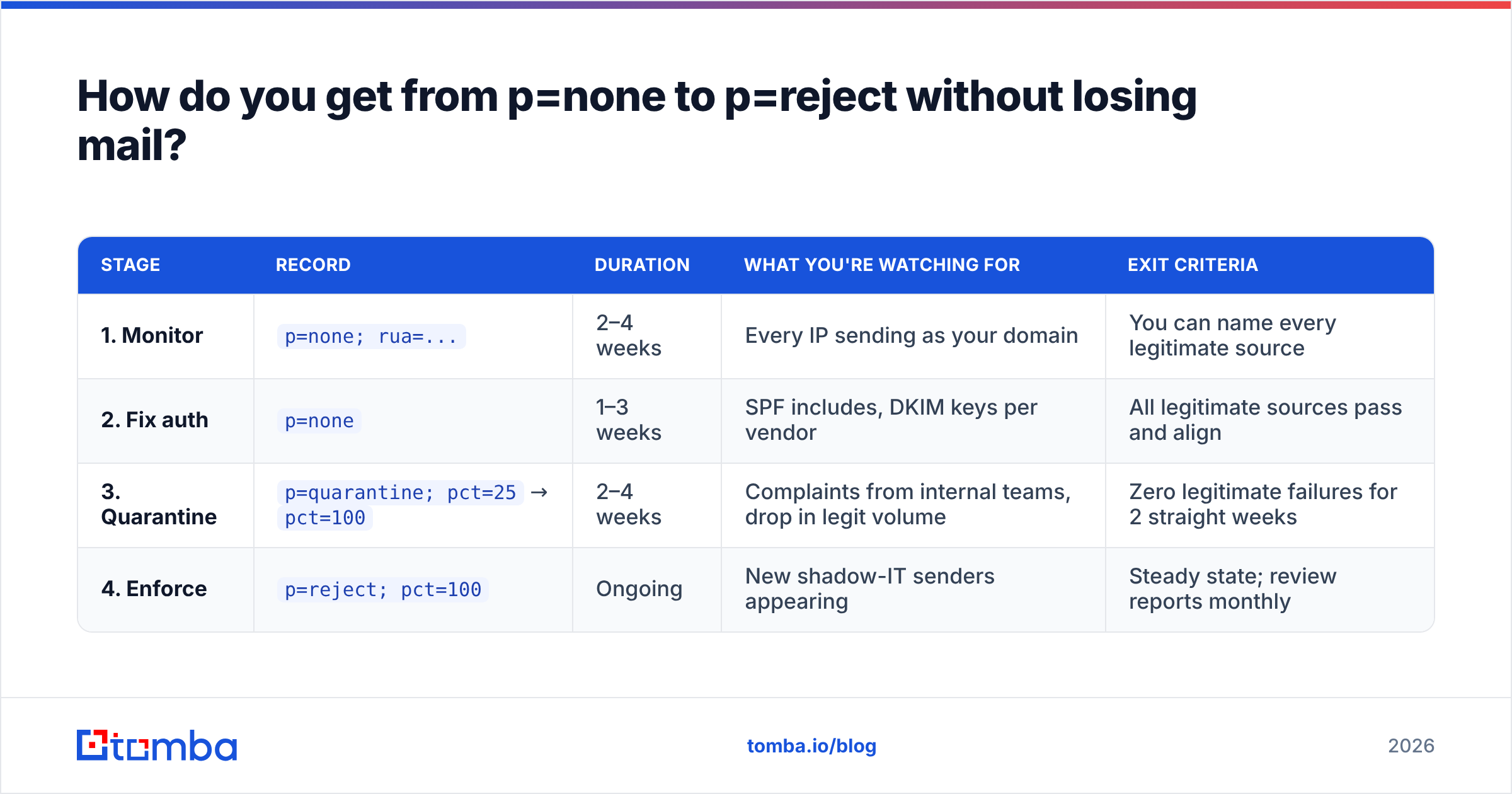
Six tags cover 95% of real-world records. Understand these and every generator becomes a formality.
v=DMARC1— the version tag. Always first, always this exact value. If it's missing or misspelled, receivers ignore the entire record and you're back to no DMARC at all.p=— the policy for the organizational domain:none(monitor only),quarantine(send failures to spam), orreject(block outright). This is the single most consequential character in the record.rua=— where aggregate XML reports go, asmailto:addresses. These are daily rollups from receivers: how many messages claimed your domain, from which IPs, and whether they passed. This is your entire visibility layer.ruf=— forensic/failure reports, sent per-message. Most large receivers no longer send these for privacy reasons, so treatrufas a bonus, not a plan.adkim=/aspf=— alignment mode,r(relaxed) ors(strict). Relaxed allows subdomains to align with the organizational domain; strict requires an exact match. Start relaxed unless you have a specific reason not to.pct=— the percentage of failing mail the policy applies to.pct=25withp=quarantinemeans one in four failing messages gets quarantined. It's the throttle for a careful rollout.
Two more worth knowing: sp= sets a separate policy for subdomains (useful when marketing sends from mail.yourdomain.com and isn't ready for enforcement), and fo= controls when failure reports fire.

Which DMARC generator should you use in 2026?#
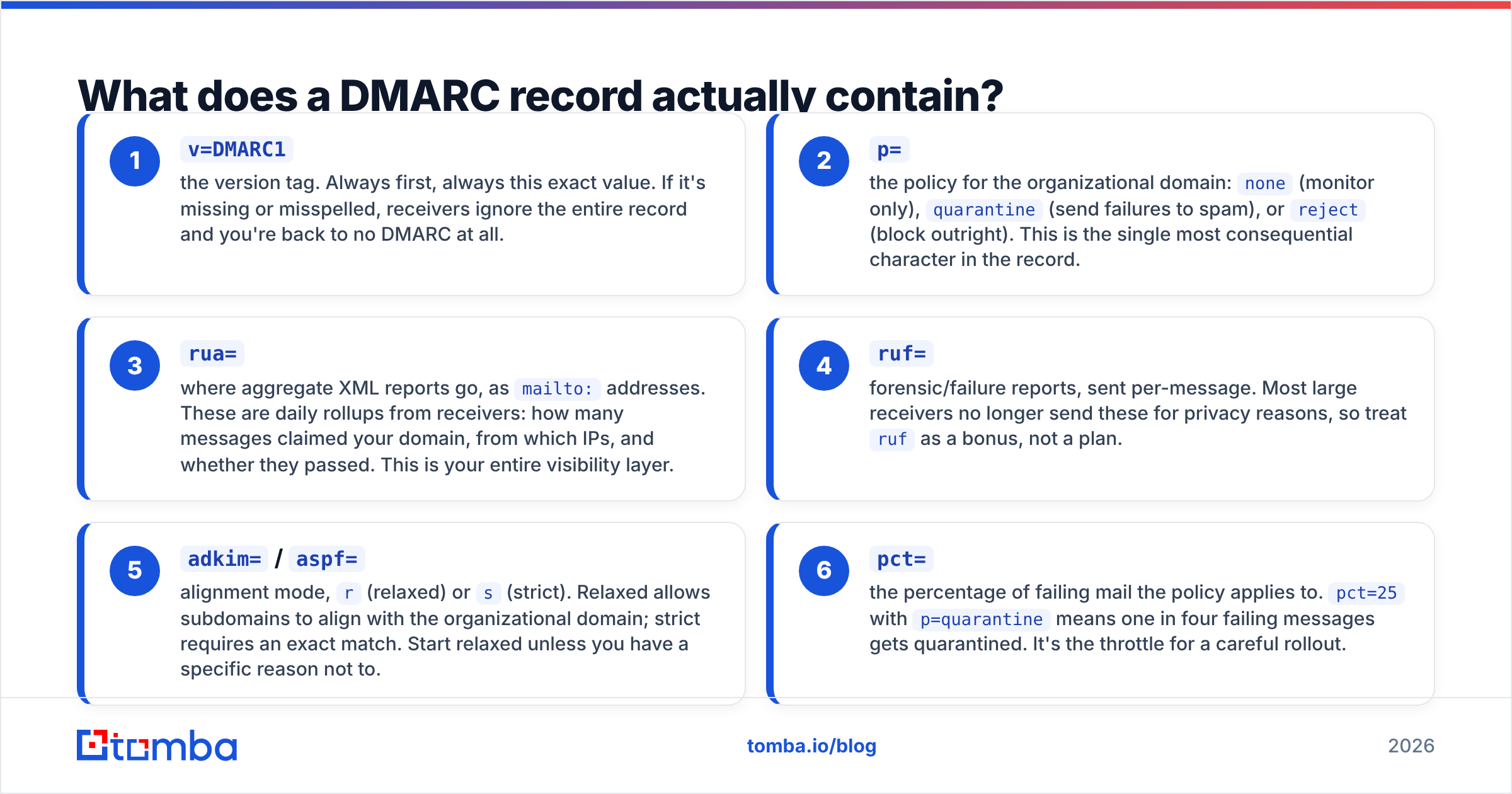
All of these produce a valid record. The differences show up after generation — when reports start arriving as unreadable XML attachments and you need somewhere to put them.
| Tool | Free record generator | Hosted report parsing | Free tier limit | Paid entry price | Best for |
|---|---|---|---|---|---|
| EasyDMARC | Yes | Yes | 1 domain, limited reports | ~$35–40/mo | SMBs wanting generator + dashboard in one place |
| dmarcian | Yes | Yes | 1 domain, low volume | ~$25–30/mo (volume-tiered) | Teams that want the deepest source classification |
| MXToolbox | Yes | Yes (Delivery Center) | Ad-hoc lookups free | ~$20+/mo | Quick diagnostics and one-off DNS checks |
| Postmark DMARC | Yes | Weekly digest email | Free, unlimited domains | Free | Anyone who just wants a readable weekly summary |
| Valimail / Proofpoint | Yes | Yes, enterprise-grade | Limited monitoring tier | Enterprise quote | Large orgs with dozens of sending services |
| Manual (text editor) | N/A | No | Free | Free | Engineers who already know the tag syntax |
Honest read: for a company sending from one or two domains, the free generator plus Postmark's weekly digest covers you. You do not need a subscription to publish a correct record. You need a subscription when you have 15 sending services, several subdomains, and nobody willing to hand-parse XML every Monday.
Where paid tools genuinely earn their keep is source identification — turning "unknown IP 198.51.100.7 sent 4,200 messages" into "that's your Zendesk instance, and it isn't DKIM-signed." That mapping is tedious to do manually and is the actual bottleneck between p=none and p=reject.
Also check the generator's subdomain behavior. Some emit sp= automatically mirroring p=; others leave it out, which means subdomains inherit the organizational policy anyway. Both are defensible, but you should know which you got.
How do you get from p=none to p=reject without losing mail?#
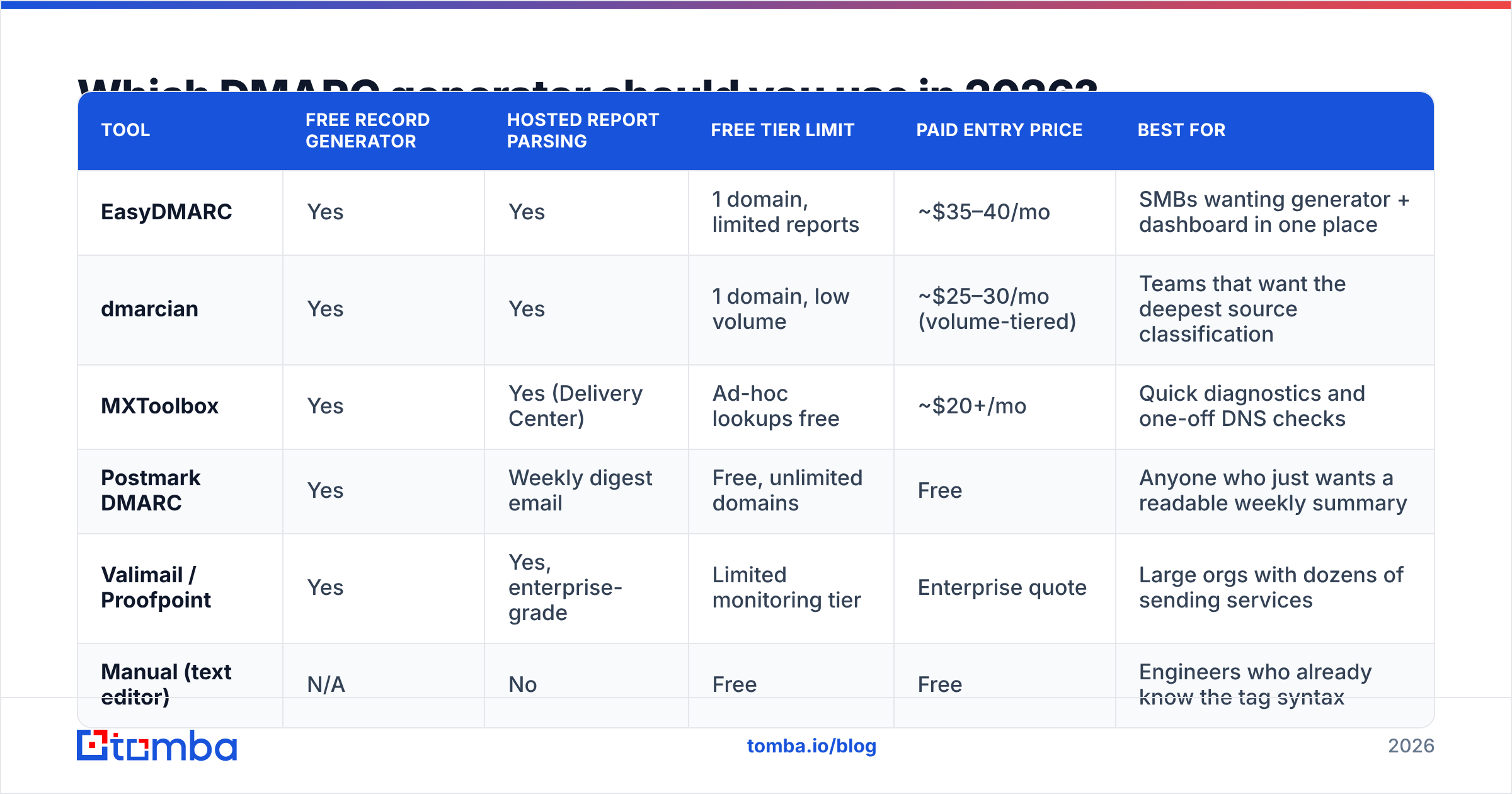
This is the part the generator doesn't do. Treat it as a four-stage rollout, and don't compress it.
| Stage | Record | Duration | What you're watching for | Exit criteria |
|---|---|---|---|---|
| 1. Monitor | p=none; rua=... |
2–4 weeks | Every IP sending as your domain | You can name every legitimate source |
| 2. Fix auth | p=none |
1–3 weeks | SPF includes, DKIM keys per vendor | All legitimate sources pass and align |
| 3. Quarantine | p=quarantine; pct=25 → pct=100 |
2–4 weeks | Complaints from internal teams, drop in legit volume | Zero legitimate failures for 2 straight weeks |
| 4. Enforce | p=reject; pct=100 |
Ongoing | New shadow-IT senders appearing | Steady state; review reports monthly |
The most common failure mode is skipping stage 2. Someone publishes p=reject on day one because a blog post said enforcement is the goal, and three weeks later the finance team discovers their invoicing platform's mail has been silently rejected since the change. Rejected mail generates no bounce you'll see and no complaint — the recipient just never got it.
The second most common failure: setting rua= to a mailbox nobody opens. Aggregate reports are XML, often gzipped, and arrive daily from dozens of receivers. If no human or tool reads them, you've built a smoke detector with no battery.
A practical shortcut — while you're in stage 2, audit the supporting records too. Run your SPF record through a checker to confirm you're under the 10-DNS-lookup limit (exceeding it makes SPF fail permanently, which drags DMARC down with it), and confirm your domain isn't on a blocklist with a blacklist checker. DMARC enforcement on a blacklisted IP fixes the spoofing problem and none of the delivery problem.

What do DMARC aggregate reports actually tell you?#
Each aggregate report is an XML file from one receiver covering one 24-hour window. Stripped of ceremony, each row says: this IP sent N messages claiming your domain; SPF result was X; DKIM result was Y; alignment was Z; here's what I did about it.
Three patterns show up in nearly every first month of monitoring:
- Your own forgotten senders. A marketing automation platform from two years ago, a status-page provider, a recruiting tool. All legitimate, none authenticated. This is usually 60–80% of your failures.
- Forwarding. Mailing lists and auto-forwards break SPF by design, because the forwarding server's IP isn't in your record. DKIM usually survives forwarding, which is exactly why DMARC accepts either mechanism passing with alignment.
- Actual spoofing. Low volume, scattered IPs, often from regions where you have no infrastructure. Frequently a phishing campaign aimed at your customers or your own AP department.
That third category is the reason to enforce. Domain spoofing in B2B is rarely random — it targets the vendor-payment relationships your domain is known for. Google's own guidance on DMARC setup for Workspace makes the same point about starting in monitoring mode before enforcing.
If you want the plain-language background on how the three protocols interlock, the DMARC entry on Wikipedia is unusually well-maintained.
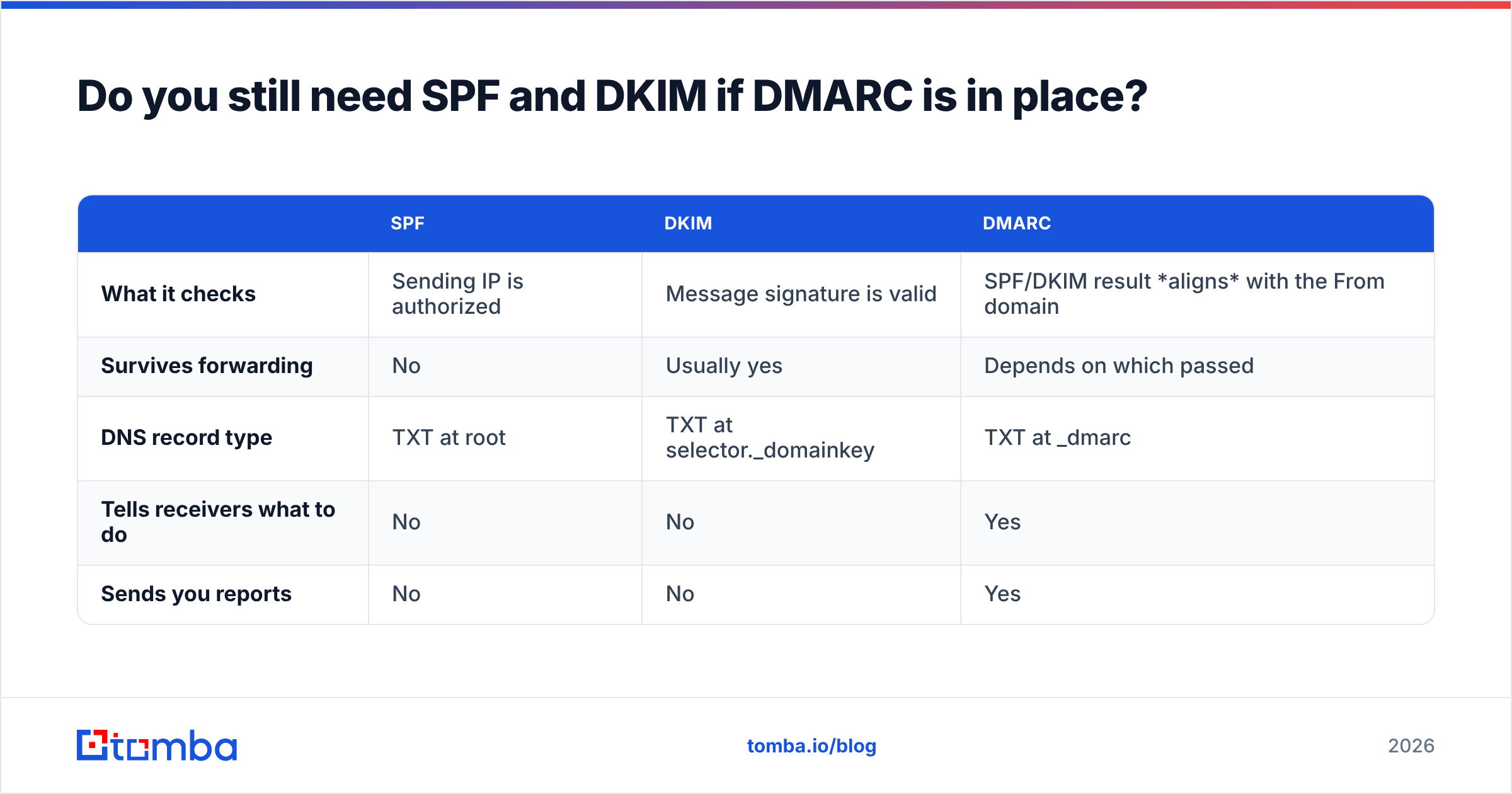
Do you still need SPF and DKIM if DMARC is in place?#
Yes, and this trips people up constantly. DMARC is not a third authentication method — it's a policy layer that consumes the results of the first two.
| SPF | DKIM | DMARC | |
|---|---|---|---|
| What it checks | Sending IP is authorized | Message signature is valid | SPF/DKIM result aligns with the From domain |
| Survives forwarding | No | Usually yes | Depends on which passed |
| DNS record type | TXT at root | TXT at selector._domainkey | TXT at _dmarc |
| Tells receivers what to do | No | No | Yes |
| Sends you reports | No | No | Yes |
A message passes DMARC if either SPF or DKIM passes and aligns with the visible From domain. Alignment is the crucial word: a message can pass SPF for sendgrid.net while showing From: you@yourdomain.com, and DMARC will still fail it. That's the whole point — it closes the gap between "some domain authenticated" and "the domain the human sees authenticated."
Practical implication: sign with DKIM everywhere you can, because DKIM alignment survives forwarding and SPF alignment often doesn't. If you only get one right, make it DKIM.
Is a DMARC generator enough for cold outreach deliverability?#
No — and this is where a lot of outbound teams misread the situation.
DMARC is a domain reputation control. It stops other people from sending as you, and it signals to receivers that you run a tight domain. What it cannot do:
- Fix bounce rate. If 18% of your list is invalid, mailbox providers will throttle you regardless of a perfect
p=rejectrecord. - Fix spam complaints. Authentication proves you sent it. It doesn't prove anyone wanted it.
- Fix content filtering. A well-authenticated message with spam-trigger copy still lands in Promotions.
- Fix a cold domain. New domains need volume ramping. DMARC doesn't accelerate that.
Order of operations that actually works: publish DMARC and get to enforcement → warm the sending domain → clean the list → then scale volume. Skipping list hygiene is the expensive mistake, because hard bounces are the fastest way to burn a domain you just spent a month authenticating.
That means running every address through an email verifier before it enters a sequence, and being honest about catch-all domains — a catch-all verifier tells you which "valid" addresses are actually unverifiable accept-alls. Pair that with a periodic sender reputation check and you've covered both halves of email deliverability: the technical half DMARC owns, and the behavioral half your list quality owns.
What are the mistakes DMARC generators won't catch?#
- Publishing at the wrong host. The record belongs at
_dmarc.yourdomain.com, not at the root. Root is SPF. - Two DMARC records. Multiple TXT records at
_dmarcinvalidate each other. Receivers treat it as no policy. ruaon an external domain without authorization. If you send reports todmarc@vendor.com, that vendor needs ayourdomain.com._report._dmarc.vendor.comrecord authorizing it. Most hosted services set this up for you; if you point reports at a Gmail address on a different domain, they won't arrive.- Enforcing before third parties are signed. Every vendor sending on your behalf needs its own DKIM key.
- Forgetting parked domains. Domains you own but never send from should publish
v=DMARC1; p=reject;immediately. There's no legitimate mail to break, and unprotected parked domains are prime spoofing material. - Leaving
pct=below 100 permanently.pct=50atp=rejectmeans half of spoofed mail still gets through. It's a rollout tool, not a destination.
What's the fastest correct setup?#
If you want the whole thing in one sitting:
- Publish
v=DMARC1; p=none; rua=mailto:dmarc@yourdomain.com; fo=1;at_dmarc.yourdomain.com. - Sign up for a free report parser so the XML becomes a readable dashboard.
- Wait two weeks. List every sending source that appears.
- Add SPF includes and DKIM keys for each legitimate one.
- Move to
p=quarantine; pct=100. Wait two more weeks. - Move to
p=reject; pct=100. Addsp=reject. Publishp=rejecton every parked domain you own. - Review reports monthly for new shadow-IT senders.
Six weeks, mostly waiting. The generator was step one, and it took thirty seconds.
Where to go from here#
A DMARC generator solves a syntax problem you were going to solve anyway. The rollout discipline — monitor, identify, authenticate, enforce — is what actually stops spoofing, and it costs patience rather than money.
Once your domain is authenticated and enforcing, the constraint moves downstream: are you emailing real people at real addresses? That's where bounce rates, complaint rates, and reputation get decided. Start with accurate contact data — Tomba's Email Finder returns verified professional addresses with a confidence score and source attribution, so your sequences hit live inboxes instead of burning the domain you just secured. The free tier covers 25 searches a month, and paid plans start at $49/mo when you're ready to scale. Authenticate the domain, then protect it by only sending to addresses that exist.
Related guides#
Ready to find emails that actually work?
Join 150,000+ professionals who stopped guessing and started sending. Free credits on signup — no credit card required.
Get the Tomba newsletter
Practical outbound tactics and product updates — once every two weeks.
About the author