DMARC Record Setup: The Complete Step-by-Step Guide for 2026
A practical walkthrough of DMARC record setup — every tag explained, the safe p=none to p=reject rollout, how to read aggregate reports, and the mistakes that silently kill legitimate mail.
TL;DR
- A DMARC record is a single TXT entry at
_dmarc.yourdomain.comthat tells inbox providers what to do with mail that fails SPF and DKIM alignment — and where to send reports about it. - Start at
p=nonewithrua=reporting on. Publishingp=rejecton day one is the fastest way to delete your own invoices, password resets, and newsletters. - Minimum viable record:
v=DMARC1; p=none; rua=mailto:dmarc@yourdomain.com; fo=1. Everything else is tuning. - Google and Yahoo's bulk-sender rules (5,000+ messages/day) made DMARC mandatory in 2024; by 2026 Microsoft has tightened the same way. "We'll do it later" is now a deliverability tax.
- Budget 6–12 weeks for a full rollout: 2–4 weeks at
p=none, 3–4 weeks atp=quarantinewith risingpct=, thenp=reject.
What is a DMARC record, and why does it matter in 2026?#
DMARC is the bouncer's instruction sheet. SPF and DKIM are the ID checks — SPF says "this IP is allowed to send for me," DKIM says "this message carries my cryptographic signature." Neither one tells the receiving server what to do when a check fails. DMARC (Domain-based Message Authentication, Reporting and Conformance) is the policy layer on top: it defines the consequence, and it demands that the authenticated domain align with the From: address your recipient actually sees.
That alignment requirement is the whole point. Before DMARC, a spammer could pass SPF using their own domain while displaying billing@yourbank.com in the From header. DMARC closes that gap.
Technically it's just DNS. One TXT record at the _dmarc subdomain, read by every major mailbox provider on every inbound message from your domain. You can read the formal specification in RFC 7489 on dmarc.org or the plain-English background on Wikipedia's DMARC entry.
Why it matters more now than it did three years ago:
- Bulk sender enforcement. Google and Yahoo began requiring DMARC for senders above 5,000 messages/day in February 2024. Microsoft followed with its own enforcement for high-volume senders. Missing DMARC no longer means "slightly worse placement" — it means rejection at the gateway.
- BIMI depends on it. You cannot display a brand logo in the inbox without
p=quarantineorp=rejectat minimum. - Reputation isolation. Without DMARC, anyone spoofing your domain damages your sender reputation, not theirs.
- Procurement checklists. Enterprise security reviews now routinely ask for the DMARC policy string.
p=noneon a vendor questionnaire is a visible red flag.
What do you need before you set up a DMARC record?#
Do not touch _dmarc until these four things are true. Skipping the prep is where most rollouts go wrong.
- A complete inventory of every sending source. Your ESP, your transactional provider, your CRM, your invoicing tool, your helpdesk, your marketing automation, your recruiting platform, that one WordPress plugin nobody remembers installing. Each one sends as your domain and each one must authenticate.
- A valid SPF record with fewer than 10 DNS lookups. SPF silently fails at the 11th lookup — the result is
permerror, which DMARC treats as a fail. Run your domain through an SPF checker before you go further. - DKIM signing enabled and verified on every source. DKIM is the more durable of the two mechanisms because it survives forwarding. SPF does not.
- A mailbox or reporting tool to receive aggregate reports. These arrive as gzipped XML, several per day, from dozens of providers. A shared inbox works for week one; after that you want a parser.
The honest version: step 1 takes longer than the rest combined. Most companies discover three to five sending systems they had forgotten about, and at least one of them is sending real customer mail.
What does each DMARC tag actually do?#
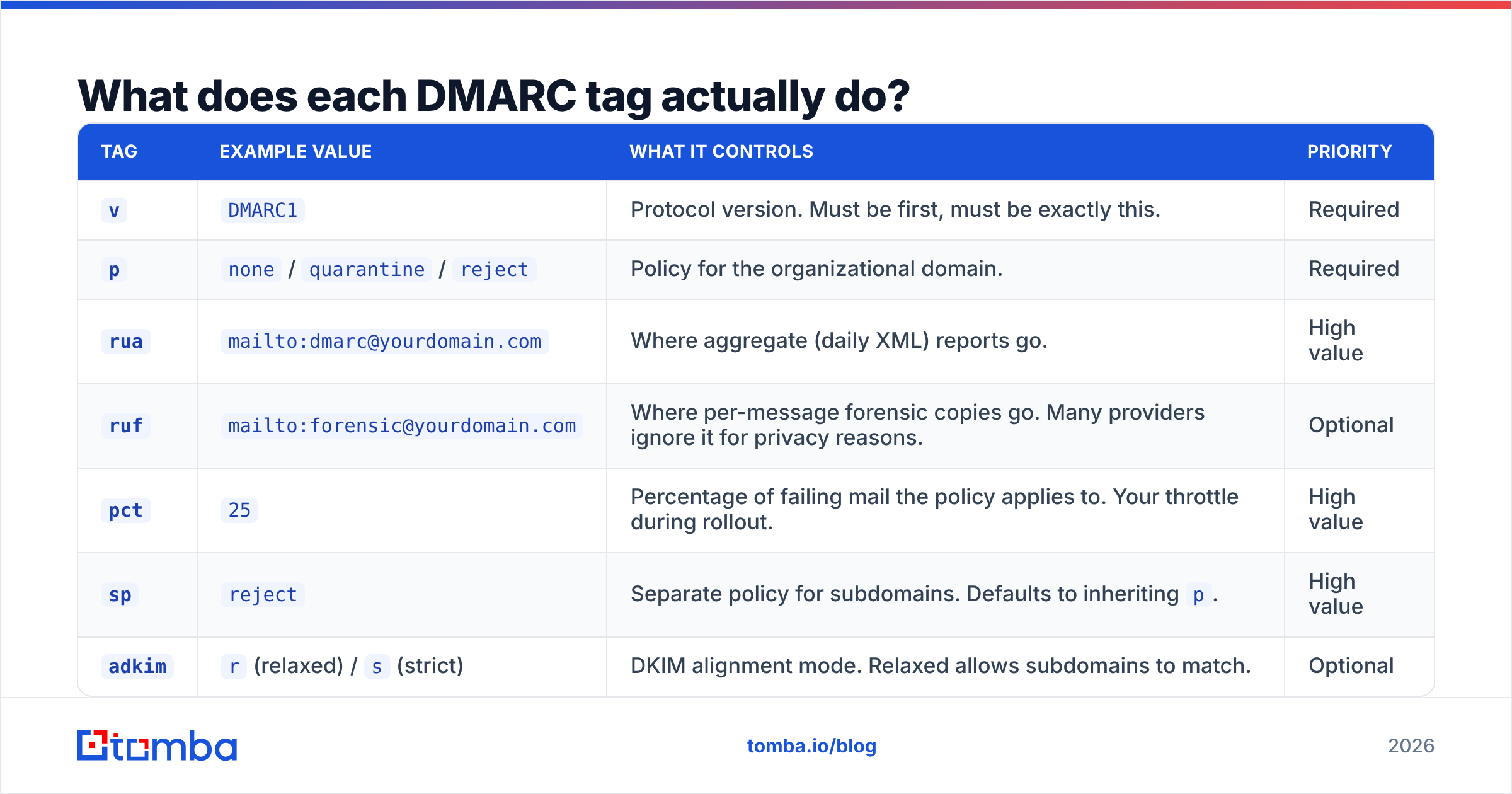
Here is the full tag reference. Only two tags are required — v and p — but the ones marked "high value" are the difference between a rollout you can steer and one you're flying blind through.
| Tag | Example value | What it controls | Priority |
|---|---|---|---|
v |
DMARC1 |
Protocol version. Must be first, must be exactly this. | Required |
p |
none / quarantine / reject |
Policy for the organizational domain. | Required |
rua |
mailto:dmarc@yourdomain.com |
Where aggregate (daily XML) reports go. | High value |
ruf |
mailto:forensic@yourdomain.com |
Where per-message forensic copies go. Many providers ignore it for privacy reasons. | Optional |
pct |
25 |
Percentage of failing mail the policy applies to. Your throttle during rollout. | High value |
sp |
reject |
Separate policy for subdomains. Defaults to inheriting p. |
High value |
adkim |
r (relaxed) / s (strict) |
DKIM alignment mode. Relaxed allows subdomains to match. | Optional |
aspf |
r / s |
SPF alignment mode. Same logic. | Optional |
fo |
1 |
Forensic options. 1 = report if either SPF or DKIM fails. |
Recommended |
ri |
86400 |
Reporting interval in seconds. 86400 (daily) is the practical default. | Rarely changed |
A working starter record, published as a TXT value at host _dmarc:
v=DMARC1; p=none; rua=mailto:dmarc@yourdomain.com; fo=1; adkim=r; aspf=rAn enforced record for a domain that has finished its rollout:
v=DMARC1; p=reject; sp=reject; rua=mailto:dmarc@yourdomain.com; pct=100; adkim=s; aspf=sTwo syntax rules that trip people up constantly: tags are separated by semicolons, and the whole thing goes in one TXT record. Two DMARC records on the same host is a configuration error — receivers treat the domain as having no policy at all.
Which DMARC policy should you start with?#
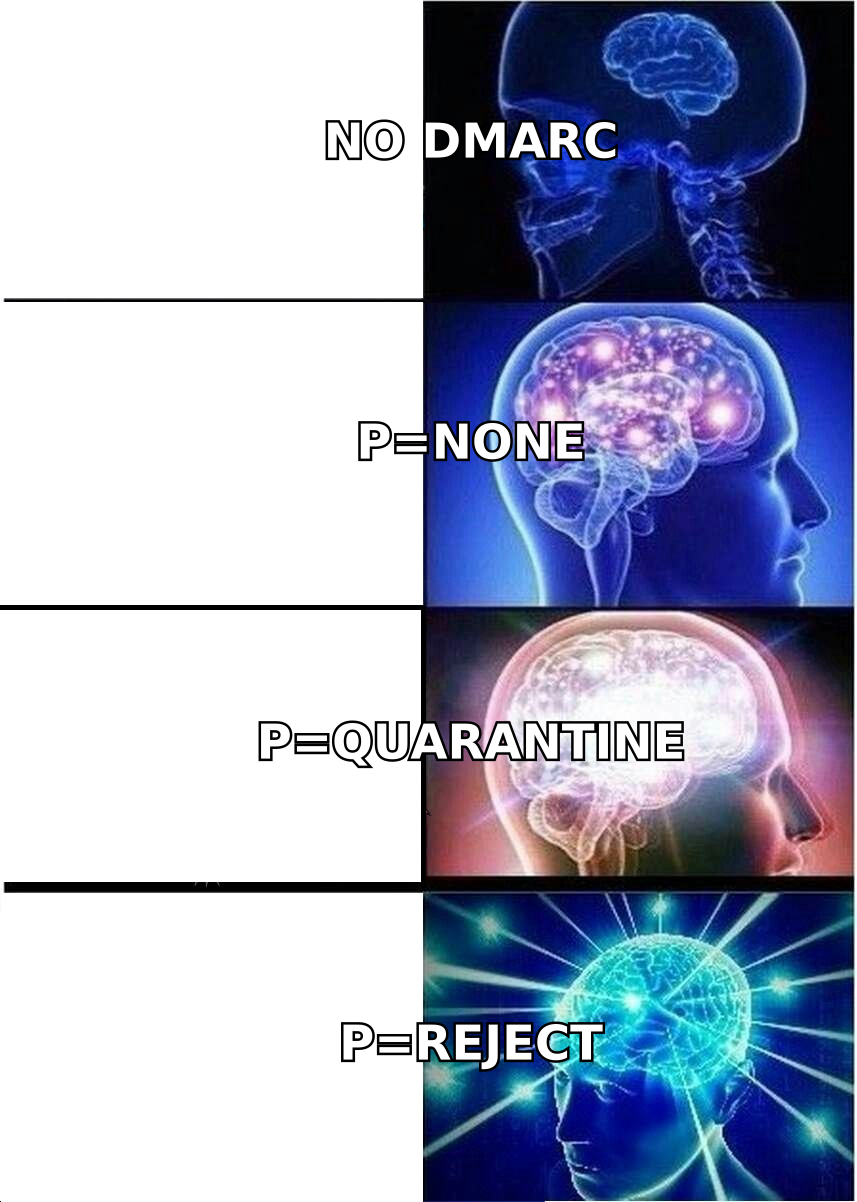
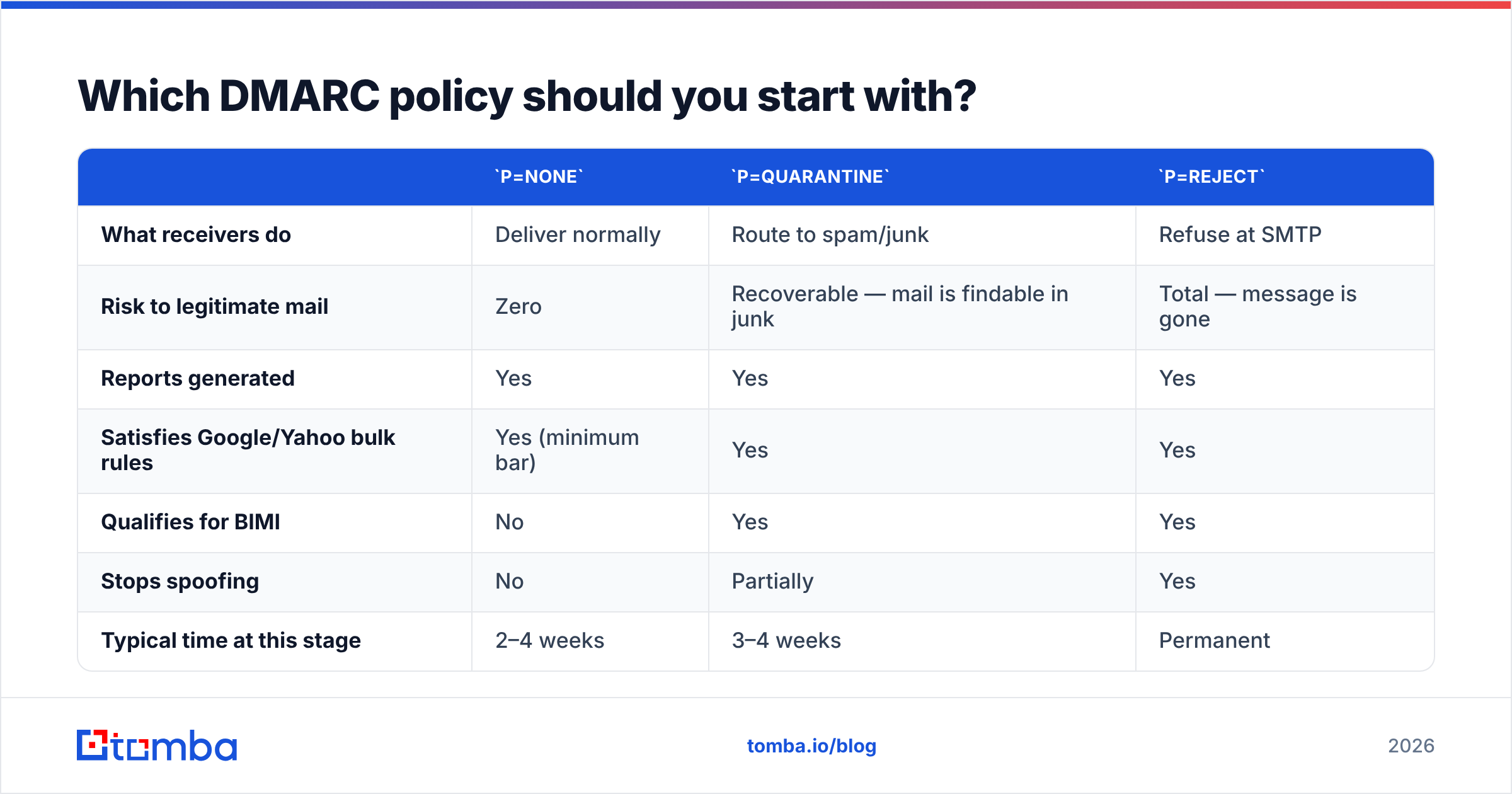
p=none. Always. There is no legitimate scenario where a domain with real senders goes straight to enforcement.
p=none |
p=quarantine |
p=reject |
|
|---|---|---|---|
| What receivers do | Deliver normally | Route to spam/junk | Refuse at SMTP |
| Risk to legitimate mail | Zero | Recoverable — mail is findable in junk | Total — message is gone |
| Reports generated | Yes | Yes | Yes |
| Satisfies Google/Yahoo bulk rules | Yes (minimum bar) | Yes | Yes |
| Qualifies for BIMI | No | Yes | Yes |
| Stops spoofing | No | Partially | Yes |
| Typical time at this stage | 2–4 weeks | 3–4 weeks | Permanent |
p=none is a monitoring mode, not a protection mode. It satisfies the letter of the bulk-sender requirements but blocks nothing. Treat it as a data-collection phase with a hard expiry date on your calendar — the single most common failure pattern in email deliverability work is a domain that has sat at p=none for three years because nobody owned the next step.
How do you publish the DMARC record in DNS?#
The mechanics are identical everywhere; only the UI labels change.
- Log into your DNS host — the registrar or provider that controls your nameservers, which is often not the same company that hosts your website.
- Create a new TXT record.
- Set the host/name to
_dmarc(some panels want the fully-qualified_dmarc.yourdomain.com). - Paste the record string as the value, no surrounding quotes unless the panel demands them.
- Set TTL to 3600 (one hour) during rollout so changes propagate fast. Raise it later.
- Wait for propagation — usually minutes, occasionally an hour — then query it back with
dig TXT _dmarc.yourdomain.comor any public DNS lookup.
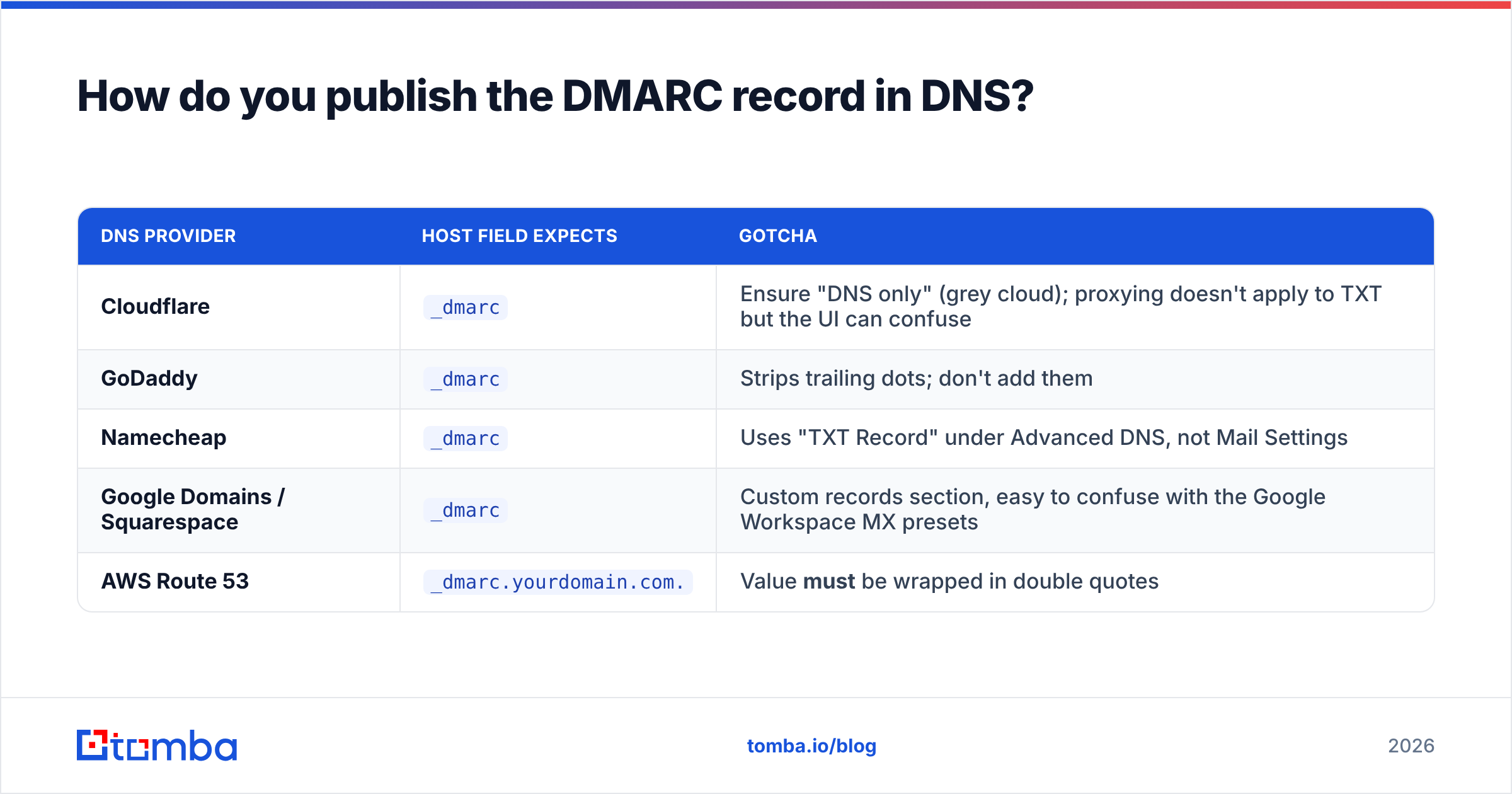
| DNS provider | Host field expects | Gotcha |
|---|---|---|
| Cloudflare | _dmarc |
Ensure "DNS only" (grey cloud); proxying doesn't apply to TXT but the UI can confuse |
| GoDaddy | _dmarc |
Strips trailing dots; don't add them |
| Namecheap | _dmarc |
Uses "TXT Record" under Advanced DNS, not Mail Settings |
| Google Domains / Squarespace | _dmarc |
Custom records section, easy to confuse with the Google Workspace MX presets |
| AWS Route 53 | _dmarc.yourdomain.com. |
Value must be wrapped in double quotes |
If you use Google Workspace, Google's own DMARC setup documentation walks through the same steps with Workspace-specific screenshots.
How do you read DMARC reports without drowning?#
Aggregate reports are gzipped XML files sent daily by each receiving provider. A medium-sized domain will get 10–40 of them per day. Reading them by hand is possible for about a week.
What you are actually hunting for in that XML:
- Source IPs you don't recognize. Every IP in the report is claiming to send as you. Some are your ESP, some are forwarders, some are spoofers.
- Volume per source. A source sending 12 messages/day is a forgotten test script. A source sending 40,000 is a system you cannot break.
- SPF pass but DKIM fail (or the reverse). This is normal for forwarded mail and usually fine — DMARC passes if either mechanism aligns.
- Both fail, high volume, recognizable source. This is your work queue. Fix authentication on that source before you enforce.
- Both fail, high volume, unknown source. Either shadow IT or an active spoofing campaign. Investigate before you assume malice.
Practical advice: pipe rua= into a dedicated parser rather than a human inbox. Free tiers from the major DMARC analytics vendors handle 10k+ messages/month and will save you the XML. Skip ruf= entirely on your first pass — forensic reports contain message content, most large providers won't send them anyway, and the privacy review is not worth the small extra signal.
What breaks when you rush to p=reject?#
Everything that sends as your domain without authenticating. In practice that means:
- Mailing lists and listservs. They rewrite headers and break SPF. Well-configured lists use ARC or rewrite the From address; older ones do not.
- Forwarded mail. An employee who auto-forwards work mail to a personal Gmail breaks SPF on every message. DKIM usually survives — usually.
- Calendar invites and meeting tools sending on behalf of individual users.
- The billing system nobody documented, which sends 400 invoices a month from a static IP that has never been in your SPF record.
- Contact forms on your marketing site that spoof the visitor's address into the From header. This one bites almost everyone.

What does a safe rollout timeline look like?#
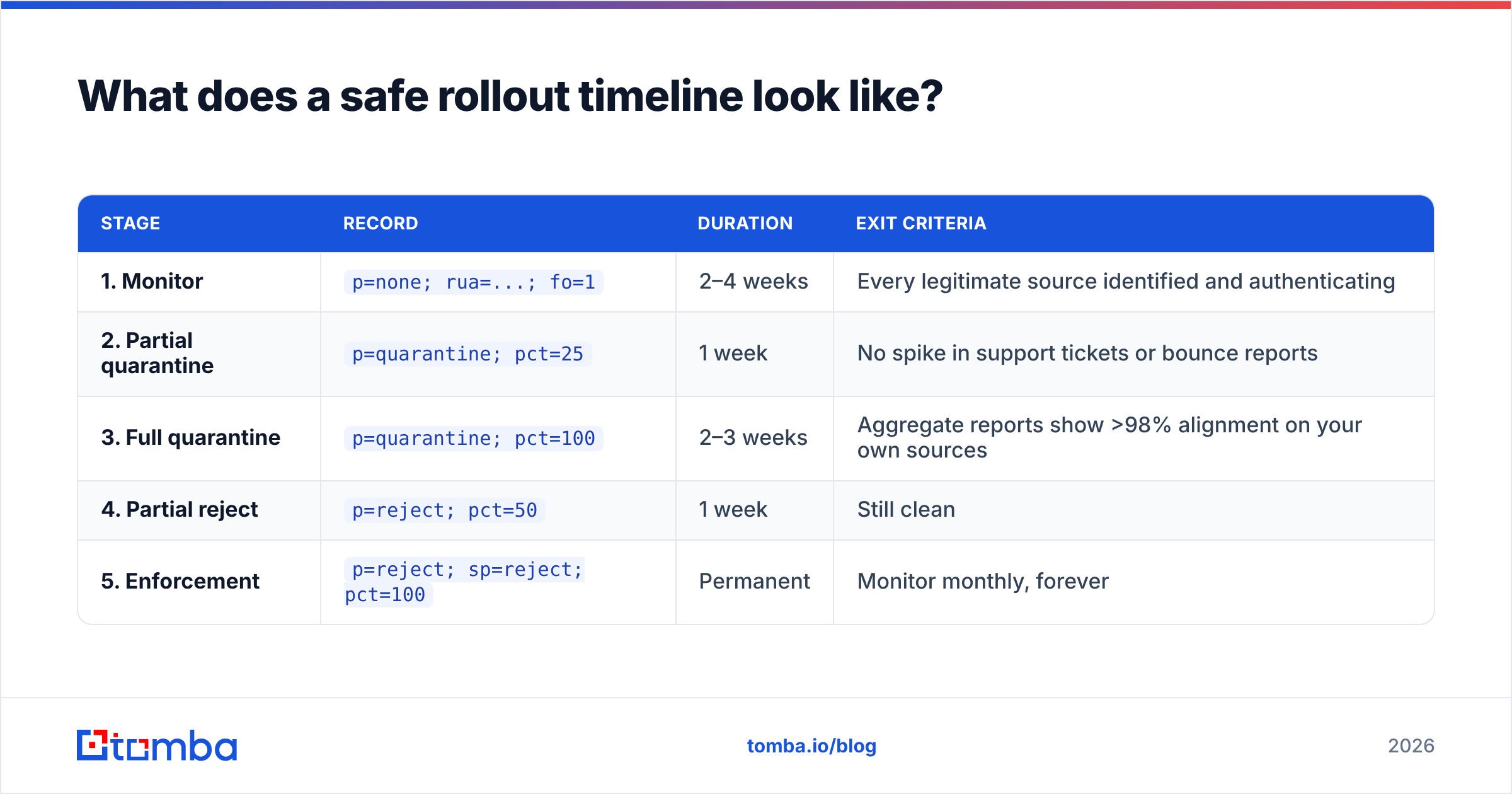
| Stage | Record | Duration | Exit criteria |
|---|---|---|---|
| 1. Monitor | p=none; rua=...; fo=1 |
2–4 weeks | Every legitimate source identified and authenticating |
| 2. Partial quarantine | p=quarantine; pct=25 |
1 week | No spike in support tickets or bounce reports |
| 3. Full quarantine | p=quarantine; pct=100 |
2–3 weeks | Aggregate reports show >98% alignment on your own sources |
| 4. Partial reject | p=reject; pct=50 |
1 week | Still clean |
| 5. Enforcement | p=reject; sp=reject; pct=100 |
Permanent | Monitor monthly, forever |
The pct= tag is doing real work here. At pct=25, only a quarter of failing messages get the policy — you get a controlled sample of the blast radius instead of the whole explosion. Raise it in steps and watch the reports between each one.
Do not skip sp=. If you set p=reject without a subdomain policy, subdomains inherit it — which is usually what you want, but if you have an unauthenticated subdomain sending real mail, you just broke it. Set sp=none explicitly while you sort that out, then tighten.
What are the most common DMARC record setup mistakes?#
- Two DMARC records on one host. Receivers see an ambiguous policy and apply none. Merge them into one string.
- Publishing the record on
yourdomain.cominstead of_dmarc.yourdomain.com. The record is invisible at the apex. ruapointing at a mailbox on the same domain that later gets restricted. Use an address you will still be able to read after enforcement, or an external reporting service (which requires a DNS authorization record on their end).- Forgetting that DMARC needs alignment, not just a pass. A message can pass SPF and still fail DMARC if the SPF-authenticated domain doesn't match the visible From domain.
- Setting
adkim=sandaspf=son day one. Strict alignment breaks subdomain sending. Start relaxed, tighten at the end if you need it. - Treating DMARC as a spam fix. It stops spoofing of your domain. It does nothing about bad content, cold lists, or blacklisted IPs.
- No parked-domain policy. Every domain you own that sends no mail should carry
v=DMARC1; p=reject; rua=...plus a null SPF record. Unused domains are the easiest spoofing targets you have.
Does DMARC actually improve deliverability?#
Directly, modestly. Indirectly, a lot.
DMARC is not a placement booster on its own — passing it is table stakes, not a bonus. What it does is protect the reputation you have already built by making it impossible for someone else to burn it, and it unlocks the sender-identity features (BIMI, higher trust signals) that do move placement.
The bigger lever remains list quality. A perfectly authenticated domain sending to a 20% invalid list will still get throttled, because bounce rate and spam-complaint rate outweigh authentication in every major provider's filtering model. Authentication gets you to the door; hygiene gets you through it. If your bounce rate is above 3%, fix that before you fine-tune adkim.
The practical order of operations:
- Authenticate — SPF, DKIM, DMARC, in that order.
- Clean the list — remove invalid, role-based, and long-inactive addresses.
- Warm the sending domain — gradual volume ramp, especially on a new domain.
- Monitor continuously — DMARC reports, complaint rates, blocklists.
- Fix content last — subject lines and copy matter, but only after the plumbing is sound.
Where does contact data fit into all of this?#
Authentication and data quality are the two halves of the same problem. DMARC guarantees that the message genuinely came from you; a clean recipient list guarantees the message reaches a real human instead of a spam trap. Get the first right and the second wrong, and you have a perfectly signed message landing in a honeypot.
That's why the workflow that actually holds up looks like this: verify every address before it enters a sequence with an email verifier, catch the ambiguous domains with a catch-all verifier, and only then send from a domain with SPF, DKIM, and an enforced DMARC policy behind it.
If you're building the prospect list in the first place, start with sources that return verified addresses rather than guessed permutations. The Tomba Email Finder returns a confidence score and the source of every address it finds, so you're not shipping guesses into a domain whose reputation you just spent six weeks protecting. The free tier covers 25 searches a month, and paid Tomba plans start at $49/mo if you need bulk volume, API access, or the verification endpoints in the same account.
Set the DMARC record first. Then make sure the addresses you're sending to deserve it.
Related guides#
Ready to find emails that actually work?
Join 150,000+ professionals who stopped guessing and started sending. Free credits on signup — no credit card required.
Get the Tomba newsletter
Practical outbound tactics and product updates — once every two weeks.
About the author