DMARC Report Explained: How to Read and Fix Yours in 2026
A DMARC report is a raw XML file most senders never open — and it holds the exact reason your cold email lands in spam. Here's how to read one, find the failing sender, and get to p=reject without killing your own mail.

TL;DR
- A DMARC report is an XML file that receiving mailbox providers (Google, Microsoft, Yahoo) send back to you, listing every IP that sent mail claiming to be your domain and whether it passed SPF, DKIM, and alignment.
- There are two kinds: aggregate (RUA) reports — daily rollups, safe, what 95% of senders need — and forensic (RUF) reports — per-message failure samples that most providers no longer send.
- The single most useful column is alignment, not authentication. SPF can pass and DMARC can still fail, and that gap is where most cold-email deliverability problems live.
- Reading raw XML by hand does not scale past about two days of data. Use a parser, then act on the sending sources — not on the aggregate percentage.
- Moving from
p=nonetop=rejectis a 6–10 week project, not a config change. Skip the ramp and you will silently block your own invoices, helpdesk, and newsletter.
What is a DMARC report?#
A DMARC report is a receipt. Every time a mailbox provider gets a message claiming to come from your domain, it checks that claim against your SPF and DKIM records, then writes down the result. Once a day, it bundles all those results into an XML file and mails it to whatever address you listed in your DMARC record's rua= tag.
Think of it like a credit card statement. You do not see it while you are spending — you see it after the fact, itemised, and the fraudulent charge is obvious only because it sits next to the legitimate ones. DMARC reports work the same way: they show you every system on earth sending mail as you, including the four you forgot about and the one you never authorised.
You get reports only if you ask. A DMARC record with no rua= tag is a policy with no telemetry:
v=DMARC1; p=none; rua=mailto:dmarc@yourdomain.com; fo=1; pct=100That record does nothing to your mail flow (p=none), but it turns the reporting firehose on. That is the correct first move for any domain that is about to run outbound. If you want the underlying spec rather than a summary, DMARC.org's overview is the canonical starting point, and Google's sender guidelines tell you what Gmail specifically enforces.
What is actually inside a DMARC aggregate report?#
An aggregate report has two halves: metadata about who sent it, and one <record> block per sending source.
The metadata half tells you the reporting organisation (google.com, Enterprise Outlook, Yahoo), the date range, and the DMARC policy they saw published at the time. If your reports show a policy you do not recognise, someone edited your DNS.
The record half is where the work is. Each block contains:
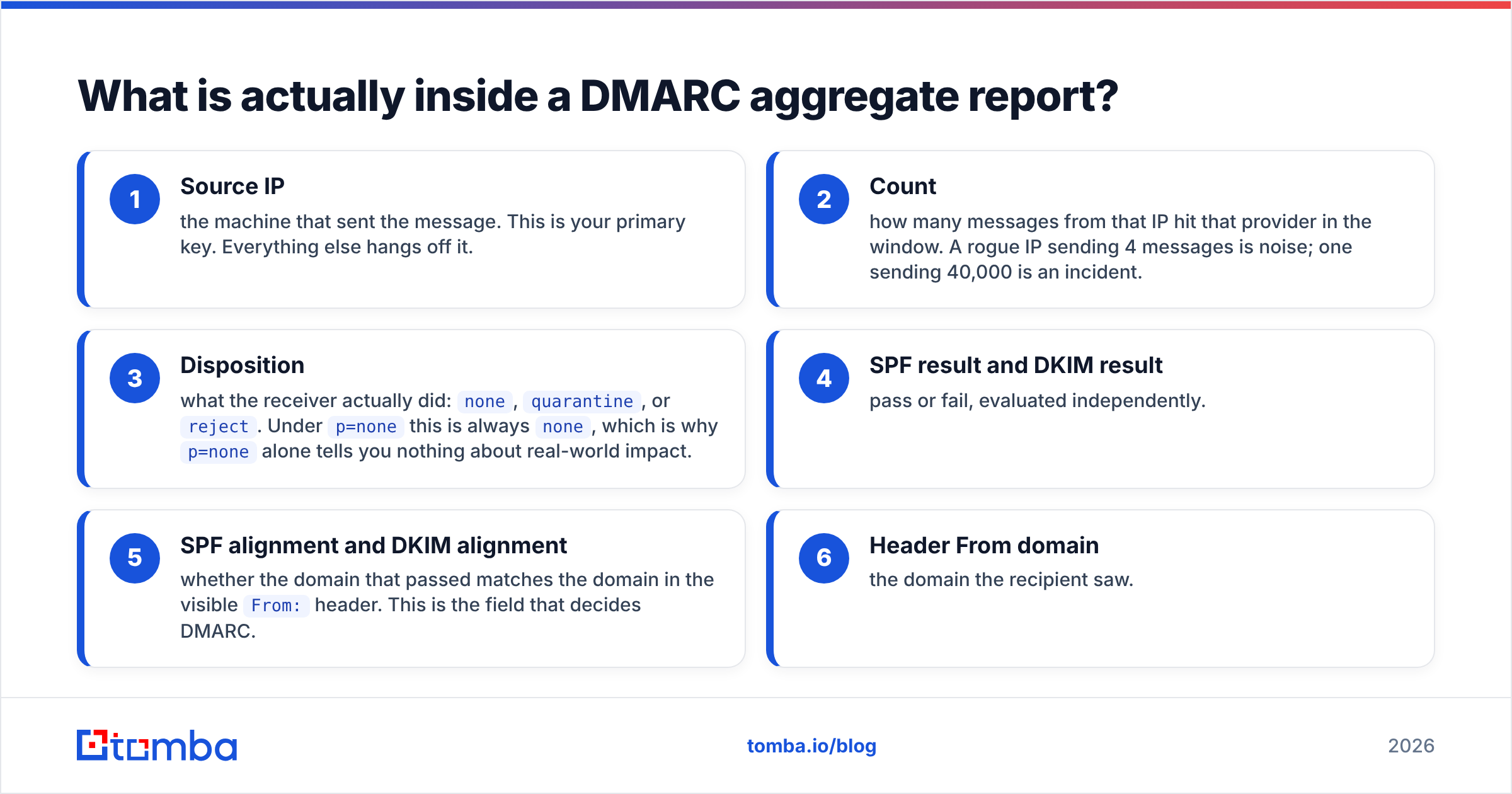
- Source IP — the machine that sent the message. This is your primary key. Everything else hangs off it.
- Count — how many messages from that IP hit that provider in the window. A rogue IP sending 4 messages is noise; one sending 40,000 is an incident.
- Disposition — what the receiver actually did:
none,quarantine, orreject. Underp=nonethis is alwaysnone, which is whyp=nonealone tells you nothing about real-world impact. - SPF result and DKIM result — pass or fail, evaluated independently.
- SPF alignment and DKIM alignment — whether the domain that passed matches the domain in the visible
From:header. This is the field that decides DMARC. - Header From domain — the domain the recipient saw.
DMARC passes if either SPF or DKIM passes and is aligned. Not both. That "or" is why a well-configured domain survives forwarding: SPF breaks when a message is relayed, but DKIM signatures usually survive, so alignment holds.
Why does SPF pass but DMARC still fail?#
Because SPF authenticates the envelope sender, and humans read the header sender. Those are different fields, and DMARC only cares whether they match.
Here is the classic failure. You send through a marketing platform. The platform sets the envelope return-path to bounces@mail.esp-vendor.net and publishes SPF for its own domain. SPF passes — for esp-vendor.net. Your recipient sees From: you@yourdomain.com. The two domains do not match, so SPF alignment fails. If the platform is not also DKIM-signing with your domain, DMARC fails outright.
The fix is almost never "add another include: to SPF." The fix is:
- Set up a custom return-path (also called a custom bounce domain) so the envelope domain is a subdomain of yours, e.g.
bounce.yourdomain.com. - Enable DKIM signing with your domain in the vendor's dashboard and publish the CNAME or TXT records they give you.
- Verify alignment mode. Relaxed alignment (
aspf=r,adkim=r, the default) accepts subdomains. Strict (s) requires an exact match and breaks more than it protects for most senders. - Re-check with a lookup tool — run your record through an SPF checker and confirm you are still under the 10 DNS-lookup limit, which silently returns
permerrorand fails SPF for everything.
Cold-email infrastructure amplifies this. If you run five sending domains through two providers, you have ten alignment configurations to get right, and a DMARC report is the only place you will see all ten at once. Deeper background on the surrounding concepts sits in Tomba's email deliverability glossary entry.
RUA vs RUF: which DMARC report do you actually need?#
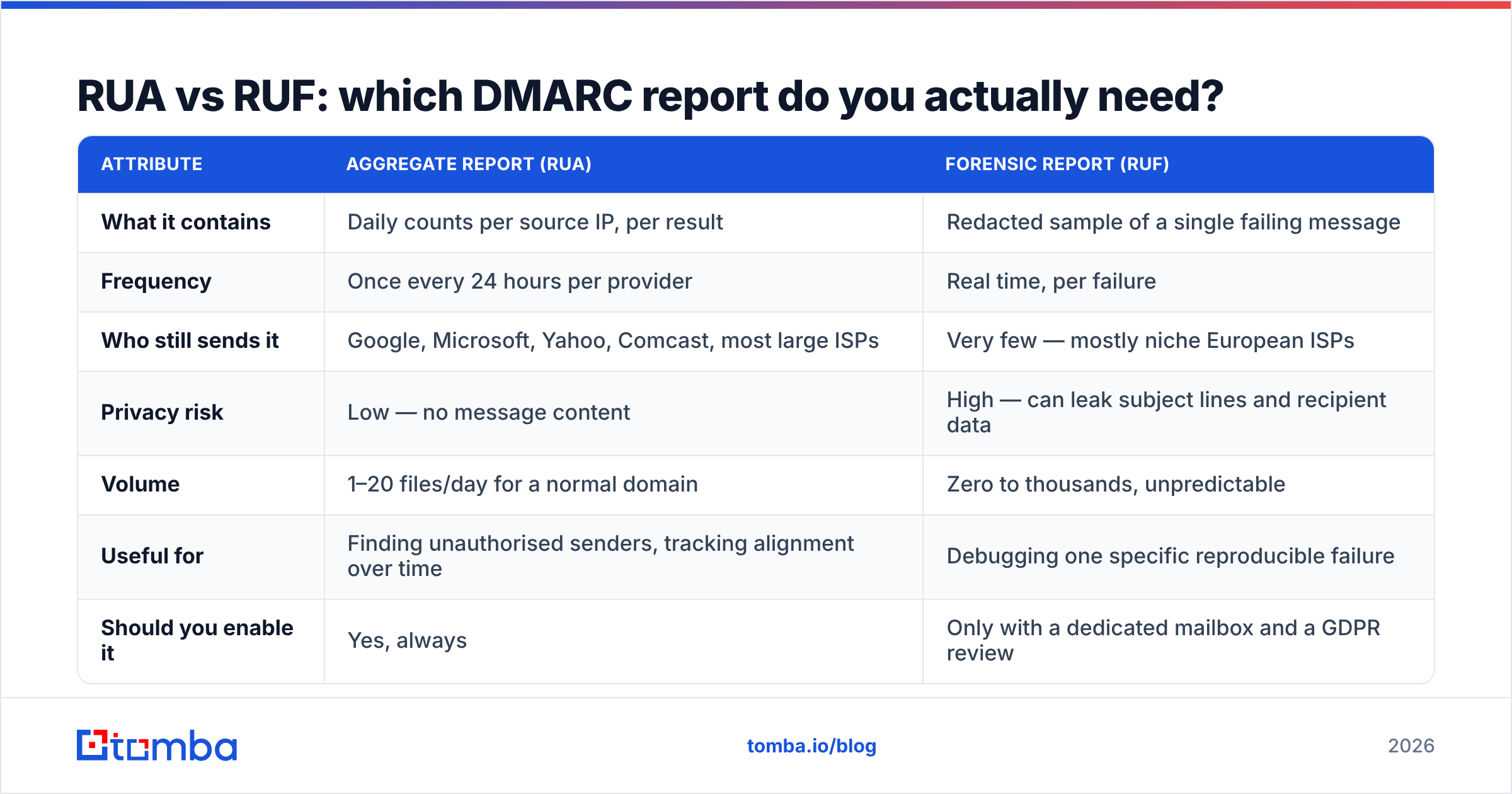
| Attribute | Aggregate report (RUA) | Forensic report (RUF) |
|---|---|---|
| What it contains | Daily counts per source IP, per result | Redacted sample of a single failing message |
| Frequency | Once every 24 hours per provider | Real time, per failure |
| Who still sends it | Google, Microsoft, Yahoo, Comcast, most large ISPs | Very few — mostly niche European ISPs |
| Privacy risk | Low — no message content | High — can leak subject lines and recipient data |
| Volume | 1–20 files/day for a normal domain | Zero to thousands, unpredictable |
| Useful for | Finding unauthorised senders, tracking alignment over time | Debugging one specific reproducible failure |
| Should you enable it | Yes, always | Only with a dedicated mailbox and a GDPR review |
The practical answer: set rua= and leave ruf= off unless you have a specific forensic need. Most teams who enable RUF get either nothing at all or an unreadable flood, and they inherit a privacy obligation for message fragments they never asked for.
How do you read a DMARC report without drowning in XML?#
Raw XML is fine for exactly one thing: confirming reports are arriving. Past that, you need a parser. Here is an honest comparison of the common approaches.
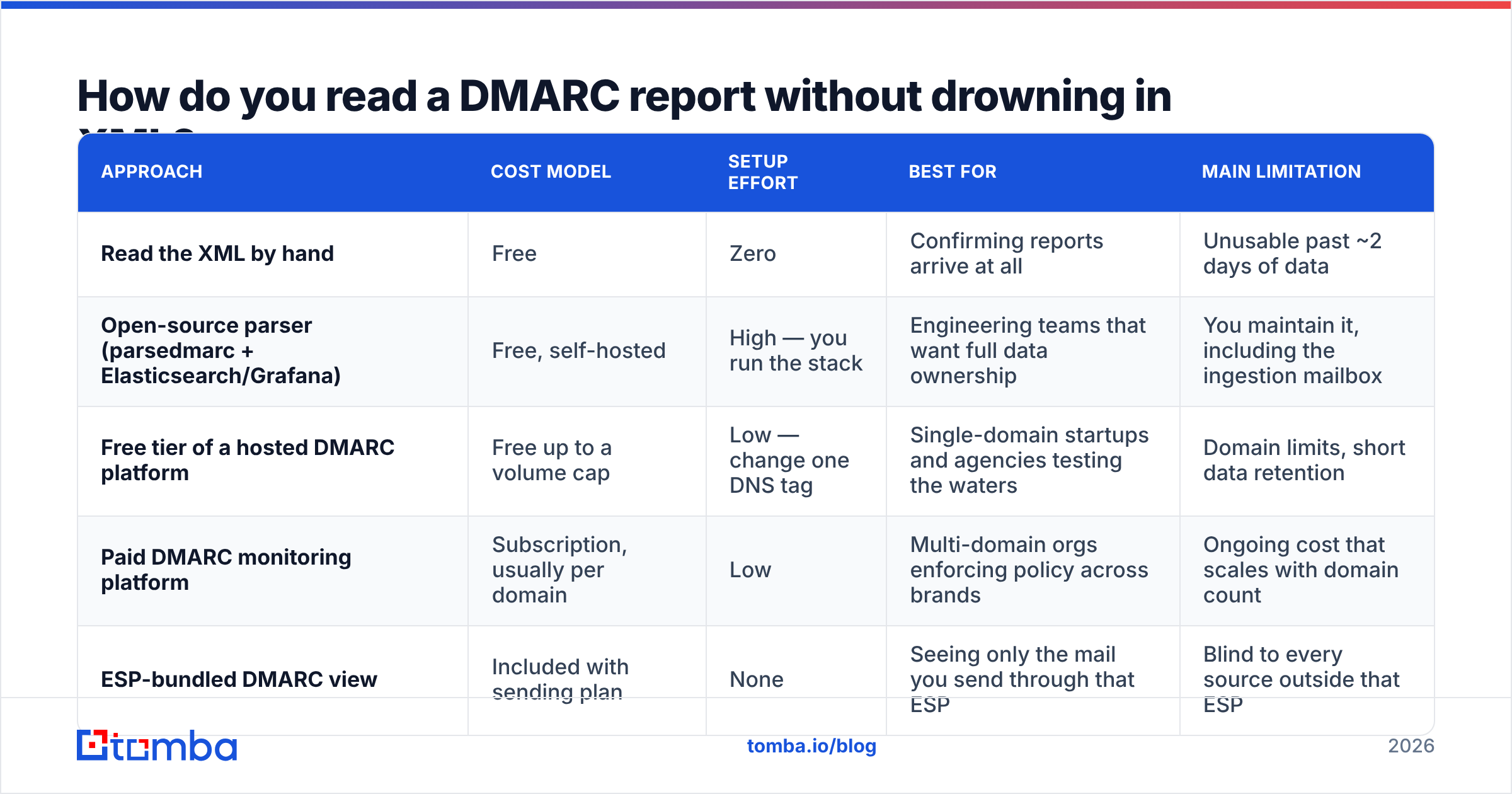
| Approach | Cost model | Setup effort | Best for | Main limitation |
|---|---|---|---|---|
| Read the XML by hand | Free | Zero | Confirming reports arrive at all | Unusable past ~2 days of data |
| Open-source parser (parsedmarc + Elasticsearch/Grafana) | Free, self-hosted | High — you run the stack | Engineering teams that want full data ownership | You maintain it, including the ingestion mailbox |
| Free tier of a hosted DMARC platform | Free up to a volume cap | Low — change one DNS tag | Single-domain startups and agencies testing the waters | Domain limits, short data retention |
| Paid DMARC monitoring platform | Subscription, usually per domain | Low | Multi-domain orgs enforcing policy across brands | Ongoing cost that scales with domain count |
| ESP-bundled DMARC view | Included with sending plan | None | Seeing only the mail you send through that ESP | Blind to every source outside that ESP |
That last row is the trap. A view bundled with your sending platform shows you the traffic it already knows about. The entire point of a DMARC report is to reveal the sources you do not know about — the legacy CRM, the invoicing tool from a department that reorganised, the contractor's script. Pick something that ingests reports from every provider, not just one.
Whatever you choose, the workflow is the same:
- Group by source IP, then reverse-DNS every IP until you can name the service behind it.
- Sort by message volume, descending. Fix the top three sources first; the tail is usually noise or spoof attempts.
- Split each source into three buckets: legitimate and aligned, legitimate but misaligned, and not yours.
- Fix the misaligned legitimate sources with DKIM and custom return-paths, one per week.
- Ignore the spoof traffic until your legitimate sources are at 100% alignment — you cannot block it safely before then anyway.
- Re-measure after 7 days, because DMARC data lags reality by a full reporting cycle.
When can you safely move from p=none to p=reject?#
When your aggregate reports show that every source you recognise is passing alignment, for at least two consecutive weeks, across all major providers. Not before.
p=reject tells the world to discard mail that fails DMARC. If a payroll system you forgot about is still misaligned, that mail disappears — not to spam, not bounced back to a human, just gone. Enforcement is the last step, not the first.
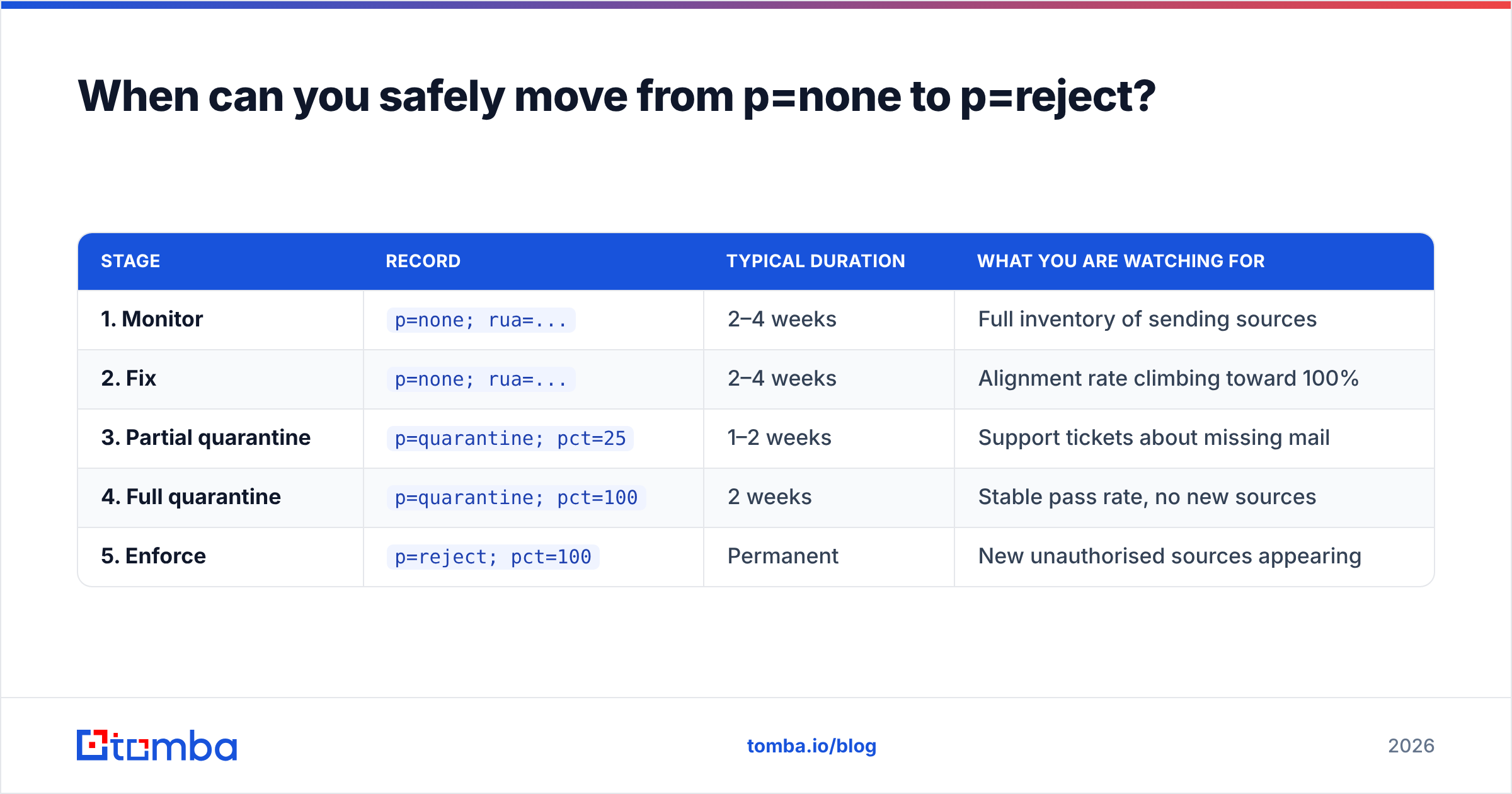
A realistic ramp looks like this:
| Stage | Record | Typical duration | What you are watching for |
|---|---|---|---|
| 1. Monitor | p=none; rua=... |
2–4 weeks | Full inventory of sending sources |
| 2. Fix | p=none; rua=... |
2–4 weeks | Alignment rate climbing toward 100% |
| 3. Partial quarantine | p=quarantine; pct=25 |
1–2 weeks | Support tickets about missing mail |
| 4. Full quarantine | p=quarantine; pct=100 |
2 weeks | Stable pass rate, no new sources |
| 5. Enforce | p=reject; pct=100 |
Permanent | New unauthorised sources appearing |
Two details people miss. First, pct= applies to quarantine and reject only — it does nothing under p=none. Second, publish a subdomain policy explicitly with sp=; without it, subdomains inherit the parent policy, and a forgotten mail.yourdomain.com can be spoofed or, once you enforce, silently blocked.
Microsoft documents its own enforcement behaviour in the Microsoft 365 DMARC guidance, and the mechanics of the standard itself are summarised well on Wikipedia's DMARC page if you want the RFC-level detail without reading RFC 7489 end to end.
What does a DMARC report not tell you?#
This is where most teams over-index. A DMARC report is an authentication log, not a deliverability dashboard. It cannot tell you:
- Whether your mail landed in the inbox or the spam folder. Disposition
nonemeans the receiver applied no DMARC action. It says nothing about spam filtering, which happens separately and for entirely different reasons. - Why your reply rate dropped. Content, sending volume, list quality, and sender reputation drive that. DMARC is a prerequisite, not a lever.
- Whether your recipients exist. A perfectly aligned message to a dead mailbox still bounces, and bounces still damage reputation. That is a list-hygiene problem — run addresses through an email verifier before the send, not after.
- Whether your IP or domain is blocklisted. Check that separately with a blacklist checker; DMARC reports never mention it.
Passing DMARC gets you to the starting line. It removes one category of rejection and it satisfies the bulk-sender requirements Google and Yahoo now enforce. It does not make a bad email good.
What should you do this week?#
Three steps, in order, each about an hour.
Publish a monitoring record. Add v=DMARC1; p=none; rua=mailto:dmarc@yourdomain.com to _dmarc.yourdomain.com. Use a real mailbox or a parser's ingestion address — not a distribution list that drops attachments.
Wait seven days, then inventory. Reverse-DNS every source IP in the reports and write the service name next to it in a spreadsheet. Most teams find between four and eleven sources they cannot immediately name.
Fix in volume order. DKIM-sign with your own domain everywhere you can, add custom return-paths where the vendor supports them, and re-check SPF lookup count after every change.
Then leave it alone for a fortnight. DMARC rewards patience and punishes the urge to jump straight to enforcement because a blog post said p=reject is the goal. It is the goal. It is not the first step.
Where does prospecting data fit into all this?#
Authentication and list quality fail in opposite directions but produce the same symptom: nothing lands. You can have flawless alignment and still burn a domain by mailing 2,000 guessed addresses that bounce, because hard bounces hit reputation regardless of how well the message was signed.
If you are building outbound lists, start with verified addresses rather than permutated guesses. The Tomba Email Finder returns professional addresses by domain, name, or company with a confidence score attached, so your bounce rate stays low enough that the authentication work you just did actually pays off. The free tier covers 25 searches a month, and paid plans start at $49/mo — see Tomba pricing for the full breakdown. Get the DMARC report clean first, then feed it a list worth sending to.
Related guides#
Ready to find emails that actually work?
Join 150,000+ professionals who stopped guessing and started sending. Free credits on signup — no credit card required.
Get the Tomba newsletter
Practical outbound tactics and product updates — once every two weeks.
About the author