DMARC Report Analyzer: How to Read XML Reports in 2026
Raw DMARC XML is unreadable by design. Here is what a DMARC report analyzer actually does, which tools are worth paying for, and how to go from p=none to p=reject without blocking your own mail.
TL;DR
- A DMARC report analyzer ingests the aggregate (RUA) XML that mailbox providers send you every day and turns it into a readable answer to one question: which systems are sending mail as your domain, and which of them are failing authentication.
- You cannot skip this step. Publishing
p=rejectwithout reading reports first is how companies block their own invoices, ticketing systems, and marketing automation. - Free tools (Postmark, Dmarcian's free tier, MXToolbox) are fine for a single domain. Paid platforms earn their price at 5+ domains, or when you need BIMI, MTA-STS, and hosted SPF flattening.
- The reports tell you about authentication, not reputation. You still need Google Postmaster Tools and Microsoft SNDS for complaint and spam-rate data.
- Budget 4-8 weeks from
p=nonetop=rejectfor a typical mid-market stack. Most of that time is chasing down forgotten SaaS senders.
Every domain that publishes a DMARC record with a rua= tag starts receiving XML files within 24 hours. Gmail, Yahoo, Microsoft, Comcast, Mail.ru, and a long tail of smaller providers each send a daily digest describing every message they saw claiming to be from your domain. Open one of those files in a text editor and you get a few hundred lines of nested tags with IP addresses, counts, and pass/fail verdicts. Multiply that by 30 providers a day and you have a data problem, not an insight.
That gap is what a DMARC report analyzer fills.
What is a DMARC report analyzer?#
A DMARC report analyzer is a service that receives, parses, aggregates, and visualizes the reports mailbox providers generate about your domain. You point the rua= tag in your DNS record at an address the tool controls, and it does four things:
- Ingests and de-duplicates. Reports arrive as gzipped or zipped XML attachments, sometimes several per provider per day. The analyzer unpacks them and normalizes the schema differences between providers.
- Resolves IPs to senders. The raw XML gives you
209.85.220.41, not "Google Workspace." A good analyzer maintains a fingerprint database that maps sending IPs and hostnames to named services — Mailchimp, SendGrid, Zendesk, your own MTA, or an unknown host. - Separates SPF from DKIM alignment. DMARC passes if either SPF or DKIM passes and aligns with the header-From domain. Failures look identical in a summary count but have completely different fixes.
- Trends it over time. One day of data tells you almost nothing. Thirty days tells you whether that weird 2% failure block is a monthly billing run or a spoofer.
Some tools also handle forensic (RUF) reports, which contain redacted headers from individual failing messages. Fewer providers send these now for privacy reasons, so treat RUF as a bonus rather than a requirement.
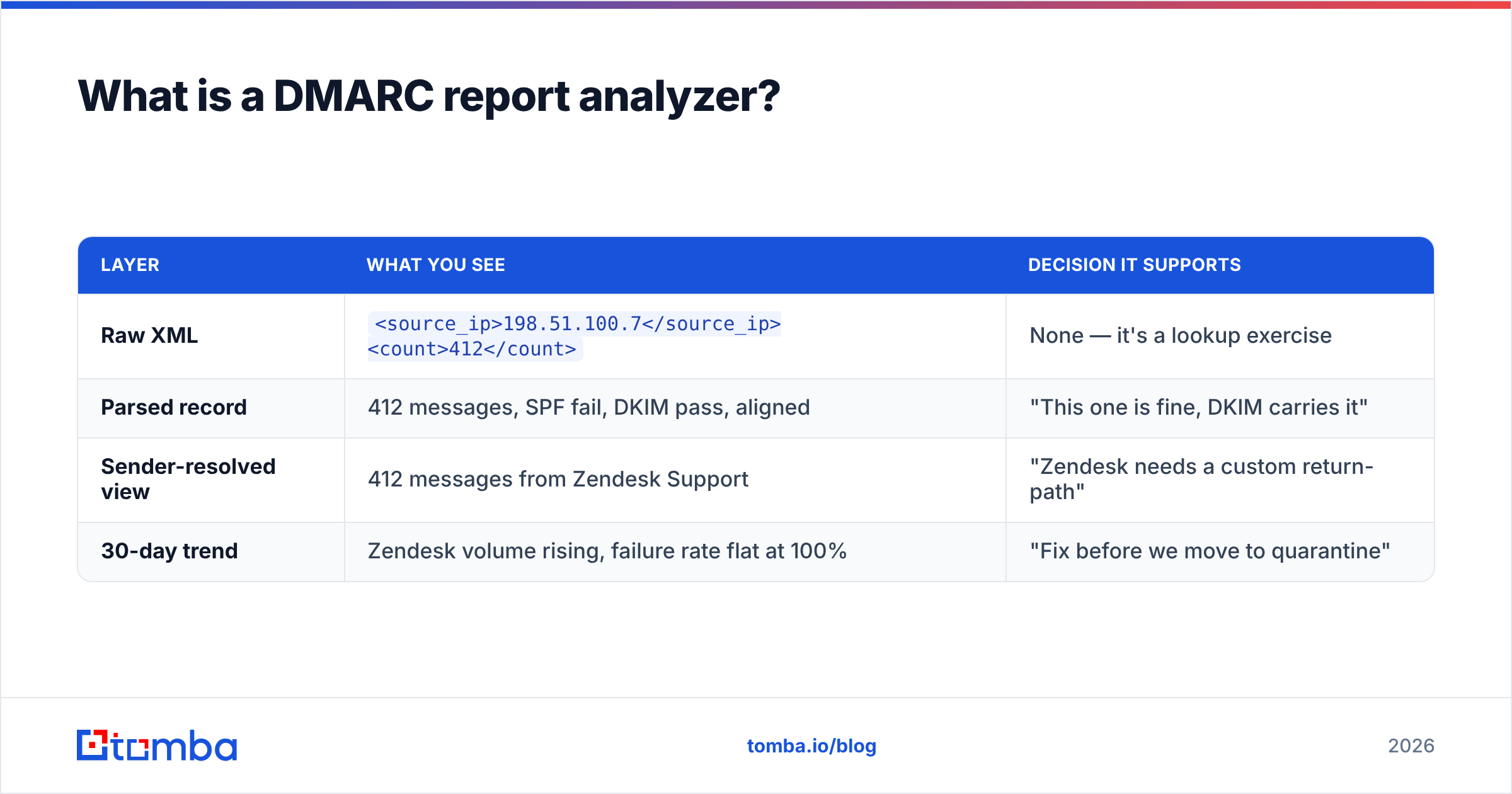
Here is what the same data looks like at each layer:
| Layer | What you see | Decision it supports |
|---|---|---|
| Raw XML | <source_ip>198.51.100.7</source_ip><count>412</count> |
None — it's a lookup exercise |
| Parsed record | 412 messages, SPF fail, DKIM pass, aligned | "This one is fine, DKIM carries it" |
| Sender-resolved view | 412 messages from Zendesk Support | "Zendesk needs a custom return-path" |
| 30-day trend | Zendesk volume rising, failure rate flat at 100% | "Fix before we move to quarantine" |

Why can't you just read the XML yourself?#
You can, for exactly one domain with one sending source, and only for about a week before the volume beats you.
The structural problems compound fast. First, the report is per-provider, so Gmail's view of your domain and Microsoft's view of your domain arrive as separate files with no shared identifier. Second, the <policy_evaluated> block tells you what the receiver did, while <auth_results> tells you what actually happened — and local overrides (mailing lists, forwarding, trusted-sender rules) mean the two frequently disagree. Third, IP addresses churn. The IP that was Mailgun last quarter may be a different tenant today.
The failure mode is predictable: teams publish p=none, glance at three XML files, decide "looks mostly fine," and jump to p=reject. Two weeks later, the finance team's invoicing tool stops delivering and nobody connects it to the DNS change from a fortnight ago.
The official DMARC specification defines the report format precisely, which is why parsing is a solved problem. Interpretation is not.
What should a DMARC report analyzer actually show you?#
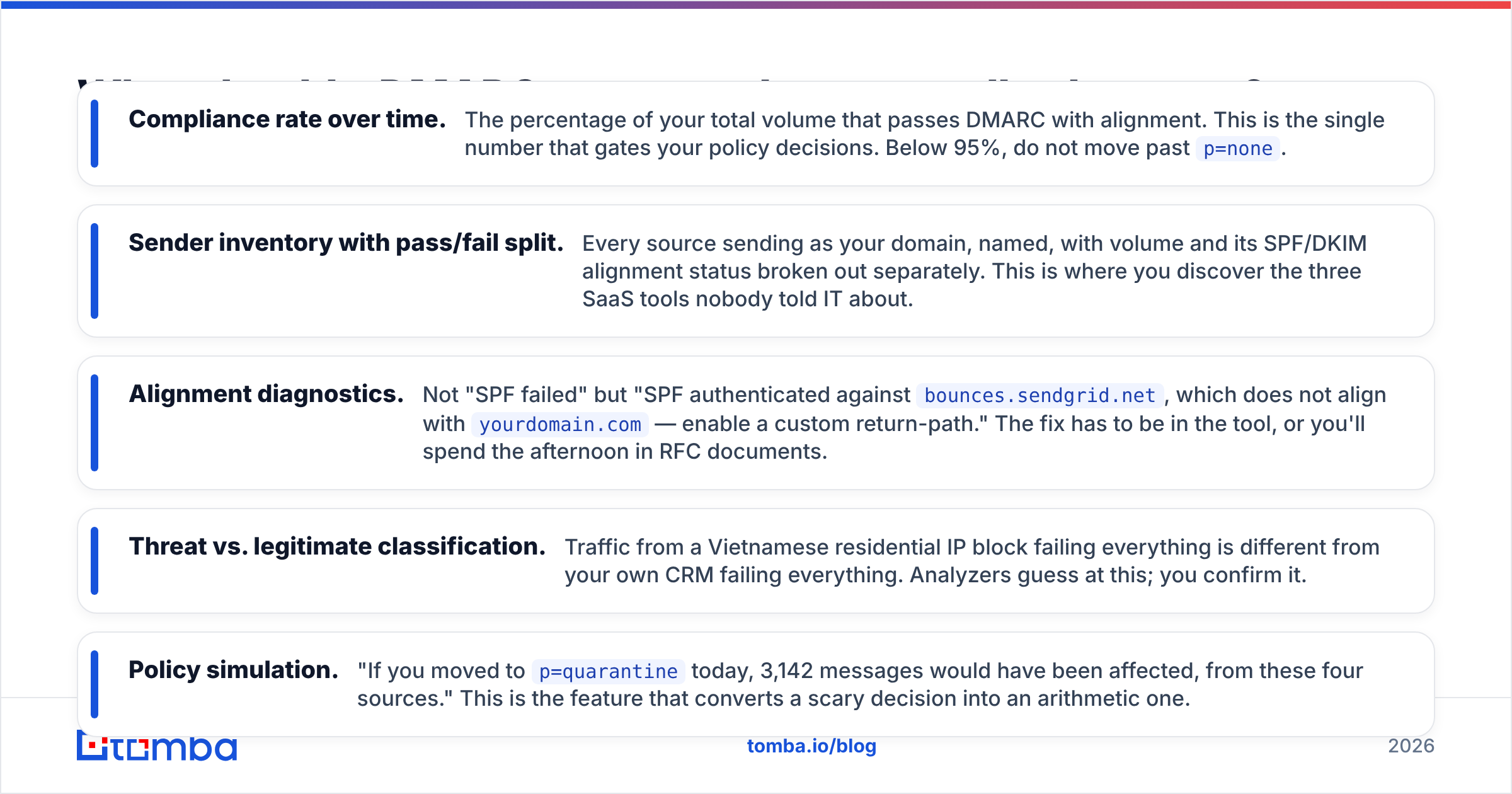
Ignore the dashboard chrome. Four views do the real work.
- Compliance rate over time. The percentage of your total volume that passes DMARC with alignment. This is the single number that gates your policy decisions. Below 95%, do not move past
p=none. - Sender inventory with pass/fail split. Every source sending as your domain, named, with volume and its SPF/DKIM alignment status broken out separately. This is where you discover the three SaaS tools nobody told IT about.
- Alignment diagnostics. Not "SPF failed" but "SPF authenticated against
bounces.sendgrid.net, which does not align withyourdomain.com— enable a custom return-path." The fix has to be in the tool, or you'll spend the afternoon in RFC documents. - Threat vs. legitimate classification. Traffic from a Vietnamese residential IP block failing everything is different from your own CRM failing everything. Analyzers guess at this; you confirm it.
- Policy simulation. "If you moved to
p=quarantinetoday, 3,142 messages would have been affected, from these four sources." This is the feature that converts a scary decision into an arithmetic one.
If a tool gives you a pie chart of pass/fail and nothing else, it's a parser, not an analyzer.
Which DMARC report analyzers are worth using in 2026?#
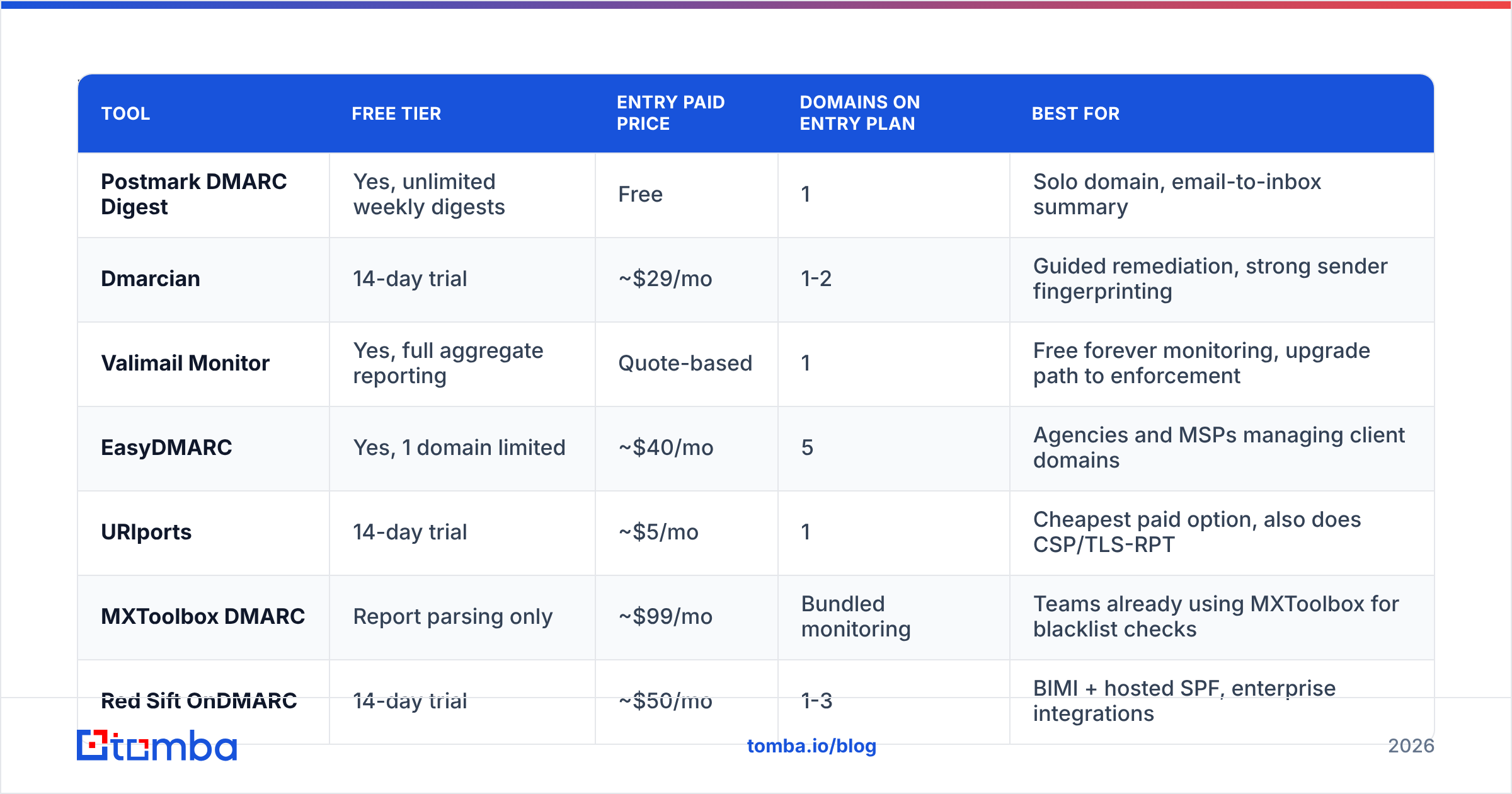
The market splits into three tiers: free single-domain parsers, mid-market platforms, and enterprise suites that bundle DMARC with MTA-STS, TLS-RPT, and BIMI management.
| Tool | Free tier | Entry paid price | Domains on entry plan | Best for |
|---|---|---|---|---|
| Postmark DMARC Digest | Yes, unlimited weekly digests | Free | 1 | Solo domain, email-to-inbox summary |
| Dmarcian | 14-day trial | ~$29/mo | 1-2 | Guided remediation, strong sender fingerprinting |
| Valimail Monitor | Yes, full aggregate reporting | Quote-based | 1 | Free forever monitoring, upgrade path to enforcement |
| EasyDMARC | Yes, 1 domain limited | ~$40/mo | 5 | Agencies and MSPs managing client domains |
| URIports | 14-day trial | ~$5/mo | 1 | Cheapest paid option, also does CSP/TLS-RPT |
| MXToolbox DMARC | Report parsing only | ~$99/mo | Bundled monitoring | Teams already using MXToolbox for blacklist checks |
| Red Sift OnDMARC | 14-day trial | ~$50/mo | 1-3 | BIMI + hosted SPF, enterprise integrations |
A few honest notes on that table. Postmark's free digest is genuinely good and costs nothing — if you have one domain and one or two senders, start there and stop reading vendor comparisons. Valimail's free tier is the most generous in the market because monitoring is their funnel into enforcement services; that's a fair trade. EasyDMARC and Red Sift both price per domain in ways that get expensive at scale, so get a quote before you commit a 40-domain portfolio.
The pricing above reflects publicly listed rates and moves around. Verify current numbers on each vendor's own site and cross-check reviews on G2 before you buy.
How do you go from p=none to p=reject without breaking mail?#
Six weeks, five phases. Do not compress this.
Week 1 — Publish and collect. Add a v=DMARC1; p=none; rua=mailto:... record and do nothing else for seven days. You need a full business cycle of data, including whatever runs on Fridays and month-end.
Week 2 — Build the sender inventory. Every source in your analyzer gets a row: system name, owner, volume, current SPF result, current DKIM result. Expect to find 30-50% more senders than your initial guess. Marketing automation, HR systems, e-signature tools, monitoring alerts, and the CI pipeline that emails deploy notifications are the usual surprises.
Weeks 3-4 — Fix alignment source by source. For each failing sender, enable DKIM signing with a key on your domain, and configure a custom return-path (sometimes called a custom bounce domain) so SPF aligns too. DKIM is the more durable of the two because it survives forwarding; get DKIM right first and treat SPF alignment as belt-and-braces. While you're in DNS, run an SPF checker to confirm you're under the 10-lookup limit — flattening or removing dead includes is often necessary.
Week 5 — Quarantine at a percentage. Publish p=quarantine; pct=25. The pct tag applies the policy to a random quarter of failing mail, which limits the blast radius of anything you missed. Watch for a week. If compliance holds above 98%, go to pct=100, then wait another week.
Week 6 — Reject. p=reject; pct=100. Keep the rua= tag forever. DMARC is not a project you finish; new SaaS tools get bought every quarter and each one is a new potential failure.
What does DMARC data not tell you?#
This is where most teams overestimate what they've bought.
DMARC aggregate reports describe authentication outcomes. They say nothing about whether your mail landed in the inbox or the spam folder. A message can pass SPF, pass DKIM, align perfectly, and go straight to Junk because your complaint rate is 0.8% and your content reads like a phishing attempt. Email deliverability is a superset of authentication, not a synonym for it.
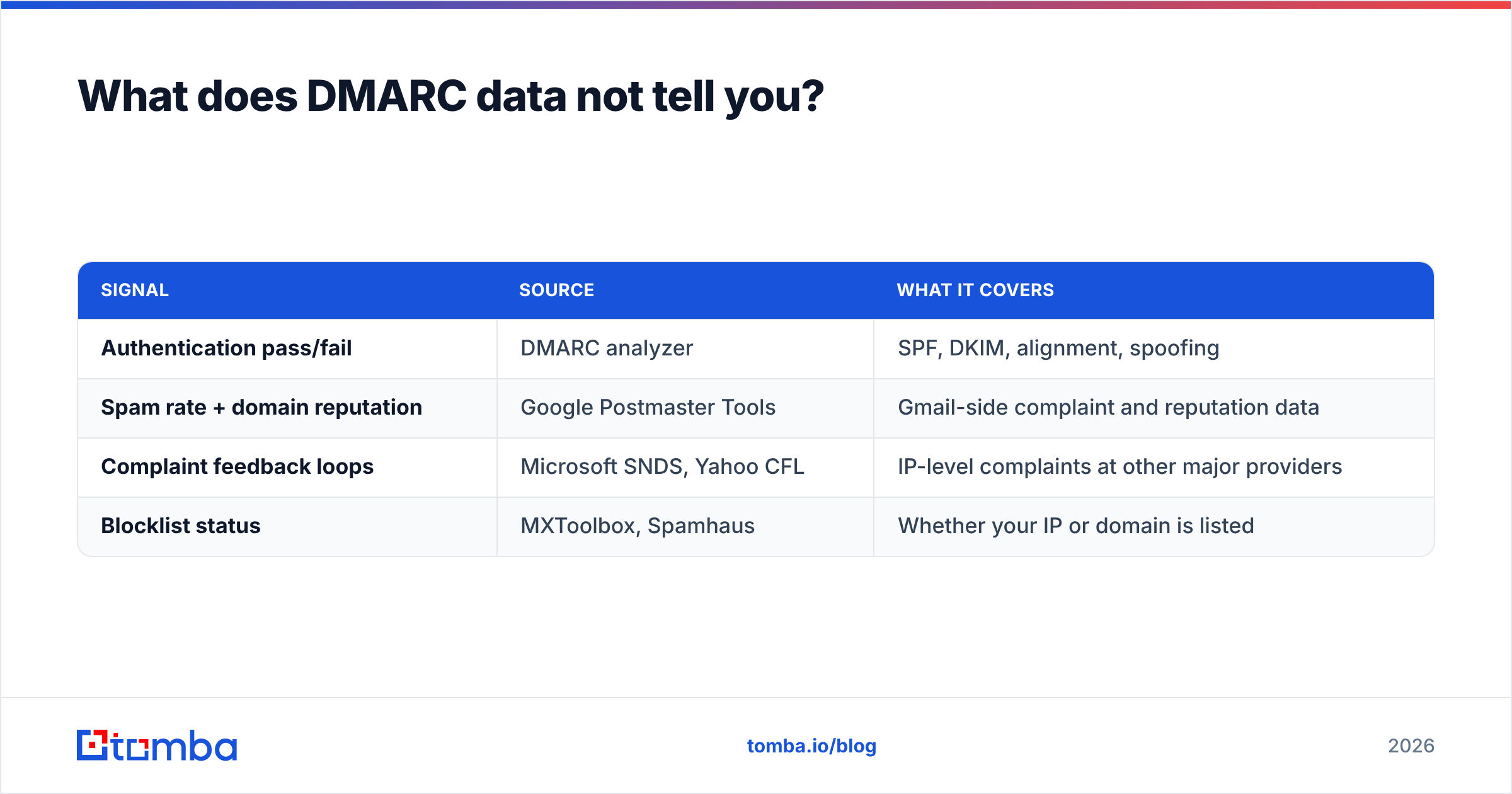
Fill the gap with three other sources:
| Signal | Source | What it covers |
|---|---|---|
| Authentication pass/fail | DMARC analyzer | SPF, DKIM, alignment, spoofing |
| Spam rate + domain reputation | Google Postmaster Tools | Gmail-side complaint and reputation data |
| Complaint feedback loops | Microsoft SNDS, Yahoo CFL | IP-level complaints at other major providers |
| Blocklist status | MXToolbox, Spamhaus | Whether your IP or domain is listed |
There's also a data-quality dimension DMARC never touches. If 12% of your outbound list is invalid, you generate hard bounces that damage sender reputation regardless of how clean your DNS records are. Authentication proves you are who you say you are; it does not prove you're mailing real people. Running your list through an email verifier before a send addresses a failure mode DMARC reports will never surface.
How do you handle forwarding and mailing lists in the reports?#
You'll see a persistent band of SPF failures you cannot fix, and that's expected.
When someone forwards your message, the forwarding server relays it from an IP that isn't in your SPF record. SPF breaks. DKIM usually survives — unless a mailing list manager rewrites the subject line or appends a footer, which invalidates the signature. This is why traditional discussion lists show up in reports as total DMARC failures from otherwise legitimate infrastructure.
The mitigations are partial. ARC (Authenticated Received Chain) lets an intermediary vouch for the original authentication result, and Google and Microsoft both honor it, but adoption is uneven. Many list operators now rewrite the From header to their own domain, which sidesteps DMARC entirely at the cost of a uglier sender name.
Practically: identify these sources in your analyzer, tag them as known-benign, and exclude them from your compliance calculation. If forwarded mail is 1.5% of volume and permanently failing SPF, you can still move to p=reject — those messages were passing on DKIM anyway. Do not let an unfixable 1.5% keep you at p=none for a year.
How do you pick between free and paid?#
Answer three questions.
How many domains? One or two, free tools cover you. Postmark's digest or Valimail's monitor will get you to enforcement without a line item. Past five domains — including your parking and defensive registrations, which absolutely should have p=reject on them — the manual overhead of free tools exceeds the subscription cost.
Do you need remediation guidance or just data? The gap between "SendGrid is failing SPF" and "here is the exact CNAME to add in SendGrid's dashboard to fix it" is worth real money if nobody on your team has done this before. Dmarcian and Red Sift both invest heavily here.
What else are you buying? If BIMI, hosted SPF (a CNAME that lets you update includes without touching DNS), MTA-STS, and TLS-RPT are on your roadmap, buying them bundled beats four separate vendors. If they're not, don't pay for them.
One thing no analyzer does: tell you whether the addresses you're sending to are worth sending to. Prospecting data quality sits upstream of every deliverability metric. If you're building outbound lists, pairing verified contact data from a domain search with a properly enforced DMARC record is what separates a campaign that reaches the inbox from one that quietly disappears. See Tomba pricing for how the credit tiers work — the free plan covers 25 searches a month if you want to test the data before committing.
Where should you start today?#
Check whether you have a DMARC record at all. If you don't, publish p=none with a rua= address this afternoon — it's a single TXT record, it changes nothing about how your mail flows, and it starts the data clock. If you do have one and it's been sitting at p=none for eight months, that's a record doing zero work; every day at p=none is a day anyone can spoof your domain with impunity.
Then pick the smallest tool that fits your domain count, spend two weeks building an honest sender inventory, and fix alignment one source at a time. The technical work is not hard. The organizational work — finding out which department signed up for which SaaS tool and getting them to add a DNS record — is where the six weeks go.
And once your domain authenticates cleanly, make sure what you're sending is worth authenticating. Clean infrastructure delivering messages to stale, guessed, or scraped addresses still produces bounces, complaints, and a slowly eroding reputation. The Tomba Email Finder sources verified professional email addresses by domain, name, or company, with verification built into the same workflow — so the list you send to is as sound as the DNS records you just spent six weeks fixing. Start on the free tier, confirm the accuracy against contacts you already know, and scale from there.
Related guides#
Ready to find emails that actually work?
Join 150,000+ professionals who stopped guessing and started sending. Free credits on signup — no credit card required.
Get the Tomba newsletter
Practical outbound tactics and product updates — once every two weeks.
About the author