DMARC Settings Explained: How to Configure DMARC in 2026
Most domains publish a DMARC record once, leave it on p=none, and assume they're protected. Here's what each DMARC setting actually does, how to move to enforcement without losing mail, and how to read the reports.
TL;DR
- DMARC settings tell receiving mail servers what to do when a message claiming to be from your domain fails authentication. The policy tag (
p=) is the only part that changes delivery behavior. p=noneis a monitoring mode, not protection. If your record has saidp=nonefor two years, you have telemetry and nothing else.- Google and Yahoo's bulk-sender rules made a published DMARC record mandatory for anyone sending over 5,000 messages a day to their users. A record at
p=nonesatisfies the letter of the rule; enforcement is what actually stops spoofing. - The dangerous part of DMARC is not SPF or DKIM — it's alignment. A message can pass SPF and still fail DMARC because the domain in the
Return-Pathdoesn't match the visibleFrom:domain. - Move
none → quarantine (pct=25) → quarantine (100) → rejectover 6–10 weeks, reading aggregate reports at each step. Skipping straight top=rejectis how invoices and password resets disappear.
What are DMARC settings, and what do they actually control?#
DMARC (Domain-based Message Authentication, Reporting and Conformance) is a single TXT record published at _dmarc.yourdomain.com. It does exactly two things: it tells receiving servers what to do with mail that fails authentication, and it asks them to send you reports about what they saw.
Think of it like the instruction card a landlord leaves with the doorman. SPF is the list of delivery companies allowed in the building. DKIM is the tamper-proof seal on each package. DMARC is the note that says "if a package arrives without a valid seal and isn't from an approved courier, do this — and text me a summary every night." Without that note, the doorman improvises, and every building improvises differently.
Technically, DMARC is defined in RFC 7489 and sits on top of SPF and DKIM. It adds the piece neither of those protocols has: a published, machine-readable enforcement policy plus a feedback loop.
The record itself looks like this:
v=DMARC1; p=quarantine; pct=100; rua=mailto:dmarc@yourdomain.com; adkim=s; aspf=r; fo=1Every part after v=DMARC1 is a tag. Most people copy a record from a blog post, never touch it again, and end up permanently stuck in monitoring mode.
How do SPF, DKIM, and DMARC fit together?#
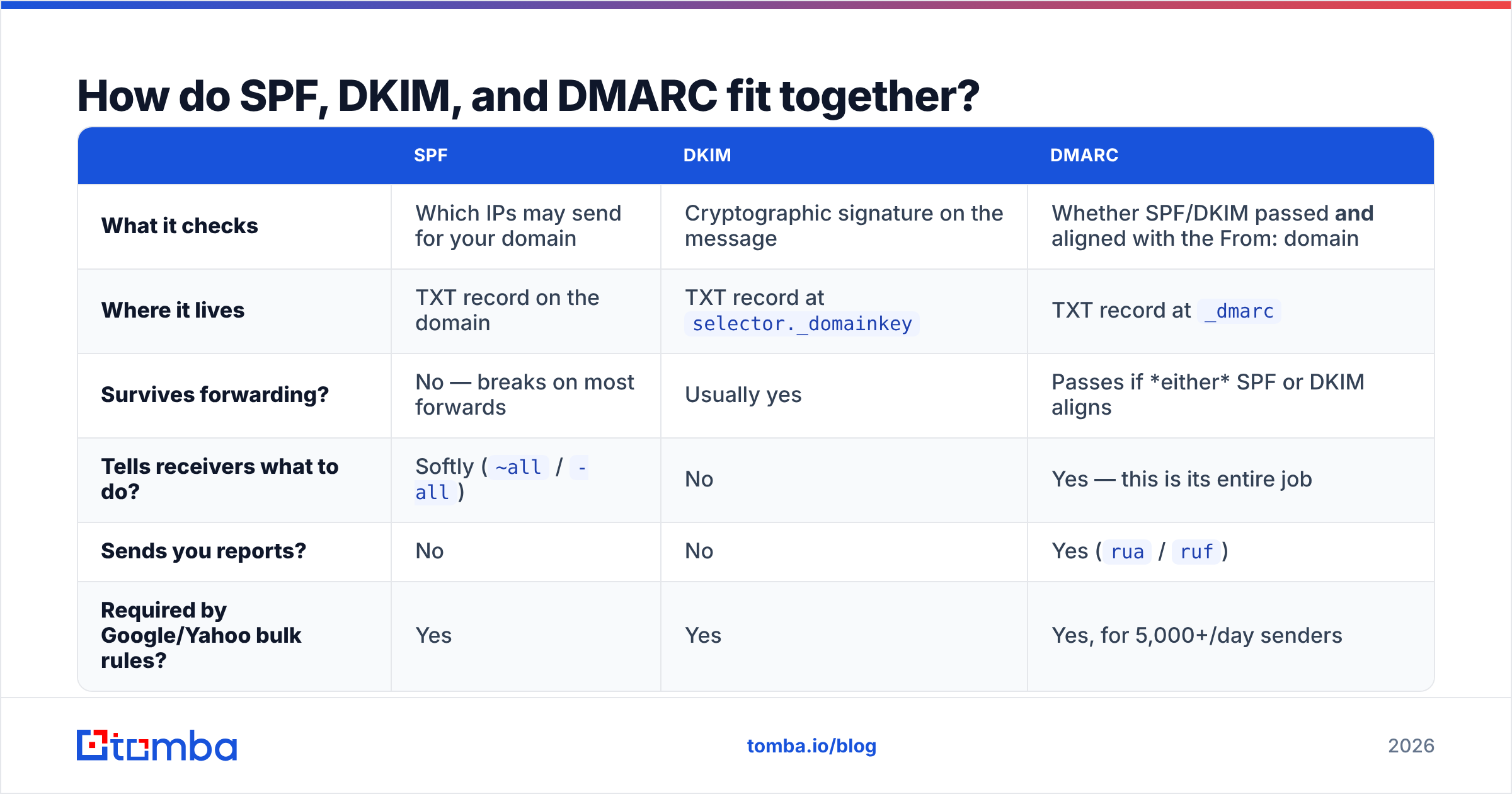
These three are constantly confused, so here's the split:
| SPF | DKIM | DMARC | |
|---|---|---|---|
| What it checks | Which IPs may send for your domain | Cryptographic signature on the message | Whether SPF/DKIM passed and aligned with the From: domain |
| Where it lives | TXT record on the domain | TXT record at selector._domainkey |
TXT record at _dmarc |
| Survives forwarding? | No — breaks on most forwards | Usually yes | Passes if either SPF or DKIM aligns |
| Tells receivers what to do? | Softly (~all / -all) |
No | Yes — this is its entire job |
| Sends you reports? | No | No | Yes (rua / ruf) |
| Required by Google/Yahoo bulk rules? | Yes | Yes | Yes, for 5,000+/day senders |
The critical column is row three. DMARC passes if either SPF or DKIM passes and aligns. That "and aligns" clause is where nearly all real-world failures come from.
Alignment means the domain that authenticated has to match the domain your recipients actually see in the From: header. If you send through a marketing platform and the envelope sender is bounces.esp-provider.net while the visible From is you@yourcompany.com, SPF passes for the ESP but DMARC fails for you — unless you've set up a custom return-path (CNAME) on your own domain, or DKIM is signing with your domain.
This is the single most common support ticket in email authentication: "SPF is green, why is DMARC red?" Answer: alignment.
What does each DMARC tag mean?#
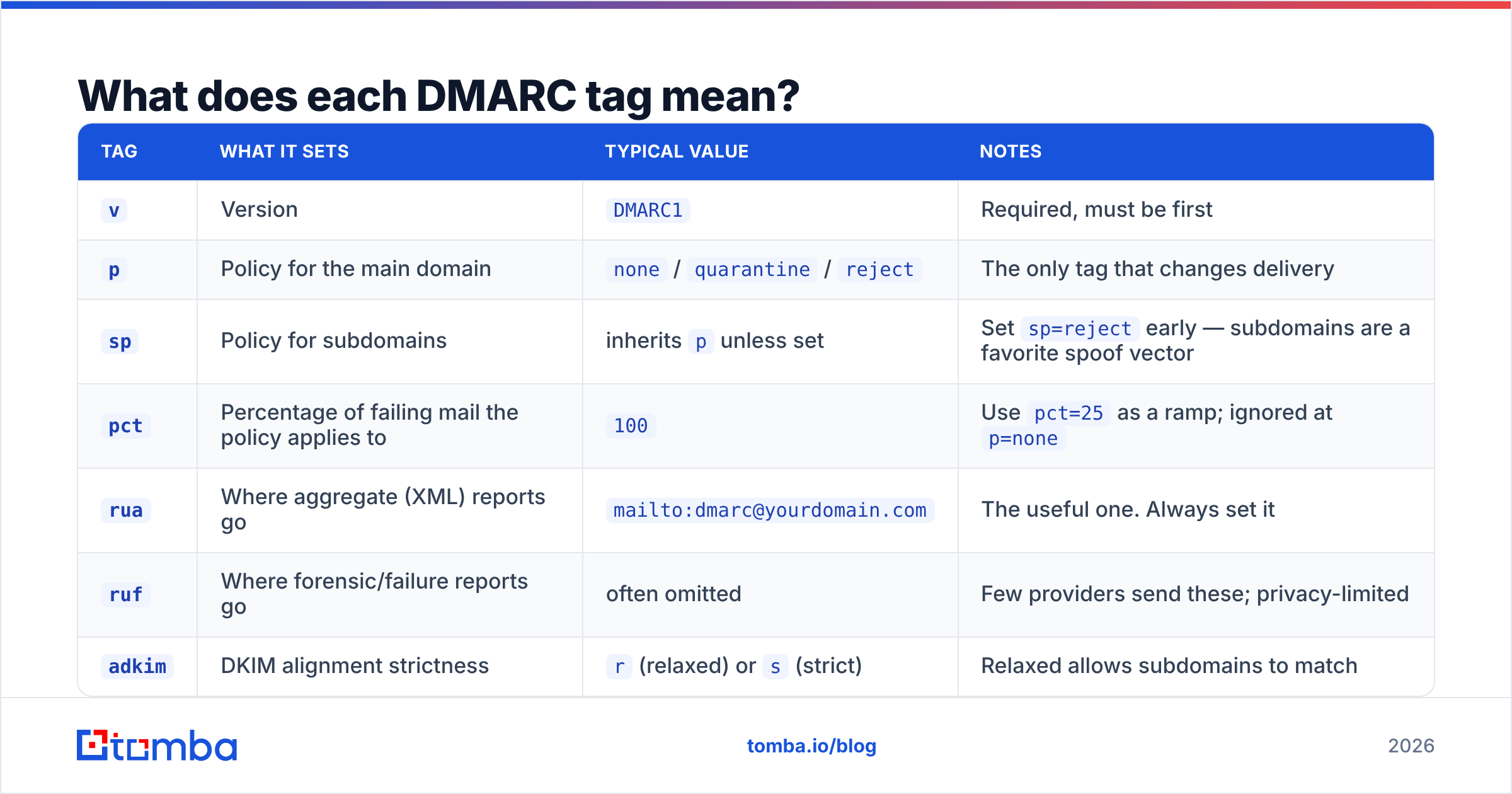
Here's the full working reference. Only three tags are common enough to matter day to day, but knowing the rest prevents copy-paste accidents.
| Tag | What it sets | Typical value | Notes |
|---|---|---|---|
v |
Version | DMARC1 |
Required, must be first |
p |
Policy for the main domain | none / quarantine / reject |
The only tag that changes delivery |
sp |
Policy for subdomains | inherits p unless set |
Set sp=reject early — subdomains are a favorite spoof vector |
pct |
Percentage of failing mail the policy applies to | 100 |
Use pct=25 as a ramp; ignored at p=none |
rua |
Where aggregate (XML) reports go | mailto:dmarc@yourdomain.com |
The useful one. Always set it |
ruf |
Where forensic/failure reports go | often omitted | Few providers send these; privacy-limited |
adkim |
DKIM alignment strictness | r (relaxed) or s (strict) |
Relaxed allows subdomains to match |
aspf |
SPF alignment strictness | r or s |
Same logic as adkim |
fo |
When to generate failure reports | 1 |
1 = report if any mechanism fails |
ri |
Reporting interval in seconds | 86400 |
One report per day is standard |
Two settings deserve special attention. sp is the one attackers count on you forgetting: a domain at p=reject with no sp inherits reject, which is fine — but if you set sp=none "temporarily" for a transactional subdomain, you've opened a door that never closes. And pct is your safety valve; it lets you apply quarantine to a quarter of failing mail while you watch reports, rather than betting the whole domain on one DNS edit.
Which DMARC policy should you use: none, quarantine, or reject?#
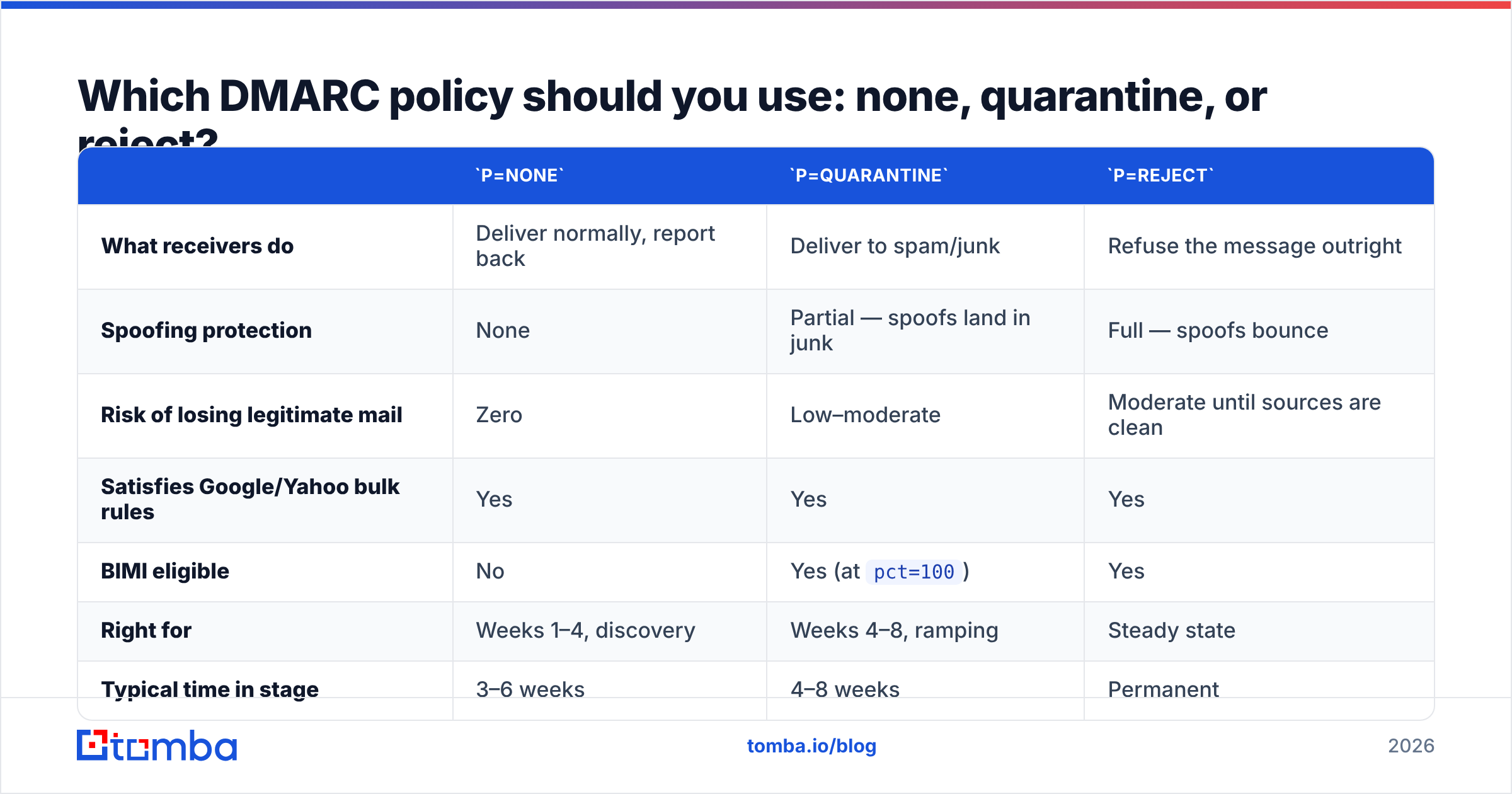
The three policy values are not three equally valid options. They are three stages of the same journey, and most domains stall on stage one.
p=none |
p=quarantine |
p=reject |
|
|---|---|---|---|
| What receivers do | Deliver normally, report back | Deliver to spam/junk | Refuse the message outright |
| Spoofing protection | None | Partial — spoofs land in junk | Full — spoofs bounce |
| Risk of losing legitimate mail | Zero | Low–moderate | Moderate until sources are clean |
| Satisfies Google/Yahoo bulk rules | Yes | Yes | Yes |
| BIMI eligible | No | Yes (at pct=100) |
Yes |
| Right for | Weeks 1–4, discovery | Weeks 4–8, ramping | Steady state |
| Typical time in stage | 3–6 weeks | 4–8 weeks | Permanent |
Most domains treat p=none as a destination. It isn't. A none policy means a phisher can send an invoice that displays as billing@yourcompany.com, and every receiving server in the world will deliver it to the inbox while dutifully emailing you an XML report about it the next day. You get a receipt for the crime, not a lock on the door.
The counterargument — "we'll break something" — is real but overstated, and it's exactly what the ramp exists for. Break it into steps:
- Publish
p=nonewith aruaaddress. Change nothing else. Wait 7–14 days for reports to accumulate. - Inventory every sending source. Your ESP, CRM, helpdesk, invoicing tool, recruiting platform, calendar system, and that one legacy server in the ops closet. Reports will surface sources you forgot existed.
- Fix alignment per source. Custom return-path CNAME for SPF alignment, or DKIM signing with your own domain. DKIM alignment is more durable because it survives forwarding.
- Move to
p=quarantine; pct=25. Watch reports and your support inbox for a week. - Raise to
pct=100, hold two more weeks. - Move to
p=reject. Keepruareporting on forever.
How do you publish and verify a DMARC record?#
The mechanics take ten minutes; the discipline takes ten weeks.
Publish: In your DNS provider, create a TXT record with host _dmarc (some panels want the full _dmarc.yourdomain.com) and value v=DMARC1; p=none; rua=mailto:dmarc@yourdomain.com; fo=1. TTL of 3600 is fine.
Verify: Query it directly rather than trusting the DNS panel's confirmation screen:
dig +short TXT _dmarc.yourdomain.com
nslookup -type=TXT _dmarc.yourdomain.com
You should see exactly one v=DMARC1 string. Two DMARC records on the same host is a hard failure — receivers treat the domain as having no policy at all. Same applies upstream: check that you have a single valid SPF record with fewer than 10 DNS lookups using a SPF checker before you touch DMARC, because a broken SPF record makes DMARC reports impossible to interpret.
Send a live test: Mail yourself from each production sending tool and inspect the raw headers. Gmail's "Show original" gives you a three-line verdict — SPF, DKIM, DMARC — and the domain each one authenticated against. If DMARC says PASS but the authenticating domain isn't yours, you have an alignment problem wearing a pass badge. Google's own bulk sender guidelines spell out what they expect from every domain sending at volume.
How do you read DMARC reports without drowning?#
Aggregate reports arrive as gzipped XML, one per receiving provider per day, and they are genuinely unreadable by hand after the third one. You have two options: pipe them into a DMARC reporting platform (Dmarcian, Postmark's free analyzer, EasyDMARC, Valimail all have entry tiers), or parse them yourself.
What you're looking for in the XML:
<source_ip>— who sent the mail. Unknown IPs are either forgotten SaaS tools or actual spoofers.<count>— volume from that source. A single message from an unknown IP is noise; 4,000 is a problem.<policy_evaluated>— what the receiver actually did, versus what your record asked for.<dkim>/<spf>results — which mechanism passed, and critically, which aligned.
The pattern to watch for: high-volume sources that pass SPF but fail alignment. Those are your own tools, misconfigured, and they are what will break when you flip to reject. Low-volume sources failing everything from residential IPs in unrelated countries are spoof attempts — and they're the reason you're doing this.
A practical rule: don't move to enforcement until 95%+ of your reported volume passes DMARC with alignment, and you can name every source above 1% of volume.
How do DMARC settings affect cold email and outbound campaigns?#
Directly, and in a direction that surprises people: enforcement helps you.
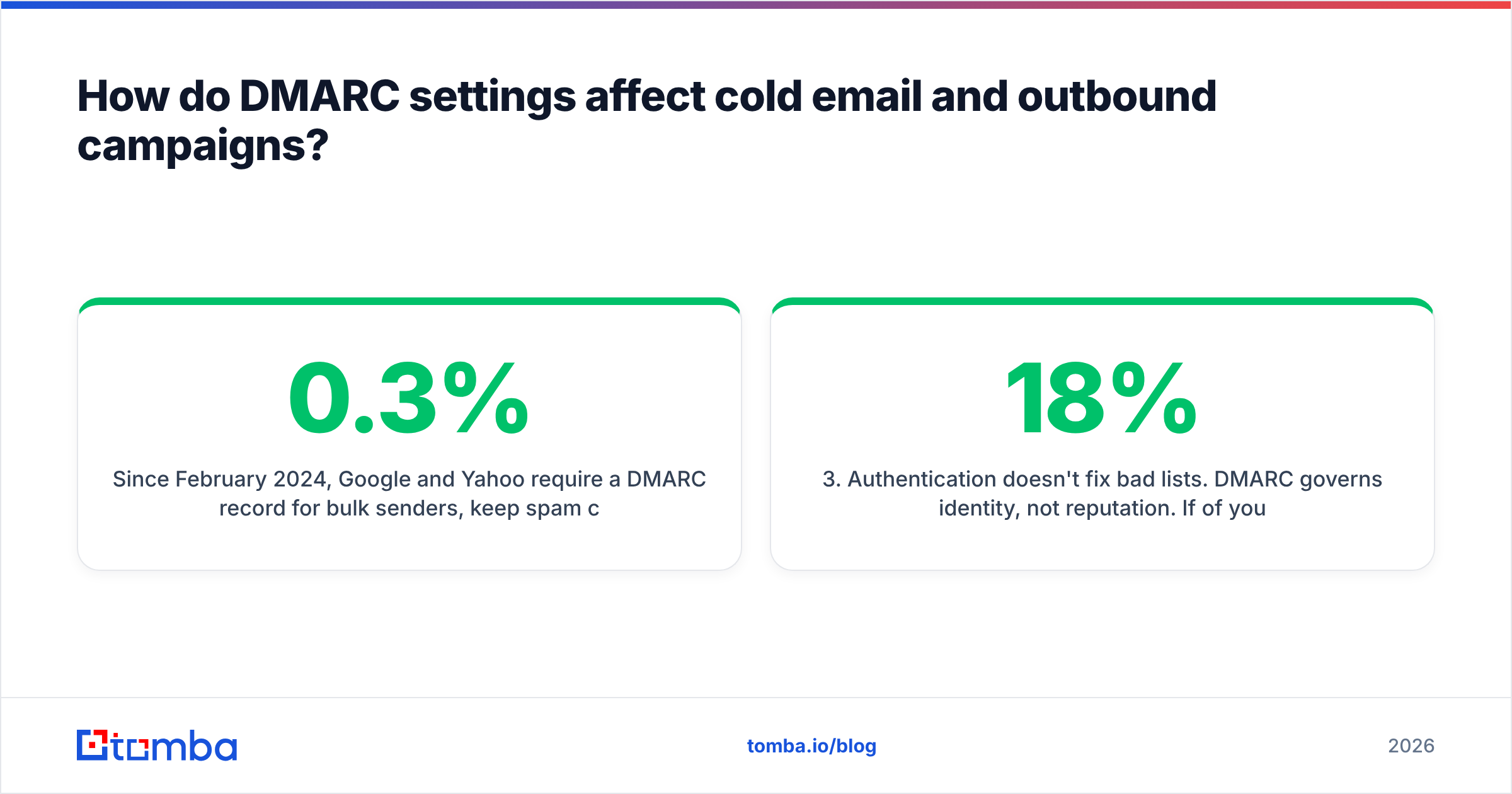
Since February 2024, Google and Yahoo require a DMARC record for bulk senders, keep spam complaint rates under 0.3%, and demand one-click unsubscribe. Microsoft rolled equivalent requirements into Outlook.com in 2025. A domain sitting at p=none technically complies, but mailbox providers increasingly weight enforcement as a positive reputation signal — it demonstrates the domain owner controls their sending surface.
Where teams get into trouble is the interaction between DMARC and cold outreach infrastructure:
- Sending subdomains. Run outbound from
mail.yourcompany.comorgo.yourcompany.com, never the root domain. A cold campaign that generates complaints shouldn't drag down the domain your invoices go out on. Setsp=explicitly so the subdomain inherits a policy you chose deliberately. - Cold email tools and DKIM. Sequencer platforms that send through connected Google/Microsoft mailboxes inherit alignment automatically. Platforms that relay through their own infrastructure need a custom return-path and domain-level DKIM signing, or every message fails DMARC.
- Authentication doesn't fix bad lists. DMARC governs identity, not reputation. If 18% of your list bounces, you'll fail on complaint and bounce metrics no matter how clean your DNS is. Run addresses through an email verifier before import — bounce rate above 3% is the fastest way to torch a warmed domain.
- Watch your standing continuously. Authentication is a prerequisite, not a guarantee. Pair DMARC with a periodic sender reputation check and Google Postmaster Tools so you catch drift before volume drops.
Put simply: DMARC settings decide whether your mail is allowed to be you. Email deliverability decides whether being you is worth anything. You need both.
What are the most common DMARC mistakes?#
- Two DMARC records on one host. Result: no policy at all. Merge them.
- A record at
p=nonefor years. The most common state on the internet, and functionally identical to no DMARC for anti-spoofing purposes. - Setting
p=rejecton day one. Password resets, invoices from your accounting tool, and calendar invites from a forgotten integration start bouncing within hours. - Missing
rua. No reports means no visibility means you can never safely move to enforcement. This is the "wear a blindfold, then complain you can't see" configuration. - Forgetting parked domains. Every domain you own that never sends mail should have
v=DMARC1; p=reject;plus an empty SPF (v=spf1 -all). Attackers love unused domains that resolve. - Strict alignment by default.
adkim=s; aspf=sbreaks legitimate subdomain sending. Start relaxed unless you have a specific reason. - Assuming DMARC blocks display-name spoofing. It doesn't.
"Your CEO" <attacker@gmail.com>passes DMARC perfectly — it's authenticating gmail.com, and it's authentic. DMARC only protects the domain in the From header. Anti-phishing training covers the rest. The Wikipedia entry on DMARC has a useful summary of these documented limitations.
What should your DMARC record look like at steady state?#
For a domain sending real business mail with clean, aligned sources:
v=DMARC1; p=reject; sp=reject; pct=100; adkim=r; aspf=r; fo=1; rua=mailto:dmarc@yourdomain.comFor a parked or non-sending domain:
v=DMARC1; p=reject; sp=reject; rua=mailto:dmarc@yourdomain.comFor a domain three weeks into the ramp:
v=DMARC1; p=quarantine; pct=25; rua=mailto:dmarc@yourdomain.com; fo=1Review your reports monthly even after reaching reject. Every new SaaS tool your team signs up for is a potential new sending source, and the first sign is usually a fresh IP in the XML.
Where to go from here#
Get your authentication stack in the right order: SPF and DKIM aligned first, DMARC at p=none with reporting on, then a staged ramp to enforcement over 6–10 weeks. That sequence is boring, it works, and it's the difference between a domain that can be impersonated and one that can't.
Once the DNS side is solid, the bottleneck moves to your data. Perfect authentication doesn't help if you're mailing addresses that bounce or contacts who never existed. Tomba's Email Finder returns verified, deliverable business addresses with a confidence score and the sources behind each one, so the messages your newly-hardened domain sends actually reach a human. The free tier covers 25 searches a month; paid plans start at $49/mo on Starter, with Growth at $99/mo — full Tomba pricing is public. Lock down the domain, then feed it clean data.
Related guides#
Ready to find emails that actually work?
Join 150,000+ professionals who stopped guessing and started sending. Free credits on signup — no credit card required.
Get the Tomba newsletter
Practical outbound tactics and product updates — once every two weeks.
About the author