Dock Pricing Reviews: Pros and Cons of Every Plan in 2026
A neutral breakdown of Dock's plans, the real per-seat math at 10 and 40 users, what reviewers praise, what they complain about, and when a cheaper stack does the same job.
Looking for Dock pricing reviews pros and cons in one place? This guide covers every plan, the real per-seat math, what reviewers consistently praise, what they complain about, and when a cheaper stack does the same job.
TL;DR
- Dock sells digital sales rooms, client portals, onboarding plans, and security-review workspaces — it is a buyer experience tool, not a prospecting or data tool.
- Pricing is per-seat and tiered: a free plan for solo testing, a paid business tier in the ~$59/user/month range on annual billing, and custom enterprise pricing. Always confirm current numbers on dock.us before you budget.
- The strongest pro in reviews is speed to value — reps build a branded room in minutes without design or RevOps help. The strongest con is that per-seat cost compounds fast on teams where only half the reps actually use it.
Two more things the pricing page will not tell you:
- Dock does not find contacts, verify emails, or enrich accounts. You still need a data layer feeding it, and that is where most "Dock is expensive" complaints actually originate — teams double-pay for overlapping tools.
- Buy Dock if your deals are multi-threaded, document-heavy, and stall in the mutual-action-plan phase. Skip it if your bottleneck is pipeline volume.
What is Dock and who actually buys it?#
Dock is a client workspace platform. Think of it as a shared Google Drive folder that grew up, got a brand kit, and learned to track who opened what. Instead of emailing a proposal, a security questionnaire, a pricing sheet, and an onboarding checklist as four separate attachments across six weeks, you send one link. The buyer's whole committee lands in the same room.
Technically, Dock bundles several product surfaces into one subscription:
- Digital sales rooms — a branded microsite per deal, holding decks, pricing, recordings, and a mutual action plan.
- Onboarding and implementation plans — the same room repurposed post-close so the handoff from AE to CS is not an email thread.
- Order forms and e-signature — quote-to-close without bouncing to a separate signing tool.
- Security profiles / trust centers — a self-serve page for SOC 2 reports, DPAs, and subprocessor lists so the security review stops eating two weeks.
- Engagement analytics — who viewed, how long, which page, which stakeholder you had never met before.
The buyer profile is fairly narrow, and that matters when you evaluate cost. Dock earns its keep in B2B sales cycles with three or more stakeholders, a written procurement process, and a real implementation phase. Mid-market and enterprise SaaS is the core. If your sales motion is a 20-minute demo and a credit card, you are paying for machinery you will never turn on.

What does Dock pricing look like in 2026?#
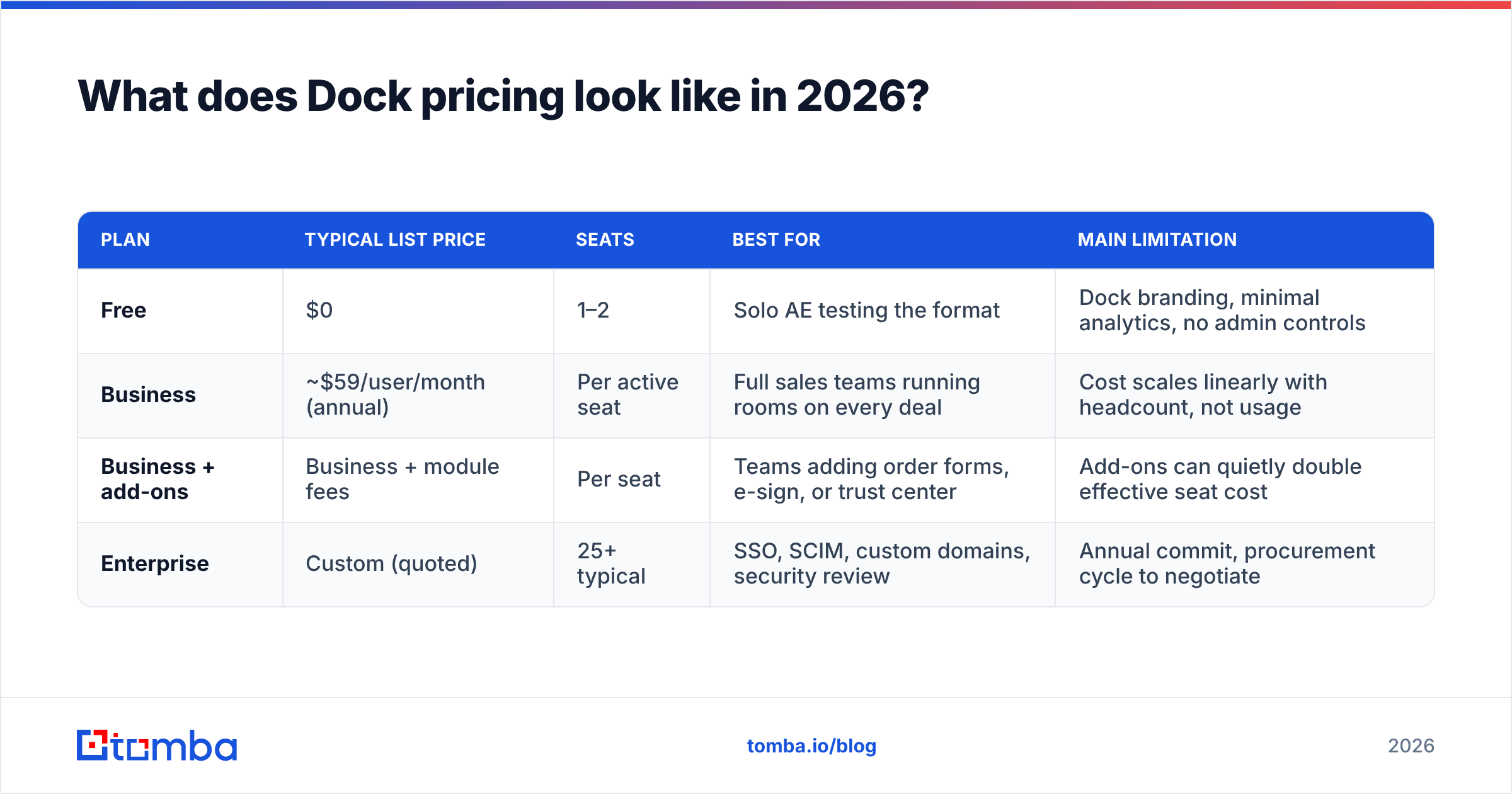
Dock publishes tiered, per-seat pricing with an annual discount. The shape has been stable for a while even as the exact figures move, so treat the table below as the structure to plan around and verify the digits on the vendor's own page before you sign anything.
| Plan | Typical list price | Seats | Best for | Main limitation |
|---|---|---|---|---|
| Free | $0 | 1–2 | Solo AE testing the format | Dock branding, minimal analytics, no admin controls |
| Business | ~$59/user/month (annual) | Per active seat | Full sales teams running rooms on every deal | Cost scales linearly with headcount, not usage |
| Business + add-ons | Business + module fees | Per seat | Teams adding order forms, e-sign, or trust center | Add-ons can quietly double effective seat cost |
| Enterprise | Custom (quoted) | 25+ typical | SSO, SCIM, custom domains, security review | Annual commit, procurement cycle to negotiate |
Two pricing mechanics deserve more attention than the sticker number.
Per-seat means per creator, not per viewer. Buyers who visit your room are free — you only pay for people who build rooms. That is genuinely fair, and it makes Dock cheaper than it first looks for teams where two or three power users create templates everyone else clones.
Annual billing is where the discount lives. Monthly pricing carries the usual 15–25% premium. If you are unsure about adoption, pay monthly for a quarter and eat the premium; it is cheaper than a 12-month commit you abandon in month four.
Run the math on your actual roster before the demo. Ten seats at $59 is $7,080 a year. Forty seats is $28,320. At that second number you are no longer buying a productivity tool — you are buying a system that needs a named owner, a template library, and a manager who checks adoption in the weekly forecast call.
Dock pricing reviews pros and cons — what reviewers praise#
Pull the review corpus on G2 and the praise clusters into a handful of repeatable themes.
- Setup takes minutes, not sprints. The most common phrase in positive reviews is some version of "I built my first room before the trial call ended." No CSS, no RevOps ticket, no design queue. For a category that historically required a web team, this is the whole value proposition.
- Buyers actually open it. Engagement rates on a single link beat scattered attachments, largely because the buyer's internal champion can forward one URL to procurement, security, and finance without re-explaining context. Champions like tools that make them look organized.
- Mutual action plans stop being fiction. A shared, dated checklist visible to both sides converts "I'll follow up next week" into a task with a name on it. Teams report cleaner close-date accuracy more often than they report bigger deals — which is the honest benefit.
The next three show up most often in reviews written six months or more after purchase:
- Security profiles kill a real bottleneck. Self-serve trust pages remove days from enterprise cycles. If your team currently emails a SOC 2 PDF forty times a quarter, this single feature can justify the line item.
- Post-sale reuse doubles the ROI. The same workspace becomes the onboarding hub. Buying one tool that serves two departments is the cleanest way to defend the cost in a budget review.
- Analytics surface hidden stakeholders. Seeing that a VP you never met spent nine minutes on the pricing page is the kind of signal that changes your next call. It is not magic, but it is better than guessing.
What are the cons reviewers keep flagging?#
No neutral review is worth reading if it only lists upsides. Any honest Dock pricing reviews pros and cons list has to include the following.
Per-seat cost punishes uneven adoption. This is the number one complaint and it is structural, not a bug. Sales orgs have a long tail — a third of reps will build rooms religiously, a third occasionally, a third never. You pay full freight for all three. Unless a manager enforces usage, the effective cost per used room climbs fast. Audit seats quarterly and reclaim the dead ones.
Template discipline is on you. Dock gives you the canvas. If nobody owns the template library, every rep invents their own layout and the brand consistency you bought evaporates within two quarters. Budget for an owner, not just a license.
Customization has a ceiling. Reviewers who want pixel-level control over layout, custom scripts, or deeply conditional content run into limits. The product optimizes for speed and consistency, which necessarily means fewer knobs. That trade is right for most teams and wrong for a few.
Add-ons stack. Order forms, e-signature, and advanced trust-center features can sit outside the base tier depending on your contract. The quote you get is often not the quote you first calculated. Ask for the fully loaded number in writing, with add-ons itemized.
It does nothing before the first meeting. Dock improves deals you already have. It does not create them. Teams that buy it hoping to fix a pipeline problem end up with a beautifully documented drought.

How does Dock compare to the alternatives?#
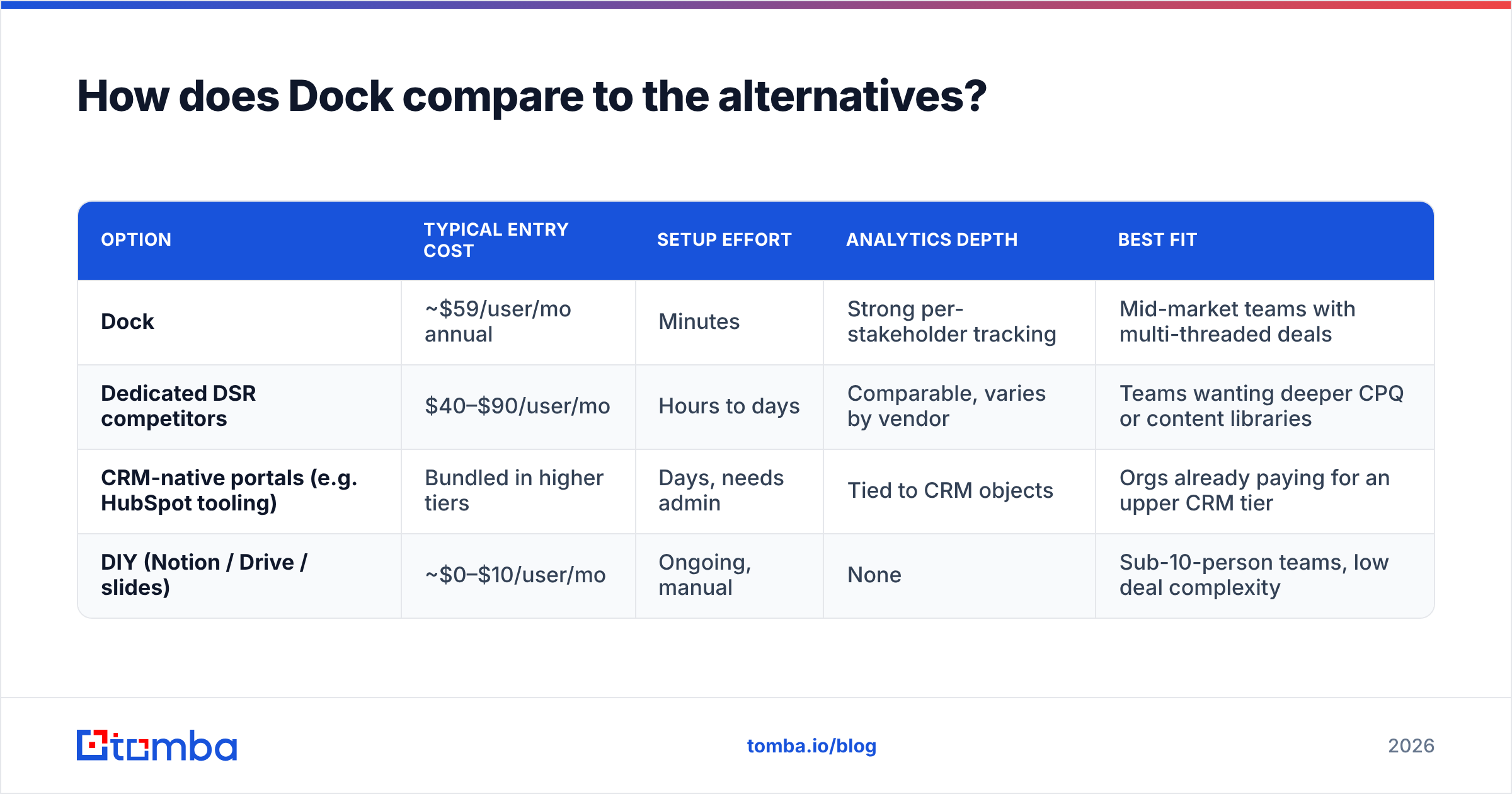
The competitive set splits into three groups: dedicated digital sales rooms, CRM-native portals, and DIY stacks. Here is the honest comparison.
| Option | Typical entry cost | Setup effort | Analytics depth | Best fit |
|---|---|---|---|---|
| Dock | ~$59/user/mo annual | Minutes | Strong per-stakeholder tracking | Mid-market teams with multi-threaded deals |
| Dedicated DSR competitors | $40–$90/user/mo | Hours to days | Comparable, varies by vendor | Teams wanting deeper CPQ or content libraries |
| CRM-native portals (e.g. HubSpot tooling) | Bundled in higher tiers | Days, needs admin | Tied to CRM objects | Orgs already paying for an upper CRM tier |
| DIY (Notion / Drive / slides) | ~$0–$10/user/mo | Ongoing, manual | None | Sub-10-person teams, low deal complexity |
A few notes on reading this table honestly. The DIY column is not a joke — plenty of teams under ten reps run perfectly good shared Notion pages and never miss the analytics. The CRM-native column looks free but usually is not; the "bundled" portal features often live in a tier that costs more than a Dock subscription on its own.
The dedicated-competitor column is where genuine feature comparison matters, since those vendors differentiate on CPQ depth, content libraries, and integration breadth rather than on the core room concept.
The question that actually decides it: is your deal loss driven by buyer confusion, or by buyer absence? Dock and its peers fix confusion. Nothing in this category fixes absence.
Is Dock worth it for your team size?#
Break it down by headcount, because the per-seat model makes this the deciding variable.
1–3 reps. Use the free tier or a shared doc. At this size, the operational overhead of templates and admin exceeds the benefit. Revisit when you hire your fourth AE.
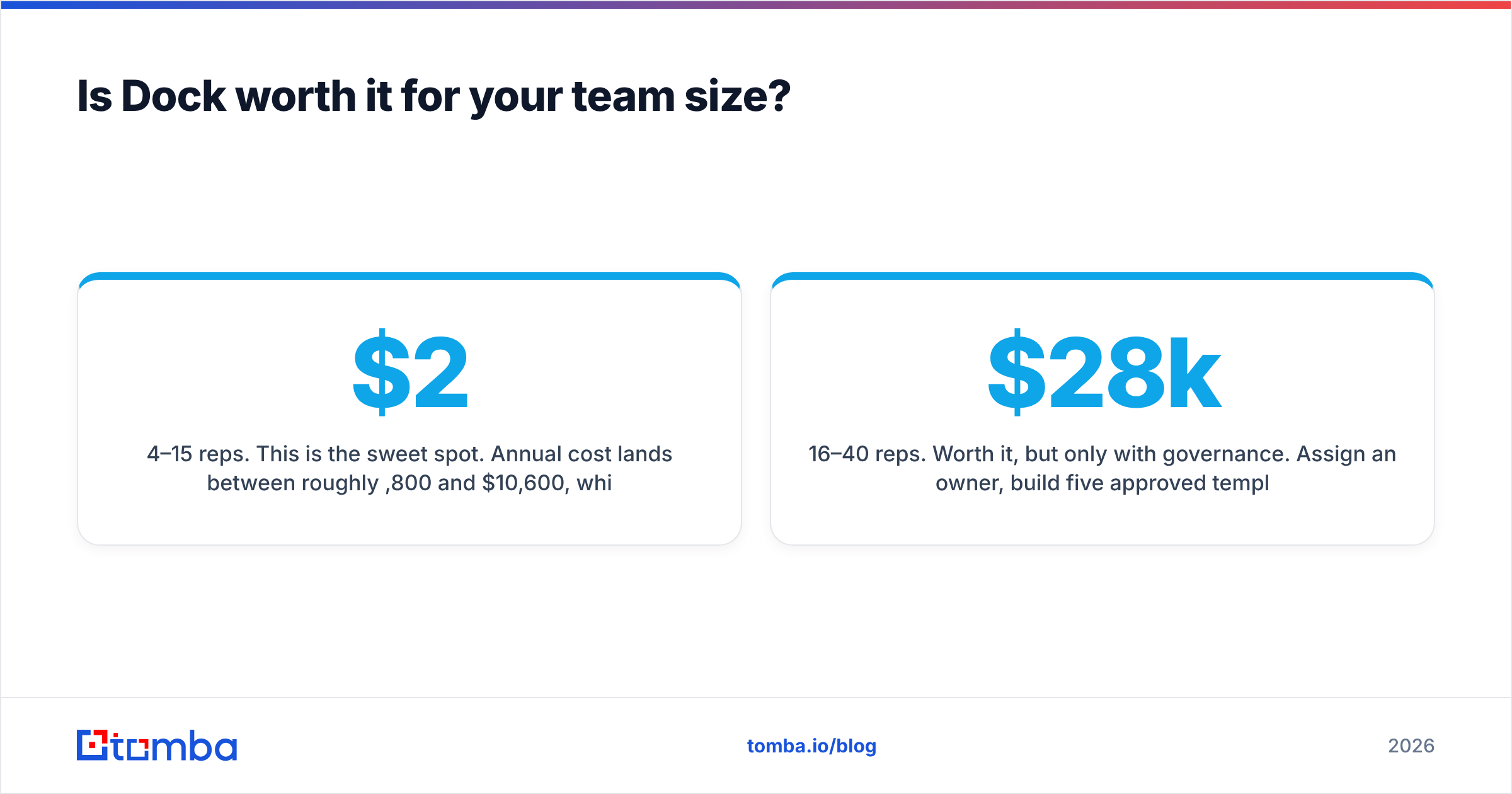
4–15 reps. This is the sweet spot. Annual cost lands between roughly $2,800 and $10,600, which one saved mid-market deal covers. You are big enough that inconsistency hurts and small enough that a single owner can maintain the templates.
16–40 reps. Worth it, but only with governance. Assign an owner, build five approved templates, and review seat utilization every quarter. Without that, expect to hear "we pay $28k for this?" in a budget review you cannot win.
40+ reps. Go straight to an enterprise conversation and negotiate. At this volume you have leverage on price, and you need SSO, provisioning, and permission controls that the self-serve tier does not carry. Also insist on a usage report clause so you can right-size at renewal.
What Dock does not solve — and what fills the gap#
Here is the part most Dock reviews skip. Every dollar you spend on buyer experience assumes a buyer exists. Dock sits at stages three through eight of your funnel. Stages one and two — finding the right accounts and reaching the right person at them — are somebody else's problem.
That is not a criticism of Dock; it is a scoping fact, and it has budget consequences. Teams that buy a sales room while their prospecting data is stale end up with immaculate workspaces and a thin pipeline. The sequence that works is unglamorous:
- Identify the accounts worth a real deal cycle.
- Find the decision-makers with an email finder that returns a verified address rather than a guess.
- Clean the list through email verification so your first touch does not bounce and damage sender reputation.
- Enrich the record with role, seniority, and company context via data enrichment so your opener is specific.
- Then open the Dock room, once there is a live opportunity worth the seat.
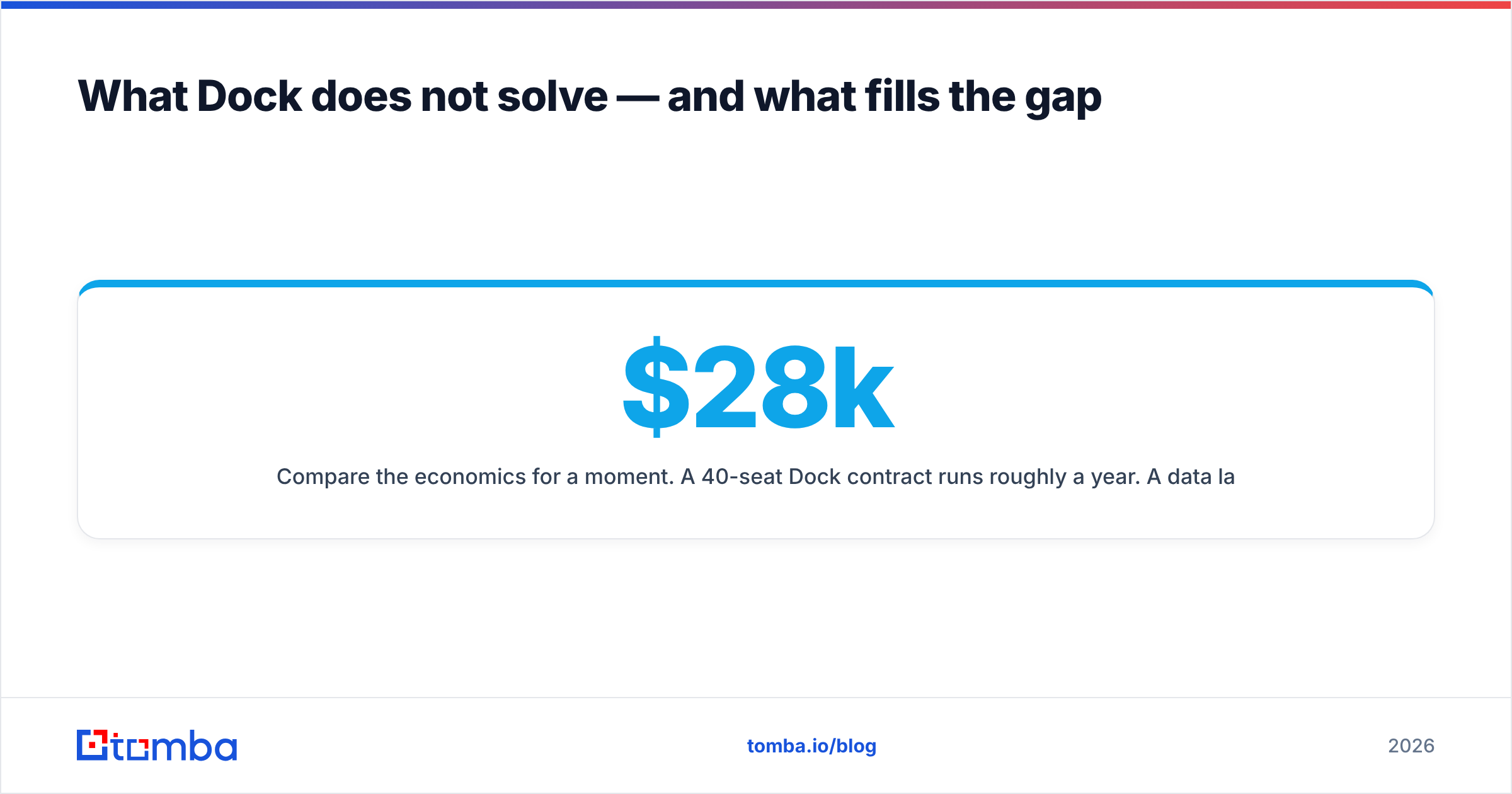
Compare the economics for a moment. A 40-seat Dock contract runs roughly $28k a year. A data layer that keeps those 40 reps supplied with verified contacts costs a fraction of that — Tomba pricing starts at a free tier with 25 searches a month, with Starter at $49/mo, Growth at $99/mo, and Pro at $249/mo.
The ratio tells you something: the expensive tool is the one that only works when the cheap tool has already done its job. Getting that order backwards is the single most common way teams end up disappointed with their buyer-experience spend, and it also explains why so many negative pricing reviews are really pipeline complaints wearing a costume. Your CRM will happily store both, but it will not tell you which one you were missing.
Frequently asked questions#
Does Dock have a free plan? Yes — a limited free tier suitable for one or two users testing the format. Expect Dock branding and reduced analytics.
Is Dock priced per user or per room? Per user, and specifically per creator. Buyers and external viewers do not consume seats.
Can you negotiate Dock pricing? On annual and enterprise contracts, yes. Leverage comes from seat count, multi-year commitment, and a competitive quote in hand.
What is the real cost at 25 seats? Roughly $17,700 a year at ~$59/seat annual list, before add-ons. Get add-ons itemized in the quote.
Does Dock replace a CRM? No. It complements one. Deal records, forecasting, and reporting stay in the CRM.
The bottom line#
Dock is a well-built tool with an honest pricing model and one predictable failure mode: teams buy seats faster than they build the habits that justify them. If your deals genuinely stall in committee — security review, procurement, mutual action plans — the ROI case writes itself at 4 to 15 seats and holds above that with governance. If your deals stall because there are not enough of them, no sales room will save you.
Fix the input before you polish the output. Tomba Email Finder gives you verified, decision-maker-level contact data with a free tier at 25 searches a month and paid plans from $49, so the rooms you build have someone standing in them. Start there, prove the pipeline, then spend the per-seat money where it compounds.
Related guides#
Ready to find emails that actually work?
Join 150,000+ professionals who stopped guessing and started sending. Free credits on signup — no credit card required.
Get the Tomba newsletter
Practical outbound tactics and product updates — once every two weeks.
About the author