12 Best DocSend Alternatives in 2026 for Sales Teams
DocSend's per-user pricing and thin CRM hooks push most teams to look elsewhere. Here are 12 document-tracking alternatives compared on price, analytics depth, e-signature, and data rooms.
TL;DR
- DocSend is still the default for pitch-deck tracking, but at roughly $15–$45 per user per month it gets expensive fast once your whole sales team needs seats.
- If you mainly need link tracking plus e-signature, PandaDoc or Proposify replace DocSend and your signature tool in one line item.
- If you need a virtual data room for fundraising or M&A, DocSend's own Advanced tier competes with Digify, Ansarada, and Firmex — and loses on granular permissions.
- Papermark is the open-source option: self-host it, own the data, pay nothing but infrastructure.
- Document tracking only pays off if the deck reaches a real inbox. Pair whichever tool you pick with verified contact data so your send list isn't 30% dead addresses.
What does DocSend actually do — and why do teams leave?#
DocSend turns a static file into a tracked link. You upload a deck, share a URL instead of an attachment, and get page-by-page analytics: who opened it, how long they spent on slide 7, whether they forwarded it. Dropbox acquired it in 2021 for $165M, and it now sits inside the Dropbox product family.
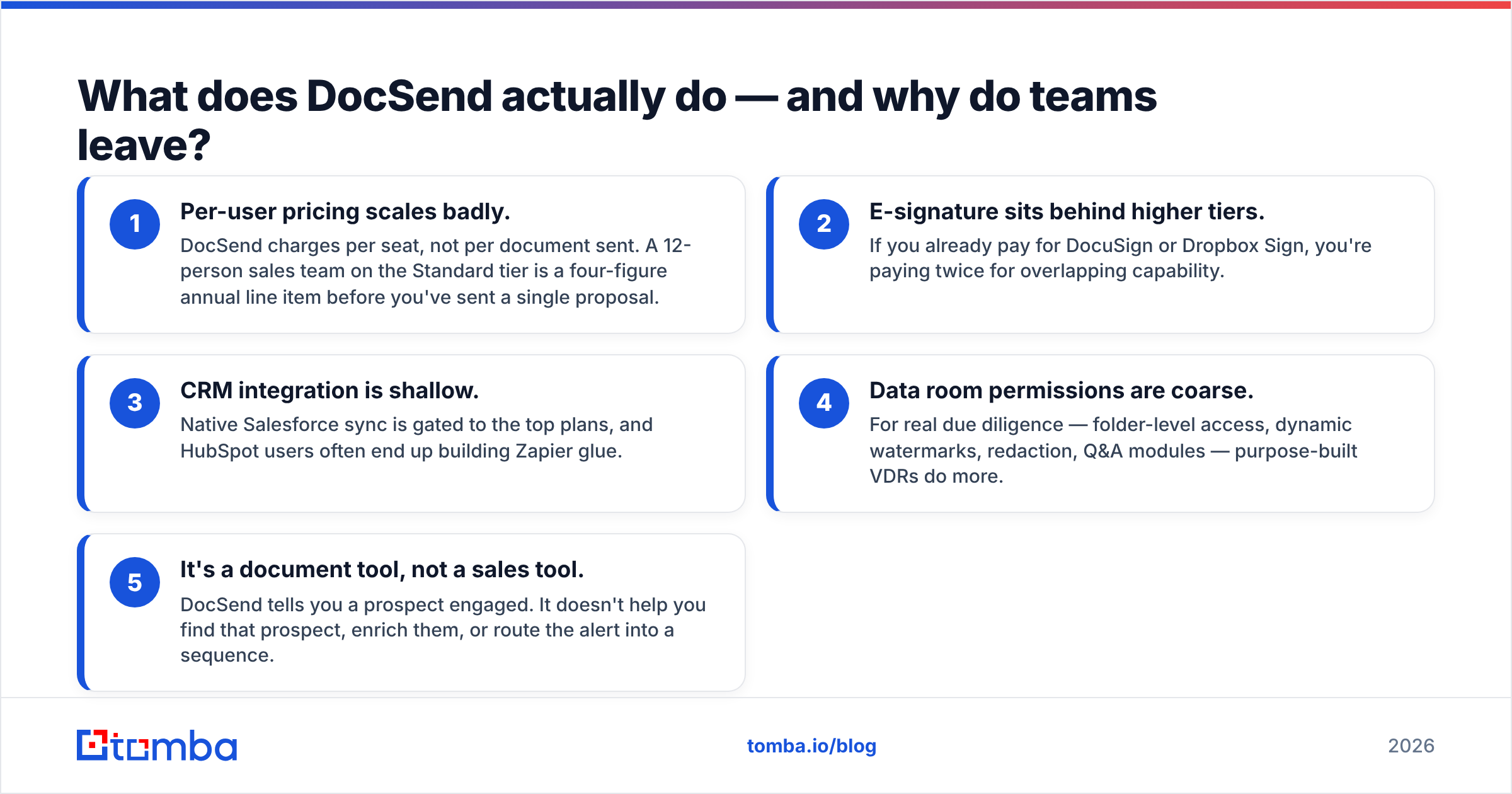
That core loop is genuinely good. The reasons teams shop for DocSend alternatives are almost never about the tracking itself:
- Per-user pricing scales badly. DocSend charges per seat, not per document sent. A 12-person sales team on the Standard tier is a four-figure annual line item before you've sent a single proposal.
- E-signature sits behind higher tiers. If you already pay for DocuSign or Dropbox Sign, you're paying twice for overlapping capability.
- CRM integration is shallow. Native Salesforce sync is gated to the top plans, and HubSpot users often end up building Zapier glue.
- Data room permissions are coarse. For real due diligence — folder-level access, dynamic watermarks, redaction, Q&A modules — purpose-built VDRs do more.
- It's a document tool, not a sales tool. DocSend tells you a prospect engaged. It doesn't help you find that prospect, enrich them, or route the alert into a sequence.
That last point matters more than the pricing complaint. Tracking analytics are only as valuable as the pipeline feeding them.
Which DocSend alternatives are worth comparing in 2026?#
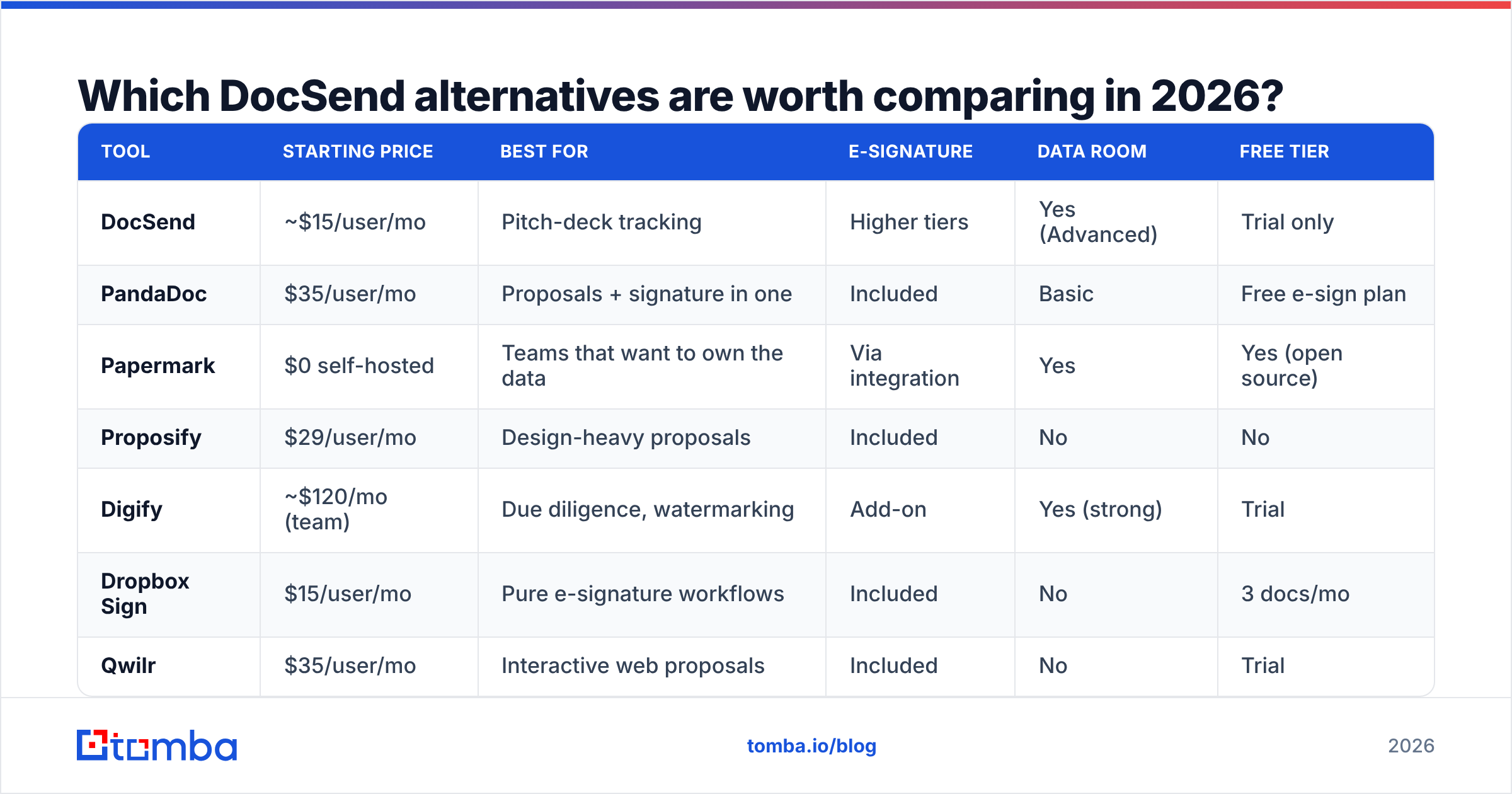
Here's the shortlist, grouped by what you're actually trying to replace.
| Tool | Starting price | Best for | E-signature | Data room | Free tier |
|---|---|---|---|---|---|
| DocSend | ~$15/user/mo | Pitch-deck tracking | Higher tiers | Yes (Advanced) | Trial only |
| PandaDoc | $35/user/mo | Proposals + signature in one | Included | Basic | Free e-sign plan |
| Papermark | $0 self-hosted | Teams that want to own the data | Via integration | Yes | Yes (open source) |
| Proposify | $29/user/mo | Design-heavy proposals | Included | No | No |
| Digify | ~$120/mo (team) | Due diligence, watermarking | Add-on | Yes (strong) | Trial |
| Dropbox Sign | $15/user/mo | Pure e-signature workflows | Included | No | 3 docs/mo |
| Qwilr | $35/user/mo | Interactive web proposals | Included | No | Trial |
| Ansarada | Custom | M&A, regulated deals | Yes | Yes (enterprise) | No |
A few notes before you read that table as gospel: vendor pricing changes constantly, most published prices assume annual billing, and "starting price" usually hides a minimum-seat requirement. Always check the vendor's own pricing page and cross-reference reviews on G2 before you commit to an annual contract.
What are the best DocSend alternatives for proposals and e-signature?#
If your documents end in a signature — proposals, SOWs, quotes, contracts — you don't need a tracking tool bolted to a signature tool. You need one product.
1. PandaDoc. The most common DocSend replacement for revenue teams. You get templates, a content library, pricing tables that recalculate live, approval workflows, and legally binding e-signature on every paid plan. Analytics show time-per-section, same as DocSend. The Business tier adds CRM sync with HubSpot, Salesforce, and Pipedrive. Where it loses to DocSend: raw document-viewing analytics are slightly less granular, and the editor has a learning curve.
2. Proposify. Narrower and better at what it does. Proposify is built for agencies and services businesses that send visually designed proposals. Brand-locked templates stop reps from mangling your design system. Its analytics answer the one question that matters in a services deal: did they read the pricing page, and for how long?
3. Qwilr. Instead of a PDF, Qwilr produces a responsive web page — embedded video, live quotes, accept-and-pay in the browser. If your buyer opens documents on a phone, this is the strongest format on the list. The trade-off is that some enterprise procurement teams still insist on a PDF they can archive.
4. Dropbox Sign. Formerly HelloSign, and now a sibling product to DocSend under Dropbox. If all you actually needed from DocSend was "send a document, get it signed, see when," Dropbox Sign is cheaper and simpler. It won't give you slide-level heatmaps.
Is there a free or open-source DocSend alternative?#
Yes, and it's more viable than it was two years ago.
Papermark is the open-source document-sharing platform most often recommended as a DocSend replacement. You get custom-domain links, page-by-page analytics, access controls with email verification, and data rooms. Self-host it on your own infrastructure and the licence cost is zero — you pay for servers and whoever maintains it. There's a hosted plan if you'd rather not run it yourself.
Who it fits:
- Privacy-sensitive teams — legal, healthcare, defence — that can't put deal documents on a third-party SaaS.
- Startups pre-revenue who need fundraising analytics but can't justify $180/year per founder.
- Engineering-heavy companies with the ops capacity to run one more service.
Who it doesn't fit: a five-person sales team with no DevOps support. Self-hosting is free the way a puppy is free.
Other budget options worth a look: Attach.io for basic tracking, Bit.ai for collaborative docs with analytics, and Google Drive with link expiry if your requirements are genuinely minimal. Drive gives you nothing on page-level engagement, so treat it as a floor, not a solution.
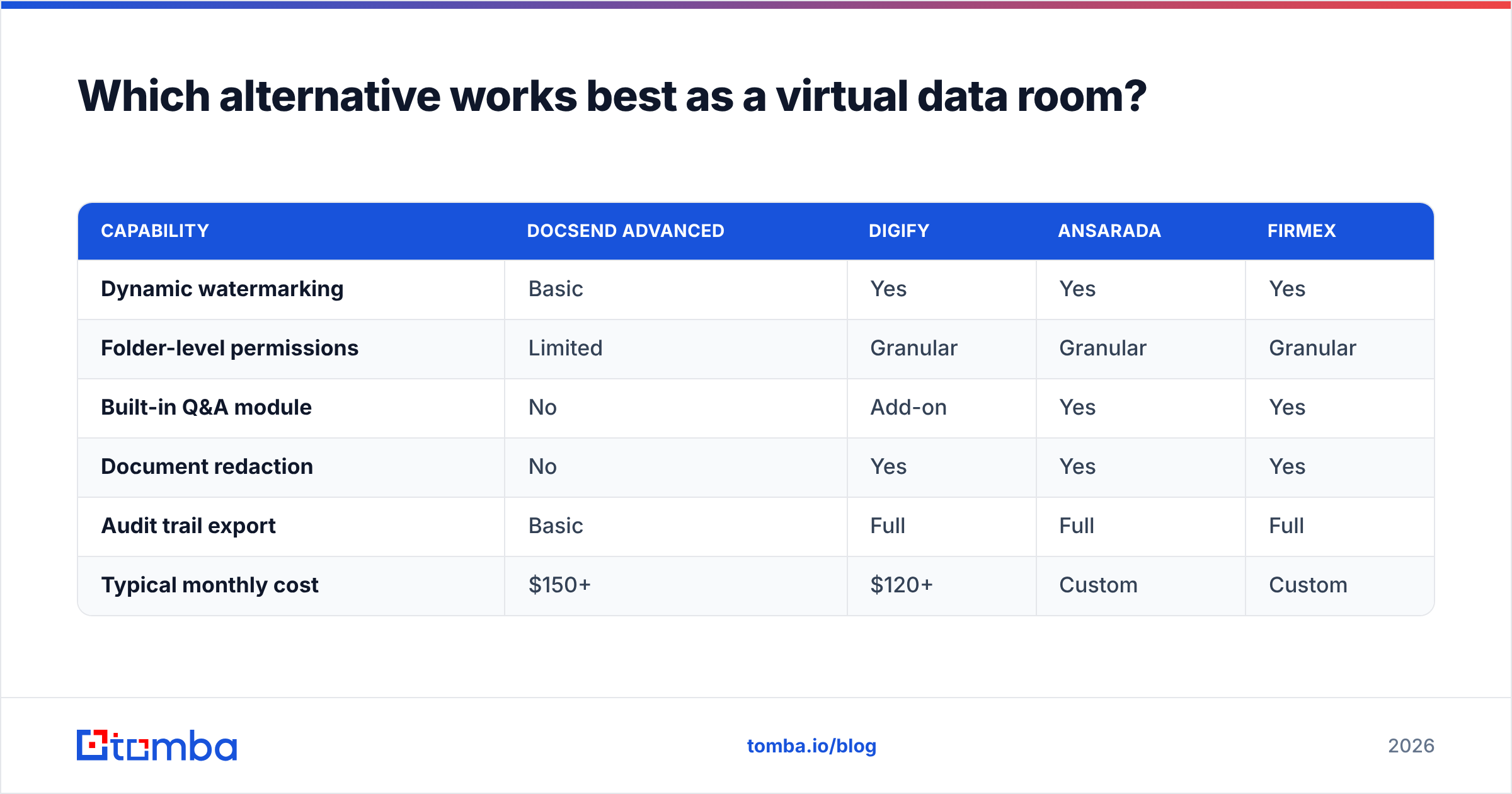
Which alternative works best as a virtual data room?#
DocSend markets a data room product, and for a seed or Series A raise it's fine. For anything with real diligence attached — a sale, a regulated transaction, a multi-party audit — you want a purpose-built VDR.
| Capability | DocSend Advanced | Digify | Ansarada | Firmex |
|---|---|---|---|---|
| Dynamic watermarking | Basic | Yes | Yes | Yes |
| Folder-level permissions | Limited | Granular | Granular | Granular |
| Built-in Q&A module | No | Add-on | Yes | Yes |
| Document redaction | No | Yes | Yes | Yes |
| Audit trail export | Basic | Full | Full | Full |
| Typical monthly cost | $150+ | $120+ | Custom | Custom |
The pattern is consistent: DocSend wins on speed and usability for a small fundraise, and loses on control the moment lawyers get involved. Most founders end up using DocSend for the deck and a real VDR for the data room, which is a reasonable split rather than a failure.
How do you choose between them?#
Work through these in order. Most teams over-index on features and under-index on step 1.
- Count your actual senders. Per-seat pricing means the cost driver is headcount, not usage. If three people send 95% of your documents, buy three seats and route everything through them.
- Decide whether signature is in scope. If it is, PandaDoc or Proposify collapses two tools into one and usually costs less than DocSend plus DocuSign.
- Check your CRM before anything else. A tracking alert that never reaches your CRM is a notification you'll ignore by week three. Verify native sync, not "available via Zapier."
- Test the mobile render. Upload your ugliest deck — the one with the custom fonts and the 40MB background image — and open the link on a phone. Half these tools fall apart there.
- Read the data-retention terms. If you're sharing customer PII or financials, where the documents live is a procurement question, not a sales one.
- Run a two-week parallel trial. Send the same deck through DocSend and your top candidate. Compare what each one told you that actually changed a follow-up.

Does document tracking actually improve close rates?#
Only when it changes behaviour. Tracking data is a trigger, not an insight.
The teams that get value from these tools do three specific things:
- They act inside the hour. A prospect spending four minutes on your pricing page is a live signal with a short half-life. If your alert routing means you see it tomorrow morning, you've bought an expensive analytics dashboard.
- They read the negative signal too. Nobody opened the deck in nine days. That's information — it usually means your champion isn't the decision maker, and the next email should ask who is.
- They tie engagement to stage. Deck opens at discovery mean something different than pricing-page dwell at proposal. Forrester and other analyst research on B2B buying consistently shows buying groups of six-plus people; one tracked opener is rarely the whole story.
What tracking tools can't do is fix the top of the funnel. If your deck is going to a generic info@ address or a contact who left the company eight months ago, no amount of page-level analytics helps. That's a data problem, and it happens upstream.
Where does contact data fit into this stack?#
Document tracking is the last mile. The first mile is knowing who to send to.
A typical flow that works:
- Identify target accounts in your ICP.
- Find the right person at each — usually the economic buyer, not the first name you find on the site — and get a verified work email. A domain search returns the people and email patterns at a company in one call, which is faster than guessing formats.
- Verify before sending. A hard bounce on the email carrying your proposal link is a lost deal for a reason that has nothing to do with your product. Run addresses through an email verifier first.
- Send the tracked document link.
- Route the engagement alert to the rep who owns the account.
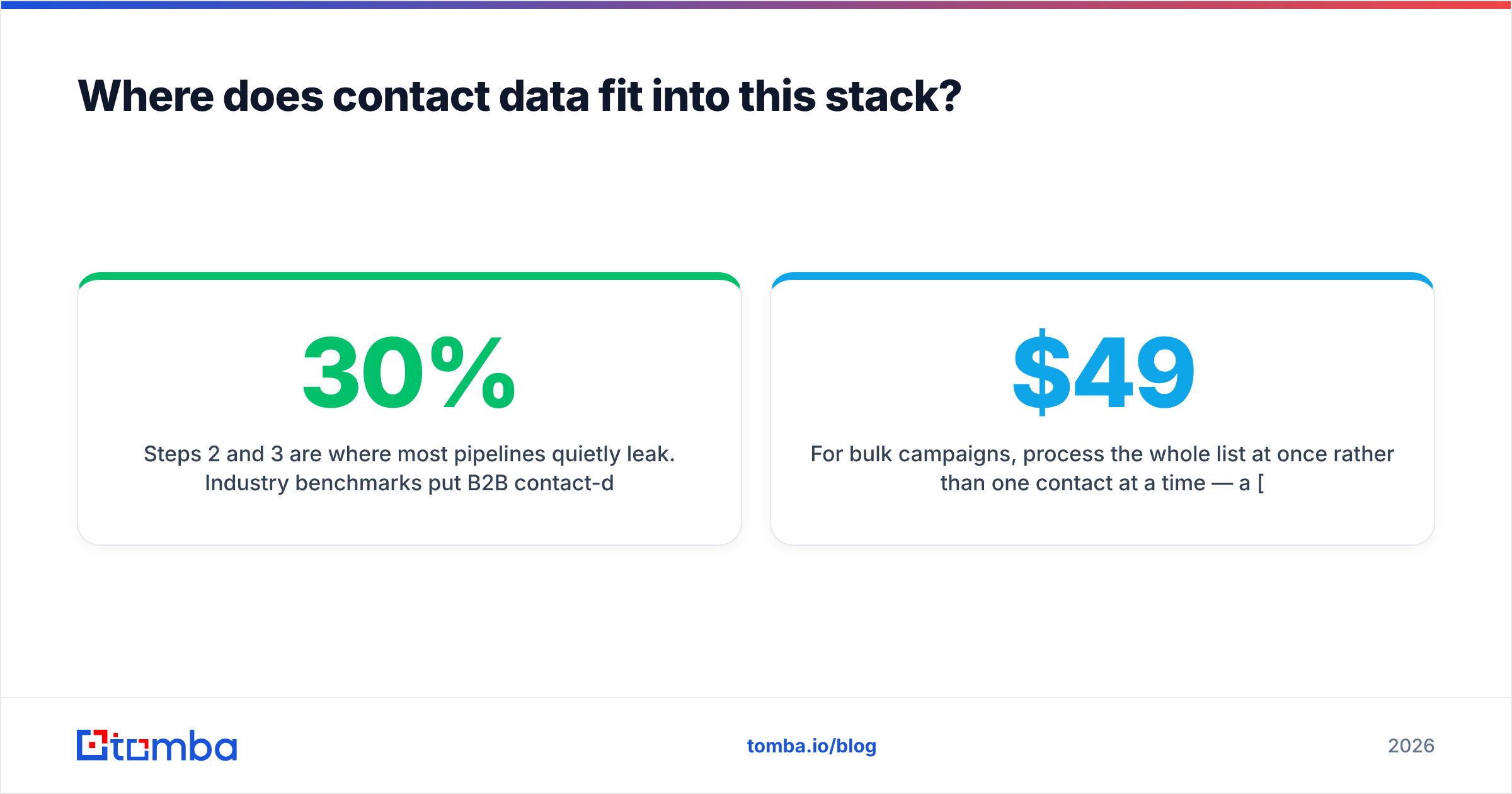
Steps 2 and 3 are where most pipelines quietly leak. Industry benchmarks put B2B contact-data decay somewhere around 25–30% per year — people change jobs, companies rebrand, catch-all domains swallow mail without bouncing. HubSpot has published similar decay figures in its own database research. If you're not re-verifying your list, roughly a third of your beautifully tracked links never render for a human.
For bulk campaigns, process the whole list at once rather than one contact at a time — a bulk email finder run against your target account list is a ten-minute job that saves you a month of bounce cleanup. If cost is the concern, Tomba pricing starts free at 25 searches a month, with the Starter plan at $49/mo and Growth at $99/mo — usually less than the DocSend seats you're trying to cut.
What's the verdict?#
There's no single best DocSend alternative, because DocSend does three different jobs and most competitors do one of them better:
- Replacing proposal + signature workflow: PandaDoc, or Proposify if design fidelity matters more than pricing tables.
- Replacing pitch-deck tracking on a budget: Papermark, self-hosted if you have the ops capacity, hosted if you don't.
- Replacing the data room: Digify for mid-market, Ansarada or Firmex when the transaction is regulated.
- Replacing just the e-signature piece: Dropbox Sign.
If your honest answer is "DocSend works, it's just expensive," the cheapest fix is often reducing seats rather than switching vendors. Migration costs — retraining, rebuilt templates, broken links in old email threads — are real and routinely underestimated.
And whichever way you go, audit the list you're sending to before you audit the tool you're sending with. Tomba's Email Finder gives you verified professional email addresses by domain, name, or company, so the tracked link you spent an afternoon designing actually lands in a real inbox. Start on the free tier, check your current send list against it, and see what percentage comes back stale — most teams are surprised, and not in a good way.
Related guides#
Ready to find emails that actually work?
Join 150,000+ professionals who stopped guessing and started sending. Free credits on signup — no credit card required.
Get the Tomba newsletter
Practical outbound tactics and product updates — once every two weeks.
About the author