DocSend Pricing Reviews Pros and Cons: 2026 Cost Breakdown
DocSend starts at $15/user/mo but real-world costs climb fast once you need eSignature, data rooms, and seat parity. Here's the honest breakdown of every tier, the hidden costs, and when a cheaper stack wins.
TL;DR
- DocSend's entry plan is $15/user/month billed annually, but the plan most sales teams actually need (Advanced) runs $150/month for three users — a 3.3x jump per seat.
- Every paid tier is priced per user, and eSignature volume, data rooms, and custom branding are gated behind the higher plans. That's where the "cheap" perception breaks.
- Reviews on G2 and Capterra cluster around the same two themes: the analytics are genuinely excellent, and the billing model frustrates teams that need more than a couple of seats.
- DocSend solves document tracking. It does not solve who to send the document to — you still need a separate prospecting and contact-data layer.
- If your use case is fundraising or one-off deal rooms, DocSend is worth it. If it's high-volume outbound where you send 200 decks a month, the per-seat math stops working.
Nobody evaluates DocSend on features alone. The real question is whether the price fits how many people on your team need to send tracked documents. That answer shifts a lot between a 2-person founding team and a 15-rep sales org. This guide to DocSend pricing reviews pros and cons covers the actual tiers, the costs that never show up on the pricing page, what real users say, and how the alternatives stack up.
What is DocSend and who actually uses it?#
DocSend is a document-sharing platform that replaces email attachments with tracked links. You upload a pitch deck, sales proposal, or diligence file and share a link instead of a PDF. In return you get page-by-page analytics: who opened it, how long they spent on slide 7, whether they forwarded it, and when they came back for a second look.
Dropbox acquired DocSend in 2021 for $165 million, and it now sits inside the broader Dropbox product family while keeping its own pricing page and brand. Three groups drive most of the usage:
- Founders raising capital — the original wedge. Send a deck to 40 investors, see which ones actually read past the team slide, and prioritize follow-ups accordingly.
- Sales teams sending proposals — knowing a prospect reopened your pricing page three times is a real buying signal.
- Corp dev and M&A teams — virtual data rooms with granular permissions, NDA gating, and dynamic watermarks.
- Agencies and consultants — client-facing decks where engagement data justifies the retainer.
The core value is the analytics layer, not the file hosting. Any cloud drive can share a link. DocSend tells you what happened after you shared it.
What does DocSend actually cost in 2026?#
Here's the published structure. Note that DocSend prices annually and quotes monthly-equivalent numbers, so the sticker price you see is the discounted one — month-to-month costs meaningfully more.
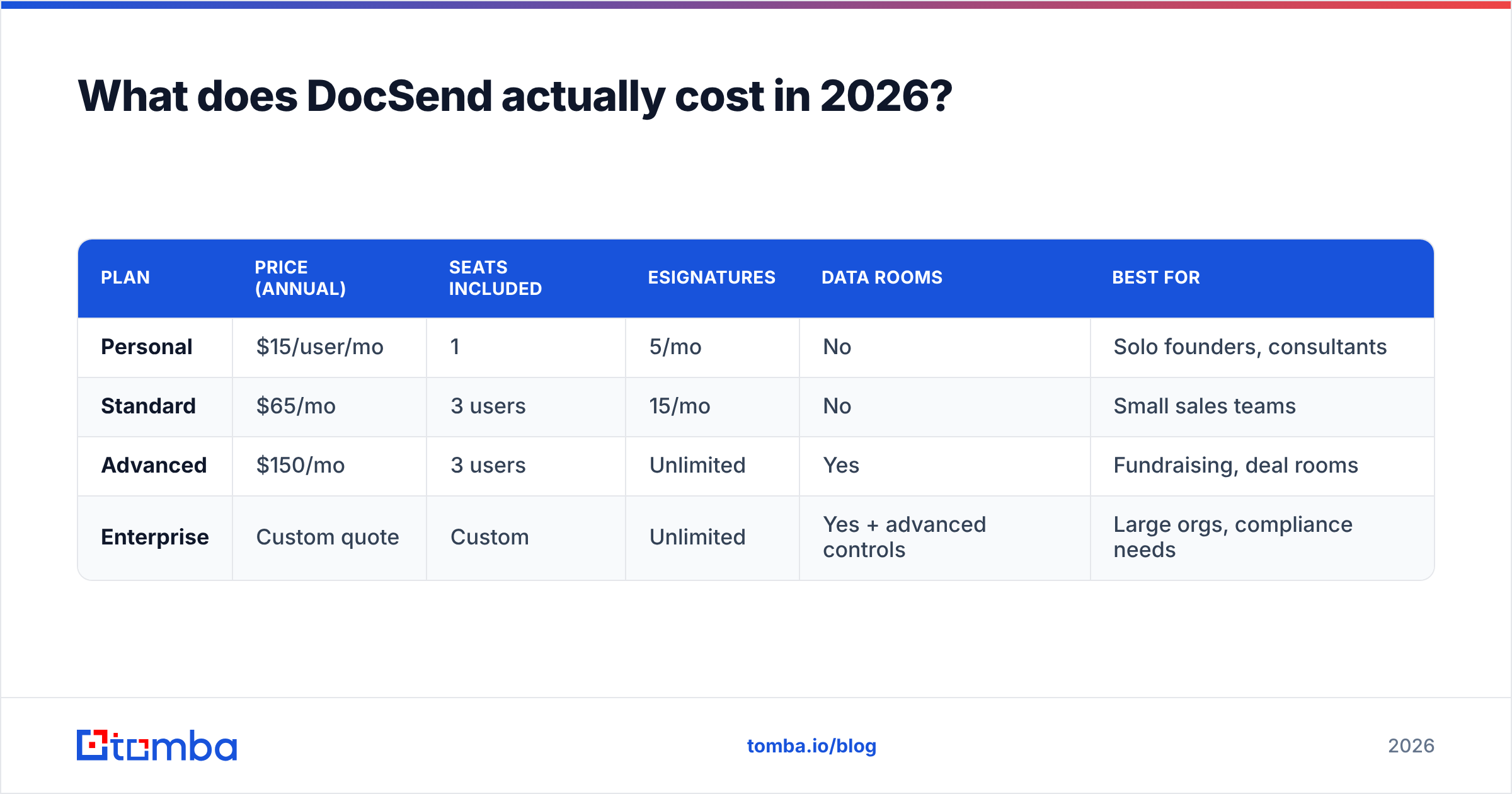
| Plan | Price (annual) | Seats included | eSignatures | Data rooms | Best for |
|---|---|---|---|---|---|
| Personal | $15/user/mo | 1 | 5/mo | No | Solo founders, consultants |
| Standard | $65/mo | 3 users | 15/mo | No | Small sales teams |
| Advanced | $150/mo | 3 users | Unlimited | Yes | Fundraising, deal rooms |
| Enterprise | Custom quote | Custom | Unlimited | Yes + advanced controls | Large orgs, compliance needs |
A few things this table makes obvious once you sit with it:
- The jump from Personal to Standard isn't 1x — Standard bundles three seats, so the effective per-seat cost is roughly $21.67. Fine. But Advanced at $150 for the same three seats is $50/user/month. That's the tier with data rooms, and data rooms are the reason most serious buyers show up.
- Additional seats beyond the bundled three are charged separately. A 10-person sales team on Advanced isn't paying $150 — you're modeling closer to $350-500/month depending on the seat add-on rate you negotiate.
- eSignature limits on the lower tiers are the most common upgrade trigger. Fifteen signatures a month sounds generous until a single enterprise deal burns four.

What do DocSend reviews actually say?#
Pull the review corpus on G2 and Capterra and the sentiment splits cleanly. DocSend holds strong ratings — generally in the 4.5-4.6 range across hundreds of reviews — and the praise is remarkably consistent.
What reviewers consistently like:
- Page-level analytics. This is the single most-cited strength. Reviewers describe changing their pitch deck order based on where investors dropped off.
- Link control. Kill a link, set an expiry, require an email, add an NDA gate. Once you've had it, sending a raw PDF feels reckless.
- Speed of setup. Upload, share, done. No implementation project, no onboarding call required.
- Version control. Update the deck after sending; the same link serves the new file.
What reviewers consistently complain about:
- Per-user pricing on a tool that's used sporadically. The most repeated criticism. A marketing manager who sends four decks a quarter still costs a full seat.
- Feature gating. Custom branding, data rooms, and unlimited eSignature all sit on Advanced. Teams feel pushed up a tier for one feature.
- Viewer friction. Requiring an email to view a document lowers open rates with cold recipients — a real cost in outbound contexts.
- Mobile viewing experience. Recurring note that decks render inconsistently on smaller screens.
- Support responsiveness on lower tiers. Post-acquisition, several reviewers report slower resolution than they experienced pre-2021.
None of these is disqualifying. But the pattern is clear: people love the product and question the invoice.
DocSend pricing reviews pros and cons: the honest ledger#
Stripping out the noise, here's the ledger.
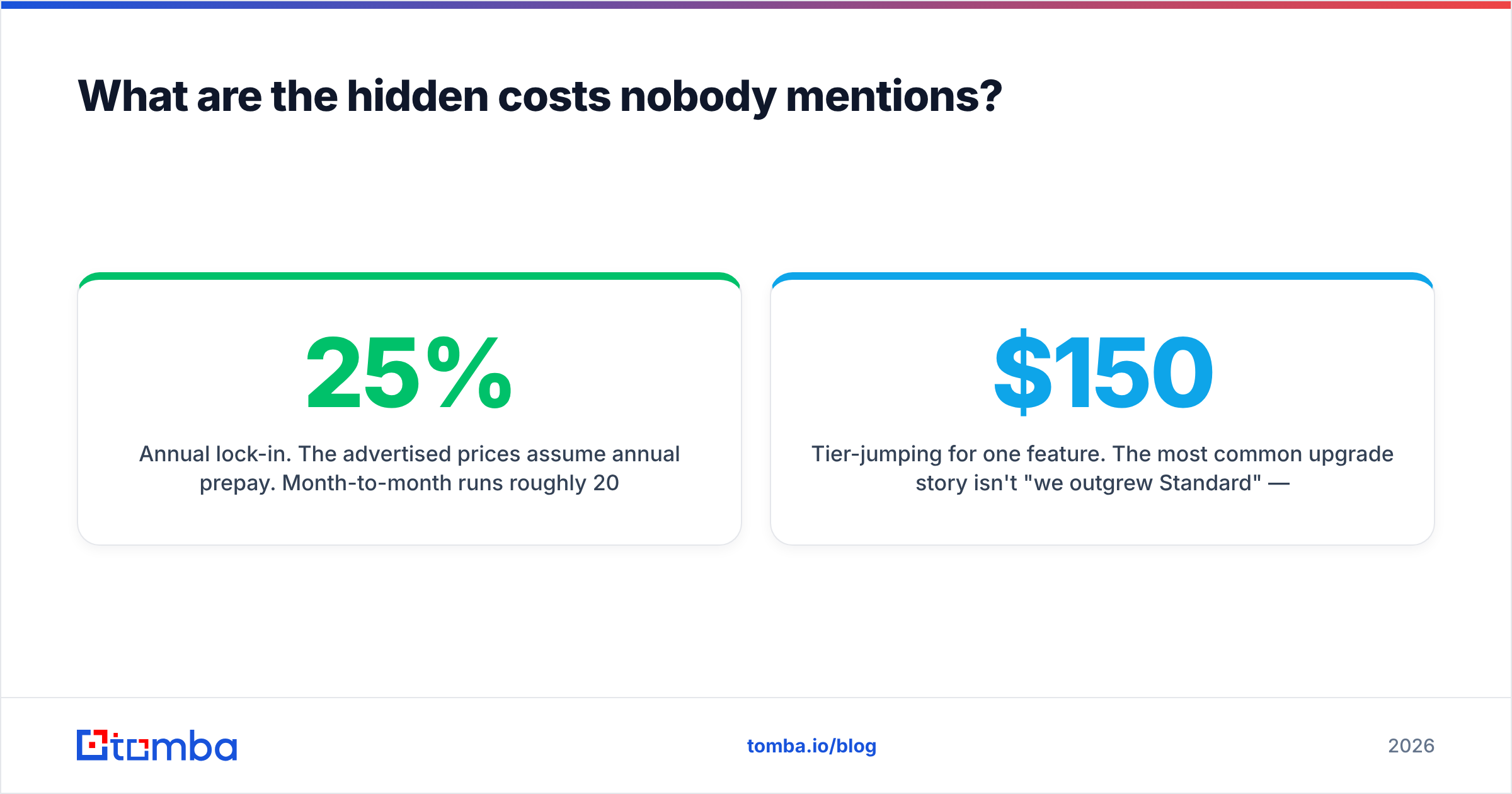
| Pros | Cons | |
|---|---|---|
| Analytics | Best-in-class page-by-page engagement data | Data is only as useful as your follow-up process |
| Pricing | $15 entry point is genuinely low | Per-seat model punishes occasional users |
| Security | NDA gating, watermarks, link expiry, passcodes | Advanced controls locked to Enterprise |
| Data rooms | Clean, fast, far simpler than legacy VDRs | Advanced tier only — $150/mo floor |
| eSignature | Included, no separate vendor needed | Capped at 5/15 per month on lower plans |
| Setup | Live in under 10 minutes | Minimal admin depth for larger orgs |
| Integrations | Salesforce, HubSpot, Dropbox, Gmail | Thinner than dedicated sales-engagement platforms |
Where DocSend is clearly worth the money#
If you're raising a round, DocSend pays for itself on the first close. Knowing which of your 40 investor conversations are real — before you spend three weeks on follow-ups — is worth far more than $150/month. Same logic applies to M&A diligence and high-ACV enterprise proposals where a single deal covers years of subscription.
Where the math stops working#
High-volume outbound. Say your team sends 200 proposals a month across 12 reps. Most of those seats sit idle between sends, and the analytics signal gets lost in the volume. At that scale, your sequencing tool already tracks engagement well enough. Spend the budget on contact data quality instead. A beautifully tracked deck sent to a bounced address tracks nothing at all.
What are the hidden costs nobody mentions?#
The pricing page is honest. The problem is what it doesn't model.
Seat creep. Sales, marketing, customer success, and the founder all want sending rights. A three-seat plan becomes a seven-seat plan within two quarters, and that's the line item that surprises finance.
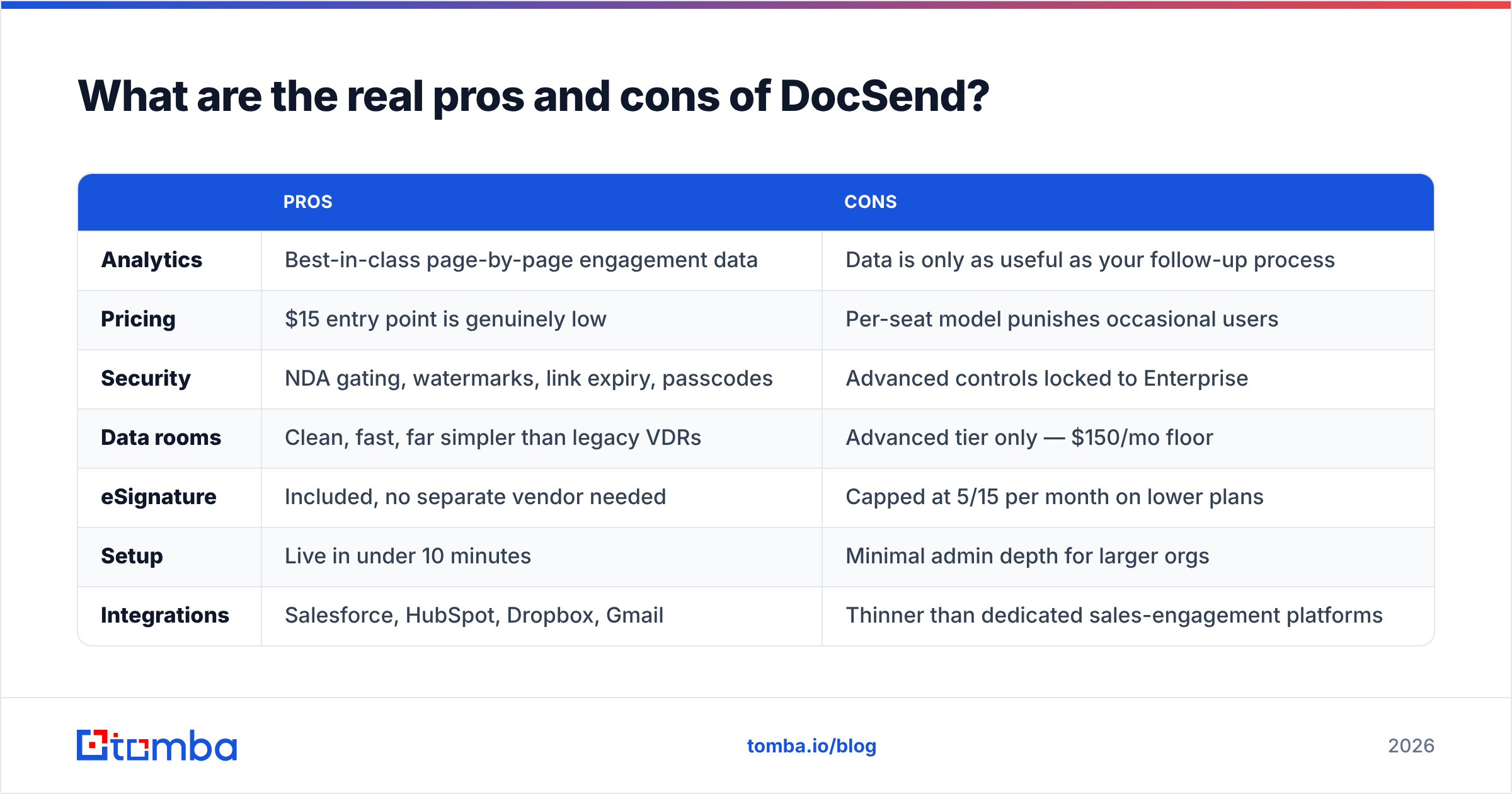
Annual lock-in. The advertised prices assume annual prepay. Month-to-month runs roughly 20-25% higher, so the "$15/month" figure most people quote isn't the price they'd pay if they wanted flexibility.
Tier-jumping for one feature. The most common upgrade story isn't "we outgrew Standard" — it's "we needed one data room for one deal." You pay $150/month indefinitely for a feature you used once.
Overlapping subscriptions. Many teams already pay for eSignature (DocuSign, PandaDoc) and file storage. DocSend duplicates both. Consolidating helps; running all three in parallel is pure waste.
The upstream cost. DocSend measures what happens after you send. It says nothing about whether you're sending to the right person at the right company. Teams that skip the contact-data layer end up with pristine analytics on documents that reached the wrong inbox — or no inbox at all. A quick pass through an email verifier before a send campaign protects the spend on everything downstream.
How does DocSend compare to the alternatives?#
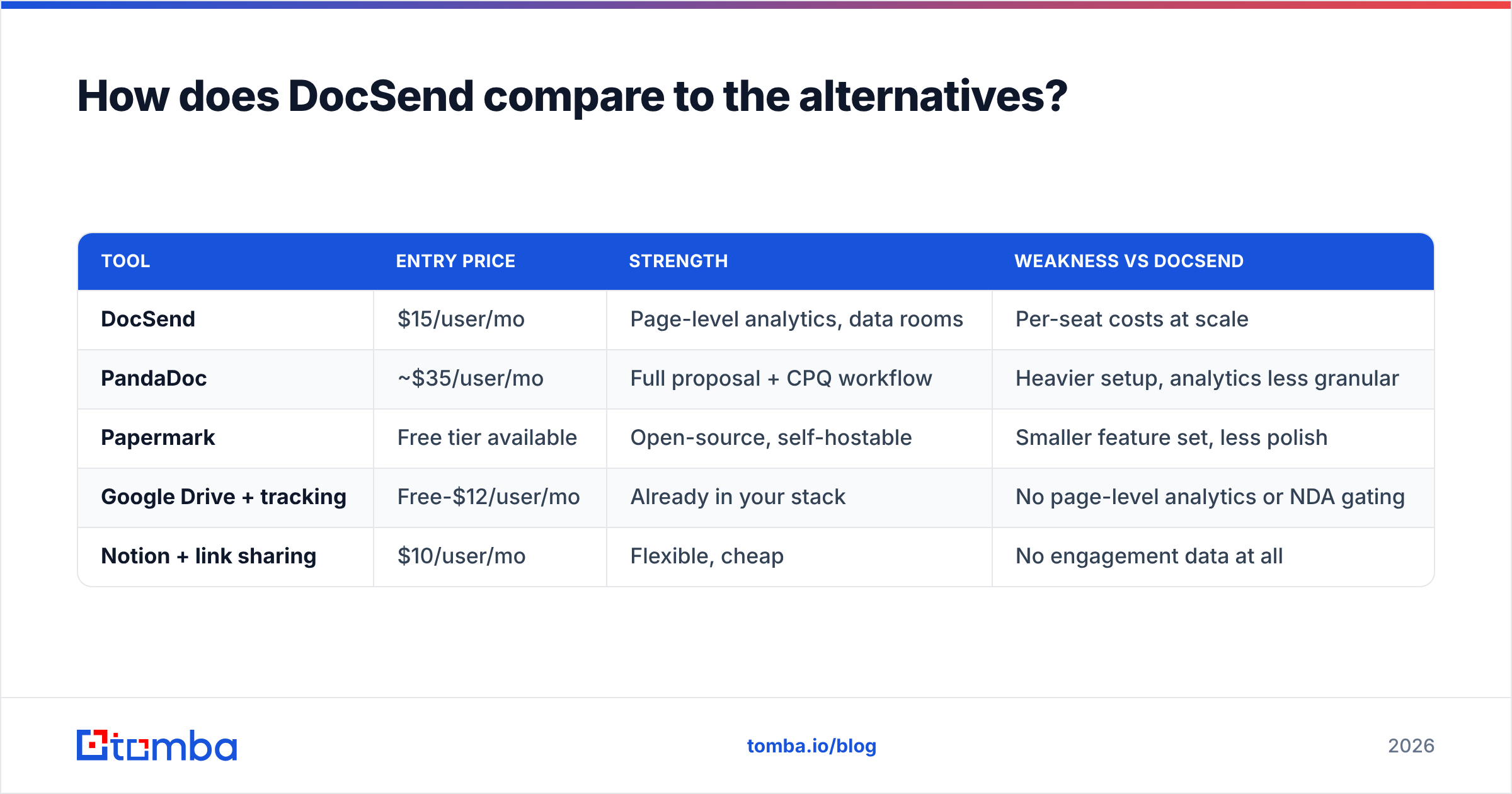
There's no single replacement, because DocSend sits at the intersection of three categories: document tracking, eSignature, and virtual data rooms. Here's how the realistic options line up.
| Tool | Entry price | Strength | Weakness vs DocSend |
|---|---|---|---|
| DocSend | $15/user/mo | Page-level analytics, data rooms | Per-seat costs at scale |
| PandaDoc | ~$35/user/mo | Full proposal + CPQ workflow | Heavier setup, analytics less granular |
| Papermark | Free tier available | Open-source, self-hostable | Smaller feature set, less polish |
| Google Drive + tracking | Free-$12/user/mo | Already in your stack | No page-level analytics or NDA gating |
| Notion + link sharing | $10/user/mo | Flexible, cheap | No engagement data at all |
The honest read: nothing matches DocSend's analytics depth at its price point. Papermark is the closest budget alternative and legitimately good if you're comfortable self-hosting. PandaDoc wins if your bottleneck is the proposal-to-signature workflow rather than the read-tracking. And if you only need "did they open it," your existing email tool probably already tells you that for free.

Does DocSend fix your pipeline problem?#
No — and this is the strategic point most pricing comparisons skip.
Document analytics are a middle-of-funnel tool. They optimize what happens after a qualified conversation is already underway. If your problem is that decks aren't getting read, DocSend gives you the diagnostic. If your problem is that you don't have enough of the right people to send decks to, DocSend gives you nothing.
Ranking the actual leverage points in that order:
- Targeting — are you reaching decision-makers at companies that fit? No tracking tool fixes a bad ICP.
- Contact accuracy — a verified, deliverable address is the precondition for every downstream metric. Bounce rates above 3% start damaging your sender reputation, which quietly kills campaigns you thought were working.
- Message relevance — does the recipient have a reason to open?
- Document engagement — this is where DocSend lives, and it's genuinely good here.
- Follow-up discipline — the analytics only matter if someone acts on them within 24 hours.
Most teams buying DocSend are trying to solve problem 4 while problems 1 and 2 are unaddressed. That's how you end up with a $500/month subscription and flat pipeline. Build the top of that list first: use domain search to map who's actually at your target accounts, verify before you send, then add tracking on top of a list that's real.
Is DocSend worth it in 2026?#
Yes, if: you're a founder raising capital, a corp dev team running diligence, or a small sales team with high-ACV deals where one closed contract covers years of subscription. At those stakes, $150/month for the Advanced tier is a rounding error against the value of knowing which conversations are real.
Probably not, if: you have more than eight people who need send access, your average deal size is under $10k, or you're running volume outbound where per-document analytics get lost in the aggregate. The per-seat model was designed for a small number of high-value senders, and it prices accordingly.
Definitely not, if: you're using it as a substitute for prospecting infrastructure. Tracking is a measurement layer, not a demand-generation layer.
Weighing DocSend pricing reviews pros and cons comes down to one number, not five. Before committing to an annual contract, run the seat-count exercise honestly. List every person who will ask for access in the next 12 months, not the number you'd like it to be. Multiply by the tier you'll actually need — which is almost always Advanced once someone asks for a data room. That number is your real DocSend cost. Compare that against alternatives, not the $15 headline.
Where should the rest of your budget go?#
The tools that compound are the ones at the top of the funnel. A tracked deck sent to a verified decision-maker at a well-fit account beats twenty tracked decks sent into the void — and the second scenario costs the same in DocSend seats.
If you're auditing spend across your sales stack, start by checking how much of your outbound is reaching real inboxes. Bad data is the most expensive line item in any sales org, and it never appears on an invoice. Use the Tomba Email Finder to build verified contact lists from company domains, names, or LinkedIn profiles — the free tier covers 25 searches a month so you can test list quality before spending anything, and paid plans start at $49/month with transparent pricing that doesn't gate core features behind a tier jump. Get the targeting right first; then let DocSend tell you what happened next.
Related guides#
Ready to find emails that actually work?
Join 150,000+ professionals who stopped guessing and started sending. Free credits on signup — no credit card required.
Get the Tomba newsletter
Practical outbound tactics and product updates — once every two weeks.
About the author