DocuSign Pricing Reviews Pros and Cons: 2026 Costs
DocuSign's list price is only half the story. Here's what the plans really cost per seat in 2026, where the envelope cap bites, what reviewers praise and complain about, and when a cheaper e-signature tool is the smarter buy.
This DocuSign pricing reviews pros and cons guide gives you the short read first. DocuSign is strong, pricey, and capped by an envelope limit that catches teams out.
TL;DR
- The cheapest plan is about $10 a month for one user on annual billing. Most sales teams need Business Pro. That runs near $40 per user each month on annual terms, or $65 if you pay monthly.
- The shock is not the price. It is the envelope cap of about 100 envelopes per user per year. Busy teams hit that wall. Then they land in custom pricing.
- Reviews praise uptime, legal weight, and signer trust. They knock cost, seat math, and slow help on low tiers.
- Rivals like Dropbox Sign, PandaDoc, and Adobe Acrobat Sign win on price. They lose on brand trust and deep compliance.
- Buy it when volume is steady and legal risk is high. Skip it if you send fewer than 20 docs a month.
Most posts on this topic just repeat the price page. This DocuSign pricing reviews pros and cons breakdown adds up what teams pay once seats, caps, and API fees hit the bill. It also weighs what a few hundred public reviews say.
DocuSign pricing reviews pros and cons: what does it cost in 2026?#
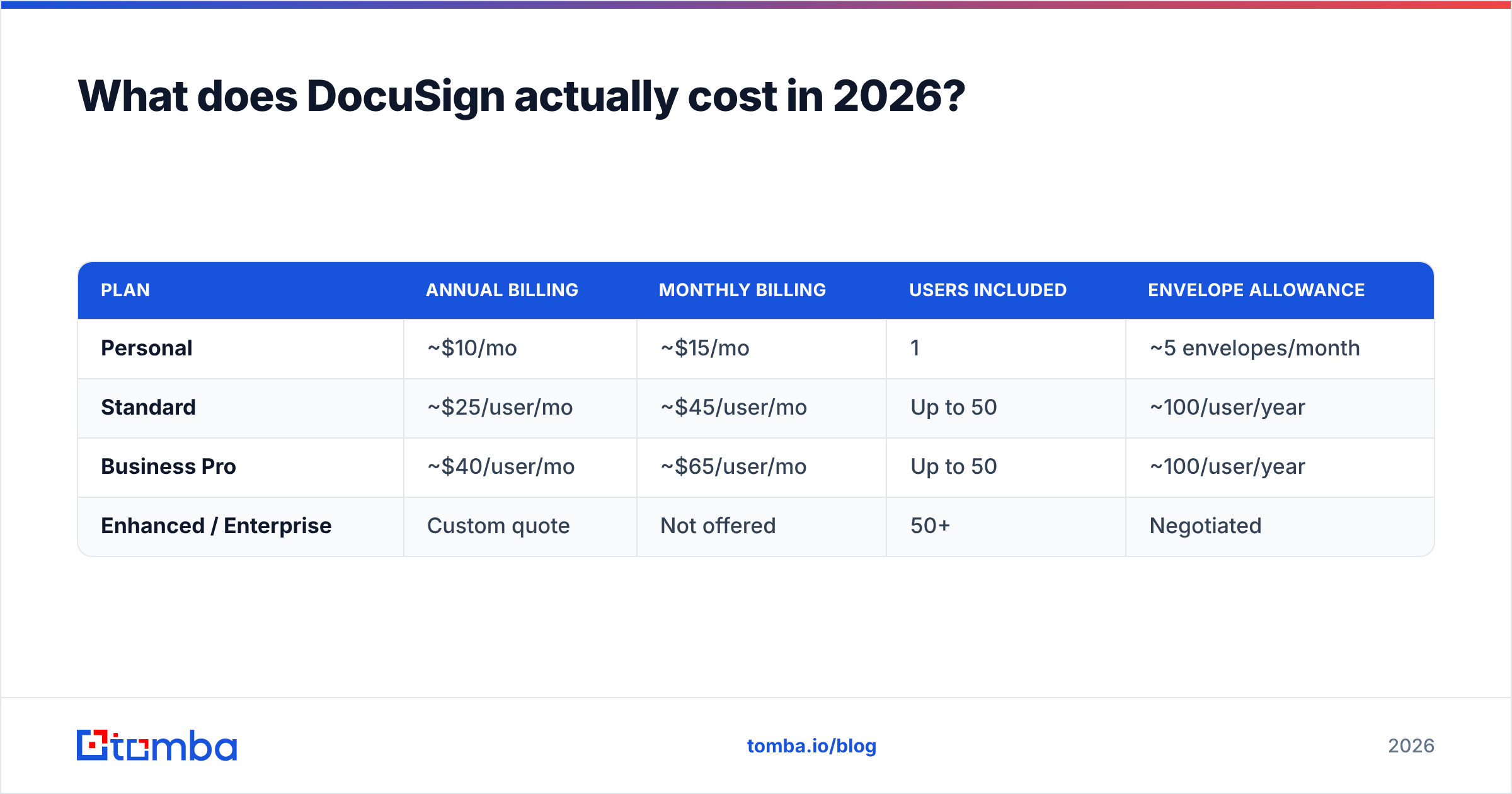
DocuSign sells four public tiers plus a custom enterprise track. The rates below are US list prices at the time of writing. Check the official DocuSign pricing page before you sign. DocuSign changes its tiers more often than most vendors.
| Plan | Annual billing | Monthly billing | Users included | Envelope allowance |
|---|---|---|---|---|
| Personal | ~$10/mo | ~$15/mo | 1 | ~5 envelopes/month |
| Standard | ~$25/user/mo | ~$45/user/mo | Up to 50 | ~100/user/year |
| Business Pro | ~$40/user/mo | ~$65/user/mo | Up to 50 | ~100/user/year |
| Enhanced / Enterprise | Custom quote | Not offered | 50+ | Negotiated |
Two things jump out of that table.
First, the monthly penalty is steep. It runs 60% to 80% above annual rates. Few vendors charge that much for a short trial. So buyers commit to a year before they know their real volume.
Second, the envelope cap is the real lever, not the seat price. An envelope is one document pack sent for signature. The signer count and page count do not change that. A team of five on Business Pro gets about 500 envelopes a year, pooled. That sounds like plenty. Then you count NDAs, order forms, renewals, and every deal that dies after you send the contract.
What do you get at each DocuSign tier?#
Feature gates matter more than price gaps. Here is what opens up as you move up:
- Personal — Send from your own account. You get basic fields, mobile signing, and an audit trail. There is no team sharing and no real branding. Fine for a solo consultant. Weak for a team.
- Standard — Shared templates, reminders, expiry dates, light branding, comments, and multi-user admin. Most small teams start here. Most outgrow it fast.
- Business Pro — Take payment inside the envelope. You also get bulk send, richer fields, signer uploads, and SMS codes. Bulk send alone pulls sales teams up to this tier.
- Enhanced or Enterprise — API use at volume, deeper admin tools, SSO, contract lifecycle modules, and Salesforce signing. Many of these deals price per envelope block, not per seat.
- Add-ons — ID checks, notary, web forms, and API packs are billed on their own. This is how a $25 seat turns into a $60 seat.
The shape is familiar in B2B software. The cheap tier is a demo. The middle tier works. The tier that fixes your real problem costs four times the entry price.

What do DocuSign reviews actually say?#
Most DocuSign pricing reviews pros and cons roundups stop at the star rating. That rating is high. Scores on G2's DocuSign reviews and similar sites sit near 4.5 out of 5, across thousands of entries. That is not spin. In e-signature, trust builds over time, and DocuSign has shipped since 2003. The company background on Wikipedia has the full story.
What reviewers praise:
- Signer trust. No legal team asks "what is this?" when a DocuSign envelope lands. That cuts friction at the end of a deal. It is the top plus in reviews.
- Audit trails that hold up. You get a completion certificate, IP logs, time stamps, and a sealed file. Buyers in banks and health care treat this as a must.
- Uptime. Envelopes arrive. Mobile signing works. It is boring in the best way.
- Deep links to other tools. Salesforce, HubSpot, Workday, NetSuite, and SAP. If your CRM matters, DocuSign already talks to it.
What reviewers knock:
- Price against rivals. This is the top gripe by a wide margin. Many say they are stuck: too costly to keep, too woven in to drop.
- Caps that surprise them. Teams find the cap when a deal is stuck, not when they plan the budget.
- Seat math for light users. A finance lead who sends four docs a quarter still eats a full paid seat. So teams share logins. That breaks the audit trail they paid for.
- Slow help on low tiers. Standard users report slow email-only replies. Large accounts rarely say this. That tells you where the support money goes.
- A busy admin screen. The tool is strong. The template and rights screens still take real training.
Is DocuSign worth it next to the alternatives?#
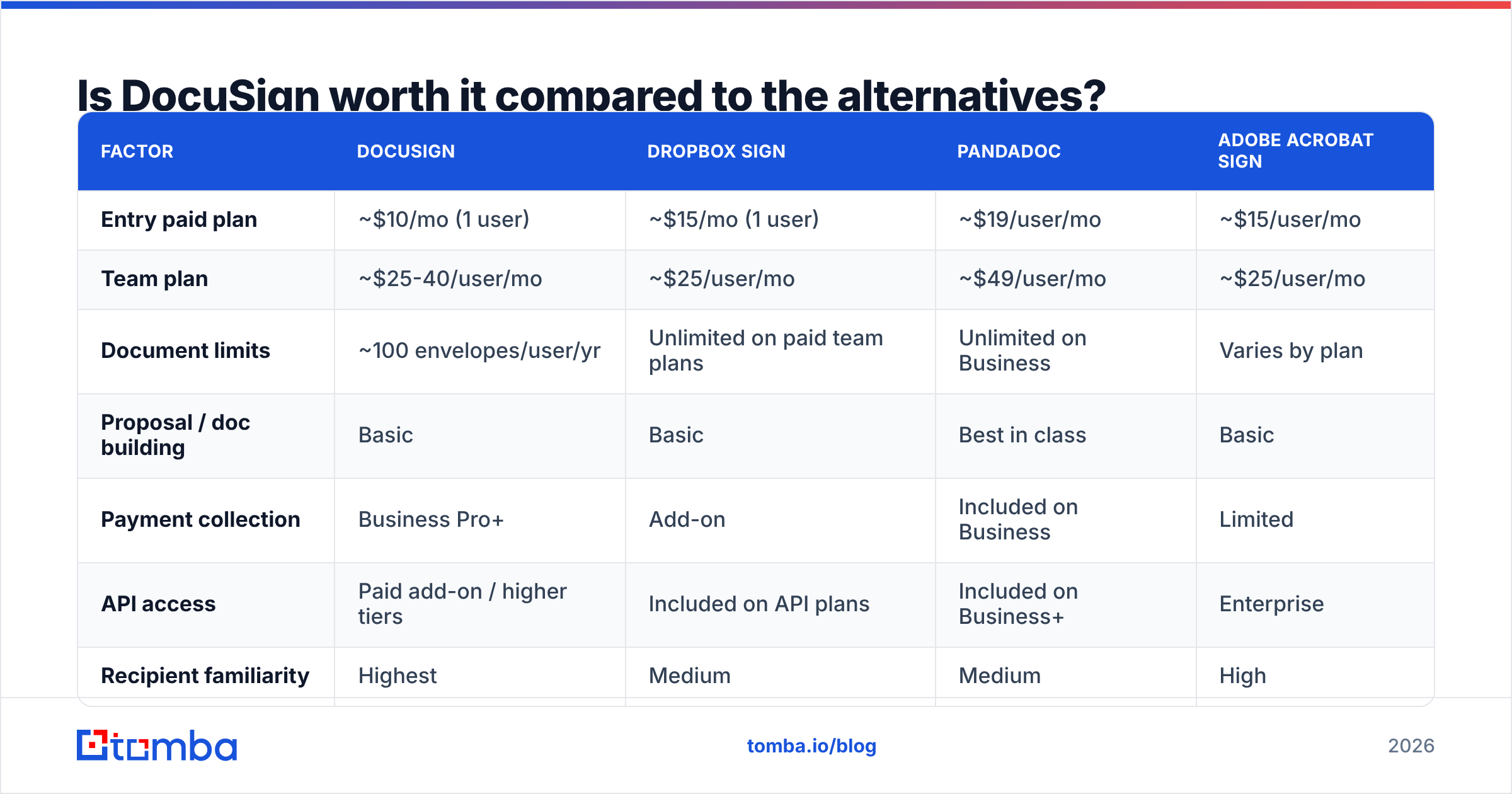
That trade-off drives most DocuSign pricing reviews pros and cons debates. Here is an honest side-by-side with the three tools that come up most. Prices are list rates at the time of writing and shift often.
| Factor | DocuSign | Dropbox Sign | PandaDoc | Adobe Acrobat Sign |
|---|---|---|---|---|
| Entry paid plan | ~$10/mo (1 user) | ~$15/mo (1 user) | ~$19/user/mo | ~$15/user/mo |
| Team plan | ~$25-40/user/mo | ~$25/user/mo | ~$49/user/mo | ~$25/user/mo |
| Document limits | ~100 envelopes/user/yr | Unlimited on paid team plans | Unlimited on Business | Varies by plan |
| Proposal / doc building | Basic | Basic | Best in class | Basic |
| Payment collection | Business Pro+ | Add-on | Included on Business | Limited |
| API access | Paid add-on / higher tiers | Included on API plans | Included on Business+ | Enterprise |
| Recipient familiarity | Highest | Medium | Medium | High |
| Best for | Regulated, high-stakes contracts | Simple, high-volume signing | Sales proposals + signing | Adobe-native orgs |
The honest read: if you send lots of simple documents, DocuSign is the costly pick. Dropbox Sign drops the cap worry at a similar seat price. If you build proposals with price tables and upsells, PandaDoc does two jobs at once. If your team lives in Acrobat, Adobe Acrobat Sign is the easy path.
One spot stays hard to win. It is high contract value, a regulated field, and lawyers in the loop. When a deal could end up in court, the completion certificate earns its keep. That is why buyers who gripe about price still renew.
What are the hidden costs nobody quotes you?#
Most DocuSign pricing reviews pros and cons posts skip the fine print. Four line items push real spend past the quote:
- Cap overage. Blow past the pool and you face an upgrade talk or per-envelope fees. Plan for 1.5 times your current pace. Envelopes you send and lose still count.
- ID checks. SMS codes, ID scans, and quiz-based checks are billed per use. One rule from legal can add a few dollars per signature.
- API envelopes. Are you embedding signing in your own app? Those envelopes are a separate line item. Budget for them on their own.
- Seats for people who never send. Approvers and internal signers often want logins. Check who needs to send, not just sign. Signers are always free.
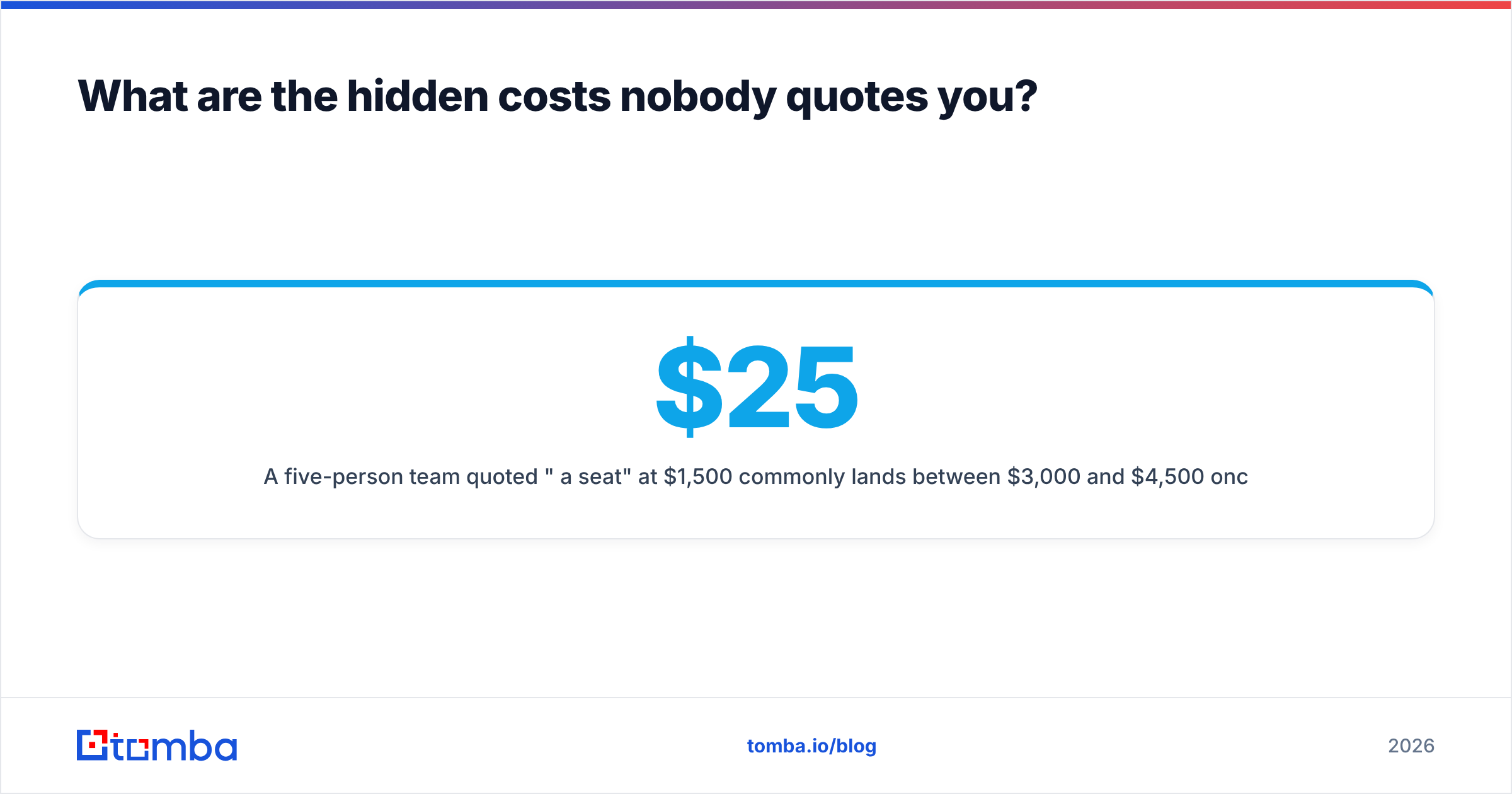
A team of five quoted "$25 a seat" plans on $1,500 a year. Real spend often lands between $3,000 and $4,500. Business Pro, ID checks, and one extra admin seat do that. It is still cheap next to one lost deal. But it is not the price on the page.

Who should buy which DocuSign plan?#
Here is how the DocuSign pricing reviews pros and cons picture maps to team size.
- Solo, under 5 docs a month → Personal, billed yearly. Or a free tier from a rival.
- Sales team of 2 to 10 with standard forms → Standard, billed yearly. Set a reminder at month eight to check envelope burn.
- Team that takes payment or sends in batches → Business Pro. Bulk send and in-envelope payment pay for the jump.
- Regulated field with legal review on each deal → Enhanced or Enterprise. Push for a shared envelope pool.
- Product team that embeds signing → Ask about API packs. Self-serve tiers will skew your model.
One tip that reviewers repeat: DocuSign cuts prices on multi-year deals and at renewal. It helps to show a live bake-off. Enterprise quotes are not list prices. Ask.
Where does e-signature sit in your outbound stack?#
E-signature is the last mile of a sales cycle, not the whole route. It earns its cost only when enough good deals reach the contract stage. That work starts much earlier, with clean contact data.
Most teams run the same order. Pick target accounts. Find the right buyer. Reach out. Qualify. Then send paper. DocuSign owns step five. If the first three steps leak, a better signing tool will not save you.
That is where a good email finder beats a signature upgrade. Load verified contacts into your CRM before you reach out. Run an email verifier pass so bounces do not wreck your sender score. Account-based teams often start with domain search to map every contact at a target firm. Then they push the list into a sequencer through the Tomba API.
Compare the math. Business Pro at about $40 per user each month buys roughly 100 envelopes a year. Tomba's plans start at $49 a month, and a free tier gives 25 searches a month to test how well it works. These are different jobs. But if too few deals reach signature, spend the money upstream.
FAQ: DocuSign pricing reviews pros and cons#
Is there a free DocuSign plan? There is a free trial, not a free plan. Signers never pay. Only senders need a paid seat. If you only sign, you never need an account.
What counts as one envelope? One document pack sent to one or more people. A 40-page contract sent to three signers is one envelope. Send it again after a fix and that makes two.
Can I share a DocuSign seat? You can, but it breaks the audit trail. The certificate names the account holder as sender, not the real person. If audit proof is why you bought DocuSign, do not do this.
Does DocuSign offer discounts? Yes. On annual and multi-year deals, on school and charity pricing, and at times at renewal. Large volume quotes are open to talks.
Is DocuSign legally binding? Yes. ESIGN and UETA cover the US. eIDAS covers the EU. There are stricter options where the law asks for them.
DocuSign pricing reviews pros and cons: the verdict#
DocuSign is costly, well built, and hard to swap out. The pros are real: trust, audit quality, and deep links to your CRM. So are the cons: seat cost, envelope caps, and add-on fees. Small teams feel the cons most.
Buy it when a disputed signature would cost more than the plan. Pick a cheaper tool when you send routine forms at volume and no lawyer will squint at the certificate.
One last note on DocuSign pricing reviews pros and cons: fix the top of the funnel before you polish the last mile. Start with the Tomba Email Finder. Find verified work emails by domain, name, or firm. Test it on the free tier. Then see if signing is your real block, or the talks that come first.
Related guides#
Ready to find emails that actually work?
Join 150,000+ professionals who stopped guessing and started sending. Free credits on signup — no credit card required.
Get the Tomba newsletter
Practical outbound tactics and product updates — once every two weeks.
About the author