DocuSign vs PandaDoc 2026: Pricing, Features, and Verdict
DocuSign owns the signature. PandaDoc owns the document that leads to it. Here is an honest breakdown of pricing, features, CRM fit, and which one your revenue team should actually buy in 2026.
TL;DR — DocuSign vs PandaDoc in one minute
- DocuSign is a signature company. PandaDoc is a document company. DocuSign gets a legal signature on any file. PandaDoc builds the proposal, quote, or contract that earns that signature.
- PandaDoc is usually cheaper per seat for sales teams. It bundles proposal templates, a content library, and payment collection. DocuSign charges for envelopes and add-ons instead.
- DocuSign wins on scale, compliance, and API depth. Do you sign across strict regions, or build signing into your own product? DocuSign is the safer default.
- Envelope limits are the hidden cost in DocuSign. Most standard plans cap sends per user per year. Heavy senders land in a custom quote fast.
- Neither tool fixes the real problem: getting the file to the right person. A contract sent to a dead email address never gets signed.
The DocuSign vs PandaDoc choice is not a feature bake-off. It is a question about your bottleneck. Do deals stall because legal wants a clean audit trail? Pick DocuSign. Do deals stall because reps spend two hours building a proposal in Google Docs? Pick PandaDoc.
Here is the detail behind that.
What are DocuSign and PandaDoc, actually?#
DocuSign launched in 2003 and created the category. Its core product is the signature envelope. You upload a file, drop fields on it, and route it to signers in order. DocuSign then issues a tamper-evident certificate of completion.
It has since grown into agreement management. That adds contract lifecycle tools, clause libraries, obligation tracking, and AI contract review. Your legal team already knows it. Your enterprise buyers already trust it.
PandaDoc came later and attacked from another angle. It starts at document creation, not at the signature. You build proposals and quotes from reusable blocks. You embed pricing tables that update live. Buyers can toggle optional line items and pay at signing.
You also see how long a buyer spent on the pricing page. Signature is one step in that flow, not the whole product. That gap in origin explains most of the DocuSign vs PandaDoc trade-offs below.
DocuSign vs PandaDoc: how do the features compare?#
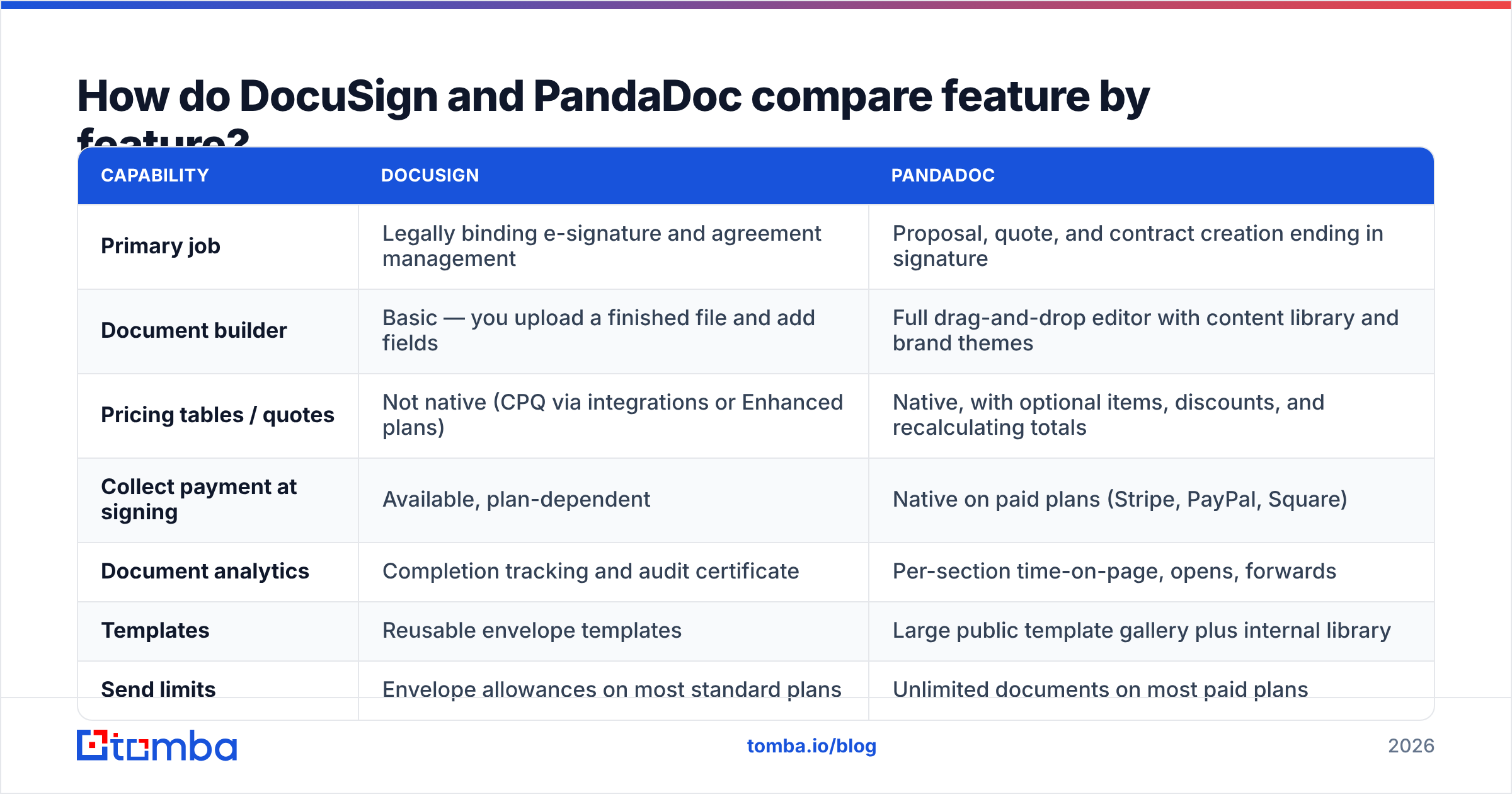
| Capability | DocuSign | PandaDoc |
|---|---|---|
| Primary job | Legally binding e-signature and agreement management | Proposal, quote, and contract creation ending in signature |
| Document builder | Basic — you upload a finished file and add fields | Full drag-and-drop editor with content library and brand themes |
| Pricing tables / quotes | Not native (CPQ via integrations or Enhanced plans) | Native, with optional items, discounts, and live totals |
| Collect payment at signing | Available, plan-dependent | Native on paid plans (Stripe, PayPal, Square) |
| Document analytics | Completion tracking and audit certificate | Per-section time-on-page, opens, forwards |
| Templates | Reusable envelope templates | Large public gallery plus an internal library |
| Send limits | Envelope caps on most standard plans | Unlimited documents on most paid plans |
| Compliance depth | 21 CFR Part 11, eIDAS/QES options, HIPAA, wide regional cover | ESIGN/UETA, SOC 2, HIPAA on higher tiers |
| API maturity | Very deep; large embedded-signing ecosystem | Solid REST API, lighter embedded-signing ecosystem |
| Best fit | Legal, HR, procurement, regulated fields, in-product signing | Rep-led sales teams, agencies, SMB and mid-market |
The DocuSign vs PandaDoc pattern is consistent. DocuSign gives you more assurance at the moment of signing. PandaDoc gives you more control over everything before it.
One nuance is worth flagging. DocuSign's document generation and CLM tools have improved a lot. PandaDoc's compliance story is also stronger than it was three years ago. The gap is smaller than either vendor's marketing suggests. Still, defaults matter. You will fight DocuSign less to stay compliant, and fight PandaDoc less to look good.
DocuSign vs PandaDoc pricing: what does each cost in 2026?#
Treat every number below as a starting point, not a quote. Both vendors change list prices often. They also run annual discounts and gate features by region. Check the vendor's own pricing page before you budget.
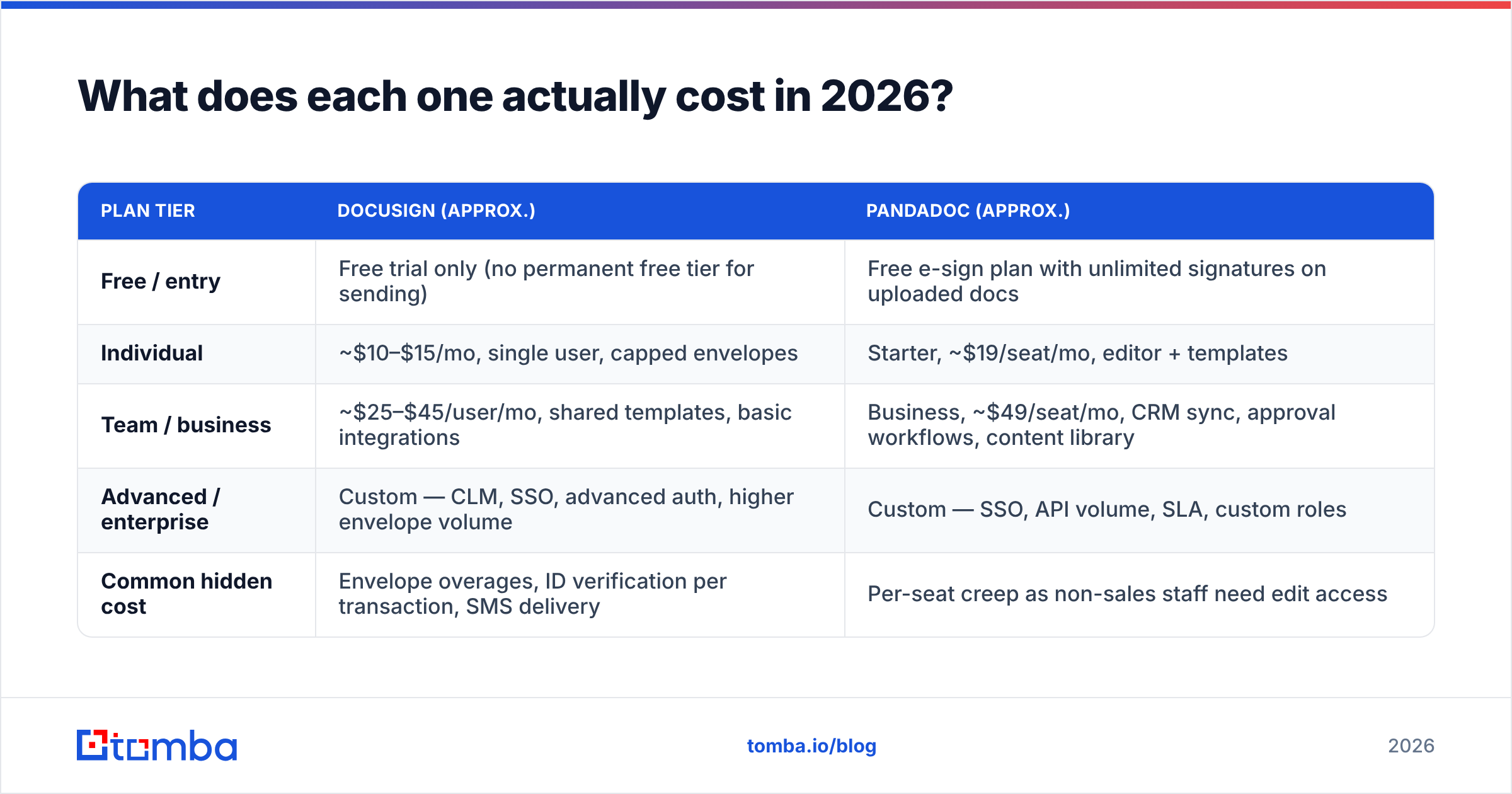
| Plan tier | DocuSign (approx.) | PandaDoc (approx.) |
|---|---|---|
| Free / entry | Free trial only (no permanent free tier for sending) | Free e-sign plan with unlimited signatures on uploaded docs |
| Individual | ~$10–$15/mo, single user, capped envelopes | Starter, ~$19/seat/mo, editor + templates |
| Team / business | ~$25–$45/user/mo, shared templates, basic integrations | Business, ~$49/seat/mo, CRM sync, approvals, content library |
| Advanced / enterprise | Custom — CLM, SSO, advanced auth, higher envelope volume | Custom — SSO, API volume, SLA, custom roles |
| Common hidden cost | Envelope overages, ID checks per transaction, SMS delivery | Per-seat creep as non-sales staff need edit access |
The two cost traps are different, and both are real.
With DocuSign, the trap is envelope math. Standard plans include a yearly envelope allowance per user. Say a five-person team assumes "unlimited" and sends 400 agreements a month. They will hit the ceiling and get moved to a custom plan mid-year. Model your send volume first.
With PandaDoc, the trap is seat creep. Only people who create or edit documents need a paid seat. Recipients and internal approvers usually do not. Teams still buy extra seats to be safe, then pay for viewers who could have been free. Audit your seat list every quarter.
Team size changes the DocuSign vs PandaDoc math. Two people sending twenty agreements a month? DocuSign's individual plan is cheaper. Eight reps sending custom proposals? PandaDoc usually wins once you count the templating hours you stop paying for in salary.
Which tool fits each stage of your document workflow?#
Map the stages, not the logos. The DocuSign vs PandaDoc answer changes by stage. Here is where each tool earns its keep:
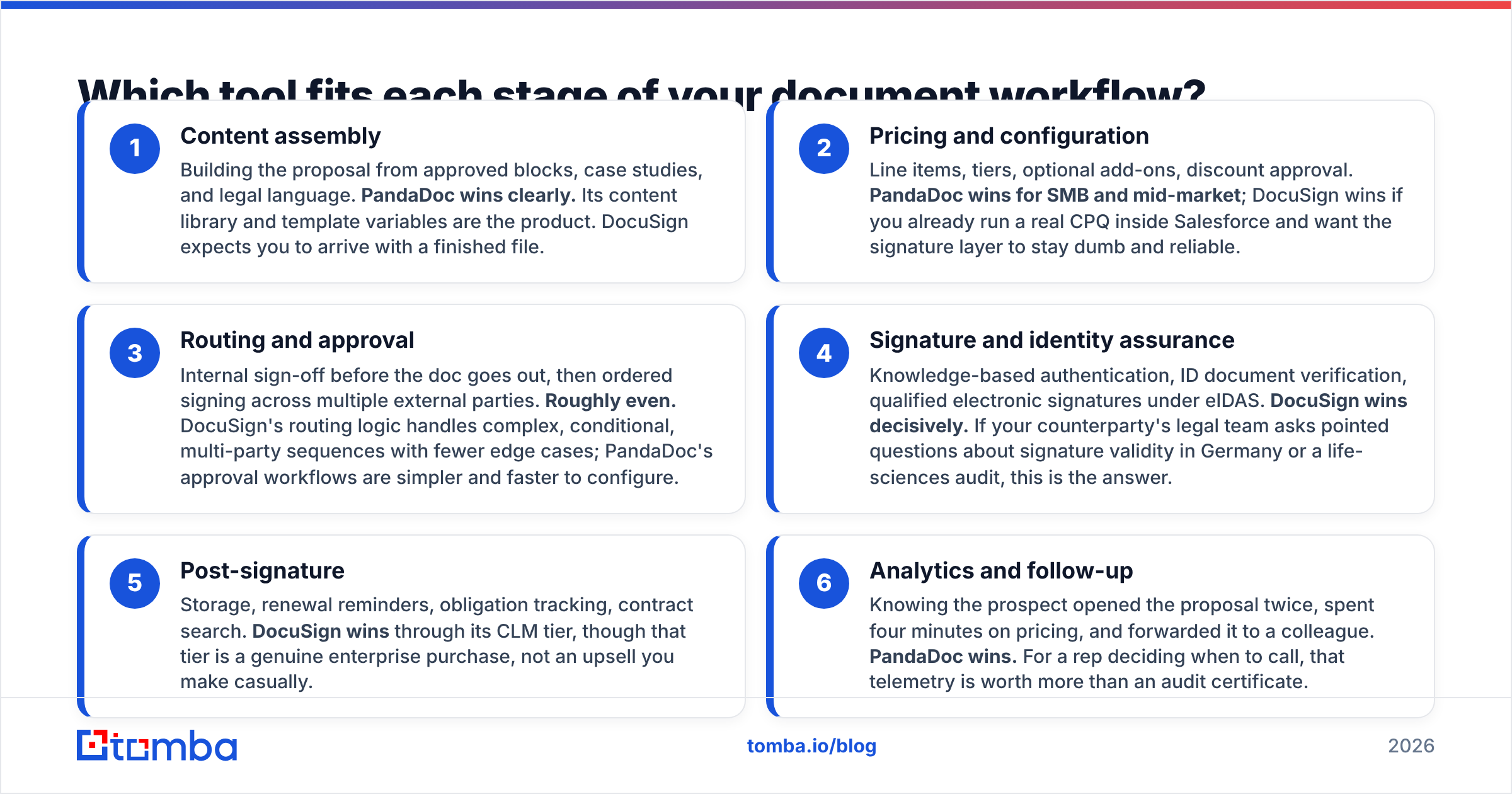
Content assembly — You build the proposal from approved blocks, case studies, and legal text. PandaDoc wins clearly. Its content library and template variables are the product. DocuSign expects a finished file.
Pricing and setup — Line items, tiers, add-ons, and discount approvals. PandaDoc wins for SMB and mid-market. DocuSign wins if you already run a real CPQ in Salesforce and want the signature layer to stay simple.
Routing and approval — Internal sign-off first, then ordered signing across outside parties. Roughly even. DocuSign handles complex, conditional, multi-party routing with fewer edge cases. PandaDoc's approvals are simpler and faster to set up.
Signature and identity checks — Knowledge-based auth, ID document checks, and qualified signatures under eIDAS. DocuSign wins clearly. If a buyer's lawyer asks hard questions about signature validity in Germany, this is your answer.
After the signature — Storage, renewal reminders, obligation tracking, and contract search. DocuSign wins through its CLM tier. That tier is a real enterprise purchase, though, not a casual upsell.
Analytics and follow-up — You learn the prospect opened the file twice, spent four minutes on pricing, and forwarded it. PandaDoc wins. For a rep deciding when to call, that beats an audit certificate.
Is DocuSign better for compliance and legal teams?#
Yes, and it is not close.
Regulated buyers are where the DocuSign vs PandaDoc gap is widest. Think pharma, medical devices, finance, or government work. DocuSign covers 21 CFR Part 11 for life sciences. It offers advanced and qualified eIDAS signatures in the EU. It checks signer identity per person.
Its certificate of completion is one that opposing counsel has seen a thousand times. That point matters more than people admit. Familiar things create less friction in a deal.
DocuSign is also safer for embedded signing, meaning signature flows inside your own product. The API is older. The SDKs cover more languages. The docs are thorough. More engineers have already shipped it. If signing is part of your product, that depth pays for itself.
Where DocuSign falls short: the authoring screen looks dated. Building a modern proposal means designing it elsewhere and importing a PDF. Reviewers on G2 praise its reliability. They also flag clunky menus and unclear pricing. That is a fair summary of the trade.
Is PandaDoc better for sales teams?#
For most rep-led motions, the DocuSign vs PandaDoc answer is PandaDoc.
The clearest win is proposal speed. A rep once spent ninety minutes building a custom quote in slides. In PandaDoc it takes fifteen. The pricing table, the security appendix, and three case studies are all saved blocks. Across a team, that adds up to real headcount savings.
The second win is buyer experience. Interactive quotes let a prospect toggle an add-on and watch the total change. That shifts the talk from "here is our price" to "here is what you are choosing." Teams often report shorter negotiations, though the effect depends on deal size.
The third win is the CRM loop. PandaDoc pushes document status back to HubSpot, Pipedrive, and Salesforce. Pipeline stages then move without manual updates. That is table stakes now, but PandaDoc's version is usually less fiddly. If your ops run through HubSpot or Salesforce, test both syncs during the trial.
Where PandaDoc falls short: big documents can load slowly in the editor. The mobile editor is limited. Past about fifty seats, per-seat pricing starts to look costly next to an enterprise DocuSign deal.
What does the DocuSign vs PandaDoc debate miss?#
Delivery to the wrong human.
No comparison table covers this failure. Your rep builds a perfect quote and routes it correctly. Then it goes to j.smith@company.com. The CFO who signs is at jsmith@company.io, because the domain changed after an acquisition. The document sits at 0% opened. The forecast slips. Everyone blames the tool that made the PDF.
Three habits prevent that, and none live inside DocuSign or PandaDoc:
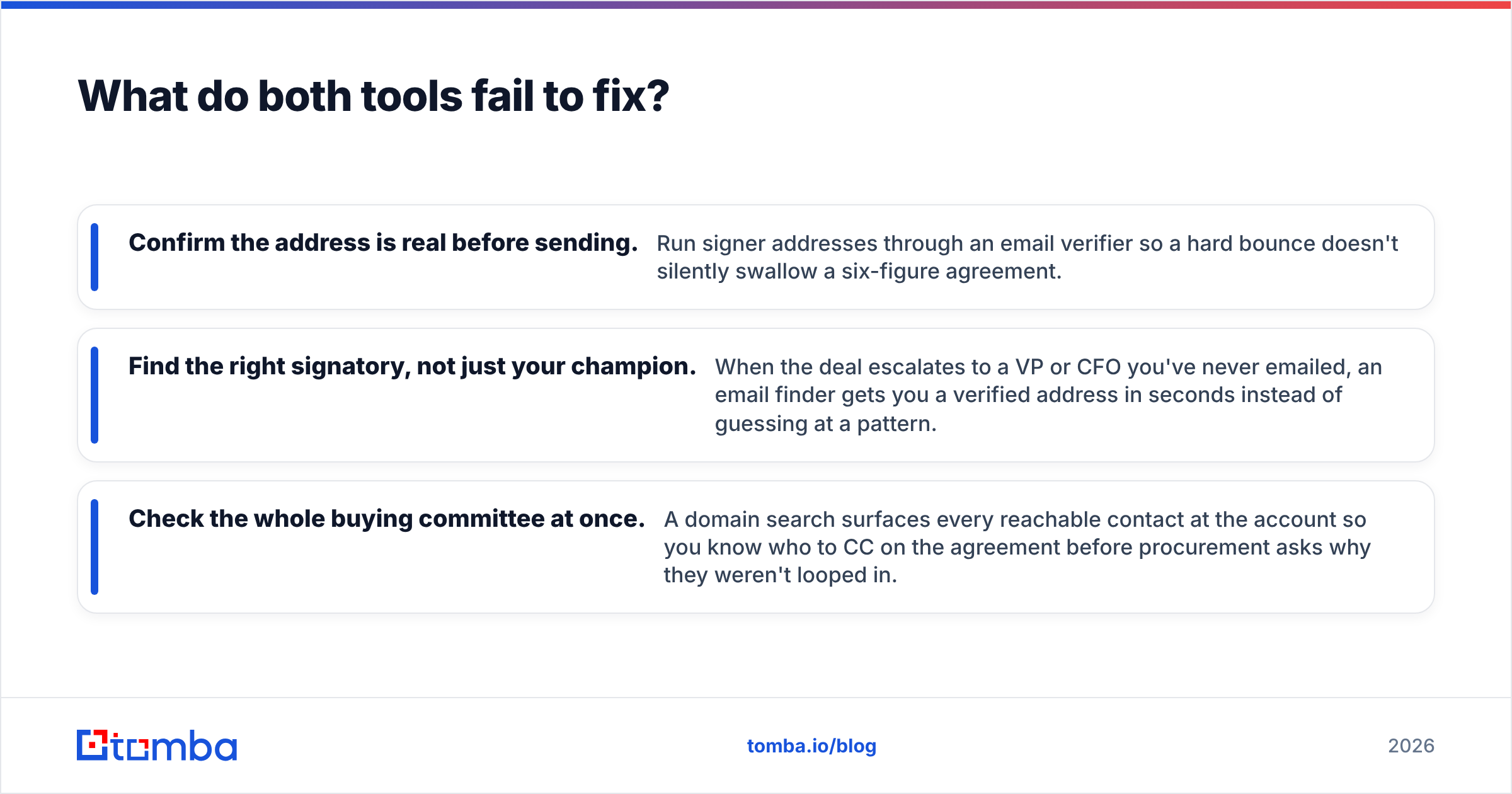
- Check the address before you send. Run signer addresses through an email verifier. A hard bounce should never swallow a six-figure deal.
- Find the real signer, not just your champion. When a deal reaches a VP or CFO you have never emailed, an email finder returns a verified address in seconds.
- Check the whole buying committee. A domain search lists every reachable contact at the account. Then you know who to CC before procurement asks why they were left out.
So which one should you buy?#
Pick DocuSign if:
- You work in a regulated field or sign across several legal regions.
- Legal, HR, and procurement send more documents than sales does.
- You need signing inside your own app.
- You want storage, renewals, and obligations under one roof.
Pick PandaDoc if:
- Sales sends the most documents and proposals are custom.
- You want quotes, pricing tables, and payments in one tool.
- Your team is under fifty seats and values speed over compliance depth.
- Rep time spent formatting documents is a visible cost.
Run both for one full sales cycle before you commit. Send the same real agreement through each. Then measure three things: minutes to build, time to signature, and support tickets filed. Those numbers settle the DocuSign vs PandaDoc question faster than any post, including this one.
Whichever you pick, fix the input before you tune the output. A great proposal sent to a dead inbox converts at zero. Use the Tomba Email Finder to confirm you are emailing a real, current decision-maker. The free tier covers 25 searches a month. Paid plans start at $49/mo on Tomba pricing. Get the address right, then let DocuSign or PandaDoc do the part it is good at.
Related guides#
Ready to find emails that actually work?
Join 150,000+ professionals who stopped guessing and started sending. Free credits on signup — no credit card required.
Get the Tomba newsletter
Practical outbound tactics and product updates — once every two weeks.
About the author