Double Opt In in 2026: How It Works and Is It Worth It?
Double opt in shrinks your list on purpose — and that is usually the point. Here is what the confirmation step actually does to deliverability, what it costs you in signups, and when single opt-in is the smarter call.
TL;DR
- Double opt in adds one step to signup: the subscriber clicks a confirmation link in an email before they land on your list. That single click filters out typos, bots, spam traps, and people who never meant to subscribe.
- Expect to lose roughly 20-35% of raw signups to unconfirmed addresses. Expect to gain measurably cleaner engagement metrics, lower bounce rates, and fewer complaints.
- It is not universally required by law — GDPR demands provable consent, not a specific mechanism — but it is the cheapest proof of consent you can generate.
- Double opt in does nothing for cold outbound prospecting, where nobody signs up in the first place. There, real-time email verification is the equivalent hygiene layer.
- Use it when your list feeds a shared-IP ESP, when you sell into the EU, or when your signup form is publicly exposed. Skip it for gated content, purchase receipts, and high-intent product trials.
What is double opt in?#
Double opt in is a two-step subscription flow. Someone enters their email address on your form (step one), then receives an email with a confirmation link they must click (step two). Until that link is clicked, the address sits in a pending state and receives nothing else.
Think of it like a nightclub with a coat check. Single opt-in is the doorman waving everyone through — fast, crowded, and you have no idea who is actually inside. Double opt in makes each person hand over a coat and take a ticket. Slower queue, smaller room, but every person in there chose to be there and you have a receipt to prove it.
The technical mechanics are dull on purpose: your ESP generates a signed token, embeds it in a URL, and flips a boolean when the URL is hit. What matters is the behavioral filter that token creates. A confirmation click proves three things at once — the mailbox exists, a human controls it, and that human wanted your email. No other list-hygiene method proves all three simultaneously.
The term itself is a slight misnomer that stuck. Opt-in email taxonomy calls this "confirmed opt-in" (COI) in RFC-adjacent circles, because there is only one opt-in decision — it just gets confirmed. Everyone in marketing says double opt in, so that is what we will use.
How does double opt in actually work, step by step?#
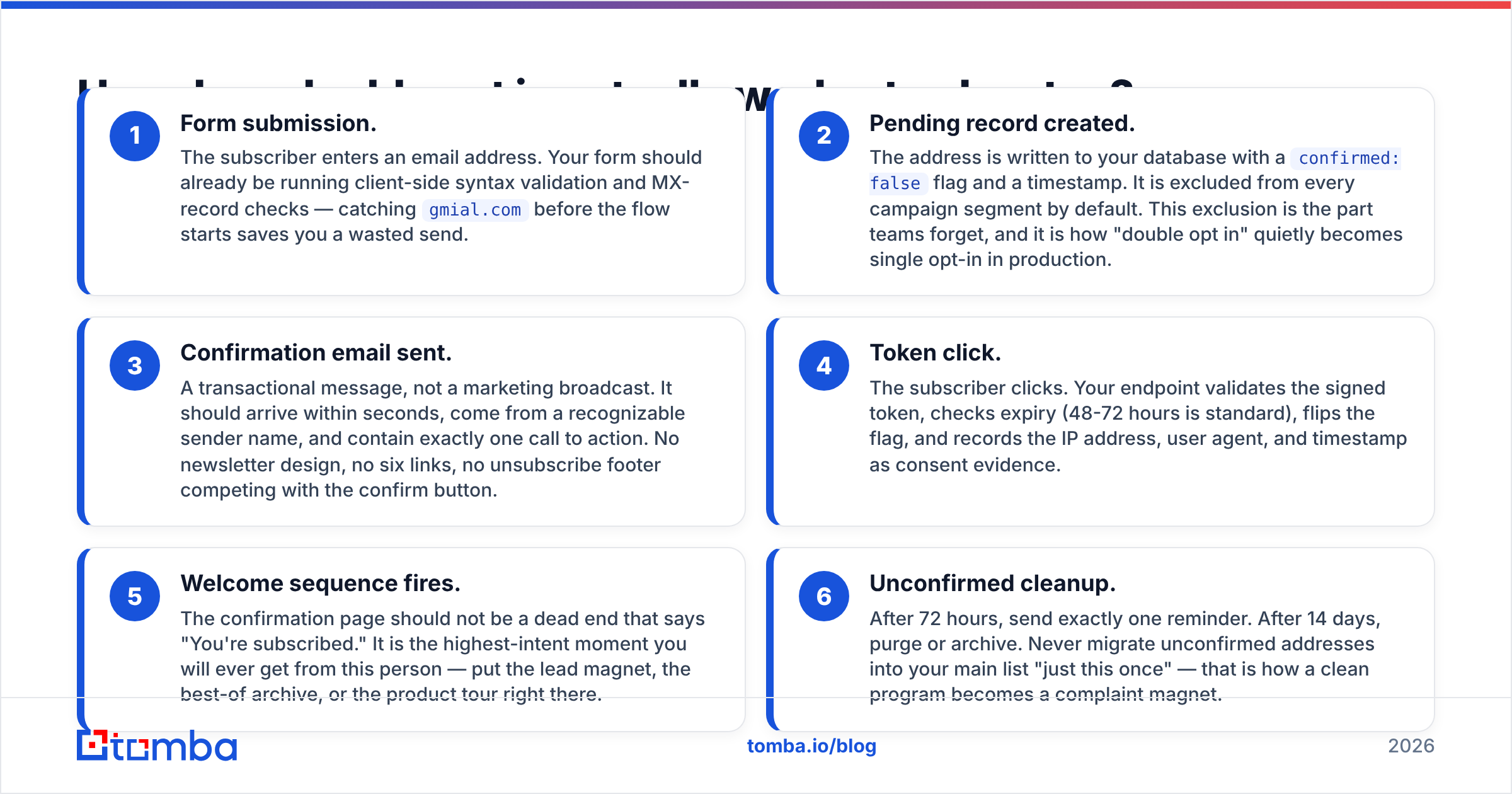
- Form submission. The subscriber enters an email address. Your form should already be running client-side syntax validation and MX-record checks — catching
gmial.combefore the flow starts saves you a wasted send. - Pending record created. The address is written to your database with a
confirmed: falseflag and a timestamp. It is excluded from every campaign segment by default. This exclusion is the part teams forget, and it is how "double opt in" quietly becomes single opt-in in production. - Confirmation email sent. A transactional message, not a marketing broadcast. It should arrive within seconds, come from a recognizable sender name, and contain exactly one call to action. No newsletter design, no six links, no unsubscribe footer competing with the confirm button.
- Token click. The subscriber clicks. Your endpoint validates the signed token, checks expiry (48-72 hours is standard), flips the flag, and records the IP address, user agent, and timestamp as consent evidence.
- Welcome sequence fires. The confirmation page should not be a dead end that says "You're subscribed." It is the highest-intent moment you will ever get from this person — put the lead magnet, the best-of archive, or the product tour right there.
- Unconfirmed cleanup. After 72 hours, send exactly one reminder. After 14 days, purge or archive. Never migrate unconfirmed addresses into your main list "just this once" — that is how a clean program becomes a complaint magnet.
Single opt-in vs. double opt in: which one actually wins?#
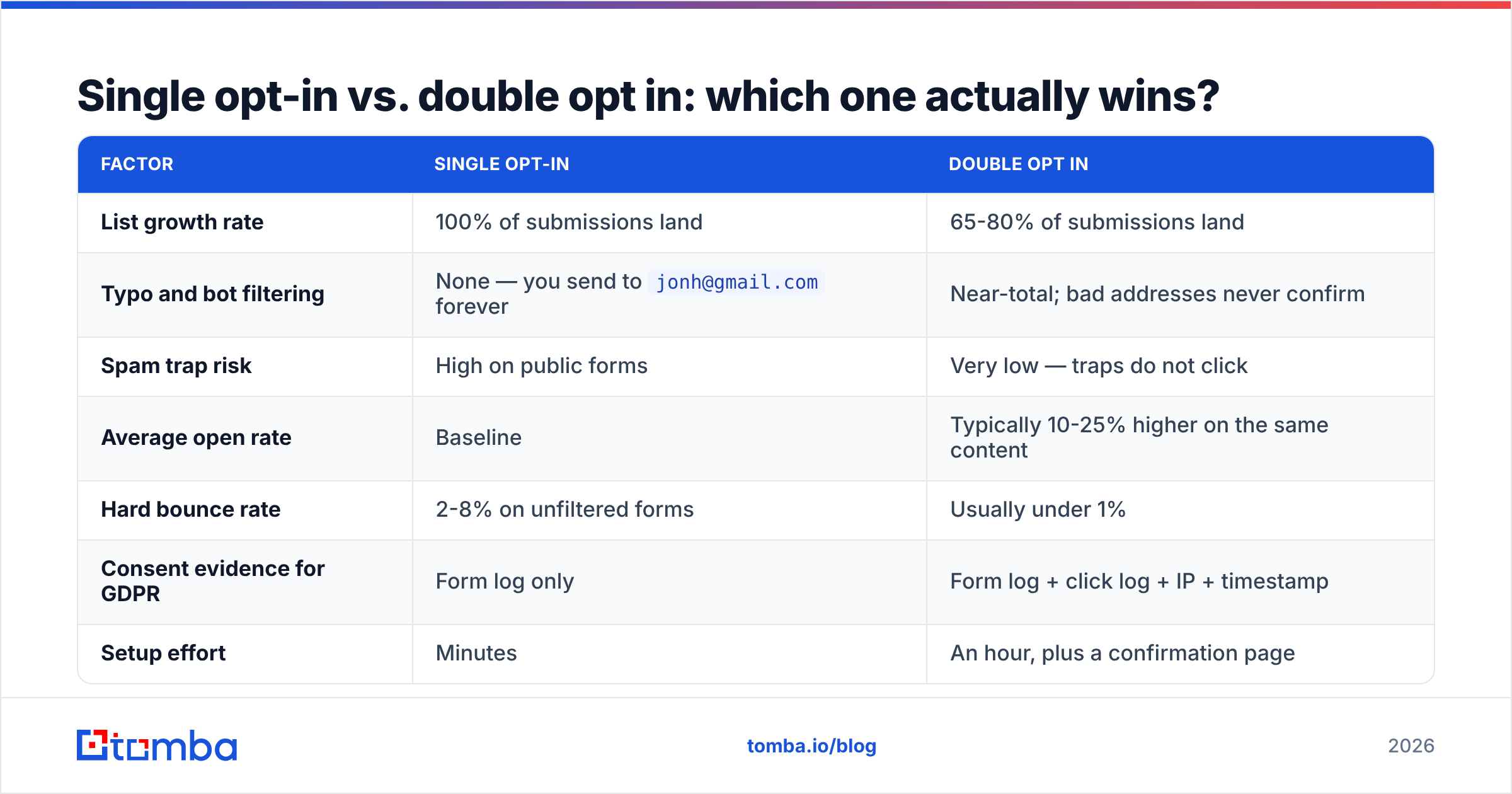
There is no universal winner, which is why this argument never dies. The honest answer depends on how much you value list size versus email deliverability and legal defensibility.
| Factor | Single opt-in | Double opt in |
|---|---|---|
| List growth rate | 100% of submissions land | 65-80% of submissions land |
| Typo and bot filtering | None — you send to jonh@gmail.com forever |
Near-total; bad addresses never confirm |
| Spam trap risk | High on public forms | Very low — traps do not click |
| Average open rate | Baseline | Typically 10-25% higher on the same content |
| Hard bounce rate | 2-8% on unfiltered forms | Usually under 1% |
| Consent evidence for GDPR | Form log only | Form log + click log + IP + timestamp |
| Setup effort | Minutes | An hour, plus a confirmation page |
| Best fit | High-intent flows (trials, purchases, gated PDFs) | Newsletters, public forms, EU audiences, shared IPs |
Read that table as a trade of quantity for certainty. If your business model monetizes reach — ad-supported newsletters selling on subscriber count — the shrinkage genuinely hurts and you may rationally accept a dirtier list. If your business model monetizes replies, meetings, or purchases, the confirmed list will out-earn the bigger one within a quarter.
Does double opt in really improve deliverability?#
Yes, but indirectly — and the indirection is why skeptics dismiss it.
Mailbox providers do not check whether you used a confirmation step. Gmail cannot see your database flag. What Gmail sees is the aggregate behavior of the addresses you send to: open rates, reply rates, deletion-without-reading, manual spam reports, and bounce volume. Google's sender guidelines are explicit that a spam complaint rate above 0.3% puts your domain at risk, and that bulk senders must make unsubscribing trivial.
Double opt in improves every one of those inputs at once:
- Bounces collapse. Typo'd and abandoned addresses never enter the list, so hard bounces drop toward zero. Bounce spikes are one of the fastest ways to torch sender reputation.
- Complaints drop. People who deliberately confirmed rarely hit "report spam" three weeks later. Most complaints come from subscribers who do not remember signing up.
- Engagement rises. Not because your content improved, but because the denominator shrank to people who wanted it. Providers weight engagement heavily when deciding inbox versus promotions versus spam.
- Spam traps stay out. Recycled and pristine traps do not click confirmation links. This is the single most valuable thing double opt in does, because one pristine trap hit can blacklist a sending domain for weeks.
The catch: double opt in protects you going forward. It does nothing about the 40,000 addresses already sitting in your list from three years of single opt-in forms. For those, you need a one-time cleanup — run the file through a bulk verify pass, drop the invalids and the risky catch-alls, then re-permission the stale-but-valid segment with a "still want these?" campaign.
Is double opt in legally required in 2026?#
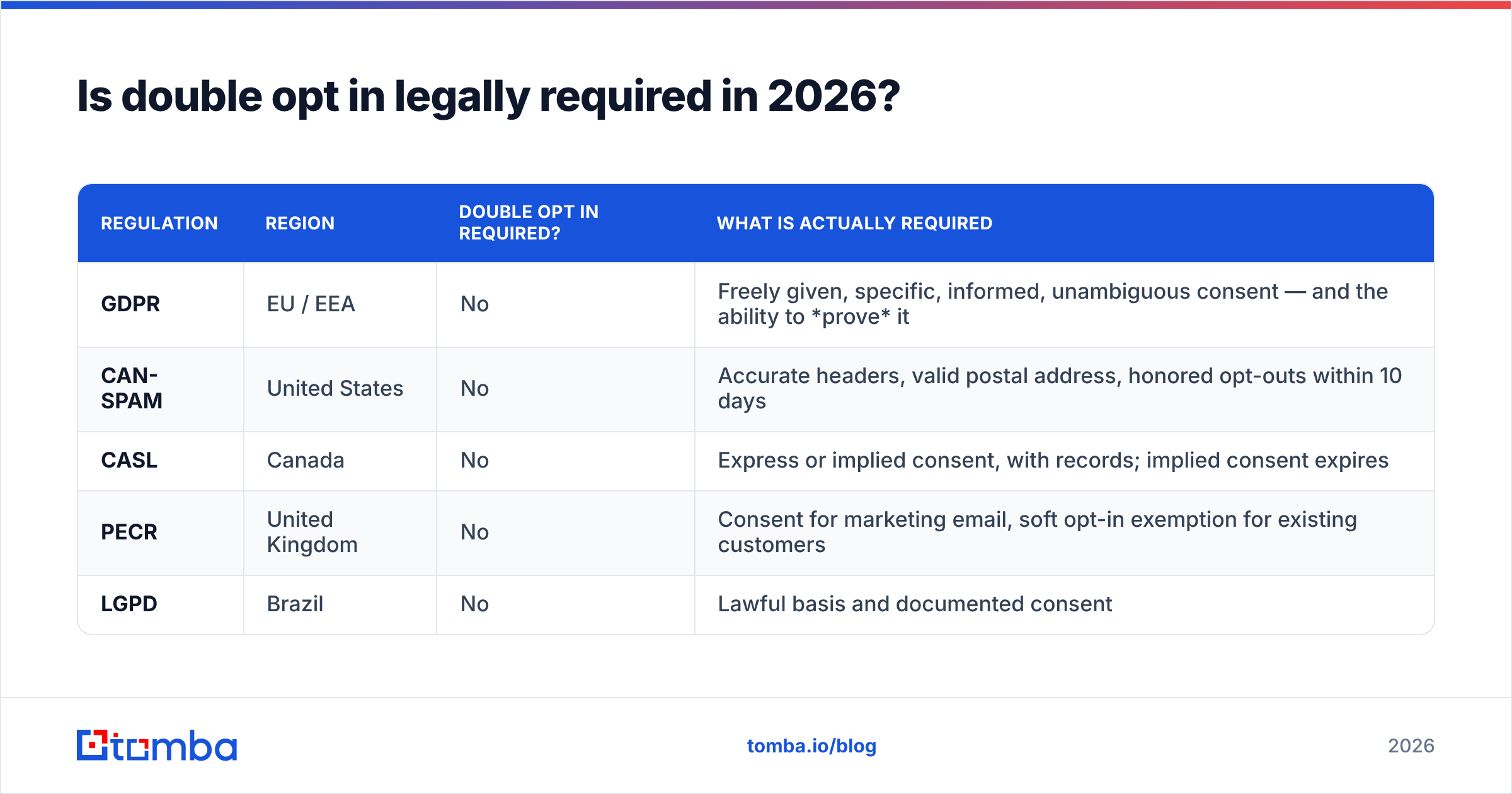
Mostly no, with one important nuance and one practical reality.
| Regulation | Region | Double opt in required? | What is actually required |
|---|---|---|---|
| GDPR | EU / EEA | No | Freely given, specific, informed, unambiguous consent — and the ability to prove it |
| CAN-SPAM | United States | No | Accurate headers, valid postal address, honored opt-outs within 10 days |
| CASL | Canada | No | Express or implied consent, with records; implied consent expires |
| PECR | United Kingdom | No | Consent for marketing email, soft opt-in exemption for existing customers |
| LGPD | Brazil | No | Lawful basis and documented consent |
The nuance: German courts and several EU data protection authorities have repeatedly treated confirmed opt-in as the practical standard for demonstrating consent in disputes. Nothing in the regulation names it, but when a regulator asks "prove this person agreed," a timestamped click from a logged IP address ends the conversation. A form-submission log alone does not — anyone can type anyone's address into your form.
The practical reality: your ESP may force your hand. Several major platforms enable confirmed opt-in by default for imported lists, and some require it for accounts with elevated complaint rates. Check your provider's policy before you architect around it. HubSpot's guidance on double opt-in is a reasonable neutral summary of where the mainstream lands.
What does a double opt in flow that actually converts look like?#
Most confirmation-rate problems are design problems, not consent problems. If only 55% of your signups confirm, you have a broken email — not a disinterested audience.
- Set expectations on the form itself. One line under the button: "Check your inbox — we'll send a confirmation link." Confirmation rates jump when people are looking for the email.
- Send from a human-looking sender.
sarah@yourdomain.combeatsnoreply@mail.yourdomain.comby a wide margin, andnoreply@addresses also correlate with worse placement generally. - Write a subject line that names the action. "Confirm your subscription" outperforms clever every time. This is the one email where curiosity gaps hurt you. If you want to test variants, run them through a subject line tester rather than guessing.
- One button, nothing else. No navigation, no social icons, no secondary offer. Every additional link is a chance to leave without confirming.
- Show the interstitial page. After the form, land people on a page that says "Almost done — click the link we just sent to your inbox," with the sending address visible so they can whitelist it or search for it.
- Send one reminder, 24 hours later. A single nudge typically recovers 8-15% of pending records. Two reminders recover almost nothing and generate complaints.
When should you skip double opt in?#
Skip it when the confirmation click adds friction without adding information — that is, when intent is already proven by a stronger signal.
Skip for: purchase and transaction receipts, product trial signups where the user already verified their email to access the account, gated content where the asset is delivered by email (the download is the confirmation), event registrations, and existing customers under a soft opt-in exemption.
Use it for: public newsletter forms, footer signups, giveaway and contest entries, co-marketing lists, anything imported from a partner, and any list that will be sent from a shared IP pool where your neighbors' reputation is already a variable you cannot control.
The pattern: if you already have a behavioral proof stronger than a click — money changed hands, an account was created, a password was set — the confirmation email is redundant friction. If all you have is a string someone typed into a box, confirm it.
Does double opt in apply to cold outbound?#
No, and conflating the two causes real damage.
Double opt in is a permission mechanism. Cold outbound has no permission to confirm — you are contacting someone who never visited your site. There is no ethical or technical version of "double opt in for prospects." Anyone selling you one is selling something else.
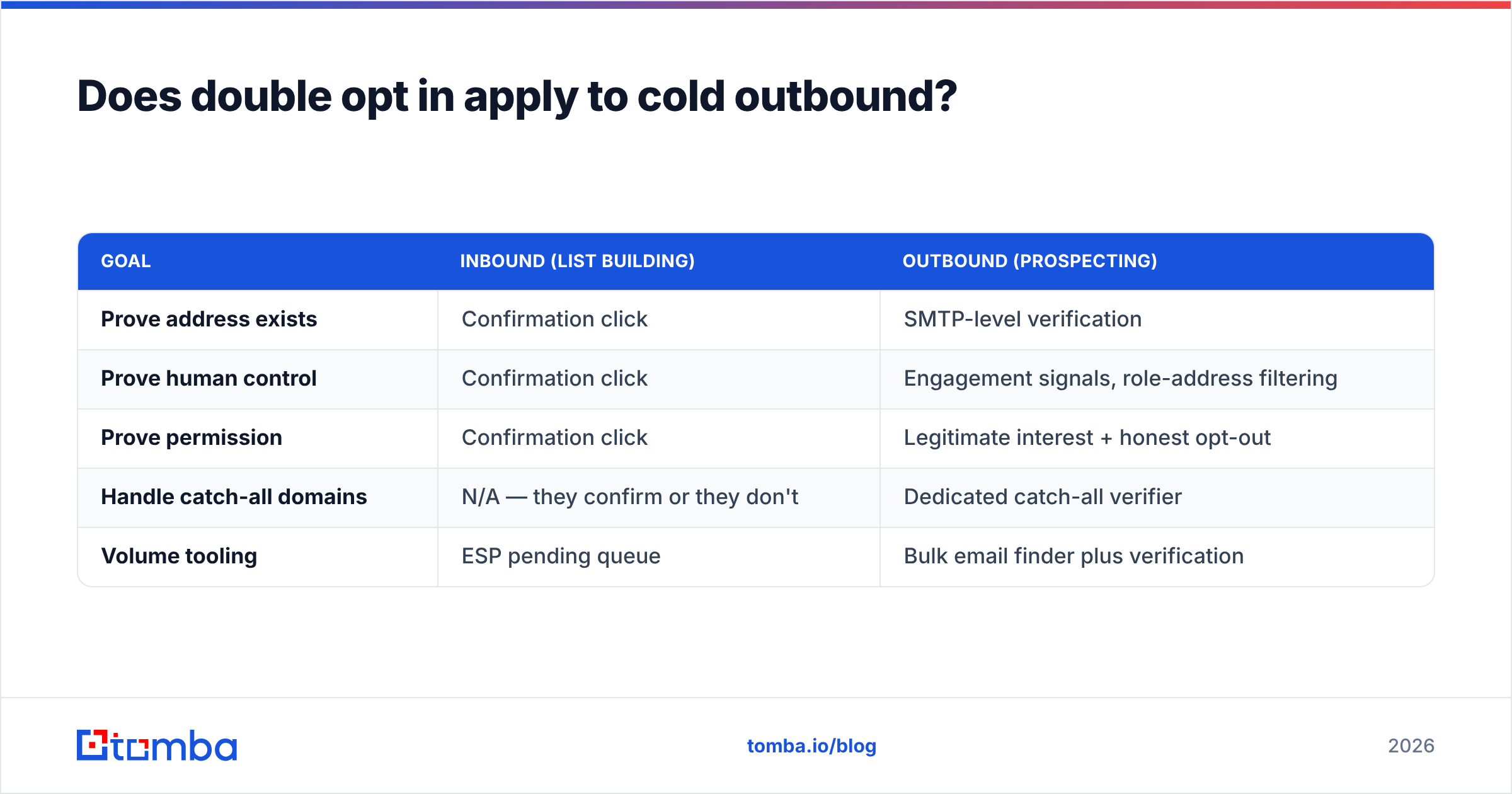
What cold outbound needs is the hygiene half of what double opt in delivers, achieved by a different route. Where a confirmation click proves an address is real and monitored, outbound teams have to establish the same thing before the first send:
| Goal | Inbound (list building) | Outbound (prospecting) |
|---|---|---|
| Prove address exists | Confirmation click | SMTP-level verification |
| Prove human control | Confirmation click | Engagement signals, role-address filtering |
| Prove permission | Confirmation click | Legitimate interest + honest opt-out |
| Handle catch-all domains | N/A — they confirm or they don't | Dedicated catch-all verifier |
| Volume tooling | ESP pending queue | Bulk email finder plus verification |
The bounce math is identical on both sides. A 6% bounce rate wrecks your domain reputation whether those addresses came from a leaky signup form or a stale prospect list. The difference is only in how you prevent it — a confirmation link inbound, a verification API outbound.
What should you do this week?#
Three concrete moves, in order of impact:
- Audit whether your "double opt in" is real. Query your database for records with
confirmed: falsethat have received a campaign in the last 90 days. In most accounts this number is not zero, and every one of those sends is a complaint waiting to happen. - Clean the legacy segment. Everything collected before you turned confirmation on is unverified by definition. Run it through verification, drop invalids, and re-permission the rest.
- Fix the confirmation email. Measure your confirm rate. Below 70% on an interested audience means the email is landing in promotions, arriving late, or asking for too much. Test sender name first, subject line second.
If your growth motion is outbound rather than inbound, the equivalent discipline is verifying addresses before they ever hit a sequence. The Tomba Email Finder returns addresses with a confidence score and SMTP-level validation attached, so your prospect list arrives pre-filtered instead of getting filtered by Gmail after the damage is done. The free tier covers 25 searches a month if you want to test the accuracy against a list you already trust; paid plans start at $49/mo, and full Tomba pricing is public. Confirm your subscribers, verify your prospects, and let your sending reputation stop being the thing that decides whether your best email gets read.
Related guides#
Ready to find emails that actually work?
Join 150,000+ professionals who stopped guessing and started sending. Free credits on signup — no credit card required.
Get the Tomba newsletter
Practical outbound tactics and product updates — once every two weeks.
About the author