How to Drive Pipeline in 2026: The Complete B2B Playbook
Most teams try to drive pipeline by adding activity, then wonder why coverage still slips. Here's the 2026 coverage math, channel-by-channel benchmarks, and the data fixes that move the number.
TL;DR
- To drive pipeline you need three things working at once: enough qualified accounts, enough accurate contact data, and enough sequenced touches. Missing any one of them turns activity into noise.
- Coverage math beats vibes. If you close 22% of qualified pipeline and carry a $1M quarterly target, you need roughly $4.5M in the funnel — not "more meetings."
- Bad contact data is the silent tax. A 30% bounce-and-wrong-person rate on a 5,000-contact list quietly deletes 1,500 attempts before a single reply is possible.
- Multi-threading is the highest-leverage change most teams can make this quarter: 6–10 stakeholders now sit on a typical B2B buying committee.
- Measure pipeline created per rep per week, not dials. Leading indicators tell you in 10 days what bookings tell you in 90.
What Does It Actually Mean to Drive Pipeline?#
Driving pipeline means creating a predictable, repeatable supply of qualified opportunities — not a burst of activity that spikes in week 11 of the quarter and collapses in week 2 of the next one.
Most teams conflate the two. A "pipeline push" where everyone dials for three days generates meetings, sure. It also borrows from next quarter, burns the best accounts on a rushed pitch, and teaches nobody anything repeatable. When the quarter closes, you're back to the same starting position.
A real pipeline engine has four moving parts:
- Target account supply — a defined ICP and a list that regenerates itself as companies hit trigger events (funding, hiring, tech changes, leadership moves).
- Contact coverage — verified emails and direct phone numbers for every buying-committee role at those accounts, not just the one VP you found on LinkedIn.
- Sequenced touch volume — enough attempts per contact, spaced correctly, across enough channels to survive a 3–8% reply rate.
- Qualification discipline — a shared definition of what counts as pipeline, enforced at stage 1, so the number you report is the number you can forecast.
Break any one and the whole thing degrades. Great messaging against a stale list fails. A perfect list with two touches per contact fails. Both fail quietly, which is why they persist for quarters at a time.
How Much Pipeline Do You Actually Need?#
Start with coverage math, then work backwards to activity. This is the calculation that turns "we need more pipeline" into a weekly number a rep can act on.
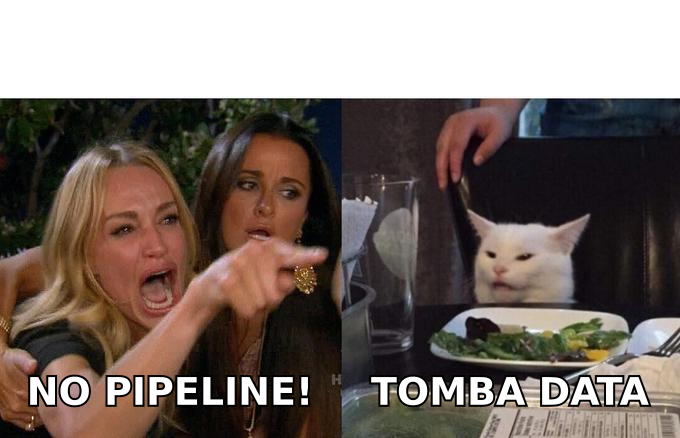
The formula: Required pipeline = Quota ÷ Win rate. Then divide by your average deal size to get opportunity count, and divide again by your meeting-to-opportunity rate to get meetings needed.
| Input | Team A (SMB) | Team B (Mid-market) | Team C (Enterprise) |
|---|---|---|---|
| Quarterly quota per rep | $150,000 | $300,000 | $600,000 |
| Average deal size | $8,000 | $35,000 | $120,000 |
| Win rate (qualified opps) | 28% | 22% | 16% |
| Required pipeline | $536,000 | $1,364,000 | $3,750,000 |
| Opportunities needed | 67 | 39 | 31 |
| Meetings needed (at 55% → opp) | 122 | 71 | 57 |
| Verified contacts needed (at 4% reply, 60% meeting rate) | ~5,080 | ~2,960 | ~2,375 |
Read the bottom row carefully. A mid-market rep needs close to 3,000 verified contacts per quarter to hit a $300K number through outbound alone. If your list is 25% invalid, that's really 3,950 raw records — and every one of those bad rows costs sender reputation on the way through.
Two things fall out of this table immediately. First, enterprise reps need fewer contacts but far better ones, because each account is worth 15x an SMB account. Second, nobody hits these numbers by working harder on a list that doesn't exist yet. Supply is the constraint, not effort.
Which Channels Drive Pipeline Fastest in 2026?#
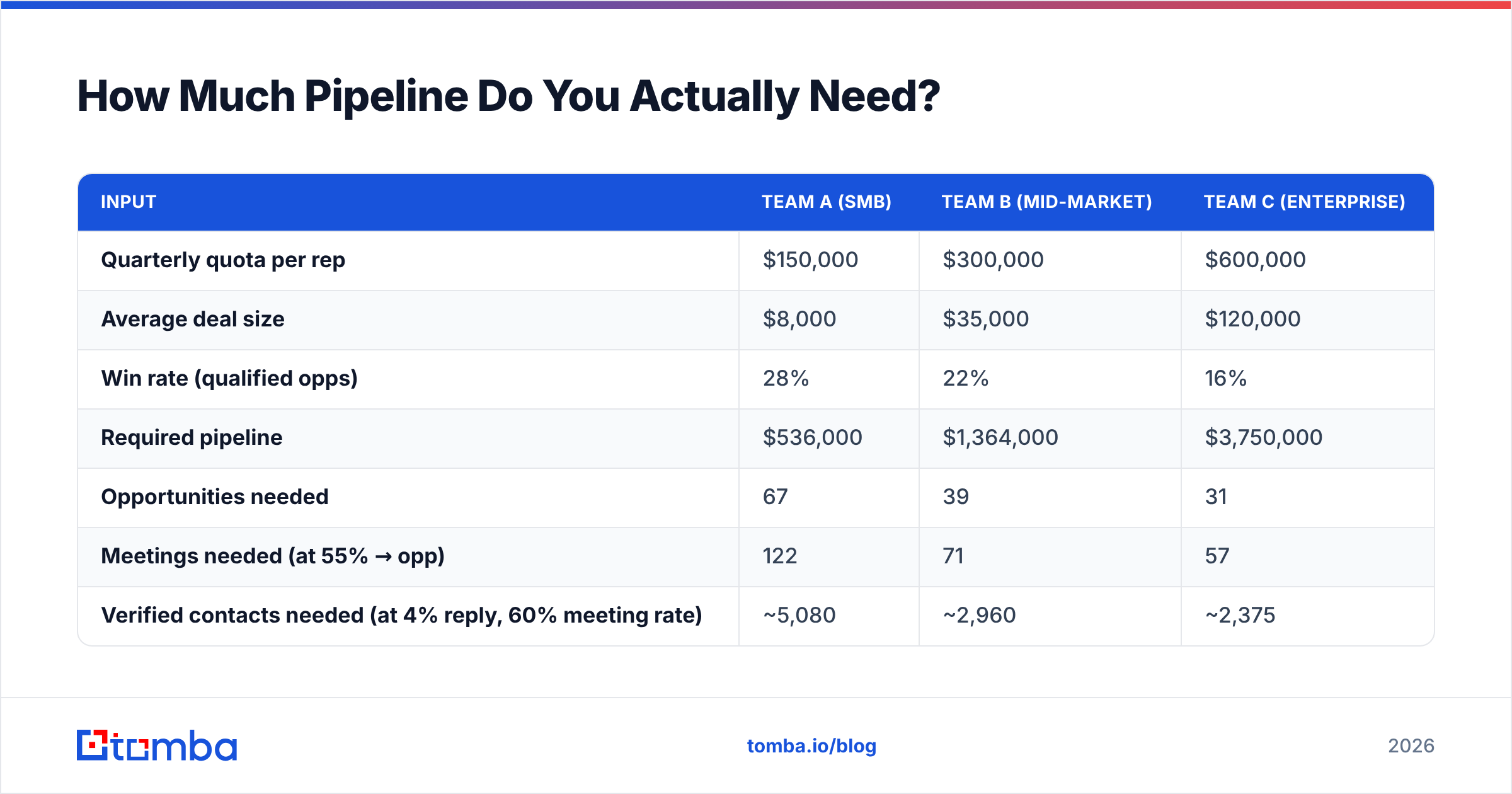
There's no single best channel — there's a best mix for your deal size and cycle length. Here's how the main pipeline sources compare on the metrics that matter for planning.
| Channel | Typical cost per opportunity | Time to first pipeline | Reply/conversion rate | Best for | Main failure mode |
|---|---|---|---|---|---|
| Cold email | $180–$450 | 2–4 weeks | 2–8% reply | Any ACV above ~$8K | Bad data, poor deliverability |
| Cold calling | $400–$900 | 1–2 weeks | 4–9% connect-to-meeting | ACV $30K+, urgent problems | Wrong numbers, no direct dials |
| LinkedIn / social | $250–$600 | 3–6 weeks | 15–25% accept, 5–10% reply | Senior buyers, warm brands | Connection limits, slow scale |
| Inbound content | $120–$400 | 4–9 months | 1–3% visitor-to-MQL | Long-term compounding | Slow, hard to force |
| Paid search | $500–$2,000 | 1–2 weeks | 2–5% form fill | High-intent categories | Cost inflation, competitor bidding |
| Partner / referral | $80–$250 | 6–12 weeks | 25–40% meeting-to-opp | Established teams | Doesn't scale on command |
The practical read: outbound is the only channel you can turn on this month and see pipeline from this quarter. Everything else is either slower (content, partners) or more expensive per opportunity (paid). That's why outbound remains the backbone of most pipeline plans even at companies with strong inbound — it's the lever you can actually pull on a deadline.
But outbound only works if the underlying data holds up. Which brings us to the part most pipeline plans skip.
Why Do Most Pipeline Pushes Fail?#
Five failure modes account for the overwhelming majority of pipeline misses. They're all fixable, and none of them require hiring.
Data decay you never measured. B2B contact data degrades roughly 22–30% per year as people change jobs. A list you built 14 months ago is meaningfully fiction today. Re-verify before every campaign, not once a year.
Single-threading. Gartner's research on the B2B buying journey puts the typical buying group at 6–10 people. If you're emailing one contact per account, you're playing a lottery where the ticket is "this specific person happens to care right now." Three to five contacts per target account is the floor.
Under-touching. Most reps stop after 2–3 attempts. Meaningful reply curves don't flatten until touch 7–9 across channels. Half your pipeline lives in the touches you're not sending.
Deliverability collapse. Sending to unverified lists drives bounces above 5%, which trips spam filters, which drops your inbox placement, which silently kills campaigns that look fine in your dashboard. Your open rate falls and you blame the subject line.
Fake qualification. Stage-1 opportunities that were never qualified inflate the number and destroy forecast accuracy. When leadership stops trusting the pipeline report, they respond by demanding more activity — which restarts the cycle.
Notice that three of the five are data problems, not effort problems. That's the pattern across most teams we see: the sales motion is fine, the fuel is contaminated.
How Do You Build a Repeatable Pipeline Engine?#
Here's the sequence that works, in order. Don't skip steps — each one compounds the next.
Step 1 — Define the account list with real criteria. Not "mid-market SaaS." Something you can filter on: 50–500 employees, US or UK, using a specific tech stack, hiring for roles that signal your problem. Aim for 400–1,200 accounts per rep per quarter. Small enough to work properly, big enough to survive a 3% conversion rate.
Step 2 — Map the buying committee per account. For each account, identify 3–5 roles: the economic buyer, the champion, the technical evaluator, and one adjacent stakeholder who feels the pain daily. Use domain search to pull every public email at the company, then filter by title rather than guessing at patterns one name at a time.
Step 3 — Verify before you send. Run every address through an email verifier and drop anything that doesn't return valid. Target a bounce rate under 2%. This single step protects the sender reputation that every future campaign depends on.
Step 4 — Enrich with a second channel. Email-only sequences cap out. Add direct dials via a phone finder so reps can call the contacts who opened but didn't reply — that's the highest-converting call list you'll ever have.
Step 5 — Build a 12-touch, 21-day sequence. Mix channels: email, call, LinkedIn view/connect, email, call, voicemail. Vary the angle each time — problem, proof, peer example, provocative question, breakup.
Step 6 — Review weekly on leading indicators. Contacts added, verified rate, touches sent, replies, meetings booked, pipeline created. If any number drops two weeks running, fix it before it reaches the bookings line 90 days later.

What Tools Do You Need to Drive Pipeline?#
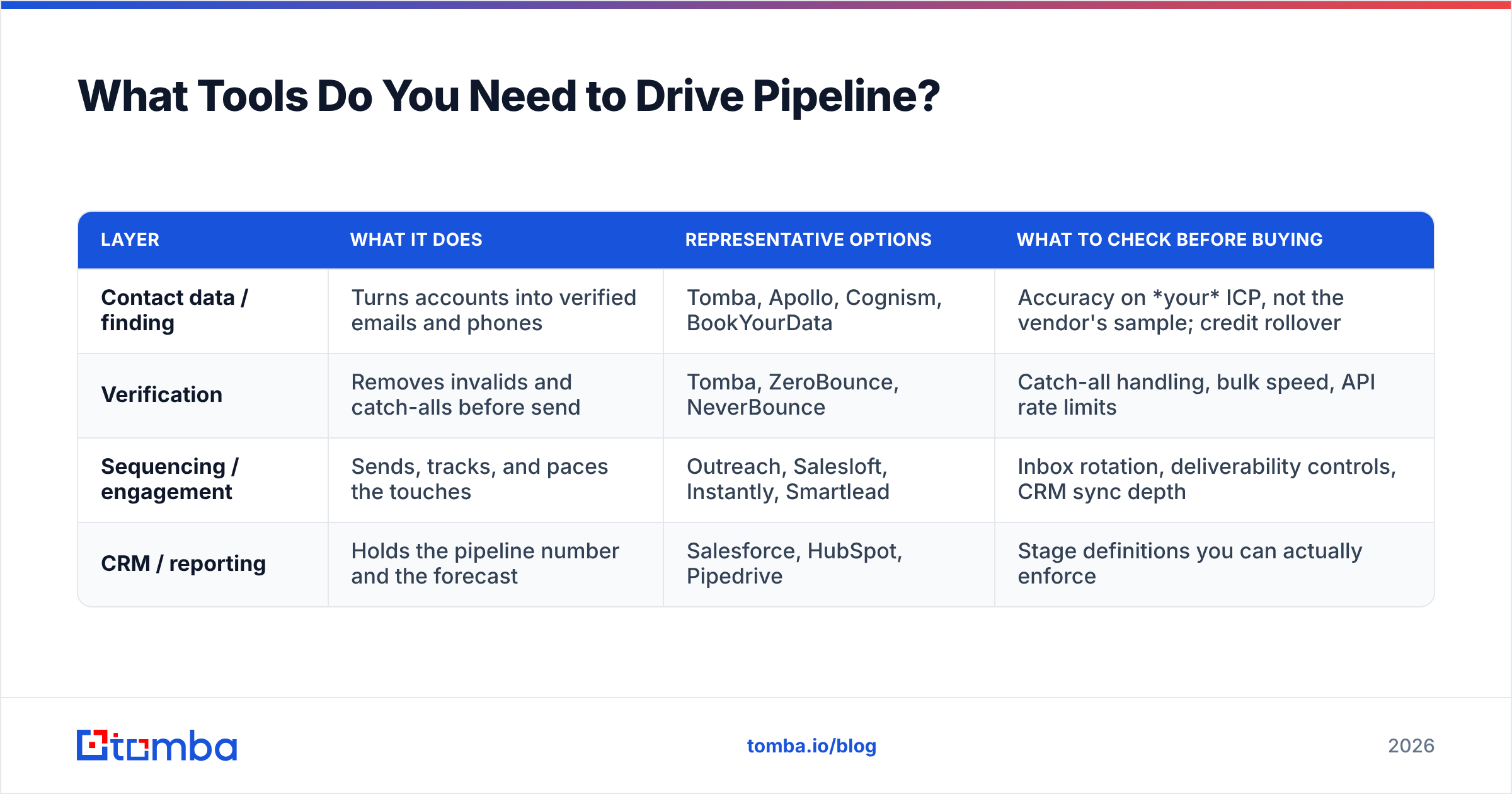
You need fewer tools than vendors would like you to believe. Four categories cover the entire motion, and several products span more than one.
| Layer | What it does | Representative options | What to check before buying |
|---|---|---|---|
| Contact data / finding | Turns accounts into verified emails and phones | Tomba, Apollo, Cognism, BookYourData | Accuracy on your ICP, not the vendor's sample; credit rollover |
| Verification | Removes invalids and catch-alls before send | Tomba, ZeroBounce, NeverBounce | Catch-all handling, bulk speed, API rate limits |
| Sequencing / engagement | Sends, tracks, and paces the touches | Outreach, Salesloft, Instantly, Smartlead | Inbox rotation, deliverability controls, CRM sync depth |
| CRM / reporting | Holds the pipeline number and the forecast | Salesforce, HubSpot, Pipedrive | Stage definitions you can actually enforce |
On pricing, run a like-for-like credit comparison rather than a headline-price comparison. As an example of how the entry tier looks at a data-first vendor: Tomba pricing starts with a free tier at 25 searches/month, Starter at $49/mo, Growth at $99/mo, and Pro at $249/mo — with the same accuracy on every plan. Competitor tiers often gate verification or API access behind higher plans, so a $79 plan can cost more per usable contact than a $99 one.
Before you commit, test on 100 real accounts from your ICP and measure three things: match rate, bounce rate after verification, and how many of the found contacts hold the title you asked for. Peer reviews on G2's sales intelligence category are useful for narrowing the shortlist, but they can't tell you how a tool performs on German manufacturing firms or US healthcare — only your own test can.
For teams building lists at volume, a bulk email finder turns a CSV of 2,000 companies into a verified contact file in one pass, which is the difference between a quarterly list refresh taking an afternoon versus two weeks of SDR time.
How Do You Measure Whether You're Actually Driving Pipeline?#
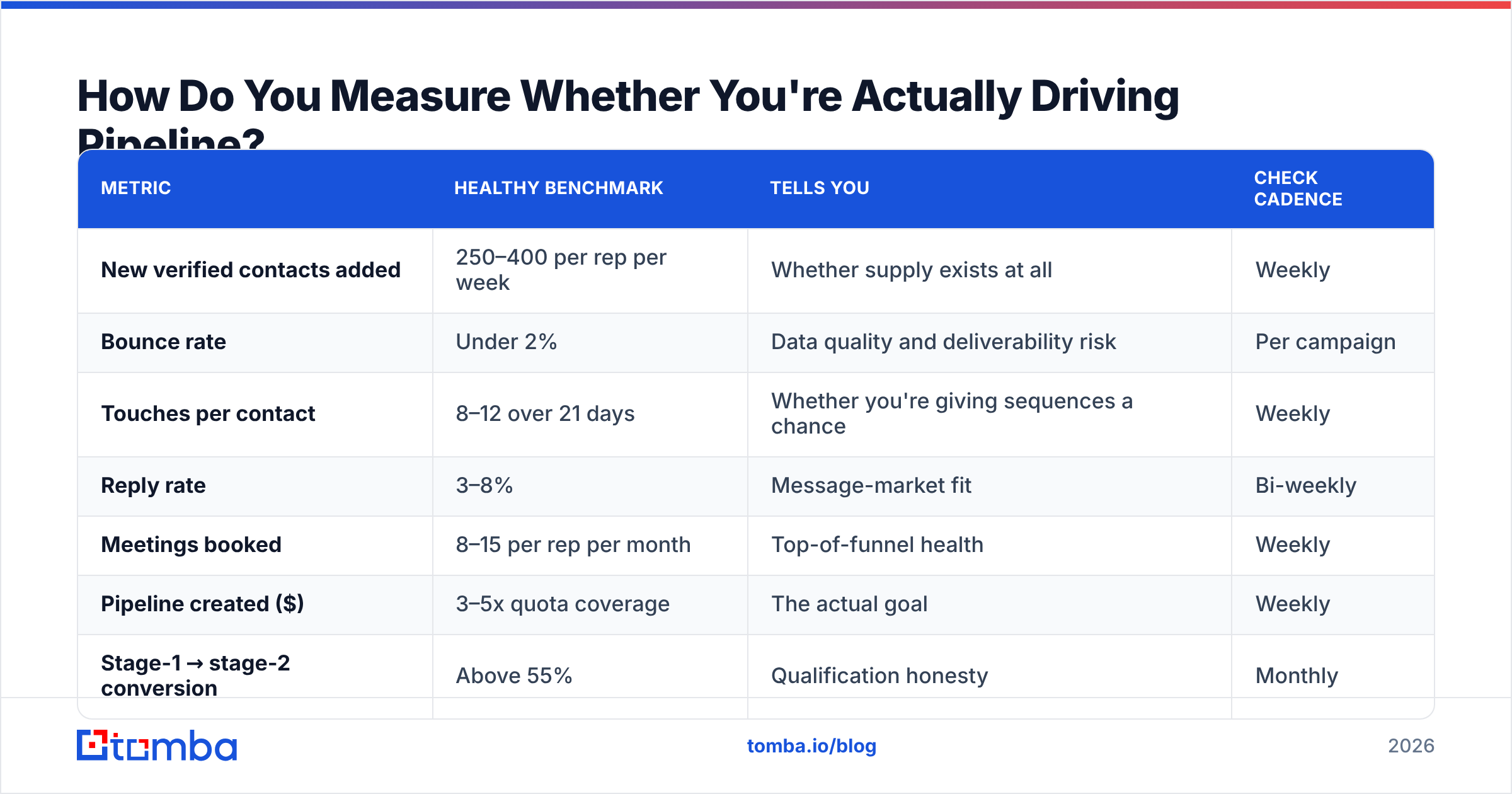
Track a short ladder of metrics where each one predicts the next. If you only report bookings, you find out you have a problem a full quarter after you could have fixed it.
| Metric | Healthy benchmark | Tells you | Check cadence |
|---|---|---|---|
| New verified contacts added | 250–400 per rep per week | Whether supply exists at all | Weekly |
| Bounce rate | Under 2% | Data quality and deliverability risk | Per campaign |
| Touches per contact | 8–12 over 21 days | Whether you're giving sequences a chance | Weekly |
| Reply rate | 3–8% | Message-market fit | Bi-weekly |
| Meetings booked | 8–15 per rep per month | Top-of-funnel health | Weekly |
| Pipeline created ($) | 3–5x quota coverage | The actual goal | Weekly |
| Stage-1 → stage-2 conversion | Above 55% | Qualification honesty | Monthly |
The most useful of these is bounce rate, because it's the earliest warning and the cheapest to fix. A campaign bouncing at 7% isn't a messaging problem — it's a list problem, and no subject line will rescue it. If your response rate drops while bounce rate climbs, you're watching deliverability erode in real time.
Set a single weekly pipeline review where these seven numbers get read out loud. Not a deal review — a supply review. Deal reviews look backward at what already exists; supply reviews look forward at whether anything will exist in six weeks. For a broader framework on structuring those cadences, HubSpot's sales resources cover the meeting rhythm well.
What Should You Do in the Next 30 Days?#
If you're behind on coverage right now, here's the compressed version:
- Week 1: Rebuild the target account list against real ICP criteria. Kill accounts that don't fit, even if it shrinks the list by half.
- Week 2: Find and verify 3–5 contacts per account. Measure the bounce rate on a 200-record test before you send anything at scale.
- Week 3: Launch a 12-touch, multi-channel sequence against the first 40% of the list. Hold the rest back so you can iterate on messaging.
- Week 4: Review the seven metrics above, fix the weakest one, and release the remaining 60%.
That cadence — build, verify, sequence, measure, fix — is the whole engine. Everything else is optimization on top of it.
The constraint for most teams isn't strategy, it's the raw material. If your reps are spending 40% of their week hunting for email addresses and getting bounces for their trouble, no playbook will save the quarter. Fix the supply layer first and the rest of the motion starts working the way it's supposed to.
Ready to fix the data layer? Start with the Tomba Email Finder — find verified professional emails by domain, name, or company, with a free tier at 25 searches/month to test accuracy against your own ICP before you spend anything. Build the list, verify it, and let your reps spend their week selling instead of searching.
Related guides#
Ready to find emails that actually work?
Join 150,000+ professionals who stopped guessing and started sending. Free credits on signup — no credit card required.
Get the Tomba newsletter
Practical outbound tactics and product updates — once every two weeks.
About the author