Dun Bradstreet vs Kipplo: B2B Data Comparison for 2026
One is a 180-year-old firmographic institution. The other is a self-serve contact-data tool. Here's an honest breakdown of coverage, pricing models, contracts, and which one actually fits your outbound motion in 2026.
TL;DR
- Dun Bradstreet vs Kipplo is not a like-for-like fight. D&B sells firmographic, credit, and entity data to the enterprise. Kipplo sells contact-level B2B records to self-serve teams.
- Pick D&B for legal-entity hierarchies, credit risk, DUNS numbers, and a record finance will accept.
- Pick Kipplo for names, emails, and phones in your sequencer this quarter, with no procurement cycle.
- Neither one nails the job most SDR teams care about: proving a given email will land.
- For most sub-100-seat teams, a light account source plus a dedicated finder and verifier costs less.
What are Dun Bradstreet and Kipplo, exactly?#
Dun & Bradstreet is a data institution. It has assigned DUNS numbers since 1963. It also keeps one of the largest company graphs in the world: hundreds of millions of business records, corporate family trees, credit files, and risk scores. Its go-to-market line (D&B Hoovers, D&B Connect, D&B Rev.Up) adds sales tools on top of that core registry. You can see the full product range on dnb.com.
Kipplo sits at the other end of the market. It is a modern, self-serve B2B contact database. You search by title, industry, headcount, geography, and tech stack. Then you export contacts or push them into your CRM or sequencer. The pitch is speed and clear pricing: sign up, filter, export, send. Check current plans on kipplo.com before you buy. Credit-based vendors in this category change packaging often.
That gap in origin explains most of what follows. D&B answers one question: who is this company, legally and financially? Kipplo answers another: who works there, and how do I reach them? Mixing the two up is the top reason teams pay for a platform they barely use.
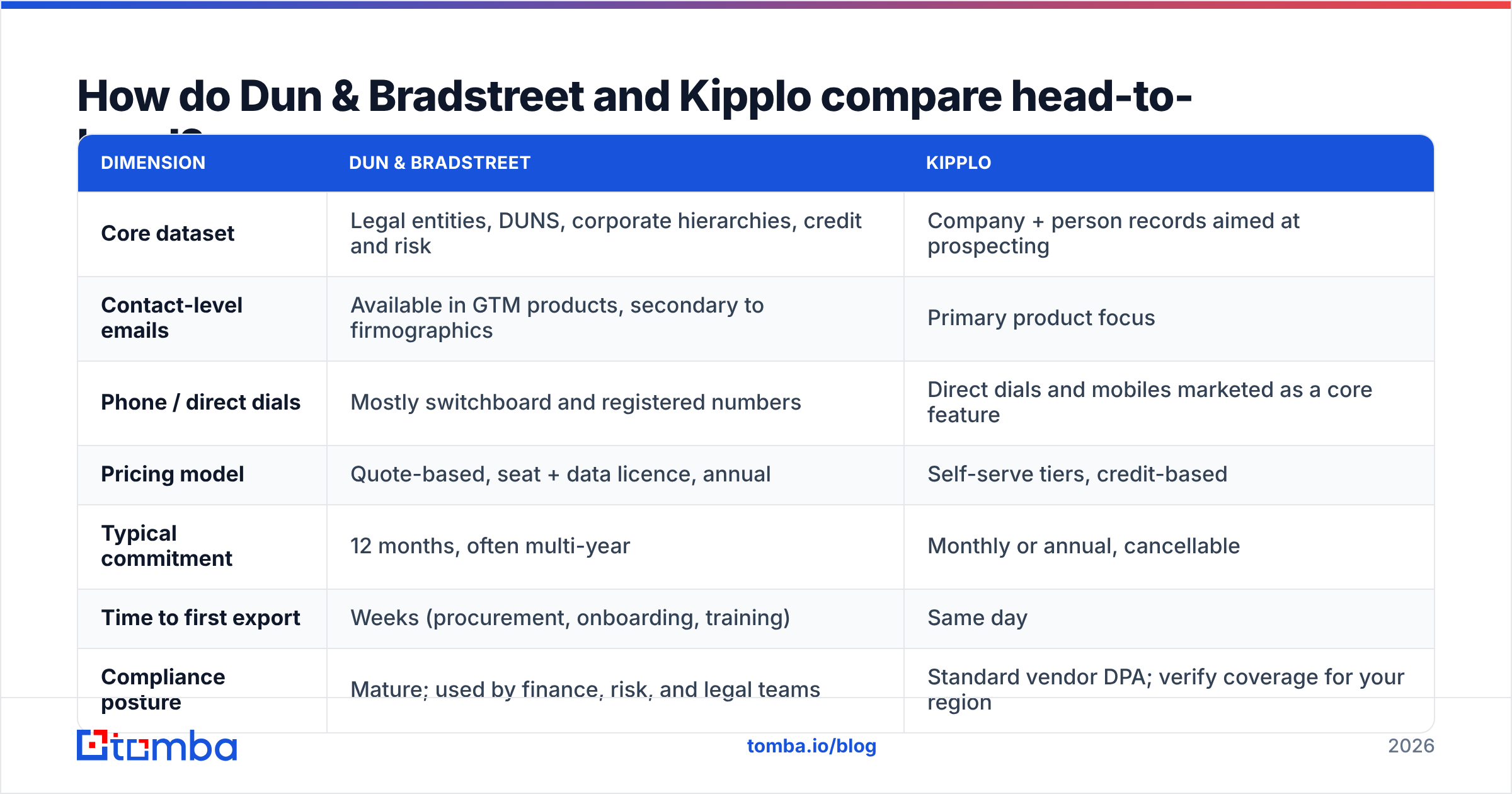
Dun Bradstreet vs Kipplo: how do they compare head-to-head?#
| Dimension | Dun & Bradstreet | Kipplo |
|---|---|---|
| Core dataset | Legal entities, DUNS, corporate hierarchies, credit and risk | Company + person records aimed at prospecting |
| Contact-level emails | Available in GTM products, secondary to firmographics | Primary product focus |
| Phone / direct dials | Mostly switchboard and registered numbers | Direct dials and mobiles marketed as a core feature |
| Pricing model | Quote-based, seat + data licence, annual | Self-serve tiers, credit-based |
| Typical commitment | 12 months, often multi-year | Monthly or annual, cancellable |
| Time to first export | Weeks (procurement, onboarding, training) | Same day |
| Compliance posture | Mature; used by finance, risk, and legal teams | Standard vendor DPA; verify coverage for your region |
| Best fit | Enterprise RevOps, credit, supplier risk, ABM at scale | SMB/mid-market outbound, agencies, founder-led sales |
The table hides one nuance. D&B data is authoritative in a way contact databases are not. Say your CFO needs to know if two subsidiaries roll up to the same parent. A DUNS-linked hierarchy answers that. A scraped contact list does not. But if your SDR needs the VP of Engineering's inbox by tomorrow, the hierarchy is beside the point.
Which one has better data coverage and accuracy?#
Ask a sharper question: coverage of what?
Company coverage. D&B wins at the entity level. Its registry holds small, private, offline businesses that never show up in a tech-focused contact database. Think of the regional distributor with no website, or the holding company behind four brands. If your ICP covers manufacturing, logistics, construction, or financial services, that gap is large and real.
Contact coverage. Kipplo and its peers tend to win for digital-first segments: SaaS, agencies, e-commerce, professional services. These databases are built from public web signals. So they lean toward companies whose staff leave a public trail.
Freshness. Both models struggle here, and this is where buyers get burned. B2B contact data decays about 25–30% per year. People change jobs, companies rebrand, mail servers move. A record can be right on the day it is licensed and stale by the time it hits your sequencer. No enterprise licence or credit export protects you. Only a check at send time does.
So treat every exported email as a guess, not a fact. Run them through an email verifier before they touch your sending domain. A 12% invalid rate on a 5,000-record list means 600 hard bounces. That is enough to hurt sender reputation on a young domain.

What does each actually cost?#
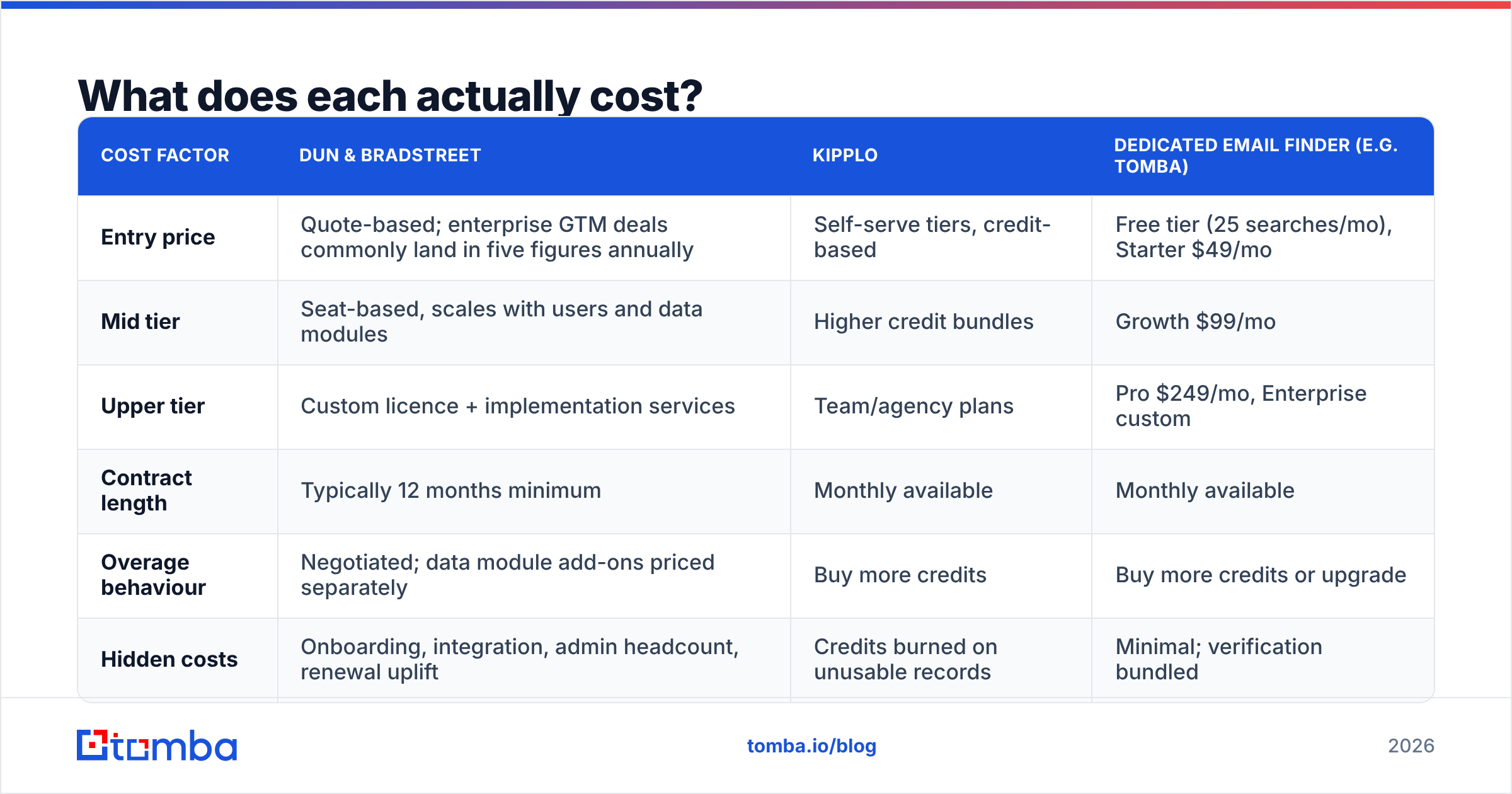
Both vendors publish less than buyers would like. Treat these as shapes, not quotes. Always ask for current numbers.
| Cost factor | Dun & Bradstreet | Kipplo | Dedicated email finder (e.g. Tomba) |
|---|---|---|---|
| Entry price | Quote-based; enterprise GTM deals commonly land in five figures annually | Self-serve tiers, credit-based | Free tier (25 searches/mo), Starter $49/mo |
| Mid tier | Seat-based, scales with users and data modules | Higher credit bundles | Growth $99/mo |
| Upper tier | Custom licence + implementation services | Team/agency plans | Pro $249/mo, Enterprise custom |
| Contract length | Typically 12 months minimum | Monthly available | Monthly available |
| Overage behaviour | Negotiated; data module add-ons priced separately | Buy more credits | Buy more credits or upgrade |
| Hidden costs | Onboarding, integration, admin headcount, renewal uplift | Credits burned on unusable records | Minimal; verification bundled |
Two cost traps are worth naming.
The first is the renewal uplift. Enterprise data contracts often reprice at renewal, once usage is clear. Teams budget for year one and get a very different number in year two. By then the data is wired into three systems, so switching is costly. Ask for capped renewal terms before you sign, not after.
The second is credit burn on records you can't use. Credit platforms charge on export, not on outcome. If 20% of exported emails bounce, you still paid full price. So the true cost of a contact database is credits ÷ usable contacts. Compare that number, not the sticker price.

Who should choose Dun & Bradstreet?#
Pick D&B when at least two of these are true:
- You need entity resolution. Several systems hold the same customer under different names. You need one canonical ID to match them. DUNS exists for this.
- Risk or credit is part of the call. You extend terms, underwrite, or vet suppliers. No prospecting database replaces a credit file.
- Your ICP is offline-heavy. Manufacturing, wholesale, construction, transport. In these sectors, thousands of good accounts have little web presence.
- You run account-based marketing at scale. Hierarchies, sites, and firmographic depth make territory carving and account scoring easier to defend.
- Compliance sign-off is a gate. Security review and data-provenance questions are easier to answer with an established provider.
If none of these apply, you are buying an institution to solve a task-list problem. That rarely ends well for the budget owner.
Who should choose Kipplo?#
Pick Kipplo — or a similar self-serve contact database — when speed and cost matter most:
- You want to test a market this month. A new ICP guess does not justify a procurement cycle.
- Your team is under ~30 sellers. Seat-based enterprise pricing gets steep fast, and the depth goes unused.
- You sell to digital-first companies. SaaS, agencies, e-commerce. That is where web-derived contact data is strongest.
- You want month-to-month terms. With no annual lock-in, you can switch when a better dataset shows up. In this category, that happens often.
One honest caveat. Self-serve databases compete on filter breadth, and filters are easy to demo but hard to validate. Run a blind sample first. Fifty records, exported and verified on your own, tell you more than any feature matrix.
Where do both fall short for outbound teams?#
Both share the same weakness: they sell you a snapshot, and you send mail in real time.
A record enters the database and sits there for months. You export it the day you filter for it. Nothing in that chain checks whether the mailbox still exists. Add catch-all domains, where the server accepts everything and tells you nothing, and a large slice of any export is unverifiable.
That's the gap a purpose-built finder-and-verifier layer fills:
- Pattern-based discovery. Derive the address from the company's real email format instead of hoping a record exists. A domain search returns every known pattern at a company. You can then build addresses for people no database has indexed.
- SMTP-level verification. Confirm the mailbox replies before you send, not after you bounce.
- Catch-all handling. A catch-all verifier scores accept-all domains instead of passing them through as "valid".
- Bulk workflows. Push a whole exported CSV through bulk verification before it reaches your sequencer.
- Enrichment at the point of need. Fill in title, company, and social data on records you own with contact enrichment, instead of licensing a second database.
Can you combine them — or replace both?#
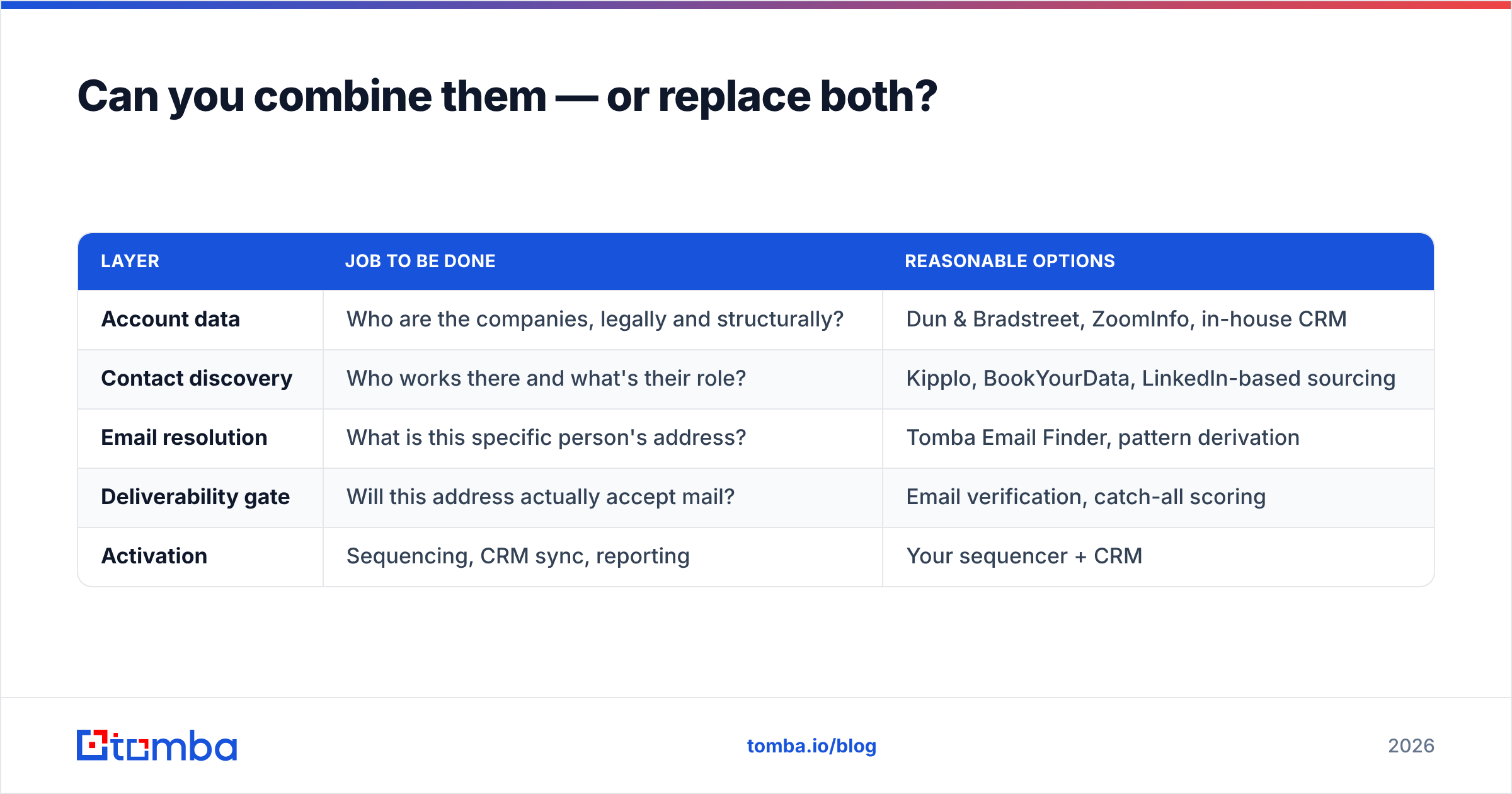
Most mature stacks split the work rather than crown one winner.
| Layer | Job to be done | Reasonable options |
|---|---|---|
| Account data | Who are the companies, legally and structurally? | Dun & Bradstreet, ZoomInfo, in-house CRM |
| Contact discovery | Who works there and what's their role? | Kipplo, BookYourData, LinkedIn-based sourcing |
| Email resolution | What is this specific person's address? | Tomba Email Finder, pattern derivation |
| Deliverability gate | Will this address actually accept mail? | Email verification, catch-all scoring |
| Activation | Sequencing, CRM sync, reporting | Your sequencer + CRM |
BookYourData is worth a look next to Kipplo if you prefer buying pre-verified lists in bulk. Same layer of the stack, different workflow. User reviews on G2 help you narrow the field. Weight recent reviews far more than old ones, since this category repackages often.
For teams under about 50 sellers, replacement usually beats combination. Keep your CRM as the account layer. Add a dedicated finder and verifier. Skip the enterprise licence until entity resolution becomes a real bottleneck. Tomba pricing starts at $49/mo for Starter and $99/mo for Growth, well below a single enterprise seat. The Tomba API also lets you wire verification into your enrichment job, so you stop exporting CSVs by hand.
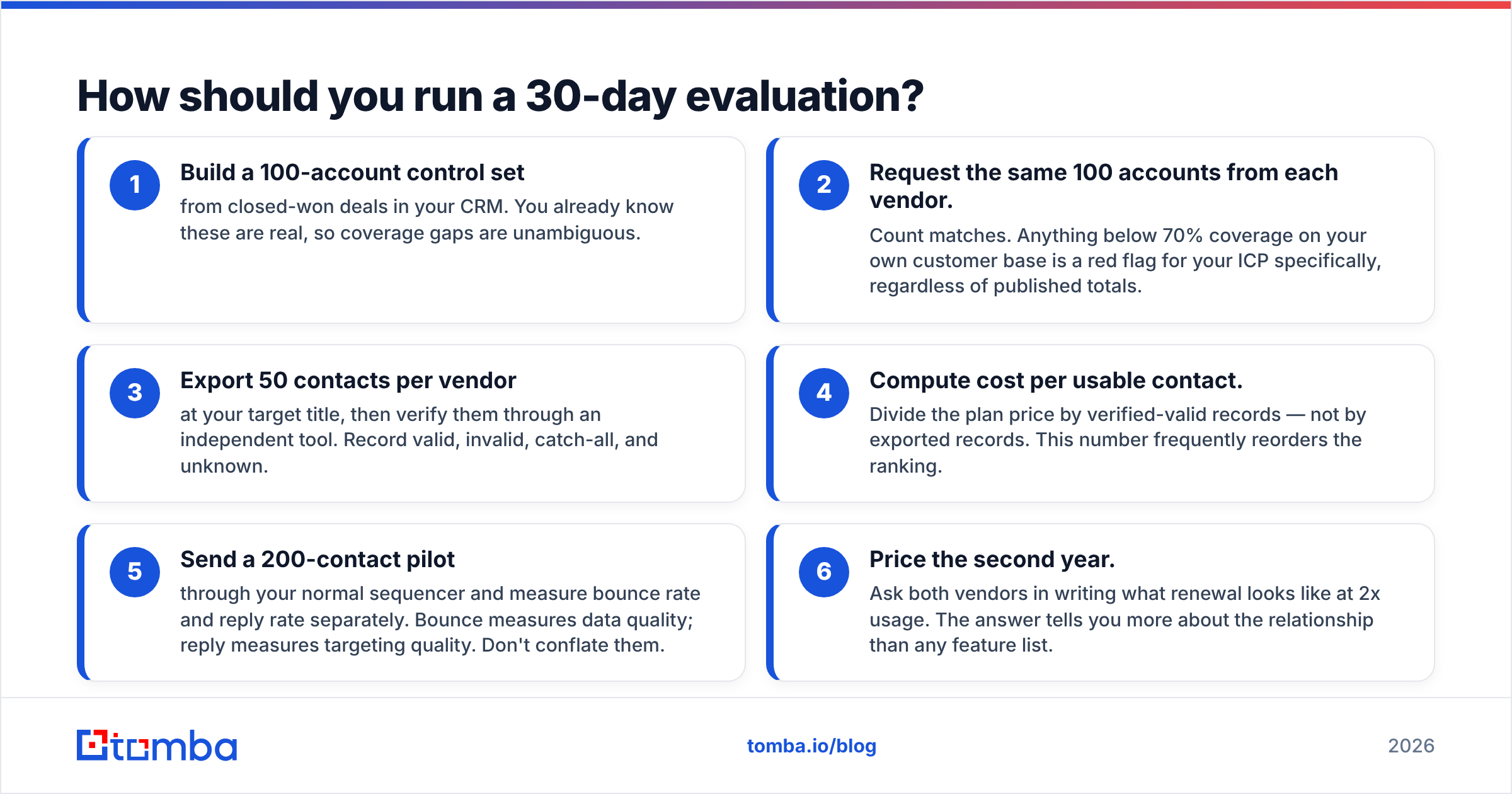
How should you run a 30-day evaluation?#
Don't buy on demos. Test on your own list.
- Build a 100-account control set from closed-won deals in your CRM. You know these are real, so gaps are obvious.
- Ask each vendor for the same 100 accounts. Count matches. Under 70% coverage of your own customers is a red flag, whatever the published totals say.
- Export 50 contacts per vendor at your target title. Verify them with an independent tool. Record valid, invalid, catch-all, and unknown.
- Work out cost per usable contact. Divide the plan price by verified-valid records, not by exported records. This number often flips the ranking.
- Send a 200-contact pilot through your normal sequencer. Measure bounce rate and reply rate separately. Bounce shows data quality; reply shows targeting quality.
- Price the second year. Ask both vendors, in writing, what renewal looks like at 2x usage. The answer says more than any feature list.
Dun Bradstreet vs Kipplo: what's the verdict?#
They win different arguments. Dun Bradstreet is right when the question is structural: entity hierarchies, credit exposure, supplier risk, and coverage of firms that don't live online. You also need the budget and the patience for procurement. Kipplo is right when the question is operational: get good contacts into a sequence this week, with no twelve-month tail.
Neither one solves the last mile. That last mile is proving the address you are about to email will land. It is a separate job, it is cheap to fix, and fixing it lifts the ROI of whichever database you pick.
Start there. Point the Tomba Email Finder at accounts you already believe in. Verify every address before it enters your sequencer. Then measure your bounce rate for a full month. The free tier covers 25 searches, so you can benchmark a D&B or Kipplo export before you spend. If the light stack wins, you just saved a procurement cycle and a five-figure line item.
Related guides#
Ready to find emails that actually work?
Join 150,000+ professionals who stopped guessing and started sending. Free credits on signup — no credit card required.
Get the Tomba newsletter
Practical outbound tactics and product updates — once every two weeks.
About the author