Easy Email Verification vs SalesQL: Which Tool Wins in 2026?
One cleans lists you already have. The other pulls contacts off LinkedIn. Here's an honest breakdown of Easy Email Verification vs SalesQL — accuracy, pricing, workflow fit, and when you actually need both.
TL;DR
- Easy Email Verification and SalesQL are not really competitors. One validates email addresses you already have; the other extracts contact data from LinkedIn profiles. Comparing them head-to-head only makes sense once you know which half of the problem you're solving.
- Pick SalesQL if your prospecting starts in LinkedIn Sales Navigator and you want emails plus phone numbers scraped straight from profiles.
- Pick Easy Email Verification if you already own a list — from a CSV, a CRM export, a webinar, or a scraper — and you need bounce rates under 2% before you press send.
- Running both means two subscriptions, two credit pools, and two exports. A combined finder-plus-verifier stack (Tomba, Hunter, Dropcontact) usually costs less and removes a CSV handoff.
- Whatever you choose: never send to an unverified list. Google and Yahoo both enforce a 0.3% spam-complaint threshold, and a hard-bounce spike is the fastest way to torch a sending domain.
What is Easy Email Verification?#
Easy Email Verification is a bulk list-cleaning service. You upload a file of addresses, it runs each one through a validation chain, and it hands back a scored list telling you which addresses are safe to mail.
The validation chain is standard across the category, and it's worth understanding because it explains both the strengths and the limits:
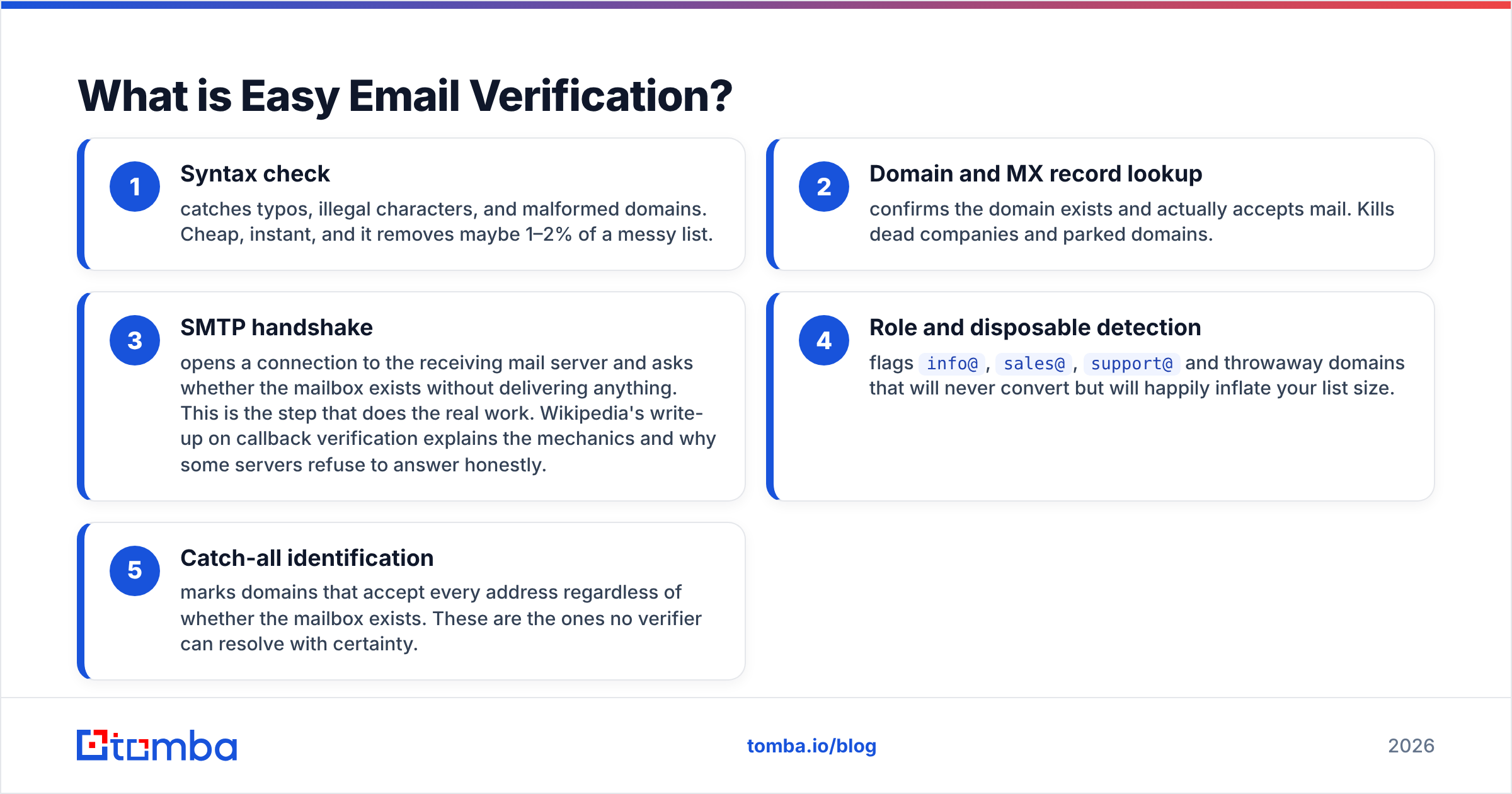
- Syntax check — catches typos, illegal characters, and malformed domains. Cheap, instant, and it removes maybe 1–2% of a messy list.
- Domain and MX record lookup — confirms the domain exists and actually accepts mail. Kills dead companies and parked domains.
- SMTP handshake — opens a connection to the receiving mail server and asks whether the mailbox exists without delivering anything. This is the step that does the real work. Wikipedia's write-up on callback verification explains the mechanics and why some servers refuse to answer honestly.
- Role and disposable detection — flags
info@,sales@,support@and throwaway domains that will never convert but will happily inflate your list size. - Catch-all identification — marks domains that accept every address regardless of whether the mailbox exists. These are the ones no verifier can resolve with certainty.
What it does not do: find you a single new contact. Easy Email Verification is a filter, not a source. Feed it nothing and you get nothing.
What is SalesQL?#
SalesQL is a browser extension that sits on top of LinkedIn. You open a profile, a Sales Navigator search, or a group member list, and it pulls out personal emails, work emails, and phone numbers. You can bulk-select search results and export the whole batch to CSV or push it into a CRM.
Its whole reason to exist is the LinkedIn-first workflow. If your ICP is defined by job title, company headcount, and seniority filters inside Sales Navigator, SalesQL turns that search into a contact list without you leaving the tab. The official SalesQL site positions it squarely as a LinkedIn extraction tool, and that's an accurate self-description.
The trade-off is the same one every LinkedIn extension carries: your data supply is capped by what LinkedIn shows you, and by the connection and search limits LinkedIn enforces on your account. You also can't work domain-first — if your target list is "every SaaS company in Berlin with 50–200 employees," you have to rebuild that as a LinkedIn search before SalesQL becomes useful.
Are Easy Email Verification and SalesQL actually competitors?#
No — and that's the single most useful thing to understand before you spend money on either.
Think of it like a kitchen. SalesQL is the grocery run: it brings raw ingredients into the building. Easy Email Verification is the prep station: it throws out anything spoiled before it hits the pan. You can't cook with only one of them, and buying a second grocery run doesn't fix rotten produce.
Here's where each one sits in a normal outbound workflow:
- Sourcing — SalesQL, Tomba, Apollo, Clay. Turns a target definition into names and addresses.
- Enrichment — adds job title, company size, tech stack, phone. SalesQL does some of this from the LinkedIn profile itself.
- Verification — Easy Email Verification, ZeroBounce, NeverBounce, Tomba's email verifier. Decides what's safe to send.
- Sending — Instantly, Smartlead, Lemlist, your own SMTP.
- Deliverability maintenance — warmup, SPF/DKIM/DMARC, complaint monitoring.
SalesQL covers step 1 and part of step 2. Easy Email Verification covers step 3. Neither touches the other's territory, which means the honest comparison isn't "which is better" — it's "which gap do I have right now, and am I about to pay for two tools where one would do."
Most finder tools, SalesQL included, run some level of validation on the addresses they return. That's real, but it's usually a lighter pass than a dedicated verifier. If you're mailing a few hundred contacts a month, the built-in check is probably fine. At tens of thousands of sends a month, a dedicated verification pass pays for itself the first time it stops a bounce spike.
How do Easy Email Verification and SalesQL compare feature by feature?#

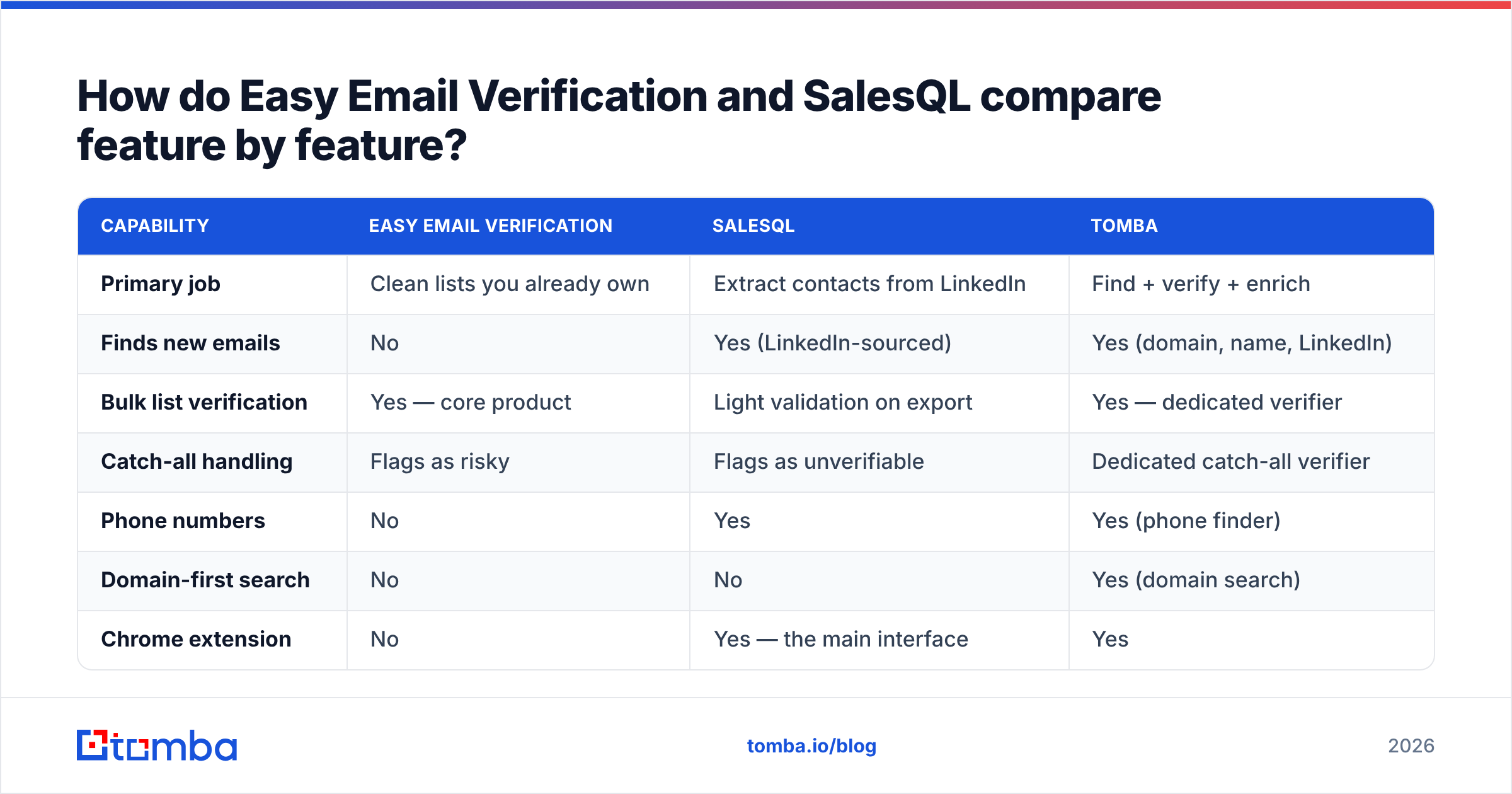
| Capability | Easy Email Verification | SalesQL | Tomba |
|---|---|---|---|
| Primary job | Clean lists you already own | Extract contacts from LinkedIn | Find + verify + enrich |
| Finds new emails | No | Yes (LinkedIn-sourced) | Yes (domain, name, LinkedIn) |
| Bulk list verification | Yes — core product | Light validation on export | Yes — dedicated verifier |
| Catch-all handling | Flags as risky | Flags as unverifiable | Dedicated catch-all verifier |
| Phone numbers | No | Yes | Yes (phone finder) |
| Domain-first search | No | No | Yes (domain search) |
| Chrome extension | No | Yes — the main interface | Yes |
| API access | Yes | Yes | Yes, plus CLI and MCP |
| Free tier | Trial credits | Free plan with monthly credits | 25 searches/mo, free forever |
| Works without LinkedIn | Yes | No | Yes |
The row that matters most for buying decisions is the last one. SalesQL's dependency on LinkedIn is a feature when your ICP lives there and a hard ceiling when it doesn't. Local businesses, agencies, e-commerce operators, and most of the long tail of SMB buyers have thin or nonexistent LinkedIn presence. For those segments, a domain search approach — start from a company website, get the people — finds contacts that LinkedIn extraction structurally cannot.
Which one is more accurate?#
Wrong question, technically — they measure different things. But there is a version of it worth answering.
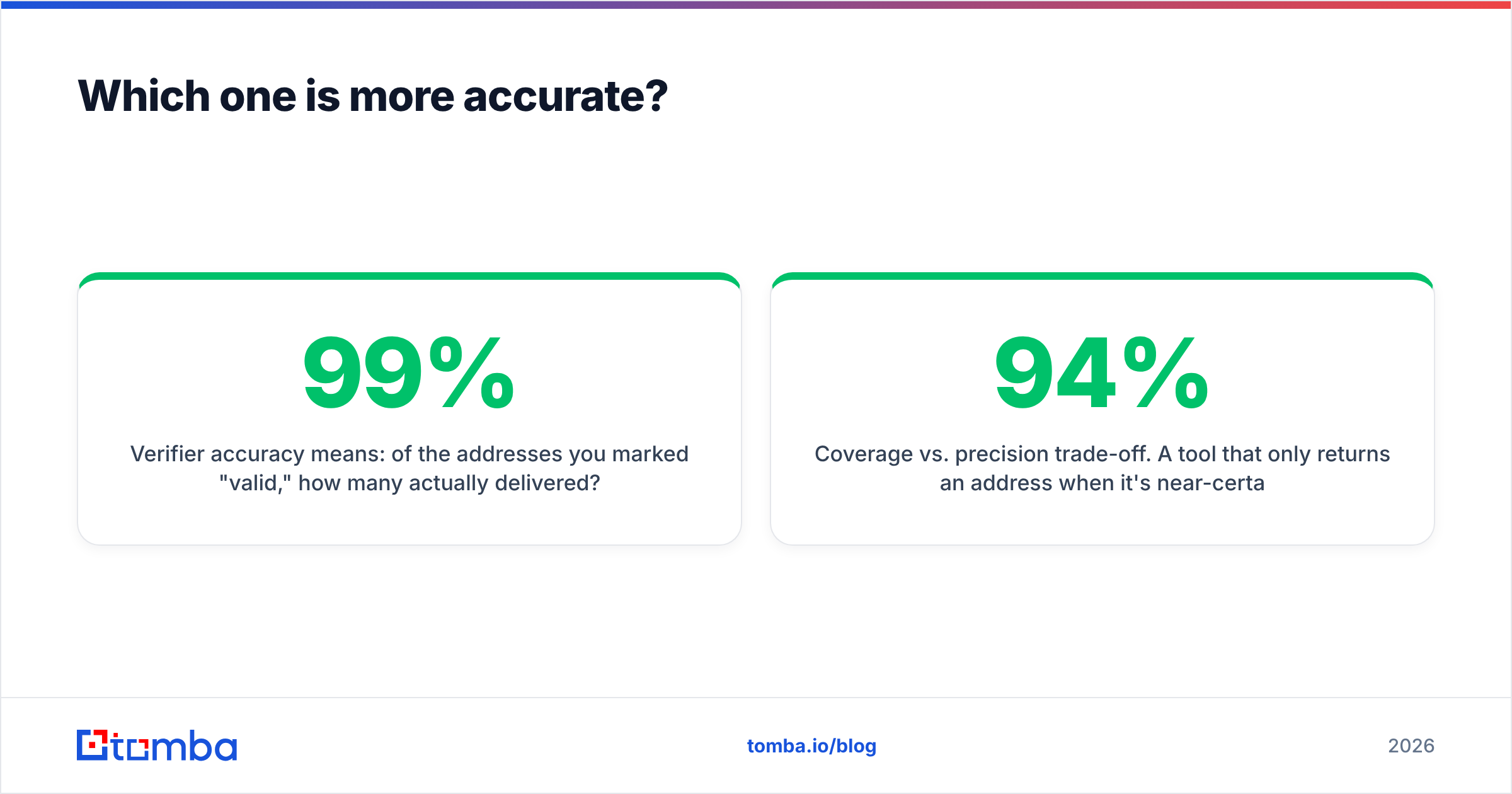
Verifier accuracy means: of the addresses you marked "valid," how many actually delivered? Good bulk verifiers land in the 95–99% range on clean B2B data. Easy Email Verification sits in that band along with most established players. The differences between reputable verifiers on a normal list are small enough that price and turnaround time usually matter more than the last percentage point.
Finder accuracy means: of the addresses returned, how many are real and current? This is where the spread is much wider — anywhere from the high 60s to the low 90s depending on the tool, the region, and whether the target company is a well-indexed tech firm or a 12-person manufacturer in Lyon.

Two things distort every accuracy claim you'll read, including vendor benchmarks:
Coverage vs. precision trade-off. A tool that only returns an address when it's near-certain will post a beautiful accuracy number and a terrible hit rate. A tool that guesses patterns aggressively posts high coverage and worse precision. Always read the two numbers together. "94% accurate" on a 30% hit rate is often worse in practice than "85% accurate" on a 70% hit rate.
Catch-all domains. Roughly a fifth of B2B domains accept mail for every address, so the SMTP handshake returns "yes" for definitely.not.a.person@company.com. Some tools count these as valid — instant accuracy inflation. Others mark them unknown and let you decide. A dedicated catch-all verifier resolves a meaningful share of these using pattern data and secondary signals rather than punting them into an "unknown" bucket you'll never act on.
When you evaluate either tool, run the same 200-contact test list through both and compare against your actual send results. Vendor-published numbers are marketing; your bounce report is evidence.
What do they cost?#
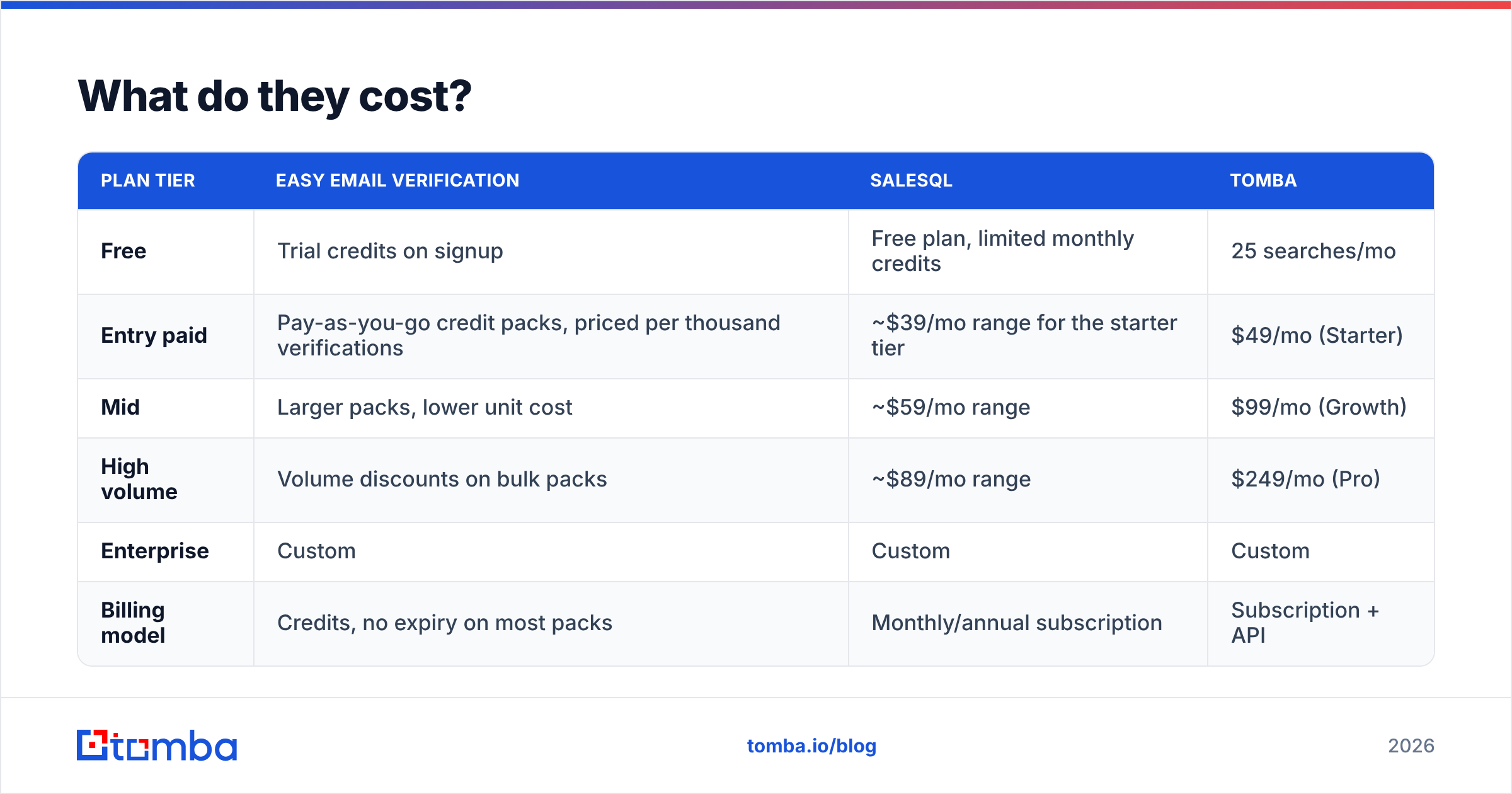
Pricing on both sides moves, so treat this as a shape rather than a quote — check each vendor's page before you commit.
| Plan tier | Easy Email Verification | SalesQL | Tomba |
|---|---|---|---|
| Free | Trial credits on signup | Free plan, limited monthly credits | 25 searches/mo |
| Entry paid | Pay-as-you-go credit packs, priced per thousand verifications | ~$39/mo range for the starter tier | $49/mo (Starter) |
| Mid | Larger packs, lower unit cost | ~$59/mo range | $99/mo (Growth) |
| High volume | Volume discounts on bulk packs | ~$89/mo range | $249/mo (Pro) |
| Enterprise | Custom | Custom | Custom |
| Billing model | Credits, no expiry on most packs | Monthly/annual subscription | Subscription + API |
The structural difference is credits versus seats. Verification services usually sell consumable credit packs — good if your volume is spiky, because unused credits typically carry over. LinkedIn extension tools sell monthly subscriptions with a credit allowance that resets, which punishes you in slow months.
Do the arithmetic on the stacked cost before assuming two specialists is the cheaper path. A SalesQL subscription plus a standing verification budget frequently lands in the same range as a single platform that does both — and the combined tool saves you the CSV export, the column mapping, and the re-import. Tomba pricing starts at $49/mo with finding and verification in one credit pool, which is the comparison most buyers should actually run.
Which should you choose for your use case?#
Choose SalesQL if: LinkedIn Sales Navigator is where you build lists, you want phone numbers alongside emails, and your team works profile-by-profile rather than in big batch jobs. The extension workflow is genuinely fast for reps who live in LinkedIn all day.
Choose Easy Email Verification if: you already have lists coming from somewhere else — a scraper, an event, a partner, a five-year-old CRM — and your only problem is bounce rate. Pay-as-you-go credits fit this pattern well because list cleaning is bursty by nature.
Choose both if: you're at meaningful volume (20k+ sends/month), you source from LinkedIn, and you want a hard verification gate before anything reaches your sequencer. This is a legitimate setup. It's just more expensive and more manual than most teams admit when they buy in.
Choose a combined platform if: you want one credit pool, one API, and no CSV handoff between finding and verifying. This covers most teams under 20 reps. A LinkedIn finder that returns already-verified addresses removes an entire step from the workflow, and domain-first search covers the prospects LinkedIn extraction misses.
One rule regardless of which path you pick: verification has a shelf life. B2B contact data decays at roughly 25–30% per year — people change jobs, companies get acquired, domains migrate. A list you cleaned in January is not clean in July. Re-verify anything older than 60–90 days before a send, and re-verify always before a large campaign. HubSpot's sales research has been making this point for years, and Google's bulk sender guidelines now put real enforcement behind it — a 0.3% spam complaint rate is the ceiling, and stale lists blow through it fast.
How do you test either tool properly?#
Skip the demo. Run this in under an hour:
- Build a 100-contact truth set. Use people you've already emailed successfully — you know these addresses deliver. Mix in 20 known-bad addresses from your bounce log.
- Run it through the verifier. Every known-good address should come back valid. Every known-bad should come back invalid. Count the false positives — those are the ones that cost you deliverability.
- For the finder, pick 50 target companies across segments. Include at least 15 outside the US and 15 non-tech. Measure hit rate (how many returned an address) and precision (how many delivered) separately.
- Check the catch-all bucket. What percentage came back "unknown"? A tool that dumps 25% of your list into unknown has effectively shrunk your addressable market by a quarter.
- Time the bulk job. Upload 5,000 rows. A verifier that takes six hours breaks a same-day campaign. Test bulk processing throughput before you depend on it.
Both vendors have free entry points, so this test costs you time and nothing else. Peer reviews on G2 are useful for spotting support and billing complaints, but they will not tell you how a tool performs on your segment. Only your truth set does that.
The bottom line#
Easy Email Verification vs SalesQL isn't a fight — it's two halves of one pipeline. SalesQL gets contacts out of LinkedIn. Easy Email Verification stops the bad ones from reaching your sending domain. If you only have one problem, buy the tool that solves it and move on.
If you have both problems, price the stacked cost honestly against a single platform first. Two subscriptions, two credit pools, and a CSV round-trip between them is real overhead, and it compounds every week.
Want finding and verification in one place? Tomba's Email Finder searches by domain, name, company, or LinkedIn profile and returns addresses that have already been through SMTP and catch-all validation — one credit pool, one API, no export-import shuffle. The free tier gives you 25 searches a month to run the truth-set test above before you pay anything.
Related guides#
Ready to find emails that actually work?
Join 150,000+ professionals who stopped guessing and started sending. Free credits on signup — no credit card required.
Get the Tomba newsletter
Practical outbound tactics and product updates — once every two weeks.
About the author