EasyLeadz vs Power Almanac (2026): Which Data Tool Wins?
One sells direct dial phone numbers skewed toward India and APAC. The other sells contact records for US city halls. Here is where each wins, where each breaks, and what to use when neither fits.
TL;DR
- EasyLeadz vs Power Almanac is an odd matchup. The two barely compete. EasyLeadz sells B2B direct dial mobile numbers, with deep coverage in India and APAC. Power Almanac sells contact records for US local government — mayors, city managers, clerks, public works directors.
- Pick EasyLeadz if you sell to companies and your reps live on the phone. It is strongest in India, Southeast Asia, and the Gulf.
- Pick Power Almanac if you sell to US cities and counties. It maps who runs which department in which town.
- Neither one is a general email finder. EasyLeadz is phone-first. Power Almanac ships a static list, not a live lookup API.
- Most teams that compare the two end up needing a third tool. They want a verified email layer that works on any domain, on demand. That is the job of a dedicated email finder.
What are EasyLeadz and Power Almanac, actually?#
Start here. The "vs" framing is misleading. These two products barely overlap.
EasyLeadz is an Indian B2B contact data company. It is best known for Mr. E, a Chrome extension. Open a LinkedIn profile, click once, and it returns a direct dial mobile number. The pitch is simple. Switchboard numbers and generic info@ addresses are dead weight, so buy the mobile number instead. Coverage is strong in India and solid across APAC and the Gulf. North America and Western Europe are covered too, but far more thinly than with a US-first vendor.
Power Almanac is a different animal. It is a database of US local government officials. The company claims well over 100,000 named officials across roughly 20,000 towns and cities. Check their current count before you cite it, because it moves. Each record ties a person to a place and a role: city manager of Boulder, public works director of Tulsa, purchasing agent of a county you have never heard of. You filter a list, download a CSV, and load it into your CRM.
So the real question is not "which one is better." It is this: do you sell to companies, or to city hall? Get that right and the rest is easy.
EasyLeadz vs Power Almanac: the head-to-head comparison#
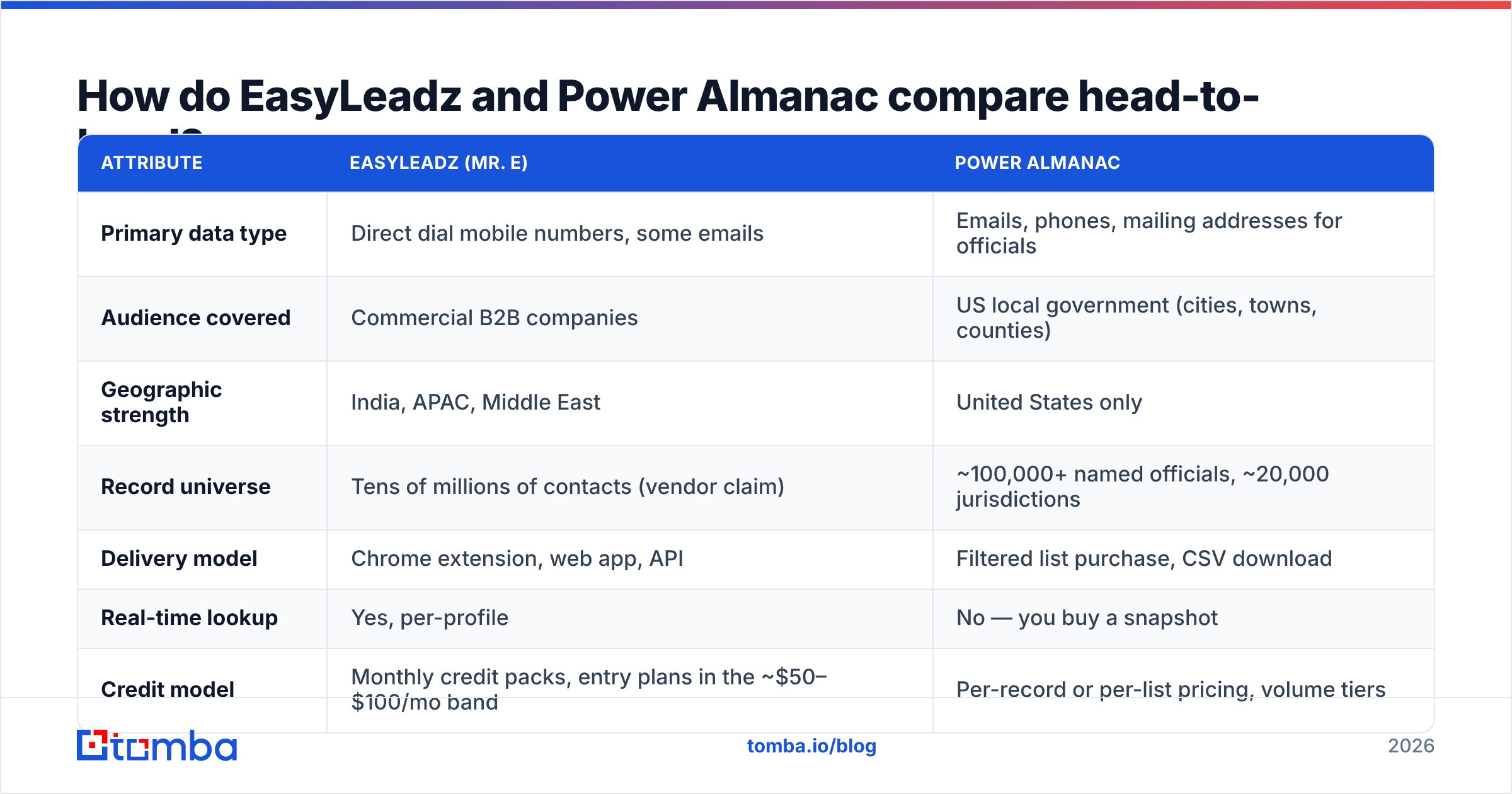
Here is the honest side-by-side. Pricing and record counts are what each vendor advertised at time of writing. Both change plans often, so treat these as directional. Confirm on their own pages before you sign.
| Attribute | EasyLeadz (Mr. E) | Power Almanac |
|---|---|---|
| Primary data type | Direct dial mobile numbers, some emails | Emails, phones, mailing addresses for officials |
| Audience covered | Commercial B2B companies | US local government (cities, towns, counties) |
| Geographic strength | India, APAC, Middle East | United States only |
| Record universe | Tens of millions of contacts (vendor claim) | ~100,000+ named officials, ~20,000 jurisdictions |
| Delivery model | Chrome extension, web app, API | Filtered list purchase, CSV download |
| Real-time lookup | Yes, per-profile | No — you buy a snapshot |
| Credit model | Monthly credit packs, entry plans in the ~$50–$100/mo band | Per-record or per-list pricing, volume tiers |
| Free tier | Limited trial credits | Free search preview, pay to export |
| CRM integrations | HubSpot, Salesforce, Zapier, API | Manual CSV import mostly |
| Best fit team | SDR teams doing outbound calling | GovTech, civic SaaS, infrastructure vendors |
The structural gap matters more than any single row. EasyLeadz is a lookup tool. You point it at a person and it hands back data. Power Almanac is a list product. You define a segment and it hands you a file. Those are different buying motions, different budget lines, and different ways to fail.
Whose data is more accurate?#
They fail in different ways, so measure them in different ways.
EasyLeadz accuracy rises and falls with geography. In India, hit rates on mobile numbers are high. Teams there build a whole calling motion on it. That is the home turf, and it shows. Aim the same queries at a mid-market SaaS firm in Ohio and the fill rate drops. Reviews on G2 show the same split. Users praise the India data and flag gaps elsewhere. If your buyers are North American, run a 200-contact pilot first. Test it against a list you already trust. Do not assume the global accuracy number applies to your slice of the market.
Power Almanac accuracy is a freshness problem, not a coverage problem. Local government holds elections, and elections cause churn. A council record that was perfect in November can be stale by February. Power Almanac re-checks records on a rolling cycle. To their credit, they show the last-verified date on each one. But a CSV you pulled eight months ago is a decaying asset. No API pings you when the parks director retires. Plan to buy the segment again each year, or accept a rising bounce rate.
This is why a standalone email verifier belongs in either workflow. Whatever the vendor claims, check the list right before it enters a sending tool. Do not trust a number on a pricing page. A 4% bounce rate is enough to start hurting your domain reputation. Neither vendor is on the hook for your deliverability.
What does each one cost in practice?#
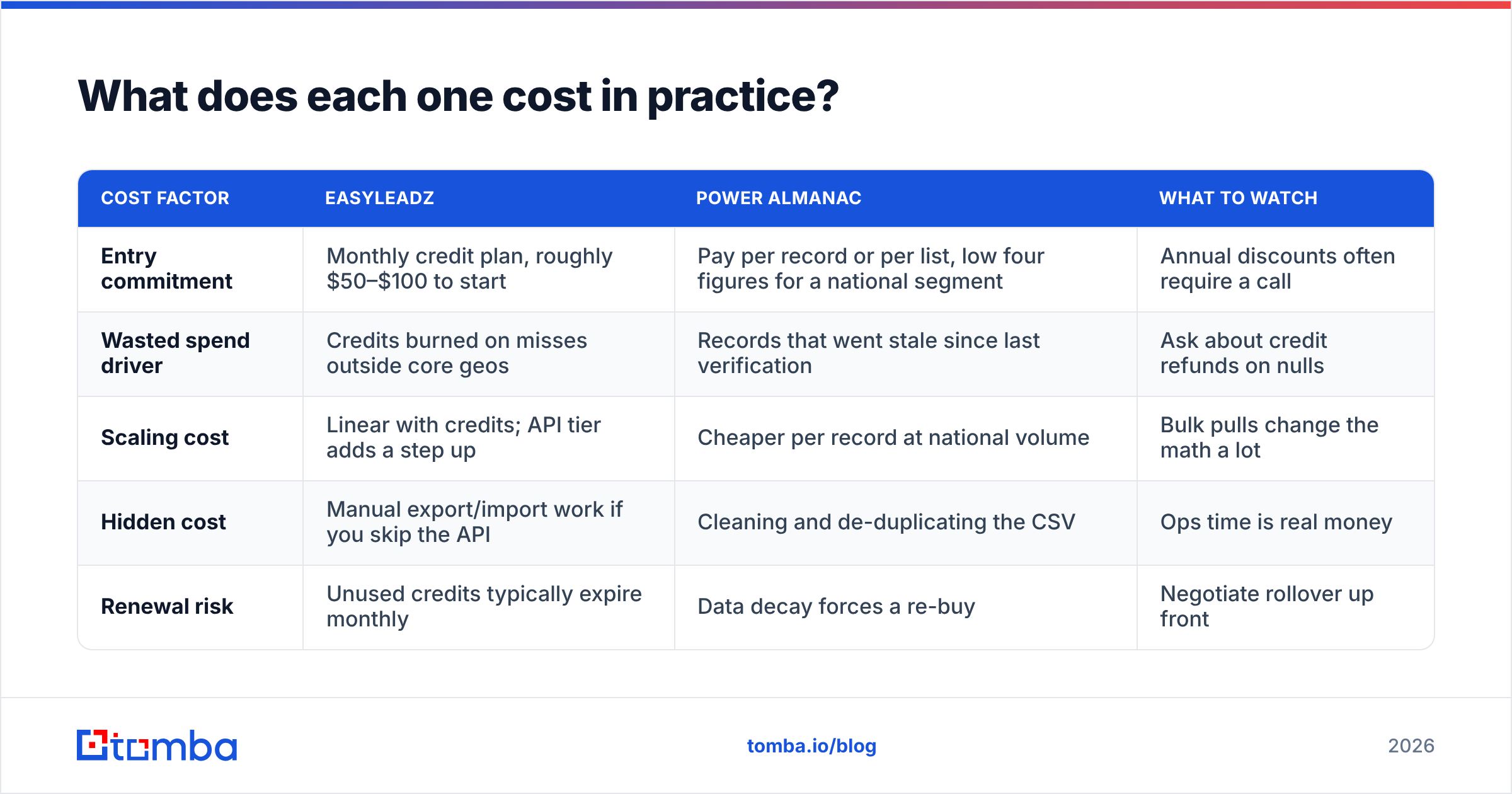
Sticker price is the least useful number here. Cost per usable contact is what hits your CAC.
| Cost factor | EasyLeadz | Power Almanac | What to watch |
|---|---|---|---|
| Entry commitment | Monthly credit plan, roughly $50–$100 to start | Pay per record or per list, low four figures for a national segment | Annual discounts often require a call |
| Wasted spend driver | Credits burned on misses outside core geos | Records that went stale since last verification | Ask about credit refunds on nulls |
| Scaling cost | Linear with credits; API tier adds a step up | Cheaper per record at national volume | Bulk pulls change the math a lot |
| Hidden cost | Manual export/import work if you skip the API | Cleaning and de-duplicating the CSV | Ops time is real money |
| Renewal risk | Unused credits typically expire monthly | Data decay forces a re-buy | Negotiate rollover up front |
Two rules here. First, price per usable record, not per credit. Say a plan gives you 1,000 credits for $99. If only 55% come back as a valid, reachable contact in your target region, your real cost is about $0.18 per usable record, not $0.099. Second, ask what happens on a miss. Some vendors charge no credit when they return nothing. Others charge anyway. That one policy can swing your true cost by 30% or more.
For a sense of what a clear, tiered model reads like, look at Tomba's pricing. The free tier runs 25 searches a month. Starter is $49/mo, Growth is $99/mo, and Pro is $249/mo. Enterprise is negotiated. Whichever vendor you pick, ask for that level of published detail. If you cannot model your annual spend from the public page, the renewal talk will go the same way.
Who should buy EasyLeadz?#
Buy EasyLeadz if three things are true:
- Your reps call more than they email. The whole product aims at getting a human on the phone. If your motion is email-first, you are paying a premium for the wrong asset.
- Your buyers sit in India, APAC, or the Gulf. This is the best reason to pick EasyLeadz over a US-first vendor. Nobody else has the same mobile depth in India.
- You want per-profile lookup, not bulk lists. Open a LinkedIn profile, click, get a number. That fits a rep working a named-account list. It fits a growth team building a 50,000-row database far less well.
Where it disappoints: European coverage under GDPR-friendly sourcing is a weak spot. If your compliance team asks how the mobile numbers were sourced, do that homework early. Phone data is the most legally touchy corner of this market, and the rules differ by country. Ask for the sourcing documents in writing.
Who should buy Power Almanac?#
Power Almanac wins in one specific, valuable case. You sell into US local government, and the buying committee is defined by role, not by company size.
That market is real and underserved. Maybe you sell fleet software, water infrastructure, public safety hardware, ERP for small cities, grant tools, or road equipment. If so, your market is a list of towns plus the people who hold certain titles in them. Power Almanac has already done that mapping. It even covers the small townships that commercial databases skip. A town of 4,000 people is invisible to a firmographic vendor. It still has a budget for a snow plow.
Where it disappoints: this is not a prospecting engine. There is no enrichment API to hang your workflows on. There is no browser extension for a quick capture. There is nothing outside US local government. The day your ICP grows to include a private contractor, a state agency, or a Canadian city, you are shopping again. Treat it as a data buy for one campaign, not as infrastructure.

Where do both tools leave gaps?#
Run either one for a quarter and the same three holes show up.
- Email is a second-class citizen. EasyLeadz is phone-first by design. Power Almanac emails are often role-based (
clerk@cityname.gov) rather than personal. That is fine for a formal RFP notice. It is terrible for a personal cold email. Neither one replaces a real finder. - No verification loop. You get data. You do not get an ongoing check that the data is still true. If you send at any volume, you need a verify step between the database and the sequencer.
- Narrow domain reach. Both are strong in their lane and blind outside it. The moment your list holds a domain neither vendor indexed, you are back to guessing formats by hand.
That third gap is the one that quietly kills campaigns. You have a company name and a person's name, but no email. The fix is a domain search that returns the verified pattern and the named contacts for that domain. It should not matter whether the company is a Bangalore fintech, an Iowa township contractor, or a German plant. Pair it with a bulk email finder run. A list that arrived 60% complete comes out the other side usable.
What are the alternatives if neither fits?#
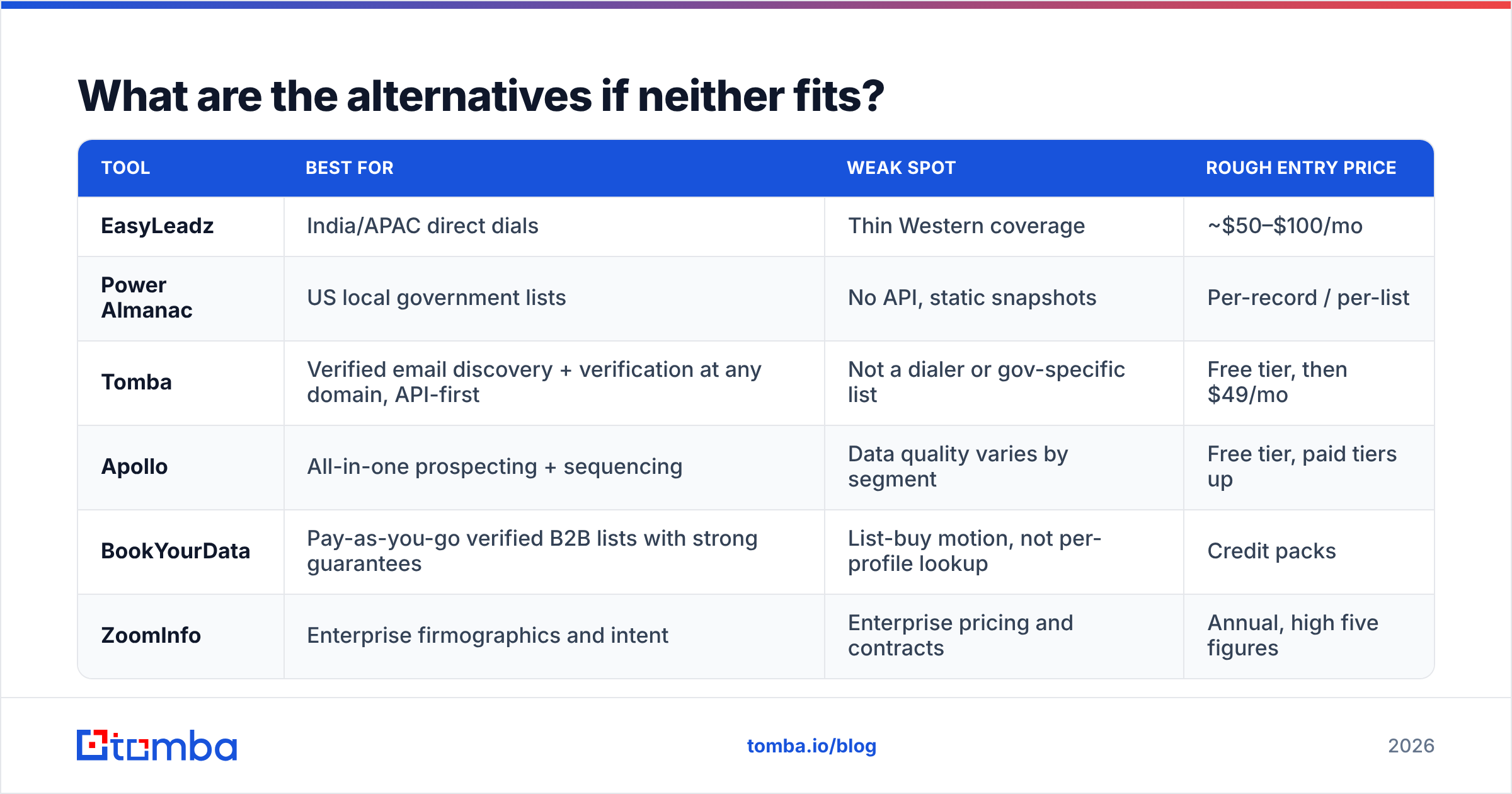
| Tool | Best for | Weak spot | Rough entry price |
|---|---|---|---|
| EasyLeadz | India/APAC direct dials | Thin Western coverage | ~$50–$100/mo |
| Power Almanac | US local government lists | No API, static snapshots | Per-record / per-list |
| Tomba | Verified email discovery + verification at any domain, API-first | Not a dialer or gov-specific list | Free tier, then $49/mo |
| Apollo | All-in-one prospecting + sequencing | Data quality varies by segment | Free tier, paid tiers up |
| BookYourData | Pay-as-you-go verified B2B lists with strong guarantees | List-buy motion, not per-profile lookup | Credit packs |
| ZoomInfo | Enterprise firmographics and intent | Enterprise pricing and contracts | Annual, high five figures |
A note on stacking. These tools are not mutually exclusive. The best outbound teams rarely run a single source. The common shape is one specialist source for the hard field, plus one broad layer for the rest. The specialist might be mobile numbers from EasyLeadz, town mapping from Power Almanac, or a guaranteed list buy from BookYourData. The broad layer finds and verifies email across everything else. The specialist gives you an edge. The broad layer gives you coverage.
How do you actually test these before committing?#
Do not judge either one on a demo. Run this in a week:
- Build a 150-contact truth set. Use contacts whose emails and numbers you have already confirmed. Spread them across the regions you really sell into. This is your answer key.
- Run the same set through each trial. Track fill rate and accuracy apart from each other. Fill rate asks if it returned anything. Accuracy asks if the answer was right. Vendors blur the two.
- Verify every returned email on your own. Use a neutral checker so the vendor does not grade its own homework. A free email checker is fine for spot checks. Use the API for the full set.
- Work out cost per verified contact, not cost per credit. Count the ops hours spent cleaning.
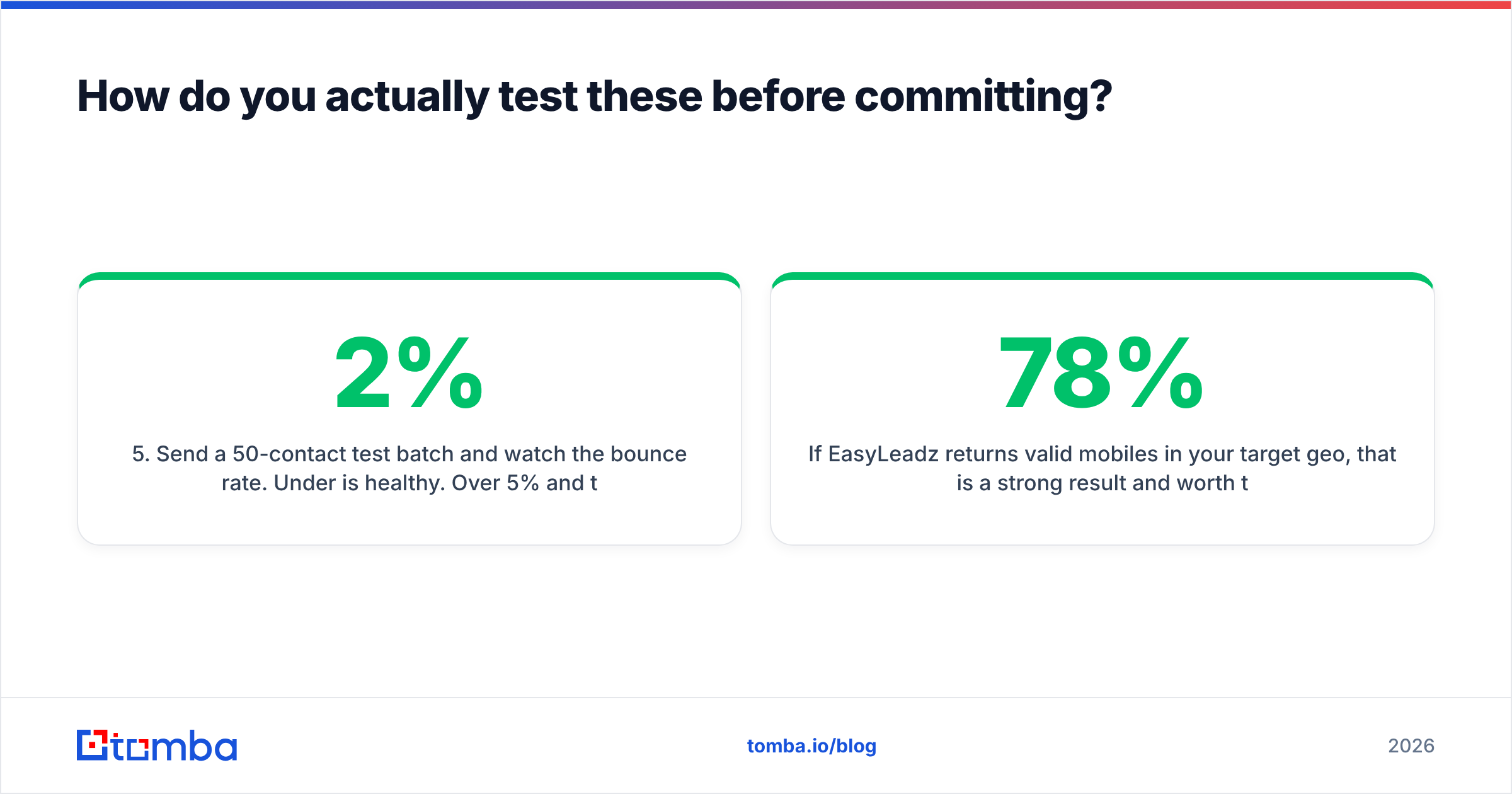
- Send a 50-contact test batch and watch the bounce rate. Under 2% is healthy. Over 5% and the list is not ready, whatever the vendor claimed.
If EasyLeadz returns 78% valid mobiles in your target region, that is a strong result and worth the spend. If a Power Almanac segment comes back 92% deliverable, buy the list. If either one lands under 60%, you have your answer. And you got it for the price of one week, not one annual contract.
The bottom line#
EasyLeadz vs Power Almanac comes down to who you sell to. EasyLeadz wins for phone-led outbound into India and APAC. Power Almanac wins for US municipal list-building, and little else competes for that job. Neither one wins as a general contact discovery layer. Neither one was built to be one.
Maybe your gap is email. You want verified addresses for named people at any company domain, on demand, through an API instead of a CSV. That is what the Tomba Email Finder does. Start on the free tier at 25 searches a month. Run it against your truth set and see the fill rate before you spend a rupee or a dollar anywhere else. If it closes the gap your vendor leaves open, Starter is $49/mo. The API is the same one your ops team can wire into the pipeline this afternoon.
Related guides#
Ready to find emails that actually work?
Join 150,000+ professionals who stopped guessing and started sending. Free credits on signup — no credit card required.
Get the Tomba newsletter
Practical outbound tactics and product updates — once every two weeks.
About the author