EasyLeadz vs SalesQL (2026): Which Contact Finder Wins?
EasyLeadz sells direct dials. SalesQL sells LinkedIn emails. They look like competitors but solve different problems — here is the honest breakdown of coverage, accuracy, credits and cost before you pick one.
TL;DR
- EasyLeadz and SalesQL are not really the same product. EasyLeadz (the "Mr. E" extension) is built around direct-dial mobile numbers with unusually deep coverage in India and APAC. SalesQL is built around pulling work and personal emails off LinkedIn profiles and lists.
- Pick EasyLeadz if you call. Pick SalesQL if you email. If you do both, you will end up paying for two subscriptions and still hitting credit walls.
- Both are extension-first. Neither is a strong choice if your workflow lives in a CRM, a spreadsheet, or an API — you'll be exporting CSVs by hand.
- Credits burn faster than you expect on both platforms, because a "credit" is often consumed on a lookup that returns nothing useful.
- A third path exists: run a domain-first email finder with an API and verification built in, then buy phone data only for the accounts that actually reach the call stage.
What are EasyLeadz and SalesQL, exactly?#
Short version: EasyLeadz is a phone-number company that also returns emails. SalesQL is an email company that also returns some phones.
EasyLeadz launched out of India and made its name on one thing — direct-dial mobile numbers for decision makers, delivered through a Chrome extension branded "Mr. E." You open a LinkedIn profile or a company website, click the extension, and it returns a mobile number plus whatever else it has on file. Its coverage is genuinely strong in India, Southeast Asia, and the Middle East, which is a real differentiator: most Western data vendors thin out badly outside the US and Western Europe.
SalesQL is a LinkedIn-native contact extractor. It sits on top of LinkedIn profiles, search results, Sales Navigator lists, and group member pages, and returns work emails, personal emails, and sometimes phone numbers. Its calling card is the personal-email angle — useful for recruiters and for anyone selling into people who ignore their corporate inbox.
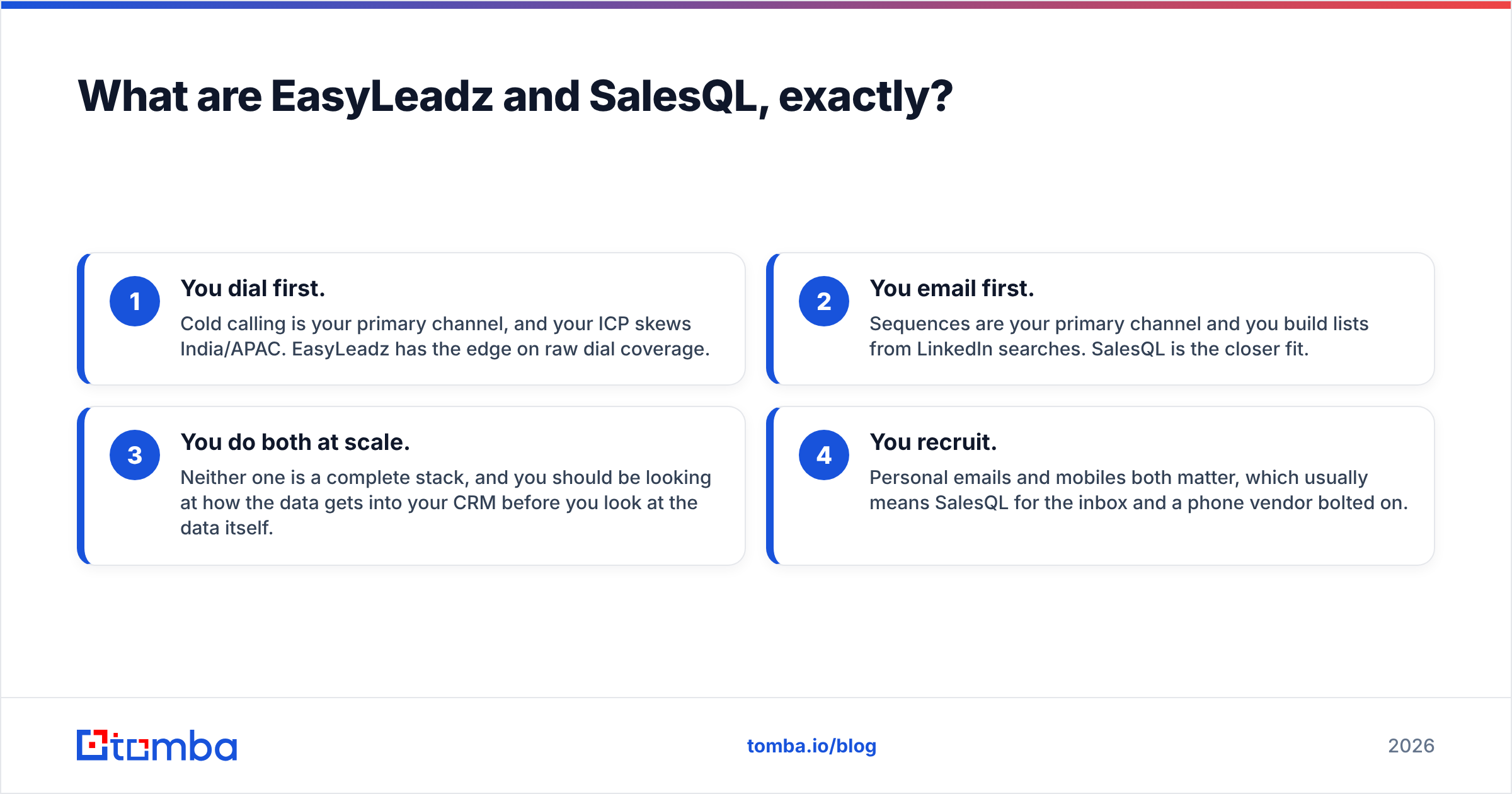
So the "EasyLeadz vs SalesQL" question is really a question about your motion:
- You dial first. Cold calling is your primary channel, and your ICP skews India/APAC. EasyLeadz has the edge on raw dial coverage.
- You email first. Sequences are your primary channel and you build lists from LinkedIn searches. SalesQL is the closer fit.
- You do both at scale. Neither one is a complete stack, and you should be looking at how the data gets into your CRM before you look at the data itself.
- You recruit. Personal emails and mobiles both matter, which usually means SalesQL for the inbox and a phone vendor bolted on.
How do EasyLeadz and SalesQL compare feature by feature?#
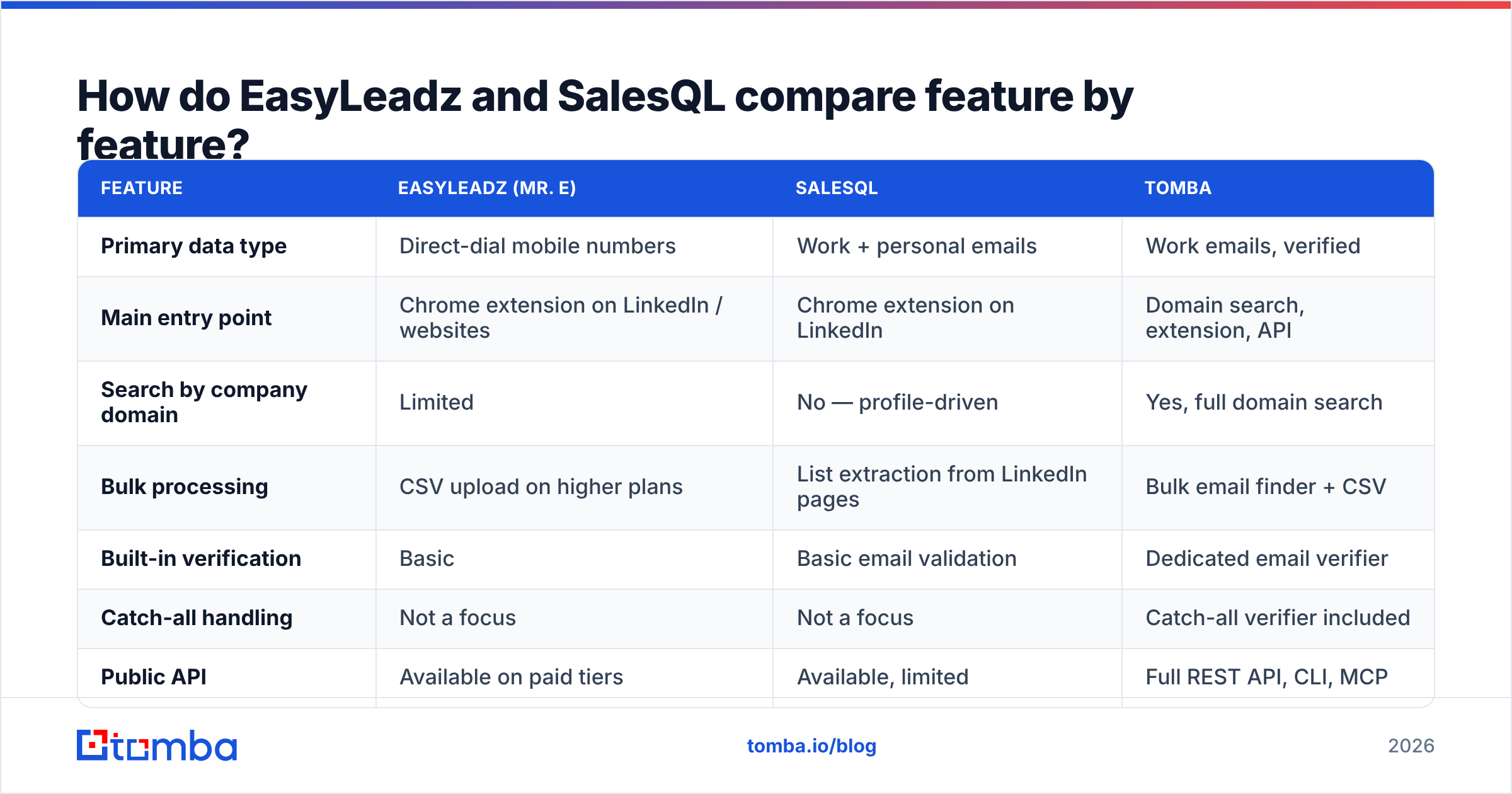
Here is the side-by-side, with a third column so you can see what a domain-first email finder does differently. Pricing and limits reflect each vendor's published plans at the time of writing — always check the live pricing page before you buy, since credit rules change quietly.
| Feature | EasyLeadz (Mr. E) | SalesQL | Tomba |
|---|---|---|---|
| Primary data type | Direct-dial mobile numbers | Work + personal emails | Work emails, verified |
| Main entry point | Chrome extension on LinkedIn / websites | Chrome extension on LinkedIn | Domain search, extension, API |
| Search by company domain | Limited | No — profile-driven | Yes, full domain search |
| Bulk processing | CSV upload on higher plans | List extraction from LinkedIn pages | Bulk email finder + CSV |
| Built-in verification | Basic | Basic email validation | Dedicated email verifier |
| Catch-all handling | Not a focus | Not a focus | Catch-all verifier included |
| Public API | Available on paid tiers | Available, limited | Full REST API, CLI, MCP |
| Geographic strength | India, APAC, Middle East | US, EU, global LinkedIn base | Global, domain-driven |
| Free tier | Limited trial credits | ~100 credits/month | 25 searches/month |
| Entry paid plan | ~$59/month | ~$39/month | $49/month |
Two things jump out of that table.
First, neither tool is domain-first. Both start from a person — a LinkedIn profile you already found. That's fine when you're prospecting one account at a time. It falls apart when someone hands you a list of 400 target domains and asks for the head of ops at each one. For that shape of work you want to search a company and get its people and patterns back, not scrape profiles one by one.
Second, the API story is thin on both sides. If your RevOps team wants enrichment to fire automatically when a lead hits the CRM, an extension is the wrong primitive. That's a workflow gap, not a data gap, and it's the single most common reason teams outgrow both tools.
Which one returns more accurate data?#
It depends entirely on which field you're grading, and this is where most comparison posts go wrong by declaring a single winner.
On mobile numbers, EasyLeadz wins in its home territory. If your list is Indian SaaS founders, APAC operations leaders, or Gulf-region procurement managers, EasyLeadz will return a working mobile where most US-built databases return nothing at all. Outside that footprint, the gap narrows sharply and its dial coverage becomes comparable to any mid-tier vendor — which is to say, hit-or-miss.
On work emails, SalesQL is respectable but pattern-heavy. Like most LinkedIn extractors, it infers likely addresses from name plus company domain, then applies a validation pass. That works well for companies with a clean, single email pattern. It degrades on companies that use multiple patterns, on catch-all domains where SMTP checks can't distinguish real mailboxes from accepted-anything servers, and on any org where the person's LinkedIn name doesn't match their internal name (nicknames, married names, transliterations).
On personal emails, SalesQL is the more interesting of the two — and also the one that needs the most care. Personal addresses carry real compliance weight under GDPR and similar regimes, and blasting a personal Gmail with a B2B sequence is a fast way to earn spam complaints. Use them where the context justifies it, not by default.

The practical accuracy lesson across both tools is the same: a returned address is not a verified address. Any tool that guesses first.last@domain.com will hand you something plausible for almost every contact. What separates a 3% bounce rate from a 14% bounce rate is what happens after the guess — SMTP validation, MX checks, role-account filtering, and honest handling of catch-all domains. If you're running volume, put a real email verification step between your finder and your sending tool no matter which vendor you choose. Your sender reputation is the asset you're actually protecting.
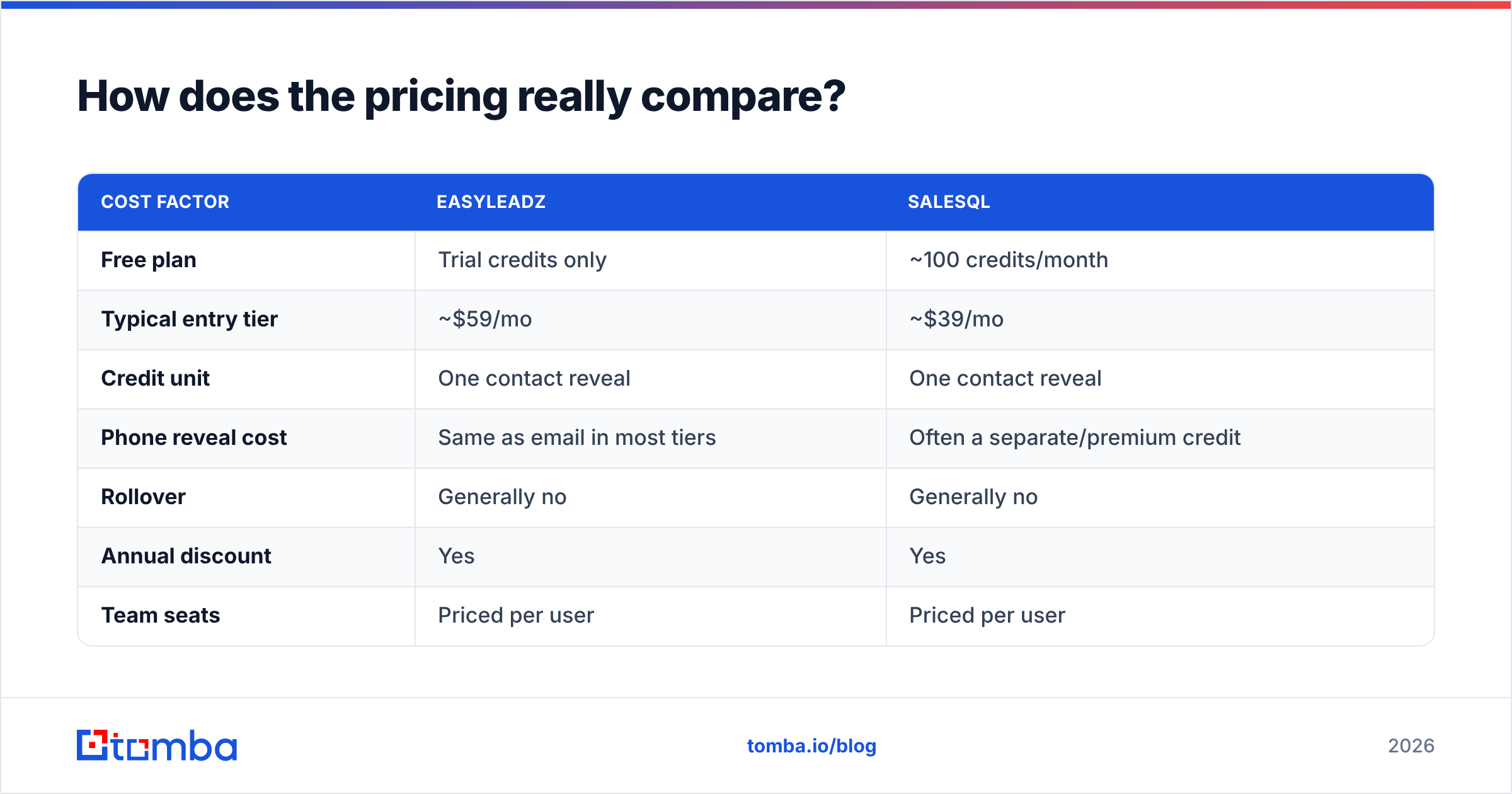
How does the pricing really compare?#
Both companies price in credits, and both make credits mean slightly different things — which is where the sticker price stops being useful.
| Cost factor | EasyLeadz | SalesQL |
|---|---|---|
| Free plan | Trial credits only | ~100 credits/month |
| Typical entry tier | ~$59/mo | ~$39/mo |
| Credit unit | One contact reveal | One contact reveal |
| Phone reveal cost | Same as email in most tiers | Often a separate/premium credit |
| Rollover | Generally no | Generally no |
| Annual discount | Yes | Yes |
| Team seats | Priced per user | Priced per user |
| API access | Higher tiers | Available, rate-limited |
Three cost traps to check before you commit:
- Credits expire monthly on both. Buy for your peak month and you overpay eleven months a year. Buy for your average month and your reps run dry mid-quarter.
- A failed lookup can still cost you. Policies vary and change; ask support in writing whether a reveal that returns no phone or a catch-all-only email consumes a credit. This single answer can swing your effective cost per usable contact by 40%.
- Seats multiply fast. Both price per user. A five-rep team on a $59 plan is $295/month before anyone has sent an email.
For reference, Tomba pricing runs Free at 25 searches/month, Starter at $49/month, Growth at $99/month, and Pro at $249/month, with Enterprise custom — and verification, domain search, and API access are part of the same account rather than upsells stacked on top.

Which tool should you pick for your team?#
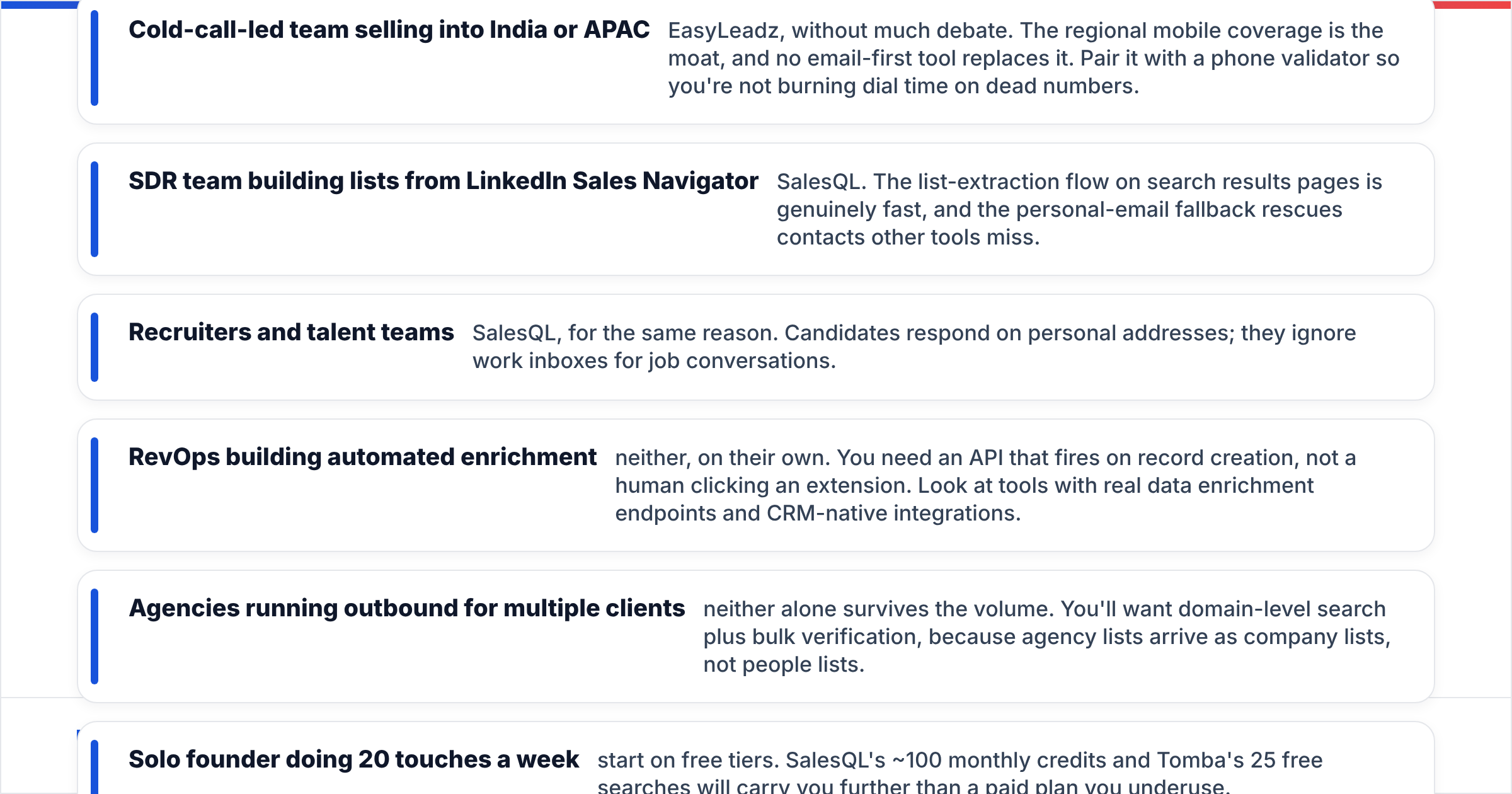
Rather than a verdict, here's the decision matrix I'd actually use:
- Cold-call-led team selling into India or APAC — EasyLeadz, without much debate. The regional mobile coverage is the moat, and no email-first tool replaces it. Pair it with a phone validator so you're not burning dial time on dead numbers.
- SDR team building lists from LinkedIn Sales Navigator — SalesQL. The list-extraction flow on search results pages is genuinely fast, and the personal-email fallback rescues contacts other tools miss.
- Recruiters and talent teams — SalesQL, for the same reason. Candidates respond on personal addresses; they ignore work inboxes for job conversations.
- RevOps building automated enrichment — neither, on their own. You need an API that fires on record creation, not a human clicking an extension. Look at tools with real data enrichment endpoints and CRM-native integrations.
- Agencies running outbound for multiple clients — neither alone survives the volume. You'll want domain-level search plus bulk verification, because agency lists arrive as company lists, not people lists.
- Solo founder doing 20 touches a week — start on free tiers. SalesQL's ~100 monthly credits and Tomba's 25 free searches will carry you further than a paid plan you underuse.
What do both tools leave on the table?#
Three gaps show up repeatedly in reviews on G2 and in conversations with teams that have churned off one or both.
Domain-first prospecting. If your target list is companies rather than people — the standard case for ABM and for territory-based outbound — a profile-driven extractor makes you do the discovery work manually. You need to find every relevant person on LinkedIn before the tool does anything. Searching a domain and getting back the people plus the company's email pattern inverts that and saves hours per list.

Catch-all domains. A large share of mid-market and enterprise domains accept mail to any address, which means a standard SMTP check returns "valid" for asdf@company.com. Neither EasyLeadz nor SalesQL treats catch-all resolution as a first-class problem. If a meaningful slice of your list sits behind catch-all servers, you need a catch-all verifier or you're guessing with extra steps.
Workflow depth. Extensions are great for one-off research and bad for repeatable process. The moment you want emails found inside Google Sheets, enriched on CRM record creation, or pulled by a script during a nightly job, you've left extension territory. That's an API, CLI, and integrations question — and it's why teams often end up keeping a specialist phone tool like EasyLeadz for dials while moving email discovery to a platform with an email finder API.
Is there a better combination than either one alone?#
For most teams, yes — and it's usually a two-tool stack rather than a single winner.
The pattern that works: use a domain-first email finder as your base layer, because company-level discovery scales and person-level scraping doesn't. Verify everything before it touches a sending tool. Then buy phone data narrowly — only for accounts that have already shown intent or reached a call stage — instead of paying per-dial-credit across your whole list.
That structure fixes the two expensive failure modes at once. You stop burning premium phone credits on contacts who will never take a call, and you stop bouncing into spam folders because a pattern-guessed address was never actually validated. Bounce rates below 3% keep your email deliverability intact; above 5% and your domain starts paying a tax you can't buy your way out of.
If your ICP is heavily India/APAC, keep EasyLeadz in the stack for dials — nothing replaces that coverage. If your team lives inside Sales Navigator and personal emails move your reply rate, SalesQL earns its seat. Just don't expect either to be the system of record for your contact data.
The bottom line#
EasyLeadz vs SalesQL is a phone-vs-email decision dressed up as a tool comparison. EasyLeadz is the better buy for call-led teams with APAC-heavy target lists. SalesQL is the better buy for LinkedIn-native SDRs and recruiters who need personal addresses. Neither is the right base layer for a team that prospects by company domain, verifies at volume, or automates enrichment through an API.
If that last description sounds like your team, start with the Tomba Email Finder. Search by domain, name, or company, get verified work emails with confidence scores instead of pattern guesses, and push the results straight into HubSpot, Salesforce, Google Sheets, or your own code through the API. The free tier gives you 25 searches a month to test it against your own list — run the same 25 contacts through all three tools and let the bounce rate pick the winner.
Related guides#
Ready to find emails that actually work?
Join 150,000+ professionals who stopped guessing and started sending. Free credits on signup — no credit card required.
Get the Tomba newsletter
Practical outbound tactics and product updates — once every two weeks.
About the author