EasyLeadz vs Tomba (2026): Which Contact Finder Wins?
EasyLeadz sells direct dials. Tomba sells verified work emails. We compare coverage, accuracy, pricing, and API depth so you know which one your outbound motion actually needs in 2026.
EasyLeadz vs Tomba is a simple choice with a big impact. One tool sells direct dial phone numbers. The other sells verified work emails. Here is how the two compare on coverage, accuracy, price, and API depth.
TL;DR
- EasyLeadz is phone-first. Its flagship product is the Mr. E Chrome extension. It pulls direct dial mobile numbers off LinkedIn profiles. Email is a side output.
- Tomba is email-first. Domain search, pattern detection, SMTP-level verification, and a documented API are the core. Phone data sits alongside as an add-on.
- Pricing models differ more than the sticker price. EasyLeadz meters credits per revealed contact. Tomba's plans run Free (25 searches/mo), Starter $49/mo, Growth $99/mo, Pro $249/mo, and Enterprise custom.
- Geography matters. EasyLeadz has strong India and APAC mobile coverage. Tomba's strength is the breadth of company domains across US and EU B2B.
- Most teams need both categories. But only one tool can be the system of record for your outbound list. Pick that one on email accuracy, not on phone novelty.
What is EasyLeadz and what is Tomba?#
They solve nearby problems. That is why the comparison confuses people.
EasyLeadz is a B2B contact data company. It is best known for Mr. E by EasyLeadz, a browser extension that reveals direct dial phone numbers from a LinkedIn profile in one click. The pitch is speed for callers: open a prospect, click, dial. It also returns work emails, and it offers a company API for bulk lookups. Its data is strongest in India and the wider APAC region, where most Western providers thin out badly.
Tomba is an email finding and verification platform. Give it a domain, a name, a LinkedIn URL, or a company. It returns the professional email address, a confidence score, and the sources it used. Around that core sit an email verifier, catch-all detection, data enrichment, bulk processing, and a REST email finder API with SDKs.
The one-line difference: EasyLeadz optimizes for the last mile of a phone call. Tomba optimizes for building and cleaning the list that feeds every channel.

EasyLeadz vs Tomba: how do they compare head-to-head?#
Here is the honest side-by-side. The EasyLeadz prices reflect publicly listed plans at the time of writing. Credit-based vendors change packaging often, so check their site before you buy.
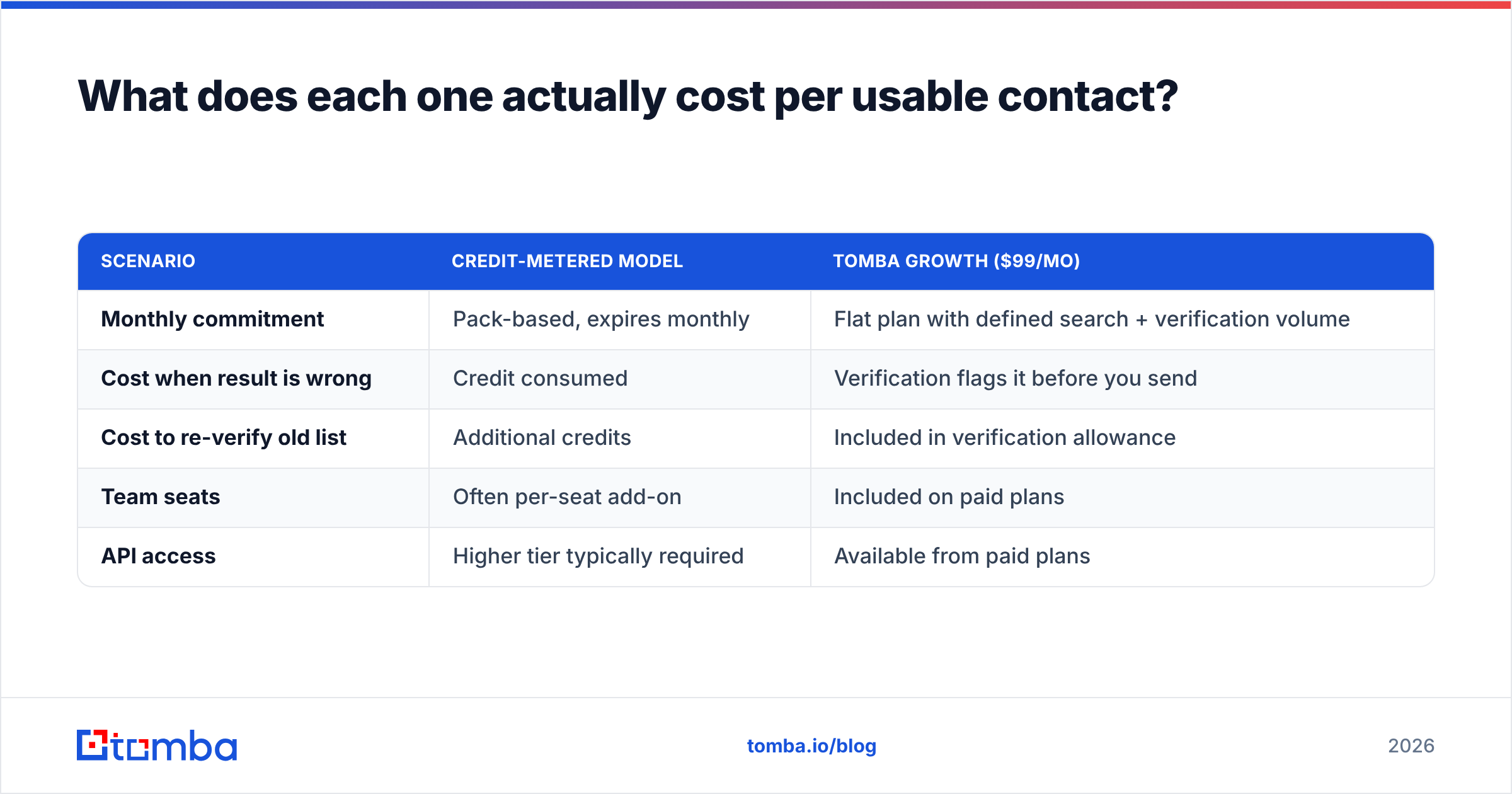
| Attribute | EasyLeadz | Tomba |
|---|---|---|
| Primary data type | Direct dial mobile numbers | Verified professional emails |
| Secondary data | Work emails, company firmographics | Phones, enrichment, social profiles |
| Entry price | ~$59/mo credit pack (annual discounts) | $49/mo Starter |
| Free tier | Limited trial credits | 25 searches/mo, no card |
| Mid tier | ~$99–$199/mo credit tiers | $99/mo Growth |
| High tier | Custom / enterprise | $249/mo Pro, Enterprise custom |
| Chrome extension | Yes (Mr. E, LinkedIn-native) | Yes (browser extension) |
| Domain-wide search | No | Yes — domain search returns every known address at a company |
| Built-in verification | Basic | SMTP + MX + catch-all detection |
| Bulk processing | CSV upload | Bulk finder + verifier, Sheets/Excel add-ons |
| Public API docs | Yes | Yes, with SDKs and CLI |
| Regional strength | India, APAC mobiles | US, EU, LATAM company domains |
| Best for | SDRs who cold call first | Teams building and cleaning email lists at scale |

Two structural differences deserve more than a table row.
No domain-wide discovery in EasyLeadz. You look up one person at a time. You cannot ask for every VP at stripe.com and get back a list of addresses with patterns and confidence scores. That is a different research motion: profile-by-profile versus account-by-account. If your target list starts with accounts, the profile-by-profile model is slow.
Verification depth. Returning an address and proving it is deliverable are two different jobs. Tomba runs MX checks, SMTP handshakes, disposable-domain filters, and catch-all verification before it hands you a result. EasyLeadz builds email as a byproduct of its phone pipeline. It shows in bounce rates on Western domains.
Which tool returns more accurate data?#
It depends on which field you are grading.
On mobile numbers in India and APAC, EasyLeadz is hard to beat. Its data partnerships in that region run deeper than most global providers. Buyers on G2 name that as the reason they keep the subscription. If your reps dial Bangalore, Mumbai, Singapore, or Jakarta, that coverage is a real moat.
On work email accuracy across US and EU domains, an email-native engine wins. Not because of marketing claims. Because of method. An email finder blends crawled public sources, pattern inference across a company's known addresses, and live SMTP checks. That gives it three signals to cross-check. A phone-first tool usually has one weaker guess layer bolted on.

Here is a practical way to settle it for your own list, in about 30 minutes:
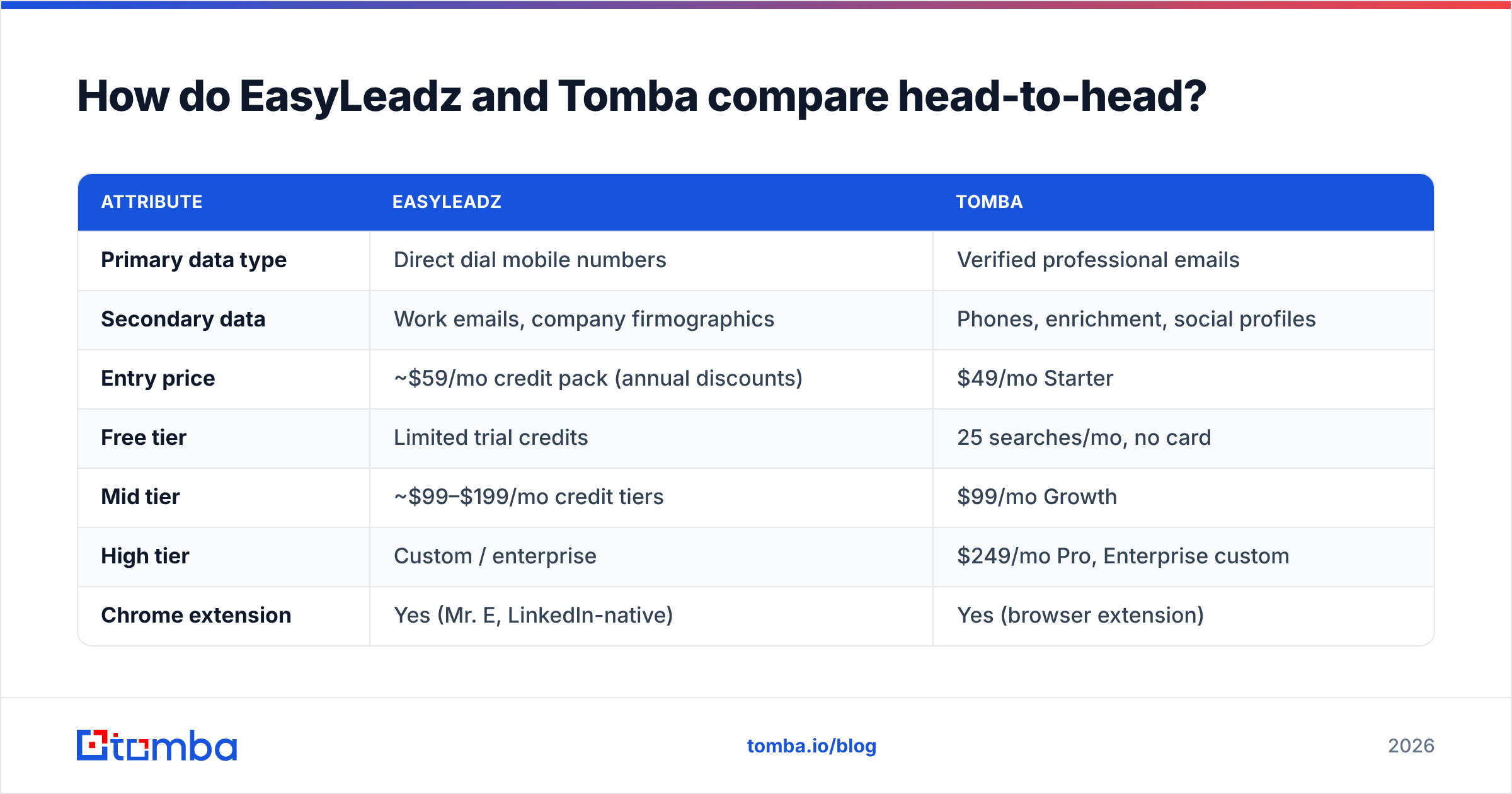
- Pull 100 real prospects from your own ICP. Do not use a demo list the vendor suggests.
- Run the same 100 through both tools. Record hit rate and accuracy separately. Hit rate is how many returned anything. Accuracy is how many were correct.
- Send the emails through a neutral verifier. Use a third-party check, not either vendor's own score. Then count the hard bounces.
- Divide total cost by verified-usable records, not by credits. A cheap credit that returns nothing is infinitely expensive.
- Repeat for a second region. Vendors that dominate one region often collapse in another. A single-region test will mislead you.
That last step is where most head-to-head reviews fail. Average accuracy numbers hide regional cliffs.
What does each one actually cost per usable contact?#
The sticker prices are close. The unit economics are not.
Credit tools charge you when a lookup returns data. That sounds fair. But a wrong record still burns the credit. The number you care about is cost per verified usable contact.
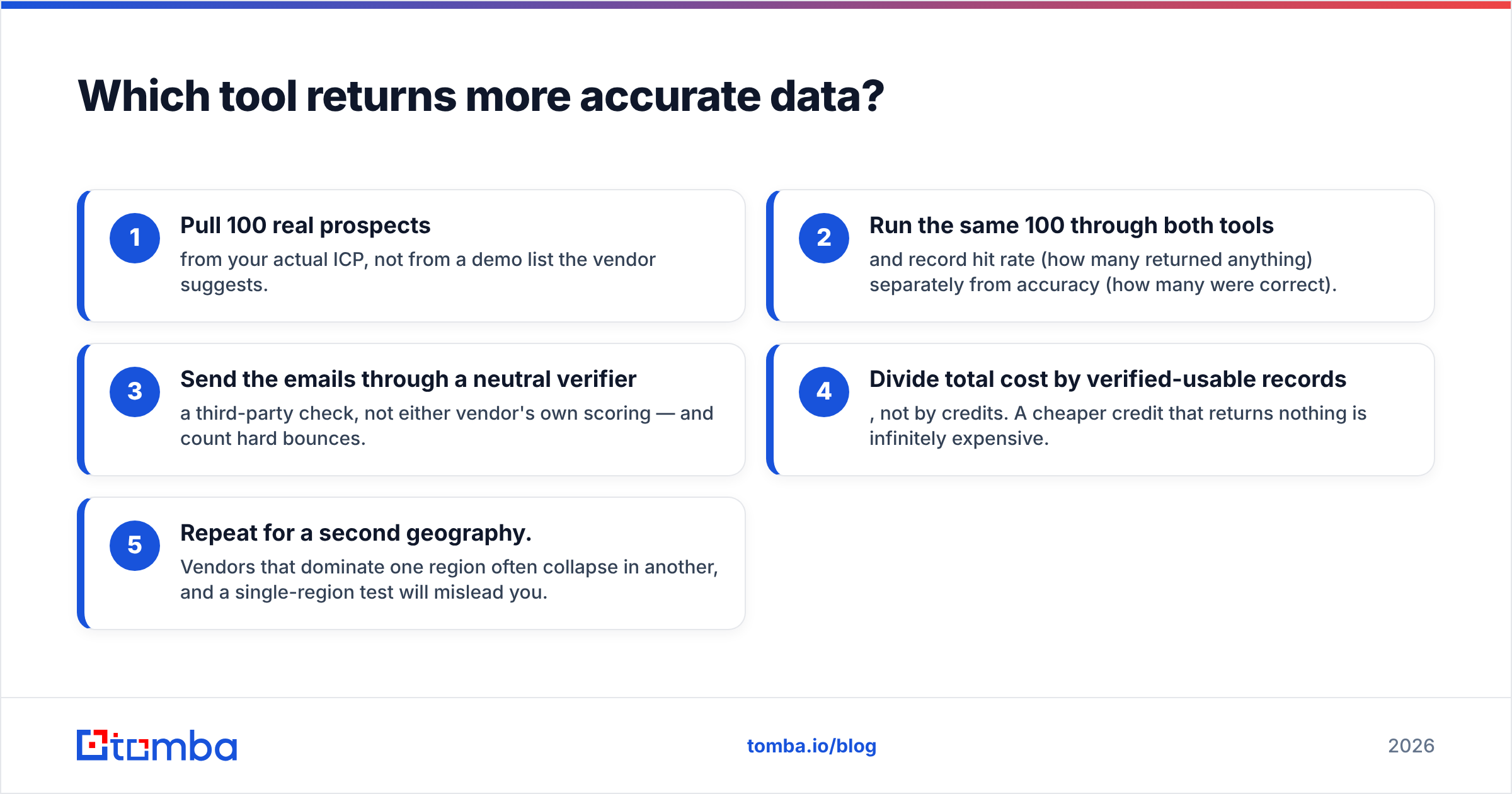
| Scenario | Credit-metered model | Tomba Growth ($99/mo) |
|---|---|---|
| Monthly commitment | Pack-based, expires monthly | Flat plan with defined search + verification volume |
| Cost when result is wrong | Credit consumed | Verification flags it before you send |
| Cost to re-verify old list | Additional credits | Included in verification allowance |
| Team seats | Often per-seat add-on | Included on paid plans |
| API access | Higher tier typically required | Available from paid plans |
Run the math on a 3,000-contact quarter. Say 18% of the returned addresses bounce. You did not buy 3,000 contacts. You bought 2,460. You also paid a deliverability tax on your sending domain that no invoice shows you. That is the hidden line item.

Tomba's pricing is flat on purpose — Free (25 searches/mo), Starter $49/mo, Growth $99/mo, Pro $249/mo, Enterprise custom. Flat plans let you work out cost per usable contact in advance. You do not have to rebuild it from a usage dashboard later.
Who should choose EasyLeadz?#
Be honest about your motion. EasyLeadz is the better buy if:
- Cold calling is your main channel, not a follow-up to email. If 60% or more of your pipeline starts on a dial, phone coverage outranks email coverage.
- Your territory is India or APAC. This is the strongest single argument for the tool, and it is a good one.
- Your reps live inside LinkedIn. The Mr. E flow — profile, click, dial — has almost no friction. Friction is what kills SDR tool adoption.
- You need hundreds of contacts, not tens of thousands. Profile-by-profile lookup does not scale to list building.
Where it struggles: there is no domain-wide discovery, Western email accuracy is thinner, and credit models punish exploration. If your team likes to check 40 companies to see which ones have the right titles, you will burn budget fast.
Who should choose Tomba?#
Tomba is the better fit if:
- Email is your main or multi-threaded channel. Verified addresses feed cold email, nurture, ABM ads, and CRM hygiene at the same time.
- You build lists by account, not by person. Domain search returns the whole org's known addresses plus the pattern. One query replaces forty profile visits.
- Deliverability is a board-level concern. Verification, catch-all handling, and bounce prevention are the product here, not an afterthought. Anyone who has watched a domain get throttled after a bad list knows the value.
- You need automation. The API, CLI, MCP server, and native Google Sheets, Excel, and CRM integrations let enrichment run without a human clicking anything.
- You want to test before paying. 25 free searches per month with no card is enough to run the 100-prospect test above.
Where it struggles: if you need one decision-maker's personal mobile in Pune tomorrow morning, a phone-first specialist will beat it on that field. Tomba's phone finder covers B2B numbers well. But no single vendor owns every region's mobile data.
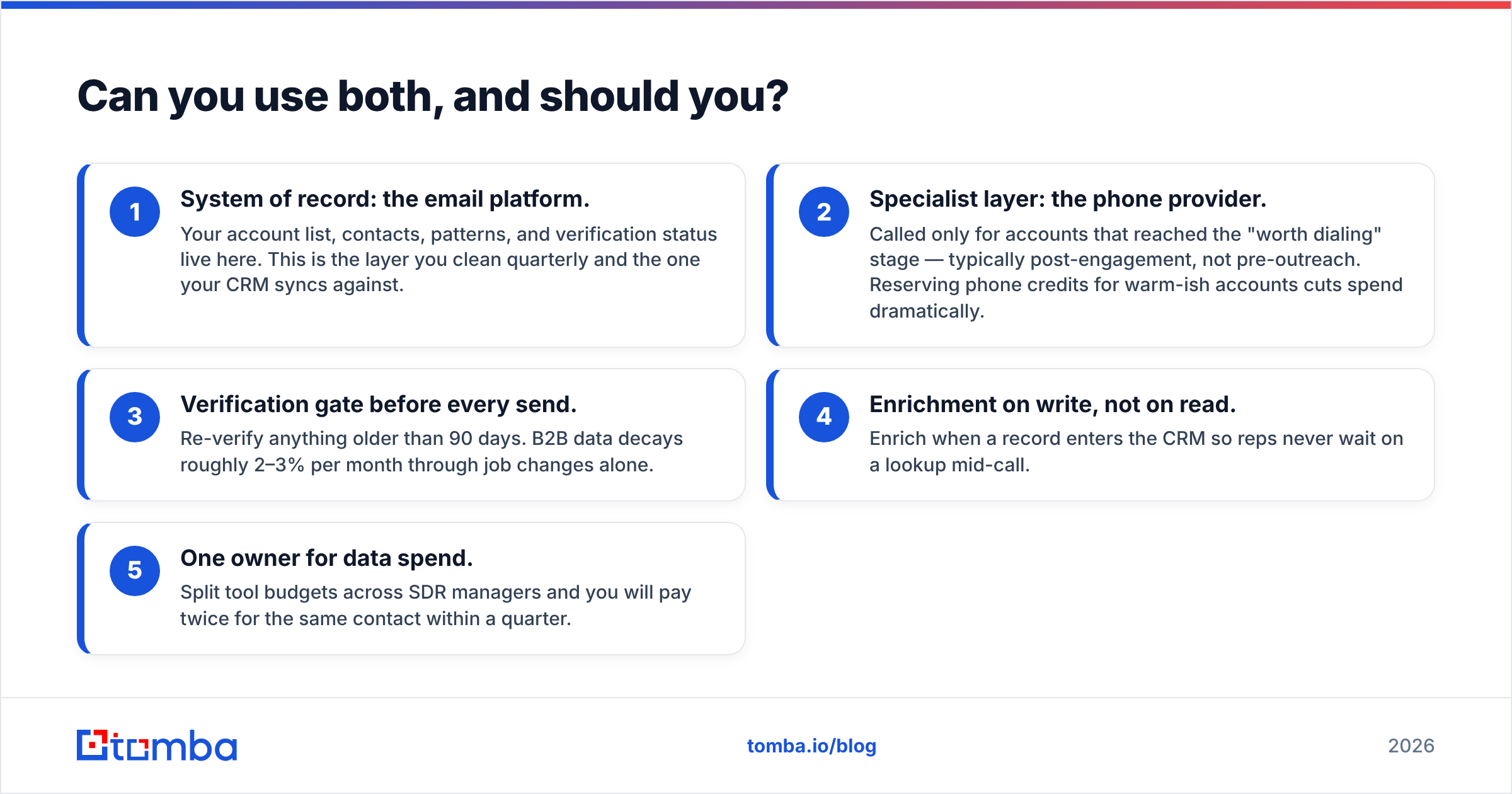
Can you use both, and should you?#
Yes, and plenty of teams do. Just keep a clear hierarchy. Here is the stack that works:
- System of record: the email platform. Your accounts, contacts, patterns, and verification status live here. You clean this layer every quarter, and your CRM syncs against it.
- Specialist layer: the phone provider. Call it only for accounts that reach the "worth dialing" stage. That is usually after some engagement, not before outreach. Saving phone credits for warm accounts cuts spend a lot.
- Verification gate before every send. Re-verify anything older than 90 days. B2B data decays about 2–3% per month from job changes alone.
- Enrichment on write, not on read. Enrich when a record enters the CRM. Then reps never wait on a lookup mid-call.
- One owner for data spend. Split tool budgets across SDR managers and you will pay twice for the same contact in a quarter.
The mistake to avoid is running two list-building tools side by side. You get duplicate credits, conflicting records, and no clean source of truth. Specialist tools should stay narrow and downstream.
What alternatives should you also look at?#
If neither fits, the nearby options split along the same axis. Apollo and Seamless.AI bundle data with sequencing. That is handy until you want to change sending tools — see our take on Apollo alternatives. ZoomInfo is still the enterprise default for firmographics and intent, at enterprise prices. Lusha and ContactOut compete with EasyLeadz on the LinkedIn extension motion. BookYourData suits teams that would rather buy pre-built, geography-filtered lists than run lookups. That is a different purchase shape, and a solid one when you need volume up front.
Whichever way you go, run the same test: cost per verified usable contact, measured on your own ICP, in your own regions. Vendor accuracy percentages are marketing. Your bounce log is evidence. Research firms like Gartner have said the same thing for years. Bad data costs far more than data tools do.
The verdict on EasyLeadz vs Tomba#
Choose EasyLeadz if the phone rings first in your process and your territory is APAC. It does one hard thing well. Its regional mobile coverage is a real advantage that generalist providers cannot match.
Choose Tomba if email is the backbone of your outbound and you need a system of record that scales. You get domain-wide discovery, real verification, flat pricing from $49/mo, and an API to automate the whole pipeline. That makes it the layer everything else plugs into.
Start with 25 free searches a month — no card required. Run the Tomba Email Finder against a hundred prospects from your real ICP. Compare hit rate, bounce rate, and cost per usable contact against what you pay today. If the numbers do not beat your current stack, you lost half an hour. If they do, you just found the cheapest deliverability fix available.
Related guides#
Ready to find emails that actually work?
Join 150,000+ professionals who stopped guessing and started sending. Free credits on signup — no credit card required.
Get the Tomba newsletter
Practical outbound tactics and product updates — once every two weeks.
About the author