eGrabber vs FindThatLead in 2026: Pricing, Accuracy, Verdict
One is a desktop license built for recruiters and list builders, the other a cloud prospecting suite with a credit meter. Here is how eGrabber and FindThatLead actually compare on cost, accuracy, and workflow fit in 2026.
Short answer on eGrabber vs FindThatLead: they solve different jobs. eGrabber is a Windows app you license per seat. FindThatLead is a cloud tool with monthly credits. Pick on workflow fit, not on claimed accuracy.
TL;DR
- eGrabber is a Windows desktop license, sold per seat for a year. It is strong on messy sources: resumes, directories, PDFs, and LinkedIn lists.
- FindThatLead is a cloud suite with a browser extension, domain search, lead search, and a cold email sender. Plans start near $49 a month.
- They are not the same product. eGrabber wins on bulk desktop parsing. FindThatLead wins on team access and on sending.
- Neither one is API-first. For enrichment inside a CRM or a script, pick a tool with a real API.
- Verify every result. Guessed emails need an SMTP check before you send to them.
eGrabber vs FindThatLead: what are these two tools?#
eGrabber has been around since the late 1990s. That shows in good ways and bad ones. The company sells a family of Windows apps: ListGrabber, eMail-Prospector, eGrabber iQ, and a recruiter edition. They all run on your own machine.
You paste in text, a directory page, or a resume. The software pulls out names, titles, and companies. Then it hunts for the email address. It builds likely patterns and checks them live.
The business model is old-school too. You buy a seat for a year, and the price comes from a quote rather than a checkout page. Past pricing has run into four figures per seat per year. There is a free trial, but no real free tier.
FindThatLead is the opposite shape. It is a Spanish-built SaaS tool that lives in your browser.
You get a Chrome extension for LinkedIn. Domain search returns every email pattern it knows for a company. Lead search filters people by role and place. A bulk CSV tool handles big lists. Scrab.in-style automation and a native cold email sender round it out.
Plans are self-serve. The entry Growth tier sits near $49 a month, and team plans go up from there. Credits reset every month.
So the honest eGrabber vs FindThatLead question is not which email finder is more accurate. It is simpler than that. Do you want a heavy desktop tool licensed to one analyst? Or a light cloud tool your whole SDR team logs into?
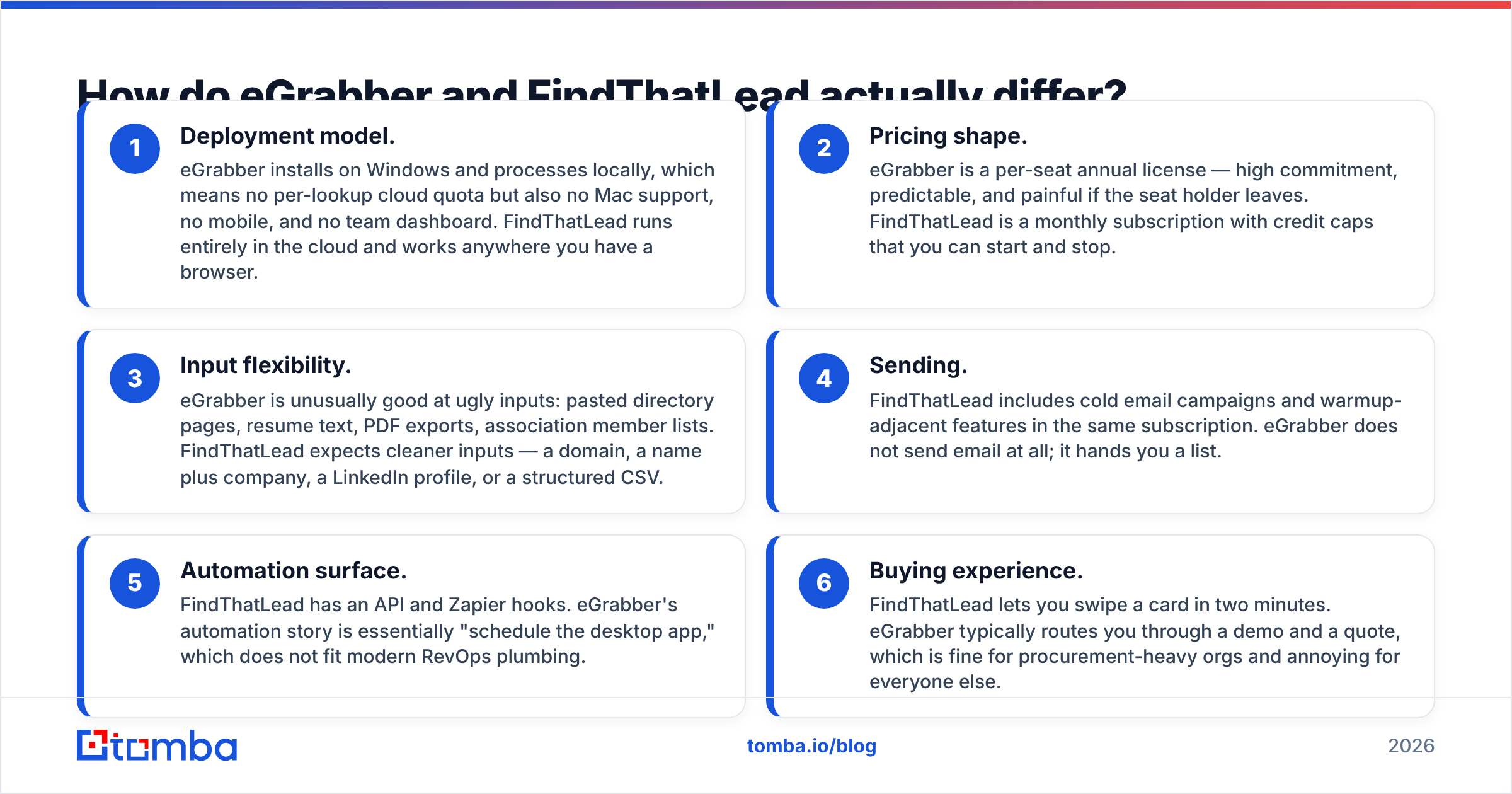
eGrabber vs FindThatLead: how do the two differ?#
Six differences matter more than the rest:
- Deployment. eGrabber runs locally on Windows. There is no Mac app, no mobile, and no team dashboard. FindThatLead runs in any browser.
- Pricing shape. eGrabber sells a yearly seat, which stings if the seat holder leaves. FindThatLead bills monthly with credit caps, and you can stop any time.
- Input. eGrabber handles ugly input well: pasted pages, resume text, PDF exports, member lists. FindThatLead wants a domain, a name plus company, or a tidy CSV.
- Sending. FindThatLead sends cold email campaigns in the same plan. eGrabber only hands you a list.
- Automation. FindThatLead has an API and Zapier hooks. eGrabber can only schedule the desktop app.
- Buying. FindThatLead takes a card in two minutes. eGrabber routes you through a demo and a quote.
eGrabber vs FindThatLead pricing: what does each one cost?#
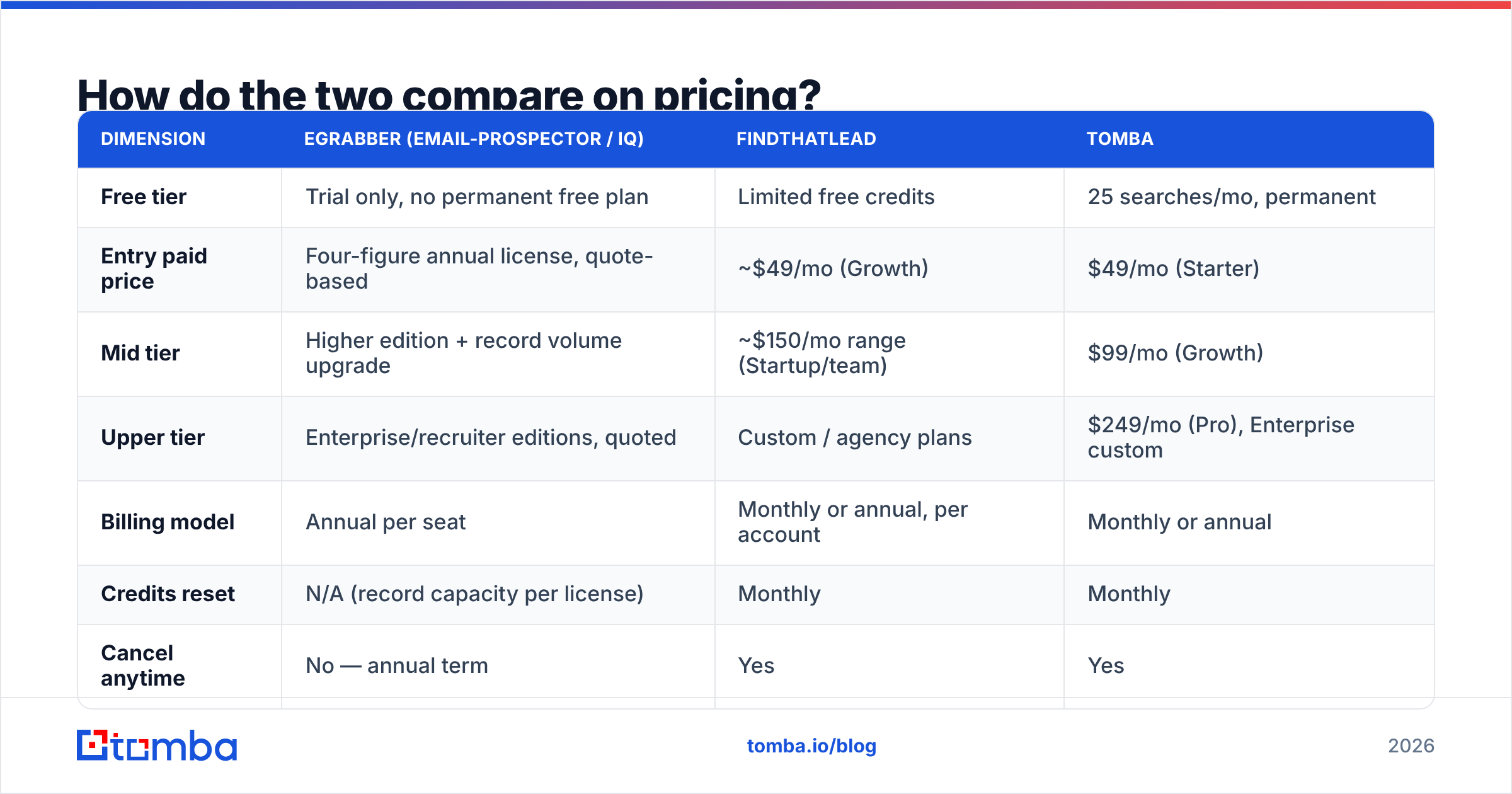
Prices move, so read this as a shape rather than a quote. Check each vendor page before you buy. The pattern has held for years, even when the numbers shift.
| Dimension | eGrabber (eMail-Prospector / iQ) | FindThatLead | Tomba |
|---|---|---|---|
| Free tier | Trial only, no permanent free plan | Limited free credits | 25 searches/mo, permanent |
| Entry paid price | Four-figure annual license, quote-based | ~$49/mo (Growth) | $49/mo (Starter) |
| Mid tier | Higher edition + record volume upgrade | ~$150/mo range (Startup/team) | $99/mo (Growth) |
| Upper tier | Enterprise/recruiter editions, quoted | Custom / agency plans | $249/mo (Pro), Enterprise custom |
| Billing model | Annual per seat | Monthly or annual, per account | Monthly or annual |
| Credits reset | N/A (record capacity per license) | Monthly | Monthly |
| Cancel anytime | No — annual term | Yes | Yes |
The eGrabber vs FindThatLead cost gap comes down to headcount. An eGrabber seat only pays off if one person drives it hard, all year. Say you have three SDRs, and each needs a few hundred lookups a month. Three seats is a budget event.
FindThatLead and Tomba pricing both scale the way teams actually grow: more seats, modest volume each.
eGrabber vs FindThatLead: which one finds more valid emails?#
Here you should be skeptical of everyone, including us.
Each vendor measures accuracy on its own test set. eGrabber markets high grab rates on hard-to-find contacts. FindThatLead markets high deliverability on the emails it returns.
Both claims can be true at once, because they measure different things. Coverage asks whether the tool returned anything. Precision asks whether the answer was real.
Coverage and precision trade off. One tool builds first.last@domain.com and keeps it when the SMTP handshake does not hard-bounce. Coverage looks great, and precision is so-so. Another tool returns only addresses it has seen in a crawl. Coverage looks lower, and precision looks better.

Here is what teams tend to report:
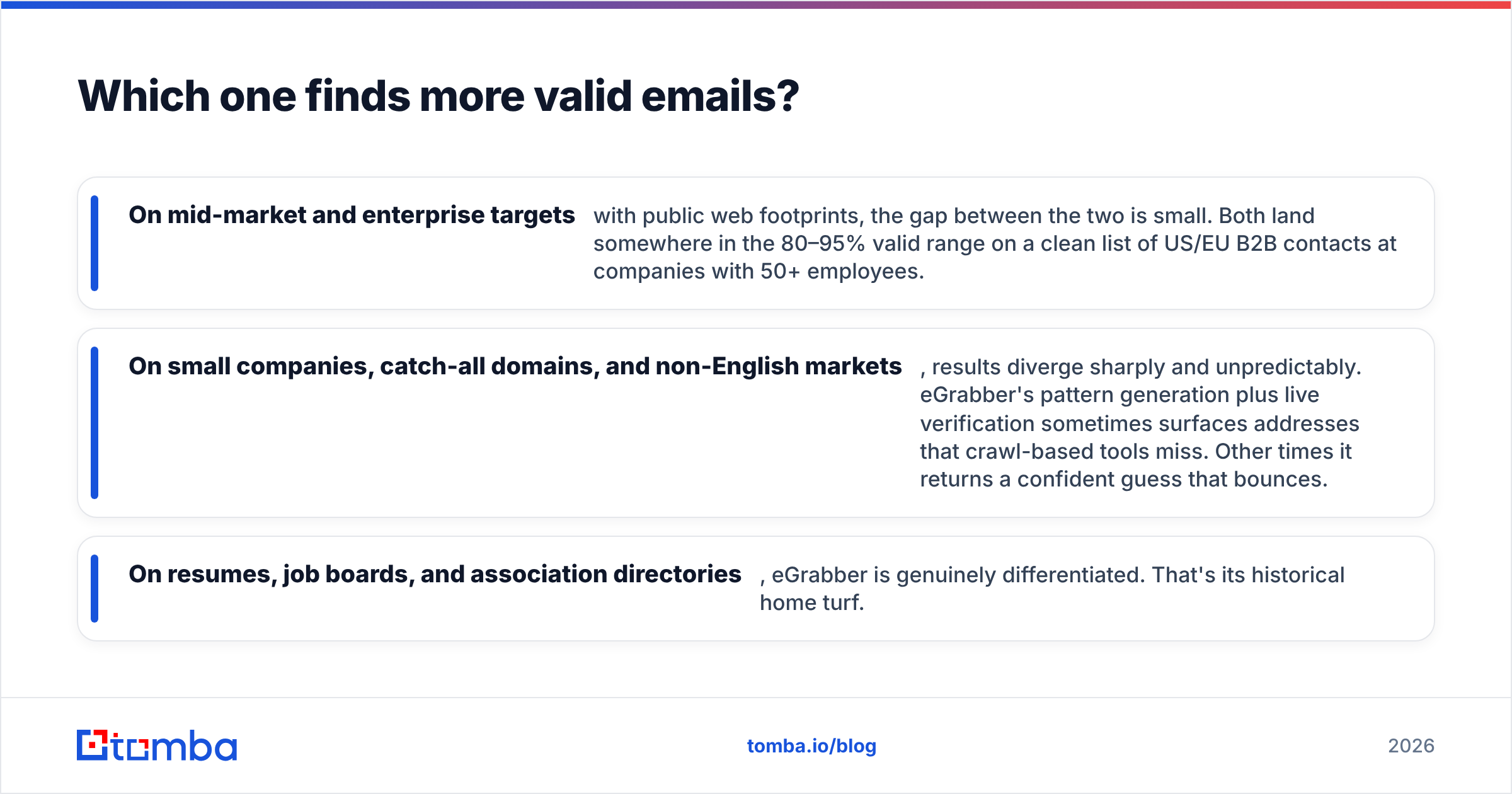
- Mid-market and enterprise targets with a public web trail: the gap is small. Both land in the 80–95% valid range on a clean US or EU B2B list.
- Small firms, catch-all domains, and non-English markets: results split, and not in a pattern you can plan for. eGrabber sometimes finds what crawlers miss. Other times it returns a confident guess that bounces.
- Resumes, job boards, and member directories: eGrabber is clearly ahead. That is its home turf.
The only accuracy number that matters is the one you measure. Take 100 known-good contacts inside your ICP. Run them through both trials. Count exact matches, not just a filled field. One afternoon of work beats every benchmark chart online, ours included.
Then verify. Run the output through a dedicated email verifier before it enters a sequence. A finder's own check is a smoke test, not a verdict. A separate pass that handles catch-all domains is what protects your domain.
How do the features compare, row by row?#
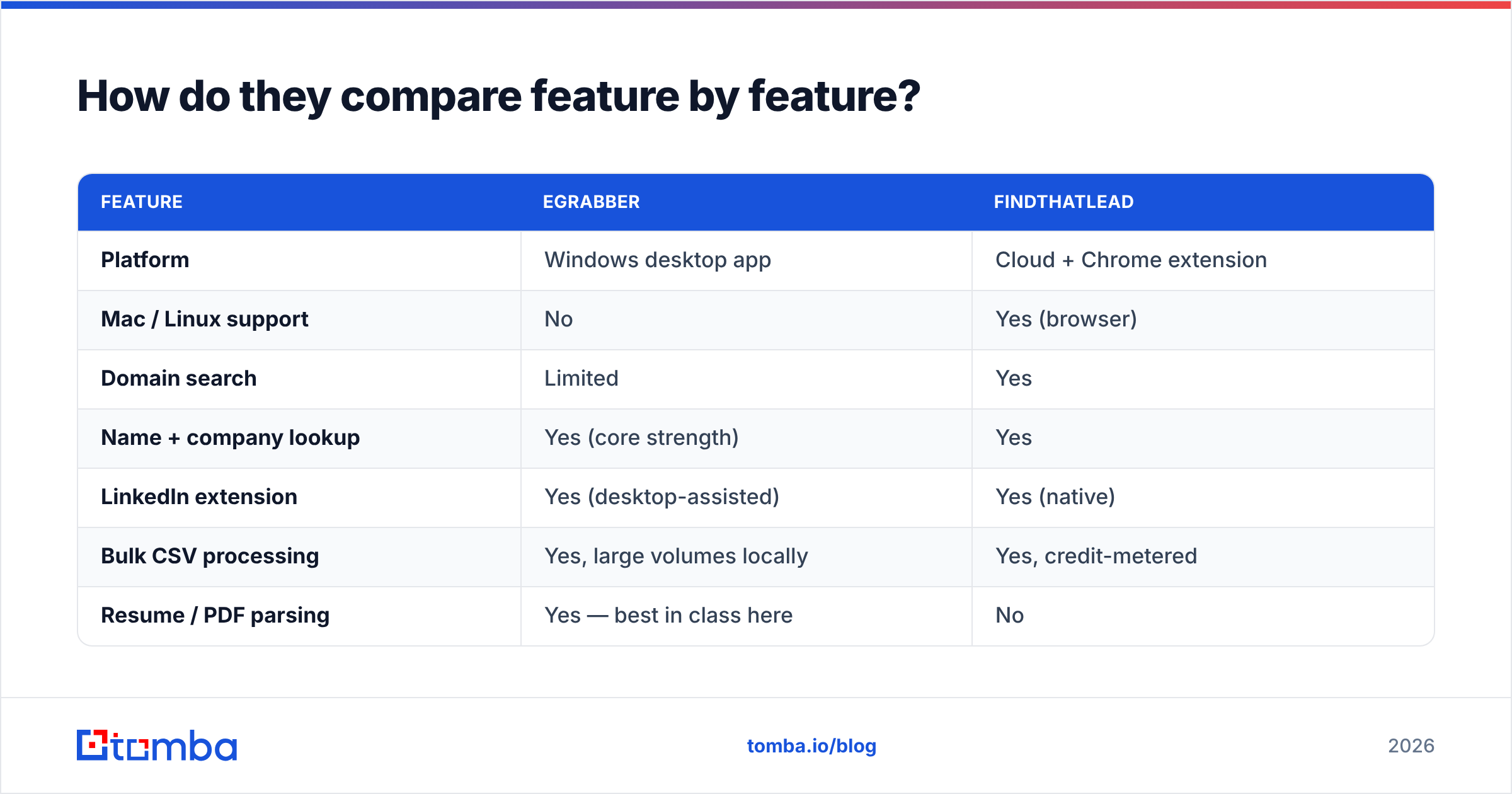
| Feature | eGrabber | FindThatLead |
|---|---|---|
| Platform | Windows desktop app | Cloud + Chrome extension |
| Mac / Linux support | No | Yes (browser) |
| Domain search | Limited | Yes |
| Name + company lookup | Yes (core strength) | Yes |
| LinkedIn extension | Yes (desktop-assisted) | Yes (native) |
| Bulk CSV processing | Yes, large volumes locally | Yes, credit-metered |
| Resume / PDF parsing | Yes — best in class here | No |
| Built-in email verification | Yes, real-time | Yes |
| Cold email sending | No | Yes |
| LinkedIn automation | Recruiter edition features | Yes (Scrab.in) |
| Public REST API | Minimal | Yes |
| Zapier / Make | No | Yes |
| CRM integrations | Export-based | Native + Zapier |
| Team seats / shared credits | Per-seat license | Yes |
| Free plan | No | Yes, limited |

Two rows deserve extra weight. The first is resume and PDF parsing. If you mine CVs or pull names out of conference PDFs, eGrabber does a job FindThatLead does not do at all.
The second is API access. If your flow is a new lead hits HubSpot, enrich it, then route it, FindThatLead can help. eGrabber cannot.
What about deliverability and sending?#
On sending, eGrabber vs FindThatLead is a short comparison. FindThatLead bundles a sender. eGrabber does not send at all.
A bundled sender is handy, and it is also a trap worth naming. It works fine for low-volume, low-stakes outbound. It turns into a liability as you scale, because your finder and your sender now share one vendor. If that sender's shared IPs pick up a bad reputation, your list quality gets blamed for a problem it did not cause.
Most teams past $1M ARR keep finding and sending in separate stacks for that reason. With eGrabber you export a CSV and load it into your own sequencer.
Either way, the deliverability work is yours. Authenticate your domain. Check your SPF record. Warm the mailbox slowly. Keep bounce rates under 2%. No finder protects you from 500 cold emails a day out of a two-week-old domain.
Who should pick eGrabber?#
Pick eGrabber if at least two of these fit:
- You are a recruiter or staffing firm processing resumes in volume.
- You work from unstructured sources: member directories, PDF lists, conference programs, pasted pages.
- You have one dedicated researcher who will use the tool daily, so a yearly seat pays off.
- You are on Windows and fine with desktop software and manual exports.
- You prefer one purchase order a year to a monthly card charge.
Skip it if your team is Mac-heavy or spread out. Skip it too if enrichment has to run inside a pipeline rather than by hand in an app.
Who should pick FindThatLead?#
Pick FindThatLead if:
- You want to start today, with no demo call and no annual term.
- Your team is small and shares one workspace: two to five people, moderate volume each.
- You want find and send in one plan, and you have no sequencer yet.
- Your prospecting starts on LinkedIn, and a browser extension suits you as the main interface.
- You need Zapier-level automation, not deep engineering work.
Skip it if you need high-volume enrichment, since credit caps bite fast. Skip it as well if coverage is thin in your target market, or if you need enterprise controls and audit trails.
Where does Tomba fit in?#
Tomba sits in a third spot on purpose: API-first data infrastructure with a usable UI on top, billed monthly.
Neither side of the eGrabber vs FindThatLead choice is built that way. Here is the practical difference:
- A permanent free tier. You get 25 searches a month, with no trial clock. Test coverage on your ICP before you spend a cent.
- A real API. The email finder API is the main product, not an add-on. The same endpoints power the CLI, the MCP server, the Chrome extension, and the Sheets add-on.
- Verification as a first-class product, catch-all handling included. That is the failure mode that quietly poisons cold email lists.
- Bulk with no desktop install. Bulk email finder jobs run server-side, and results come back with confidence scores.
- Monthly pricing from $49 to $249 before enterprise. You never negotiate a four-figure license just to test an idea.
Where Tomba is not the answer: it does not parse resumes, and it does not send email. If CV mining is your core need, eGrabber is better at that job. If you want one tool for finding and sending because you have no sequencer yet, FindThatLead is a fair start.
For most B2B outbound teams in 2026, a two-layer stack wins. Use a data layer with an API and per-record pricing. Then choose a sending layer on its own deliverability record. Bundles look cheaper on the invoice and cost more in switching pain 18 months later.
What should you do next?#
Run the 100-contact test. Pull a sample from your real ICP, not a list of Fortune 500 CMOs. Measure exact-match rate and bounce rate on the two tools you are weighing. Budget one afternoon. It will settle the eGrabber vs FindThatLead question faster than any comparison post, this one included.
You can also check pattern coverage for free first. Run a target company through domain search and count the verified addresses. Then compare that with what each trial returns on the same domain.
When you are ready to test, start with the Tomba Email Finder: 25 free searches a month, no card, no demo call. Point it at ten accounts you know cold, compare exact-match rates against your current tool, and let the numbers pick your stack.
Related guides#
Ready to find emails that actually work?
Join 150,000+ professionals who stopped guessing and started sending. Free credits on signup — no credit card required.
Get the Tomba newsletter
Practical outbound tactics and product updates — once every two weeks.
About the author