Egrabber vs Wiza: Which B2B Email Finder Wins in 2026?
eGrabber sells perpetual desktop licenses; Wiza sells LinkedIn-native credits. We break down accuracy, pricing math, and which one actually fits your outbound motion in 2026.
TL;DR
- eGrabber (LeadGrabber Pro) is a Windows desktop application sold on a per-seat annual license — roughly $3,495/year list for the standard edition — that scrapes lists from LinkedIn, directories, and web pages, then appends emails and phones.
- Wiza is a browser-native, credit-based tool built almost entirely around LinkedIn and Sales Navigator exports, starting around $50/month for its entry tier and scaling by credit volume.
- Accuracy is close on US-based, mid-market prospects. eGrabber tends to win on phone appends; Wiza tends to win on LinkedIn-sourced email match rate and on speed-to-CSV.
- The real decision is architecture, not features: eGrabber locks you to a Windows desktop with no meaningful API; Wiza is cloud-first but LinkedIn-dependent, so your data pipeline breaks when LinkedIn changes.
- If you need programmatic enrichment inside your own stack, a pure API-first provider like Tomba is a cheaper third option — Starter is $49/mo and the free tier gives you 25 searches to test match rates before you commit.
What are eGrabber and Wiza, and why do people compare them?#
They get compared because they solve the same last-mile problem — turning a name and a company into a reachable email or phone — from opposite ends of the software spectrum.
eGrabber has been around since the late 1990s. Its flagship, LeadGrabber Pro, is a Windows desktop executable. You install it, point it at a LinkedIn search result page, a conference attendee list, or an association directory, and it parses names into structured rows, then runs an append process to guess and verify business emails. It is sold like enterprise software: annual per-seat license, quote-driven upgrades, phone-based onboarding.
Wiza launched much later and made the opposite bet. It lives in the browser as a Chrome extension plus a web app, and its core promise is "point me at a Sales Navigator search, get a clean CSV with verified emails." No install beyond the extension, no per-seat license negotiation, credits deducted only on valid results.
So the comparison is really: do you want a heavyweight desktop scraper you own, or a lightweight cloud exporter you rent?
How do eGrabber and Wiza compare on pricing and features?#
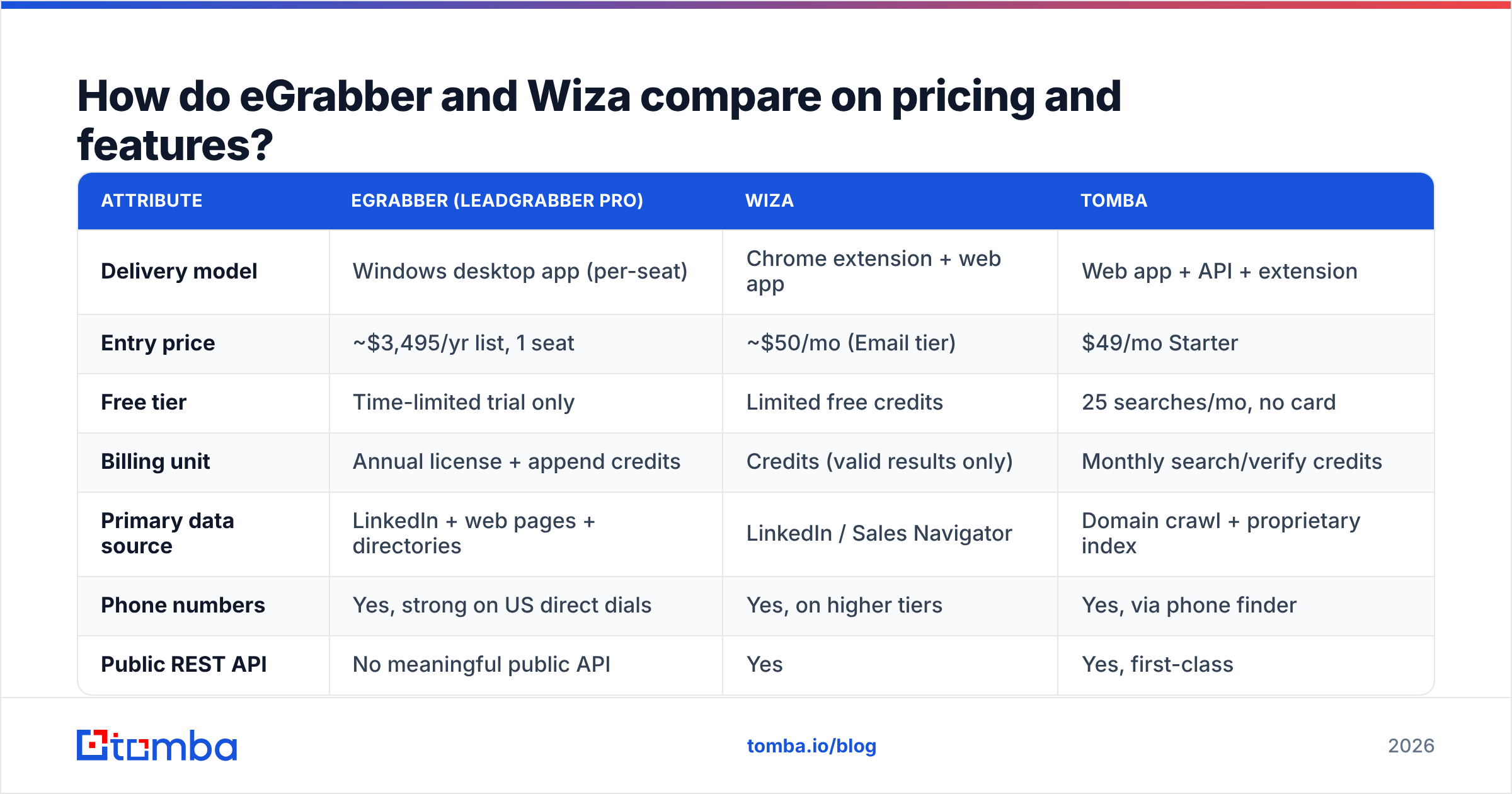
Here is the head-to-head on the attributes that actually change your cost per meeting. Pricing reflects publicly listed 2026 rates; both vendors quote custom on the top end, so treat enterprise rows as directional.
| Attribute | eGrabber (LeadGrabber Pro) | Wiza | Tomba |
|---|---|---|---|
| Delivery model | Windows desktop app (per-seat) | Chrome extension + web app | Web app + API + extension |
| Entry price | ~$3,495/yr list, 1 seat | ~$50/mo (Email tier) | $49/mo Starter |
| Free tier | Time-limited trial only | Limited free credits | 25 searches/mo, no card |
| Billing unit | Annual license + append credits | Credits (valid results only) | Monthly search/verify credits |
| Primary data source | LinkedIn + web pages + directories | LinkedIn / Sales Navigator | Domain crawl + proprietary index |
| Phone numbers | Yes, strong on US direct dials | Yes, on higher tiers | Yes, via phone finder |
| Public REST API | No meaningful public API | Yes | Yes, first-class |
| Bulk CSV upload | Yes (desktop) | Yes | Yes |
| macOS / Linux | No (Windows only) | Yes (browser) | Yes (browser) |
| Best for | Recruiters, list-building agencies | SDRs living in Sales Navigator | Dev teams + RevOps pipelines |
Two rows deserve extra attention.
The API row is the biggest structural gap. eGrabber's model assumes a human sits in front of the app. If your enrichment needs to happen inside a HubSpot workflow, a nightly cron job, or a product signup flow, a desktop tool is the wrong shape — you would need an RPA layer to fake it. Wiza and Tomba both expose an email finder API, so enrichment can be a service call rather than a person's afternoon.
The billing unit row hides the real cost. eGrabber's license fee is sunk on day one whether you pull 500 contacts or 50,000. Wiza's credit model scales with usage but charges nothing for non-matches, which makes budget forecasting easier for spiky campaigns.
Which tool is more accurate on email match rate?#
Neither vendor publishes an audited match rate, so treat every marketing number with suspicion — including the ones on their own sites.
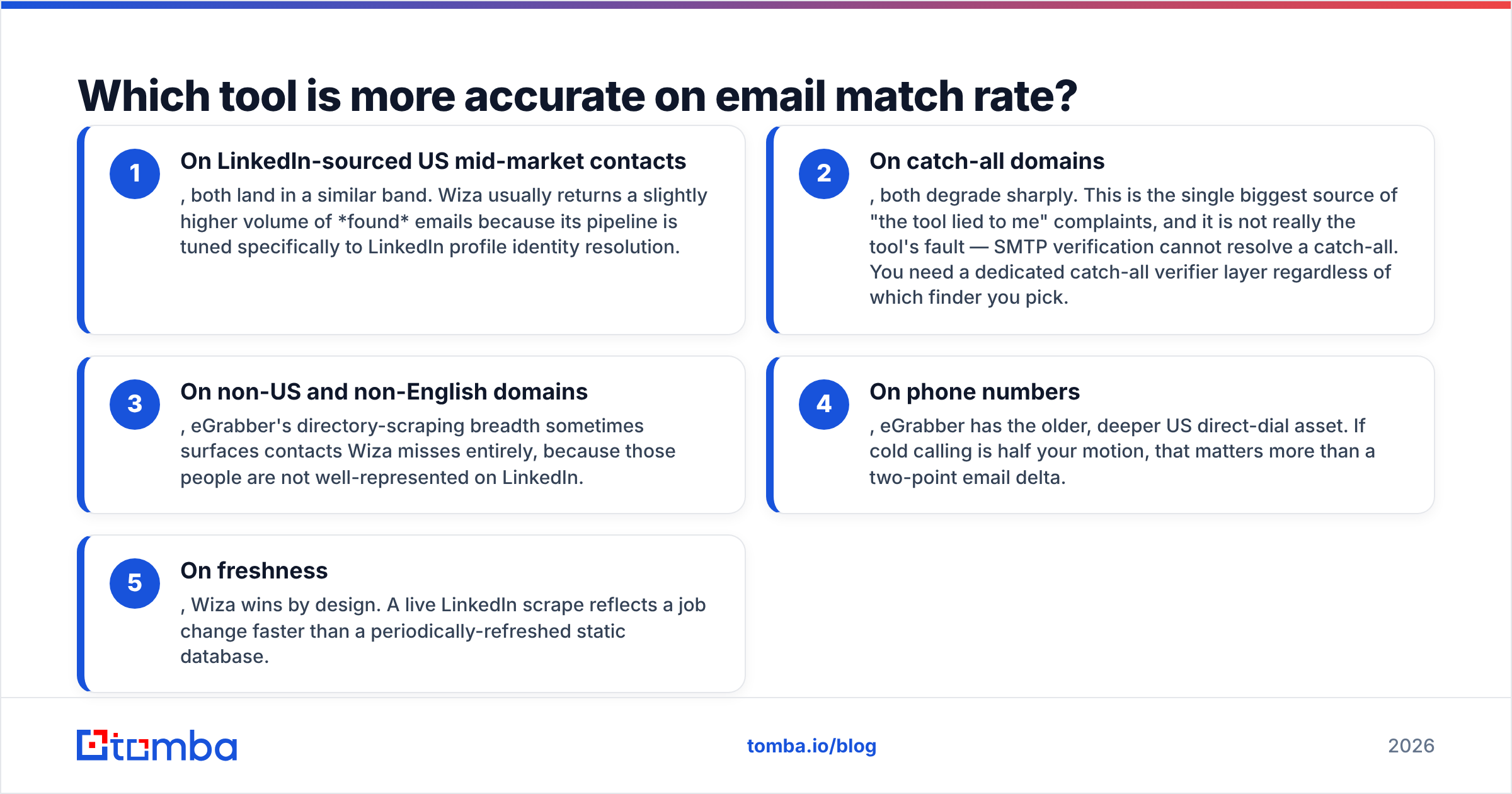
What holds up across practitioner tests and G2 reviews is a pattern, not a single number:
- On LinkedIn-sourced US mid-market contacts, both land in a similar band. Wiza usually returns a slightly higher volume of found emails because its pipeline is tuned specifically to LinkedIn profile identity resolution.
- On catch-all domains, both degrade sharply. This is the single biggest source of "the tool lied to me" complaints, and it is not really the tool's fault — SMTP verification cannot resolve a catch-all. You need a dedicated catch-all verifier layer regardless of which finder you pick.
- On non-US and non-English domains, eGrabber's directory-scraping breadth sometimes surfaces contacts Wiza misses entirely, because those people are not well-represented on LinkedIn.
- On phone numbers, eGrabber has the older, deeper US direct-dial asset. If cold calling is half your motion, that matters more than a two-point email delta.
- On freshness, Wiza wins by design. A live LinkedIn scrape reflects a job change faster than a periodically-refreshed static database.
The honest takeaway: the accuracy difference between these two is smaller than the accuracy difference between "verified" and "not verified" in your own process. Running any finder's output through an independent email verifier before it hits your sequencer will move your bounce rate more than switching vendors will.
Is eGrabber's perpetual-license model still worth it in 2026?#
Short answer: only if you are a high-volume list builder with a Windows fleet and predictable, heavy monthly usage.
The math works like this. At roughly $3,495/year for one seat, you are committing about $291/month before you append a single record — and append credits are typically metered separately. If your team pulls 20,000+ contacts per month and never needs those contacts inside an automated pipeline, the per-record cost can beat credit-based tools.
If you pull 2,000 contacts a month, you are paying a premium of several hundred dollars monthly for the privilege of installing software.
The bigger cost is the one that never appears on an invoice:
- Platform lock. Windows-only means your Mac-based SDRs need a VM or a spare laptop.
- No API. Every integration is a manual CSV export. That is a person's time, weekly, forever.
- Seat math. Desktop licensing scales linearly with headcount. Cloud tools often let a whole team share a credit pool.
- Slow feedback loops. You cannot A/B test data providers when one of them requires an annual commitment and an install.
What are Wiza's real limitations?#
Wiza's weakness is the flip side of its strength: it is a LinkedIn company.
That creates three dependencies you should price in.
LinkedIn account risk. Heavy Sales Navigator exporting sits in a grey zone against LinkedIn's user agreement. Wiza is careful and widely used, but the risk of a restricted account is non-zero and it is your account, not Wiza's. Read LinkedIn's own terms before you scale a workflow that depends on a single seat.
Coverage ceiling. If a prospect has no LinkedIn presence — common in trades, local services, manufacturing, and much of Japan and Germany — Wiza has very little to work with. A domain-first approach like domain search finds those people by crawling the company's own web footprint instead.
Sales Navigator dependency. Getting the most out of Wiza effectively assumes a Sales Navigator seat, which is roughly $99+/month per user on its own. That is a real line item that never shows up in a Wiza-vs-competitor pricing table.
Enrichment depth. Wiza gives you contact data. It is not a full firmographic or technographic enrichment platform, so if you want to score and route leads on company attributes, you are stacking another tool on top.
eGrabber vs Wiza vs Tomba: which should you actually pick?#
Match the tool to the shape of your workflow, not to a feature checklist.
Pick eGrabber if:
- You are a recruiting or list-building shop where staff manually build lists all day.
- Your team is standardized on Windows.
- US direct-dial phone numbers are a primary deliverable.
- You can absorb an annual commitment and want a predictable flat cost at high volume.
Pick Wiza if:
- Your reps live inside LinkedIn Sales Navigator and think in saved searches.
- You want a CSV in ten minutes with zero IT involvement.
- Your volume is spiky and you would rather pay per valid result.
- You already have a Sales Navigator seat you are underusing.
Pick an API-first provider like Tomba if:
- Enrichment needs to happen in code — inside your CRM workflow, your signup flow, or a nightly job.
- You want to test match rate before spending anything (the free tier is 25 searches/month).
- You need email and verification and catch-all handling from one vendor instead of three.
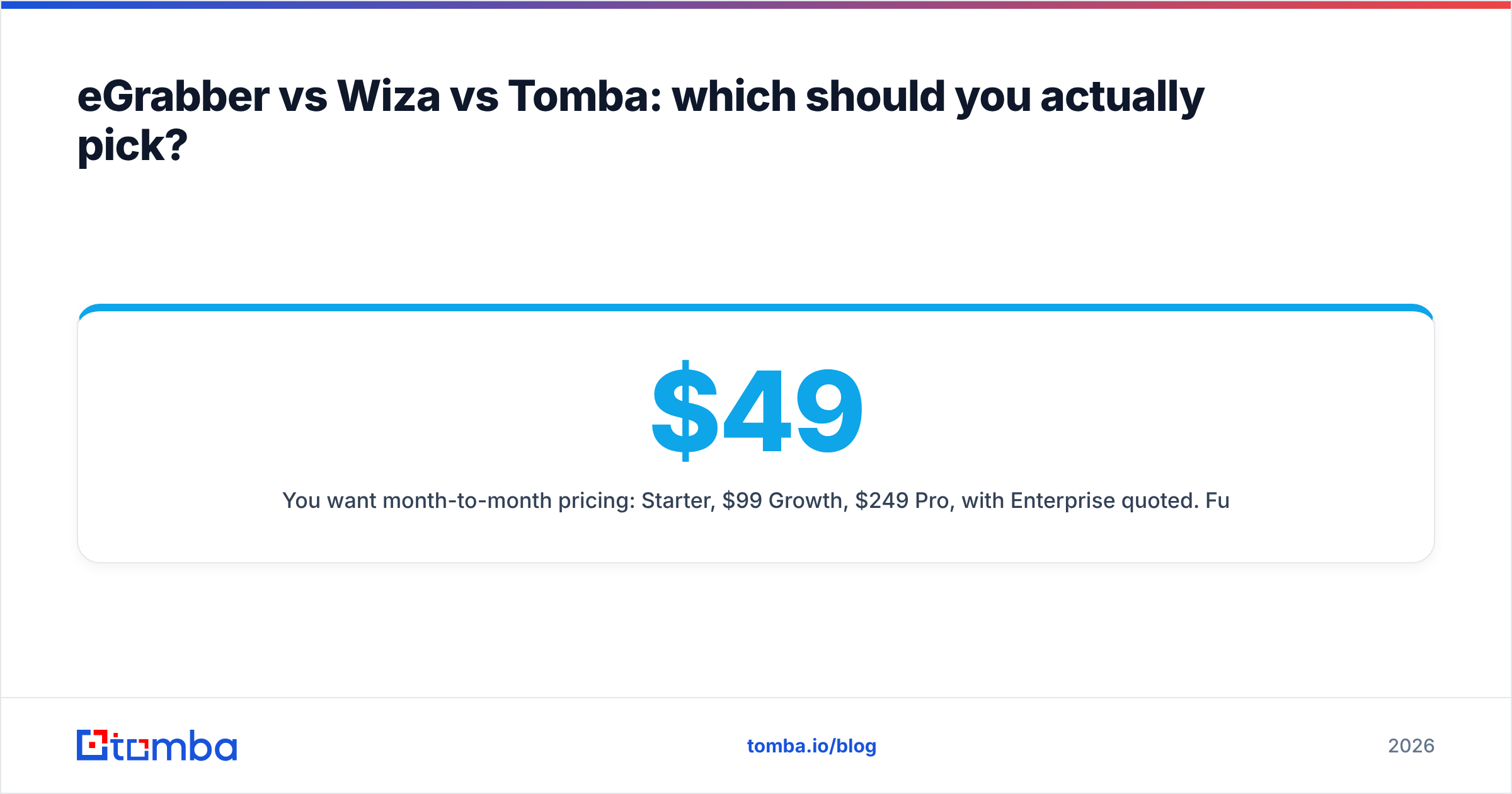
- You want month-to-month pricing: $49 Starter, $99 Growth, $249 Pro, with Enterprise quoted. Full Tomba pricing is public, which is itself a differentiator against quote-driven desktop software.
It is also worth naming the adjacent option: if what you actually want is a pre-built list you own outright rather than a finder you operate, a database vendor like BookYourData solves a different problem well — you buy verified contacts by filter with no scraping workflow at all. That is a legitimately different purchase from either eGrabber or Wiza, and for some teams it is the cleaner answer.
How do you actually test these tools before buying?#
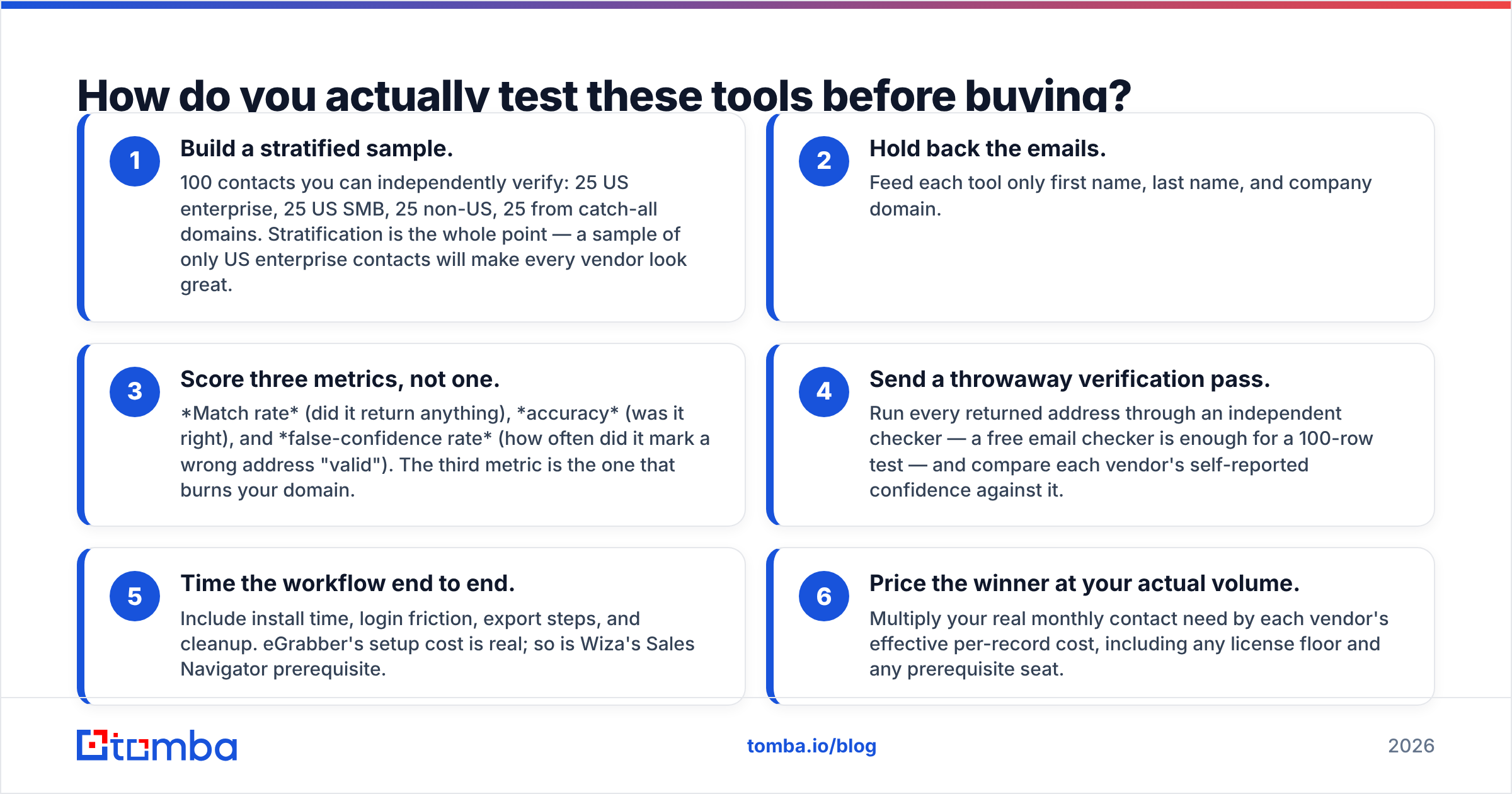
Run the same 100-contact benchmark through each candidate. This takes an afternoon and beats any review site.
- Build a stratified sample. 100 contacts you can independently verify: 25 US enterprise, 25 US SMB, 25 non-US, 25 from catch-all domains. Stratification is the whole point — a sample of only US enterprise contacts will make every vendor look great.
- Hold back the emails. Feed each tool only first name, last name, and company domain.
- Score three metrics, not one. Match rate (did it return anything), accuracy (was it right), and false-confidence rate (how often did it mark a wrong address "valid"). The third metric is the one that burns your domain.
- Send a throwaway verification pass. Run every returned address through an independent checker — a free email checker is enough for a 100-row test — and compare each vendor's self-reported confidence against it.
- Time the workflow end to end. Include install time, login friction, export steps, and cleanup. eGrabber's setup cost is real; so is Wiza's Sales Navigator prerequisite.
- Price the winner at your actual volume. Multiply your real monthly contact need by each vendor's effective per-record cost, including any license floor and any prerequisite seat.
Teams that run this test frequently end up splitting the work: one tool for LinkedIn-sourced prospecting, one API for programmatic enrichment. That is not indecision — it is the correct answer when your outbound has two different shapes.
What does this mean for your outbound stack in 2026?#
The market has moved away from the model eGrabber represents. Buyers now expect usage-based pricing, cloud delivery, and an API by default, because enrichment has become infrastructure rather than a task a person performs. Wiza is a much better fit for how modern SDR teams actually work, and it is the more defensible pick for most sales organizations comparing the two directly.
But "better than eGrabber" is a low bar for a 2026 stack. The question worth asking is whether your contact data should depend on any single source at all — one desktop scraper, or one social network. Data decays at roughly 25–30% annually as people change jobs, which means whatever you buy, you are buying a subscription to freshness, not a one-time asset. Layer your sources, verify independently, and keep your enrichment behind an API you control so switching vendors is a config change rather than a migration project.
If you want to sanity-check either vendor's match rate against a neutral third source before you sign anything, start with the Tomba Email Finder. The free tier gives you 25 searches a month with no card, which is enough to run the 100-contact benchmark above on a real slice of your ICP. If it holds up, Starter is $49/mo and the API is included from day one — so the same tool that answers your evaluation question also becomes the thing you wire into HubSpot next quarter.
Related guides#
Ready to find emails that actually work?
Join 150,000+ professionals who stopped guessing and started sending. Free credits on signup — no credit card required.
Get the Tomba newsletter
Practical outbound tactics and product updates — once every two weeks.
About the author