Email Address Verifier Free: 7 Tools Tested in 2026
Free email verification tiers range from 25 to 1,000 credits, and the quality gap between them is bigger than the price gap. Here is what each free plan actually catches, where it quietly fails, and when paying starts to make sense.
TL;DR
- Every serious verification vendor has a free tier, but "free" ranges from 25 credits a month to a one-time 1,000-credit trial. The recurring monthly allowances are the ones that matter for ongoing work.
- Free tiers almost always run the same verification engine as the paid plans. What you lose is volume, bulk uploads, API rate limits, and catch-all resolution — not core accuracy.
- Catch-all (accept-all) domains are where free tools diverge hardest. Some mark them "valid" and hand you a bounce; better ones label them honestly as risky.
- A free email address verifier is enough for validating a form signup, a 50-row list, or spot-checking a scraped CSV. It is not enough for a 20,000-record database cleanup.
- Test any verifier with a control list of 20 known-good and 5 known-dead addresses before you trust it on real data.
What does an "email address verifier free" tier actually give you?#
A free verification tier is a metered sample of a paid product. You get the same validation pipeline, capped at a small number of checks — typically 25 to 100 per month, sometimes a larger one-time trial.
Think of it like a water testing kit. The lab uses the same instruments whether you send one sample or a thousand; the free kit just limits how many samples you can send. The instrument doesn't get dumber for free users.
What normally does get restricted on free plans:
- Monthly credit volume — the headline limit, usually 25–100 recurring credits or a 100–1,000 credit one-time trial.
- Bulk CSV uploads — many vendors gate list uploads behind a paid plan and leave only single-address lookups free.
- API access and rate limits — some free tiers include API keys at low request-per-second caps; others block API entirely.
- Catch-all and SMTP-deep checks — the expensive, slow part of verification is often reserved for paying accounts.
- Integrations and exports — CRM sync, Zapier, and enriched exports are the standard upsell.
- Support SLA — free means community docs and email support at best.
That list is the honest map of the free/paid boundary. If a vendor restricts accuracy rather than volume on the free plan, that is a red flag — you cannot evaluate the product on data you can't trust.
How does email verification actually work under the hood?#
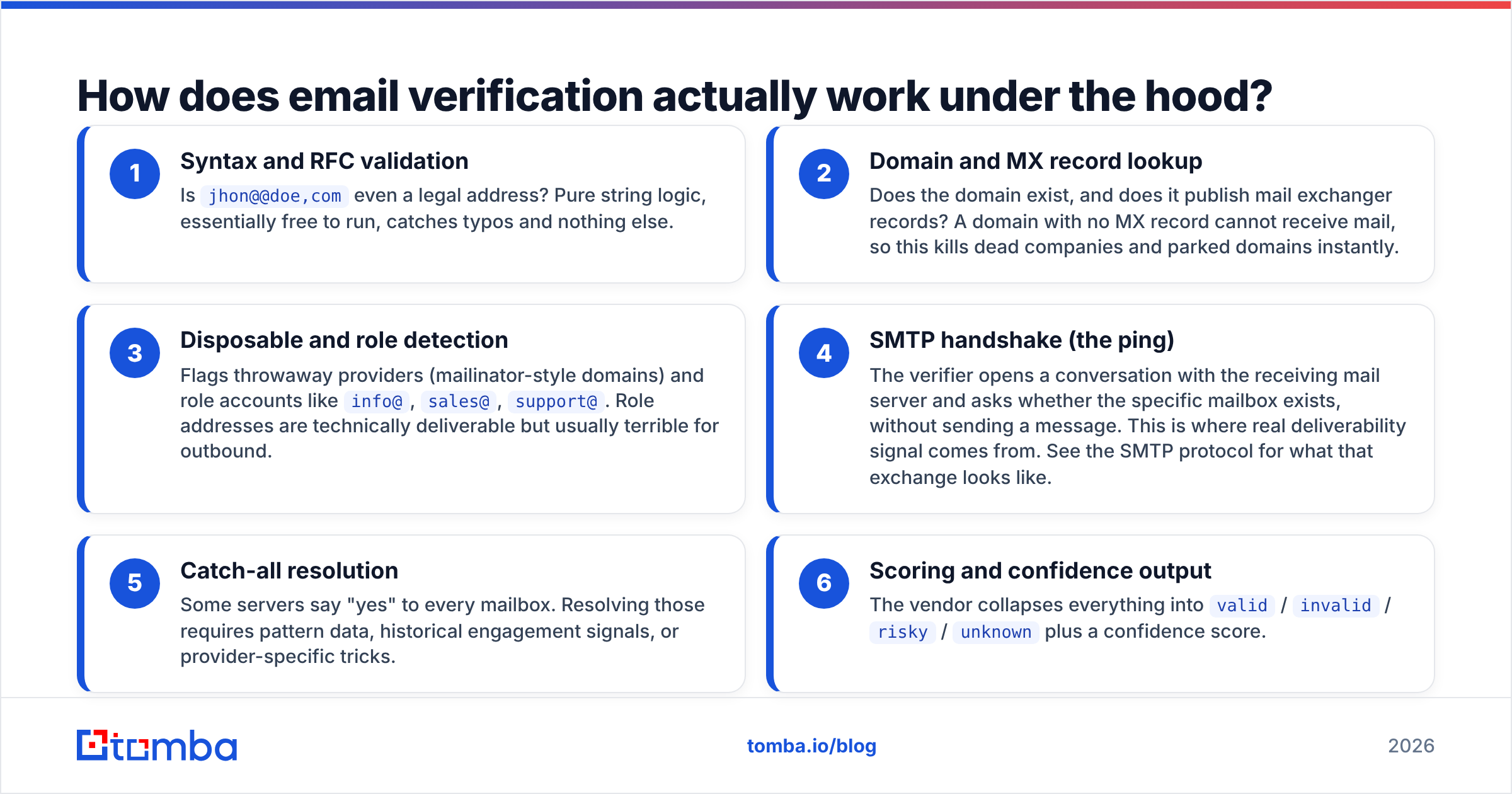
Verification is a stack of checks, each one cheaper and less conclusive than the next. Understanding the layers tells you exactly what a free tool can and cannot promise.
- Syntax and RFC validation — Is
jhon@@doe,comeven a legal address? Pure string logic, essentially free to run, catches typos and nothing else. - Domain and MX record lookup — Does the domain exist, and does it publish mail exchanger records? A domain with no MX record cannot receive mail, so this kills dead companies and parked domains instantly.
- Disposable and role detection — Flags throwaway providers (mailinator-style domains) and role accounts like
info@,sales@,support@. Role addresses are technically deliverable but usually terrible for outbound. - SMTP handshake (the ping) — The verifier opens a conversation with the receiving mail server and asks whether the specific mailbox exists, without sending a message. This is where real deliverability signal comes from. See the SMTP protocol for what that exchange looks like.
- Catch-all resolution — Some servers say "yes" to every mailbox. Resolving those requires pattern data, historical engagement signals, or provider-specific tricks.
- Scoring and confidence output — The vendor collapses everything into
valid/invalid/risky/unknownplus a confidence score.
Layers 1–3 are commoditized. Any free tool does them well. Layers 4–6 are where vendors genuinely differ, and where the cost of running verification lives. When you compare free tiers, you are really comparing how much of layers 4–6 a vendor will hand you for nothing.

Which free email verifiers are worth using in 2026?#
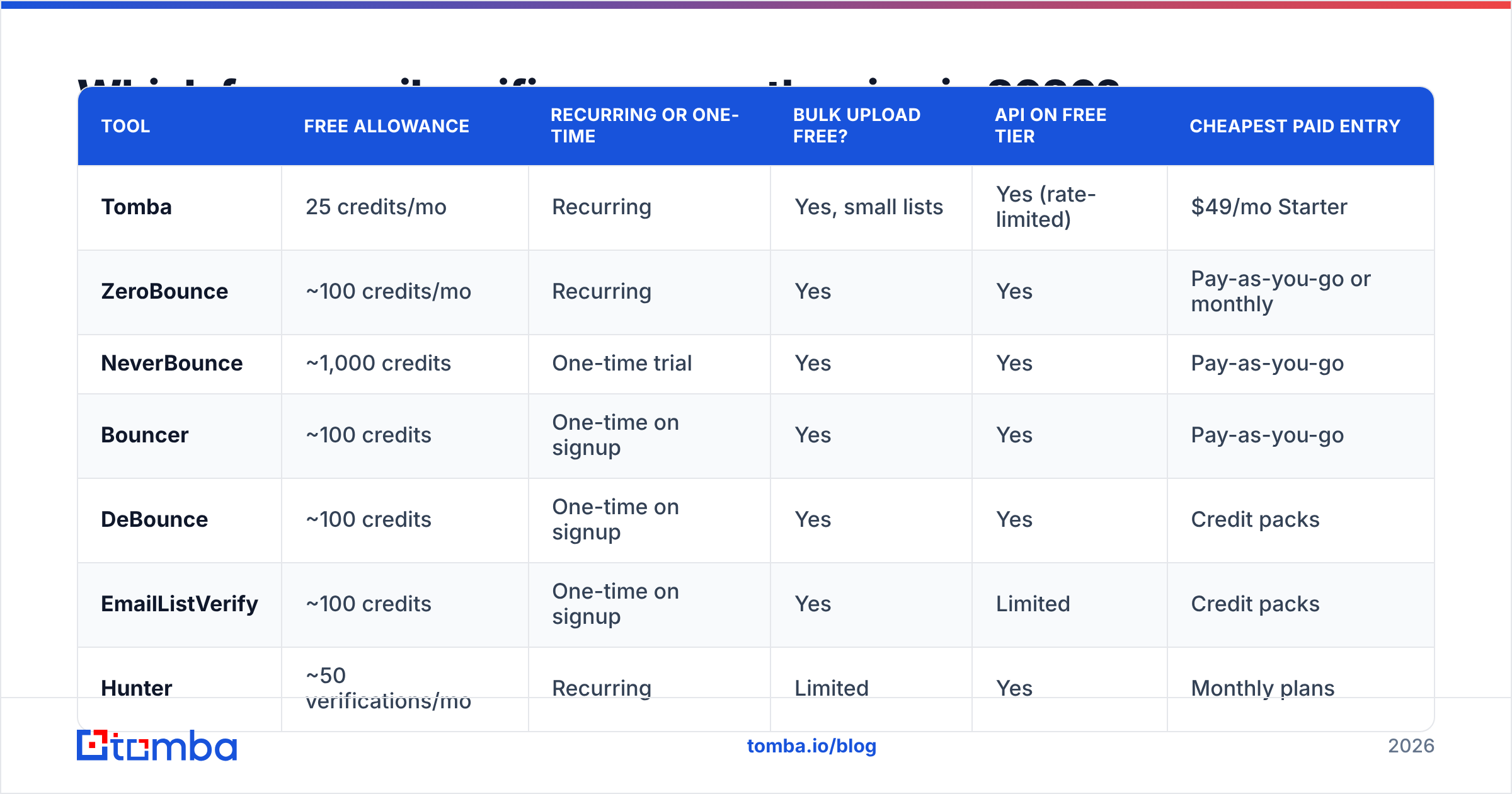
Here is the landscape. Free allowances change often — treat these as a starting point and confirm on each vendor's pricing page before you commit a workflow to them.
| Tool | Free allowance | Recurring or one-time | Bulk upload free? | API on free tier | Cheapest paid entry |
|---|---|---|---|---|---|
| Tomba | 25 credits/mo | Recurring | Yes, small lists | Yes (rate-limited) | $49/mo Starter |
| ZeroBounce | ~100 credits/mo | Recurring | Yes | Yes | Pay-as-you-go or monthly |
| NeverBounce | ~1,000 credits | One-time trial | Yes | Yes | Pay-as-you-go |
| Bouncer | ~100 credits | One-time on signup | Yes | Yes | Pay-as-you-go |
| DeBounce | ~100 credits | One-time on signup | Yes | Yes | Credit packs |
| EmailListVerify | ~100 credits | One-time on signup | Yes | Limited | Credit packs |
| Hunter | ~50 verifications/mo | Recurring | Limited | Yes | Monthly plans |
| Clearout | ~100 credits | One-time on signup | Yes | Yes | Credit packs |

Two structural patterns fall out of that table.
Recurring beats one-time for ongoing work. A 1,000-credit one-time trial looks generous and is genuinely useful for a single list cleanup. But if you verify 30 addresses a week, a recurring 25–100/month allowance keeps working forever while the trial is gone by day three. Match the shape of the free tier to the shape of your workload.
Bundled finding plus verification saves a step. Standalone verifiers only answer "is this address alive?" If you also need to discover the address, a combined platform means one credit system instead of two. Tomba's email verifier sits next to its finder and domain search on the same account, so a prospecting workflow doesn't need two vendors, two API keys, and two billing relationships. Hunter works similarly. The pure verifiers — ZeroBounce, NeverBounce, Bouncer, DeBounce — are deeper on hygiene features like abuse-complainer lists and toxic-domain flags, and shallower on discovery.
If you want crowd data alongside this, the G2 email verification category tracks review volume and satisfaction across most of these vendors, which is a useful sanity check on any single benchmark including this one.
How accurate are free email verifiers?#
Accuracy on the free tier is usually identical to the paid tier — with one important exception: catch-all handling.

Here is the trap in vendor accuracy claims. A verifier that labels every uncertain address valid will score beautifully on a list of obviously-real addresses and destroy your sender reputation in production. A verifier that labels every uncertain address invalid will show a low bounce rate and quietly delete a third of your reachable market.
So judge a free verifier on three numbers, not one:
- False valid rate — addresses marked good that bounce. This is the expensive error. It burns sender reputation and, past roughly a 2% bounce rate, starts triggering inbox-provider filtering. Google's email sender guidelines are explicit that high bounce and complaint rates are treated as spam signals.
- False invalid rate — real, reachable addresses discarded. Invisible in your metrics, expensive in pipeline. You never learn about the deals you didn't email.
- Unknown / risky share — how much the tool refuses to guess on. A higher honest-unknown rate is often better than a confident wrong answer, because you can route those addresses to a low-volume, high-care sequence instead of a blast.
Any vendor quoting a single "98% accurate" figure without publishing the denominator is marketing, not measurement. Run your own control list — instructions below.
What happens with catch-all domains on a free plan?#
Catch-all domains are the single biggest reason two verifiers disagree about the same address.
A catch-all server accepts mail for anything@company.com and sorts it out internally. The SMTP handshake therefore returns "yes" for a mailbox that may not exist. Roughly one in five B2B domains is configured this way, and it skews heavily toward mid-market and enterprise — exactly the accounts you care about.
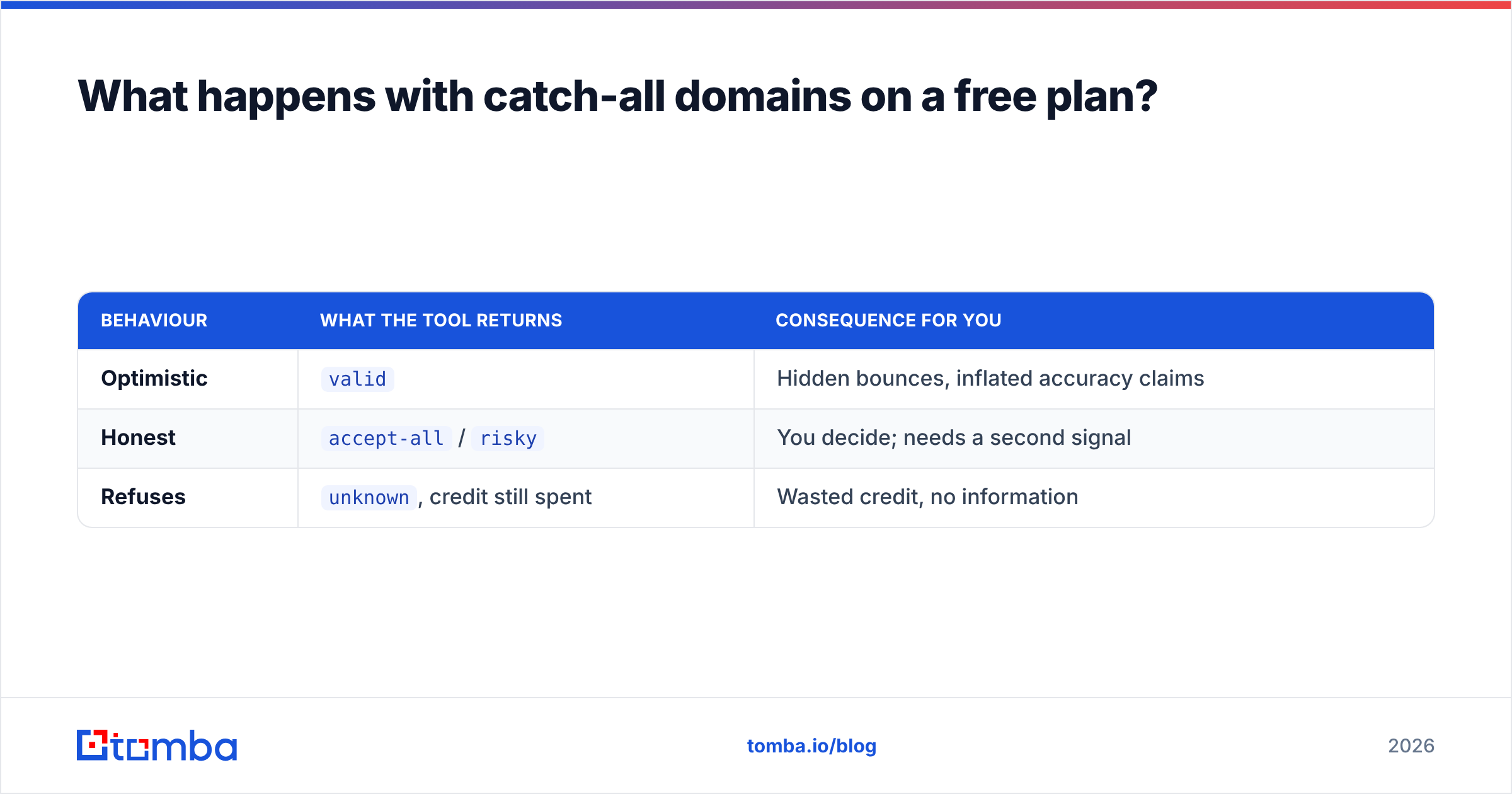
Free tiers handle this three ways:
| Behaviour | What the tool returns | Consequence for you |
|---|---|---|
| Optimistic | valid |
Hidden bounces, inflated accuracy claims |
| Honest | accept-all / risky |
You decide; needs a second signal |
| Refuses | unknown, credit still spent |
Wasted credit, no information |
The honest label is what you want. From there you need a second signal — pattern confidence for the company, engagement history, or a dedicated resolution pass. Tomba's catch-all verifier exists specifically for that second pass, and it's the feature most likely to be capped on any free plan, because it is the most expensive check to run.
Practical rule: never treat a catch-all address as verified. Put it in a separate segment, send at lower volume from a secondary domain, and watch the bounce rate on that segment specifically.
Free vs paid: when does paying actually pay off?#
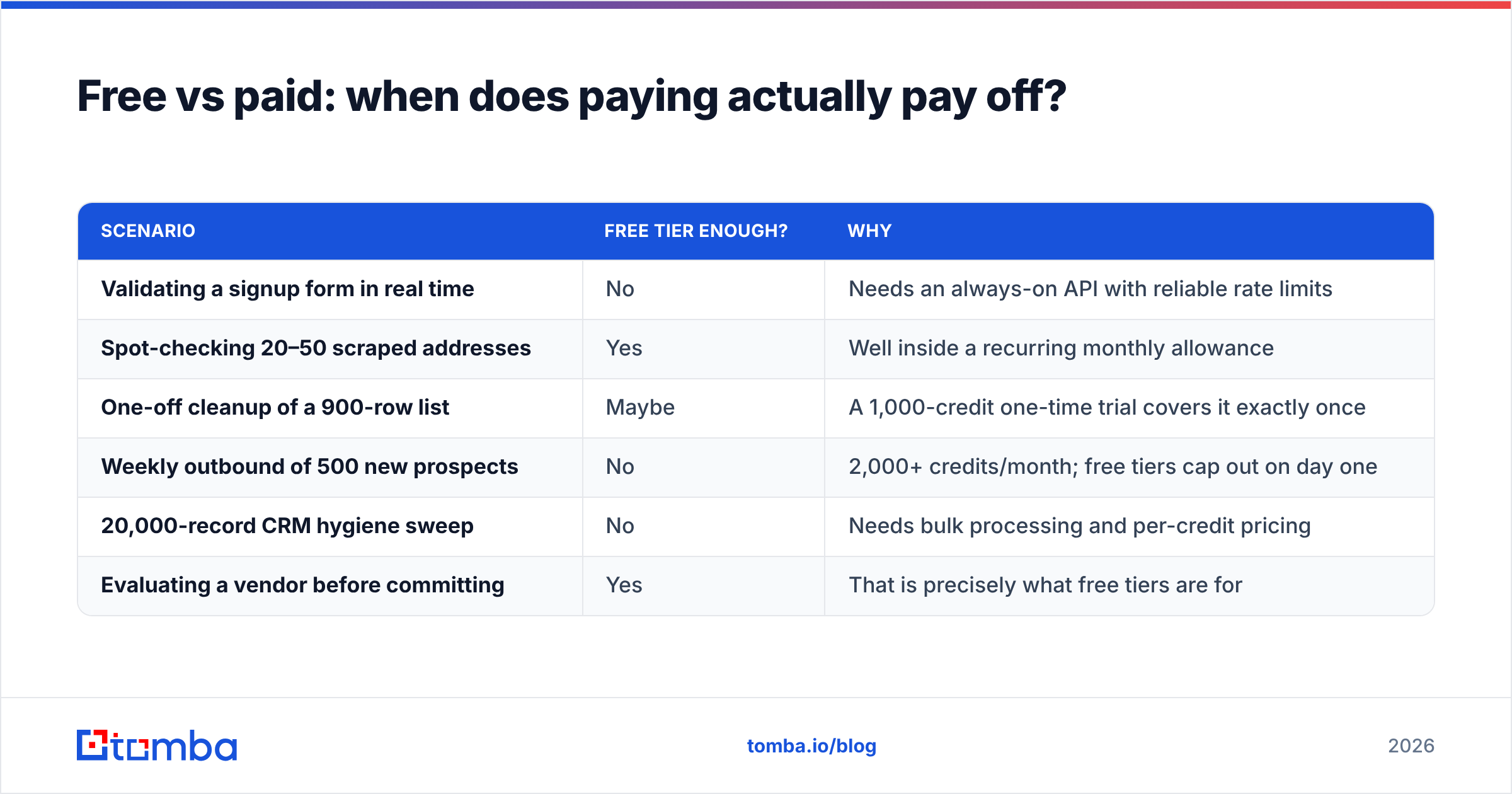
The math is straightforward once you price your own bounces.
| Scenario | Free tier enough? | Why |
|---|---|---|
| Validating a signup form in real time | No | Needs an always-on API with reliable rate limits |
| Spot-checking 20–50 scraped addresses | Yes | Well inside a recurring monthly allowance |
| One-off cleanup of a 900-row list | Maybe | A 1,000-credit one-time trial covers it exactly once |
| Weekly outbound of 500 new prospects | No | 2,000+ credits/month; free tiers cap out on day one |
| 20,000-record CRM hygiene sweep | No | Needs bulk processing and per-credit pricing |
| Evaluating a vendor before committing | Yes | That is precisely what free tiers are for |
The crossover point is usually around 200–300 verifications per month. Below that, stack two or three free tiers and stop thinking about it. Above that, per-credit paid pricing is cheaper than the engineering time you'll spend juggling accounts — and far cheaper than a damaged sending domain.
For reference on where paid pricing starts, Tomba's pricing runs Free (25 searches/month), Starter at $49/mo, Growth at $99/mo, and Pro at $249/mo, with verification, finding, and enrichment drawing from the same credit pool. Pure-play verifiers like ZeroBounce and NeverBounce sell credit packs instead, which suits infrequent large cleanups better than steady weekly volume. Neither model is universally better — it depends on whether your usage is spiky or continuous.
How do you test a free verifier in ten minutes?#
Do this before you wire any tool into a workflow. It costs about 30 credits and saves you a quarter of guessing.
- Build a control list of 25 addresses. Include 15 addresses you have personally received replies from in the last 90 days (known good), 5 addresses that hard-bounced (known dead), 3 role addresses (
info@,sales@,hr@), and 2 addresses at a domain you know is catch-all. - Run the list through each candidate tool. Use the free tier. Don't tell the vendor what you're doing; you want default behaviour.
- Score the known-dead five. Any tool that marks a hard-bounced address
validis disqualified immediately. This is the check that matters most. - Score the known-good fifteen. Count how many come back
invalidorunknown. Each one is a prospect the tool would have made you throw away. - Check the catch-all pair. Look for an explicit
accept-allorriskylabel. A flatvalidhere means the tool is guessing on your behalf. - Compare response time and output format. If you plan to automate, a clean JSON response with a confidence score and a documented status enum matters more than a two-point accuracy difference. Tomba's email verification API and the equivalents from ZeroBounce and Bouncer all document their status values — read them before you build.
If you'd rather start with zero signup friction, a browser-based free email checker will validate a single address without an account. That's the right tool for "does this one address exist?" and the wrong tool for anything repeated.
What mistakes do people make with free verification tiers?#
Stacking free accounts as a permanent strategy. Creating six accounts to reach 600 monthly credits works until it doesn't. Vendors detect it, terms of service usually forbid it, and you end up with six inconsistent scoring systems producing six different answers about the same address. Use free tiers to choose a vendor, then commit.
Verifying once and never again. B2B email data decays at roughly 2–2.5% per month through job changes alone — around 25–30% annually. A list verified in January is meaningfully stale by summer. Re-verify anything older than 90 days before a send.
Treating verification as a substitute for deliverability work. A clean list is necessary and not sufficient. Authentication records, warmup, sending volume ramp, and content all still matter. Verification protects you from bounce-driven reputation damage; it does nothing about spam-folder placement caused by a missing DMARC policy or a link-stuffed template.
Ignoring the risky bucket. Most people delete risky addresses or blast them like verified ones. Both are wrong. Segment them, send at low volume, measure, and let the results tell you whether that provider's risky label leans good or bad. Within a few hundred sends you'll know your own correction factor — which is more valuable than any vendor's published accuracy number.
Verifying addresses you should never have collected. If a list is full of role accounts and generic inboxes, verification will confirm they're deliverable and your reply rate will still be near zero. Deliverable is not the same as worth emailing.
Where should you start?#
If your volume is genuinely small — a few dozen checks a month — pick one recurring free tier and stop optimizing. If you're building a repeatable outbound motion, start free, run the ten-minute control test above, and upgrade the moment you cross a couple hundred verifications a month.
For teams that need to find addresses as well as validate them, the two-vendor split is usually the thing that breaks first. Tomba Email Finder runs discovery, verification, catch-all checks, and bulk processing from one credit pool and one API key — free for the first 25 credits a month, $49/mo when you outgrow that. Start on the free tier, run your control list, and let your own bounce rate decide whether it's worth paying for.
Related guides#
Ready to find emails that actually work?
Join 150,000+ professionals who stopped guessing and started sending. Free credits on signup — no credit card required.
Get the Tomba newsletter
Practical outbound tactics and product updates — once every two weeks.
About the author