Email and Phone Number Lookup: The Complete 2026 Guide
Most lookup tools quote 95%+ accuracy and deliver far less once you strip out catch-alls and dead mobiles. Here's how email and phone number lookup really works, what to pay, and which tools hold up.
TL;DR
- An email and phone number lookup takes something you already know — a name, a domain, a LinkedIn URL, a company — and returns a work email, a direct dial, or a mobile number, ideally with a confidence score attached.
- Email lookup is a solved problem for most B2B domains: 90-97% accuracy is realistic on verifiable mailboxes. Phone lookup is not: 45-70% mobile coverage is the honest range, and vendors who claim 90%+ are usually counting switchboard numbers.
- Cost per usable contact matters more than cost per credit. A $0.02 email that bounces costs you sender reputation worth far more than the credit.
- The best workflow is layered: find by domain, verify before sending, and only spend phone credits on accounts that already replied or fit tightly.
- Tools split into three camps — finder-first (Tomba, Findymail), database-first (ZoomInfo, Apollo, BookYourData), and enrichment-API-first (Clearbit-style). Pick by whether you need breadth, precision, or programmatic access.
What is an email and phone number lookup?#
A lookup is a resolution step. You hold a partial identity — "Priya Raman, VP Engineering, Datadog" or just datadog.com — and you need a channel to reach that person. The lookup fills the gap.
Three input shapes cover nearly every real workflow:
- Person + domain → email. The classic email finder path. You supply first name, last name, and company domain; the tool infers or retrieves the mailbox and validates it. This is the highest-accuracy path in B2B.
- Domain → all contacts. A domain search returns every known mailbox at a company plus roles and detected pattern (
first.last@,flast@,first@). Useful when you don't yet know who the buyer is. - Person or company → phone. A phone finder resolves direct dials and mobiles. Coverage is thinner, sourcing is murkier, and compliance rules are stricter.
The word "lookup" hides a real distinction: retrieval versus inference. Retrieval means the record already exists in a dataset and gets returned. Inference means the tool generates a likely candidate — p.raman@datadog.com — and then tests whether that mailbox accepts mail. Good email tools do both and tell you which happened. Phone tools can only retrieve; you cannot guess a mobile number and test it without dialing, which is exactly why phone accuracy lags email accuracy by 20-40 points.
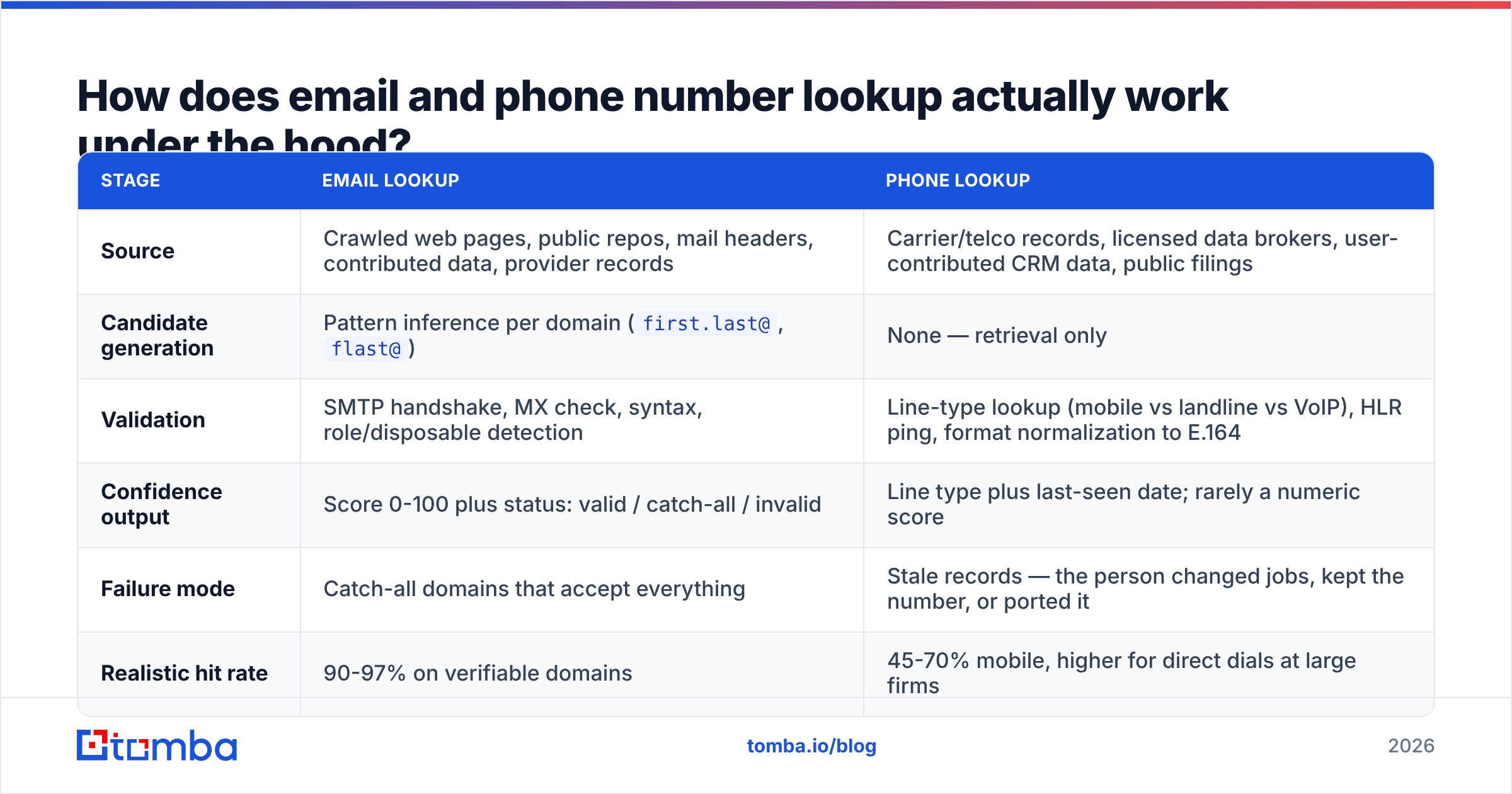
How does email and phone number lookup actually work under the hood?#
| Stage | Email lookup | Phone lookup |
|---|---|---|
| Source | Crawled web pages, public repos, mail headers, contributed data, provider records | Carrier/telco records, licensed data brokers, user-contributed CRM data, public filings |
| Candidate generation | Pattern inference per domain (first.last@, flast@) |
None — retrieval only |
| Validation | SMTP handshake, MX check, syntax, role/disposable detection | Line-type lookup (mobile vs landline vs VoIP), HLR ping, format normalization to E.164 |
| Confidence output | Score 0-100 plus status: valid / catch-all / invalid | Line type plus last-seen date; rarely a numeric score |
| Failure mode | Catch-all domains that accept everything | Stale records — the person changed jobs, kept the number, or ported it |
| Realistic hit rate | 90-97% on verifiable domains | 45-70% mobile, higher for direct dials at large firms |
Two mechanics deserve more attention than they usually get.
The SMTP handshake. An email verifier opens a conversation with the recipient mail server and asks, in effect, "would you accept mail for this address?" without sending anything. Most servers answer honestly. Some — configured as catch-alls — say yes to every address, which is why a separate catch-all verifier exists. Roughly 15-20% of B2B domains are catch-all, and Microsoft 365 tenants increasingly throttle or obscure verification responses, so any vendor quoting a flat accuracy number across all domains is averaging over very different populations.
Phone freshness beats phone volume. A phone dataset with 500 million numbers and a 2021 median last-seen date is worse than one with 80 million numbers refreshed quarterly. Ask any vendor for the last-verified date distribution, not the record count. Numbers in the E.164 format are also far easier to dial programmatically than the local-format strings some tools still return, so check the output shape before you wire anything to a dialer.
What accuracy should you expect in 2026?#
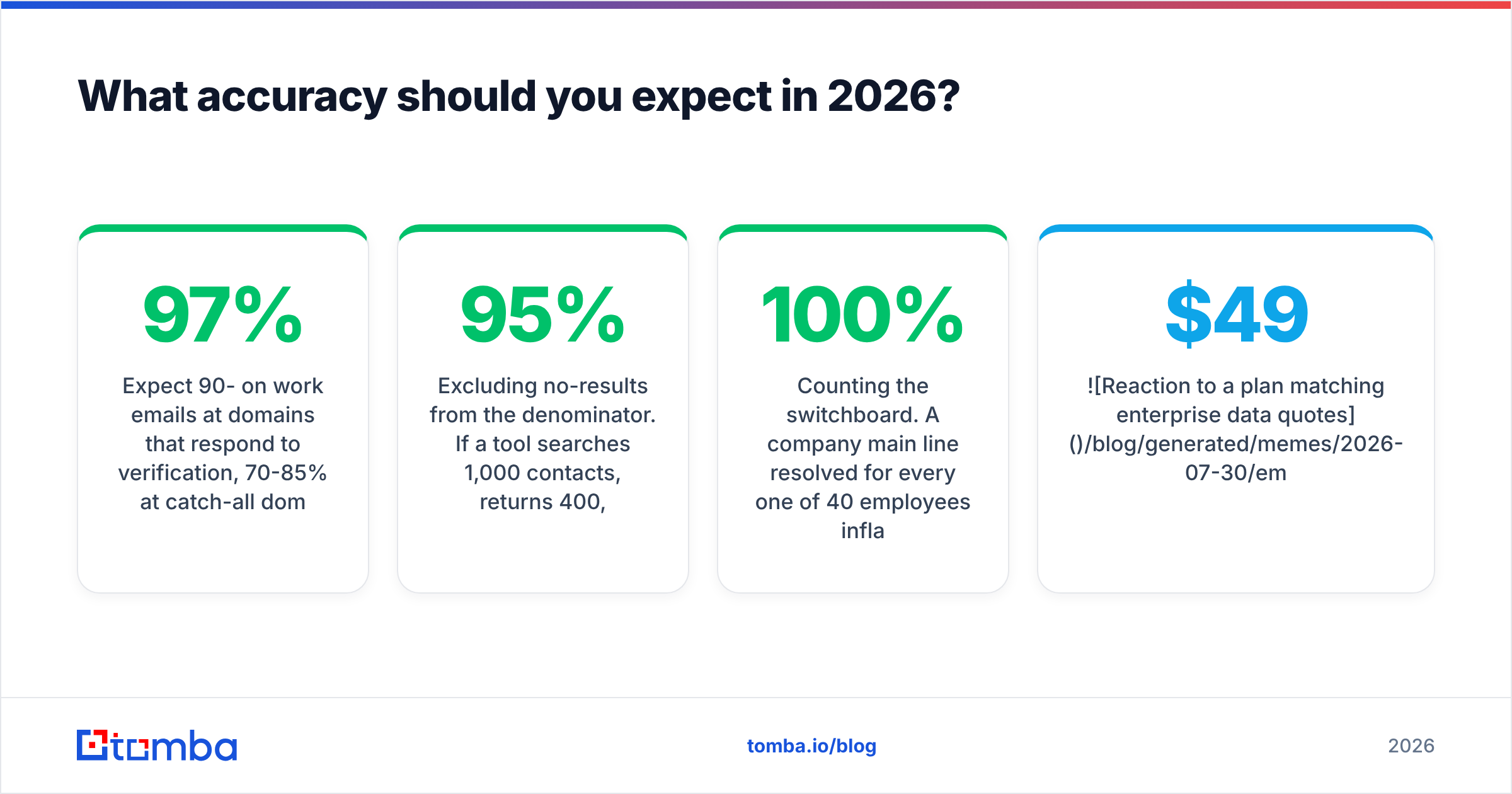
Expect 90-97% on work emails at domains that respond to verification, 70-85% at catch-all domains where you can only infer, and 45-70% on mobile numbers. Anyone promising better than that across the board is quoting a lab number.

The gap between advertised and delivered accuracy usually comes from four accounting tricks:
- Counting "found" as "correct." A returned address is not a validated one. Insist on the status field.
- Excluding no-results from the denominator. If a tool searches 1,000 contacts, returns 400, and 380 are valid, that's 95% "accuracy" and 38% coverage. Both numbers matter; only one gets advertised.
- Testing on famous domains. Fortune 500 companies with public press pages are easy. Your ICP of 60-person Series A SaaS companies is not.
- Counting the switchboard. A company main line resolved for every one of 40 employees inflates "phone coverage" to 100% while delivering zero direct connects.
Run your own test before you commit. Take 100 contacts you already have confirmed emails and phones for, strip the contact fields, and feed the names and domains back through each trial. Measure three things: coverage (how many returned anything), precision (how many matched your known-good value), and cost per correct record. That fifteen-minute exercise beats every G2 grid, though the G2 category listings are still a reasonable way to build your shortlist of candidates.
Which tools do email and phone number lookup best?#
There is no single winner, because the three tool archetypes optimize for different things. Finder-first tools maximize precision per lookup. Database-first tools maximize how many rows you can pull at once. API-first tools maximize how cleanly the data flows into your own systems.

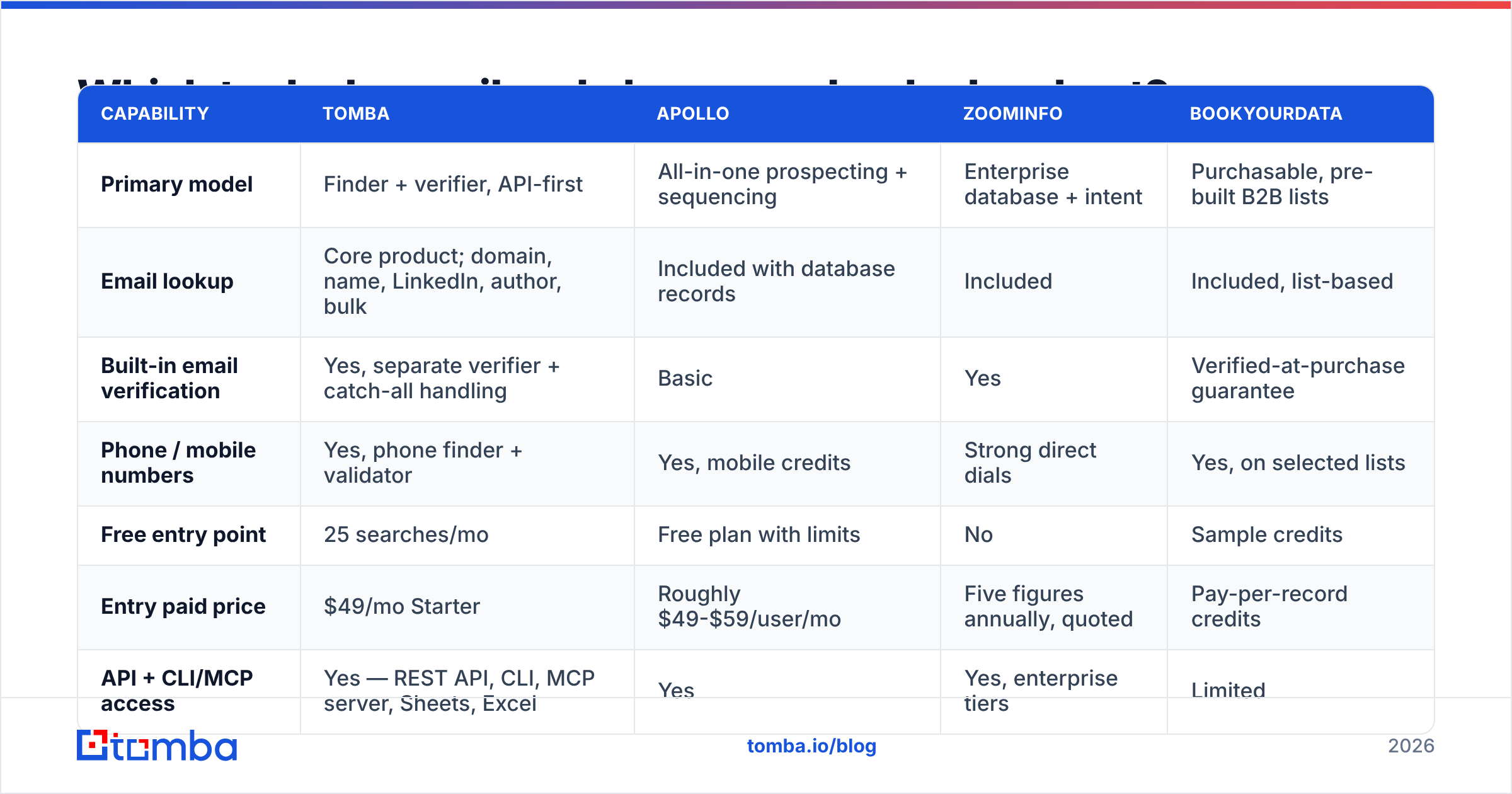
| Capability | Tomba | Apollo | ZoomInfo | BookYourData |
|---|---|---|---|---|
| Primary model | Finder + verifier, API-first | All-in-one prospecting + sequencing | Enterprise database + intent | Purchasable, pre-built B2B lists |
| Email lookup | Core product; domain, name, LinkedIn, author, bulk | Included with database records | Included | Included, list-based |
| Built-in email verification | Yes, separate verifier + catch-all handling | Basic | Yes | Verified-at-purchase guarantee |
| Phone / mobile numbers | Yes, phone finder + validator | Yes, mobile credits | Strong direct dials | Yes, on selected lists |
| Free entry point | 25 searches/mo | Free plan with limits | No | Sample credits |
| Entry paid price | $49/mo Starter | Roughly $49-$59/user/mo | Five figures annually, quoted | Pay-per-record credits |
| API + CLI/MCP access | Yes — REST API, CLI, MCP server, Sheets, Excel | Yes | Yes, enterprise tiers | Limited |
| Best for | Precision lookup and programmatic enrichment | Teams wanting data plus outreach in one seat | Large enterprise territory coverage | Buying a clean, targeted list without building a workflow |
How to read that table in practice:
- Choose finder-first when you already know who you want to reach and need the contact detail to be right. This is the case for founder-led sales, agencies working named-account lists, and any team where a bounce is expensive. Tomba sits here, and its pricing reflects a per-search rather than per-seat model: Free at 25 searches, Starter $49/mo, Growth $99/mo, Pro $249/mo, Enterprise quoted.
- Choose database-first when discovery is the bottleneck — you don't know the accounts yet and want filters over a large universe. Apollo and ZoomInfo shine here, at the cost of variable per-record quality.
- Choose list-purchase when you want speed with no build. BookYourData is a credible option in this lane; you specify the segment, get verified rows, and skip the tooling question entirely. The tradeoff is that a static list ages, so plan a re-verification pass before each campaign.
- Choose API-first when lookups need to happen inside your product or CRM rather than in a browser tab. The Tomba API and its MCP server cover the case where an agent or backend job resolves contacts on demand.
Most mature teams end up running two of these, not one: a broad database for discovery and a precision finder plus verifier as the last mile before anything reaches a mailbox.
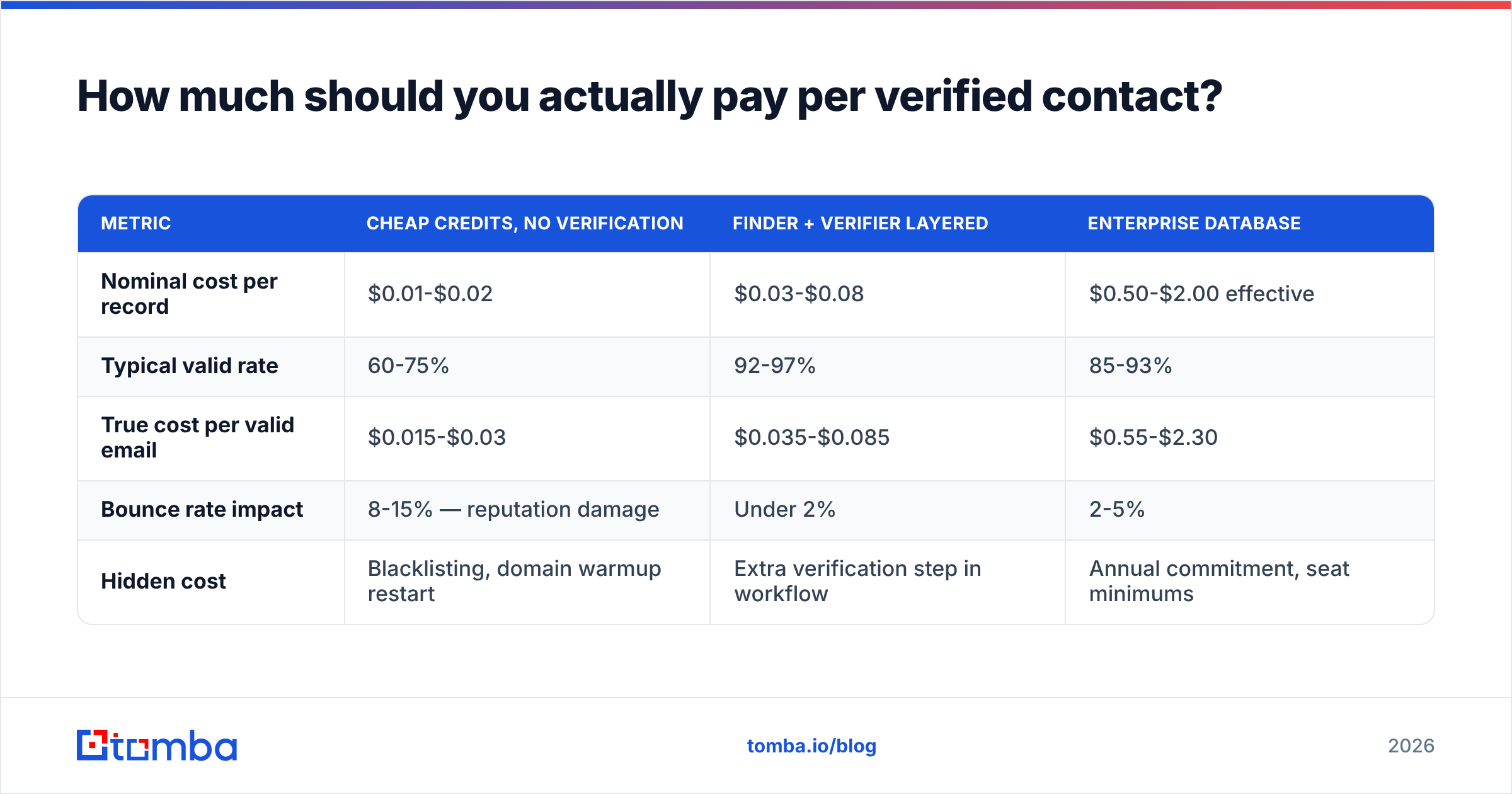
How much should you actually pay per verified contact?#
Stop comparing monthly prices. Compare cost per contact that produces a delivered email or a connected call.
| Metric | Cheap credits, no verification | Finder + verifier layered | Enterprise database |
|---|---|---|---|
| Nominal cost per record | $0.01-$0.02 | $0.03-$0.08 | $0.50-$2.00 effective |
| Typical valid rate | 60-75% | 92-97% | 85-93% |
| True cost per valid email | $0.015-$0.03 | $0.035-$0.085 | $0.55-$2.30 |
| Bounce rate impact | 8-15% — reputation damage | Under 2% | 2-5% |
| Hidden cost | Blacklisting, domain warmup restart | Extra verification step in workflow | Annual commitment, seat minimums |
That fourth row is the one that decides the math. A 10% bounce rate on a 2,000-contact campaign does not cost you 200 wasted credits; it costs you inbox placement across your entire sending domain for weeks. Mailbox providers read repeated hard bounces as a signal that you bought a list, and recovery means pausing sends and rebuilding sender reputation from a lower baseline. Measured that way, the verification step is the cheapest line item in the stack.
For volume work, run lookups in batches rather than one at a time. A bulk email finder processes a CSV of names and domains in a single job, returns statuses per row, and lets you drop the invalids before they ever reach a sequence.
Is phone lookup worth the extra spend?#
Yes, but only as a second touch on accounts that have already shown a signal — not as a primary channel sprayed across a cold list.
The arithmetic is straightforward. Cold-dialing a 1,000-record list with 60% mobile coverage and a 4% connect rate gets you 24 conversations. The same 1,000 records emailed with a verified list at a 6% response rate gets you 60 replies for a fraction of the labor cost. Phone wins on a different axis: conversation quality. A connected call with someone who opened your last two emails converts several times better than a first-touch dial into a stranger.
So sequence it deliberately:
- Email first, verified, to establish awareness and generate signal.
- Spend phone credits on the responders and the openers — people who engaged but didn't book.
- Validate before dialing. Run numbers through a phone validator to confirm line type. Dialing a landline when you expected a mobile wastes a slot; dialing a VoIP number that forwards to a dead extension wastes two.
- Log the outcome back to the record, including wrong-number results. Your own disposition data becomes the most accurate phone dataset you own within a quarter.
How do you build a lookup workflow that doesn't break?#
The failure pattern is always the same: a big one-time enrichment push, followed by six months of decay, followed by a mystery drop in deliverability. Build for continuous resolution instead.
- Store the confidence score, not just the value. A record with a 72 score and a catch-all flag should be treated differently at send time than a 98-score verified mailbox. If your CRM only has an email field, you have thrown away the information that prevents bounces.
- Set a re-verification cadence. B2B contact data decays roughly 2-3% per month from job changes alone. Anything older than 90 days should be re-checked before use, and anything older than a year should be re-found, not just re-verified.
- Resolve at the point of use. An enrichment call fired when a rep opens a record — via the HubSpot integration, a Sheets add-on, or a webhook — beats a quarterly batch job because it is fresh by construction.
- Keep a suppression list that outlives your tools. Unsubscribes, bounces, and do-not-call flags belong in your own system, not inside a vendor's platform you might churn from.
- Separate discovery credits from verification credits in your reporting so you can see which half of the pipeline is actually underperforming.
For teams already living in a spreadsheet, the Google Sheets route is the lowest-friction start: paste names and domains into columns, resolve in place, and keep the status column visible so nobody sends to an unverified row by accident.
What are the compliance limits on email and phone lookup?#
Different rules, different risk levels — and phone is the stricter of the two.
For email, B2B outreach to a business address is permitted in most jurisdictions provided you identify yourself, state why you're contacting them, and honor opt-outs immediately. Under GDPR, the usual basis is legitimate interest, which requires that the message be relevant to the recipient's professional role and that you can produce a record of where the data came from. That last point is why data provenance matters when picking a vendor — check the vendor's published data sources documentation before you rely on it in a regulated market.
For phone, national do-not-call registries, consent requirements for automated dialing, and state-level rules in the US add real exposure. Scrub against DNC lists, avoid autodialers unless you have explicit consent, respect calling-hour windows in the prospect's timezone, and never treat a mobile number sourced from a contributed-data pool as consent to text.
Two practical rules cover most of the risk: never buy or use data whose origin the vendor won't describe, and keep deletion requests honored within the statutory window across every system, including the CSVs sitting on a rep's laptop.
Where should you start?#
If you need names resolved to reliable work emails today — with verification, catch-all handling, and phone numbers available on the same account — start with the Tomba Email Finder. The free tier gives you 25 searches to run your own accuracy test against contacts you already know, which is the only benchmark that matters. If the precision holds on your ICP, Starter at $49/mo covers most single-operator and small-team volume, and the API, CLI, and MCP server are there when you outgrow doing lookups by hand. Run the test on 100 known records first, compare cost per valid contact rather than cost per credit, and let the numbers pick your stack.
Related guides#
Ready to find emails that actually work?
Join 150,000+ professionals who stopped guessing and started sending. Free credits on signup — no credit card required.
Get the Tomba newsletter
Practical outbound tactics and product updates — once every two weeks.
About the author