Email Append Service: How It Works and When to Use One
Email appending fills the gaps in your CRM by matching records to verified addresses. Here's how match rates, pricing, and compliance risk actually stack up in 2026.
TL;DR
- An email append service takes records you already have (name + company, postal address, or phone) and matches them against a third-party database to add a business email address.
- Typical match rates run 25–60% for B2B appends and lower for consumer lists. Anyone promising 90% is counting matches, not deliverable matches.
- Appending is a compliance exercise as much as a data one. Under GDPR and CASL, an appended address has no consent attached to it, which makes cold outreach to it legally risky in the EU, UK, and Canada.
- Real-time email finding (name + domain → verified address) usually beats batch appending on accuracy and cost per usable contact, because you verify at the moment of use rather than months earlier.
- Best practice: append only what you need, verify every appended address before it touches a send, and suppress anything that comes back catch-all or risky.
What is an email append service?#
An email append service adds missing email addresses to records you already own. You upload a file — say 40,000 rows of first name, last name, company, and job title from a trade-show scan or a decade-old CRM — and the vendor matches each row against its own contact database, returning an email address wherever it finds a confident match.
Think of it like a locksmith re-keying a building. You already have the doors (the accounts and the people). What you're missing is the key that actually opens each one. Appending doesn't create new prospects; it makes the prospects you already recorded reachable again.
Three flavors dominate the market:
- B2B email append — matches business records (name + company or name + domain) to work email addresses. Highest-value, most defensible use case.
- Consumer / postal append — matches physical mailing addresses or phone numbers to personal email addresses. Higher legal exposure, lower match confidence, and increasingly restricted by state privacy laws.
- Reverse append — you have an email address and want the name, title, company, and firmographics behind it. That's closer to data enrichment than appending, and it's the least risky of the three.
The important distinction: appending is a batch, historical operation. You send a file, wait hours or days, and get a file back. That gap between match time and send time is where most append projects go wrong.
How does email appending actually work?#
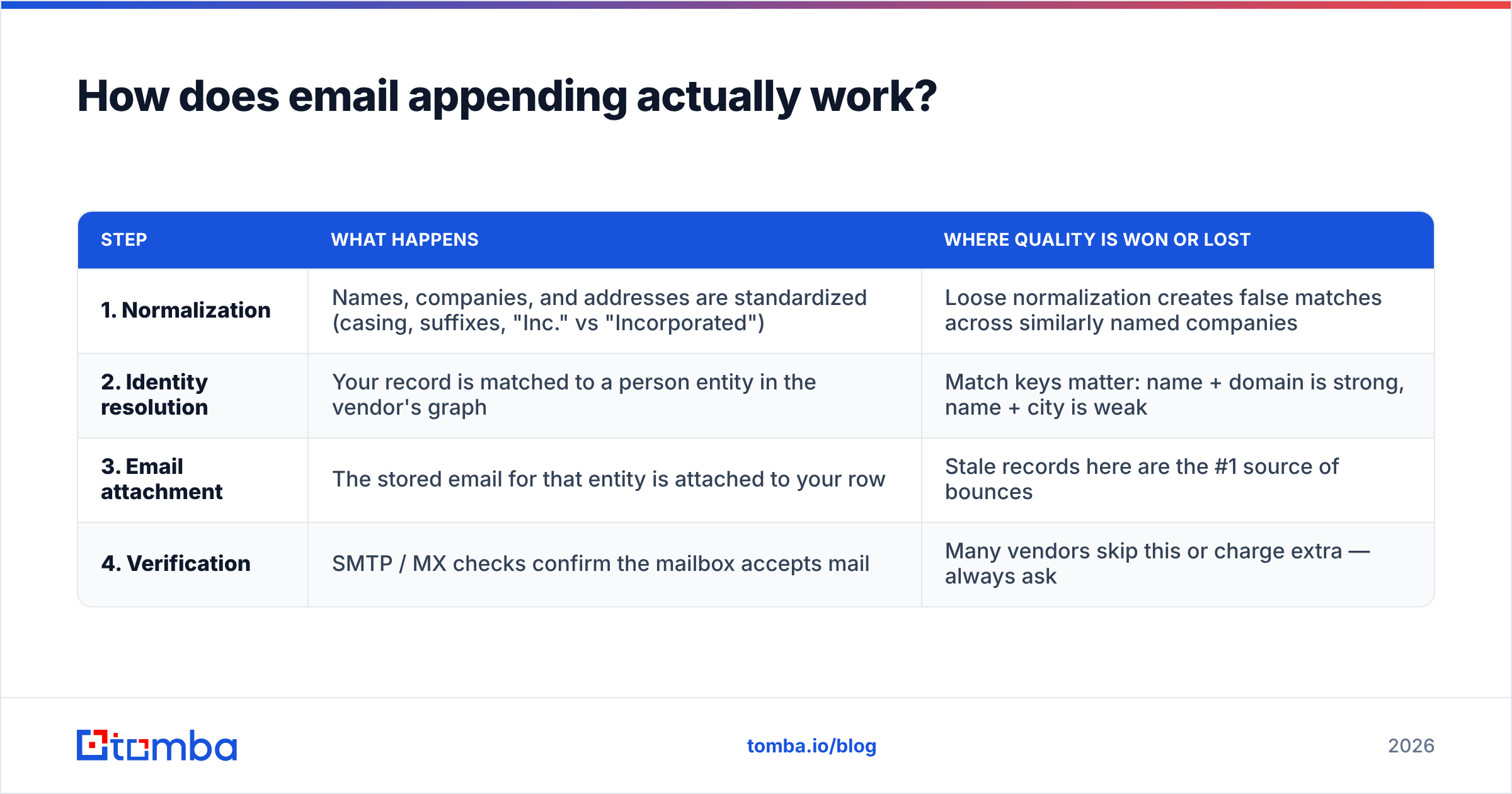
Under the hood, every append vendor runs the same four-step chain. The differences are in how strict each step is.
| Step | What happens | Where quality is won or lost |
|---|---|---|
| 1. Normalization | Names, companies, and addresses are standardized (casing, suffixes, "Inc." vs "Incorporated") | Loose normalization creates false matches across similarly named companies |
| 2. Identity resolution | Your record is matched to a person entity in the vendor's graph | Match keys matter: name + domain is strong, name + city is weak |
| 3. Email attachment | The stored email for that entity is attached to your row | Stale records here are the #1 source of bounces |
| 4. Verification | SMTP / MX checks confirm the mailbox accepts mail | Many vendors skip this or charge extra — always ask |
Step 2 is where the honest vendors separate themselves. If a service matches on name plus city plus approximate company, it will happily hand you the email address of a different Michael Chen. If it insists on name plus verified corporate domain, your match rate drops but your accuracy climbs. You want the second kind, and you should be suspicious of any vendor whose match rate is dramatically higher than its peers.
Step 4 is where most append files quietly fail. An email that was valid when the vendor's crawler found it in 2024 may belong to someone who left the company in 2025. B2B contact data decays at roughly 25–30% per year — job changes, restructurings, domain migrations. That's why running an email verifier over the returned file is not optional cleanup; it's part of the job.

What match rate should you actually expect?#
Here's the number nobody puts on the pricing page: for a clean B2B file with full names and correct company domains, a good append service returns 40–60% matches, of which perhaps 75–85% survive verification. Do the math and your usable yield on a 40,000-row file is roughly 12,000–20,000 addresses.
Match rates collapse in predictable ways:
- Missing or wrong domain — if you only have a company name, expect the rate to fall by 15–25 points.
- SMB-heavy lists — append databases skew toward mid-market and enterprise. Contacts at 8-person agencies are frequently absent.
- Non-US geographies — coverage in DACH, Japan, and Latin America is materially thinner than in North America.
- Old records — a name captured six years ago may no longer work anywhere near that company.
- Generic titles — "Manager" with no first name is unmatchable, and no vendor will tell you until after you've paid.
Ask every vendor for a free test append on 500 of your own rows before signing. A vendor confident in its coverage will run it. If they refuse or insist on using their sample file, that answer tells you what you need to know.
Is an email append service better than an email finder?#
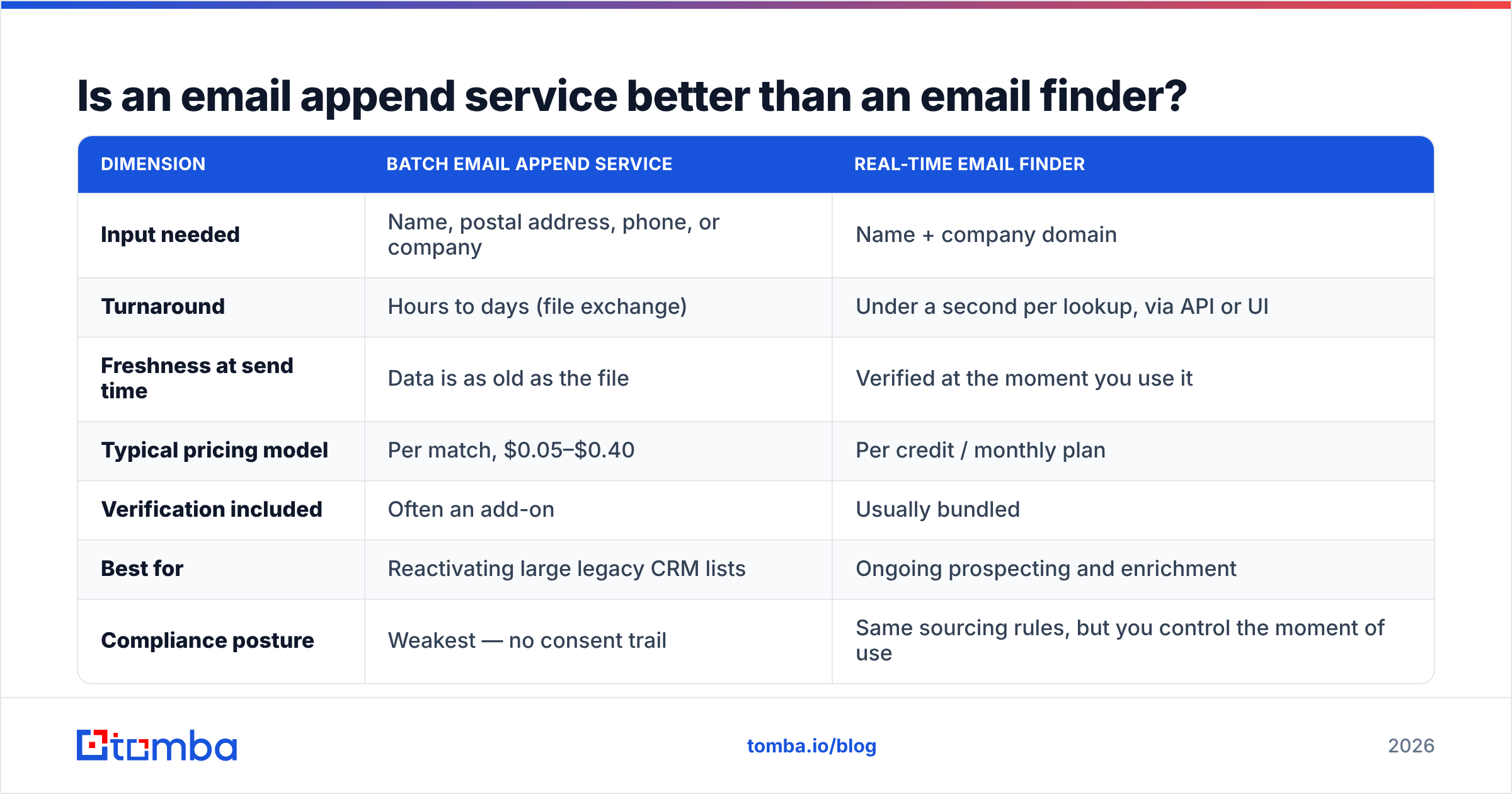
For most B2B teams in 2026, no — a real-time finder wins on cost per usable contact. But the honest answer depends on what shape your data is in.
| Dimension | Batch email append service | Real-time email finder |
|---|---|---|
| Input needed | Name, postal address, phone, or company | Name + company domain |
| Turnaround | Hours to days (file exchange) | Under a second per lookup, via API or UI |
| Freshness at send time | Data is as old as the file | Verified at the moment you use it |
| Typical pricing model | Per match, $0.05–$0.40 | Per credit / monthly plan |
| Verification included | Often an add-on | Usually bundled |
| Best for | Reactivating large legacy CRM lists | Ongoing prospecting and enrichment |
| Compliance posture | Weakest — no consent trail | Same sourcing rules, but you control the moment of use |
If your problem is "I have 60,000 dormant CRM records and no emails," a batch append is the pragmatic tool. If your problem is "my SDRs need 200 verified addresses a week," a finder plus a bulk email finder workflow is cheaper and stays current.
There's also a hybrid that works well: use domain-level discovery to pull every known address at a target company, then match internally against your existing names. A domain search over 500 target accounts often recovers more usable contacts than a blind append on the same list, because you see the company's actual email pattern and can validate your assumptions instead of trusting a vendor's black box.

What are the compliance risks of email appending?#
This is the section most append vendors' marketing pages skip, and it's the one that can cost you more than the data.
An appended email address carries no consent. The person gave their address to someone — an employer directory, a conference registrar, a public profile — not to you. That distinction matters enormously depending on where they sit:
- GDPR (EU/UK) — you need a lawful basis. Legitimate interest can cover B2B outreach relevant to the recipient's job, but appending a personal address to a record the person never gave you weakens that argument, and Article 14 requires you to tell them where you got their data. Practically: appended EU consumer emails are a bad idea, and appended EU business emails require a documented balancing test.
- CASL (Canada) — express or implied consent is required before sending commercial email. Appending does not manufacture consent. Penalties run into seven figures.
- CAN-SPAM (US) — the most permissive of the three. Appending is legal; you still need accurate headers, a working unsubscribe, and honest subject lines.
- State laws (CA, CO, TX, and expanding) — consumer appends increasingly trigger notice and deletion obligations. Business-contact data has carve-outs in some states, but not all.
The major ESPs have their own view too. Mailchimp's terms explicitly prohibit importing purchased, rented, or appended lists, and violating that is a fast route to account suspension regardless of what the law permits. If your append plan involves your primary marketing ESP, read that policy first.
Practical risk controls if you append anyway:
- Append business addresses only. Skip personal Gmail/Yahoo matches entirely.
- Segment appended contacts into their own list so you can measure their complaint rate separately and cut them loose if it spikes.
- Warm up gradually. Send to appended contacts from a secondary domain, in small batches, and watch bounce and complaint rates before scaling. Use a warmup calculator to set a realistic ramp instead of guessing.
- Document your sourcing. Keep the vendor's data-provenance statement. If a regulator asks, "the vendor said it was fine" is not an answer; a written sourcing disclosure is.
- Honor opt-outs across the whole file, not just the list that generated the complaint.
How much does an email append service cost?#
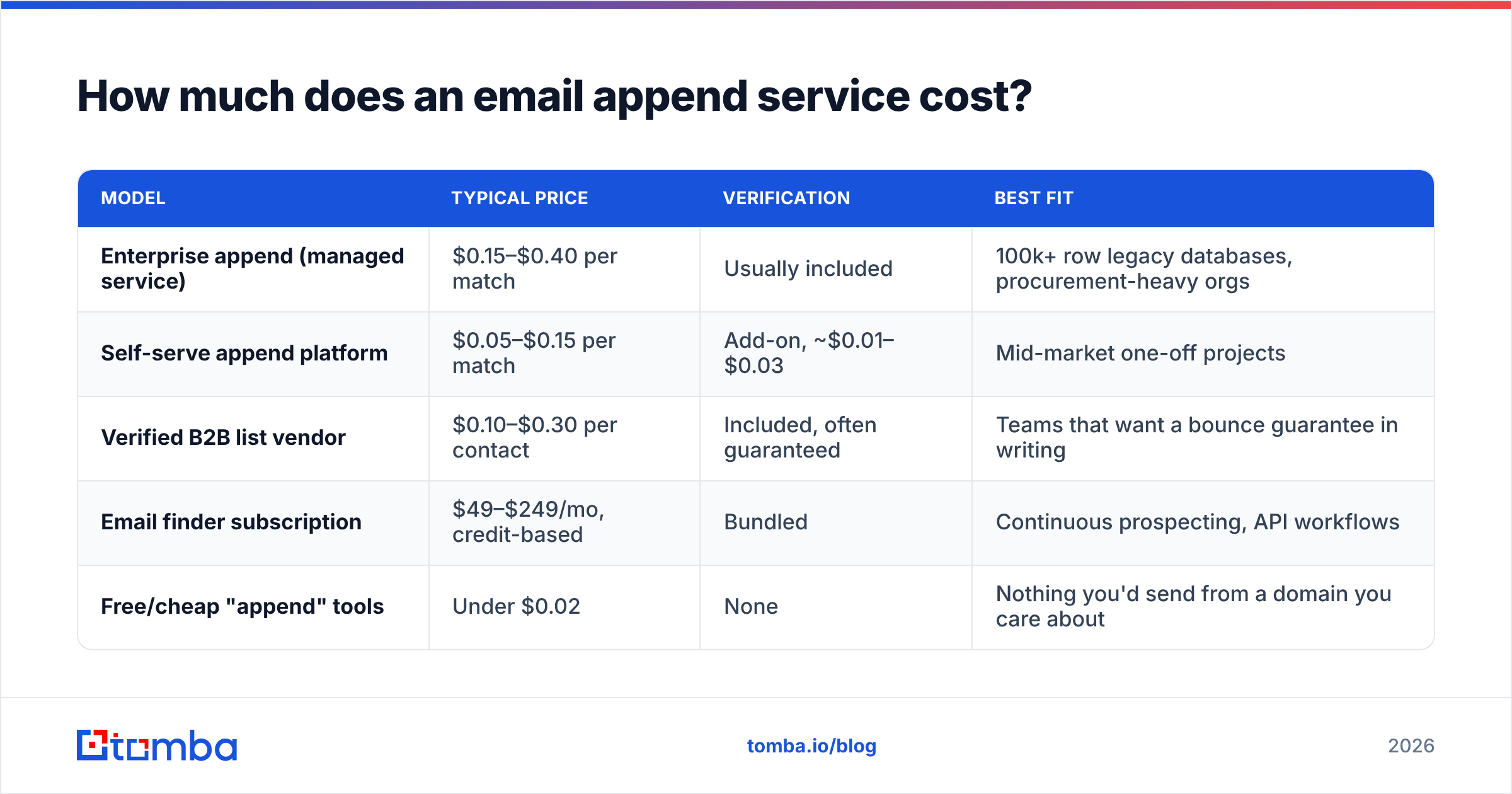
Pricing is almost always per match, not per record submitted — which sounds generous until you notice that unverified matches count as matches. Here's how the market segments in 2026.
| Model | Typical price | Verification | Best fit |
|---|---|---|---|
| Enterprise append (managed service) | $0.15–$0.40 per match | Usually included | 100k+ row legacy databases, procurement-heavy orgs |
| Self-serve append platform | $0.05–$0.15 per match | Add-on, ~$0.01–$0.03 | Mid-market one-off projects |
| Verified B2B list vendor | $0.10–$0.30 per contact | Included, often guaranteed | Teams that want a bounce guarantee in writing |
| Email finder subscription | $49–$249/mo, credit-based | Bundled | Continuous prospecting, API workflows |
| Free/cheap "append" tools | Under $0.02 | None | Nothing you'd send from a domain you care about |
Vendors like BookYourData sit in the verified-list tier and back their data with an accuracy guarantee, which is genuinely valuable if you need a contractual floor on bounce rate — worth pricing against a pure append if you're buying at volume.
For the subscription side, Tomba pricing runs a free tier at 25 searches/mo, Starter at $49/mo, Growth at $99/mo, and Pro at $249/mo, with verification bundled rather than upsold. On a 12,000-usable-contact project, a Growth or Pro plan run through the API typically lands well under a per-match append quote for the same file — and every address is checked the day you use it, not the day the vendor's crawler found it.
The number to compare is cost per contact that produces a delivered email, not cost per match. A $0.08 match that bounces costs you more than a $0.20 match that lands, because bounces damage sender reputation and reputation damage taxes every future send.

How do you run an append project without wrecking deliverability?#
Treat the returned file as raw material, not a mailing list. The sequence that works:
- Split the file by confidence. Most vendors return a match-confidence score. Anything below "high" goes into a separate bucket you test last, or never.
- Verify everything, twice if the file is old. Run the full return through verification and drop hard-invalid results immediately. Catch-all domains need special handling — a catch-all verifier tells you whether the domain accepts everything (meaning the address is unconfirmed) rather than leaving you to guess.
- Deduplicate against your suppression list. Appended files routinely contain people who already unsubscribed under a different address. Sending to them is both a legal problem and a trust problem.
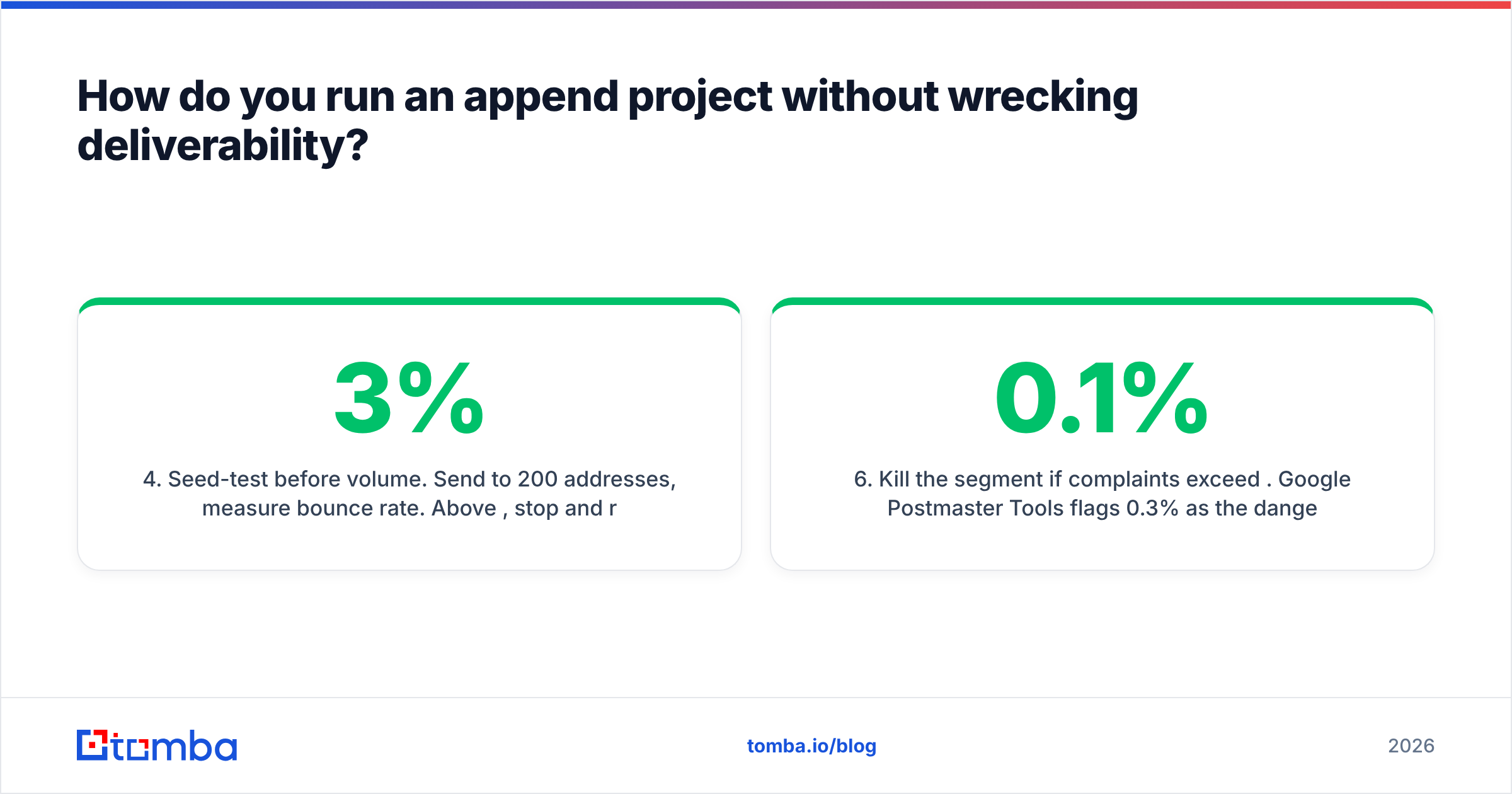
- Seed-test before volume. Send to 200 addresses, measure bounce rate. Above 3%, stop and re-verify. Above 5%, the file is not usable — go back to the vendor.
- Ramp over two to three weeks. New recipients on a domain that has never mailed them look like a spam pattern to Google and Microsoft. Slow ramps are how you avoid the email deliverability cliff.
- Kill the segment if complaints exceed 0.1%. Google Postmaster Tools flags 0.3% as the danger line; treat 0.1% on an appended segment as your own stop-loss, because appended contacts have the weakest relationship with you and will complain fastest.
One more discipline: re-append is not a strategy. If a record didn't match this year, appending the same row again next quarter rarely helps. Better to spend that budget finding fresh contacts at the same accounts, where the company relationship is real and the person is currently employed.
When should you skip appending entirely?#
Skip it when any of these are true:
- Your list is consumer, not business. The compliance math almost never works out, and match quality on personal addresses is poor.
- Your records lack company domains. Without a domain, match rates drop far enough that you're paying for guesswork.
- Your target accounts have changed. If the list is from a market you no longer serve, appending makes stale prospects reachable — which is worse than unreachable, because now you'll email them.
- You mail primarily from your main marketing ESP. The terms-of-service risk outweighs the incremental contacts.
- You need fewer than a few thousand contacts. At that scale, per-lookup finding is faster and gives you full control over verification.
The alternative in most of these cases is the same: rebuild the list at the account level. Identify the companies you want, discover the people currently in the relevant roles, find and verify their addresses at the moment you plan to reach out. Slower to set up, dramatically cleaner to operate, and every contact comes with a timestamp you can defend.
What's the fastest path from a gap-filled CRM to a sendable list?#
Start with your existing records, but flip the order of operations: instead of asking a vendor to match names to emails from a stale index, resolve each contact live against the company's current email pattern and verify before it enters a sequence.
That's exactly what the Tomba Email Finder is built for. Feed it a name and a company domain and it returns a verified professional address with a confidence score and the sources behind it — no batch file, no waiting, no per-match invoice for addresses that bounce. Run it row by row through the Tomba API against your CRM, or drop a spreadsheet into the bulk tool and let verification run inline. The free tier gives you 25 searches to test coverage on your own worst records before you spend anything, and Starter at $49/mo covers most one-off cleanup projects outright.
Append when a batch match is genuinely the only option. For everything else, find it fresh, verify it now, and send with confidence.
Related guides#
// get started
Find, verify and enrich your first contacts today
Start on the free plan with 25 searches a month, then scale when your team is ready.
Free plan · No credit card required · GDPR & CCPA
// about the author