Email Check vs ListKit 2026: Which B2B Data Tool Wins?
Email Check sells cheap verification credits. ListKit sells verified B2B lists. They solve different halves of the same problem — here's which one your outbound motion actually needs in 2026.
TL;DR
- Email Check tools (bulk verifiers like the free email checker category) answer one question: is this address deliverable? ListKit answers a different one: who should I email in the first place?
- ListKit sells pre-built, triple-verified B2B contact lists starting around $97/mo for a few thousand credits. Cheap standalone verifiers run $0.001–$0.007 per email.
- If you already have a list, buy verification. If you have nothing but an ICP, buy list-building. Most teams need both — which is why bundling a finder plus a verifier usually beats stitching two vendors together.
- ListKit's data is a licensed aggregate refreshed on a cycle; a live finder re-resolves the address at query time. That gap matters most for job-hopping roles.
- Our pick for teams under 20 reps: run list-building and verification in one platform (Tomba at $49/mo, or BookYourData if you want a purely list-first vendor with pay-as-you-go credits).
What exactly is "email check" and what is ListKit?#
They aren't competitors in the way "Apollo vs Lusha" are competitors. They sit at different stations on the same assembly line.
Email check is shorthand for email verification: you upload addresses you already have, and the tool tells you which will bounce. Under the hood it runs MX lookups, syntax parsing, disposable-domain checks, role-account detection, and an SMTP handshake that asks the receiving server whether the mailbox exists — without actually delivering a message. Standalone verifiers (ZeroBounce, Bouncer, Debounce, NeverBounce, and free web-based checkers) all do roughly this. Tomba's email verifier and the free email checker sit in the same category.
ListKit is a B2B data platform. You filter by industry, headcount, title, tech stack, and geography, then export a list of contacts with emails already attached and verified. It launched out of the agency world and is positioned squarely at cold-email operators — the product assumes you're running sequences in Instantly or Smartlead and wants to hand you a clean CSV, or push directly into your sender.
The practical difference in one line: a verifier cleans a list you brought; ListKit gives you the list.
Where this gets confusing is that both categories now claim "verified emails." ListKit advertises triple verification on its exports. Verifiers advertise 98%+ accuracy. Those numbers measure different things — one is coverage of a database, the other is precision on an arbitrary input.

How do email verification and list-building actually differ?#
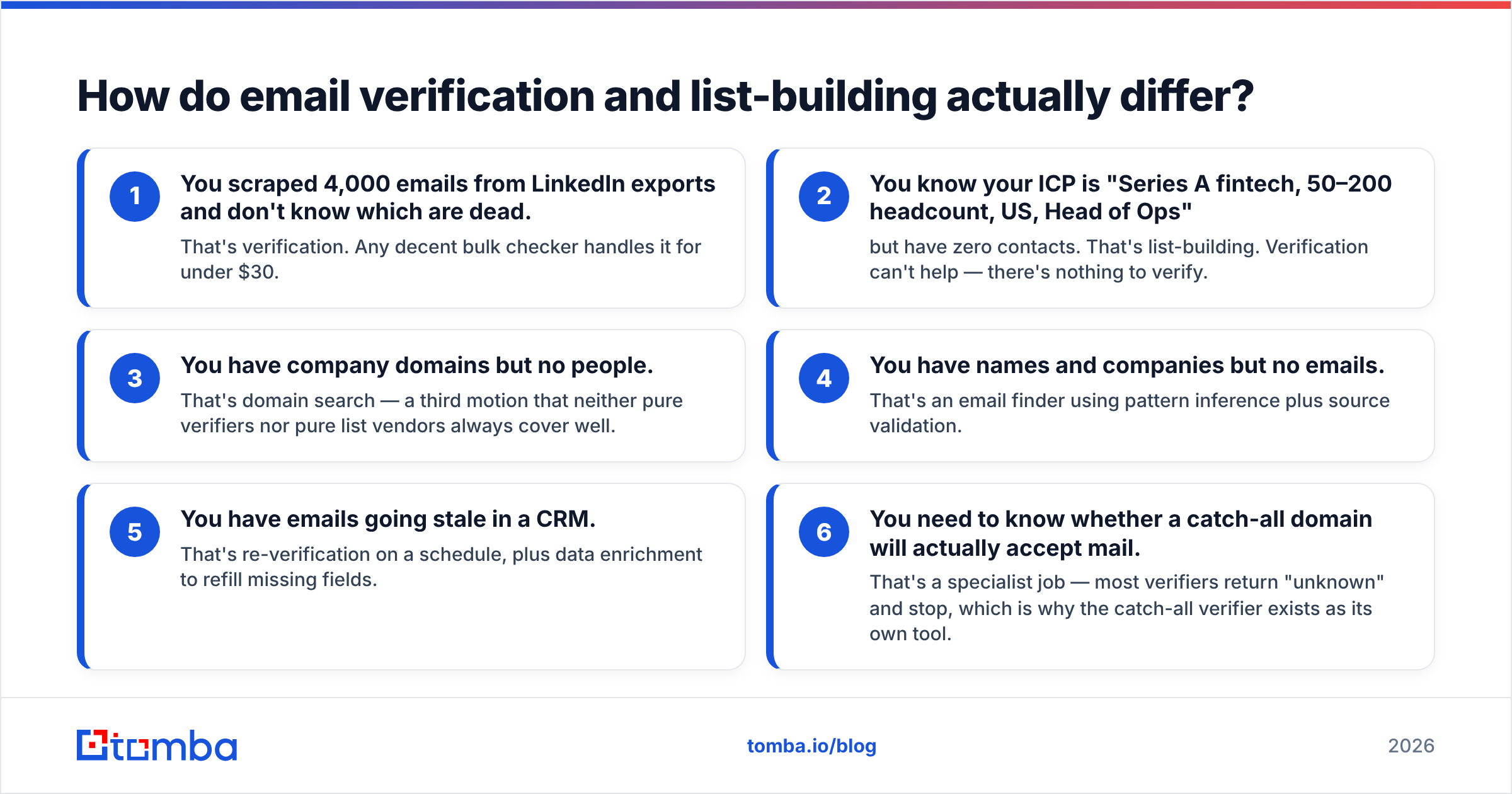
Here's the split by job-to-be-done:
- You scraped 4,000 emails from LinkedIn exports and don't know which are dead. That's verification. Any decent bulk checker handles it for under $30.
- You know your ICP is "Series A fintech, 50–200 headcount, US, Head of Ops" but have zero contacts. That's list-building. Verification can't help — there's nothing to verify.
- You have company domains but no people. That's domain search — a third motion that neither pure verifiers nor pure list vendors always cover well.
- You have names and companies but no emails. That's an email finder using pattern inference plus source validation.
- You have emails going stale in a CRM. That's re-verification on a schedule, plus data enrichment to refill missing fields.
- You need to know whether a catch-all domain will actually accept mail. That's a specialist job — most verifiers return "unknown" and stop, which is why the catch-all verifier exists as its own tool.
Notice that ListKit competes on #2 and partially #3. Email check competes on #1 and #5. Only #4 and #6 force you to think about which vendor architecture you're buying into.
Email check vs ListKit: how do they compare on price and features?#
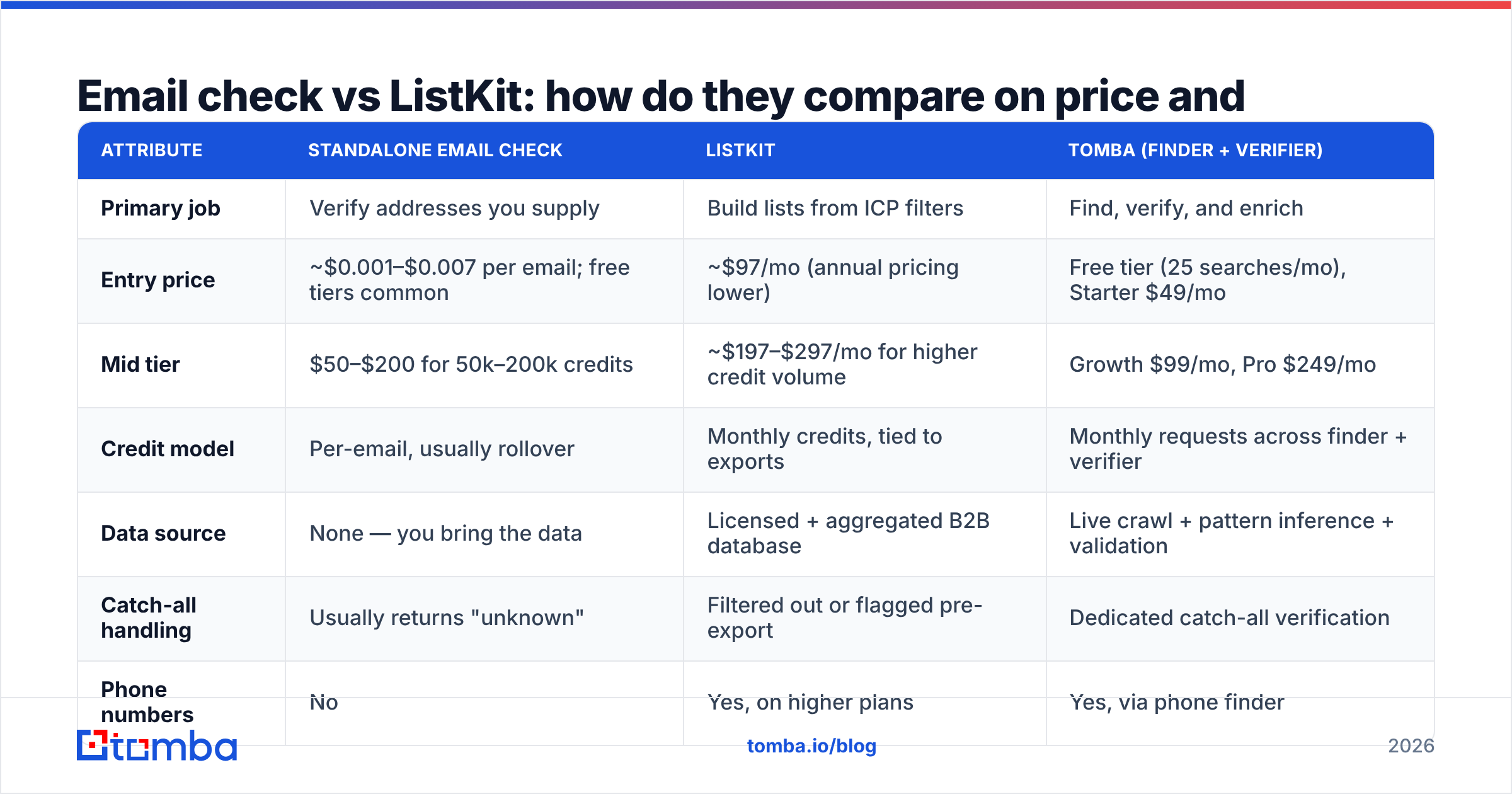
| Attribute | Standalone email check | ListKit | Tomba (finder + verifier) |
|---|---|---|---|
| Primary job | Verify addresses you supply | Build lists from ICP filters | Find, verify, and enrich |
| Entry price | ~$0.001–$0.007 per email; free tiers common | ~$97/mo (annual pricing lower) | Free tier (25 searches/mo), Starter $49/mo |
| Mid tier | $50–$200 for 50k–200k credits | ~$197–$297/mo for higher credit volume | Growth $99/mo, Pro $249/mo |
| Credit model | Per-email, usually rollover | Monthly credits, tied to exports | Monthly requests across finder + verifier |
| Data source | None — you bring the data | Licensed + aggregated B2B database | Live crawl + pattern inference + validation |
| Catch-all handling | Usually returns "unknown" | Filtered out or flagged pre-export | Dedicated catch-all verification |
| Phone numbers | No | Yes, on higher plans | Yes, via phone finder |
| API access | Yes, on most | Limited / plan-gated | Full email finder API on all paid plans |
| Best for | Cleaning an existing list | Cold-email agencies with no data | Teams that need both halves |
Two things jump out of that table.
First, the cost structures aren't comparable line-for-line. Verification is priced per email and gets cheaper in bulk. List platforms price per export credit, and an export credit is worth far more — it includes discovery, enrichment, and verification bundled. Paying $97/mo for 3,000 ListKit credits looks expensive next to $30 for 100,000 verifications until you remember the verifier gave you zero contacts.
Second, the "unknown" column is where money leaks. Catch-all domains — where the mail server accepts everything at SMTP time and bounces later — make up a meaningful share of B2B domains, especially at enterprises running Microsoft 365 with a wildcard rule. A cheap verifier marks those "unknown" and you're back to guessing. That's a real cost that never shows up in per-email pricing.
Is ListKit's data actually better than what you'd get from a finder?#
Depends entirely on your ICP's volatility.
ListKit's model is database-first: contacts are sourced, verified, and stored, then refreshed on a cadence. That's excellent for stable roles at stable companies — a VP of Finance at a 500-person manufacturer probably has the same address they had 18 months ago. The list is ready in seconds and the verification is already done.
Live-resolution finders work the other way. When you query, the tool infers the likely pattern from the domain's known formats, checks it against its sources, and validates in real time. Slower per lookup, but it reflects today's reality rather than the last refresh cycle.
The gap shows up in high-churn segments. LinkedIn's own workforce data has consistently shown elevated job mobility in tech and SaaS roles, and independent B2B data audits published on G2 regularly flag stale contact records as the top complaint across every database vendor — not just ListKit. If you sell to sales, marketing, or engineering leadership at startups, assume any static database is decaying at a double-digit annual rate.
Two practical mitigations:
- Re-verify at send time, not export time. Even a triple-verified list should get a pass through a verifier the day before your sequence launches. A record verified in March means nothing in July.
- Use pattern tools to sanity-check. If a list gives you
j.smith@acme.combut the company email pattern checker says Acme usesjsmith@, one of those is wrong and it's worth 10 seconds to find out.
Which one should you buy for your specific situation?#
Buy a standalone email check tool if:
- You have a list already — from a conference, a webinar, a partner, a scrape, an old CRM
- Your bounce rate crept above 3% and you need to protect sender reputation fast
- You're consolidating multiple CRM instances and need dedupe plus validation
- Your volume is spiky (50k one month, zero the next) and you want per-credit pricing with rollover
Buy ListKit if:
- You're an agency spinning up new client campaigns weekly and need lists on day one
- Your ICP filters map cleanly to firmographic fields ListKit indexes
- You want the CSV-to-Instantly path with as few steps as possible
- You'd rather pay a premium than run your own sourcing infrastructure
Buy a combined finder + verifier if:
- Your ICP is narrow enough that generic database filters return junk
- You need to go from "here's a target account list" to "here are the five people I want" repeatedly
- You want API access to wire this into your own tooling rather than living in a UI
- You care about catch-all domains and don't want half your list marked "unknown"
Worth naming a peer here: BookYourData plays a similar list-first game to ListKit with a pay-as-you-go credit model and a strong accuracy guarantee. If you like ListKit's approach but hate monthly subscriptions, it's the closest structural alternative and a genuinely solid vendor.

What does the total cost actually look like over 12 months?#
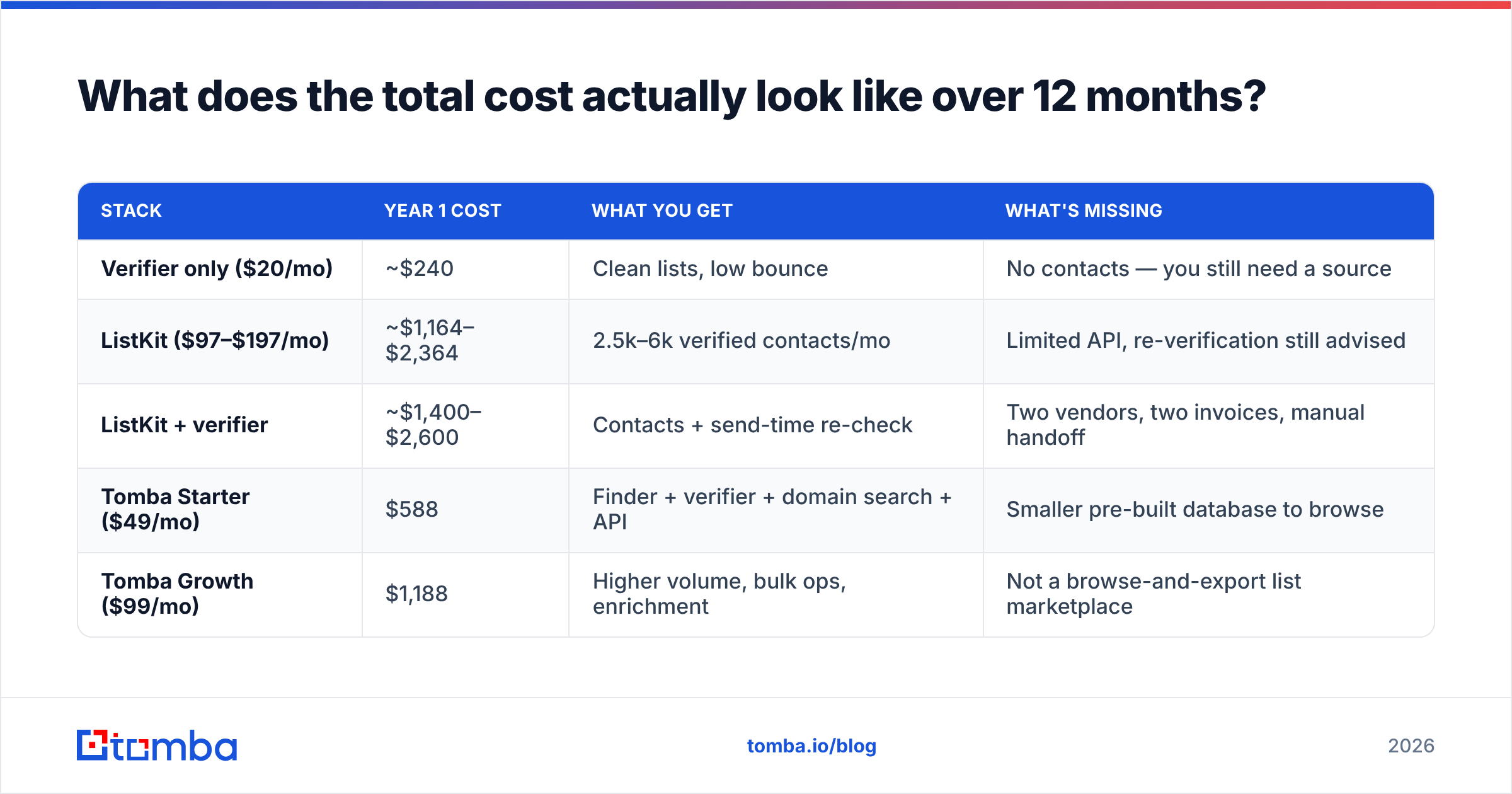
Let's price a realistic scenario: a five-rep team sending 8,000 cold emails a month, needing roughly 2,500 fresh verified contacts monthly.
| Stack | Year 1 cost | What you get | What's missing |
|---|---|---|---|
| Verifier only ($20/mo) | ~$240 | Clean lists, low bounce | No contacts — you still need a source |
| ListKit ($97–$197/mo) | ~$1,164–$2,364 | 2.5k–6k verified contacts/mo | Limited API, re-verification still advised |
| ListKit + verifier | ~$1,400–$2,600 | Contacts + send-time re-check | Two vendors, two invoices, manual handoff |
| Tomba Starter ($49/mo) | $588 | Finder + verifier + domain search + API | Smaller pre-built database to browse |
| Tomba Growth ($99/mo) | $1,188 | Higher volume, bulk ops, enrichment | Not a browse-and-export list marketplace |
The honest read: if your workflow is "browse filters, click export, upload to sequencer," ListKit is built for that and a finder isn't. If your workflow is "here are 300 target accounts, get me the right person at each," a finder is built for that and a browse-and-export database isn't.
Where the combined stack wins is the tail. You'll always have accounts the database doesn't cover — the 40-person agency in Lisbon, the family-owned distributor, the stealth-mode startup. A database returns nothing for those. A finder with bulk email finder support will usually resolve a pattern anyway.
How do you evaluate either tool before paying?#
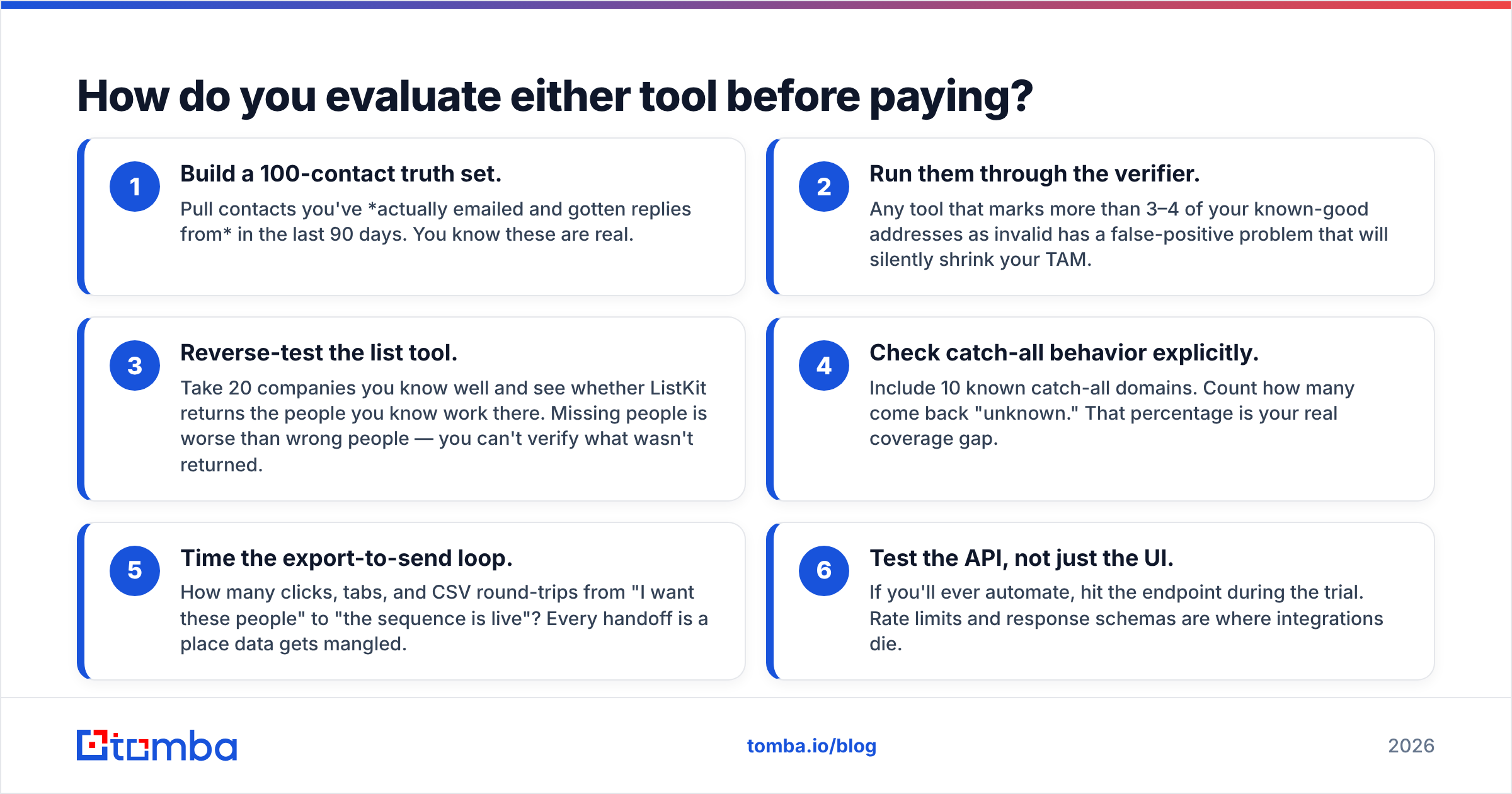
Run the same test on both. Vendor-published accuracy numbers are marketing; your list is the only benchmark that matters.
- Build a 100-contact truth set. Pull contacts you've actually emailed and gotten replies from in the last 90 days. You know these are real.
- Run them through the verifier. Any tool that marks more than 3–4 of your known-good addresses as invalid has a false-positive problem that will silently shrink your TAM.
- Reverse-test the list tool. Take 20 companies you know well and see whether ListKit returns the people you know work there. Missing people is worse than wrong people — you can't verify what wasn't returned.
- Check catch-all behavior explicitly. Include 10 known catch-all domains. Count how many come back "unknown." That percentage is your real coverage gap.
- Time the export-to-send loop. How many clicks, tabs, and CSV round-trips from "I want these people" to "the sequence is live"? Every handoff is a place data gets mangled.
- Test the API, not just the UI. If you'll ever automate, hit the endpoint during the trial. Rate limits and response schemas are where integrations die.
Do this in a trial window and you'll have a defensible answer in an afternoon. HubSpot's research on data decay has long pegged B2B database degradation at roughly 22% annually — which is another way of saying whatever you test today, retest in six months.
What's the verdict on email check vs ListKit?#
They're not rivals, and choosing between them is usually the wrong frame. The right question is which half of the problem is currently costing you more.
If you're bouncing at 6% and your domain reputation is sliding, buy verification today and worry about sourcing next quarter. If you have pristine deliverability and nothing to send, buy list-building and skip the verifier for now. If you're doing outbound seriously and continuously — which most B2B teams are — you'll end up needing both, and the question becomes whether you want two vendors or one.
Two vendors gives you best-of-breed and a manual seam. One vendor gives you a single credit pool, a single API, and no CSV shuffling. At the volumes most teams under 20 reps operate at, the seam costs more in ops time than the tool costs in dollars.
Ready to stop paying twice? The Tomba Email Finder resolves contacts from a domain, a name, or a company — then verifies them in the same request, catch-all domains included. Start on the free tier (25 searches/mo) to run the 100-contact truth test above, then move to Starter at $49/mo when you're convinced. Full Tomba pricing is public, credits cover finder and verifier together, and the Tomba API is available on every paid plan so you can wire it into whatever sequencer you already run.
Related guides#
Ready to find emails that actually work?
Join 150,000+ professionals who stopped guessing and started sending. Free credits on signup — no credit card required.
Get the Tomba newsletter
Practical outbound tactics and product updates — once every two weeks.
About the author