Email Check vs Salesbot: Which One Fixes Your Outbound?
An email check tool cleans the list you send to. A Salesbot automates what happens after you send. They solve different problems — and buying them in the wrong order is why most outbound stalls.
TL;DR
- An email check tool validates whether an address exists and can receive mail. A Salesbot is an AI agent that automates conversations — chat replies, qualification questions, follow-up sequences.
- They are not substitutes. One protects your ability to land in the inbox; the other multiplies the volume of messages you send from that inbox.
- If your bounce rate is above 3%, buy the email check first. A Salesbot running on dirty data just burns your sending domain faster.
- If your list is already clean and you're drowning in inbound replies or unqualified demo requests, the Salesbot wins on ROI.
- The cheapest correct answer for most teams under 20 reps: a verification layer (from free tiers up to ~$49/mo) plus native CRM automation — skip the standalone bot until you have volume to justify it.
What are you actually comparing here?#
Short answer: a data-quality tool against a workflow-automation tool. That's the whole tension in the email check vs Salesbot debate, and most comparison posts get it wrong by pretending they're direct competitors.
Think of outbound like a restaurant. An email check is your ingredient supplier — it decides whether the food you cook is fresh or spoiled. A Salesbot is the extra line cook — it decides how many plates leave the kitchen per hour. Hire a second cook while your fridge is full of rotten produce and you don't get more revenue. You get more complaints, faster.
The reason people compare them at all is budget. Both tend to land in the same "sales tech, ~$50–300/month" line item, and a founder with one slot to fill has to pick. So let's make the pick concrete.
What does an email check tool actually do?#
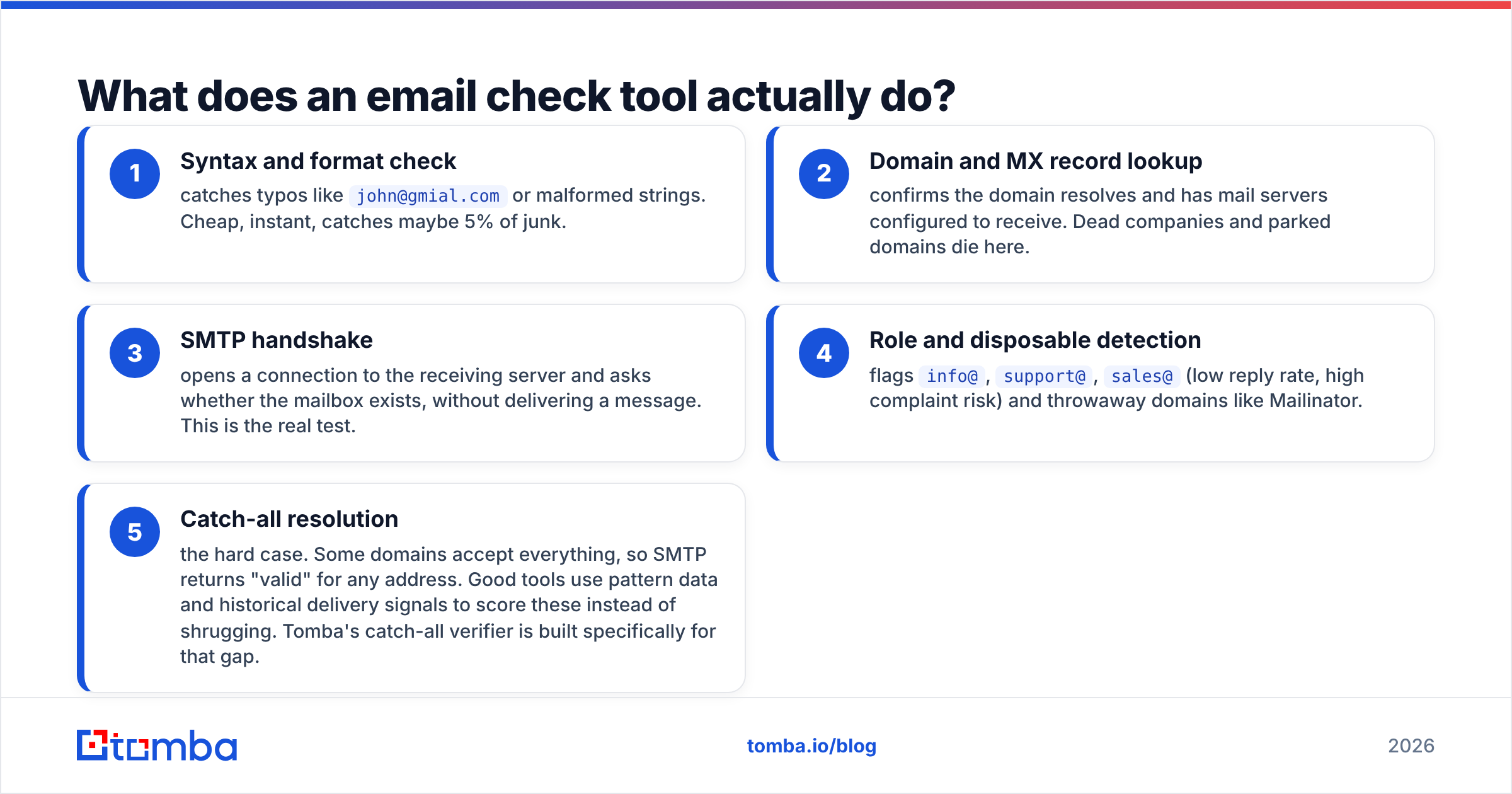
An email check (also called email verification or email validation) runs a series of tests against an address before you send to it:
- Syntax and format check — catches typos like
john@gmial.comor malformed strings. Cheap, instant, catches maybe 5% of junk. - Domain and MX record lookup — confirms the domain resolves and has mail servers configured to receive. Dead companies and parked domains die here.
- SMTP handshake — opens a connection to the receiving server and asks whether the mailbox exists, without delivering a message. This is the real test.
- Role and disposable detection — flags
info@,support@,sales@(low reply rate, high complaint risk) and throwaway domains like Mailinator. - Catch-all resolution — the hard case. Some domains accept everything, so SMTP returns "valid" for any address. Good tools use pattern data and historical delivery signals to score these instead of shrugging. Tomba's catch-all verifier is built specifically for that gap.
The output is a status per address — valid, invalid, risky, catch-all — plus a confidence score. You send to the valid ones, drop the invalid ones, and make a judgment call on risky.
Why it matters: mailbox providers judge you on how many messages you send to addresses that don't exist. Google's sender guidelines are explicit that high bounce rates and spam complaints throttle delivery. Once your domain reputation drops, every subsequent message — including replies to warm leads — gets worse placement. Verification isn't a nice-to-have; it's the thing standing between your sequence and the spam folder.
What does a Salesbot actually do?#
"Salesbot" is used two ways in the market, and the distinction changes the comparison:
- The CRM feature. Several CRMs ship a bot builder under that name — a visual flow editor that fires messages, assigns tasks, moves deals between pipeline stages, and answers common questions on chat and messaging channels. It's automation glue, not a data source.
- The standalone AI SDR. A newer category: an LLM-powered agent that reads inbound replies, classifies intent, drafts contextual responses, books meetings on a calendar, and hands off to a human when it gets stuck.
Both share the same core value: they compress the time between a prospect showing interest and a human responding. Studies on lead response time have been consistent for over a decade — the odds of qualifying a lead drop sharply after the first few minutes. A bot that answers at 2 a.m. genuinely converts leads a human rep would have lost. HubSpot's sales blog has a stack of case studies on exactly this pattern.
What a Salesbot does not do: find contact data, verify it, or tell you whether the 4,000 addresses in your CSV are real. It consumes the list you hand it.
Email check vs Salesbot: how do they compare?#
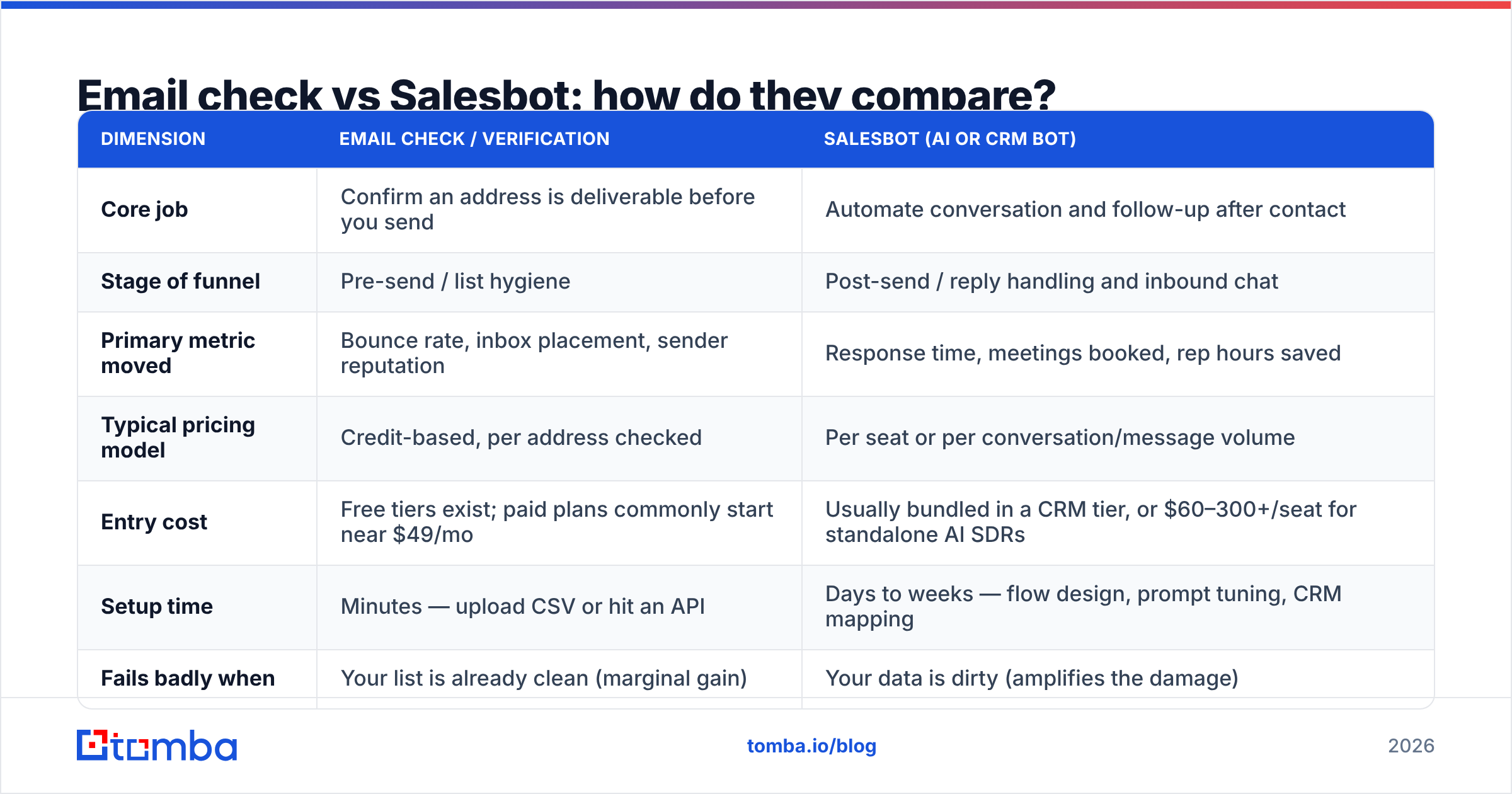
| Dimension | Email check / verification | Salesbot (AI or CRM bot) |
|---|---|---|
| Core job | Confirm an address is deliverable before you send | Automate conversation and follow-up after contact |
| Stage of funnel | Pre-send / list hygiene | Post-send / reply handling and inbound chat |
| Primary metric moved | Bounce rate, inbox placement, sender reputation | Response time, meetings booked, rep hours saved |
| Typical pricing model | Credit-based, per address checked | Per seat or per conversation/message volume |
| Entry cost | Free tiers exist; paid plans commonly start near $49/mo | Usually bundled in a CRM tier, or $60–300+/seat for standalone AI SDRs |
| Setup time | Minutes — upload CSV or hit an API | Days to weeks — flow design, prompt tuning, CRM mapping |
| Fails badly when | Your list is already clean (marginal gain) | Your data is dirty (amplifies the damage) |
| Replaces a human? | No — replaces manual guesswork | Partially — replaces tier-1 qualification |
| Risk if you skip it | Domain reputation damage, sequences land in spam | Slower replies, reps stuck on admin work |
Read that table row by row and the answer stops being a coin flip. The two tools sit on opposite sides of the send event, and only one of them can cause permanent, hard-to-reverse damage if you skip it.
Which one fixes a low reply rate first?#
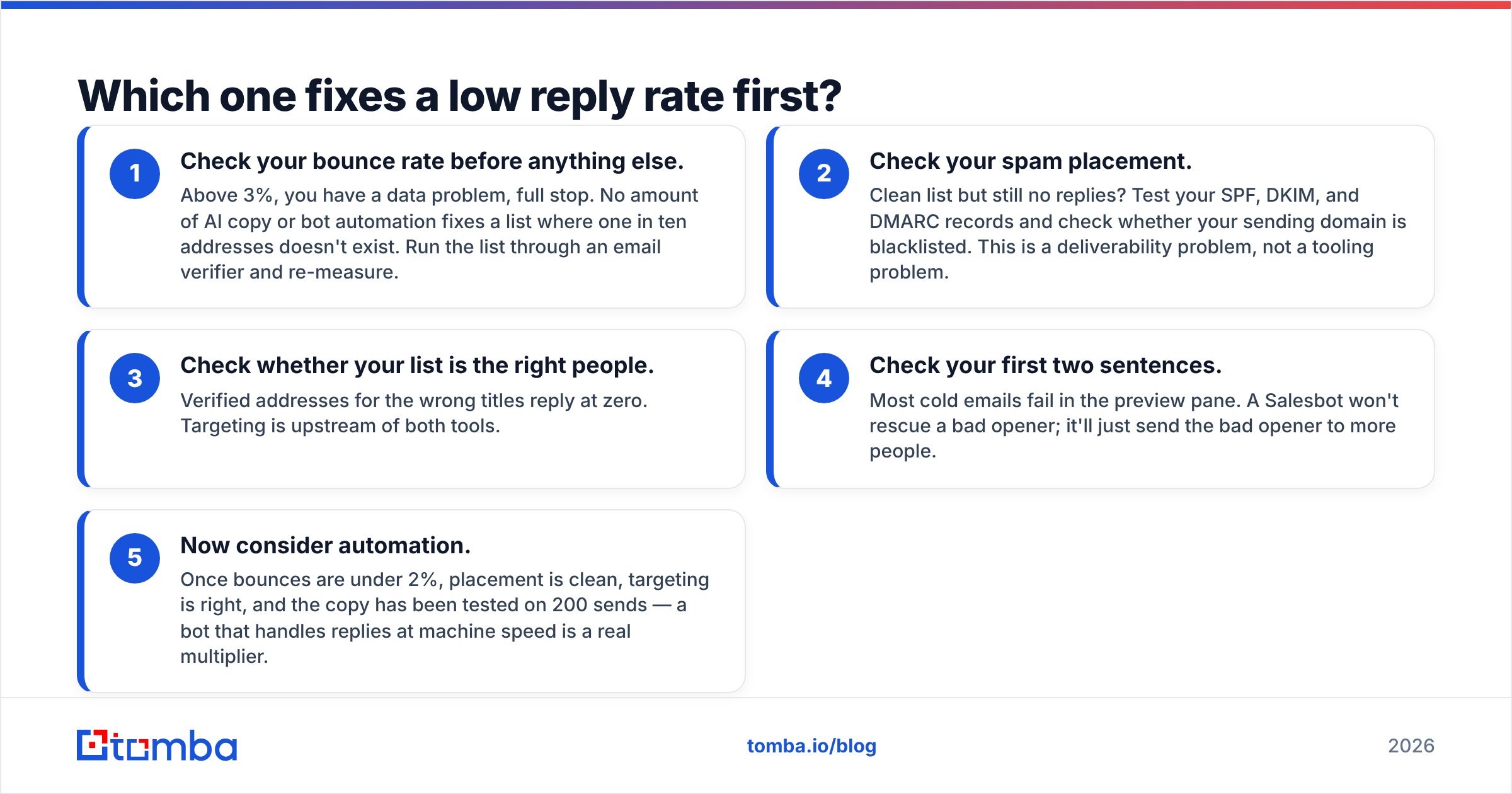
If reply rates are your symptom, work through this order. It's diagnostic, not dogma.
- Check your bounce rate before anything else. Above 3%, you have a data problem, full stop. No amount of AI copy or bot automation fixes a list where one in ten addresses doesn't exist. Run the list through an email verifier and re-measure.
- Check your spam placement. Clean list but still no replies? Test your SPF, DKIM, and DMARC records and check whether your sending domain is blacklisted. This is a deliverability problem, not a tooling problem.
- Check whether your list is the right people. Verified addresses for the wrong titles reply at zero. Targeting is upstream of both tools.
- Check your first two sentences. Most cold emails fail in the preview pane. A Salesbot won't rescue a bad opener; it'll just send the bad opener to more people.
- Now consider automation. Once bounces are under 2%, placement is clean, targeting is right, and the copy has been tested on 200 sends — a bot that handles replies at machine speed is a real multiplier.
Teams routinely reverse steps one and five. They buy the exciting AI layer, watch their reply rate stay flat, and conclude "cold email doesn't work anymore." The email was fine. Forty percent of it never arrived.
What does each actually cost — including the hidden costs?#
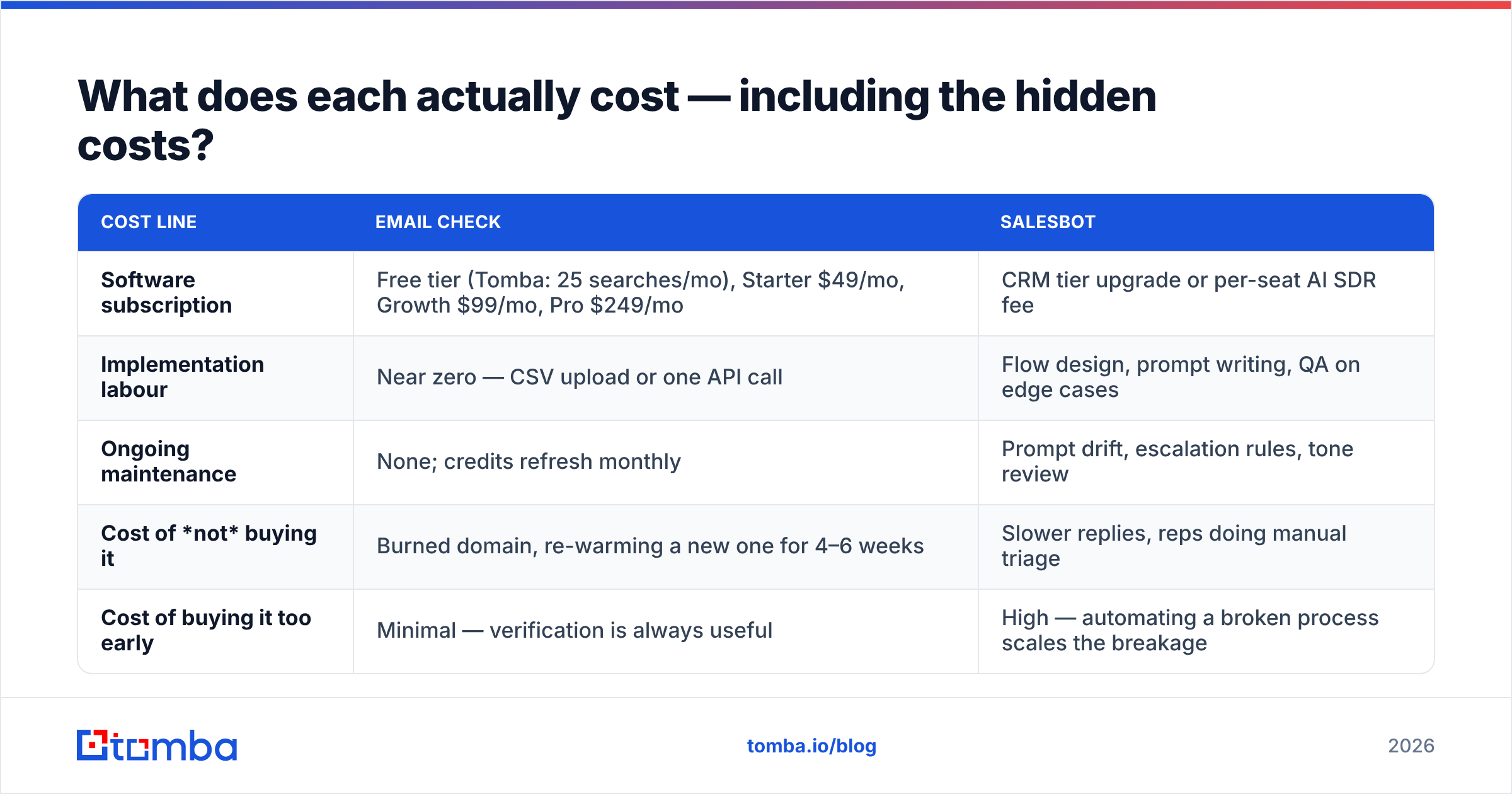
| Cost line | Email check | Salesbot |
|---|---|---|
| Software subscription | Free tier (Tomba: 25 searches/mo), Starter $49/mo, Growth $99/mo, Pro $249/mo | CRM tier upgrade or per-seat AI SDR fee |
| Implementation labour | Near zero — CSV upload or one API call | Flow design, prompt writing, QA on edge cases |
| Ongoing maintenance | None; credits refresh monthly | Prompt drift, escalation rules, tone review |
| Cost of not buying it | Burned domain, re-warming a new one for 4–6 weeks | Slower replies, reps doing manual triage |
| Cost of buying it too early | Minimal — verification is always useful | High — automating a broken process scales the breakage |
The asymmetry is the point. A verification tool bought too early wastes a few dollars in credits. A Salesbot bought too early automates a process that doesn't work yet, and hides the failure behind a dashboard full of activity metrics.
For teams building the data layer themselves, the per-credit economics matter more than the sticker price. Compare Tomba pricing against per-seat bot pricing on a cost-per-verified-contact basis, not a cost-per-month basis, and the gap widens fast.
Can you run both together?#
Yes — and for most teams past product-market fit, both is the correct answer. The sequencing looks like this:
- Source contacts from your ICP list, LinkedIn exports, or a domain search against target company websites.
- Verify in bulk before anything touches your sending infrastructure. A bulk email finder run handles thousands of rows in one pass.
- Segment by risk tier. Valid addresses go into the main sequence. Catch-all and risky addresses go into a separate, low-volume sequence on a secondary domain so a bad batch can't hurt your primary.
- Send from a warmed domain with authentication configured and volume ramped gradually.
- Route replies to the Salesbot. Positive intent gets a fast, contextual response and a calendar link. Objections and edge cases escalate to a human.
- Feed outcomes back into the list. Hard bounces get suppressed permanently; soft bounces get one retry and then a re-verification pass.
Step two is the load-bearing one. Skip it and steps four through six degrade every week as your sender reputation erodes.

When is a Salesbot clearly the right pick?#
Be honest about your situation. A bot beats a verification tool when:
- Your inbound volume exceeds your reply capacity. If demo requests sit unanswered for six hours, a bot that answers in six seconds pays for itself in a month.
- You run multichannel chat. Website chat, WhatsApp, Instagram DMs — humans can't cover all of them at once, and each channel has its own response-time expectations.
- Your qualification questions are formulaic. Company size, budget range, timeline, current stack. If a script can ask it, a bot should.
- You already verify. Some teams have verification baked into their CRM or enrichment vendor. If bounces are already under 1%, the marginal value of another verification tool is small.
A Salesbot is a legitimate, high-ROI purchase — just not the first purchase for a team with a data problem.
When is the email check clearly the right pick?#
- You're building lists from scratch. Scraped, exported, or purchased data decays roughly 25–30% per year as people change jobs. Unverified, it's a liability.
- You send cold. Cold outbound carries far more reputation risk than replying to inbound. Verification is table stakes.
- You've recently had deliverability trouble. Blacklisting, sudden open-rate collapse, or a spike in "address not found" replies all point to hygiene.
- You're API-first. A Tomba API call inside your signup flow or CRM webhook catches bad addresses at the point of entry, which is cheaper than cleaning them later.
- Your budget is tight. Verification is the cheapest meaningful improvement available to an outbound team. Nothing else moves inbox placement for less money.
If you just want to sanity-check a handful of addresses before committing budget, the free email checker will tell you what you're dealing with in under a minute.
What do buyers actually complain about?#
Reading through vendor reviews on G2's email verification category and comparable listings, the complaint patterns split cleanly:
Verification tools get dinged for catch-all handling (the honest ones return "unknown" and the dishonest ones return "valid"), for credit expiry policies, and for slow bulk processing on very large files. Ask any vendor directly how they score catch-all domains — the answer separates serious providers from wrappers around a public SMTP library.
Salesbots get dinged for robotic tone, for escalation logic that fails on ambiguous replies, and for setup time that runs three times the estimate. The good implementations take real design work; the bad ones annoy prospects at scale.
Neither complaint list is a reason to avoid the category. They're a reason to test on a small segment before you commit the whole pipeline.
So which wins?#
For a team choosing one in 2026: buy the email check first. It's cheaper, it deploys in an afternoon, it protects an asset (your sending domain) that takes months to repair, and it makes every downstream tool — including a Salesbot you buy later — perform better. The Salesbot is the second purchase, not the first, unless your inbound volume is already outrunning your headcount.
The framing that actually helps: verification is infrastructure, a Salesbot is leverage. You don't buy leverage on a foundation you haven't poured.
Start where the risk is. Run your current list through the Tomba Email Finder to fill the gaps and verify what you already have — the free tier covers 25 searches a month, Starter is $49/mo, and you'll know within an hour whether your reply-rate problem is a data problem or a message problem. Fix that first, then automate the part that's working.
Related guides#
Ready to find emails that actually work?
Join 150,000+ professionals who stopped guessing and started sending. Free credits on signup — no credit card required.
Get the Tomba newsletter
Practical outbound tactics and product updates — once every two weeks.
About the author