Email Check vs SalesQL: Which Finds Better B2B Emails?
SalesQL pulls contacts off LinkedIn profiles. An email check tool tells you whether those contacts will actually deliver. Here's how the two compare on accuracy, coverage, pricing, and when you genuinely need both.
TL;DR
- "Email check" and SalesQL solve two different problems: one confirms whether an address is deliverable, the other scrapes contact data off LinkedIn profiles. Comparing them head-to-head only makes sense once you know which half of the workflow is broken.
- SalesQL is strongest when your prospecting starts inside LinkedIn Sales Navigator and you want emails plus phone numbers without leaving the tab.
- An email check tool is strongest when you already have a list — from a CRM export, a scraper, a conference roster — and bounce rate is the thing killing you.
- If you run outbound at any volume, you need both functions. The real decision is whether you buy them as two tools or one platform with a find-then-verify pipeline.
- Cost per usable contact matters more than cost per credit. A $0.02 email that bounces costs more than a $0.05 email that lands.
What does "email check" actually mean?#
An email check is the process of confirming that an address exists, accepts mail, and belongs to a real mailbox before you send anything to it. It is a validation step, not a discovery step.
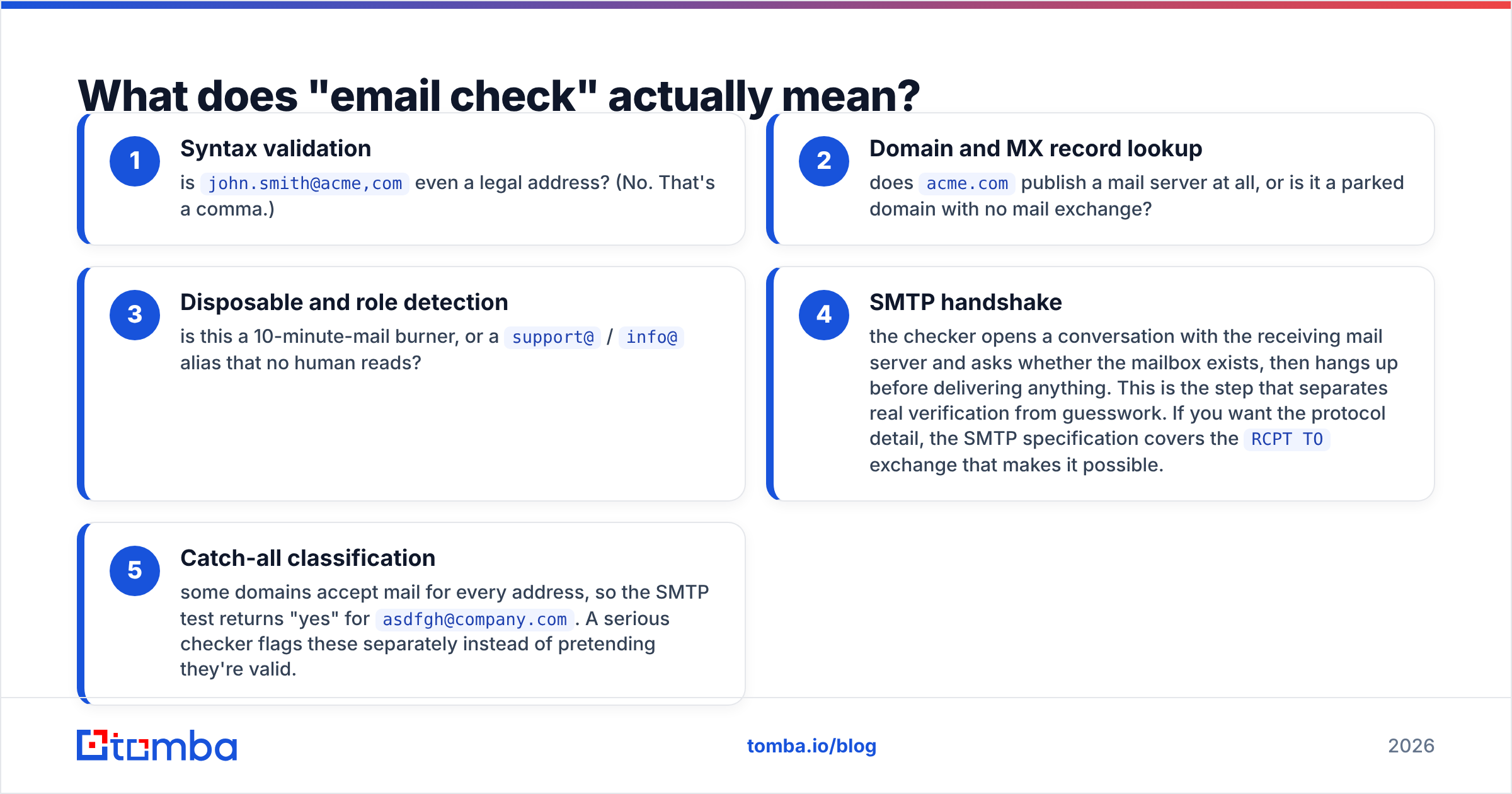
Think of it like a bouncer at a door. The bouncer doesn't find guests — he just decides who gets in. A good email check runs a chain of tests in order, and each one is cheap enough that the whole thing finishes in under a second:
- Syntax validation — is
john.smith@acme,comeven a legal address? (No. That's a comma.) - Domain and MX record lookup — does
acme.compublish a mail server at all, or is it a parked domain with no mail exchange? - Disposable and role detection — is this a 10-minute-mail burner, or a
support@/info@alias that no human reads? - SMTP handshake — the checker opens a conversation with the receiving mail server and asks whether the mailbox exists, then hangs up before delivering anything. This is the step that separates real verification from guesswork. If you want the protocol detail, the SMTP specification covers the
RCPT TOexchange that makes it possible. - Catch-all classification — some domains accept mail for every address, so the SMTP test returns "yes" for
asdfgh@company.com. A serious checker flags these separately instead of pretending they're valid.
That last point is where most cheap tools quietly fail. They report catch-all addresses as "valid," your dashboard shows 98% deliverability, and then your bounce rate lands at 9%. Tools like the free email checker and a proper catch-all verifier split those buckets apart so you can decide what risk you're willing to carry.
What is SalesQL and who is it for?#
SalesQL is a Chrome extension that extracts contact data from LinkedIn profiles and search results. You install it, browse to a profile or a Sales Navigator list, click the icon, and it returns personal and work emails plus phone numbers where available. Contacts save into lists inside its web app, and you export to CSV or push into a CRM.
The workflow it fits is very specific and very common: an SDR or founder who prospects visually. You filter Sales Navigator by title, headcount, and geography, eyeball the results, and pull contacts for the people who look right. SalesQL sits directly in that loop. It doesn't ask you to think about domains, patterns, or CSV columns.
Its main constraints are structural rather than a knock on the product:
- You are bounded by LinkedIn. If the person isn't on LinkedIn, has a locked-down profile, or your account hits a viewing limit, they don't exist in your pipeline.
- Extension-based extraction is fragile by nature. Every LinkedIn UI change or rate-limit tightening is a potential interruption for any browser-based tool in this category.
- Verification is a secondary feature, not the core engine. You get validity signals, but the depth of catch-all handling and re-verification workflow is not what a dedicated verification stack offers.
- Personal emails are a mixed blessing. A Gmail address for a VP of Engineering has high deliverability and terrible reply rates in most B2B contexts, and carries more GDPR exposure than a work address.
Reviews on G2 consistently praise the speed and the LinkedIn-native feel, and consistently flag data gaps outside of well-covered markets. That's the honest shape of the tool.
Is email check better than SalesQL?#
No — and any post that answers that question with a clean "yes" is selling you something. They occupy different stages of the same pipeline.
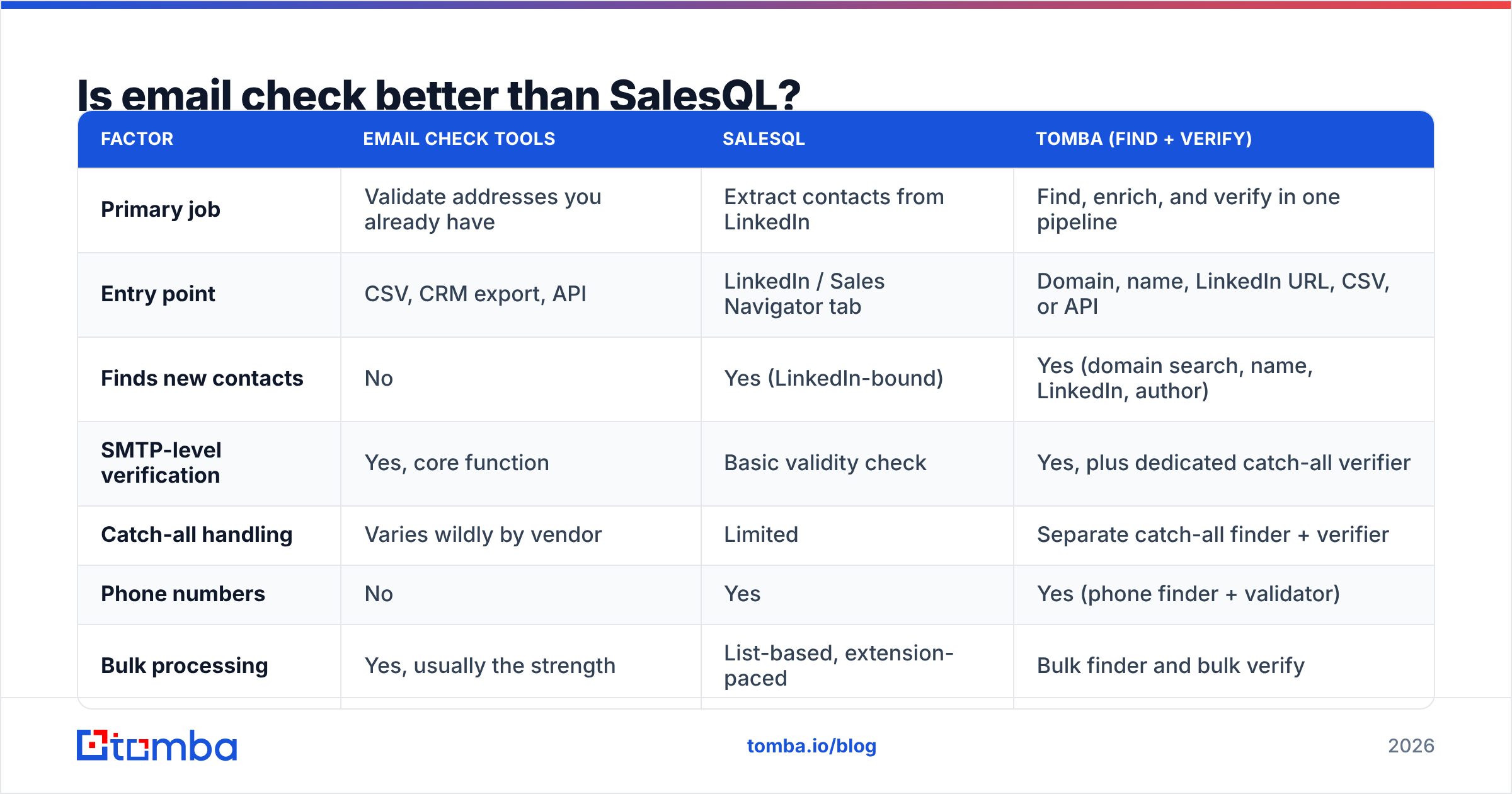
Here's the comparison that actually matters, mapped against a hybrid platform (Tomba) that does both jobs in one place:
| Factor | Email check tools | SalesQL | Tomba (find + verify) |
|---|---|---|---|
| Primary job | Validate addresses you already have | Extract contacts from LinkedIn | Find, enrich, and verify in one pipeline |
| Entry point | CSV, CRM export, API | LinkedIn / Sales Navigator tab | Domain, name, LinkedIn URL, CSV, or API |
| Finds new contacts | No | Yes (LinkedIn-bound) | Yes (domain search, name, LinkedIn, author) |
| SMTP-level verification | Yes, core function | Basic validity check | Yes, plus dedicated catch-all verifier |
| Catch-all handling | Varies wildly by vendor | Limited | Separate catch-all finder + verifier |
| Phone numbers | No | Yes | Yes (phone finder + validator) |
| Bulk processing | Yes, usually the strength | List-based, extension-paced | Bulk finder and bulk verify |
| API access | Common | Available on paid tiers | Full REST API, CLI, MCP server |
| Free tier | Often unlimited single checks | Limited monthly credits | 25 searches/mo |
| Entry paid price | $15–$49/mo typical | Starts around $39/mo | $49/mo Starter, $99/mo Growth |
| Best for | Cleaning bought or aged lists | Visual LinkedIn prospecting | Repeatable outbound at team scale |
Read that table as a diagnosis tool. If your problem is "I have 12,000 rows and 6% of them bounce," the verification column is your answer and SalesQL will not help. If your problem is "I found 40 perfect-fit people on Sales Navigator and have no way to reach them," extraction is your answer and a checker is useless on its own.

How accurate is each approach in practice?#
Accuracy claims in this category are close to meaningless without knowing what's being measured. Three different numbers get marketed as "accuracy":
- Match rate — of 100 prospects you asked about, how many came back with any email at all. High match rates are easy to fake by guessing patterns.
- Deliverability rate — of the emails returned, how many actually reach an inbox. This is the number that shows up on your ESP dashboard.
- Correctness — of the emails that deliver, how many belong to the person you intended. Nobody measures this honestly, and it's where pattern-guessing tools quietly fail.
j.smith@acme.commight deliver perfectly — to Jane Smith in accounts payable.
LinkedIn-extraction tools typically post strong match rates because LinkedIn is a dense, self-maintained identity graph. The person told LinkedIn where they work last Tuesday. That freshness is real and it's SalesQL's genuine edge.
Verification-first stacks post strong deliverability because SMTP truth beats inference every time. A pattern engine can tell you firstname.lastname@ is the dominant format at a company; only a handshake tells you whether this mailbox is still open after last quarter's layoffs.
The practical resolution: use freshness for discovery, use SMTP for the go/no-go decision. That's why Tomba pairs the email finder with an email verifier in the same request path rather than treating verification as an upsell. You can also read the data sources breakdown if you want to know what a discovery result is actually built from before you trust it.

What does each option really cost?#
Credit pricing is designed to be hard to compare. Normalize it to a single metric — cost per contact you actually email — and the picture clears up fast.
Work an example. Say you need 1,000 verified contacts a month.
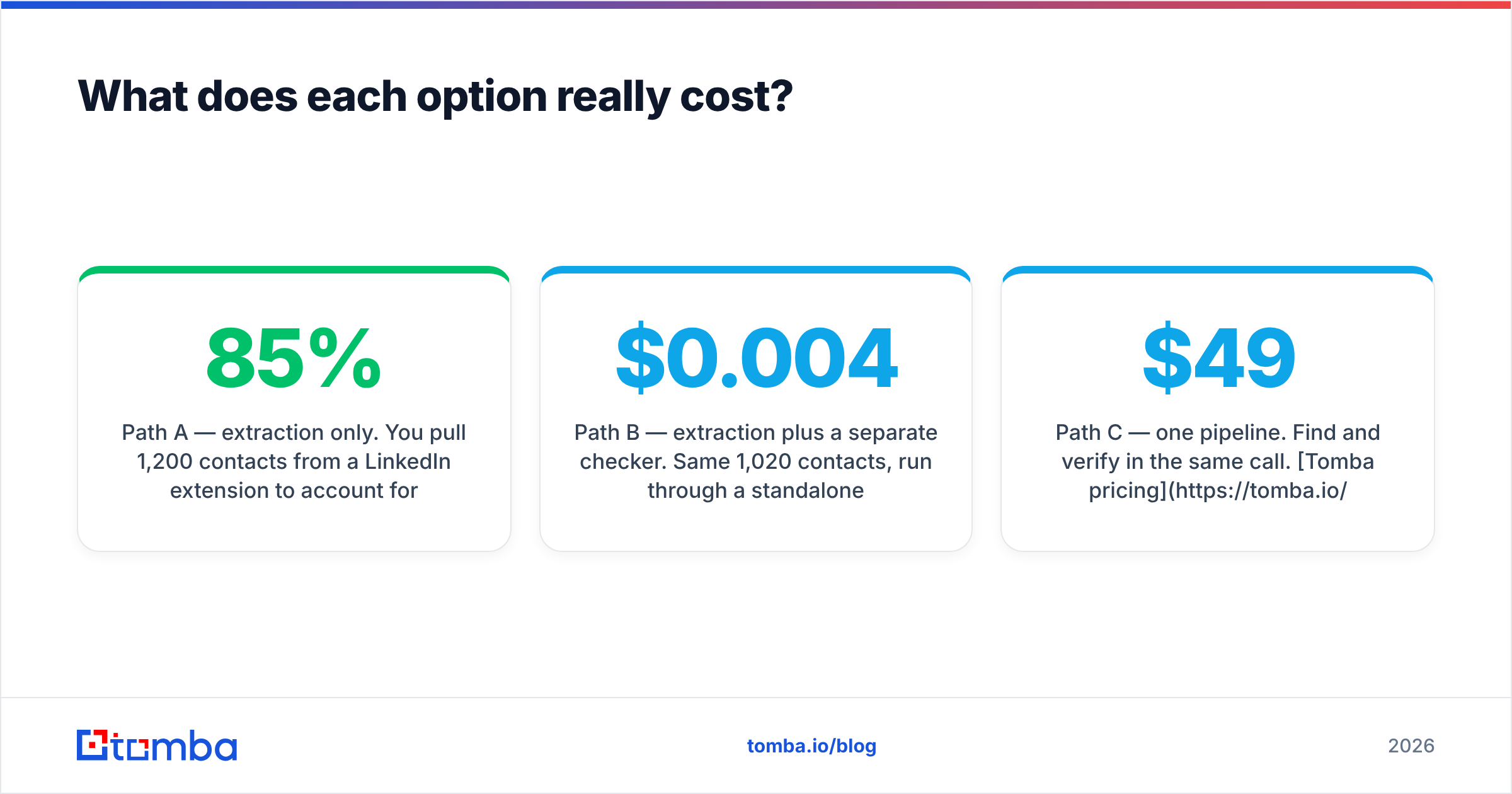
Path A — extraction only. You pull 1,200 contacts from a LinkedIn extension to account for gaps. Roughly 85% return an email; that's 1,020. Without a real verification pass, assume 8% are dead or catch-all traps. You send to 1,020, about 82 bounce, and your sending domain absorbs the damage. Cost looks like $39–$79/mo, but the hidden cost is a bounce rate that can push you past the 2–3% threshold where inbox providers start throttling you.
Path B — extraction plus a separate checker. Same 1,020 contacts, run through a standalone verification tool at roughly $0.004–$0.008 per check. Add $4–$8. Your bounce rate drops under 2%. Now you're paying two subscriptions, exporting CSVs between them, and reconciling two credit balances.
Path C — one pipeline. Find and verify in the same call. Tomba pricing runs Free (25 searches/mo), Starter $49/mo, Growth $99/mo, Pro $249/mo, and Enterprise custom, with verification included rather than metered as a separate product. At Growth, 1,000 verified contacts is well inside the plan and you're maintaining one integration instead of two.
The right choice depends on volume and on how much your time is worth. Below a few hundred contacts a month, Path A plus the occasional free email checker run is genuinely fine. Above that, the CSV shuffling in Path B starts costing more in human hours than the software costs in dollars.

When should you use SalesQL instead of a broader platform?#
Be honest about your workflow before you buy anything. SalesQL is the better pick when:
- LinkedIn is your entire prospecting surface. You live in Sales Navigator, you qualify people by reading their profile, and you'd rather not learn a second interface.
- You need mobile numbers alongside emails. Extension tools that surface phone data inline save real time for teams running a call-plus-email cadence.
- Your volume is low and manual. Twenty to fifty high-intent prospects a week doesn't justify an API or a bulk pipeline.
- Your ICP skews toward markets where LinkedIn penetration is high. Tech, SaaS, professional services in North America and Western Europe are well covered.
A platform approach makes more sense when:
- You prospect by company, not by person. "Give me every engineering lead at these 200 domains" is a domain search problem, not a browsing problem.
- You need it in your stack, not your browser. A Tomba API call inside your enrichment job beats a human clicking an extension icon 400 times.
- List hygiene is recurring work. Contact data decays roughly 22–30% per year as people change jobs. Re-verification is a scheduled job, not a one-time cleanup.
- Multiple people touch the same data. Shared credit pools, team seats, and CRM sync matter more than extension convenience once you're past two reps.
If you're specifically trying to keep the LinkedIn workflow while adding verification depth, a LinkedIn finder that takes a profile URL and returns a verified work email is the bridge between the two worlds — same input as an extension, deliverability-grade output.
What's the practical setup that works?#
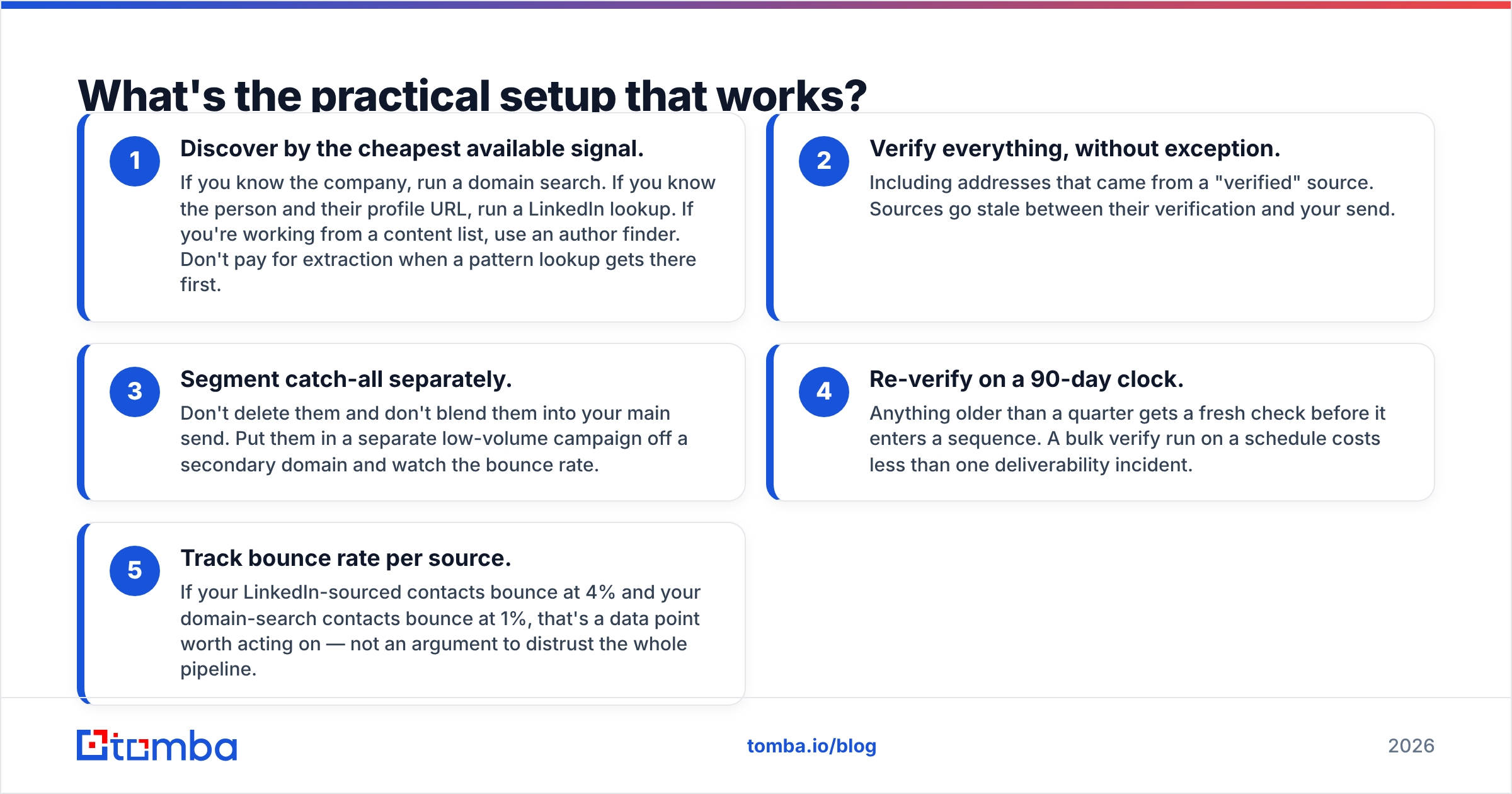
Here's the sequence most teams land on after they've broken a sending domain once:
- Discover by the cheapest available signal. If you know the company, run a domain search. If you know the person and their profile URL, run a LinkedIn lookup. If you're working from a content list, use an author finder. Don't pay for extraction when a pattern lookup gets there first.
- Verify everything, without exception. Including addresses that came from a "verified" source. Sources go stale between their verification and your send.
- Segment catch-all separately. Don't delete them and don't blend them into your main send. Put them in a separate low-volume campaign off a secondary domain and watch the bounce rate.
- Re-verify on a 90-day clock. Anything older than a quarter gets a fresh check before it enters a sequence. A bulk verify run on a schedule costs less than one deliverability incident.
- Track bounce rate per source. If your LinkedIn-sourced contacts bounce at 4% and your domain-search contacts bounce at 1%, that's a data point worth acting on — not an argument to distrust the whole pipeline.
That sequence is tool-agnostic. Run it with SalesQL plus a standalone checker if that's what you have. Run it inside one platform if you'd rather stop maintaining the seams.
The verdict#
If your outbound starts and ends inside LinkedIn and you send a few hundred emails a month, SalesQL plus a free email check is a perfectly reasonable stack. It's fast, it's cheap, and the LinkedIn-native workflow is genuinely pleasant.
If you prospect by company, run volume, or need contact data inside your own systems, a find-plus-verify platform wins on total cost and on the thing that actually matters — the percentage of your sends that reach a human. Extraction tools optimize for coverage; verification stacks optimize for deliverability; and only one of those two numbers shows up in your reply rate.
Start with the Tomba Email Finder if you want both in one place. The free tier gives you 25 searches a month with verification included — enough to run your next 25 prospects through the full pipeline and compare the bounce rate against whatever you're using today. If the numbers don't move, you've lost nothing but ten minutes. If they do, you'll know exactly which half of your stack was leaking.
Related guides#
Ready to find emails that actually work?
Join 150,000+ professionals who stopped guessing and started sending. Free credits on signup — no credit card required.
Get the Tomba newsletter
Practical outbound tactics and product updates — once every two weeks.
About the author