Email Check vs Seamlessai: Which Finds Better Emails?
Seamless.AI sells a giant contact database. A dedicated email check stack sells verified deliverability. We compare accuracy, credits, contracts, and real cost per usable email in 2026.
Email check vs seamlessai is really one question: do you need more contacts, or do you need the ones you already have to land? One tool confirms an address works. The other hands you a database to pull addresses from. Here is how the two compare on accuracy, price, and contract terms.
TL;DR
- "Email check" and Seamless.AI solve different halves of the same problem: one confirms an address is deliverable before you send, the other hands you a large prospect database to pull addresses from.
- Seamless.AI is quote-based with a 50-credit free tier and per-seat annual contracts. A dedicated email check stack like Tomba starts at $49/mo with a free tier of 25 searches and no seat minimum.
- Accuracy claims are marketing until you measure them yourself. The only number that matters is bounce rate on a 500-contact test send.
- If you need firmographic filters, intent signals, and a full sales database, Seamless.AI is the more complete platform. If you need clean, verified addresses at predictable cost, the email-check route wins on price per usable contact.
- Best practical setup for most teams: source broadly, then run every address through a verifier before it touches your sequencer.
What does email check vs seamlessai actually compare?#
It compares a workflow against a platform.
An email check is the act of confirming that firstname.lastname@company.com exists, accepts mail, and is not a spam trap, catch-all, or role account. Tools built for this — Tomba, ZeroBounce, NeverBounce, Bouncer — take an address in and return a verdict out. Many of them, Tomba included, also do the sourcing step: give them a domain and a name, and they return the address to check.
Seamless.AI is a B2B contact database with a search engine on top. You filter by title, industry, headcount, and location, and it returns contact records — email, phone, LinkedIn — that you push to your CRM. Verification happens inside the platform as part of the record, not as a separate deliberate step you control.
So the honest framing is not "which tool is better." It is: do you have a sourcing problem or a deliverability problem? Teams that already know their target accounts just need reachable addresses, so they have the second problem. Buying a database to fix it is expensive overkill. Teams staring at an empty list, with no account plan, have the first.
What does a dedicated email check stack actually do?#
Four steps, each of which you can price and audit on its own:
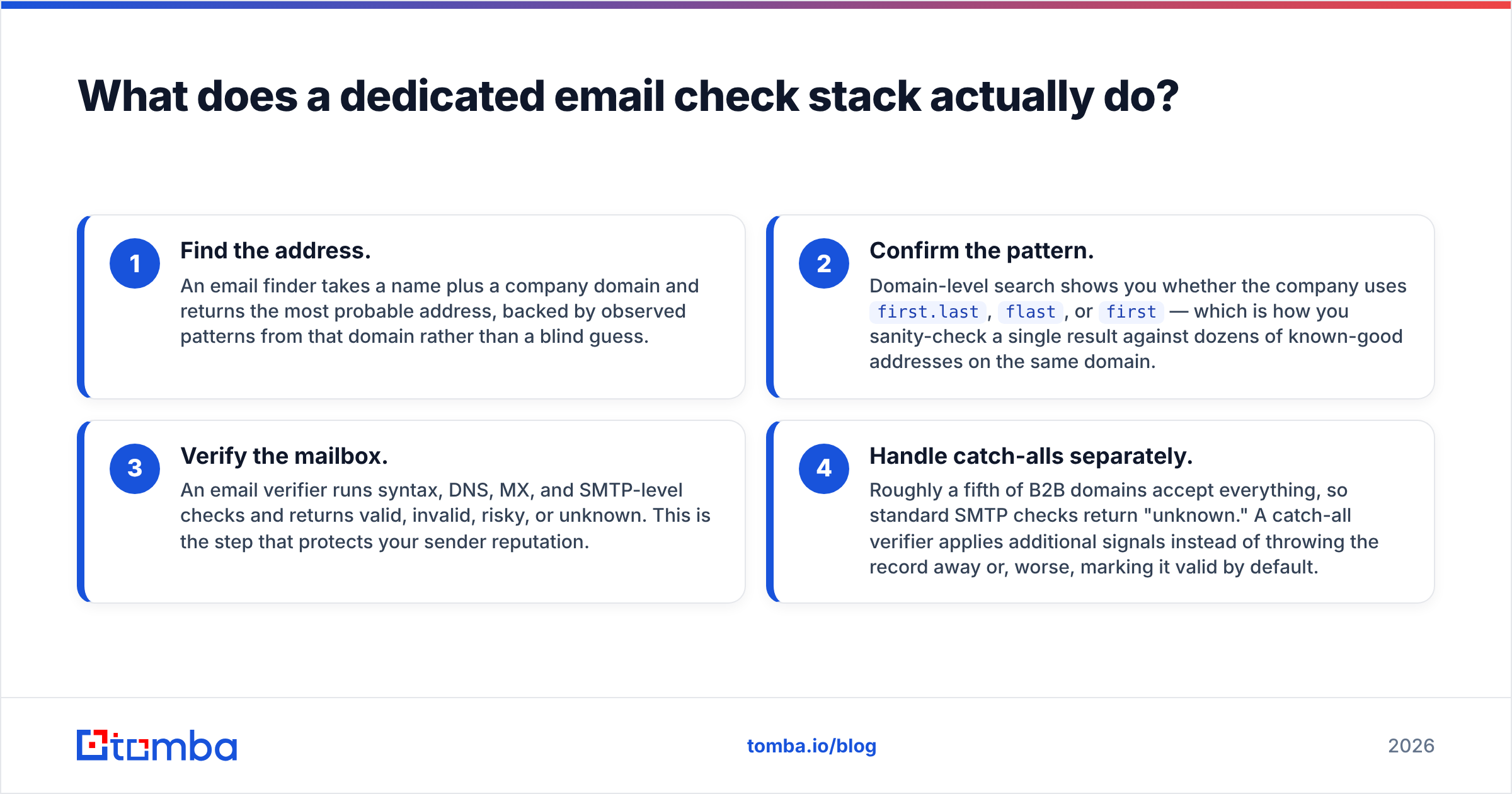
- Find the address. An email finder takes a name and a company domain. It returns the most likely address, based on patterns seen on that domain rather than a blind guess.
- Confirm the pattern. Domain search shows whether the company uses
first.last,flast, orfirst. Use it to check one result against dozens of known-good addresses on the same domain. - Verify the mailbox. An email verifier runs syntax, DNS, MX, and SMTP checks. It returns valid, invalid, risky, or unknown. This step protects your sender reputation.
- Handle catch-alls separately. Roughly a fifth of B2B domains accept every address, so SMTP checks come back unknown. A catch-all verifier adds other signals instead of dropping the record or marking it valid by default.
Why this matters commercially: each step has a unit cost you can see. When a vendor bundles sourcing and verification into one opaque credit, you can no longer tell whether you pay for data or for confidence that the data works.
What is Seamless.AI and who is it for?#
Seamless.AI positions itself as a real-time search engine for B2B contacts. Instead of shipping a static database refreshed quarterly, it claims to assemble records at query time from public sources. The pitch is coverage plus speed: search a title across an industry, get hundreds of records with emails and direct dials, push them into Salesforce or HubSpot, start dialing.
What you get beyond addresses:
- Firmographic and technographic filters — headcount, revenue, tech stack, industry codes.
- Buyer intent data as a paid add-on, flagging accounts researching your category.
- Direct dials and mobile numbers, which is a genuine strength for teams that live on the phone.
- Native CRM writeback to Salesforce, HubSpot, Outreach, and Salesloft.
- Chrome extension for pulling contacts off LinkedIn profiles and company sites.
The recurring criticism in public reviews on G2 and Capterra is not that the data is bad. It is that the commercial model is rigid. Pricing is not published. Plans are quote-based, annual, and per seat. Credits are usually assigned per user rather than pooled across the team. Reviewers often flag auto-renewal terms and trouble downgrading mid-contract. None of that makes the product bad. It makes it a procurement decision rather than a credit-card one.
How do the two compare feature by feature?#
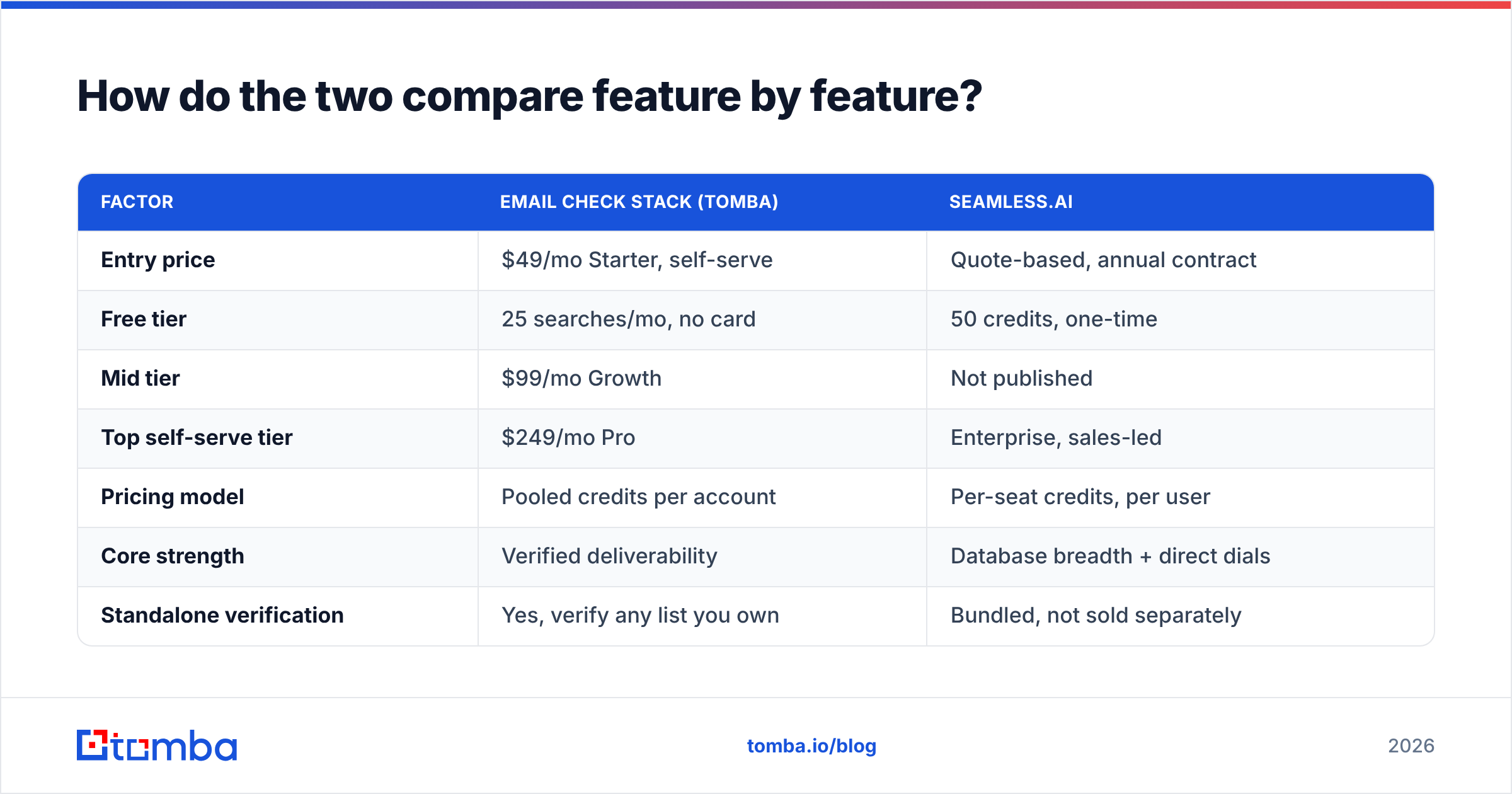
| Factor | Email check stack (Tomba) | Seamless.AI |
|---|---|---|
| Entry price | $49/mo Starter, self-serve | Quote-based, annual contract |
| Free tier | 25 searches/mo, no card | 50 credits, one-time |
| Mid tier | $99/mo Growth | Not published |
| Top self-serve tier | $249/mo Pro | Enterprise, sales-led |
| Pricing model | Pooled credits per account | Per-seat credits, per user |
| Core strength | Verified deliverability | Database breadth + direct dials |
| Standalone verification | Yes, verify any list you own | Bundled, not sold separately |
| Catch-all handling | Dedicated catch-all verifier | Marked as valid or unknown |
| Phone numbers | Phone finder add-on | Core feature, strong coverage |
| Intent data | No | Yes, paid add-on |
| API access | On all paid plans | Enterprise tiers |
| Contract | Monthly, cancel anytime | Typically 12-month |
| Best for | Targeted outbound, list hygiene | High-volume SDR teams with budget |

Two rows deserve emphasis. Pooled versus per-seat credits is the difference that bites growing teams. With pooled credits, a five-person team shares one bucket, so the researcher who does most of the sourcing can use most of it. With per-seat allocation, you buy five buckets and waste four. Standalone verification matters the moment you inherit a list from a trade show, a partner, or an old vendor. You need to clean data you did not source, and a database platform will rarely sell you that on its own.
Which one is more accurate?#
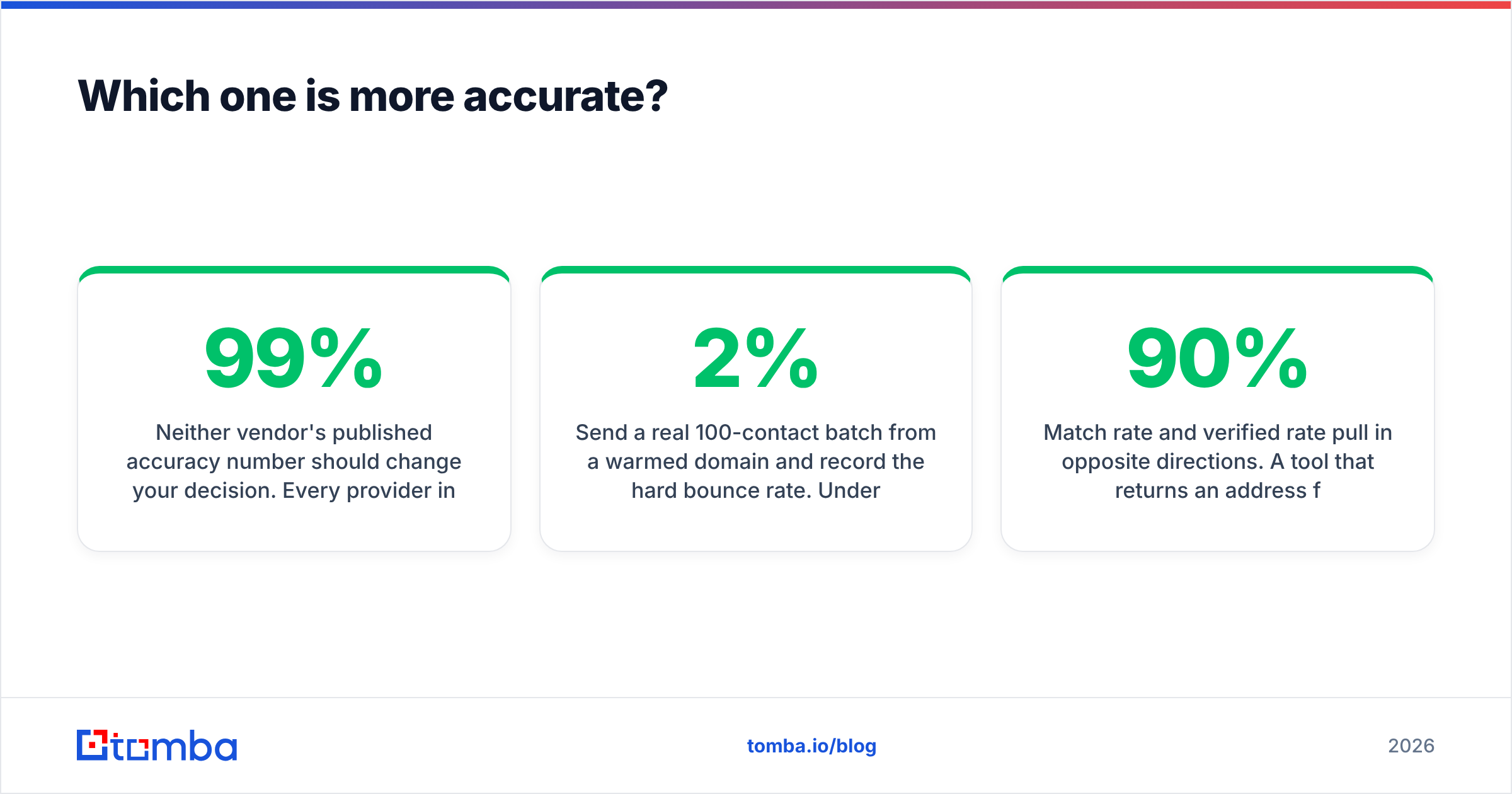
Neither vendor's published accuracy number should change your decision. Every provider in this category advertises something in the 95–99% range, and every one of those figures is measured on a sample the vendor chose.

Here is the test that does mean something, and it takes an afternoon:
- Pull the same 200 contacts from both tools — same titles, same domains, same seniority.
- Note the match rate: how many of the 200 returned an address at all. Database platforms usually win here, because breadth is what they sell.
- Note the verified rate: how many of those addresses come back valid from an independent verifier you did not buy from either vendor. Use a free email checker for the spot checks.
- Send a real 100-contact batch from a warmed domain and record the hard bounce rate. Under 2% is healthy. Between 2% and 5% you have a hygiene problem. Above 5% you are damaging your sending domain.
- Divide total spend by the number of contacts that survived all three checks. That is your true cost per usable contact.
Match rate and verified rate pull in opposite directions. A tool that returns an address for 90% of your list but verifies at 60% gives you 54 usable contacts per 100. A tool that matches 70% and verifies at 92% gives you 64. The louder number is not the useful one.
What does email check vs seamlessai cost per usable contact?#
Run the arithmetic on a realistic scenario: a three-person outbound team needing 5,000 verified contacts per quarter.
On the email-check side, the Growth plan at $99/mo covers that sourcing and verification volume from one pooled account. The API is there for anyone who wants to script the enrichment step. Three months lands you around $300 for the quarter, plus your sequencer.
On the Seamless.AI side, you buy three seats on an annual contract. Each seat carries its own credit allocation. Add the intent module if you want the feature that sets the platform apart. Public reviewer figures vary widely — that is what quote-based pricing does — but the structure holds: you commit for twelve months, per person, whether or not all three people prospect at the same rate.
That is not a knock on the product. If those three people are full-time SDRs making 60 dials a day, the direct-dial coverage alone may justify the spend. The database breadth means they never run out of accounts. It is a knock on paying that structure when only one person actually builds lists.

When should you pick Seamless.AI?#
Be honest about which of these describe you:
- You have no defined ICP account list. You need to discover companies, not just contacts at companies you already named. Database search solves this; an email finder does not.
- Phone is your primary channel. Direct dials and mobiles are Seamless.AI's strongest asset, and no verification-first tool matches a purpose-built dialing dataset.
- You run a large SDR floor where every rep sources independently, so per-seat credits actually get consumed.
- You want intent signals layered onto your prospecting, and you have the process maturity to act on them within days rather than weeks.
- Procurement is not a blocker. You can sign an annual contract and get budget approved without a self-serve trial first.
If three or more of those are true, the platform route is defensible. Pair it with an independent verifier anyway — that is the highest-ROI $49 you will spend on top of any database.
When is a dedicated email check stack better?#
- You know your accounts. Founder-led sales, agencies with a target vertical, and ABM teams usually have the list already. They need addresses for named people, not discovery.
- Deliverability is your bottleneck. If your bounce rate is over 3%, more contact volume does not help. You need cleaning, not sourcing.
- You want month-to-month. Testing a new segment for six weeks should not require a twelve-month commitment.
- You need to clean lists you did not buy. Webinar registrants, CRM records aged two years, partner lists. A database platform has no product for this; a verifier does.
- You are building automation. Direct API access on a $49 plan means your ops engineer can enrich records inside your own workflow instead of exporting CSVs.
Worth naming a third option honestly. If what you want is a pre-built list you own outright rather than a subscription, BookYourData sells verified B2B contacts on a pay-as-you-go basis with a bounce guarantee. That sidesteps both the seat model and the credit model, and it fits one-off campaigns well.
How do you run a proper email check in 2026?#
Whatever you buy, the process is the same:
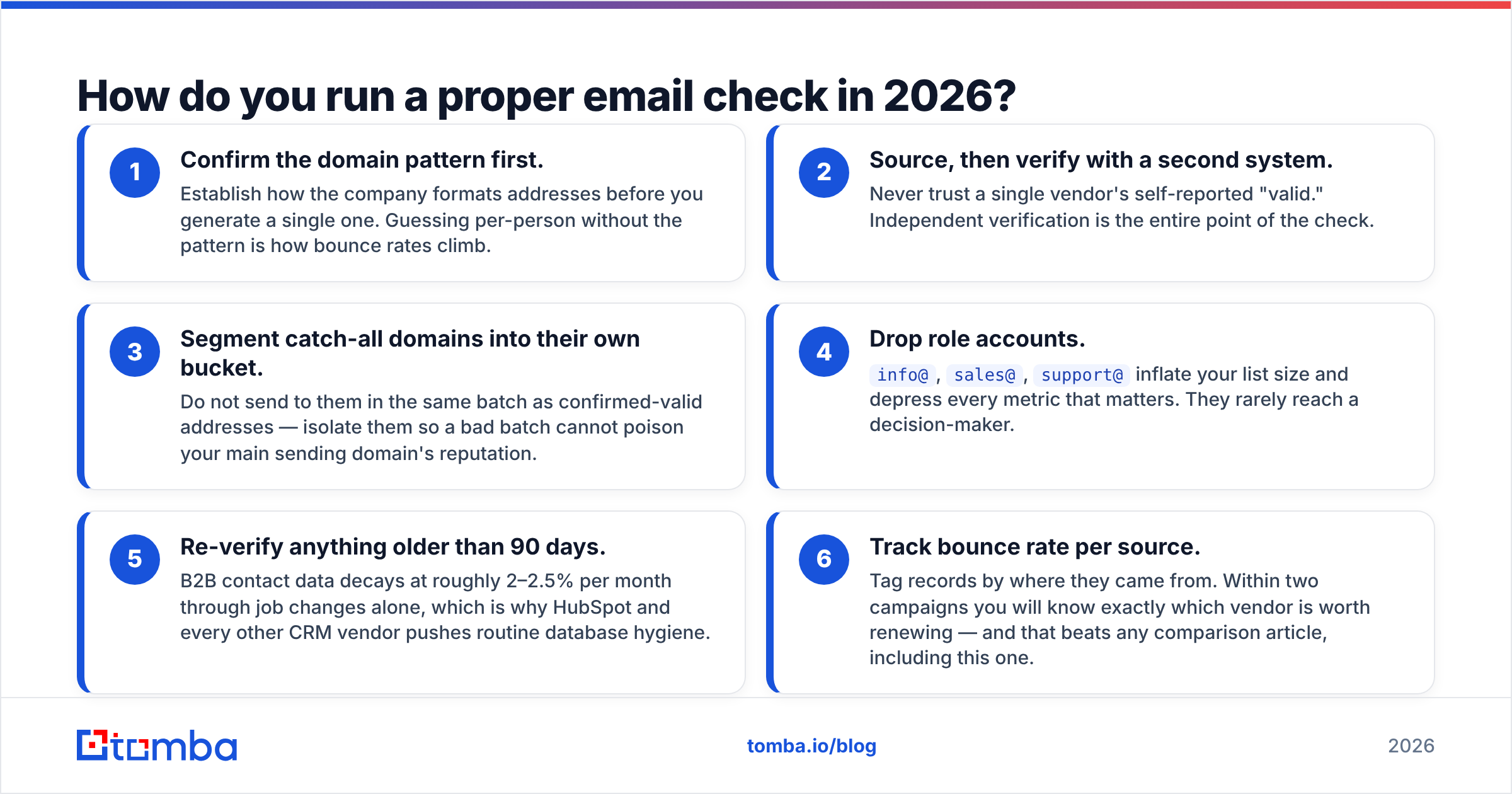
- Confirm the domain pattern first. Learn how the company formats addresses before you generate a single one. Skipping this step is how bounce rates climb.
- Source, then verify with a second system. Never trust one vendor's own verdict. Independent verification is the whole point of the check.
- Put catch-all domains in their own batch. Sent alongside confirmed addresses, they can drag down your main sending domain's reputation.
- Drop role accounts.
info@,sales@, andsupport@pad your list and rarely reach a decision-maker. - Re-verify anything older than 90 days. B2B data decays about 2–2.5% a month through job changes alone, which is why HubSpot pushes routine list hygiene.
- Track bounce rate by source. Tag each record with where it came from. Two campaigns in, you will know which vendor is worth renewing.
The bottom line#
Seamless.AI is a database with verification attached. A dedicated email check stack is verification with sourcing attached. If your constraint is "I don't know who to contact," buy the database. If your constraint is "I know who to contact but half my emails bounce," more contacts make the problem worse. That is the email check vs seamlessai call in one line: buy names when you lack names, buy inbox certainty when you lack inboxes.
Most teams under 20 reps land in the second camp and do not realize it until they measure. Start with a 200-contact test on both. Compare verified rate and bounce rate rather than headline accuracy claims, and let the arithmetic decide.
Ready to test the verification-first route? The Tomba Email Finder gives you 25 free searches a month with no card required, then $49/mo when you scale. Pooled credits, monthly billing, and API access on every paid plan. Run your next 200 prospects through it alongside your current tool and compare the bounce rates yourself.
Related guides#
Ready to find emails that actually work?
Join 150,000+ professionals who stopped guessing and started sending. Free credits on signup — no credit card required.
Get the Tomba newsletter
Practical outbound tactics and product updates — once every two weeks.
About the author