Email Format Finder: How to Crack Any Company's Pattern
Eight patterns cover most B2B domains — but guessing the right one still bounces. Here's how email format finders work, where they break, and which tool actually verifies before you send.
TL;DR
- An email format finder identifies the naming convention a company uses (
jane.doe@,jdoe@,jane@) so you can construct addresses for people who aren't in any database. - Roughly eight patterns cover the overwhelming majority of B2B domains — but "most" isn't "all," and the exceptions are where your bounce rate comes from.
- Pattern detection alone is a guess. The tools worth paying for pair detection with SMTP verification so you send to confirmed addresses, not statistically likely ones.
- Free permutators are genuinely useful for one-off lookups. They stop being useful the moment you need volume, verification, or an API.
- Budget reality: entry-level paid tiers cluster around $39–$49/mo. Tomba starts at $49/mo with a free 25-search tier; most competitors sit in the same band with different credit math.
What is an email format finder?#
An email format finder is a tool that answers one narrow question: how does this company build its employee email addresses?
Think of it like figuring out a building's apartment numbering before you mail a letter. If you know floor 4 uses 401–412, you can address an envelope to unit 407 without ever having seen the mailbox. Email formats work the same way. Once you know Acme Corp uses first.last@acme.com, you can construct an address for anyone at Acme whose name you know.
That's the appeal, and it's real. Contact databases go stale — people change jobs, junior hires never get indexed, and entire regional offices are invisible to scrapers. Pattern-based construction covers the gap between "this person exists on LinkedIn" and "this person exists in a database."
The catch is in the word construct. A format finder gives you a hypothesis, not a fact. The difference between those two things is your sender reputation.
Which email formats do companies actually use?#
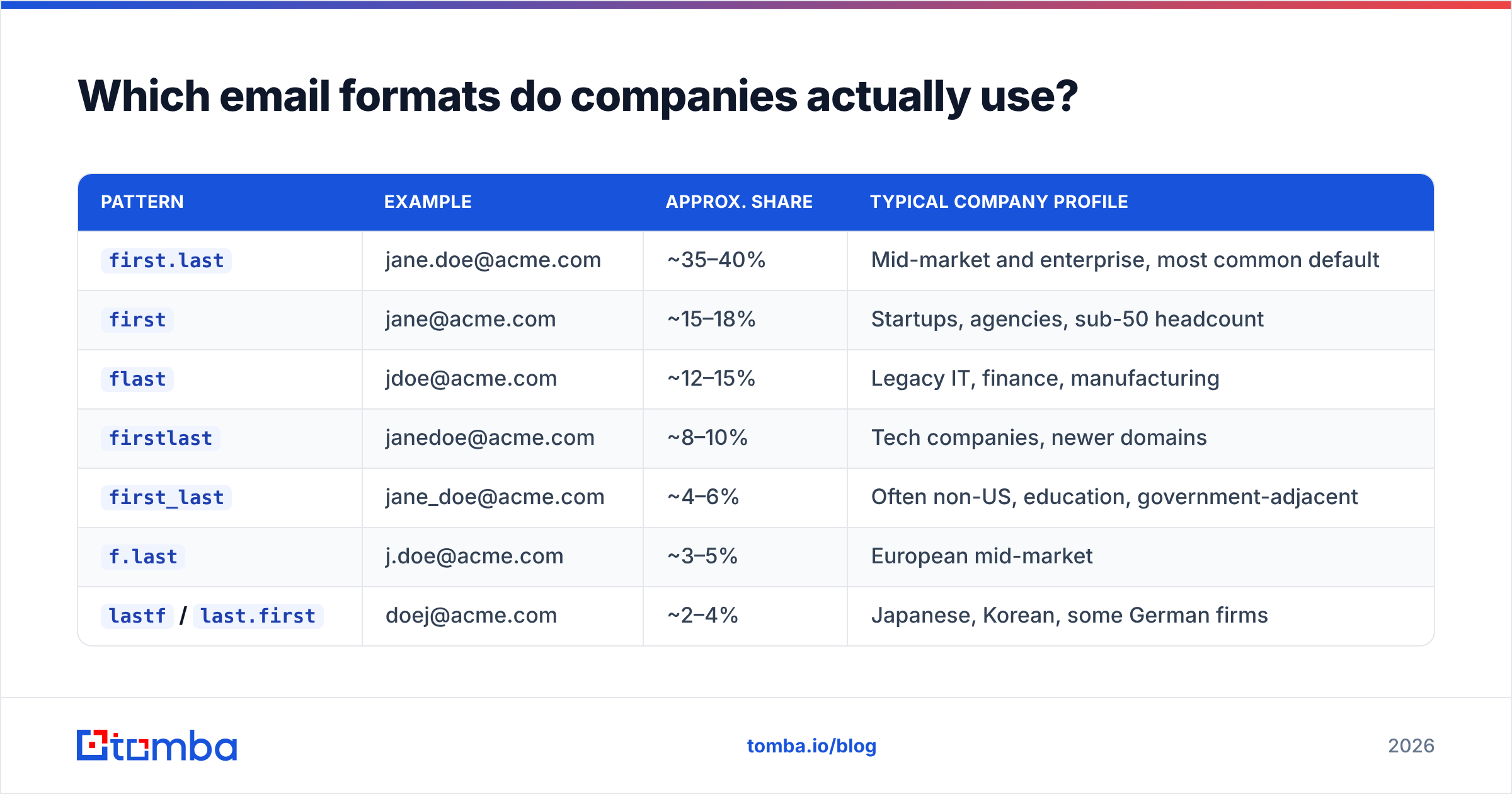
Eight patterns dominate. Here's what they look like for a hypothetical Jane Doe at acme.com, with rough prevalence based on aggregate pattern data across B2B domains:
| Pattern | Example | Approx. share | Typical company profile |
|---|---|---|---|
first.last |
jane.doe@acme.com | ~35–40% | Mid-market and enterprise, most common default |
first |
jane@acme.com | ~15–18% | Startups, agencies, sub-50 headcount |
flast |
jdoe@acme.com | ~12–15% | Legacy IT, finance, manufacturing |
firstlast |
janedoe@acme.com | ~8–10% | Tech companies, newer domains |
first_last |
jane_doe@acme.com | ~4–6% | Often non-US, education, government-adjacent |
f.last |
j.doe@acme.com | ~3–5% | European mid-market |
lastf / last.first |
doej@acme.com | ~2–4% | Japanese, Korean, some German firms |
| Non-derivable | jd2291@acme.com | ~5–8% | Large enterprise with employee IDs, healthcare, defense |
That bottom row is the one people skip. When a company assigns addresses from an HR system rather than a name template, no format finder on earth can derive the address. You either find it in a verified dataset or you don't get it. Any tool that returns a confident-looking guess for those domains is quietly lying to you.
There's a second complication: mixed formats. Companies that grew through acquisition often run two or three conventions on the same domain — the original staff on flast, the acquired team on first.last, and executives on vanity aliases. A single "the format for acme.com is X" answer flattens that reality into one wrong guess for a third of the org.

Why does pattern guessing fail more often than it looks?#
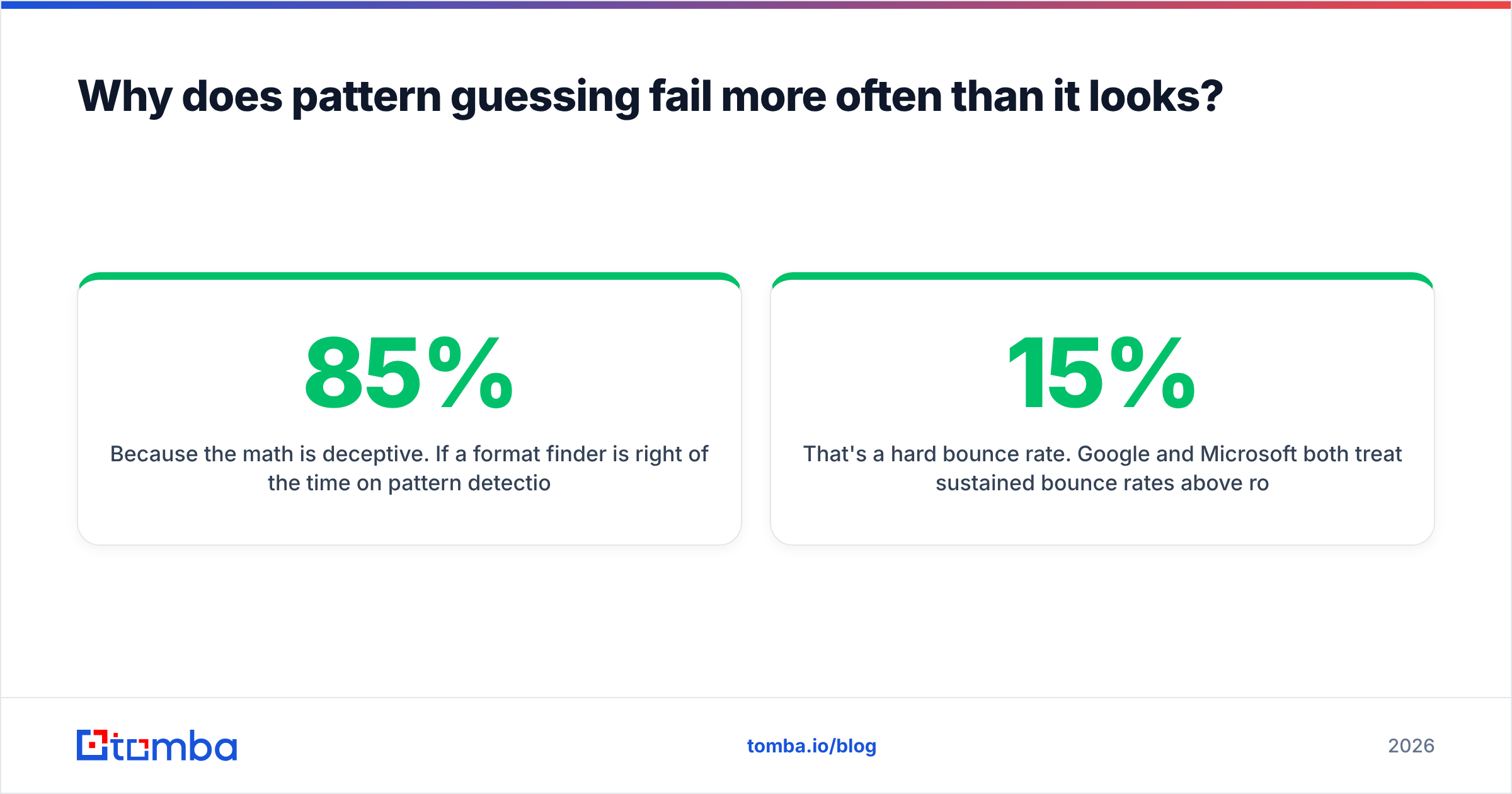
Because the math is deceptive. If a format finder is right 85% of the time on pattern detection, and you send to 200 constructed addresses, you've just sent 30 emails to non-existent mailboxes.
That's a 15% hard bounce rate. Google and Microsoft both treat sustained bounce rates above roughly 2–3% as a spam signal. One campaign at 15% doesn't just waste 30 emails — it degrades sender reputation for every email that domain sends afterward, including the 170 that went to real people.
The failure modes stack up:
- Name ambiguity. "Jane Doe-Smith" could be
jane.doe-smith,jane.doesmith,jdoesmith, orjane.smith. Hyphenated and multi-part surnames break naive templates constantly. - Non-ASCII names. Accented and transliterated names (José, Müller, Nguyễn) get normalized differently by different IT departments. There's no standard.
- Nicknames in the source data. LinkedIn says "Mike Chen." Payroll says "Michael Chen." The address is
michael.chen@. - Departed employees. The pattern is right, the person left in 2024, and the mailbox now bounces or forwards to a black hole.
- Catch-all domains. The server accepts every address, so a naive verifier marks all eight of your guesses as valid. You send eight emails; seven land nowhere.

How do modern email format finders actually work?#
The good ones don't guess in isolation. A production-grade pipeline looks like this:
- Pattern mining from known addresses. The tool already holds verified addresses for the domain — scraped from public sources, press pages, GitHub commits, WHOIS records, and partner data. It reverse-engineers the pattern from real examples rather than assuming a default. This is why where the data comes from matters more than the algorithm.
- MX and provider fingerprinting. Knowing a domain runs Google Workspace vs. Microsoft 365 vs. a self-hosted server changes which verification methods will return honest answers.
- Candidate generation. Only after the pattern is scored does the tool build candidate addresses for your target name — usually ranked by confidence, not returned as a flat list.
- SMTP-level verification. The verifier opens a conversation with the receiving mail server and checks whether the mailbox exists, without sending anything. This is the step that separates a guess from an answer.
- Catch-all handling. For domains that accept everything, a good tool flags the result as catch-all rather than valid — and a catch-all verifier applies additional signals to estimate deliverability instead of shrugging.
If a tool skips steps 4 and 5, you're paying for a permutator with a nicer interface.
Which email format finder should you use in 2026?#
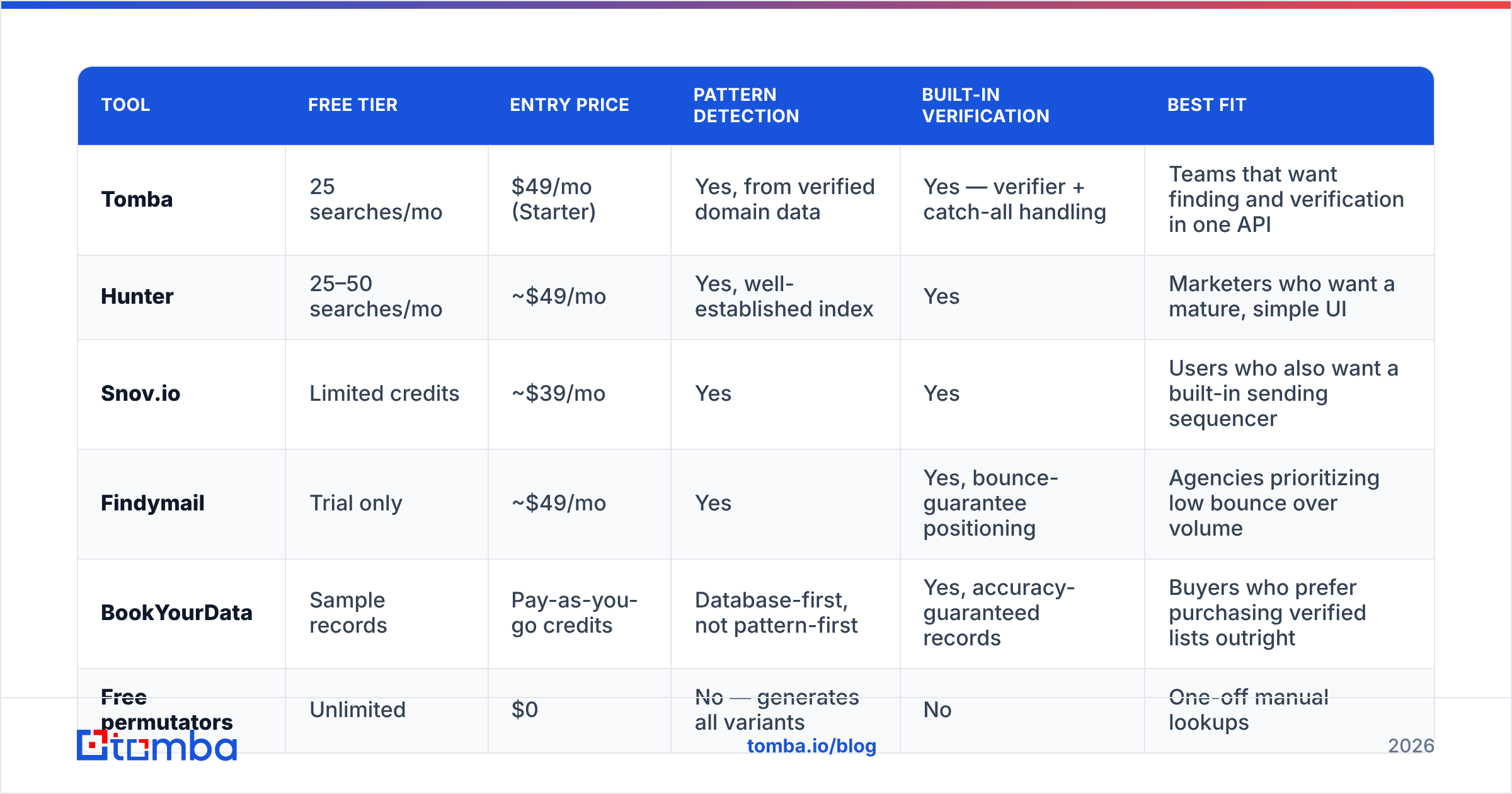
Here's how the main options compare. Prices are published list prices at the time of writing — always check the vendor's page, since credit definitions differ wildly between them.
| Tool | Free tier | Entry price | Pattern detection | Built-in verification | Best fit |
|---|---|---|---|---|---|
| Tomba | 25 searches/mo | $49/mo (Starter) | Yes, from verified domain data | Yes — verifier + catch-all handling | Teams that want finding and verification in one API |
| Hunter | 25–50 searches/mo | ~$49/mo | Yes, well-established index | Yes | Marketers who want a mature, simple UI |
| Snov.io | Limited credits | ~$39/mo | Yes | Yes | Users who also want a built-in sending sequencer |
| Findymail | Trial only | ~$49/mo | Yes | Yes, bounce-guarantee positioning | Agencies prioritizing low bounce over volume |
| BookYourData | Sample records | Pay-as-you-go credits | Database-first, not pattern-first | Yes, accuracy-guaranteed records | Buyers who prefer purchasing verified lists outright |
| Free permutators | Unlimited | $0 | No — generates all variants | No | One-off manual lookups |
Two honest observations about this table.
First, the pricing tiers are close enough that price shouldn't decide it. Between $39 and $49/mo, what actually matters is how a credit is counted. Some tools charge a credit for a failed search. Some charge separately for finding and verifying the same address. Read that section of the pricing page before the feature list.
Second, BookYourData plays a different game than the rest. It's a database purchase model rather than a real-time lookup model — you buy verified records with guaranteed accuracy instead of querying a pattern engine. If your workflow is "build a list of 5,000 CFOs in fintech," that model is often cleaner than pattern-finding one name at a time. If your workflow is "I have 200 specific people and need their addresses," pattern-plus-verification wins.

For a broader look at how the category shakes out, G2's email verification category carries enough reviews to spot the patterns in what users actually complain about — usually credit accounting, not accuracy.
Is a free email format finder good enough?#
For fewer than ten lookups a month: yes, absolutely.
A free email permutator takes a first name, last name, and domain, and spits out every plausible variant. Paste those into a checker, see which one resolves, done. Zero dollars, five minutes.
That workflow collapses at three specific thresholds:
- Volume. Manually permutating 200 names is a full day of work. At 2,000 it's not a job, it's a career.
- Verification. Free permutators generate candidates but don't tell you which one is real. You still need a free email checker or a paid verifier to close the loop, and free checkers rate-limit hard.
- Auditability. When someone asks "why did we email this person," a permutator gives you no confidence score, no source, and no timestamp. Paid tools do.
The honest framing: free tools solve the format problem. They don't solve the deliverability problem, and deliverability is what you're actually being paid to protect.

How do you find a company's email format manually?#
If you'd rather not pay for anything yet, here's the sequence that works:
- Check the company's own site. Press releases, "contact us" pages, and PDF whitepapers frequently expose a real address. One real address gives you the pattern for the whole domain.
- Search Google with operators.
site:acme.com "@acme.com"and"@acme.com" -site:acme.comsurface addresses that leaked into job boards, conference agendas, and partner directories. - Check GitHub commits. Engineers commit with their work email.
github.comsearch for the domain often returns a real, current address in seconds. - Look at WHOIS and DNS records. Older domains often list an admin contact address in a recognizable format.
- Cross-check on a second person. One address could be a vanity alias. Two addresses in the same format is a pattern.
- Verify before you send. Always. Even a confirmed pattern doesn't confirm that a specific mailbox exists.
If step 5 gives you two different formats, stop treating the domain as pattern-derivable and move to a lookup tool with actual verified records.
For the mechanics of what makes an address syntactically valid in the first place — local-part rules, length limits, character restrictions — the Wikipedia entry on email addresses is the least-wrong free reference on the internet. It'll explain why jane..doe@ fails validation before it ever reaches a server.
How do you verify what you found?#
Verification is a separate step from finding, and treating them as one thing is the most common mistake in this workflow.
A proper email verifier runs four checks in order: syntax validity, domain and MX record existence, disposable/role-account detection, and an SMTP mailbox probe. The first three are cheap and fast. The fourth is where the real signal lives, and where providers differ most.
Practical rules:
- Verify in bulk, not one at a time. Bulk verification amortizes connection overhead and avoids tripping rate limits that make individual checks return false negatives.
- Re-verify anything older than 90 days. B2B contact data decays at roughly 2–3% per month through job changes alone. A list verified in January is meaningfully wrong by April.
- Treat "catch-all" as its own category. It's not valid and it's not invalid. Segment those into a separate, lower-priority send with tighter volume caps.
- Drop role accounts from cold outreach.
info@,sales@, andsupport@are technically valid and practically worthless for personalized outbound.
If you're processing lists rather than individuals, running finding and verification through a bulk email finder in one pass avoids the classic failure where you pay for 5,000 constructed addresses and then pay again to discover 900 of them bounce.
What should this actually cost you?#
Cost per usable address is the only metric that matters. A tool at $39/mo that returns 60% verified addresses is more expensive than a tool at $49/mo returning 90%.
Run the math on your own list before committing. Take 100 names you already know the answers for, run them through each tool's free tier, and count how many come back correct, how many come back wrong-but-confident, and how many come back as "not found." That third bucket is the honest one — a tool that admits it doesn't know is worth more than one that guesses to protect its hit-rate stat.
Where should you start?#
If you need one address today, use a free permutator and a checker. If you need this to be a repeatable part of your pipeline, you need pattern detection, verification, and catch-all handling in the same system.
That's the case for Tomba's Email Finder: it derives the format from verified addresses already on the domain rather than defaulting to first.last, ranks candidates by confidence, and runs SMTP verification before handing you a result. The free tier gives you 25 searches to test it against a domain whose format you already know — which is exactly how you should evaluate any tool in this category, including this one. Paid plans start at $49/mo, and the same logic is exposed through the Tomba API if you'd rather wire it into your own enrichment flow.
Test it on ten names you can verify independently. Whatever the result, you'll know more than the marketing page told you.
Related guides#
Ready to find emails that actually work?
Join 150,000+ professionals who stopped guessing and started sending. Free credits on signup — no credit card required.
Get the Tomba newsletter
Practical outbound tactics and product updates — once every two weeks.
About the author