Email Hippo vs Leadsforge: Which Wins for B2B Outreach?
Email Hippo verifies addresses you already have. Leadsforge builds lists you don't. Here's the honest breakdown of accuracy, pricing, and which one your outbound stack actually needs in 2026.
Email Hippo vs Leadsforge comes down to one question: do you need to clean a list, or build one? Email Hippo checks addresses you already own. Leadsforge finds new ones. Here is the short version, then the detail.
TL;DR
- They are not the same category. Email Hippo is a verification specialist. It tells you whether an address you already have will bounce. Leadsforge is an AI list builder. It produces contacts you did not have before.
- Email Hippo wins on verification depth. You get multi-stage SMTP checks, a documented API, GDPR-focused positioning, and pay-as-you-go credits. That suits a large legacy database cleanup.
- Leadsforge wins on speed to first list. A chat box turns "SaaS marketing directors in Germany" into a CSV in minutes. That is far faster than manual prospecting. Just verify the output before you send.
Two more things to weigh before you sign anything:
- Neither one is a complete outbound data stack. You will pay for two tools, two credit systems, and two integrations unless you consolidate.
- Budget reality: verifiers bill per email. List builders bill per seat or per export. Model both against your monthly send volume before you commit for a year.
What is Email Hippo and what problem does it solve?#
Email Hippo is a UK-based email verification provider. It has worked in deliverability for over a decade. Its products split into three buckets. There is a bulk file verifier for lists you already own. There is a real-time API for checking addresses at the point of capture, such as signup forms and checkouts. And there is a set of risk tools that flag disposable and high-risk domains.
The value proposition is simple. You hand it a list. It hands back a status per address: deliverable, undeliverable, risky, or unknown. Behind that sit syntax checks, DNS and MX lookups, disposable-domain matching, and role-account detection (info@, sales@, support@).
It also runs an SMTP handshake. That handshake asks the receiving server whether the mailbox exists, without sending a real message.
What Email Hippo does not do is find new contacts. If your CRM is empty, it has nothing to work with. That single fact drives the rest of this comparison.
What is Leadsforge and how is it different?#
Leadsforge sits on the other side of the funnel. It is an AI lead-generation tool built around a chat interface. Instead of stacking filters in a database UI, you describe your ideal customer in plain English. The system then assembles a contact list from its data sources.
The pitch is time to first list. A rep might normally spend an afternoon in a filter-heavy prospecting tool. Here they describe the segment — industry, headcount, seniority, geography — and get a working list back in minutes. Contacts usually come with a work email, a company, and a title. Some carry extra enrichment fields.
The trade-off is the same one you get with any AI-built list: the tool suggests candidate contacts, it does not certify them. Coverage thins out in narrow niches and non-English markets. Freshness depends on when the underlying source was last crawled. That is why most serious Leadsforge workflows end with a verification step, which brings us back to tools like Email Hippo.

Email Hippo vs Leadsforge: the head-to-head comparison#
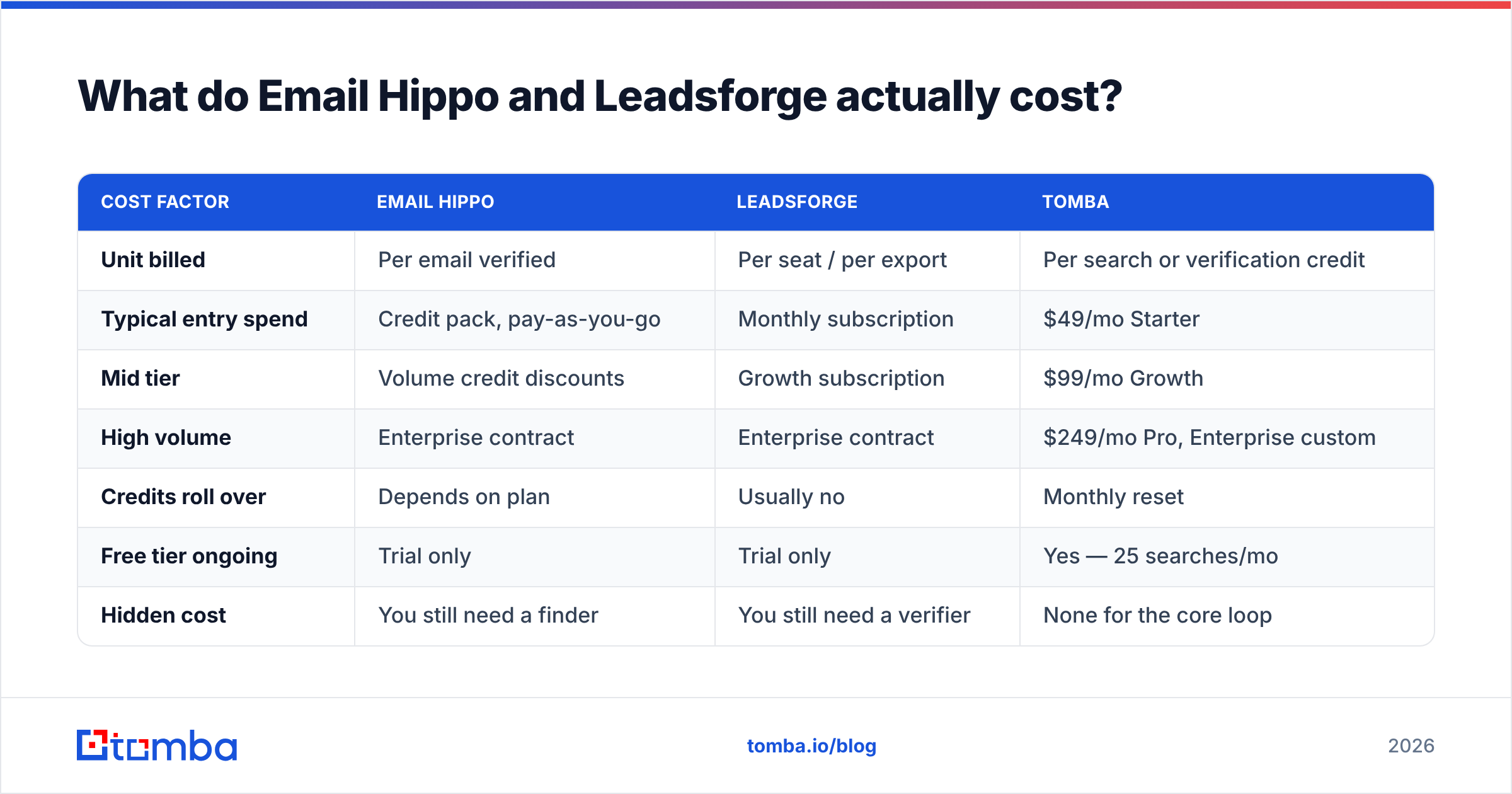
Here is the practical breakdown. Pricing moves often, so treat these as list-price ballparks and confirm on each vendor's page before you buy.
| Attribute | Email Hippo | Leadsforge | Tomba |
|---|---|---|---|
| Primary job | Verify existing addresses | Generate new contact lists | Find and verify |
| Finds new contacts | No | Yes (AI-assembled) | Yes (domain + name search) |
| Verification depth | Deep multi-stage SMTP | Basic / varies | Multi-stage + catch-all handling |
| Interface | Web app + API | Conversational AI chat | Web app, API, CLI, extensions |
| Billing model | Per-email credits | Per-seat / subscription | Subscription with monthly credits |
| Free entry point | Limited trial credits | Trial credits | 25 searches/mo, free forever |
| Entry paid tier | Pay-as-you-go credit packs | Low-to-mid two figures/mo | $49/mo Starter |
| Bulk file upload | Yes | Export-based | Yes — bulk email finder |
| Native CRM sync | Via API / Zapier | Export + integrations | HubSpot, Salesforce, Pipedrive, Zapier |
| Best for | Cleaning large legacy databases | Fast ICP list building | Full find-verify-enrich loop |

The pattern is clear once you lay it out. Email Hippo vs Leadsforge is not a duel. The two sit in adjacent squares that barely overlap. Buying one does not remove the need for the other.
Which one is more accurate, and what does "accurate" even mean?#
This is where most comparison posts get sloppy. The two tools report different things.
Email Hippo's accuracy question is: "Of the addresses you marked deliverable, how many actually accepted mail?" That is a bounce-rate problem. Good verifiers keep false positives in the low single digits on standard domains.
The hard cases are catch-all domains. Those servers accept mail for any address at the domain, so an SMTP probe tells you nothing. Every verifier struggles here. The honest ones flag the result as "unknown" or "accept-all" instead of guessing. If a vendor claims near-perfect accuracy on catch-alls and will not explain the method, stay skeptical.
Leadsforge's accuracy question is different: "Of the contacts you generated, how many are real, current, and matched to the right person?" That is a coverage and freshness problem. A contact can be perfectly deliverable and still wrong. The person may have left eight months ago. The title may be stale. The guessed address may route to a shared inbox.

The practical takeaway: run your own test. Take 200 contacts you can confirm yourself, such as recent LinkedIn connections, event attendees, or existing customers. Push them through each tool and measure:
- Match rate — what share returned a result at all.
- Verified rate — of those, how many came back as confidently deliverable.
- Real bounce rate — send a small, relevant campaign and count hard bounces.
- Cost per verified contact — total spend divided by contacts that survived steps 1–3. This is the only number that matters at renewal.
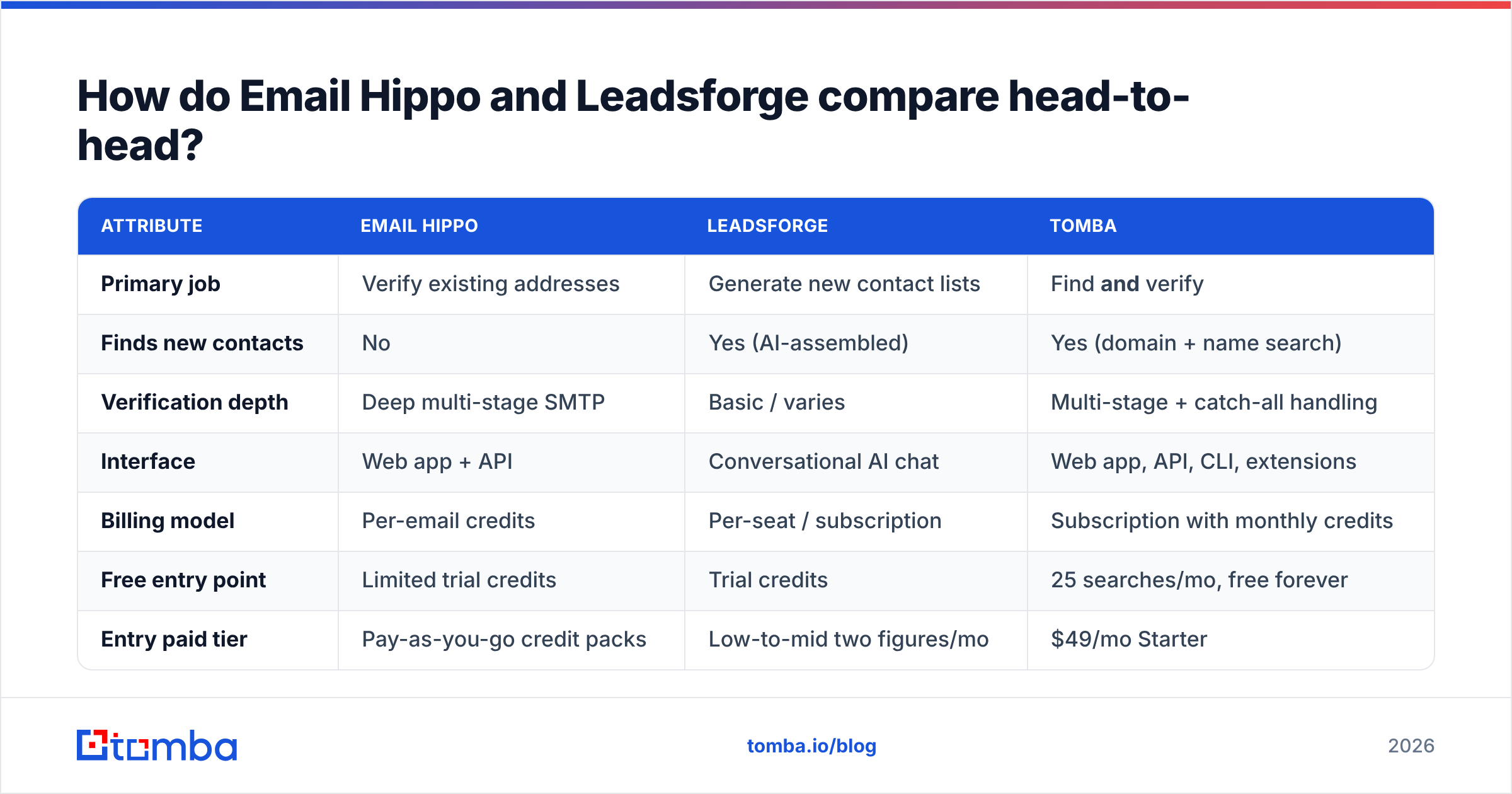
A tool with an 80% match rate at 97% deliverability beats one with a 95% match rate at 82% deliverability. Volume that bounces is not volume. It is sender reputation damage you paid for.
What do Email Hippo and Leadsforge actually cost?#
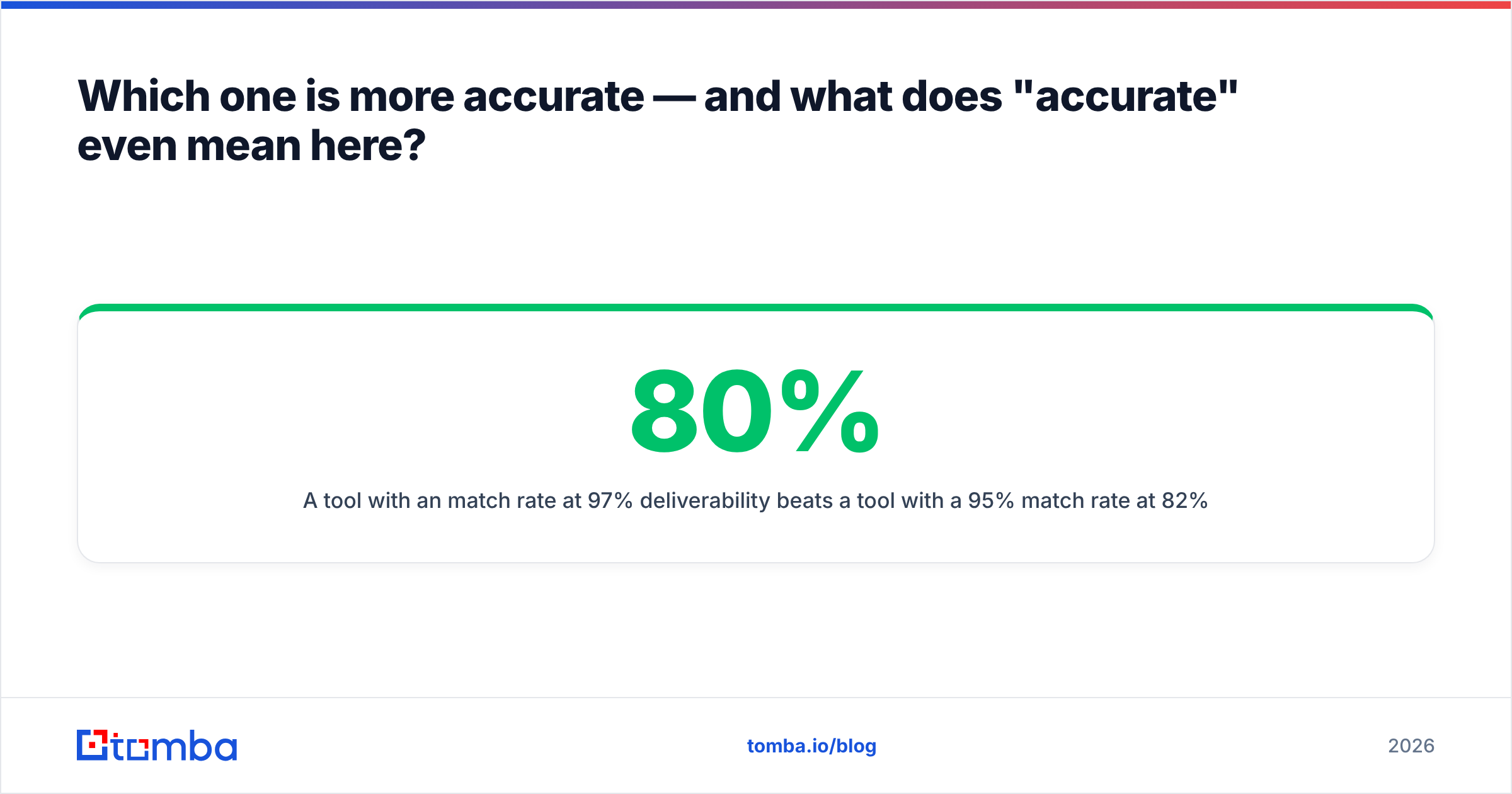
The billing models are built differently, so headline prices mislead.
| Cost factor | Email Hippo | Leadsforge | Tomba |
|---|---|---|---|
| Unit billed | Per email verified | Per seat / per export | Per search or verification credit |
| Typical entry spend | Credit pack, pay-as-you-go | Monthly subscription | $49/mo Starter |
| Mid tier | Volume credit discounts | Growth subscription | $99/mo Growth |
| High volume | Enterprise contract | Enterprise contract | $249/mo Pro, Enterprise custom |
| Credits roll over | Depends on plan | Usually no | Monthly reset |
| Free tier ongoing | Trial only | Trial only | Yes — 25 searches/mo |
| Hidden cost | You still need a finder | You still need a verifier | None for the core loop |
Read the hidden cost row twice. Buy Email Hippo and your finding budget is still unspent. Buy Leadsforge and your verification budget is still unspent. Teams tend to notice this in month two, when the cheap tool turns out to be half a stack.
Run the math on your own numbers. Say you send 5,000 cold emails a month. You need roughly 6,000 to 7,000 sourced contacts to cover suppression and bad matches, plus the same number of verifications. Price both vendors at that volume, add them up, and compare the total against one platform's pricing at the same tier. That is the fair comparison.

Which tool fits your workflow?#
There is no universal winner. Match the tool to the job instead.
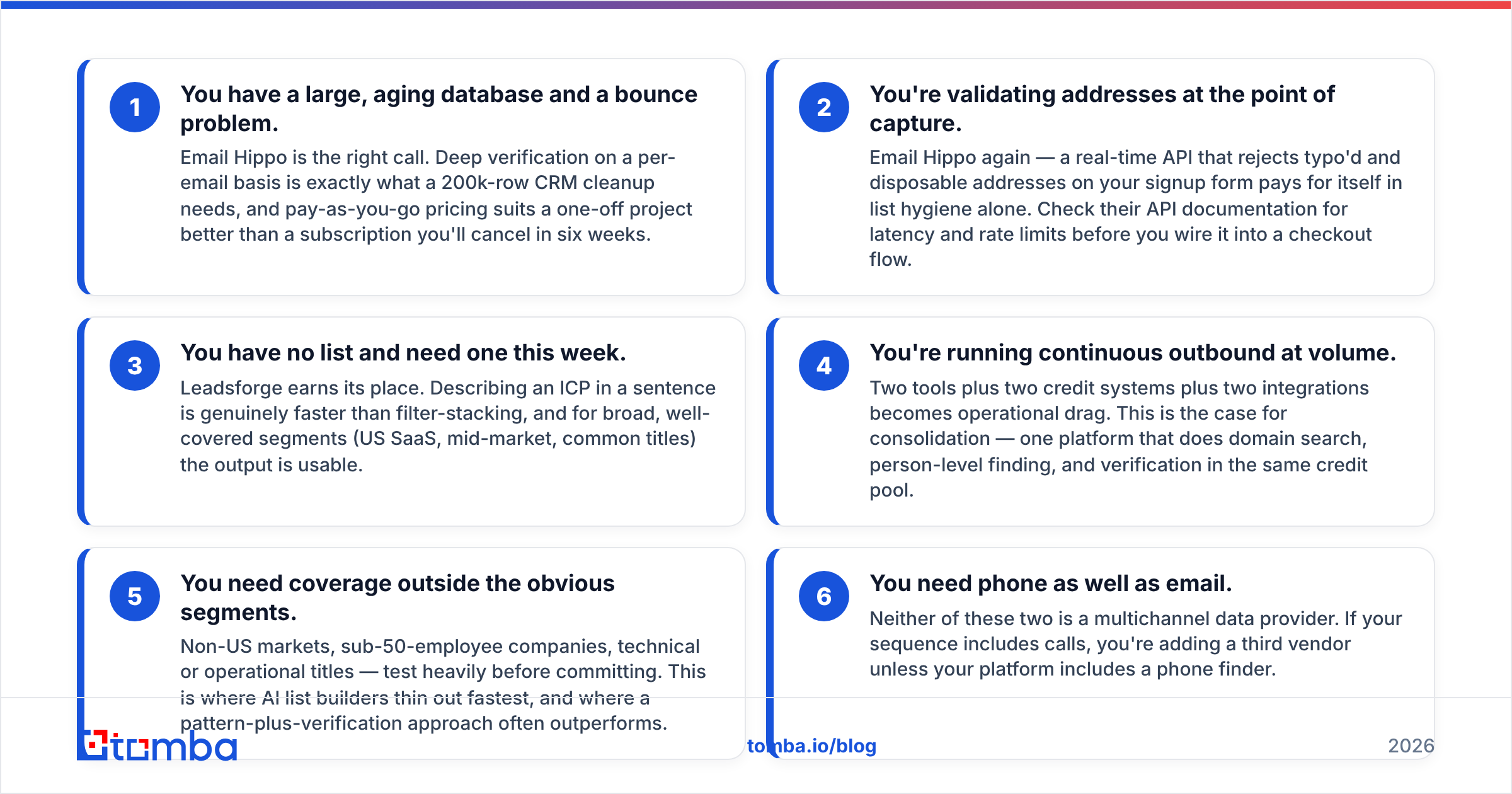
- You have a large, aging database and a bounce problem. Email Hippo is the right call. Deep per-email verification is what a 200k-row cleanup needs. Pay-as-you-go also suits a one-off project better than a subscription you cancel in six weeks.
- You validate addresses at the point of capture. Email Hippo again. A real-time API that blocks typos and disposable addresses on your signup form pays for itself in list hygiene. Check their API documentation for latency and rate limits first.
- You have no list and need one this week. Leadsforge earns its place. Describing an ICP in a sentence beats filter-stacking. For broad, well-covered segments such as US SaaS mid-market, the output is usable.
Those three cases are simple. The next three are where teams get stuck:
- You run continuous outbound at volume. Two tools, two credit systems, and two integrations create real drag. This is the case for consolidation: one platform that does domain search, person-level finding, and verification from the same credit pool.
- You need coverage outside the obvious segments. Think non-US markets, sub-50-employee companies, or technical job titles. Test heavily before you commit. AI list builders thin out fastest here, and a pattern-plus-verification approach often wins.
- You need phone numbers as well as email. Neither tool is a multichannel data provider. If your sequence includes calls, you are adding a third vendor unless your platform includes a phone finder.
Where does the verify-only vs find-only split break down?#
The awkward truth is that the two jobs no longer separate cleanly.
A finding tool often returns a pattern-derived address, such as firstname.lastname@company.com inferred from a known company format. Verification is not a nice-to-have there. It is the step that turns a guess into a contact. The reverse is also true. A verifier that only says "this mailbox exists" leaves you emailing someone who may have changed roles.
Modern stacks treat find-and-verify as one action. You request a contact. The platform sources it, checks it, scores confidence, and returns one answer. That is cheaper than two round trips through two vendors. It also removes a whole class of bugs, where a verified but stale record slips through because the two systems never share state.
Catch-all domains make the point best. When a domain accepts everything, an SMTP handshake is not enough. You need context: was this address seen in the wild, does it match the company's confirmed pattern, is the person still listed there? A catch-all verifier that reads both signal types beats either approach alone.
Does either tool protect your deliverability?#
Partly. It is worth being precise about the limits.
Verification protects you from hard bounces, and hard bounces are the fastest way to burn a sending domain. Mailbox providers read a high bounce rate as a spam signal, and a damaged reputation takes weeks to repair. Email Hippo does that job well.
Here is what no verifier protects you from:
- Spam complaints. A valid address still marks you as spam if the message is irrelevant. Verification is hygiene, not targeting.
- Authentication failures. Bad SPF, DKIM, or DMARC setup sinks a campaign no matter how clean the list is. Run an SPF checker before your first send.
- Volume ramping. Sending 3,000 emails from a two-week-old domain fails regardless of list quality.
- Content triggers. Link-heavy, image-heavy, or pushy copy still lands in Promotions or Spam.
For a wider view, G2's verification category reviews are a useful reality check. Users there tend to raise support and credit-expiry complaints that never show up in vendor comparisons.
Email Hippo vs Leadsforge: which should you pick in 2026?#
Pick Email Hippo if verification is the whole job. You already have contacts, you need them clean, and you want a specialist with a mature API and a compliance-first posture. It is a good tool doing one thing carefully.
Pick Leadsforge if list building is the whole job and speed beats depth. You are testing new segments, you want a first list today, and you already budget for a separate verification step.
Pick neither, alone, if you run sustained outbound. Two point solutions cost more and add daily overhead. That is why most teams who start with a finder plus a verifier end up collapsing them into one platform.
Whatever you choose, run the 200-contact test before you sign an annual contract. Vendor accuracy numbers come from the vendor's favorite data. Yours will look different.
Ready to stop paying two vendors for one workflow? The Tomba Email Finder sources contacts by domain, name, or company and verifies them in the same request. No second tool, no second credit system, no stale-record handoff. Start free with 25 searches a month, or move to Starter at $49/mo when your pipeline needs it. Test it against your own 200-contact benchmark and compare cost per verified contact, not cost per lookup.
Related guides#
Ready to find emails that actually work?
Join 150,000+ professionals who stopped guessing and started sending. Free credits on signup — no credit card required.
Get the Tomba newsletter
Practical outbound tactics and product updates — once every two weeks.
About the author