Email Hippo vs Salesbot: Which Tool Fits Your 2026 Stack?
Email Hippo verifies email lists. Salesbot automates the conversation. They get compared constantly, but they solve different halves of the same funnel — here's how to pick, and when you need neither.
Email Hippo vs Salesbot is a matchup people search every day. It is also a mismatch. Email Hippo cleans your email list. A salesbot answers your inbound chats. Pick the one that fits the gap you actually have.
TL;DR
- Email Hippo verifies and risk-scores email addresses. Salesbot is a sales chat bot, usually built into a CRM. They are not swaps for each other.
- Bounce rate at 12% and a throttled domain? That is the Email Hippo case. Leads waiting six hours for a reply? That is the salesbot case.
- Email Hippo goes deep on each address: SMTP checks, disposable and role detection, risk scores, an audit trail. It cannot find new addresses.
- "Salesbot" is a shared product name. Check which vendor you mean before you compare prices.
- Neither side of Email Hippo vs Salesbot finds contacts for you. A stack that finds, verifies, and enriches in one place — the Tomba model — drops a vendor and a data handoff.
Email Hippo vs Salesbot: What Does Each Tool Do?#
One is a data cleaner. The other is a chat robot. Comparing them is like comparing a water filter to a coffee machine. Most kitchens have both.
Here is what each one really does:
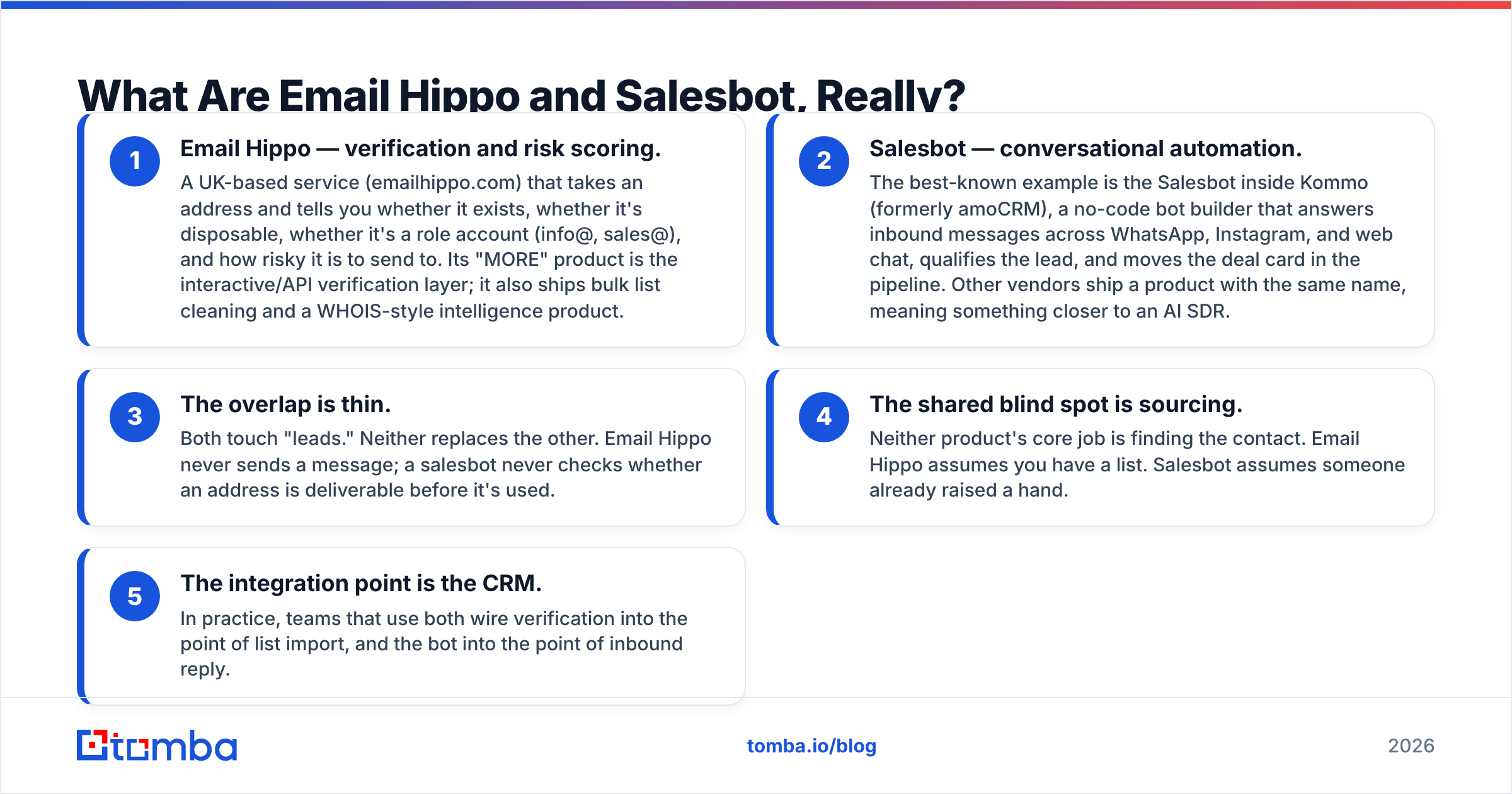
- Email Hippo — verification and risk scoring. A UK service (emailhippo.com). It tells you if an address exists, if it is disposable, if it is a role inbox (info@, sales@), and how risky it is to send to.
- Salesbot — chat automation. The best-known one sits inside Kommo, formerly amoCRM. It replies on WhatsApp, Instagram, and web chat, then moves the deal card. Other vendors use the name for an AI SDR.
- The overlap is thin. Email Hippo never sends a message. A salesbot never checks if an address is safe to send to.
- Both skip sourcing. Email Hippo assumes you have a list. A salesbot assumes someone raised a hand.
So most Email Hippo vs Salesbot searches hide one of two questions. How do I stop bouncing? Or how do I reply faster? Answer the right one and the choice makes itself.

Email Hippo vs Salesbot: A Head-to-Head Table#
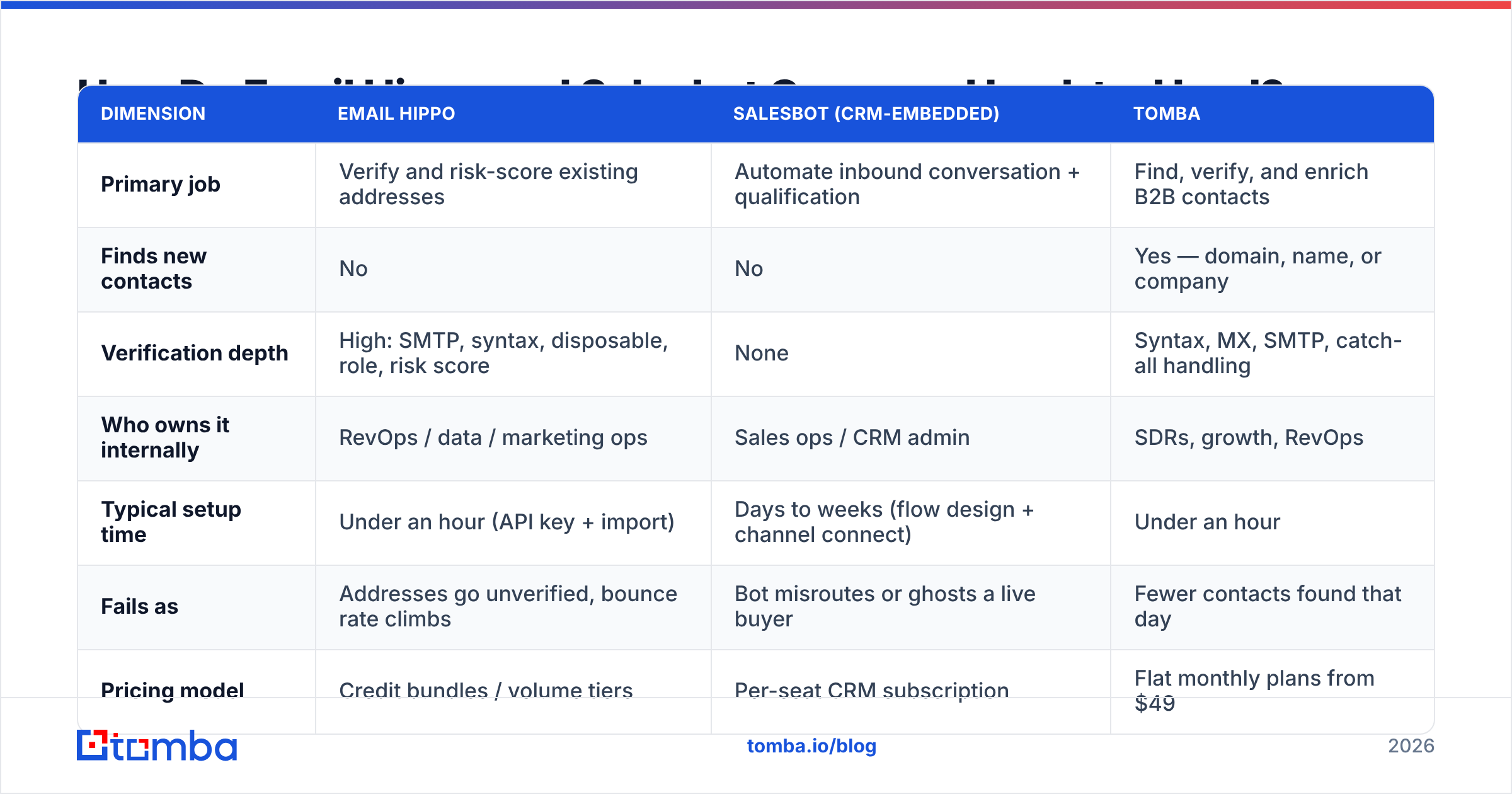
You can score the two on fit. Look at setup cost, who owns them, and how they fail.
| Dimension | Email Hippo | Salesbot (in CRM) | Tomba |
|---|---|---|---|
| Main job | Verify and score addresses you have | Answer and qualify inbound chats | Find, verify, and enrich contacts |
| Finds new contacts | No | No | Yes |
| Verification depth | High: SMTP, syntax, disposable, role, risk | None | SMTP, MX, syntax, catch-all |
| Who owns it | RevOps or marketing ops | Sales ops or CRM admin | SDRs and growth |
| Setup time | Under an hour | Days to weeks | Under an hour |
| Fails as | Bounce rate climbs | Bot ghosts a live buyer | Fewer contacts found |
| Pricing | Credit bundles | Per-seat CRM plan | Flat plans from $49 |
| Free tier | Trial credits | Tied to CRM trial | 25 searches a month |
The Email Hippo vs Salesbot table above hides one row that decides most deals: who owns it. Email Hippo is a back-office buy. That buyer is judged on list hygiene and email deliverability. A salesbot is a front-office buy, judged on speed to lead. Different budgets, different sign-off, often different quarters.
Email Hippo vs Salesbot: Which One Helps Deliverability?#
Email Hippo, and it is not close. A salesbot has no deliverability role at all.
If your domain is in trouble, bad addresses are usually the cause. Mailbox providers read hard bounces as a warning sign. Enough of them and your sender reputation drops. Inbox placement drops with it. Then the emails that do land stop working.
Google and Microsoft both tightened their bulk-sender rules in the last two years. Complaint rates and auth records (SPF, DKIM, DMARC) are now enforced, not suggested.
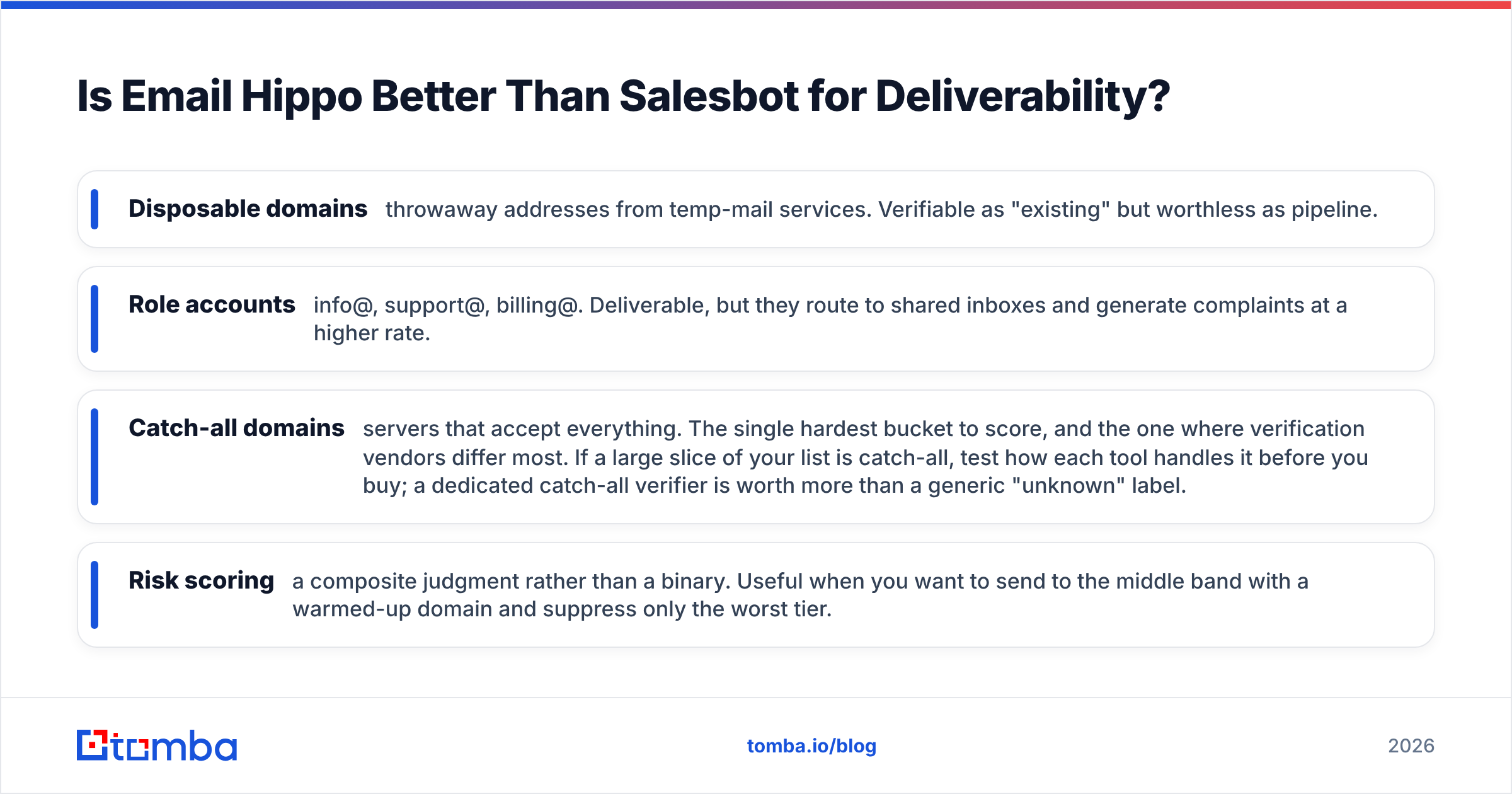
Email Hippo works on that chain. Its output goes past "valid or invalid":
- Disposable domains — temp-mail addresses. Real, but worthless as pipeline.
- Role accounts — info@, support@, billing@. They deliver, but they land in shared inboxes and draw more complaints.
- Catch-all domains — servers that accept every address. This is the hardest bucket to score, and where vendors differ most. Test it before you buy. A catch-all verifier beats a vague "unknown" label.
- Risk scores — a judgment call, not a yes or no. Handy when you want to mail the middle band and drop only the worst tier.
One caveat: no verifier is 100% right, and any vendor who claims that is selling. Catch-all domains, greylisting, and accept-then-discard servers cap what an SMTP probe can prove.
So treat published accuracy numbers — theirs, ours, anyone's — as a rough guide. Test on a sample of your own list first. Review data on G2 helps here, because it comes from messy real lists.
Email Hippo vs Salesbot: What Does Each One Cost?#
Be wary of any post that quotes exact prices, this one included.
Email Hippo bills on volume. You buy credit bundles, and the price per check drops as you commit to more. Small teams often spend tens of dollars a month. Big list clean-ups run into the hundreds.
Salesbot pricing is rarely standalone. It rides on a CRM seat price. So the real cost is seats times months, plus channel fees. WhatsApp Business chats, for one, bill on their own.
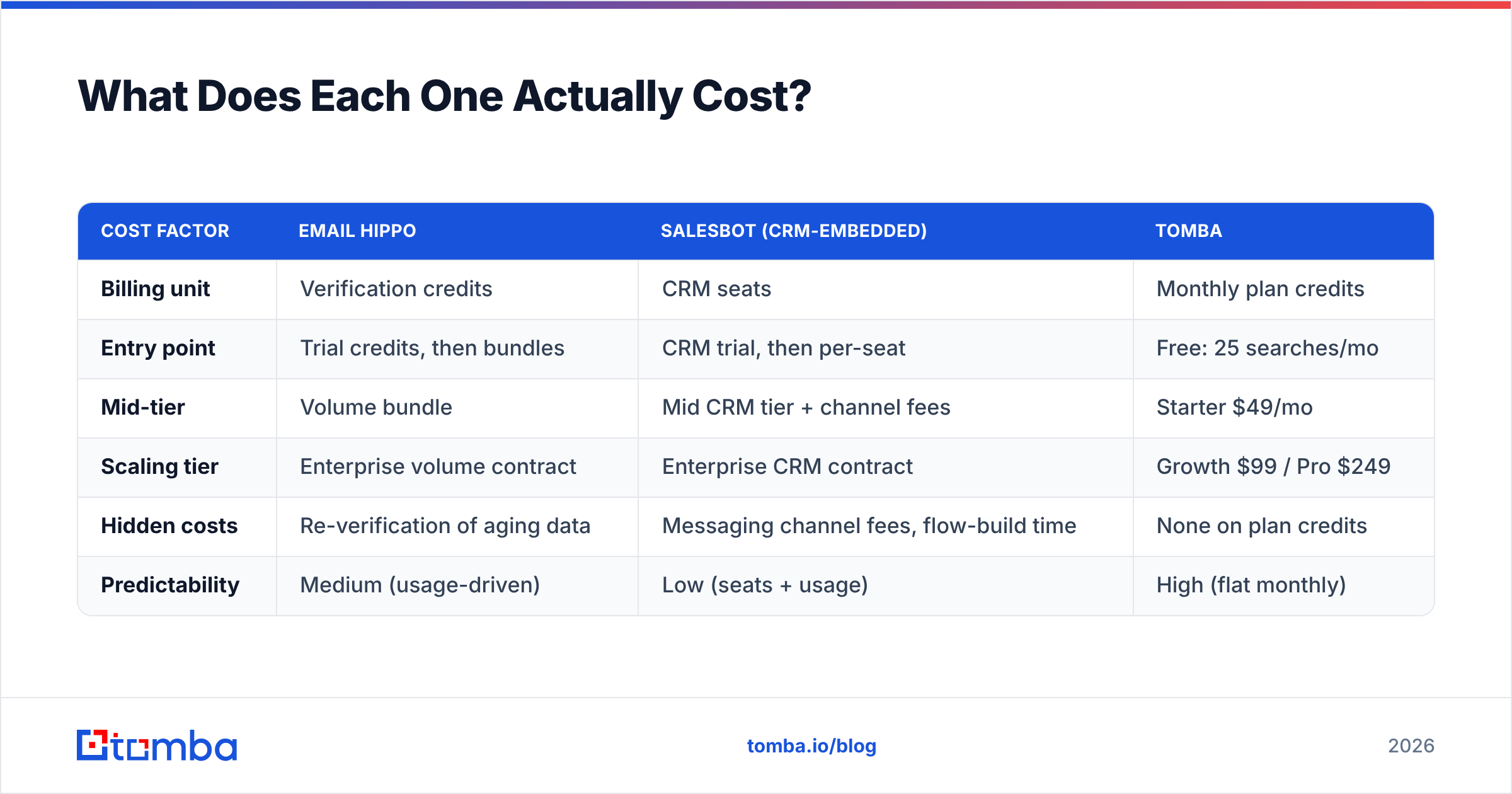
| Cost factor | Email Hippo | Salesbot (in CRM) | Tomba |
|---|---|---|---|
| Billing unit | Verification credits | CRM seats | Monthly plan credits |
| Entry point | Trial, then bundles | CRM trial, then seats | Free: 25 searches |
| Mid tier | Volume bundle | Mid CRM tier plus fees | Starter $49/mo |
| Top tier | Volume contract | Enterprise contract | Growth $99, Pro $249 |
| Hidden costs | Re-checking old data | Channel fees, build time | None on plan credits |
| How predictable | Medium | Low | High |
Two budget notes that cost teams real money:
Clean data goes stale. B2B contact data decays about 2–3% a month as people change jobs. A list verified in January is wrong by June. Budget for re-checks, not one clean-up a year.
Bot flows are labor, not license. The subscription line hides the real cost. Someone has to design the questions, write the replies, test the edge cases, and update it all when your offer changes. That is weeks of admin time in year one.
Compare that with a flat rate. Tomba pricing runs Free (25 searches a month), Starter at $49/mo, Growth at $99/mo, and Pro at $249/mo. One number, one vendor, finding and verifying from the same credit pool.
Email Hippo vs Salesbot: Where Does Each Break Down?#
Every tool has a failure mode. Knowing them beats reading a feature list.
Email Hippo breaks down when:
- Your list is mostly catch-all domains. You get a big "unknown" pile and still have to guess.
- You need the contact, not the check. Verifying is a gate, not a source.
- You want enrichment. Job title, company size, phone, LinkedIn — that is a second vendor.
- You need real-time signup checks at high volume and have not priced the API tier.
A salesbot breaks down when:
- Inbound volume is low. Below roughly 50 to 100 chats a month, a human with a phone alert is cheaper and better.
- The sale is complex. Bots handle set criteria well. They handle nuance badly, and one botched enterprise lead costs more than the plan.
- You are outbound-led. A bot sits on the inbound side. It does nothing for a cold list.
That last point is the whole story. If you run outbound, neither tool fixes your first problem: you do not have enough good contacts.
What About the Layer Neither Tool Covers?#
The missing layer is sourcing. You have to turn a target account list into real, reachable people.
Most teams stack vendors to do it. One tool finds addresses. Email Hippo verifies them. A CRM bot handles replies. A fourth tool enriches. Every handoff is a CSV export and a field-mapping choice. Records get dropped or doubled. You also get four renewal dates and four support queues.
The case for one tool is simple. If you verify anyway, verify at the moment you find the address. That is how Tomba works. The email finder returns an address, a confidence score, and its sources. The email verifier runs the same SMTP checks you would buy elsewhere. Bulk email finder handles a whole account list in one pass.
To be fair, some teams want a ready-made contact database, not a lookup tool. Vendors like BookYourData fit that need well. Ask if your motion is buying a list or working named accounts. The answer points to different tools.
Which One Should You Pick?#
Match the tool to your bottleneck, not to the demo. Here is the Email Hippo vs Salesbot decision in four lines.
Pick Email Hippo if you have a big list, a bounce rate above 3%, and a need for an audit trail. Its depth per address is strong, and the API is easy to wire into a signup form. You will still need a second tool to find contacts.
Pick a salesbot if you get real inbound volume, have a repeatable script, and have an admin with time to build flows. Confirm which vendor's salesbot you are buying.
Pick a finder plus verifier if you run outbound, your gap is "not enough verified contacts," and you want one predictable bill. Start on the Free tier and check the hit rate.
Pick both if your motion spans inbound chat and outbound list building. Fix data quality first. A fast bot on a bad list only fails faster.
Ready to Fix the Acquisition Layer?#
Verification tells you an address is safe to send to. It does not hand you the address. If your real gap is too few verified contacts, start there.
Tomba Email Finder finds work email addresses by domain, name, or company. It returns a confidence score with sources, and it verifies as it goes. So the list that lands in your CRM is already clean. The Free tier gives you 25 searches a month, and paid plans start at $49/mo. Run your own target list through it and let the hit rate decide.
Related guides#
Ready to find emails that actually work?
Join 150,000+ professionals who stopped guessing and started sending. Free credits on signup — no credit card required.
Get the Tomba newsletter
Practical outbound tactics and product updates — once every two weeks.
About the author