Email Hippo vs Tomba (2026): Which Email Tool Wins?
Email Hippo verifies addresses you already have. Tomba finds them and then verifies them. Here is where each one actually wins on accuracy, catch-all handling, API design, and cost per usable contact.
TL;DR
- Email Hippo is a verifier, not a finder. It grades addresses you already own. If your list is empty, Email Hippo has nothing to work on.
- Tomba does discovery plus verification. Domain search, name-to-email lookup, catch-all handling, and enrichment sit in one account and one API key.
- Accuracy claims are not comparable across categories. A verifier's "99%" measures bounce prediction. A finder's accuracy measures whether the address exists at all. Test both on your own list before you believe either number.
- Pricing models differ structurally. Email Hippo sells verification credits (pay-as-you-go and subscription). Tomba sells a flat monthly plan — Free (25 searches/mo), Starter $49/mo, Growth $99/mo, Pro $249/mo — that covers finding and verifying.
- The honest split: already have a 500k-row CRM to clean? Email Hippo is a legitimate specialist. Building a net-new outbound list from scratch? Tomba covers the whole job without a second vendor.
What does Email Hippo actually do?#
Email Hippo is a UK-based email verification company. You feed it addresses — one at a time, in bulk CSV, or via API — and it returns a status telling you whether sending to that address is likely to bounce.
Under the hood it runs the standard verification stack: syntax parsing, domain and MX record checks, disposable-domain detection, role-account flagging (info@, support@, sales@), and an SMTP-level mailbox probe where the receiving server allows it. Results come back as a grade plus supporting detail, which you map to your own send/don't-send rule.
What Email Hippo does not do is generate contacts. There is no "give me the marketing director at Acme" workflow. It is a quality gate that sits after acquisition, not a source of leads. That distinction is the single most important thing in this comparison — most people searching "email hippo vs tomba" are actually deciding whether they need one tool or two.
What does Tomba do differently?#
Tomba starts one step earlier in the pipeline. Its core product is the email finder: give it a person's name and a company domain, and it returns the working address with a confidence score and the public sources it drew from. Around that sit domain search (every discoverable address at a company), LinkedIn lookup, author finder, phone finder, and enrichment.
Verification is included rather than sold as a separate product. Every address Tomba returns is checked before it reaches you, and the standalone email verifier handles lists you sourced elsewhere — exports from a webinar platform, an old CRM segment, a purchased file.
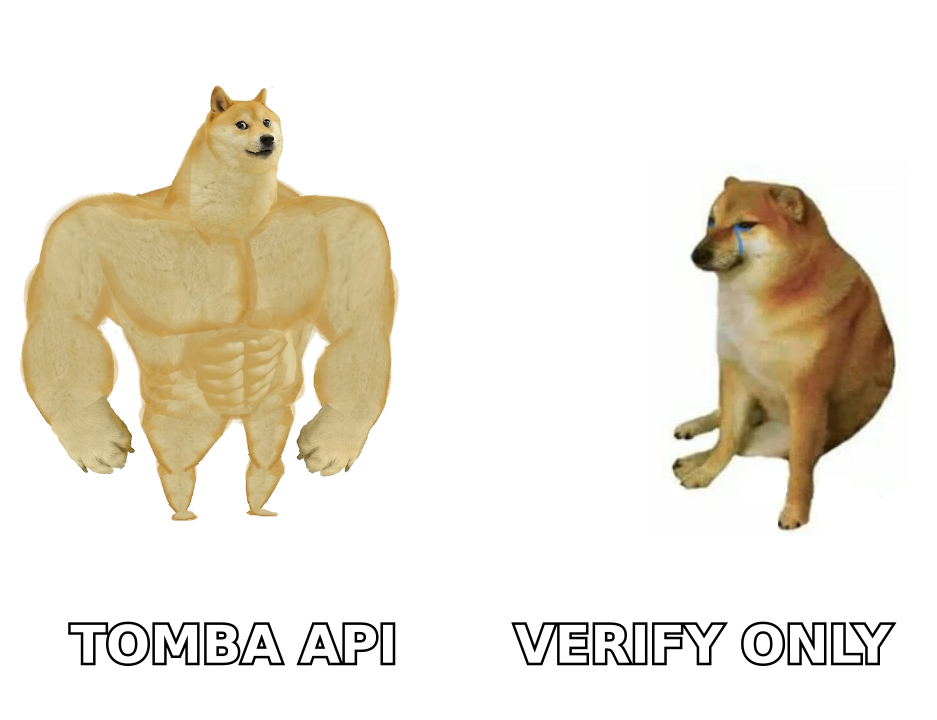
So the practical framing is not "which tool is better." It is: do you need a specialist verifier, or a pipeline that produces verified contacts end to end?
How do Email Hippo and Tomba compare head-to-head?#
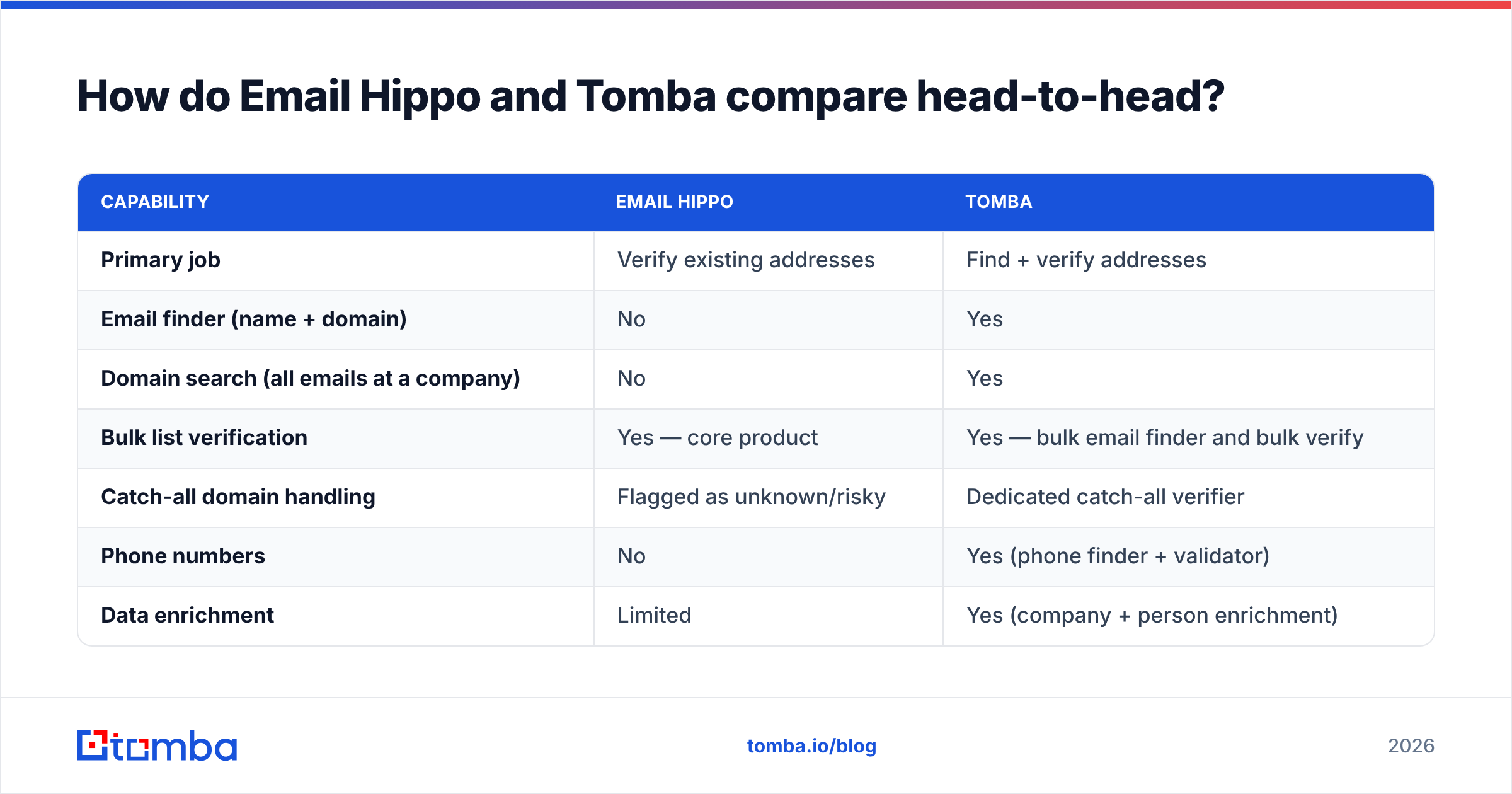
| Capability | Email Hippo | Tomba |
|---|---|---|
| Primary job | Verify existing addresses | Find + verify addresses |
| Email finder (name + domain) | No | Yes |
| Domain search (all emails at a company) | No | Yes |
| Bulk list verification | Yes — core product | Yes — bulk email finder and bulk verify |
| Catch-all domain handling | Flagged as unknown/risky | Dedicated catch-all verifier |
| Phone numbers | No | Yes (phone finder + validator) |
| Data enrichment | Limited | Yes (company + person enrichment) |
| Free tier | Limited free checks — see vendor site | 25 searches/mo, no card |
| Entry paid tier | Credit packs / subscription tiers | $49/mo Starter |
| API | REST, verification endpoints | REST covering finder, verifier, enrichment |
| Chrome extension | No | Yes |
| Spreadsheet add-ons | Limited | Google Sheets, Excel, Airtable |
| Best fit | Large existing databases | Net-new outbound + list hygiene |
Read that table as two different product categories rather than two competitors on a single axis. Email Hippo goes deep on one job. Tomba goes wide across the acquisition pipeline and includes verification as a component of it.
Which one is more accurate?#
Here is where most comparison posts get sloppy, so let's be precise about what "accuracy" means in each case.
For a verifier, accuracy means: of the addresses you marked "valid," what percentage actually delivered? That's bounce prediction. Vendors in this category routinely advertise 95–99%. Those numbers are measured on the vendor's own test corpus and are close to meaningless until you run your own sample.
For a finder, accuracy means: of the addresses you returned for a person, what percentage were the person's real working address? That's a harder problem — it includes pattern inference, source freshness, and disambiguation between two people with the same name at the same company.

A tool can be excellent at one and irrelevant at the other. Email Hippo will not tell you that jane.doe@acme.com is wrong because Jane actually uses jdoe@acme.com — if the server accepts both, both look valid. A finder with strong source coverage will pick the pattern the company actually uses.
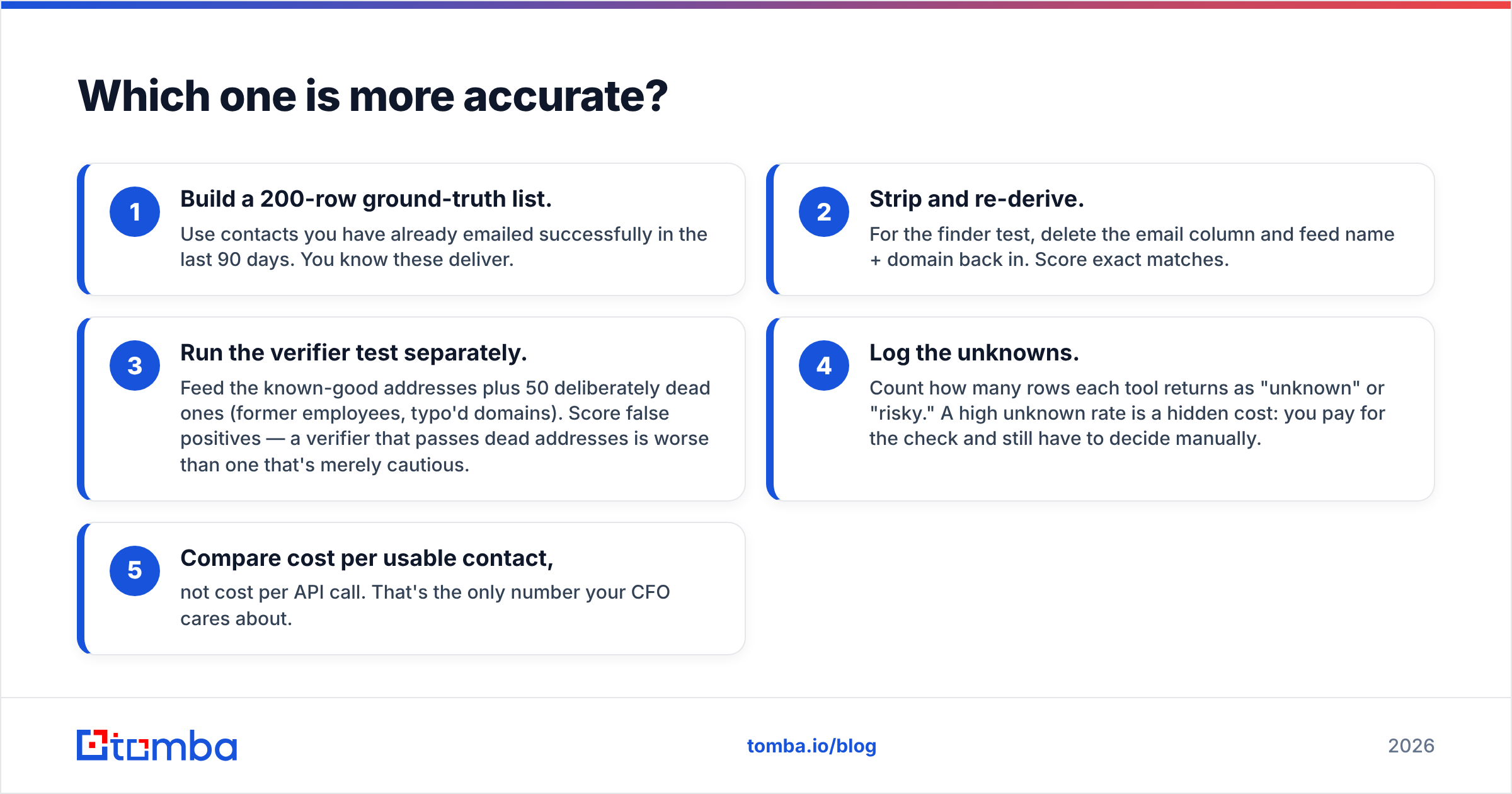
How to run a fair test in under an hour:
- Build a 200-row ground-truth list. Use contacts you have already emailed successfully in the last 90 days. You know these deliver.
- Strip and re-derive. For the finder test, delete the email column and feed name + domain back in. Score exact matches.
- Run the verifier test separately. Feed the known-good addresses plus 50 deliberately dead ones (former employees, typo'd domains). Score false positives — a verifier that passes dead addresses is worse than one that's merely cautious.
- Log the unknowns. Count how many rows each tool returns as "unknown" or "risky." A high unknown rate is a hidden cost: you pay for the check and still have to decide manually.
- Compare cost per usable contact, not cost per API call. That's the only number your CFO cares about.
Run that once and the marketing percentages stop mattering. You'll also see where the data comes from reflected in the results — source breadth is what separates finders more than algorithm cleverness does.
How do catch-all domains change the answer?#
Catch-all domains are the reason verification scores diverge between vendors. A catch-all server accepts mail to every address at the domain, valid or not, so an SMTP probe returns "accepted" regardless. Roughly a fifth to a quarter of B2B domains behave this way, and it's more common in enterprise and in regions with aggressive bounce message suppression.
Most verifiers, Email Hippo included, do the responsible thing and flag these as unknown or risky rather than guessing. That's technically correct and commercially annoying — you now have a bucket of addresses you paid to check and still can't act on.
Tomba's approach is to treat catch-all as a solvable sub-problem instead of a dead end, using pattern evidence and corroborating sources to grade the address rather than relying on the SMTP handshake alone. It's not magic and it won't be right every time, but a graded confidence score is more actionable than a shrug.
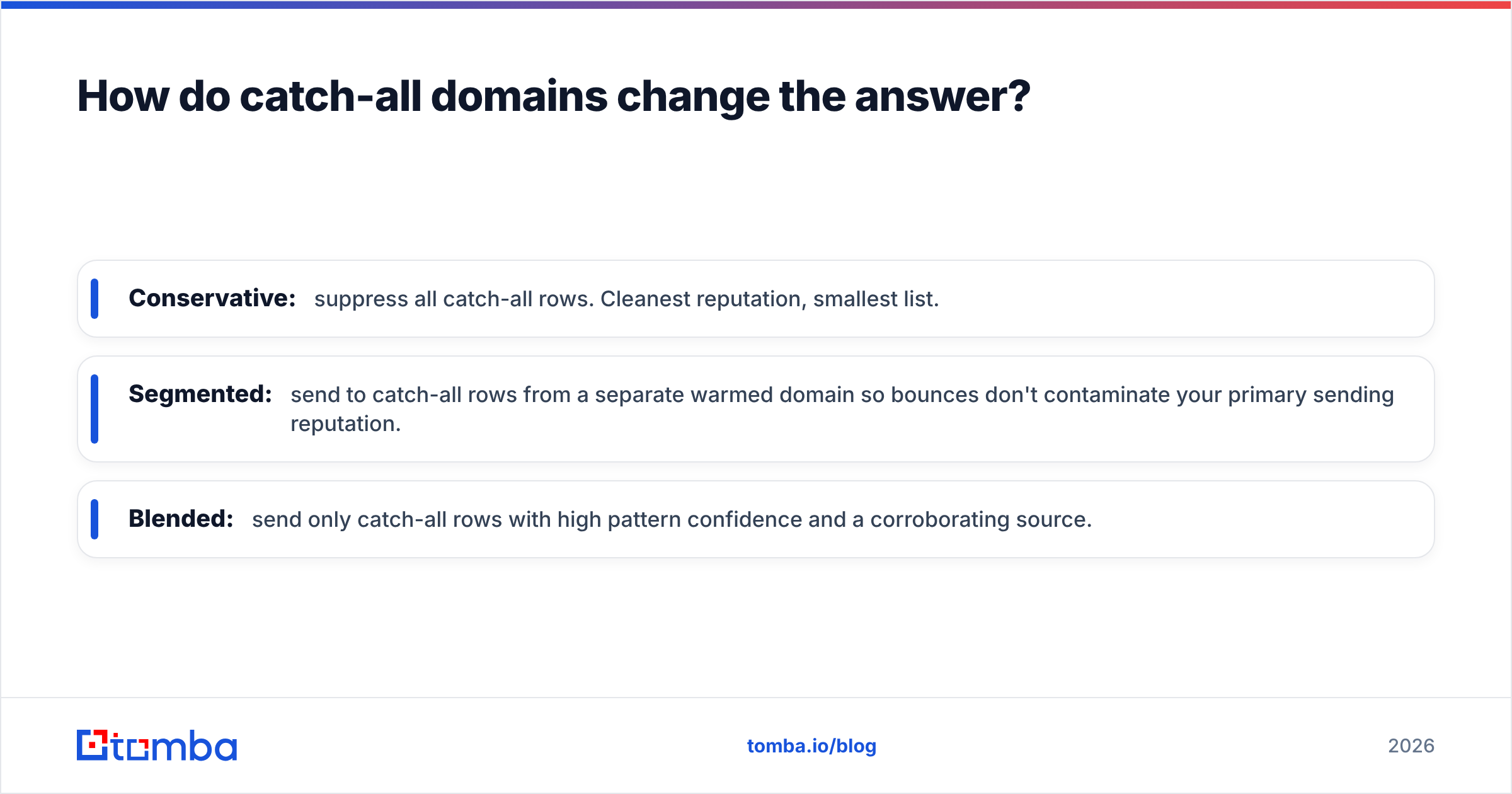
Whichever tool you pick, decide your catch-all policy before you buy:
- Conservative: suppress all catch-all rows. Cleanest reputation, smallest list.
- Segmented: send to catch-all rows from a separate warmed domain so bounces don't contaminate your primary sending reputation.
- Blended: send only catch-all rows with high pattern confidence and a corroborating source.
If you don't have a policy, you'll default to "send everything" the first time a quota gets tight, and your sender reputation will pay for it.
What does each one actually cost?#
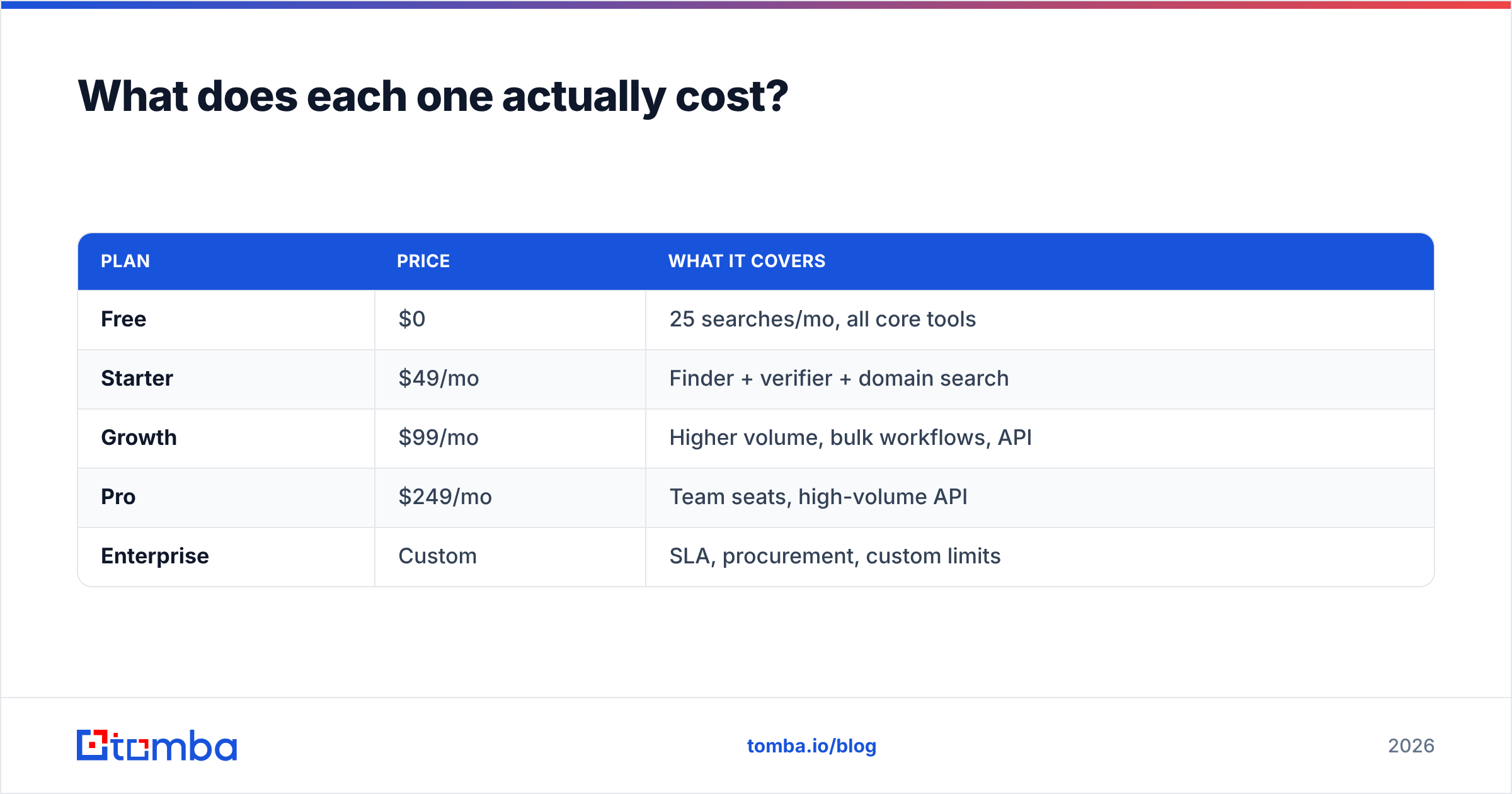
Tomba's numbers are public and flat:
| Plan | Price | What it covers |
|---|---|---|
| Free | $0 | 25 searches/mo, all core tools |
| Starter | $49/mo | Finder + verifier + domain search |
| Growth | $99/mo | Higher volume, bulk workflows, API |
| Pro | $249/mo | Team seats, high-volume API |
| Enterprise | Custom | SLA, procurement, custom limits |
Full details are on the Tomba pricing page. The relevant structural point: one plan covers discovery and verification. There is no second line item.
Email Hippo sells verification credits through pay-as-you-go packs and subscription tiers, with the per-check unit price falling as volume rises — the standard model in the verification category. Check their current pricing page directly rather than trusting any third-party summary, including this one; verification pricing changes frequently and tier names get reshuffled.
The comparison people get wrong is per-unit price. Verification-only tools look cheap per check because a check is a cheap operation. But if you also need a data source, you're now paying two vendors, reconciling two credit balances, and writing glue code between two APIs. Model cost per contact you can actually email, including the finder spend.

Which API is easier to build on?#
If you're wiring this into a product or a RevOps pipeline rather than clicking around a dashboard, the API surface matters more than the UI.
Email Hippo's API is focused: verification endpoints, straightforward REST, well-documented for its scope. If verification is genuinely all you need, a narrow API is a feature — less surface area, fewer failure modes.
The Tomba API is wider by design: finder, domain search, verifier, enrichment, and phone lookup behind one key and one auth model. That matters when your enrichment job needs to find, verify, and enrich in a single pass — you're not orchestrating retries and rate limits across two vendors with different backoff behavior.
Two practical checks before you commit to either:
- Rate limits under burst. Ask for the documented per-second and per-day ceilings, not just the monthly quota. Bulk backfills die on per-second limits.
- Failure semantics. What does the API return when it can't determine a result? A tool that returns a clear "unknown" is easier to build around than one that returns a low-confidence "valid."
Peer reviews on G2 are useful for spotting support-responsiveness patterns that no feature table captures. Read the three-star reviews, not the five-star ones.
Who should pick Email Hippo?#
Choose Email Hippo when:
- You have a large existing database — 100k+ rows — and hygiene is the entire project.
- Your contacts arrive through inbound forms, events, or acquisition, and you never need to discover anyone.
- You already have a data provider you're happy with and just want a second, independent verification opinion before high-stakes sends.
- Compliance or procurement requires a dedicated, single-purpose verification vendor with its own audit trail.
That's a real set of use cases, and a specialist verifier serves them well.
Who should pick Tomba?#
Choose Tomba when:
- You're building outbound lists from scratch and need discovery, not just grading.
- You want find, verify, and enrich under one subscription and one API key.
- Catch-all domains are a meaningful slice of your target market and "unknown" isn't an acceptable answer.
- You want prospecting inside the tools you already use — Chrome extension, Google Sheets, HubSpot, Salesforce — rather than a CSV round-trip.
- Predictable flat monthly pricing beats variable credit burn for your budgeting.
What's the honest verdict?#
Email Hippo wins on focus; Tomba wins on scope.
If your only problem is "I have a list and I don't know which addresses are dead," a specialist verifier is a clean, defensible purchase. Email Hippo has been doing that job for years and does it competently.
But most teams searching for this comparison don't have a list problem — they have a pipeline problem. They need contacts that didn't exist yesterday, verified before they're sent, enriched enough to personalize, delivered into a CRM. That's three vendors' worth of work if you buy a verifier alone, and one subscription if you don't.
Run the 200-row test above on both. It takes an hour and it will tell you more than any comparison table — including this one.
Ready to test the full pipeline? Start with the Tomba Email Finder on the free tier — 25 searches a month, no card required. Feed it 25 names and domains you already know the answers to, check the hit rate yourself, and upgrade to Starter at $49/mo only if the numbers hold up on your own data.
Related guides#
Ready to find emails that actually work?
Join 150,000+ professionals who stopped guessing and started sending. Free credits on signup — no credit card required.
Get the Tomba newsletter
Practical outbound tactics and product updates — once every two weeks.
About the author