Email Hunter Free: What You Actually Get in 2026 (Tested)
Free email finder plans advertise "free forever" and deliver 25 lookups a month. Here's what every major email hunter free tier actually gives you in 2026 — credits, accuracy, API access, and the exact point where you have to pay.
TL;DR
- "Email hunter free" almost always means a freemium tier of 25–50 lookups per month, not an unlimited tool. Every major vendor caps you in the same range.
- The differences that matter on a free plan are credit accounting (does a failed search burn a credit?), API access, and whether verification is included or billed separately.
- Tomba's free tier gives you 25 searches/month plus API access, which is unusually generous — most competitors gate the API behind a paid plan.
- Free tiers are for validating a tool, not running outbound. At 25 credits you can test accuracy on a known list; you cannot build a pipeline.
- Once you're past ~200 contacts/month, the honest comparison shifts from "who's free" to cost per verified email — and that's where entry pricing ($49/mo vs $99–$199/mo) decides it.
What does "email hunter free" actually mean?#
It means a freemium plan on an email-finding tool — and nine times out of ten, the search started with someone typing "Hunter" because Hunter.io is the category's best-known brand name. The phrase has drifted into a generic label for "free email finder," the same way people say "google it."
So there are really two questions hiding inside the search:
- Is there a genuinely free way to find someone's work email address?
- What do I give up by staying on the free tier?
The answer to the first is yes, within limits. The answer to the second is where most people get burned. Free plans are calibrated to be just big enough to prove the tool works and just small enough that you can't run a campaign on them. That's deliberate product design, not stinginess — email data is expensive to acquire and maintain, and every lookup costs the vendor money in crawl, storage, and SMTP verification infrastructure.
If you want the underlying mechanics of how these tools work at all, the short version: they combine crawled public web data, company email pattern inference (first.last@, finitial+last@, etc.), and SMTP-level checks to guess-and-confirm an address. Wikipedia's overview of email address syntax is a decent primer on why pattern inference works as reliably as it does.
How do the major free tiers compare in 2026?#
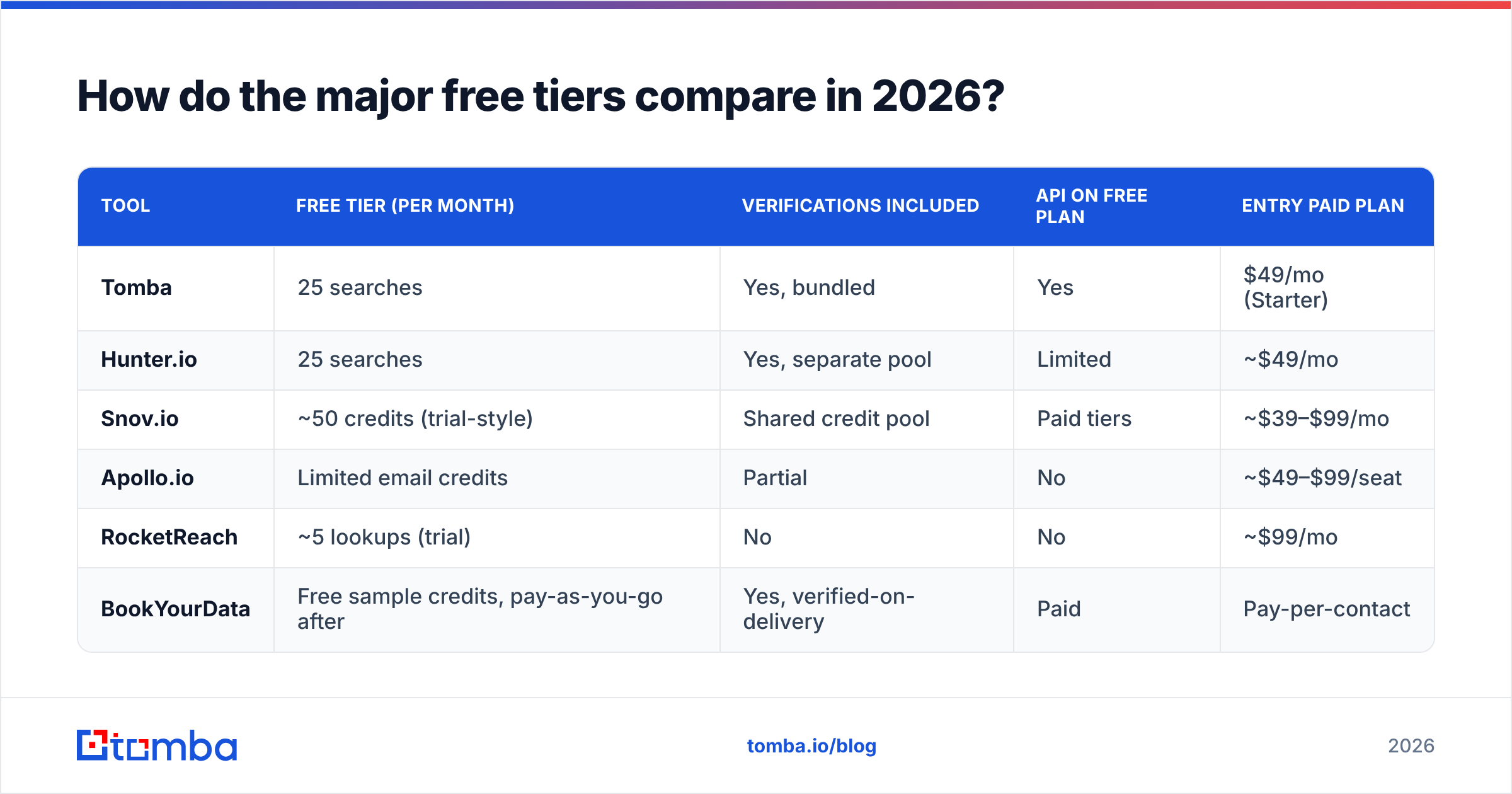
Here's the practical comparison. Free-tier limits change frequently — treat this as a snapshot and confirm on each vendor's pricing page before committing.
| Tool | Free tier (per month) | Verifications included | API on free plan | Entry paid plan |
|---|---|---|---|---|
| Tomba | 25 searches | Yes, bundled | Yes | $49/mo (Starter) |
| Hunter.io | 25 searches | Yes, separate pool | Limited | ~$49/mo |
| Snov.io | ~50 credits (trial-style) | Shared credit pool | Paid tiers | ~$39–$99/mo |
| Apollo.io | Limited email credits | Partial | No | ~$49–$99/seat |
| RocketReach | ~5 lookups (trial) | No | No | ~$99/mo |
| BookYourData | Free sample credits, pay-as-you-go after | Yes, verified-on-delivery | Paid | Pay-per-contact |
Two things jump out.
First, the 25-credit convergence. Multiple leading vendors landed on nearly identical free allowances. That's not coincidence — it's the smallest sample size that lets a buyer run a meaningful accuracy test. Twenty-five known contacts is enough to spot a tool that's wrong 40% of the time.
Second, the API line. Most free tiers give you a web UI and nothing else. If you're a developer evaluating whether to build on a provider, being able to hit the email finder API with a free key changes the evaluation entirely — you can test against your own dataset in an afternoon instead of filing a sales request.
What should you actually test with 25 free credits?#
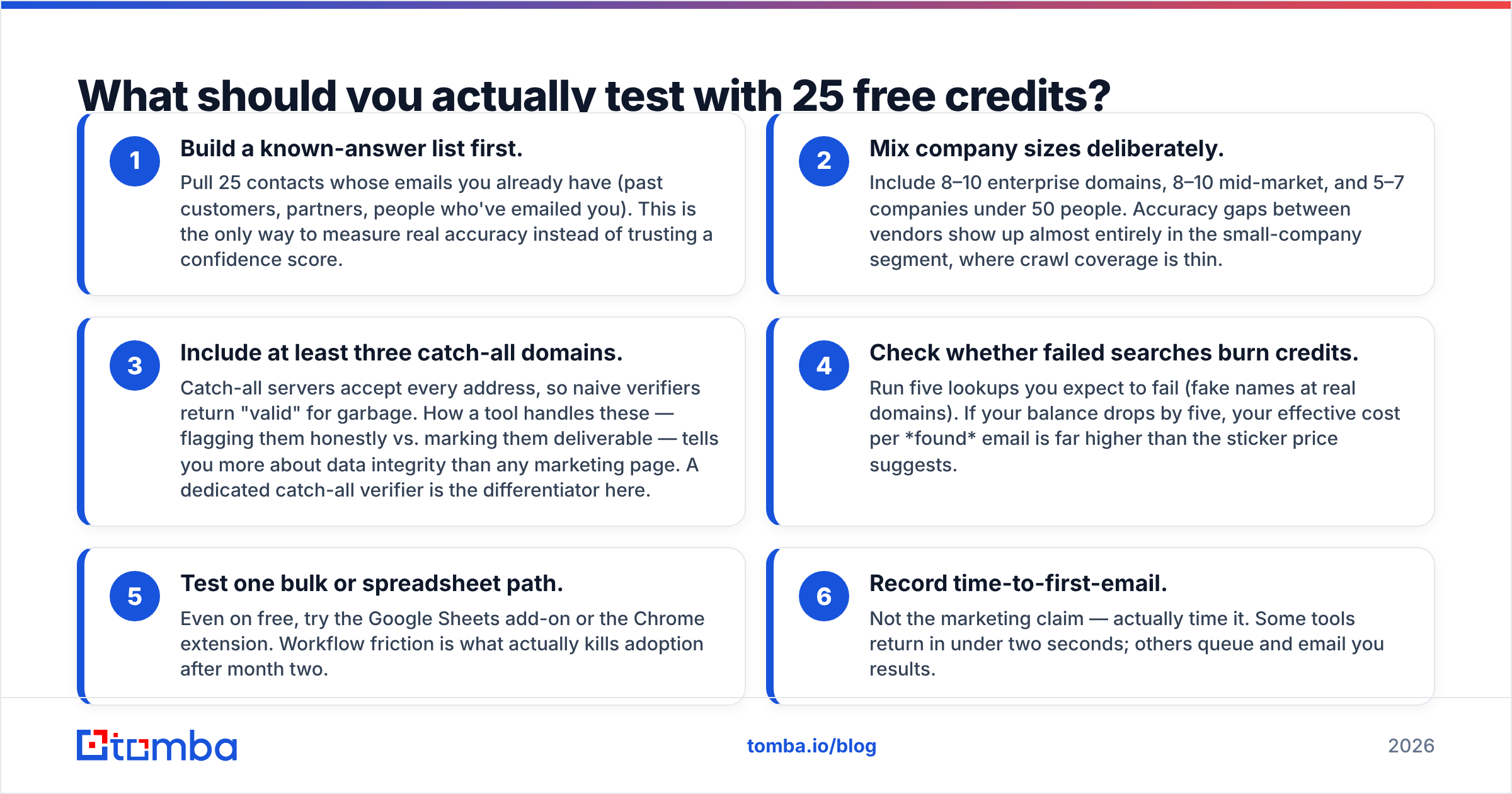
Don't spend them randomly. A free tier is a benchmark budget, and 25 lookups is enough to get a statistically rough but directionally correct read — if you structure the test.
- Build a known-answer list first. Pull 25 contacts whose emails you already have (past customers, partners, people who've emailed you). This is the only way to measure real accuracy instead of trusting a confidence score.
- Mix company sizes deliberately. Include 8–10 enterprise domains, 8–10 mid-market, and 5–7 companies under 50 people. Accuracy gaps between vendors show up almost entirely in the small-company segment, where crawl coverage is thin.
- Include at least three catch-all domains. Catch-all servers accept every address, so naive verifiers return "valid" for garbage. How a tool handles these — flagging them honestly vs. marking them deliverable — tells you more about data integrity than any marketing page. A dedicated catch-all verifier is the differentiator here.
- Check whether failed searches burn credits. Run five lookups you expect to fail (fake names at real domains). If your balance drops by five, your effective cost per found email is far higher than the sticker price suggests.
- Test one bulk or spreadsheet path. Even on free, try the Google Sheets add-on or the Chrome extension. Workflow friction is what actually kills adoption after month two.
- Record time-to-first-email. Not the marketing claim — actually time it. Some tools return in under two seconds; others queue and email you results.
Run that protocol across two or three vendors and you'll have a defensible answer in about ninety minutes. That beats reading forty G2 reviews, though G2's email-finder category is a reasonable sanity check on whether a vendor has real customers.
How accurate are free email finders, really?#
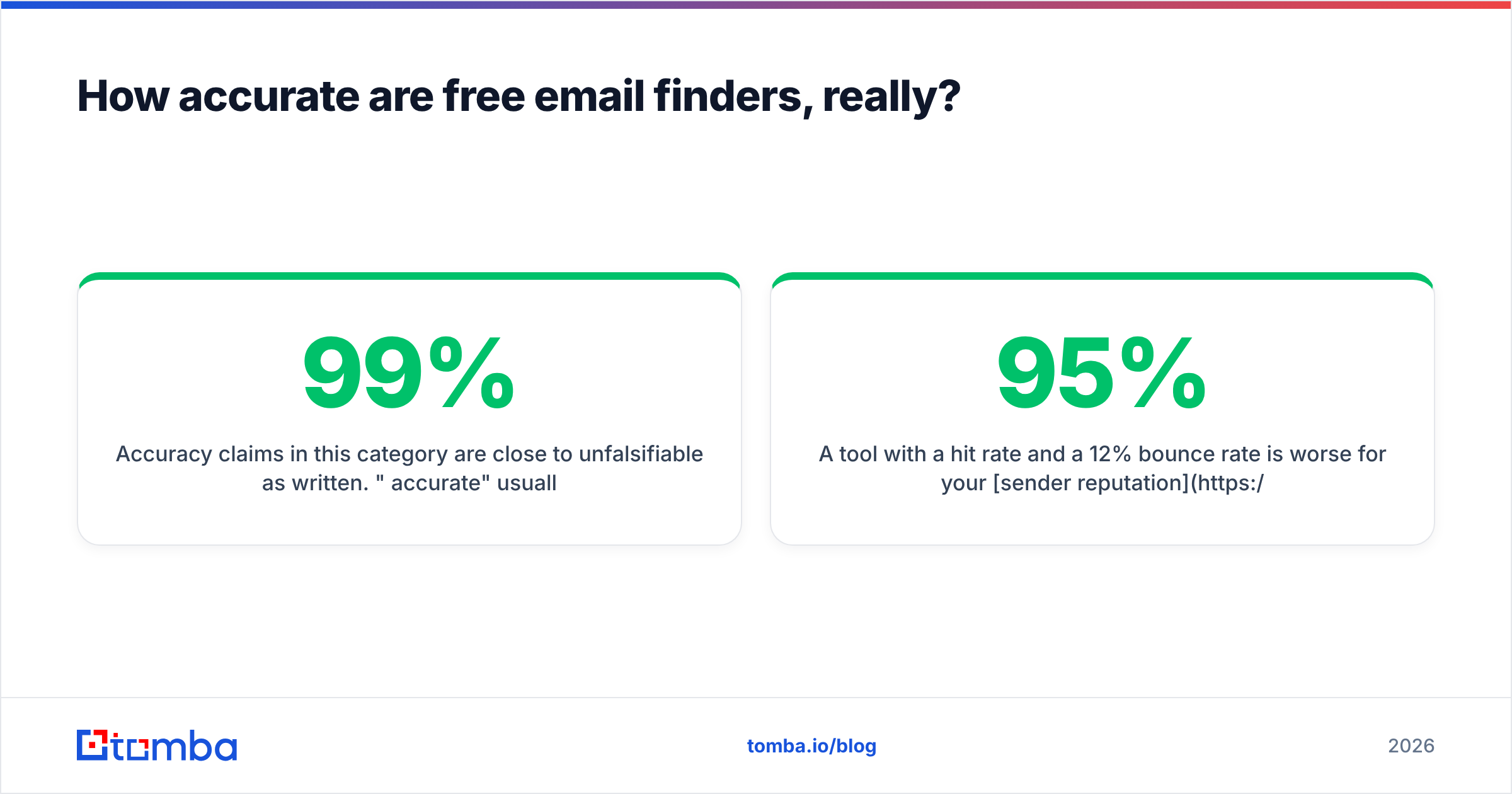
Accuracy claims in this category are close to unfalsifiable as written. "99% accurate" usually means "of the emails we chose to return, 99% passed our own verifier" — which quietly excludes every contact the tool couldn't find at all.
The two numbers that matter:
- Hit rate — of 100 contacts you asked for, how many did the tool return an address for?
- Bounce rate — of the addresses it did return, how many actually bounced?
A tool with a 95% hit rate and a 12% bounce rate is worse for your sender reputation than one with a 65% hit rate and a 2% bounce rate. Mailbox providers don't care how hard you tried to find the address.

Free tiers are also where you discover whether the vendor separates finding from verifying. Some tools return a guessed address with a confidence percentage and leave verification to you — meaning your "free" 25 credits produce 25 unverified guesses. Others run verification inline. If verification is a separate credit pool, your real free allowance is half what the pricing page says. Run every returned address through an independent email verifier before you trust the hit-rate number.
When is a free plan enough — and when is it not?#
Free is genuinely sufficient in three scenarios:
- Evaluation. You're choosing between vendors and need a controlled accuracy test.
- Low-volume, high-value outreach. Founder-led sales to 20 named accounts a month. If your ACV is $50k, 25 credits is plenty.
- Occasional one-offs. Finding a journalist, an article author's email, a hiring manager, a podcast booker.
Free stops working the moment any of these are true:
- You're running sequences to 200+ new contacts a month.
- You need enrichment fields (title, company size, tech stack) alongside the email.
- You need programmatic access inside a workflow, CRM sync, or internal tool.
- You need audit-grade compliance documentation about data sourcing.
That last one is underrated. Under GDPR and similar regimes, "where did this contact data come from" is a question you may have to answer in writing. Free tiers rarely come with the documentation to answer it; check the vendor's data sources page before you build a process on top of any provider.
What does it cost once you outgrow free?#
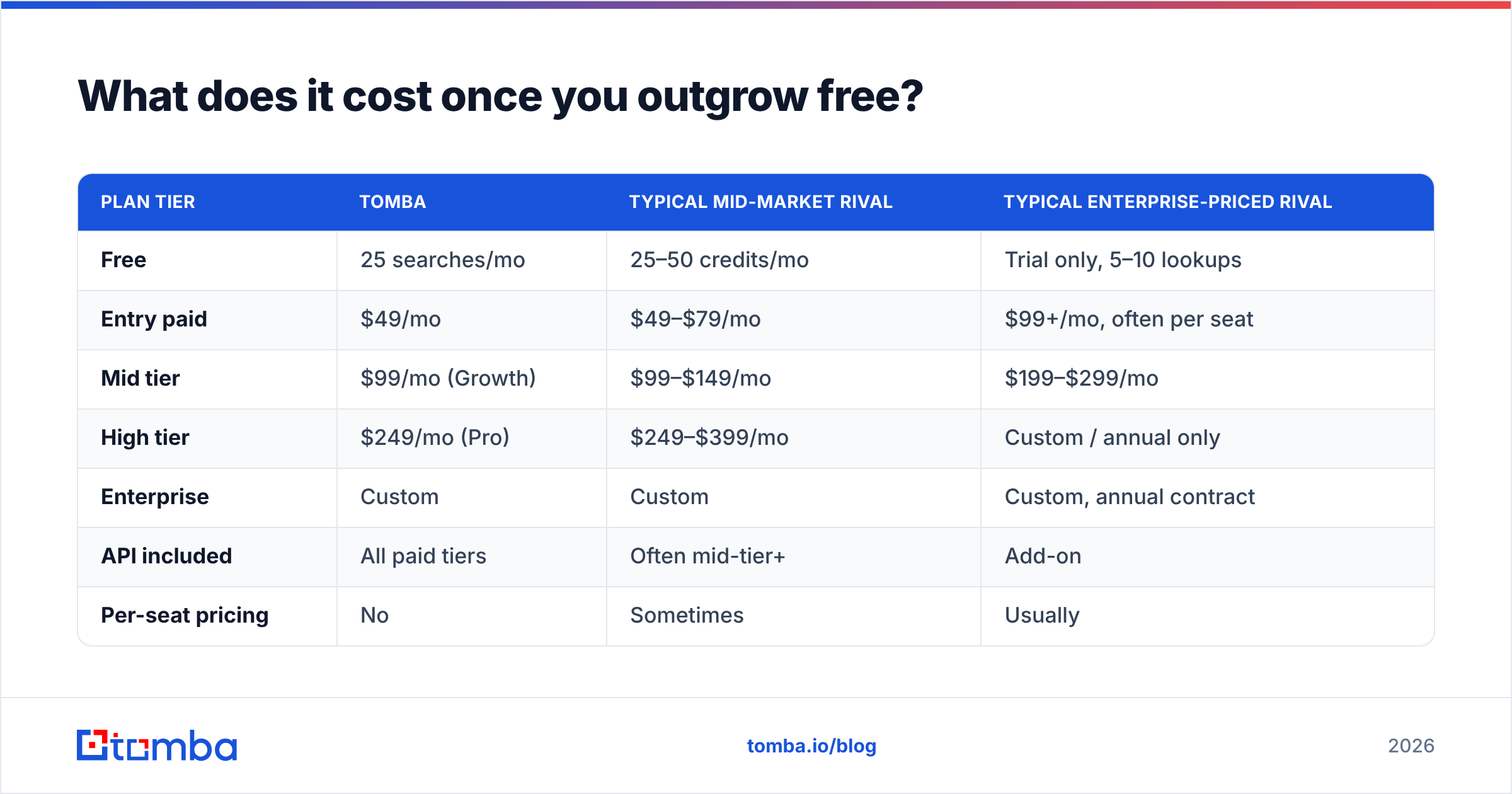
This is the comparison that actually determines your annual spend, and it's where the category splits hard.
| Plan tier | Tomba | Typical mid-market rival | Typical enterprise-priced rival |
|---|---|---|---|
| Free | 25 searches/mo | 25–50 credits/mo | Trial only, 5–10 lookups |
| Entry paid | $49/mo | $49–$79/mo | $99+/mo, often per seat |
| Mid tier | $99/mo (Growth) | $99–$149/mo | $199–$299/mo |
| High tier | $249/mo (Pro) | $249–$399/mo | Custom / annual only |
| Enterprise | Custom | Custom | Custom, annual contract |
| API included | All paid tiers | Often mid-tier+ | Add-on |
| Per-seat pricing | No | Sometimes | Usually |

The structural detail worth more than the headline number: per-seat vs. per-workspace pricing. A $99/mo workspace plan shared by four SDRs is a different business case than $99/seat/month. Seat-based tools look competitive at the entry tier and get expensive fast as the team grows. Check Tomba pricing and any competitor's pricing page for the word "per user" — it's the single highest-leverage line item in the comparison.
The other one: credit rollover and overage behavior. Do unused credits expire monthly? What happens on the 400th lookup of a 300-credit plan — hard stop, or auto-billed overage at 3x the marginal rate? Vendors are inconsistent here, and it's rarely on the pricing page.

Are free email finder alternatives (permutators, Google dorks) worth it?#
They have a place, but a narrow one.
Email permutators generate every plausible combination — jane@, jane.doe@, jdoe@, j.doe@ — from a name and domain. They're free and unlimited because they don't look anything up; they just produce strings. A free email permutator is genuinely useful when you already know a company's pattern and just need to apply it. It's useless when you don't, because you'll end up with 12 candidates and no way to pick.
Manual verification of those candidates is the bottleneck. You can run each through a free email checker, but syntax-and-MX checks won't distinguish a real mailbox from a catch-all. Sending test emails to find out is how you damage your domain reputation.
Search-operator techniques (site:linkedin.com "VP Marketing" "acme", or searching a domain plus "@acme.com") still surface real addresses, especially for people who publish. They're slow — figure five to ten minutes per contact — which prices them out of anything above a handful of targets per week.
Company website mining works better than people expect. Press pages, team pages, and PDF whitepapers leak addresses constantly. An email extractor run over pasted page text costs nothing and sometimes reveals the pattern for the whole company in one shot.
The honest summary: free manual methods cost you time instead of money, at roughly 10–15 minutes per verified contact. If your time is worth $40/hour, that's ~$8 per contact — considerably more expensive than any paid plan on the table. Manual methods are for the contacts that matter enormously, not for volume.
What about buying verified lists instead?#
Worth mentioning because it's a genuinely different model. Providers like BookYourData sell verified contacts on a pay-as-you-go basis rather than a monthly subscription, with verification applied at delivery. If your usage is spiky — a burst of 5,000 contacts for one campaign, then nothing for three months — pay-per-contact can cost less than carrying a subscription through the quiet months.
The tradeoff is freshness and specificity. A finder queries live at the moment you ask; a list is a snapshot. For fast-moving segments (startups, anyone in a layoff-heavy sector), that gap matters. Many teams run both: a subscription finder for named-account work, a list purchase for broad campaigns. Neither is strictly better — they solve different shapes of the same problem.
What should you do next?#
Pick two tools. Run the 25-credit protocol from the section above on both, with a known-answer list. Compare hit rate and bounce rate, not confidence scores. Then check whether the winner's entry plan is per-seat or per-workspace, and whether the API is included at the tier you'd actually buy.
If you want a free tier that lets you test the whole surface — UI, spreadsheet add-ons, and the API with a real key — start with the Tomba Email Finder. The free plan gives you 25 searches a month with verification bundled and API access included, so your evaluation isn't limited to clicking around a dashboard. If the accuracy holds up on your own list, Starter is $49/mo for a workspace, not per seat. If it doesn't, you've spent nothing and learned something concrete about your data problem.
Either way, run the test before you run the campaign. A bad email list is more expensive than any tool on this page.
Related guides#
Ready to find emails that actually work?
Join 150,000+ professionals who stopped guessing and started sending. Free credits on signup — no credit card required.
Get the Tomba newsletter
Practical outbound tactics and product updates — once every two weeks.
About the author