Email List Building Service: What You Actually Pay For
Done-for-you list building sounds like a shortcut. Here's what an email list building service actually costs in 2026, where the data really comes from, and when building it in-house beats buying it.
TL;DR
- An email list building service is a done-for-you research layer: someone else defines your ICP, sources contacts, verifies them, and hands you a CSV or a CRM sync.
- Pricing in 2026 splits into three models — per-contact ($0.10–$0.80), subscription credits ($49–$999/mo), and managed retainer ($1,500–$6,000/mo). The retainer is mostly labor, not data.
- The data underneath almost every vendor comes from the same pool: public web pages, business registries, permission-based panels, and contributed contact books. What you're really buying is filtering, verification, and speed.
- DIY with an email finder plus a verifier costs roughly 5–15x less per usable contact — but it costs you hours. Outsource when list building is a recurring bottleneck, not when it's a one-time project.
- Whichever route you pick, verification is non-negotiable. A 92%-deliverable list of 2,000 beats a 60%-deliverable list of 20,000 every single quarter.
What Is an Email List Building Service?#
An email list building service is a vendor that takes a target definition from you and returns a contact list you can email. That's it. The differences between providers are in how they source, how they verify, and how much of the work is human.
Think of it like a grocery delivery service. The vegetables aren't magic — they're the same ones in the same store. You're paying for someone to walk the aisles, check the sell-by dates, and drop the bag at your door. The value is real, but it's labor value, not ingredient value.
The category breaks into four distinct models that get lumped together in the same G2 grids:
- Self-serve databases. You log in, apply filters (industry, headcount, title, geography, tech stack), export. You do the thinking; the vendor supplies volume. Apollo, ZoomInfo, and BookYourData sit here, with different depth-vs-price tradeoffs.
- API-first finders. You already know the companies or people; you need the email addresses. You feed in a domain and a name, get back an address plus a confidence score. This is where an email finder or a domain search lives.
- Managed list-building agencies. A human researcher (often offshore) builds the list to your brief, usually in a shared sheet, usually within 3–10 business days. You're buying judgment on ambiguous ICP calls.
- Hybrid "data-as-a-service" retainers. Monthly contact quota, dedicated account contact, custom enrichment fields, CRM push. Priced like software, delivered partly by people.
Most buyers think they need #3 and actually need #1 or #2. The exception: when your ICP can't be expressed as filters — "manufacturers who just posted a job for a quality engineer and use SAP" — a human researcher earns their fee.

How Much Does an Email List Building Service Cost in 2026?#
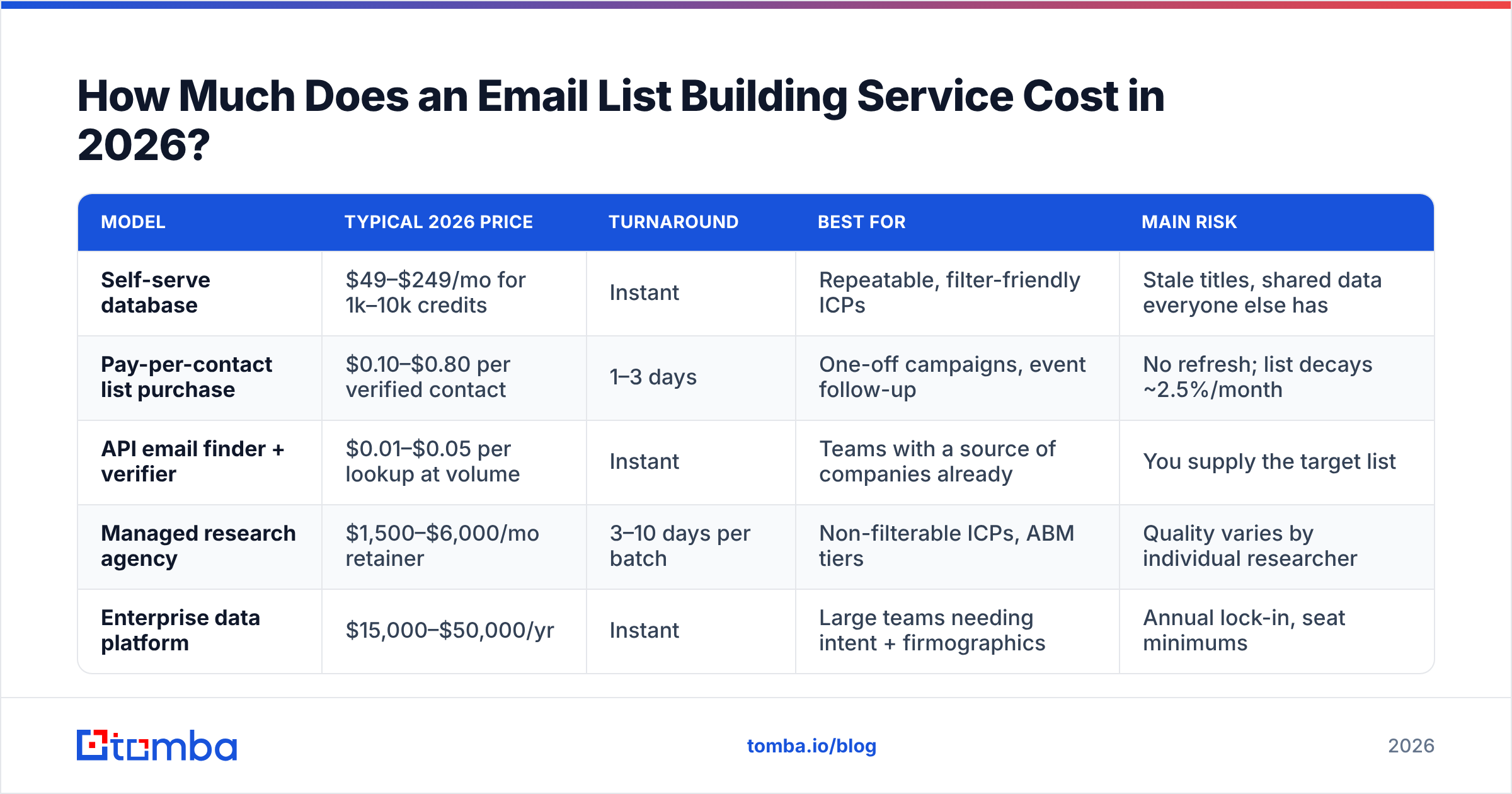
Prices have compressed hard since 2023, mostly because verification got cheap and scraping got commoditized. Here's the current landscape by model rather than by brand, since brand pricing moves quarterly.
| Model | Typical 2026 price | Turnaround | Best for | Main risk |
|---|---|---|---|---|
| Self-serve database | $49–$249/mo for 1k–10k credits | Instant | Repeatable, filter-friendly ICPs | Stale titles, shared data everyone else has |
| Pay-per-contact list purchase | $0.10–$0.80 per verified contact | 1–3 days | One-off campaigns, event follow-up | No refresh; list decays ~2.5%/month |
| API email finder + verifier | $0.01–$0.05 per lookup at volume | Instant | Teams with a source of companies already | You supply the target list |
| Managed research agency | $1,500–$6,000/mo retainer | 3–10 days per batch | Non-filterable ICPs, ABM tiers | Quality varies by individual researcher |
| Enterprise data platform | $15,000–$50,000/yr | Instant | Large teams needing intent + firmographics | Annual lock-in, seat minimums |
Two numbers matter more than the headline price:
Cost per usable contact. A $0.15 contact that bounces is not cheaper than a $0.40 contact that lands. If a vendor's list runs 70% deliverable, your real cost is $0.21. If another runs 96%, their $0.40 is $0.42. Now compare.
Cost per replied contact. This is the only number your CFO cares about. Data quality is upstream of reply rate, but so is targeting accuracy. A perfectly deliverable list of the wrong people converts at zero.
For reference, Tomba's own pricing runs a free tier at 25 searches/month, Starter at $49/mo, Growth at $99/mo, and Pro at $249/mo — which is the self-serve/API band, not the managed band. If you're being quoted $4,000/month, you're paying for people, and you should be able to name those people.
Is a Done-For-You List Better Than Building Your Own?#
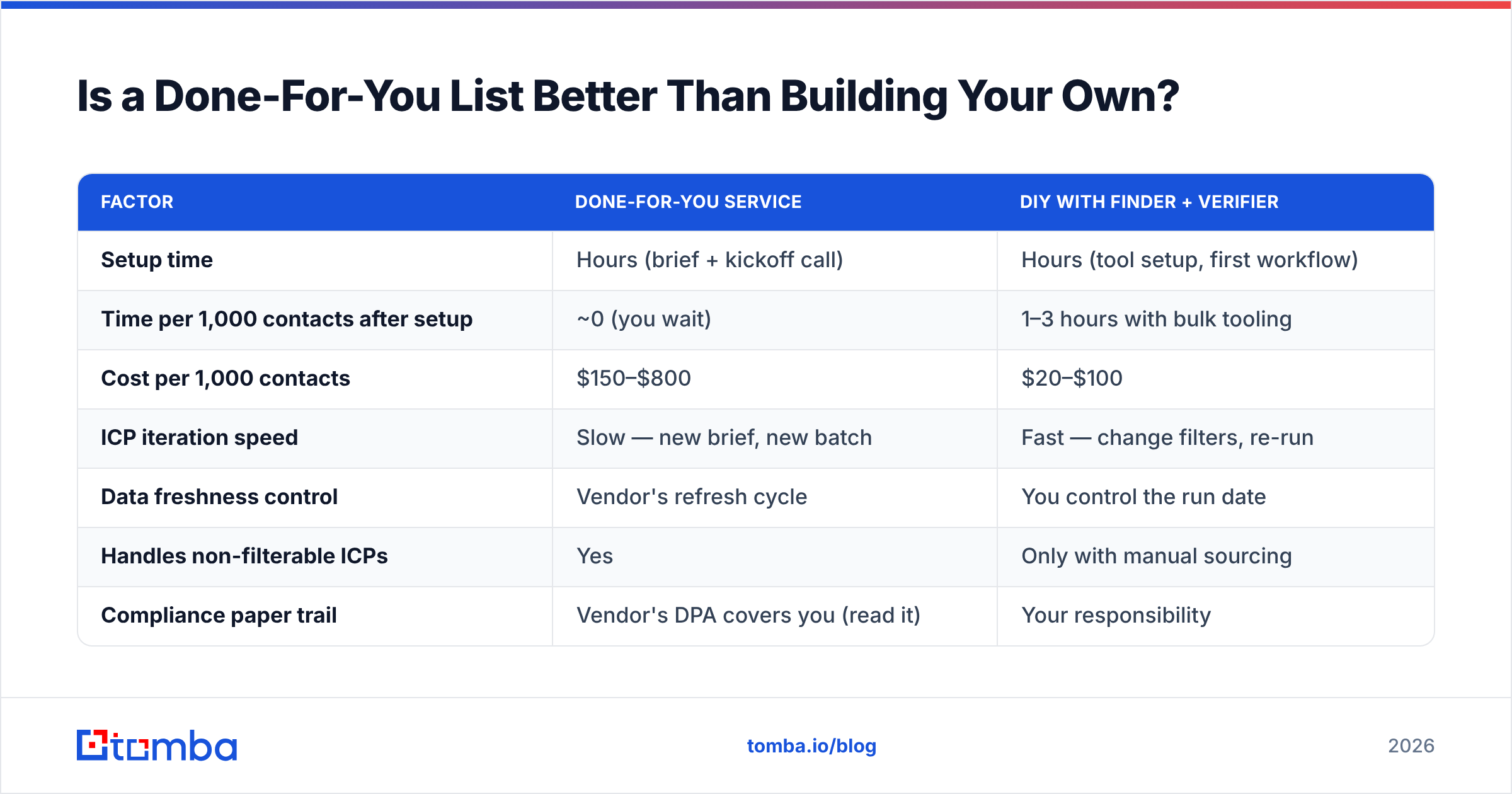
Not inherently. It's better under specific conditions, and worse under others. Here's the honest split.
| Factor | Done-for-you service | DIY with finder + verifier |
|---|---|---|
| Setup time | Hours (brief + kickoff call) | Hours (tool setup, first workflow) |
| Time per 1,000 contacts after setup | ~0 (you wait) | 1–3 hours with bulk tooling |
| Cost per 1,000 contacts | $150–$800 | $20–$100 |
| ICP iteration speed | Slow — new brief, new batch | Fast — change filters, re-run |
| Data freshness control | Vendor's refresh cycle | You control the run date |
| Handles non-filterable ICPs | Yes | Only with manual sourcing |
| Compliance paper trail | Vendor's DPA covers you (read it) | Your responsibility |
| Scales past 50k/month | Yes, linearly priced | Yes, but ops-heavy |
The pattern I see repeatedly: teams outsource because list building feels low-value, then discover that the person building the list is making 40 ICP micro-decisions per hour that nobody wrote down. When those decisions move to a vendor, the ICP drifts. Six weeks later reply rates are down and nobody can explain why.
The fix isn't "never outsource." It's: own the ICP definition and the verification step, outsource the sourcing labor. Keep the two decisions that determine outcome, hand off the one that's just typing.
Where Does the Data Actually Come From?#
Every vendor's marketing page implies proprietary access. Almost none of it is. The realistic sourcing stack, in descending order of volume:
- Public web crawling. Company sites, team pages, press releases, conference speaker lists, GitHub profiles, job boards. This is the majority of most B2B databases.
- Business registries and filings. Company names, domains, HQ addresses, headcount bands, SIC/NAICS codes.
- Pattern inference. Once you know a domain uses
first.last@, you can generate and then validate addresses for anyone whose name you know. This is what a company email pattern check does, and it's how most "found" emails are actually produced. - Contributed address books. Browser extensions and freemium apps where users grant access to their contacts. Legally murky in the EU, ubiquitous in practice.
- Permission-based panels and co-registration. Smaller volume, better provenance, usually more expensive.
Ask any vendor to name which of these five they use and in what proportion. A serious provider will answer. Tomba publishes its data sources for exactly this reason; if a vendor treats the question as adversarial, that tells you something.
This matters beyond curiosity. Under GDPR, a legitimate-interest basis for B2B outreach requires you to know where the data came from and to honor deletion requests. Under the CAN-SPAM Act, the bar is lower — accurate headers, working opt-out, physical address — but "my vendor gave it to me" is not a defense for anything.
What Separates a Good Provider From a Bad One?#
Six checks, in the order I'd run them during a trial:
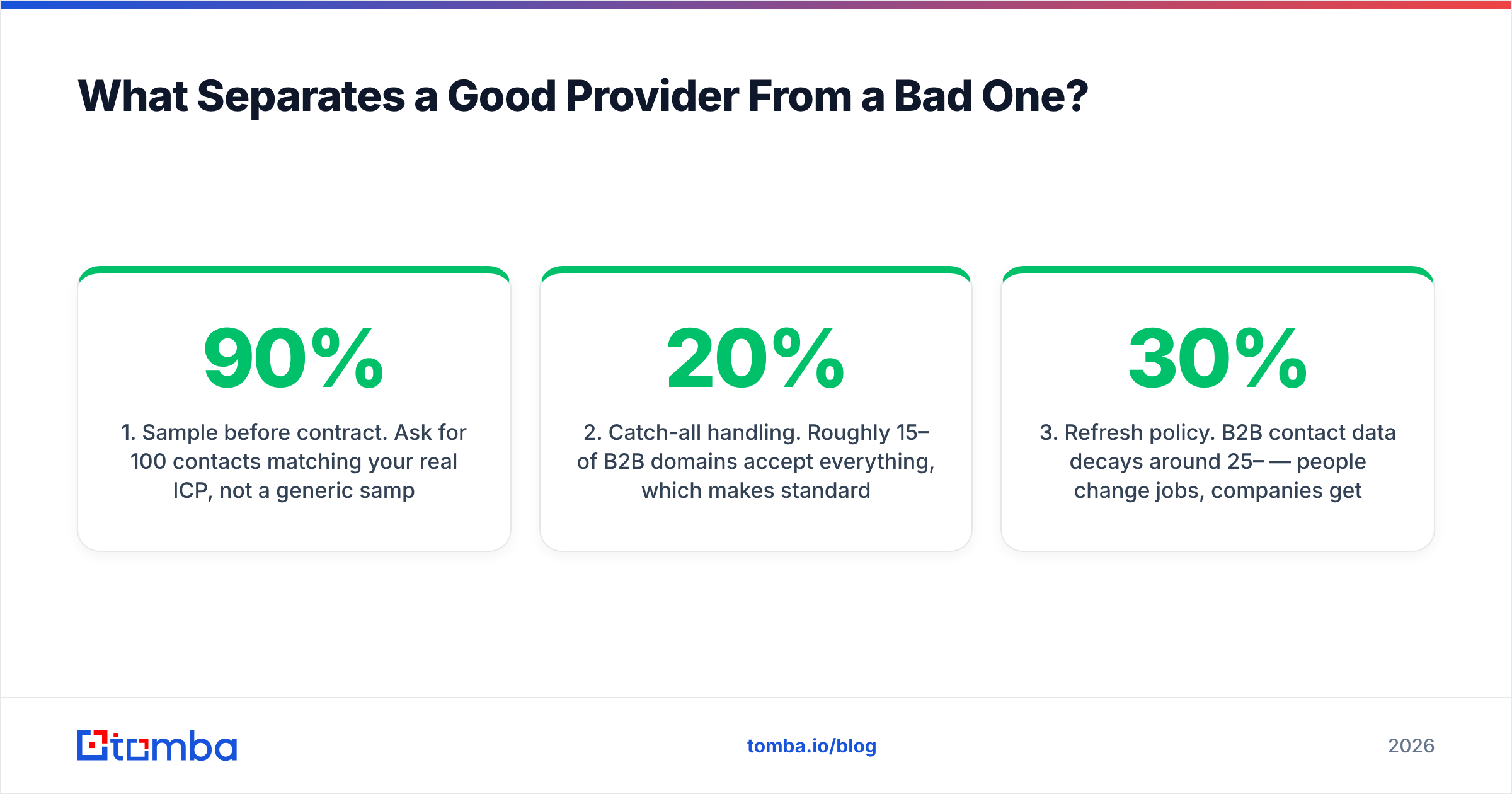
- Sample before contract. Ask for 100 contacts matching your real ICP, not a generic sample. Run them through an independent email verifier. If deliverability is under 90%, the number on their homepage is a lab number, not a field number.
- Catch-all handling. Roughly 15–20% of B2B domains accept everything, which makes standard SMTP checks useless. Ask specifically how they classify catch-alls. Vendors that mark them "valid" are inflating accuracy; vendors that discard them are throwing away real contacts. The right answer is a separate confidence tier — which is what catch-all verification exists to produce.
- Refresh policy. B2B contact data decays around 25–30% per year — people change jobs, companies get acquired. Does your list get refreshed, or is it a snapshot? Snapshot pricing should be lower.
- Replacement guarantee. Good vendors credit bounces above a stated threshold. Get the threshold and the claim window in writing.
- Exclusivity. Ask whether the same list has been sold to your competitors. Most self-serve databases: yes, obviously. Managed research: should be no.
- Export freedom. Can you take the data out in a plain CSV with no contractual restriction on re-use? Some enterprise contracts restrict this more than buyers realize.

How Do You Build the Same List Yourself?#
If the checks above make you think you'd rather own this, the DIY workflow is genuinely short. Five steps, repeatable weekly:
- Define the account list first, not the contact list. Pull companies from a directory, a job board, a G2 category page, a conference exhibitor list, or your own website traffic. Fifty to 500 accounts is a normal weekly batch. Reviews sites like G2 are underrated here — a category page is a pre-qualified list of companies that already buy software in your space.
- Identify the roles, not the names. Decide the two or three titles that own the problem you solve. Vague targeting is the single biggest cause of bad reply rates, and no vendor can fix it for you.
- Find the addresses. Run domain-level discovery to see who's publicly associated with each company, then name-level lookups for the specific people you want. A bulk email finder handles this in batches rather than one at a time — that's the difference between a 20-minute job and a 4-hour job.
- Verify everything, twice if the list is old. Syntax, MX record, SMTP response, catch-all classification, role-account flagging (
info@,sales@). Drop anything below your confidence threshold instead of "testing it in the campaign." Your sending domain pays for that experiment. - Enrich and route. Add headcount, funding stage, tech stack, or whatever your sequence personalizes on, then push into your CRM. HubSpot's inbound methodology docs are a reasonable reference for how enrichment feeds segmentation without turning into busywork.
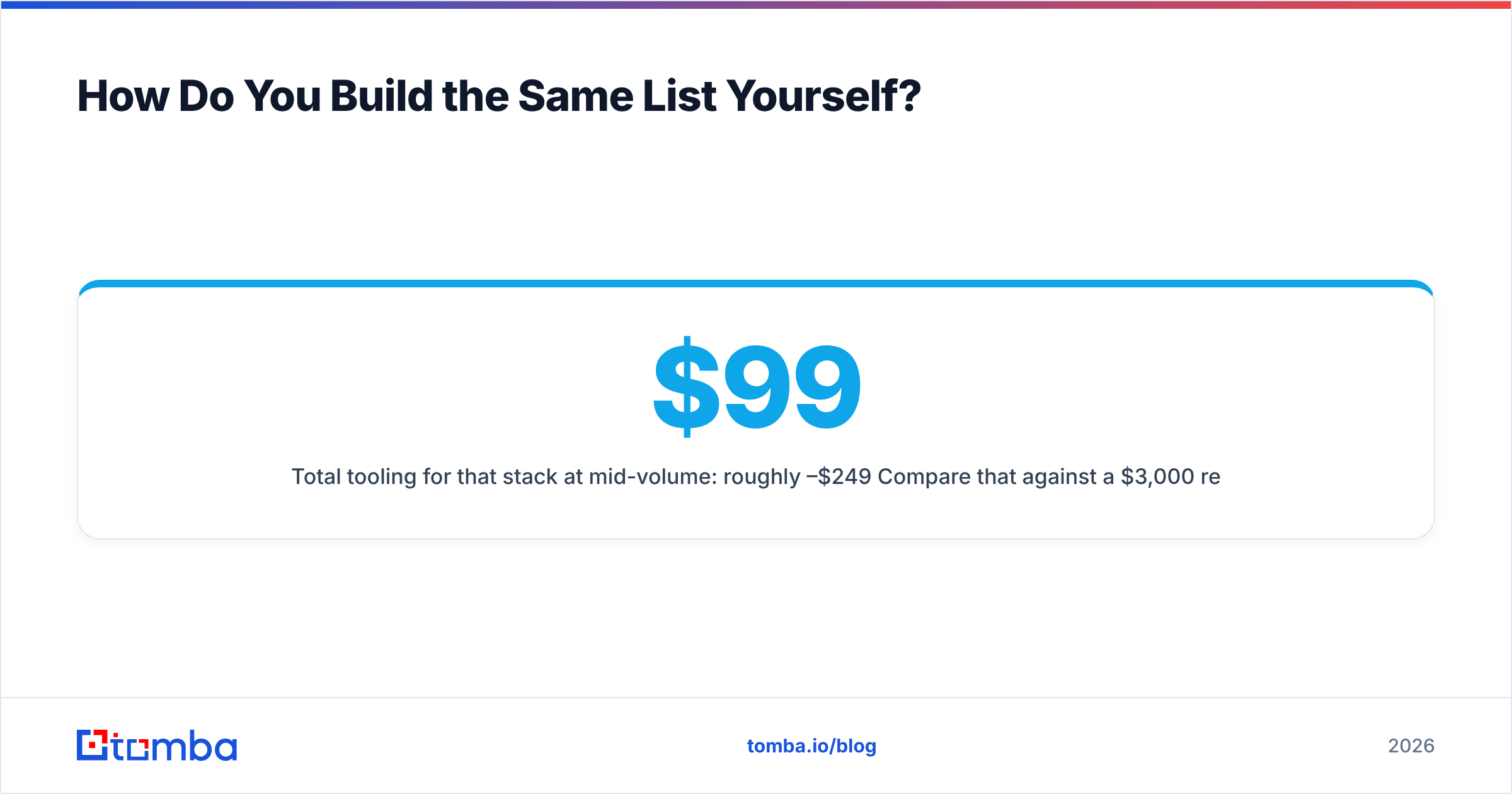
Total tooling for that stack at mid-volume: roughly $99–$249/month. Compare that against a $3,000 retainer and the math only favors the retainer when your team's hours are worth more than the delta — which, for a two-person founding sales team, they often are. For a 10-person SDR org with an ops person, they usually aren't.
What Are the Hidden Costs Nobody Quotes?#
Four line items that show up after the invoice:
- Sender reputation damage. A single campaign to a 25%-bounce list can take weeks to recover from. The remediation cost — warming a new domain, throttled sending, missed pipeline — routinely exceeds the list price by 10x. Check sender reputation before and after any new data source.
- Deduplication against existing CRM records. Bought lists overlap with your existing database more than you'd expect. Emailing a live opportunity with a cold-open template is a real risk. Budget an hour for a dedupe pass.
- Suppression list management. Every unsubscribe, every "not interested," every competitor domain needs to persist across vendors and campaigns. Nobody sells you this and everybody needs it.
- Re-verification at send time. If a list sat in a spreadsheet for eight weeks before the campaign shipped, it decayed. Re-verify immediately before sending, not when you buy.
When Should You Actually Hire an Email List Building Service?#
Four situations where outsourcing is clearly correct:
- Your ICP is a judgment call. "Family-owned distributors in the Midwest planning an ERP migration" cannot be expressed as filters. Pay a human.
- You need volume this week and have no tooling. A one-time 5,000-contact purchase to test a new market segment is a reasonable $1,000–$2,500 experiment. Just don't build a permanent process on it.
- Your team's hours are the binding constraint. If your two AEs are at capacity and each hour of research displaces an hour of selling, the retainer pays for itself at almost any price.
- You need a compliance-covered source for a regulated market. Some vendors carry DPAs and consent documentation you'd struggle to produce yourself. Verify this rather than assume it.
And two where it's usually a mistake: when you haven't validated your message yet (you'll burn good data testing bad copy), and when your total addressable market is under a few thousand accounts — at that size, manual research by someone who understands the product beats any vendor.
The Practical Middle Path#
Most teams land here, and it works: buy the accounts, build the contacts.
Use a database or a managed service to produce the company list — that's the part where breadth genuinely helps and where vendors add real value. Then run contact discovery and verification in-house, where you control freshness, confidence thresholds, and exactly which titles make the cut. You get vendor breadth with your own quality bar, and your cost per usable contact drops well below either extreme.
That split also keeps your data portable. Accounts are cheap to re-source; a verified, enriched, deduped contact database that you own is the asset that survives a vendor switch.
Ready to stop paying per contact for data you can build? Start with Tomba Email Finder — find professional email addresses by domain, name, or company, with confidence scoring and verification built into the same workflow. The free tier gives you 25 searches a month to sanity-check the quality against whatever list you're being sold. If it holds up, Starter runs $49/mo and Growth $99/mo, which is roughly what one week of a managed retainer costs.
Related guides#
Ready to find emails that actually work?
Join 150,000+ professionals who stopped guessing and started sending. Free credits on signup — no credit card required.
Get the Tomba newsletter
Practical outbound tactics and product updates — once every two weeks.
About the author