Email List Providers in 2026: How to Pick One That Works
Most email list providers resell the same aging records at wildly different prices. Here's how the major options actually compare on accuracy, pricing model, compliance, and what happens to your domain when the data is wrong.
TL;DR
- Most email list providers are selling from overlapping data pools. The real difference is refresh frequency, verification depth, and how they charge you for bad records.
- A purchased B2B list decays about 2–2.5% per month from job changes alone. A "95% accurate" file bought in January is closer to 80% by summer.
- Static CSV lists are the highest-risk format. On-demand lookup (search or API) beats a bulk file for almost every use case except one-off market sizing.
- Budget for verification separately. Assume you will re-verify every record before it touches your sending domain, no matter what the vendor promises.
- Cheapest per-record is rarely cheapest per-meeting. Price the list on delivered, correct contacts, not on row count.
What are email list providers, exactly?#
An email list provider sells access to B2B contact records — name, company, title, work email, sometimes a direct dial — either as a downloadable file or through a search interface and API.
Think of it like buying produce. Some vendors run their own farm and pick to order (crawl and verify at query time). Some run a warehouse and ship you whatever's in the crate (a pre-built database snapshot). Some are just resellers repackaging someone else's crate with a new label. All three call themselves "data providers," and the label tells you nothing about freshness.
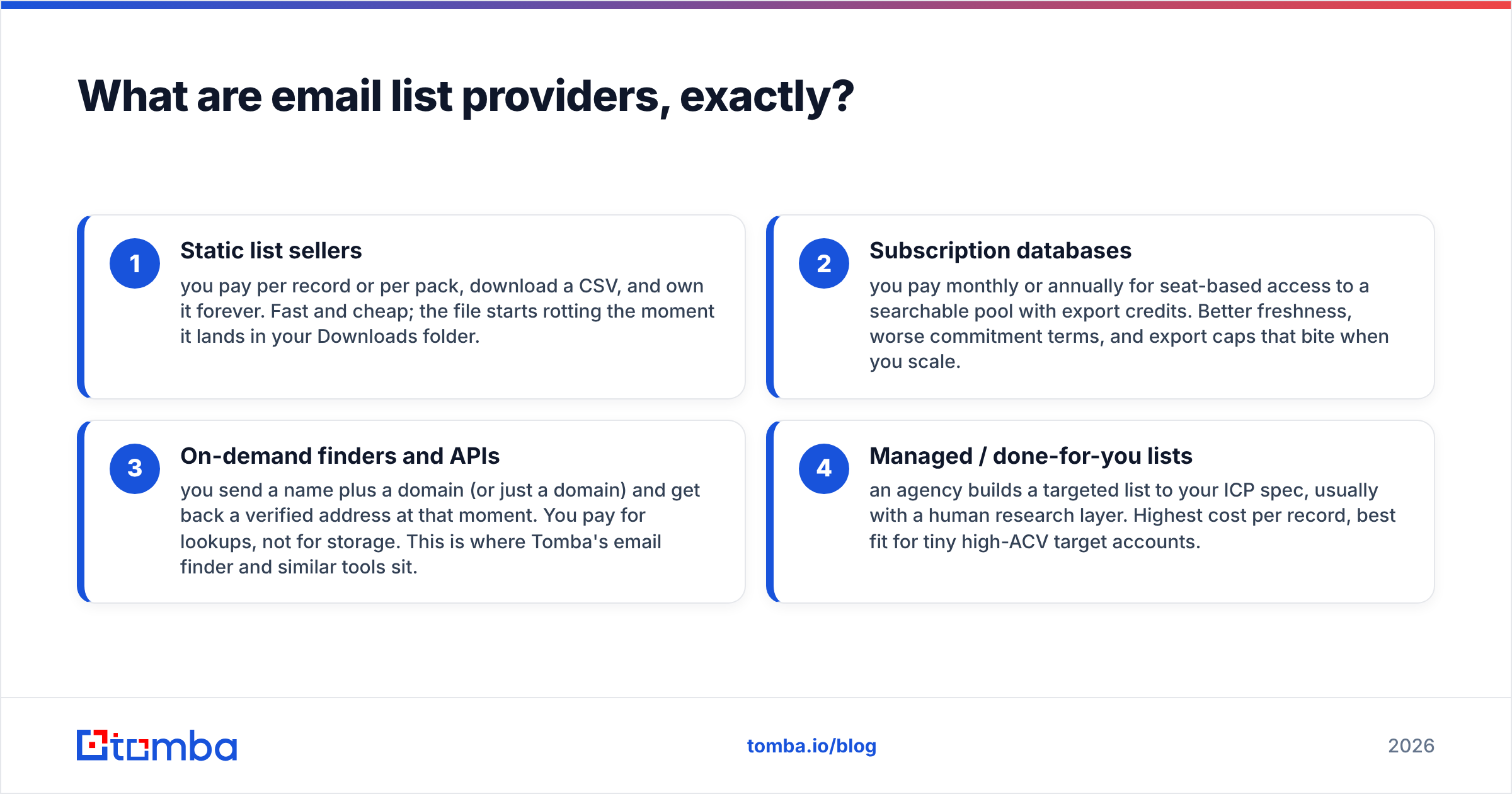
There are four business models hiding under one category:
- Static list sellers — you pay per record or per pack, download a CSV, and own it forever. Fast and cheap; the file starts rotting the moment it lands in your Downloads folder.
- Subscription databases — you pay monthly or annually for seat-based access to a searchable pool with export credits. Better freshness, worse commitment terms, and export caps that bite when you scale.
- On-demand finders and APIs — you send a name plus a domain (or just a domain) and get back a verified address at that moment. You pay for lookups, not for storage. This is where Tomba's email finder and similar tools sit.
- Managed / done-for-you lists — an agency builds a targeted list to your ICP spec, usually with a human research layer. Highest cost per record, best fit for tiny high-ACV target accounts.
Confusing these is the single most common buying mistake. A team that needs 200 precise contacts at 40 named accounts does not need a 500,000-row database, and a team doing broad SMB outbound is wasting money on managed research.
How accurate are purchased B2B email lists?#
Assume every accuracy claim on a vendor homepage is measured under conditions you will not replicate.
Three things inflate published numbers. First, vendors often report syntax and SMTP validity rather than "this human currently reads mail here." A mailbox can accept mail and still belong to someone who left 14 months ago. Second, catch-all domains — where the server accepts everything — are frequently counted as valid. In enterprise segments, catch-all configurations can cover a meaningful slice of your target list, and no provider can confirm those addresses through SMTP alone. Third, accuracy is measured at generation time, not at delivery time.
The decay math is what actually matters. B2B job-change rates run roughly 25–30% annually across sales, marketing, and revenue roles. That is a ~2% monthly haircut before you account for company renames, domain migrations, acquisitions, and role changes inside the same company.

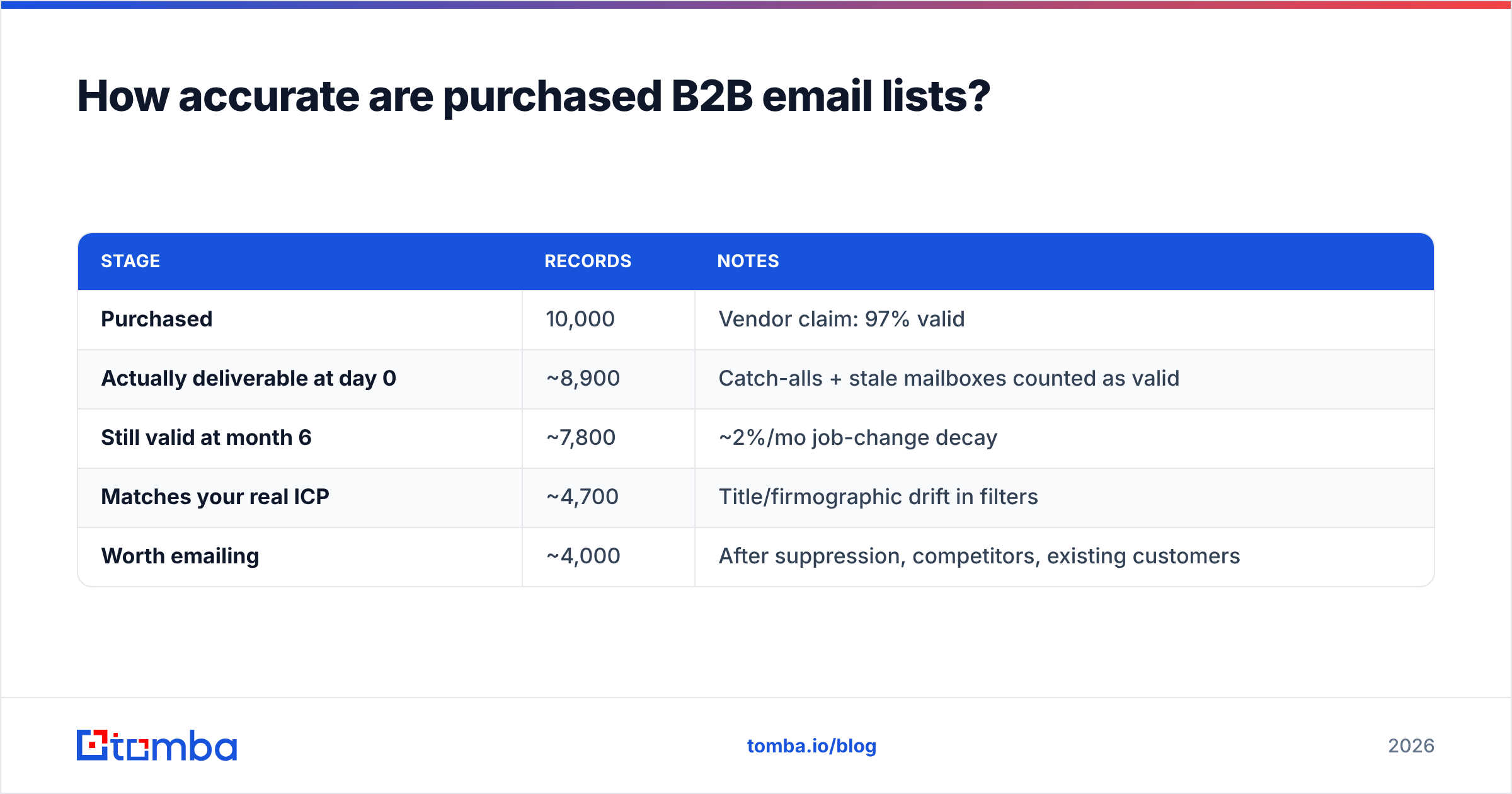
Run the arithmetic on a real purchase. Ten thousand records sold at a claimed 97% accuracy, delivered as a file, used over a six-month sequence campaign:
| Stage | Records | Notes |
|---|---|---|
| Purchased | 10,000 | Vendor claim: 97% valid |
| Actually deliverable at day 0 | ~8,900 | Catch-alls + stale mailboxes counted as valid |
| Still valid at month 6 | ~7,800 | ~2%/mo job-change decay |
| Matches your real ICP | ~4,700 | Title/firmographic drift in filters |
| Worth emailing | ~4,000 | After suppression, competitors, existing customers |
You paid for 10,000 and can responsibly mail about 4,000. That is not a scandal — it is the normal, predictable outcome. It only becomes a problem when you budget as if the 10,000 were real.
This is why the sequencing matters more than the vendor: buy or build, then run every record through an email verifier immediately before the first send, not at purchase time. The gap between those two dates is where domains get burned.
How do the major email list providers compare in 2026?#
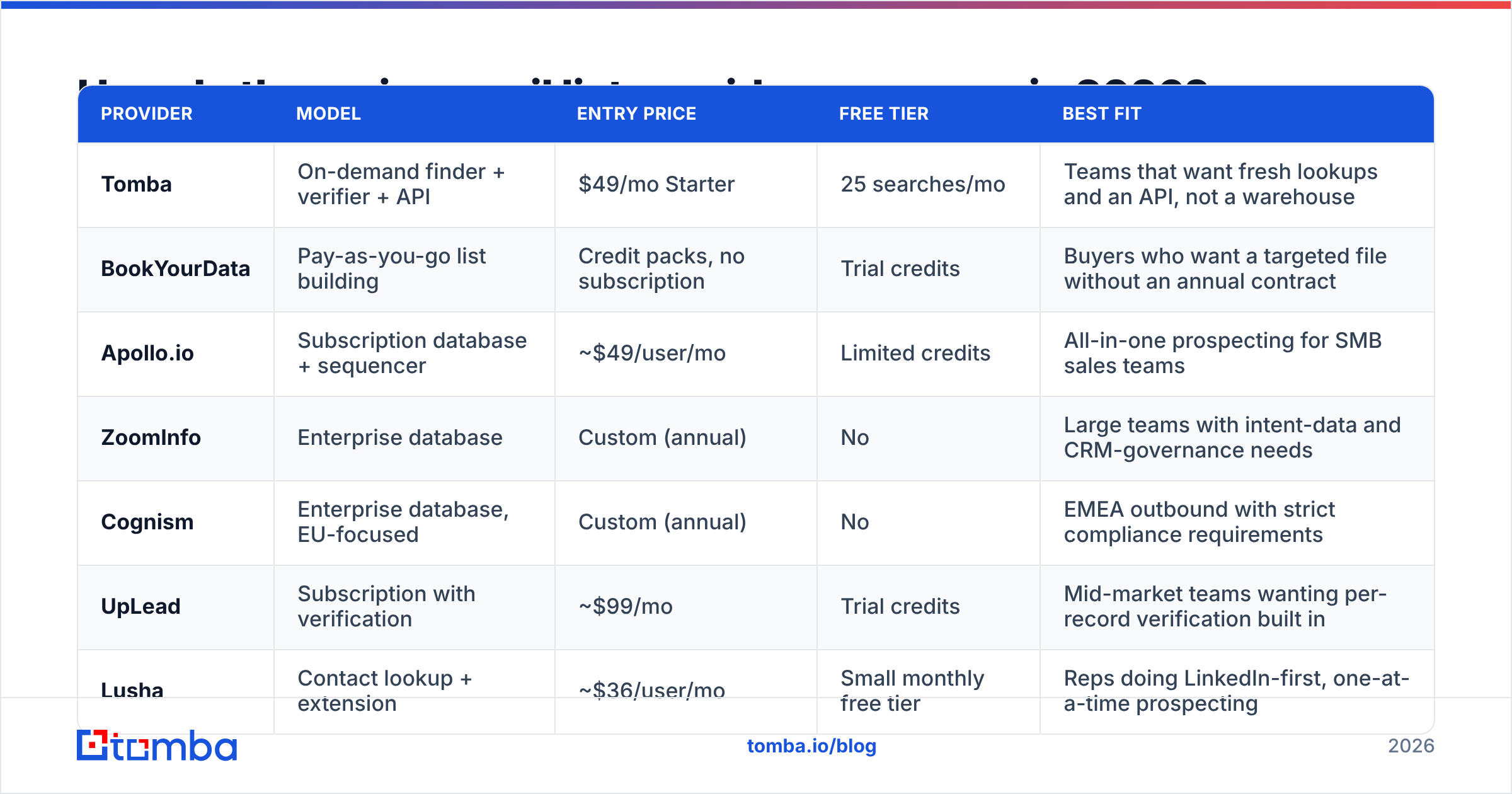
Pricing below reflects publicly listed rates at the time of writing. Enterprise vendors negotiate heavily and publish nothing, so treat "custom" as "expect a five-figure annual commitment and a procurement cycle."

| Provider | Model | Entry price | Free tier | Best fit |
|---|---|---|---|---|
| Tomba | On-demand finder + verifier + API | $49/mo Starter | 25 searches/mo | Teams that want fresh lookups and an API, not a warehouse |
| BookYourData | Pay-as-you-go list building | Credit packs, no subscription | Trial credits | Buyers who want a targeted file without an annual contract |
| Apollo.io | Subscription database + sequencer | ~$49/user/mo | Limited credits | All-in-one prospecting for SMB sales teams |
| ZoomInfo | Enterprise database | Custom (annual) | No | Large teams with intent-data and CRM-governance needs |
| Cognism | Enterprise database, EU-focused | Custom (annual) | No | EMEA outbound with strict compliance requirements |
| UpLead | Subscription with verification | ~$99/mo | Trial credits | Mid-market teams wanting per-record verification built in |
| Lusha | Contact lookup + extension | ~$36/user/mo | Small monthly free tier | Reps doing LinkedIn-first, one-at-a-time prospecting |
A few honest notes on that table.
BookYourData's pay-as-you-go structure solves a real problem the subscription vendors ignore: if you need 3,000 contacts once, an annual seat license is a terrible instrument. Credit packs with no recurring commitment are the right shape for project-based list buying, and they publish filter counts before you pay, which not every vendor does.
Apollo and ZoomInfo are database-first: enormous coverage, strong filtering, and the trade-off that any given record's last-verified date may be old. Their strength is discovery — finding accounts and people you didn't know existed. Their weakness is trusting the address without a re-check.
Tomba sits on the other side. It doesn't try to sell you the biggest warehouse; it finds and verifies the address at the moment you ask, with domain search for company-wide sweeps and bulk processing when you already have a name list. If you already know your accounts, that's the cheaper path. If you don't know your accounts yet, a database vendor earns its money first.
Should you buy an email list or build one?#
Build if you can define your ICP by account. Buy if you can only define it by filter.
That's the whole heuristic, but the details matter:
- Buy when you need market sizing, you're entering a new geography, your ICP is broad (e.g. "US SaaS companies, 50–500 employees"), or speed matters more than precision.
- Build when your ACV is above roughly $10k, your total addressable market is under a few thousand accounts, or your messaging depends on account-specific research.
- Hybrid — and this is what most good teams actually do — use a database vendor to discover accounts and named contacts, then run those names through a lookup tool to get the current, verified address. You're paying the database for discovery and the finder for freshness, which is what each is actually good at.
The hybrid approach also fixes the worst property of purchased lists: you never mail a record you didn't independently confirm. HubSpot's own research on outbound performance has been blunt for years that list quality outweighs copy quality in cold outbound results — you cannot write your way out of a bad list.
What does a bad list actually cost you?#
The invoice is not the cost. The cost is the domain.
Mailbox providers judge you on complaint rate, bounce rate, and engagement. Google and Yahoo's bulk-sender requirements pushed the effective spam-complaint ceiling to 0.3%, with 0.1% the practical target. Bounce rates above roughly 2–3% start suppressing inbox placement; above 5% you are actively training filters against your domain.
Here's the part people underestimate: reputation damage is not scoped to the campaign. Burn your sending domain on a bad list in Q1 and your renewal emails, your product notifications, and your founder's reply-to-a-warm-intro all land in Promotions or worse. Recovery takes weeks of low-volume, high-engagement sending — assuming you don't just buy a new domain and start over.
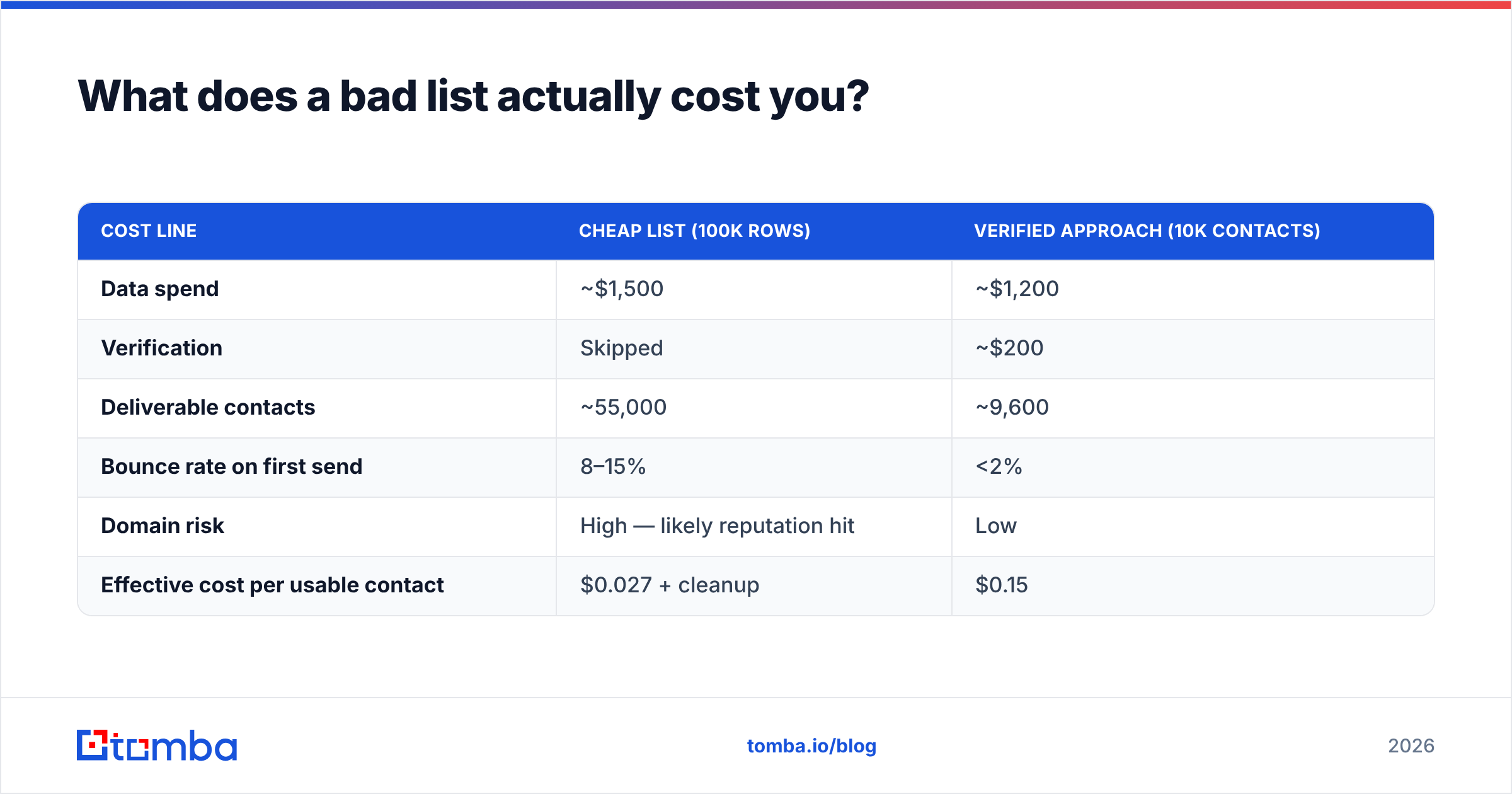
Quantify it before you buy:
| Cost line | Cheap list (100k rows) | Verified approach (10k contacts) |
|---|---|---|
| Data spend | ~$1,500 | ~$1,200 |
| Verification | Skipped | ~$200 |
| Deliverable contacts | ~55,000 | ~9,600 |
| Bounce rate on first send | 8–15% | <2% |
| Domain risk | High — likely reputation hit | Low |
| Effective cost per usable contact | $0.027 + cleanup | $0.15 |
The cheap list looks six times better per contact until you price in a burned domain, a warmup restart, and the deals that quietly didn't land because your follow-ups went to spam.
How do you vet an email list provider before paying?#
Run this checklist on every vendor, including the ones with impressive logos on the homepage:
- Ask for the last-verified timestamp per record. Not the average — the field. If the export can't include it, the data is a snapshot of unknown age.
- Request a sample of 100 records in your exact ICP filter. Verify them yourself with an independent tool. A vendor confident in its data will hand this over; one that offers only a generic sample is telling you something.
- Check the catch-all policy in writing. Does the vendor count catch-all domains as valid? Do they charge you for them? A catch-all verifier on your side is the only way to know what you actually bought.
- Confirm the replacement or credit policy for bounces. Good vendors credit invalid records. Ask for the threshold and the claim window before signing.
- Read the sourcing disclosure. Where does the data come from — public web, contributed contact books, partner networks, opt-in panels? This determines your legal exposure, not theirs.
- Test the export/API path you'll actually use. A great UI with a rate-limited export is useless if your workflow is programmatic. Check whether there's a real email finder API or just a CSV button.
Cross-reference vendor claims against verified user reviews on G2, filtering to reviewers in your company size band. Enterprise reviewers and 5-person-startup reviewers are describing different products.
Is buying B2B email lists legal?#
Short answer: legal in the US with conditions, restricted in the EU and UK, and never a defense against a complaint.
Under CAN-SPAM, purchased B2B lists are permissible. You must not use deceptive headers or subject lines, must disclose that the message is a solicitation, must include a valid physical postal address, and must honor opt-outs within 10 business days. Notably, CAN-SPAM does not require prior consent.
GDPR is different in kind, not just degree. There's no outright ban on B2B cold email, but you need a lawful basis — usually legitimate interest — and you must document a balancing test, provide a privacy notice at first contact, disclose your data source on request, and honor erasure requests. Several member states layer stricter national rules on top (Germany is the usual example). If you're mailing into the EU or UK, buy from a provider that explicitly documents GDPR handling and can produce a data-processing agreement, and keep the consent/source trail in your CRM.
Canada's CASL is the strictest of the three: it requires express or implied consent before sending, with implied consent covering things like a conspicuously published business address relevant to the recipient's role. A generic purchased list generally does not satisfy CASL.
Practical rule: the provider's compliance posture protects the provider. Your compliance posture protects you. Keep source, date, and lawful basis attached to every record you import.
How do you clean a purchased list before sending?#
Treat every file as untrusted input:
- Deduplicate across the file and against your CRM — you do not want to cold-email an existing customer.
- Suppress competitors, current customers, open opportunities, past unsubscribes, and role accounts (info@, sales@, support@) unless role accounts are the point.
- Verify every remaining address immediately before send, not at purchase. Bulk verification on 10,000 records costs less than one recovered domain.
- Segment catch-alls into their own track — lower volume, higher-quality copy, and separate reputation exposure from your clean segment.
- Ramp the send. Even a perfect list mailed at 2,000/day from a cold domain looks like an attack to a filter. Start low, watch engagement, scale weekly.
- Re-verify anything older than 60 days before a second campaign. That's the decay curve doing its work.
Step 3 is non-negotiable. Every vendor's freshness claim is a statement about their database, not about the file sitting in your sequencer this morning.
Which provider should you actually pick?#
Match the model to the shape of your problem, not to the size of the database:
- You know your target accounts by name → skip the database entirely. Use domain search plus a finder, verify, send.
- You need to discover accounts in a new segment → subscription database first for discovery, finder second for the addresses.
- You need a one-time targeted file with no contract → pay-as-you-go providers like BookYourData are built for exactly this and beat annual licenses on total cost.
- You're in EMEA with a strict legal team → prioritize documented GDPR handling and DPAs over raw record count.
- You're building an internal tool or enrichment pipeline → API quality and rate limits matter more than the marketing site's coverage number.
If your workflow is closer to the first, third, or last bullet, on-demand lookup is the cheaper and safer instrument. Tomba's pricing starts free at 25 searches a month, with Starter at $49/mo and Growth at $99/mo — enough to test whether your list can be built on demand before you commit to an annual data contract.
Start with the Tomba Email Finder. Feed it 50 accounts you already want to reach, verify what comes back, and compare the deliverable-contact count against the last file you bought. That single test will tell you more about which email list providers deserve your budget than any vendor comparison page — including this one.
Related guides#
Ready to find emails that actually work?
Join 150,000+ professionals who stopped guessing and started sending. Free credits on signup — no credit card required.
Get the Tomba newsletter
Practical outbound tactics and product updates — once every two weeks.
About the author