Email Locator Free: 9 Tools Tested for Accuracy in 2026
Every email locator free plan promises the same thing: instant contact data at zero cost. The gap shows up in accuracy, monthly caps, and how much of the result set you can actually export. Here is what the free tiers really give you.
Type "email locator free" into Google and you get a wall of tools. They all claim the same thing: work emails at zero cost. Some hand you real credits every month. Others show you a result, then hide the export button. This guide sorts out which is which.
TL;DR
- An email locator free plan returns a person's work email from a name plus a company domain. Most vendors give you 10 to 50 credits a month before the paywall.
- Free tiers differ far more on accuracy and export rights than on credit count. A tool that hands you 100 unverified guesses is worse than one that hands you 25 verified hits.
- Pattern generators and permutators are truly free and unlimited. But they produce candidates, not confirmed addresses. You still need verification.
- Tomba's free tier gives 25 searches a month on the same data pipeline as paid plans, so accuracy doesn't drop just because you're not paying yet.
- Move to paid when your bounce rate crosses 3%, or when you spend more than 20 minutes a week stitching free tools together.
Email locator free: what does the term actually mean?#
An email locator free tool takes what you already know — a first name, last name, and a company domain — and returns the work email that matches. Think of it as a reverse phone book for work inboxes. You know the building and you know the person. You need the room number.
The "free" part almost always means one of three things:
- A permanent free tier — a fixed monthly credit allowance (usually 10–50 lookups) that resets each month. This is the most useful category, because it never expires.
- A free trial — full or near-full access for 7–14 days, then a hard stop. Good for a one-time list build, useless for ongoing prospecting.
- A genuinely free utility — permutators, pattern checkers, and extractors that run on public logic rather than a private database. Unlimited, but they guess rather than confirm.
Confusing the three is the most common mistake. People sign up for a trial, build a workflow around it, then rebuild everything two weeks later.
How does an email locator actually find an address?#
Four mechanisms, usually layered:
- Pattern inference. The tool knows that
stripe.comusesfirst@andhubspot.comusesfirst.last@. Given a name, it builds the likely address. Cheap, fast, and roughly 60–75% accurate on its own. - Crawled public sources. Company sites, press releases, GitHub commits, conference pages, job boards, WHOIS records. If an address has ever been published, a crawler may have it.
- Contributed and licensed data. Users share their contact books, or the vendor buys a B2B panel. This is where large databases get their scale — and where stale records creep in.
- SMTP validation. The tool asks the receiving mail server whether the mailbox exists, without sending anything. This is what turns a guess into a confirmed hit.
The best free tools do all four. The weakest do only the first, then present the output as if it were verified. If a tool returns an address with no confidence score, assume it skipped step four.

Which free email locator tools are worth using in 2026?#
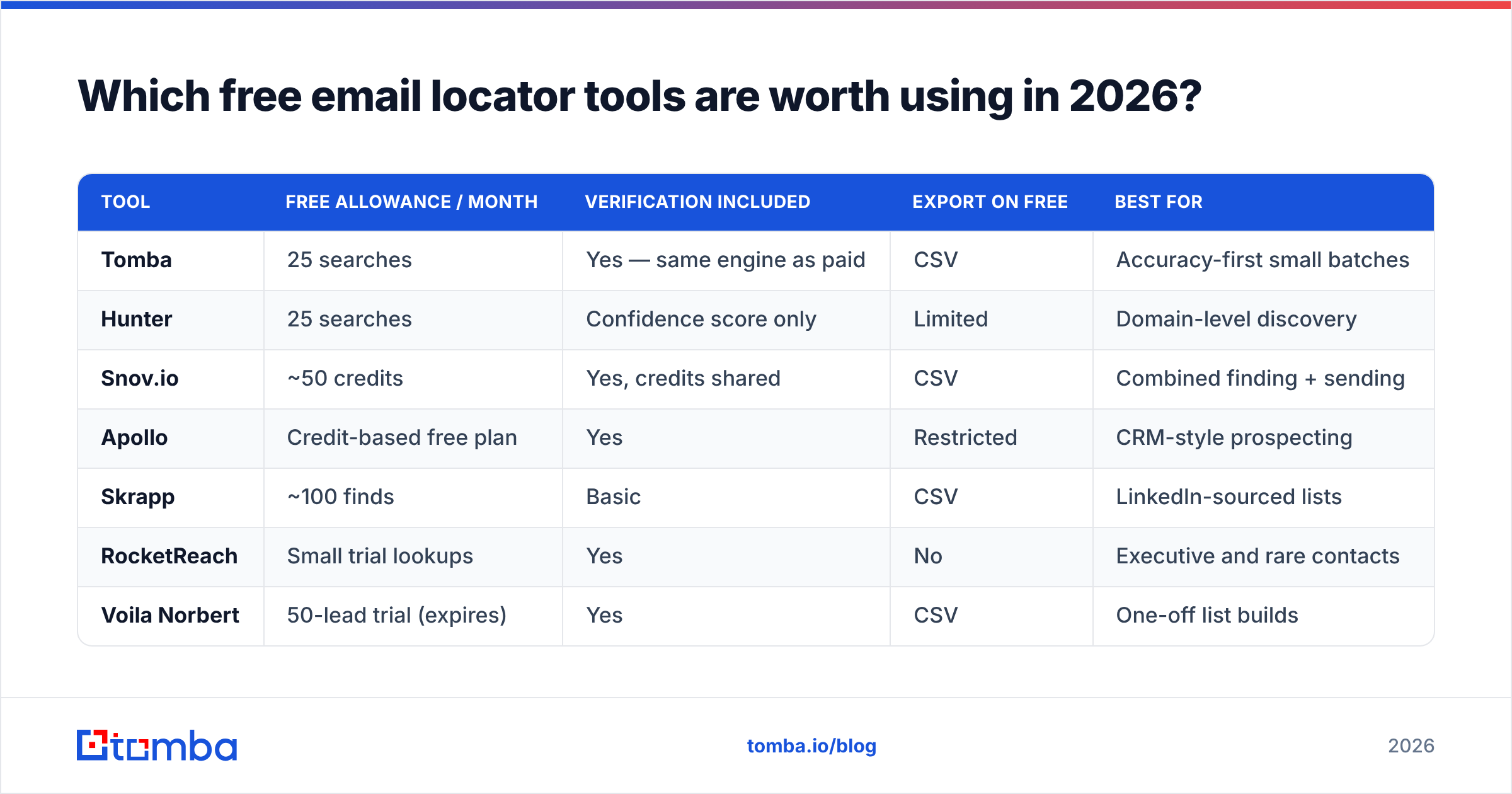
Here is the practical landscape. Free-tier limits are as published by each vendor at the time of writing. Always check the current pricing page before you plan a campaign around a number.
| Tool | Free allowance / month | Verification included | Export on free | Best for |
|---|---|---|---|---|
| Tomba | 25 searches | Yes — same engine as paid | CSV | Accuracy-first small batches |
| Hunter | 25 searches | Confidence score only | Limited | Domain-level discovery |
| Snov.io | ~50 credits | Yes, credits shared | CSV | Combined finding + sending |
| Apollo | Credit-based free plan | Yes | Restricted | CRM-style prospecting |
| Skrapp | ~100 finds | Basic | CSV | LinkedIn-sourced lists |
| RocketReach | Small trial lookups | Yes | No | Executive and rare contacts |
| Voila Norbert | 50-lead trial (expires) | Yes | CSV | One-off list builds |
| Email permutators | Unlimited | No | Copy/paste | Generating candidates |
| BookYourData | Pay-as-you-go samples | Yes, verified records | CSV | Buying pre-verified lists without a subscription |
Two things stand out. First, "more credits" and "better data" are almost never the same axis. The tools with the most generous free counts tend to include the least verification.
Second, export rights matter more than most people expect. When you shop for an email locator free plan, check the download rules before the credit count. A tool that shows an address on screen but blocks CSV download is fine for a few manual lookups. It is useless for building a sequence.

If you want to skip the multi-tool juggling, Tomba's email finder runs on the free tier with the same pipeline that paid accounts use. You test the real product, not a stripped-down sample of it.
How accurate are free email locators?#
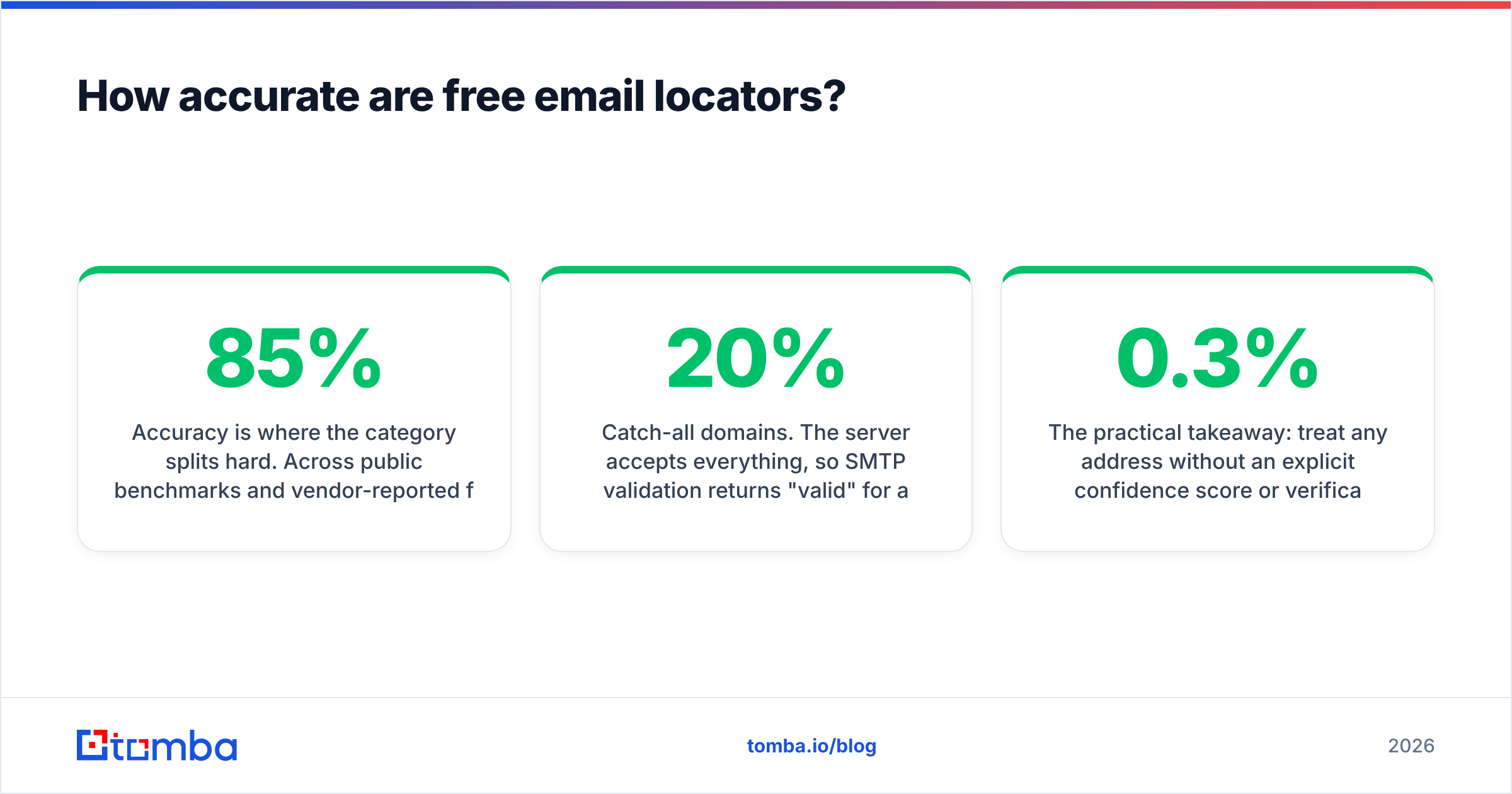
Accuracy is where the category splits hard. Across public benchmarks and vendor-reported figures, established finders land between 85% and 96% on common B2B domains. That number collapses in three predictable cases:
- Catch-all domains. The server accepts everything, so SMTP validation returns "valid" for addresses that don't exist. Roughly 15–20% of B2B domains work this way. Tools that don't flag catch-alls are quietly inflating their accuracy claims.
- Small companies and new domains. Fewer public signals means fewer crawled records. A 12-person agency founded last year is far harder than a 4,000-person enterprise.
- Non-standard formats. Companies using
f.lastname@, employee IDs, or regional subdomains break pattern inference entirely.

The takeaway is simple. Treat any address without a confidence score or verification status as unverified, however confident the UI looks. Run it through an email verifier before it enters a sequence.
Mailbox providers judge you on bounce rate. Google and Yahoo's bulk-sender rules now expect you to stay under a 0.3% spam-complaint rate. A dirty list burns sender reputation faster than bad copy ever will.

What are the hidden limits of a free plan?#
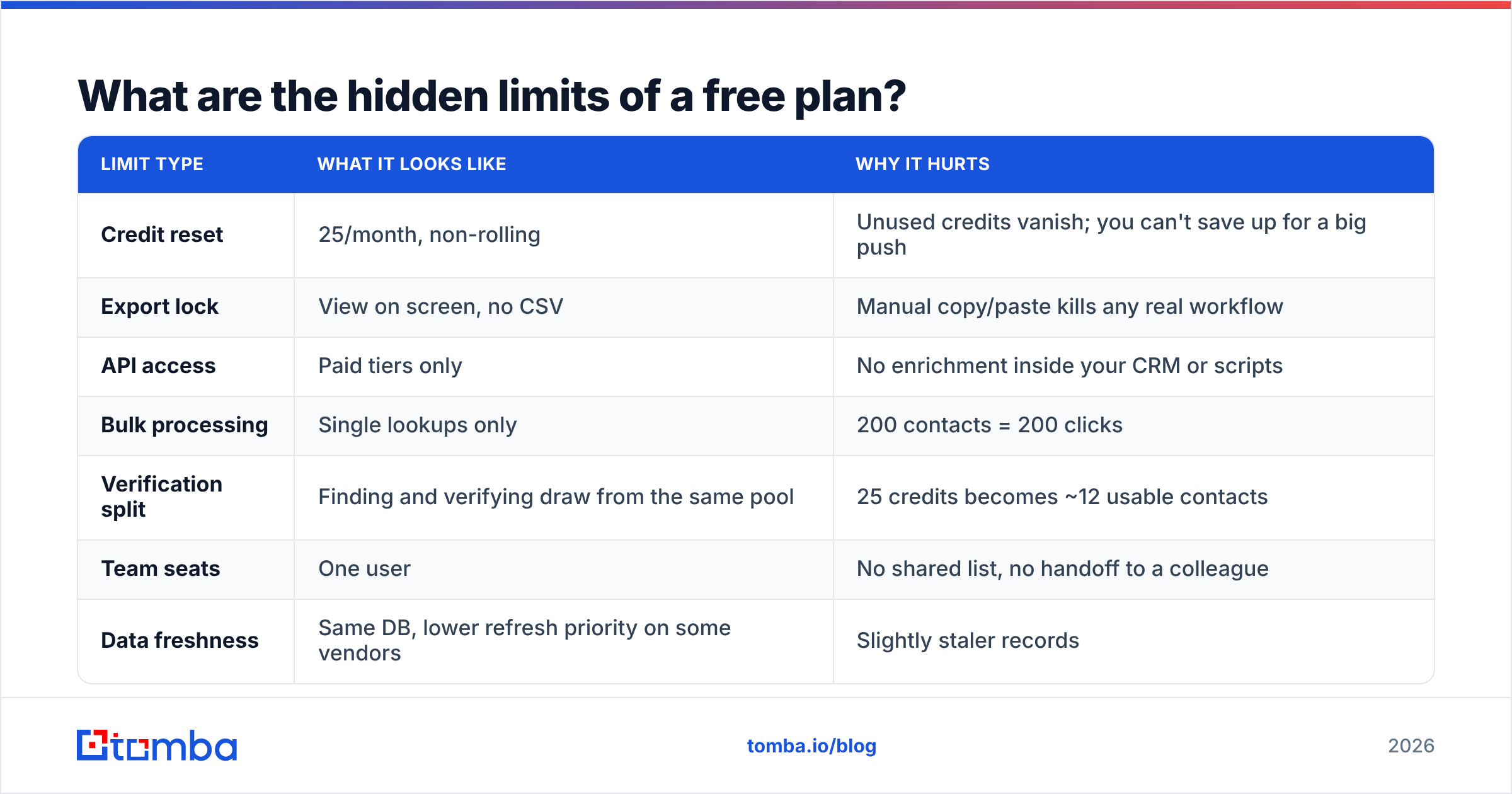
Credit count is the number vendors advertise. These are the limits that actually bite:
| Limit type | What it looks like | Why it hurts |
|---|---|---|
| Credit reset | 25/month, non-rolling | Unused credits vanish; you can't save up for a big push |
| Export lock | View on screen, no CSV | Manual copy/paste kills any real workflow |
| API access | Paid tiers only | No enrichment inside your CRM or scripts |
| Bulk processing | Single lookups only | 200 contacts = 200 clicks |
| Verification split | Finding and verifying draw from the same pool | 25 credits becomes ~12 usable contacts |
| Team seats | One user | No shared list, no handoff to a colleague |
| Data freshness | Same DB, lower refresh priority on some vendors | Slightly staler records |
The verification split is the one people miss. If finding an address costs one credit and confirming it costs another, a "50 credit" free plan is really a 25-contact plan. Read the credit table, not the headline.
How do you get the most out of a free email locator?#
Six moves stretch a small allowance. Start with these three:
- Find the domain pattern first, then reuse it. Spend one credit to confirm a single address at the company. Once you know the format is
first.last@, build the rest with a free email permutator and verify them. Verification is usually cheaper than discovery. - Qualify before you look up. Every credit spent on a company that will never buy is a credit you don't get back. Tighten your ICP filter before you open the tool.
- Stack complementary free tiers. One tool for domain discovery, another for individual lookups, a third for verification. Tedious, but it triples your monthly volume at zero cost.
Add these three once the basics are running:
- Batch your lookups monthly. Non-rolling credits mean the last week of the month is use-it-or-lose-it. Set a recurring reminder.
- Flag catch-all domains separately. Don't burn credits on a domain that will always return "accept all." Segment those contacts and reach them on another channel, or run them through a dedicated catch-all verifier.
- Log everything in one sheet. Free tiers don't give you a lasting contact database. If you lose the export, you paid credits for nothing.
Is an email locator free plan enough for real outbound?#
For most teams, no. The tipping point is more obvious than people expect.
Run the arithmetic. A working outbound motion needs roughly 300–500 fresh contacts per rep per month. At 25 free credits, you'd need 15+ accounts across 15+ tools to cover a single rep. You would spend more time on tool admin than on selling. At an average loaded SDR cost, 90 minutes a month of credit-juggling already costs more than a paid plan.
Free tiers are the right choice in exactly three cases:
- Evaluation. You're testing accuracy on domains you already know before you commit budget. This is what free tiers exist for.
- Founder-led sales at low volume. 20–40 highly targeted contacts a month, hand-researched anyway.
- Occasional one-off lookups. You need to reach one specific person, once.
Everything else needs paid volume and API access: sequences, territory coverage, ABM lists, and CRM enrichment. For a neutral view of how buyers rank the category, start with G2's lead intelligence grid. It also helps to skim a vendor's own docs, such as Hunter's published limits, rather than trusting a roundup's numbers.
What should you look for when upgrading?#
Four criteria, in order of how much they affect your results:
- Verification bundled, not billed separately. If you buy find-credits and verify-credits from two vendors, you pay twice and reconcile two exports.
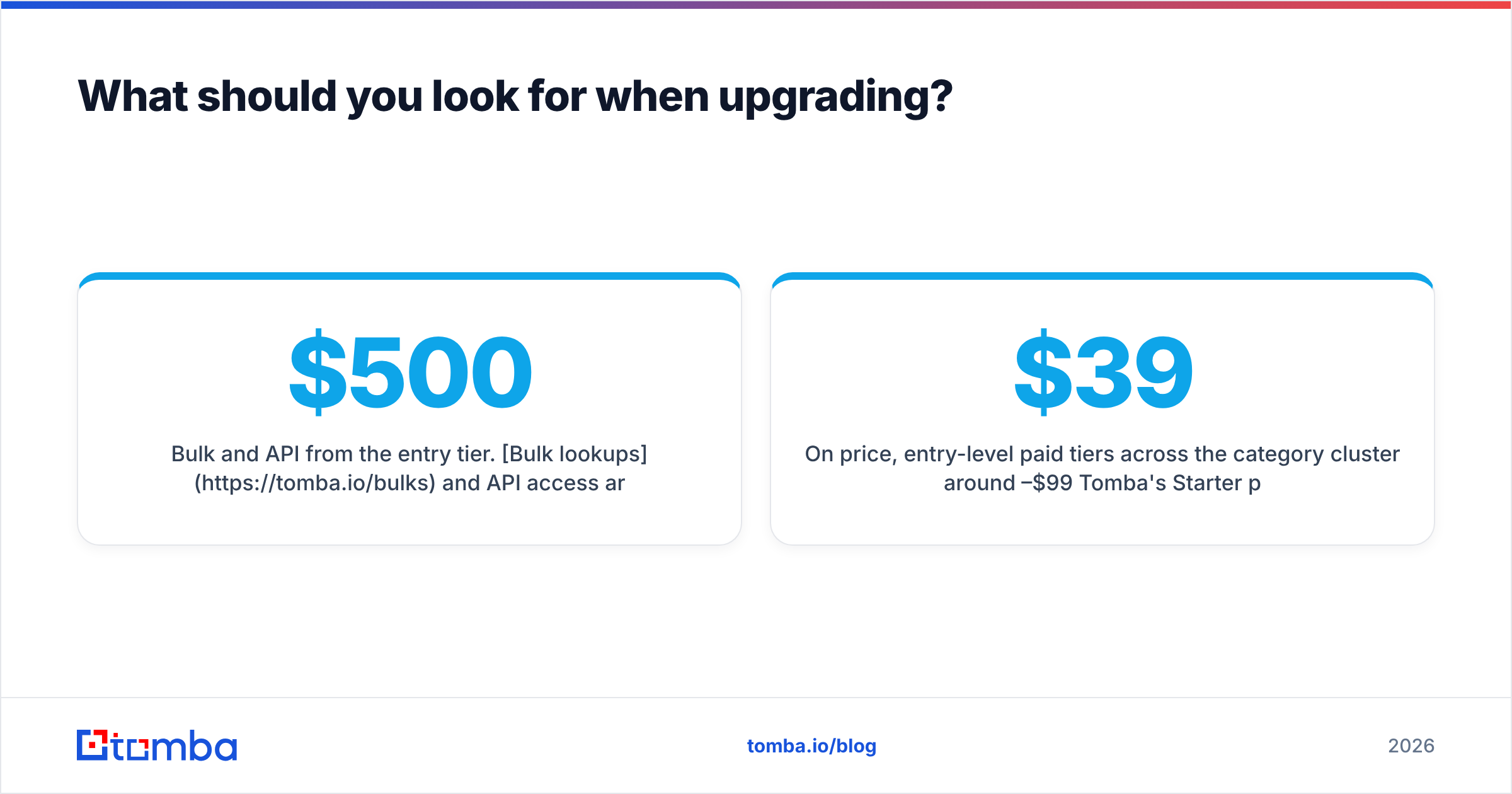
- Bulk and API from the entry tier. Bulk lookups and API access turn a lookup tool into infrastructure. Vendors that gate the API behind a $500/month tier are selling you a manual product.
- Honest catch-all handling. A tool that says "catch-all, cannot confirm" is worth more than one that says "valid" and lets you find out at send time.
- Credit rollover and clear overages. Prospecting volume is lumpy. Plans that punish a big month are plans you'll outgrow fast.
On price, entry-level paid tiers cluster around $39–$99/month. Tomba's Starter plan is $49/month, Growth is $99/month, and Pro is $249/month. Full details are on the Tomba pricing page.
The useful comparison isn't sticker price. It's cost per verified, deliverable contact. A $49 plan at 95% accuracy beats a $39 plan at 70% every time, because the cheaper one also costs you deliverability.
Where should you start?#
Start free, but pick a tool whose free tier is the real product rather than a demo. Run 25 lookups against domains where you already know the right answers: your own company, a partner, two customers. Measure the hit rate yourself instead of trusting anyone's marketing page, including this one. If a tool clears 90% on your own known-answer test, it will hold up on cold domains.
Ready to test it properly? Tomba Email Finder gives you 25 free searches a month with no card required. You get the same discovery and verification pipeline that runs on paid plans, with confidence scoring and catch-all flags included. Run your known-answer test, compare the accuracy against whatever you use now, and upgrade only when the volume demands it.
Related guides#
Ready to find emails that actually work?
Join 150,000+ professionals who stopped guessing and started sending. Free credits on signup — no credit card required.
Get the Tomba newsletter
Practical outbound tactics and product updates — once every two weeks.
About the author