Email Newsletter Click Through Rates: 2026 Benchmarks Guide
Most newsletter CTR benchmarks are useless because they average across industries, list sizes, and send types. Here's what a good click rate actually looks like in 2026 — and the five levers that move it.
TL;DR
- Median B2B newsletter click through rate in 2026 sits around 1.4–2.6% of delivered emails. If you're above 3%, you're in the top quartile. If you're below 1%, something structural is broken — usually the list, not the copy.
- Click-to-open rate (CTOR) is the more honest metric. CTR blends deliverability, subject line, and content into one number; CTOR isolates whether the content actually earned the click.
- Apple Mail Privacy Protection has made open rates functionally useless since 2021, which is why CTR became the default health metric — and why bot-click filtering now matters more than ever.
- The five levers that reliably move CTR: list hygiene, segmentation, single-CTA structure, link placement, and send-time consistency. Copy tweaks are the smallest of the five.
- A newsletter sent to a clean, permission-based list of 2,000 will out-click a dirty list of 20,000 in absolute numbers surprisingly often. Volume is not the lever you think it is.
What is a newsletter click through rate, exactly?#
Your click through rate is the percentage of delivered emails that produced at least one click on a link inside. The formula:
CTR = (unique clicks ÷ delivered emails) × 100
Two words in that formula do a lot of work. Unique means one subscriber clicking four links counts once — if your ESP reports total clicks instead, your number is inflated and not comparable to any benchmark. Delivered means sends minus hard bounces, not gross sends. Some platforms default to gross sends, which quietly deflates your rate.
That's the plumbing. The interesting part is what CTR actually measures, which is not "was my content good." It measures the product of four independent things:
- Deliverability — did the email reach the inbox instead of spam? A newsletter in the promotions tab or spam folder can't be clicked.
- Subject line and preview text — did it get opened? An unopened email has a 0% chance of a click.
- Content relevance — did the reader find something worth clicking?
- Link mechanics — were the links visible, obvious, and mobile-tappable?
Because CTR bundles all four, a drop in CTR tells you something is wrong but not what. That's the core limitation, and it's why the next section matters.
Why is CTOR a better metric than CTR?#
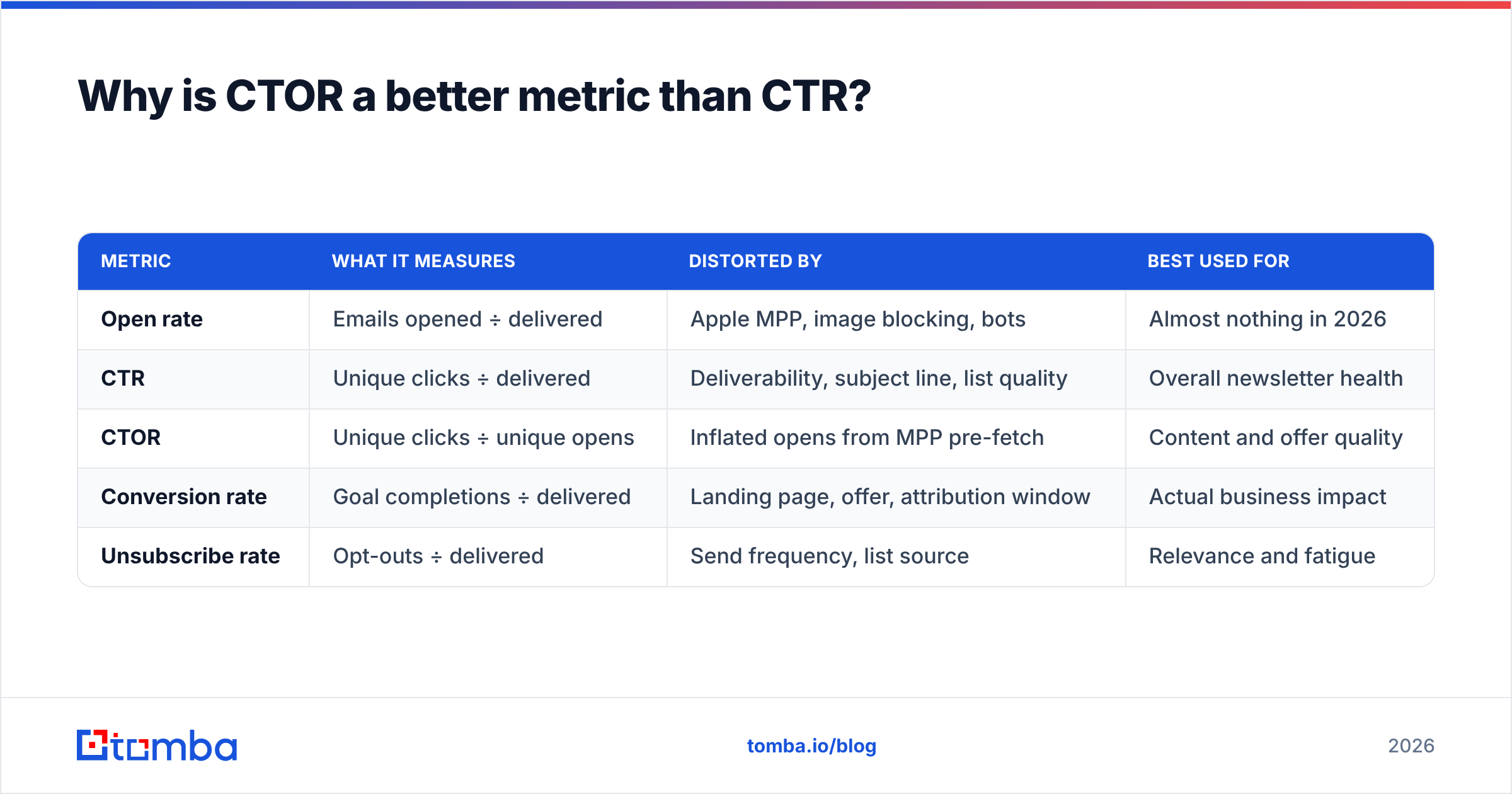
Click-to-open rate divides unique clicks by unique opens rather than delivered emails:
CTOR = (unique clicks ÷ unique opens) × 100
This strips out deliverability and subject-line performance, leaving you with a cleaner read on whether the content earned the click. Typical B2B newsletter CTOR lands between 10% and 18%. Above 20% is strong.
The catch: since Apple rolled out Mail Privacy Protection in iOS 15, opens from Apple Mail are pre-fetched automatically, whether or not a human read anything. Depending on your audience, 30–60% of your "opens" may be machine opens. That deflates CTOR — a lot — and makes cross-year comparisons unreliable.
The practical answer most sophisticated senders have landed on: track both, but trend them against your own history rather than against public benchmarks. Your CTR last quarter is a far more useful comparison than an industry average pulled from a vendor's aggregate data.
| Metric | What it measures | Distorted by | Best used for |
|---|---|---|---|
| Open rate | Emails opened ÷ delivered | Apple MPP, image blocking, bots | Almost nothing in 2026 |
| CTR | Unique clicks ÷ delivered | Deliverability, subject line, list quality | Overall newsletter health |
| CTOR | Unique clicks ÷ unique opens | Inflated opens from MPP pre-fetch | Content and offer quality |
| Conversion rate | Goal completions ÷ delivered | Landing page, offer, attribution window | Actual business impact |
| Unsubscribe rate | Opt-outs ÷ delivered | Send frequency, list source | Relevance and fatigue |
What is a good email newsletter click through rate in 2026?#
Here's the honest version: benchmarks vary more by list source than by industry. A newsletter built from opt-in website signups will out-click a purchased list by 4–6x regardless of vertical. That said, aggregated figures give you a starting reference point.
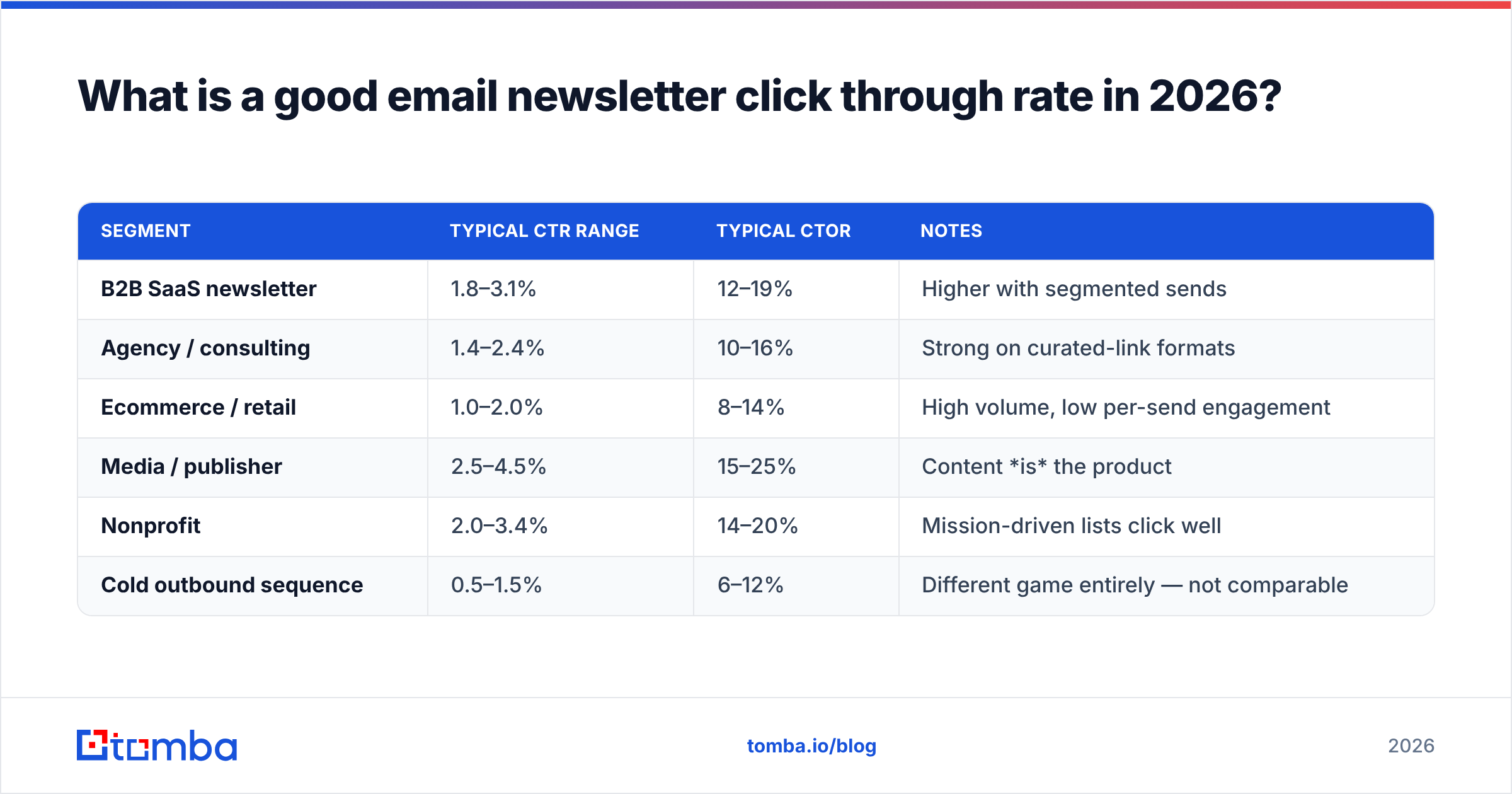
Published aggregate data from platforms like Mailchimp's industry benchmark reports and HubSpot's marketing statistics cluster around these ranges:
| Segment | Typical CTR range | Typical CTOR | Notes |
|---|---|---|---|
| B2B SaaS newsletter | 1.8–3.1% | 12–19% | Higher with segmented sends |
| Agency / consulting | 1.4–2.4% | 10–16% | Strong on curated-link formats |
| Ecommerce / retail | 1.0–2.0% | 8–14% | High volume, low per-send engagement |
| Media / publisher | 2.5–4.5% | 15–25% | Content is the product |
| Nonprofit | 2.0–3.4% | 14–20% | Mission-driven lists click well |
| Cold outbound sequence | 0.5–1.5% | 6–12% | Different game entirely — not comparable |
Three caveats before you benchmark yourself against that table:
- List size inversely correlates with CTR. A 500-person list built from conference conversations routinely hits 6–8%. A 500,000-person list at 1.2% is doing fine.
- Send frequency matters more than most people admit. Weekly sends typically show lower per-send CTR than monthly, but higher aggregate clicks per subscriber per quarter.
- Bot clicks inflate everything. Corporate security gateways (Proofpoint, Mimecast, Barracuda) click every link in an email to scan it. If your audience is enterprise-heavy, 10–25% of your "clicks" may be scanners. Most ESPs now filter these, but imperfectly.
Why does list quality affect click through rates more than copy?#
Because a bad address can't click. This sounds obvious and is routinely ignored.
Run the math. Say you send to 10,000 addresses:
- 800 are invalid or abandoned → they bounce or silently absorb the send
- 1,200 are role accounts (info@, sales@, support@) → almost never clicked by a decision-maker
- 900 are stale contacts who changed jobs 18 months ago → the mailbox may still exist but nobody reads it
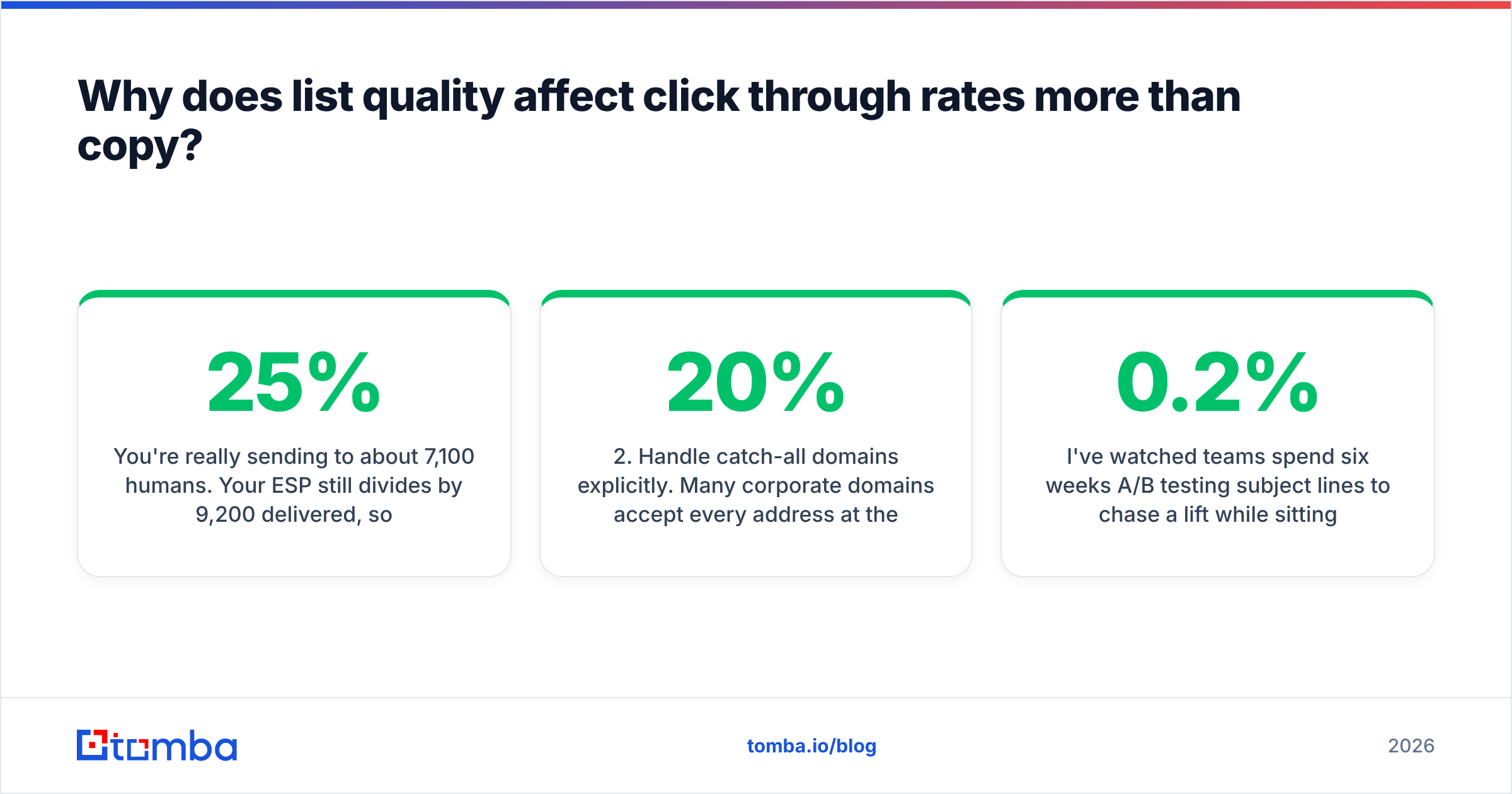
You're really sending to about 7,100 humans. Your ESP still divides by 9,200 delivered, so your reported CTR is roughly 25% lower than your true engagement with real readers. Worse, the bounces and non-engagement drag your sender reputation down, which pushes future sends toward spam, which lowers CTR again. It compounds.
The fix is unglamorous:
- Verify before you send. Run the list through an email verifier to strip invalid, disposable, and role addresses. Do this quarterly at minimum, monthly if you're actively acquiring contacts.
- Handle catch-all domains explicitly. Many corporate domains accept every address at the SMTP layer, so standard verification returns "unknown." A catch-all verifier uses pattern matching and secondary signals to make a real call instead of leaving 20% of your list in limbo.
- Sunset non-engagers. Anyone who hasn't opened or clicked in 180 days is deadweight. Run one re-permission campaign, then remove them. Painful, effective.
- Fix the acquisition source. If a signup form or lead magnet consistently produces addresses that never engage, that channel is the problem — not your subject lines.
- Segment by engagement tier. Send your highest-value content only to the engaged segment. Your aggregate CTR rises and your reputation improves simultaneously.
I've watched teams spend six weeks A/B testing subject lines to chase a 0.2% lift while sitting on a list where 18% of addresses were dead. Verification would have delivered more in an afternoon.
How do you actually increase newsletter click through rates?#
Ranked by impact, highest first.
1. Cut to one primary CTA. Newsletters with a single dominant call to action consistently outperform multi-link roundups on CTR — not because roundups are bad, but because dividing attention across eight links means each one gets a fraction of the click. If your newsletter is a curated link roundup, accept a different benchmark: measure total clicks per send rather than unique CTR.
2. Move the primary link above the fold. Mobile clients show roughly 300–400 vertical pixels before a scroll. If your main link sits below a header image, a greeting, and three paragraphs of context, most readers never see it. Put one clear link in the first screenful.
3. Segment by behavior, not demographics. Job title segmentation is weak. Behavioral segmentation — clicked-a-pricing-link, visited-docs, attended-a-webinar — routinely doubles CTR versus a broadcast send. This requires enrichment: knowing more about each contact than an email address. A data enrichment pass can attach company size, industry, tech stack, and seniority to existing rows, which makes real segmentation possible without asking subscribers to fill in a form.
4. Use text links, not just buttons. Buttons look good and get clicked, but inline text links inside a paragraph often outperform them for informational newsletters because they sit where the reader's attention already is. Use both.
5. Send at a consistent time. Not the "best" time — the consistent time. Readers who expect your newsletter Thursday at 8am develop a habit. Chasing the mythical optimal send hour across weeks destroys that.
6. Write subject lines that set an accurate expectation. A curiosity-gap subject line lifts opens and tanks CTOR, because the people who opened weren't the people who wanted the content. Net clicks stay flat and your list gets noisier.
How does deliverability quietly cap your click through rate?#
You cannot click what you never see. Before optimizing anything downstream, confirm the fundamentals:
- SPF, DKIM, and DMARC all pass. Google and Yahoo have required authentication for bulk senders since February 2024, and enforcement has tightened since. Check your SPF record and run a full authentication audit rather than assuming your ESP handled it.
- Spam complaint rate under 0.10%. Gmail's stated threshold is 0.30%, but 0.10% is the practical ceiling before throttling starts.
- Your sending domain isn't blacklisted. Check Spamhaus and the major RBLs. A single blacklist listing can drop inbox placement by half overnight.
- One-click unsubscribe in the header. Required for bulk senders. Missing it causes complaints instead of quiet opt-outs — and complaints hurt far more.
- Consistent sending volume. Sending 500 emails weekly then suddenly blasting 50,000 looks exactly like a compromised account to a filtering system.
For a deeper treatment of the inbox-placement side, email deliverability covers the mechanics. The short version: a newsletter with excellent copy and 60% inbox placement will always lose to mediocre copy at 95% placement.
Worth noting — the Gmail Postmaster Tools dashboard gives you domain reputation, spam rate, and authentication pass rates directly from Google, for free. Most teams never set it up. It takes fifteen minutes and it's the only first-party signal you'll get about how Gmail actually sees you.
What should you measure instead of chasing a benchmark?#
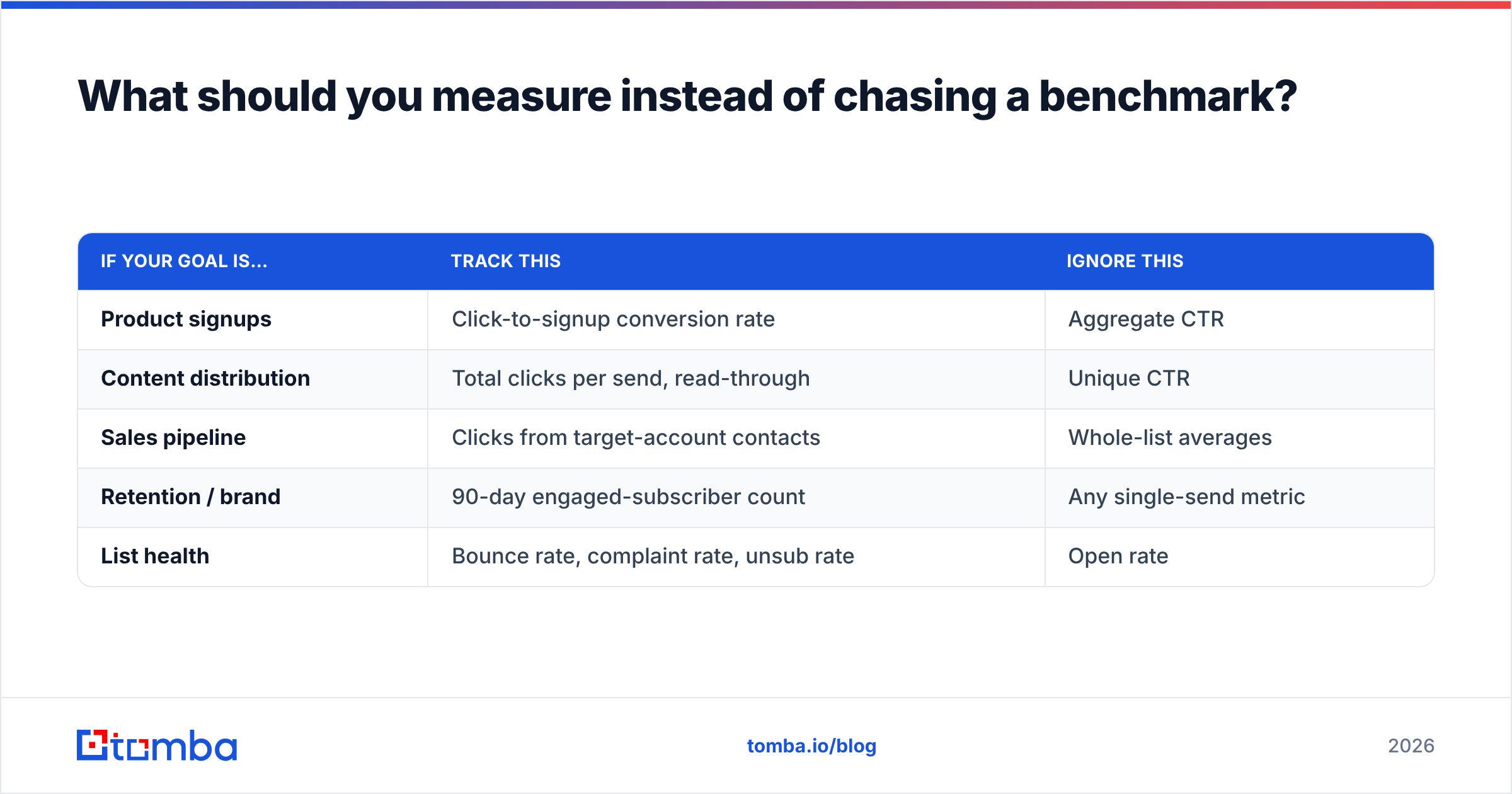
Benchmarks are useful for a sanity check and useless as a target. A media company at 4% CTR and a SaaS company at 2% CTR may be generating identical revenue per subscriber. Optimize for the number that connects to your business:
| If your goal is… | Track this | Ignore this |
|---|---|---|
| Product signups | Click-to-signup conversion rate | Aggregate CTR |
| Content distribution | Total clicks per send, read-through | Unique CTR |
| Sales pipeline | Clicks from target-account contacts | Whole-list averages |
| Retention / brand | 90-day engaged-subscriber count | Any single-send metric |
| List health | Bounce rate, complaint rate, unsub rate | Open rate |
The most valuable move is usually building a cohort view: track CTR by acquisition source over time. If webinar-sourced subscribers click at 4.1% and paid-ad subscribers click at 0.6%, that's a budget decision, not a copywriting problem. Most teams never split this out and end up optimizing the wrong end of the funnel entirely.
How do you build a list that clicks in the first place?#
The highest-CTR newsletters are almost never the biggest ones. They're the ones where every subscriber matches an actual ideal customer profile.
Three practical approaches:
- Targeted addition over broad capture. Instead of a generic popup harvesting anyone who lands on your site, identify the specific companies and roles worth reaching, then find those contacts deliberately. A domain search returns the verified addresses at a target company along with the department and confidence score, so you're adding named prospects rather than anonymous form-fills.
- Verify at capture time, not at send time. Adding real-time verification to your signup form stops typos and disposable addresses from entering the list at all. It's a one-line API call and it prevents most list decay before it starts.
- Enrich on entry. Capture an email, then immediately append firmographic data so the contact lands in the right segment from day one. Ungated segmentation beats a five-field signup form that kills your conversion rate.
On the tooling side, most teams compare a handful of providers on coverage and price. Check current Tomba pricing against the alternatives — free tier is 25 searches/month, Starter is $49/mo, Growth $99/mo, Pro $249/mo — and note that peers like BookYourData take a different and perfectly valid approach with prepaid, pre-built B2B lists if you'd rather buy verified contacts outright than search for them. Both models work; the right one depends on whether you're building a targeted list of 500 or seeding one of 50,000.
Frequently asked questions#
Is a 1% newsletter click through rate bad? Not necessarily. For a large ecommerce list or a broadcast send to an unsegmented audience, 1% is roughly median. For a 1,000-person B2B list of hand-picked contacts, 1% signals a real problem — likely list decay or a mismatch between what subscribers signed up for and what you're sending.
Why did my click through rate drop suddenly? In order of likelihood: a deliverability change (authentication failure, blacklist, reputation drop), a list-source change (a new acquisition channel adding low-intent subscribers), an ESP metrics change (switching from total to unique clicks), or bot-click filtering being newly applied. Check deliverability first — it's the most common cause and the fastest to confirm.
Should I remove subscribers who never click? Yes, after one re-permission attempt. Non-engagers depress your inbox placement for everyone else. A smaller list with a 3% CTR generates more total clicks than a bloated list at 0.8% surprisingly often, because the smaller list actually reaches the inbox.
Do image-heavy newsletters get more clicks? Generally no. Image-heavy templates trigger more aggressive spam filtering, load slowly on mobile, and are frequently blocked by default. Text-forward newsletters with one or two supporting images tend to click better and deliver better.
Where to start#
Pick the cheapest high-impact lever first: clean the list. Before you rewrite a single subject line, verify what you're sending to, remove the invalid and role addresses, and get an honest denominator. Most teams find their real CTR is 15–30% higher than reported once the dead weight is gone — and their deliverability improves in the same pass.
When you're ready to build the next segment of your list deliberately rather than hoping the right people find your signup form, the Tomba Email Finder locates verified professional addresses by name, company, or domain, with a confidence score on every result. Start on the free tier at 25 searches a month, add the ones who match your ICP, and measure the CTR of that cohort separately. That number — not an industry average — is the benchmark that should drive your decisions.
Related guides#
// get started
Find, verify and enrich your first contacts today
Start on the free plan with 25 searches a month, then scale when your team is ready.
Free plan · No credit card required · GDPR & CCPA
// about the author