Email Pacing and Sending Limits: The 2026 Deliverability Guide
Mailbox providers no longer care how many emails you send — they care how fast you send them and who complains. Here are the real 2026 caps, a ramp schedule that works, and the pacing math behind it.
TL;DR
- Your provider's published cap is a ceiling, not a target. Gmail Workspace allows 2,000 recipients/day; the volume that actually stays in the inbox on a cold domain is closer to 20–40/day per mailbox for the first month.
- Pacing — the gap between sends and the shape of your daily curve — matters more than raw volume. Bursts of 200 in four minutes get filtered; 200 spread across eight hours usually don't.
- Bounce rate is the fastest way to blow up a warm domain. Keep it under 2%, which means verifying every address before it enters a sequence.
- Complaint rate above 0.3% triggers Gmail and Yahoo enforcement. That threshold is now a published rule, not a rumor.
- The safe formula:
mailboxes × daily cap per mailbox— scale by adding inboxes and domains, not by pushing any single mailbox harder.
What are email pacing and sending limits?#
Two different constraints that people constantly confuse.
Sending limits are hard caps enforced by your email provider or relay. Exceed them and you get a bounce, a temporary block, or a 24-hour lockout. They're published, deterministic, and easy to plan around.
Pacing is how you distribute sends inside those limits — the delay between messages, the hours you send in, the day-over-day growth rate. Nobody publishes pacing rules because they're not rules; they're behavioral signals that spam filters use to distinguish a person from a script.
Think of it like a highway. The sending limit is the speed limit sign. Pacing is whether you're weaving between lanes at 68 mph or driving straight at 68 mph. Both are "legal." Only one gets you pulled over.
Most cold email failures come from the pacing side. Teams check that they're under Gmail's 2,000-recipient cap, then fire 400 emails in six minutes from a domain registered nine days ago, and wonder why open rates collapsed to 4%.
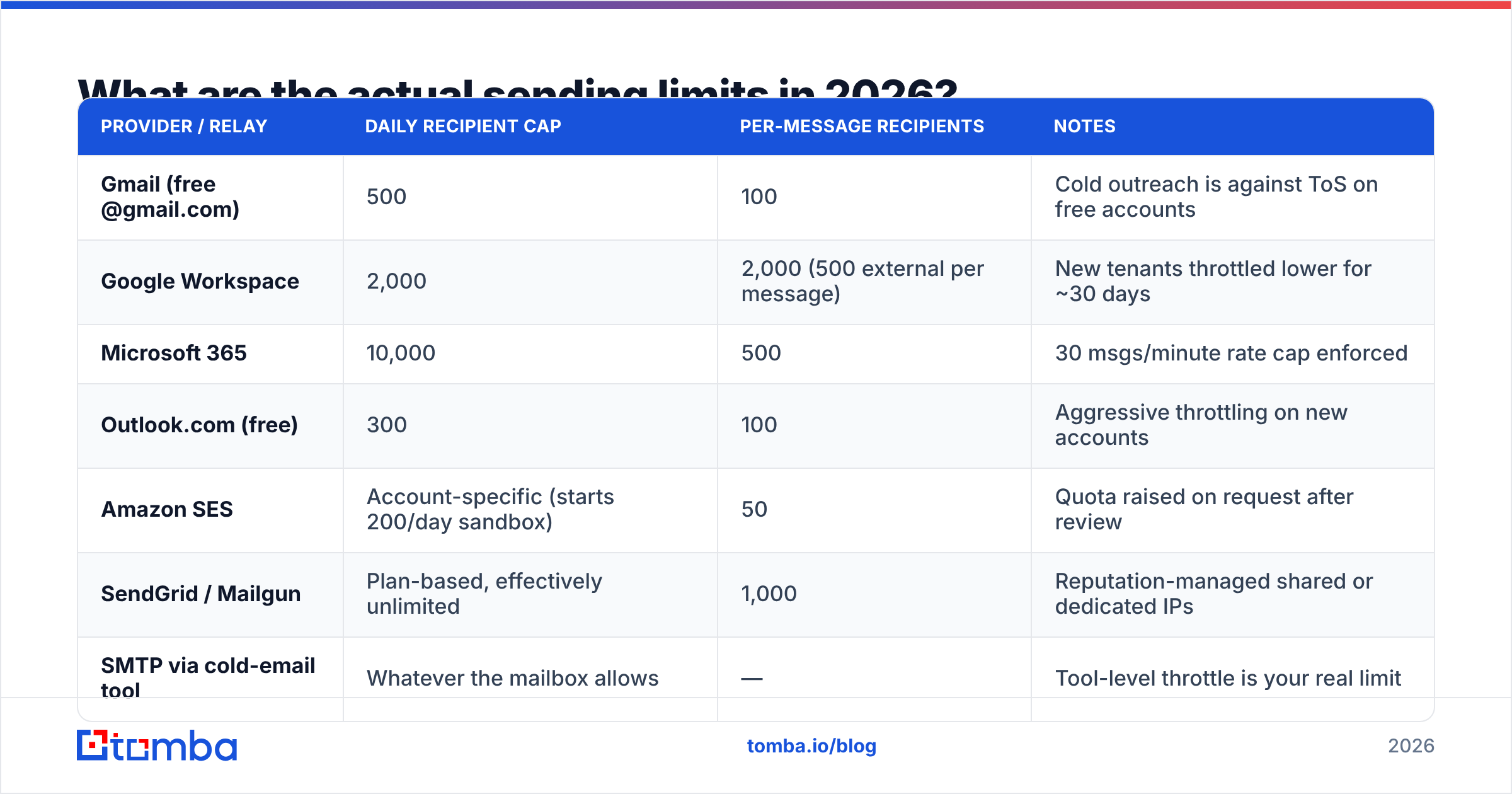
What are the actual sending limits in 2026?#
Here's what the major providers enforce. These are per-mailbox, per rolling 24 hours unless noted.
| Provider / relay | Daily recipient cap | Per-message recipients | Notes |
|---|---|---|---|
| Gmail (free @gmail.com) | 500 | 100 | Cold outreach is against ToS on free accounts |
| Google Workspace | 2,000 | 2,000 (500 external per message) | New tenants throttled lower for ~30 days |
| Microsoft 365 | 10,000 | 500 | 30 msgs/minute rate cap enforced |
| Outlook.com (free) | 300 | 100 | Aggressive throttling on new accounts |
| Amazon SES | Account-specific (starts 200/day sandbox) | 50 | Quota raised on request after review |
| SendGrid / Mailgun | Plan-based, effectively unlimited | 1,000 | Reputation-managed shared or dedicated IPs |
| SMTP via cold-email tool | Whatever the mailbox allows | — | Tool-level throttle is your real limit |
Two things to internalize. First, Microsoft's 30-messages-per-minute rate limit is the only widely published pacing rule — everyone else enforces it invisibly. Second, "unlimited" relay plans just move the constraint from the provider to the receiving side: Gmail, Yahoo, and Outlook will filter you regardless of what SendGrid lets you push.
Google's own sender guidelines spell out the receiving-side rules that supersede all of the above: authenticate with SPF, DKIM and DMARC, keep spam complaints under 0.3%, and offer one-click unsubscribe for bulk senders. Microsoft published equivalent requirements for Outlook.com senders covering the same three pillars.

Why does pacing matter more than volume?#
Because filters score patterns, not counts.
A mailbox that sends 45 emails on Monday, 47 on Tuesday, 44 on Wednesday looks like a salesperson. A mailbox that sends 0, 0, 0, then 600 looks like a compromised account. The second pattern triggers reputation review at the receiving MTA even though the weekly total is similar.
Four pacing variables actually move the needle:
- Inter-send delay. Randomized gaps of 60–180 seconds between messages from the same mailbox. Fixed 30-second intervals are a machine fingerprint; jitter is not.
- Sending window. Confine sends to 8–10 business hours in the recipient's timezone. A mailbox emailing at 3:14 a.m. local time with no reply history is anomalous.
- Day-over-day growth. Never increase a mailbox's daily volume by more than ~30% versus the prior day during ramp. Filters model your baseline; sudden step-changes reset trust.
- Weekend behavior. Real reps mostly don't send Saturday at scale. Dropping to 10–20% volume on weekends is a cheap authenticity signal.
- Reply-to-send ratio. Mailboxes that only ever emit and never receive look transactional. This is the actual mechanism behind warmup tools — they manufacture inbound.
None of these require a new tool. They require the throttle settings in the sequencer you already pay for to be set to something other than the default.
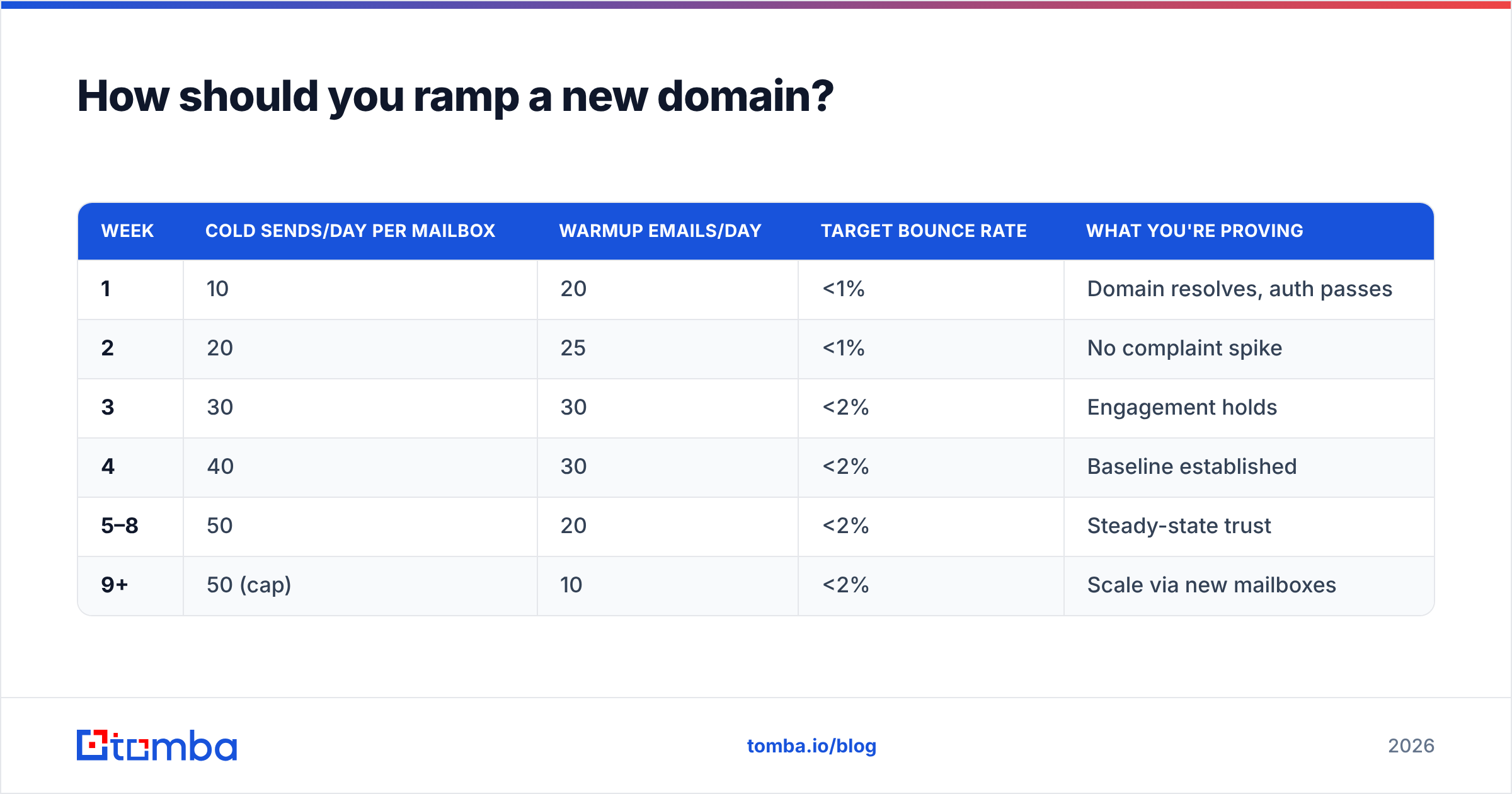
How should you ramp a new domain?#
Slower than you want to. Here's a schedule that holds up across Gmail and Microsoft in 2026, assuming a fresh domain with SPF, DKIM, and DMARC configured before the first send.
| Week | Cold sends/day per mailbox | Warmup emails/day | Target bounce rate | What you're proving |
|---|---|---|---|---|
| 1 | 10 | 20 | <1% | Domain resolves, auth passes |
| 2 | 20 | 25 | <1% | No complaint spike |
| 3 | 30 | 30 | <2% | Engagement holds |
| 4 | 40 | 30 | <2% | Baseline established |
| 5–8 | 50 | 20 | <2% | Steady-state trust |
| 9+ | 50 (cap) | 10 | <2% | Scale via new mailboxes |
The number that surprises people is the ceiling. Most experienced outbound teams cap a single mailbox at 40–50 cold sends per day permanently — not because a limit forces it, but because per-mailbox volume correlates with complaint density, and complaint density is what gets domains blocked.
If you need 500 sends a day, that's 10 mailboxes, typically across 3–4 secondary domains, not one mailbox running at 500. This costs more in seats. It also means a burned domain takes out 10% of your capacity instead of 100%.
Run the math for your own targets with a warmup calculator before you buy inboxes — it's usually more mailboxes than the plan assumes.
What happens when you ignore the limits?#
The failure is rarely a dramatic block. It's a slow slide that's hard to attribute.
- Days 1–5: Open rates drop from 45% to 30%. You blame subject lines.
- Days 6–12: Reply rate halves. You blame the offer.
- Days 13–20: Gmail placement moves to Promotions, then Spam. Opens hit 8%.
- Day 21+: Your primary domain's sender reputation is damaged, and it affects your invoices and support replies too — not just outbound.
The recovery cost is brutal. Rehabilitating a burned domain takes 6–10 weeks of near-zero volume plus deliberate re-warming, and some domains never fully recover. Buying a new domain is usually cheaper, which tells you everything about how expensive the mistake is.

How do bounce rates interact with sending limits?#
They're coupled in a way that catches teams off guard: high bounces make your effective limit collapse.
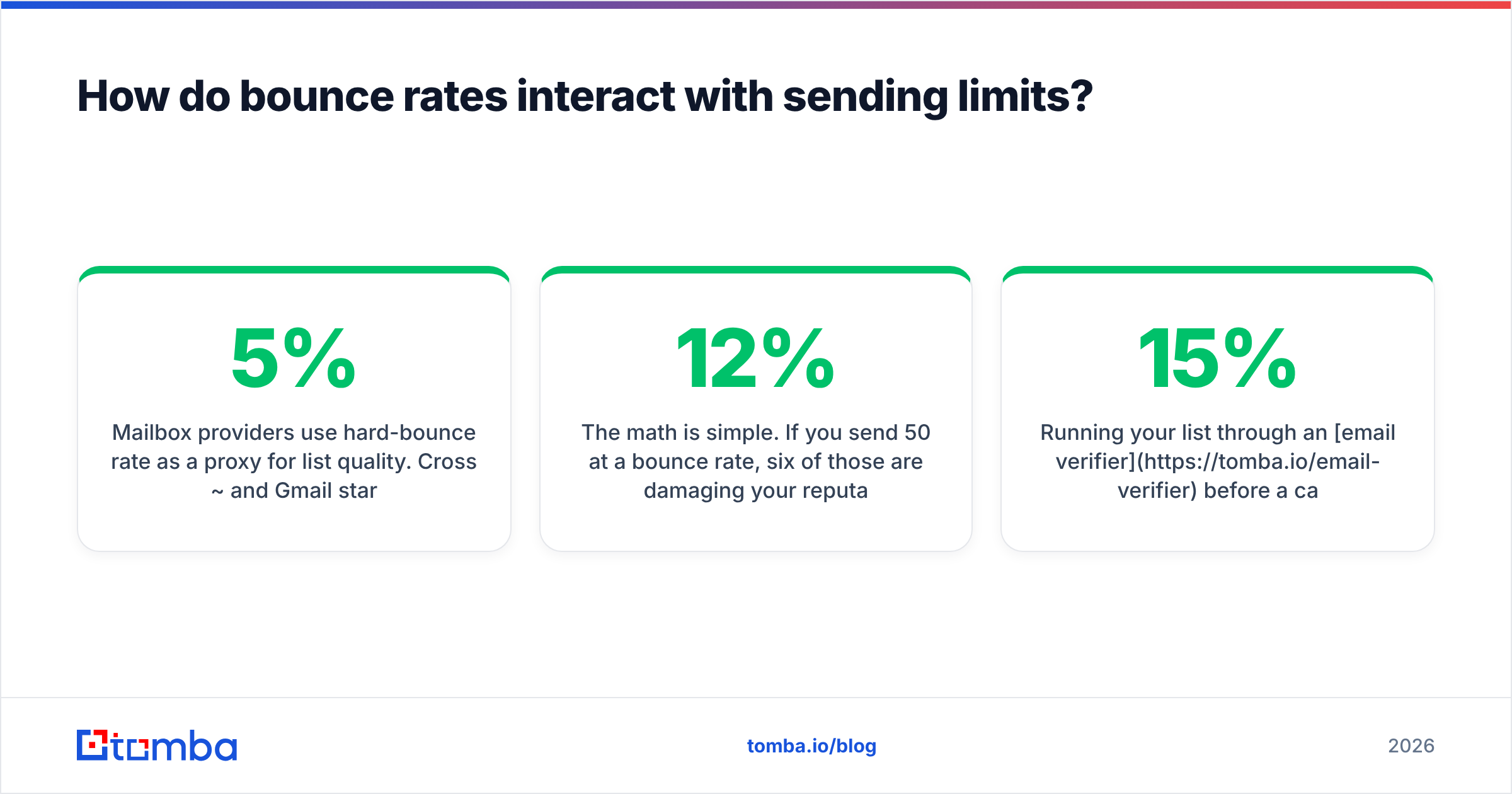
Mailbox providers use hard-bounce rate as a proxy for list quality. Cross ~5% and Gmail starts throttling your accepted volume regardless of your Workspace cap. You'll see 421-4.7.28 Gmail has detected an unusual rate of unsolicited mail and your sequencer will happily keep retrying, making it worse.
The math is simple. If you send 50/day at a 12% bounce rate, six of those are damaging your reputation daily. Over a 30-day ramp that's 180 negative signals against roughly 1,500 sends — enough to cap your domain permanently below where it should be.
The fix is upstream, not downstream. Verify addresses before they enter the sequence:
- Syntax and MX checks eliminate typos and dead domains at zero risk.
- SMTP-level verification confirms the mailbox exists without sending a message.
- Catch-all detection flags domains that accept everything, so you can route them into a lower-priority segment instead of assuming they're valid. A catch-all verifier is the difference between "unknown" and "risky."
- Role-account filtering strips
info@,sales@, andsupport@, which complain at several times the rate of individual mailboxes.
Running your list through an email verifier before a campaign typically takes a 12–15% raw bounce rate down to under 2%. That single step buys back more sending headroom than any pacing tweak.
What about tool-level limits and shared IPs?#
If you're sending through a platform rather than direct SMTP, there's a third limit stack you don't control: the platform's own reputation.
On shared-IP relays — the default on most entry-tier plans from SendGrid, Mailgun, and similar — your deliverability is partly a function of other customers' behavior. One bad tenant on your IP range degrades your placement even with perfect pacing. Dedicated IPs solve this but need their own warmup: a dedicated IP with no history is treated worse than a shared IP with good history for the first two to three weeks.
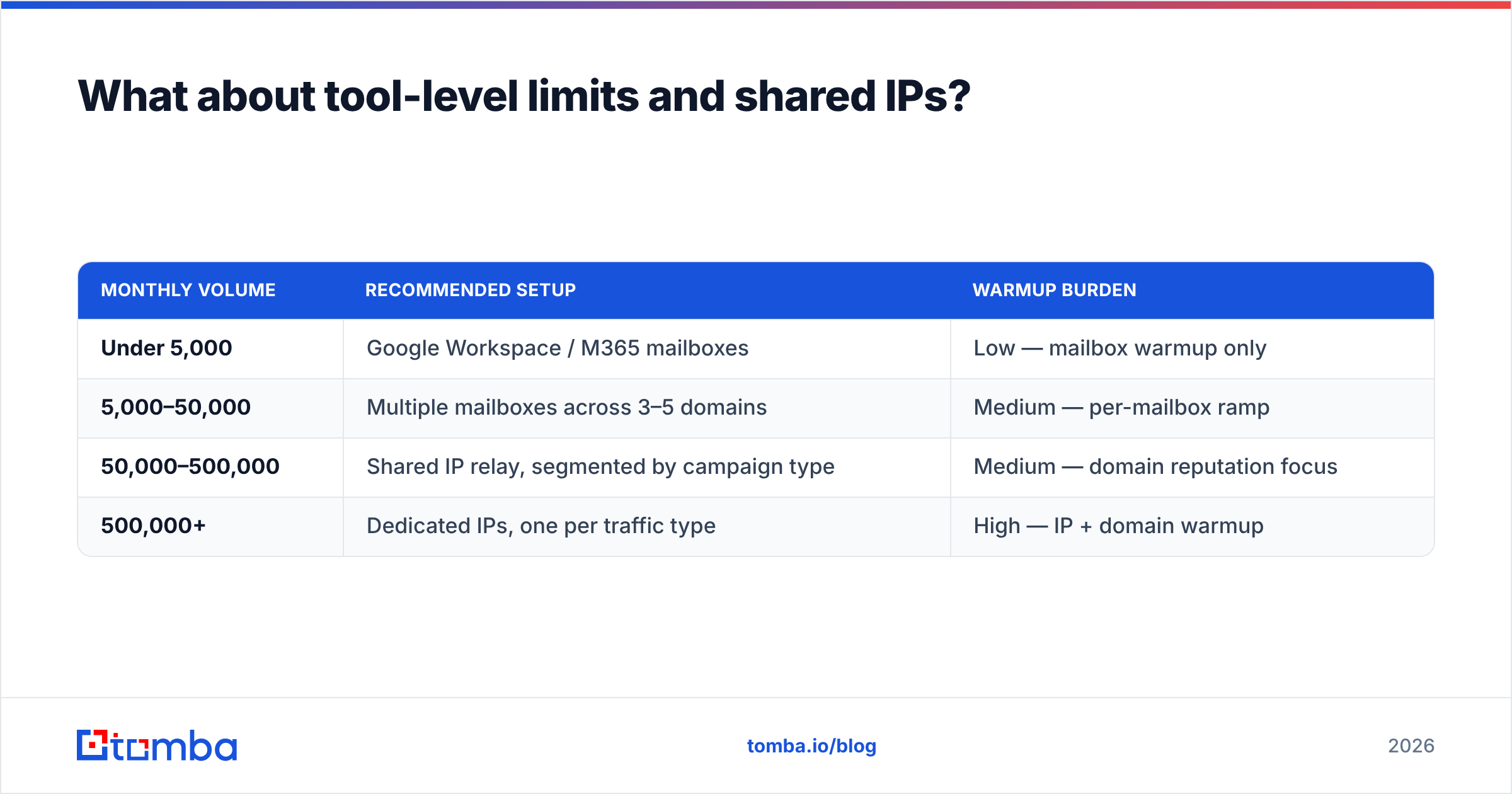
The practical decision tree:
| Monthly volume | Recommended setup | Warmup burden |
|---|---|---|
| Under 5,000 | Google Workspace / M365 mailboxes | Low — mailbox warmup only |
| 5,000–50,000 | Multiple mailboxes across 3–5 domains | Medium — per-mailbox ramp |
| 50,000–500,000 | Shared IP relay, segmented by campaign type | Medium — domain reputation focus |
| 500,000+ | Dedicated IPs, one per traffic type | High — IP + domain warmup |
Mixing traffic types on one IP is the most common structural mistake. Transactional receipts and cold prospecting have wildly different complaint profiles; sharing infrastructure means the cold campaign drags the receipts into spam. Separate them.
For the underlying concepts — authentication records, feedback loops, throttling behavior — the email deliverability glossary entry covers the terminology without the vendor spin.
How do you monitor pacing in practice?#
Four signals, checked weekly, catch nearly every problem before it's terminal.
- Google Postmaster Tools domain reputation. The single most important dashboard. Anything below "High" on a domain doing meaningful volume is a warning. Set up before your first send, not after your first problem.
- Complaint rate per campaign, not per account. An account-level 0.1% can hide one campaign running at 0.8%. Segment it.
- Accepted-vs-attempted ratio in your SMTP logs. A widening gap means silent throttling, which precedes visible blocking by days.
- Reply rate by mailbox. When one mailbox in a pool of ten drops to a third of the others' reply rate, that mailbox is being filtered. Pull it, rest it for two weeks, re-warm.
- Seed-list placement tests. Weekly, across Gmail, Outlook, and one corporate Microsoft tenant. Inbox-vs-Promotions-vs-Spam per provider tells you where to focus.
Third-party review sites like G2's email deliverability category are useful for shortlisting monitoring tools, but treat the rankings as a starting point — most are weighted toward review volume, not measured placement accuracy.
What does a safe sending plan look like end to end?#
Putting it together for a team that needs 1,000 cold sends per day:
- 20 mailboxes at 50/day steady-state, spread across 5 secondary domains (4 mailboxes each), all forwarding to the primary domain.
- Six-week ramp per the table above, staggered so you're not warming all 20 at once.
- Every address verified before import, with catch-all domains segmented into their own lower-volume sequence.
- Randomized 90–150 second gaps, 9 a.m.–5 p.m. recipient-local, weekdays at full volume and weekends at 15%.
- Weekly Postmaster review, with any domain slipping below "Medium" reputation pulled from rotation immediately.
That plan costs more upfront than one mailbox blasting 1,000. It also survives past month two, which the alternative does not.
Get the input right before you worry about the pacing. No throttle schedule saves a list full of guessed addresses — every invalid send is a permanent mark against a domain you're trying to build up. Tomba's Email Finder returns verified, source-attributed professional addresses with confidence scores, so the contacts entering your sequence are real before the first send goes out. The free tier covers 25 searches a month, and paid plans start at $49/mo — see Tomba pricing for volume tiers. Fix the list, then set the pace.
Related guides#
Ready to find emails that actually work?
Join 150,000+ professionals who stopped guessing and started sending. Free credits on signup — no credit card required.
Get the Tomba newsletter
Practical outbound tactics and product updates — once every two weeks.
About the author