Email Permutation: How to Find Any Work Email in 2026
Email permutation turns a name and a domain into every plausible address — then verification tells you which one is real. Here's the full workflow, the formats that actually dominate, and where guessing quietly wrecks your sender reputation.
TL;DR
- Email permutation is the practice of generating every plausible address from a person's name and their company domain —
jane.doe@acme.com,jdoe@acme.com,janed@acme.com, and so on. - It works because most companies use one of roughly eight formats, and about 60-70% of B2B domains fall into just two of them:
first.last@andfirst@. - Permutation alone is a liability. A raw 20-address guess list sent cold will bounce hard enough to damage your sender reputation within a single campaign.
- The correct workflow is permutate → detect the company pattern → verify → send to one address. Never send to the whole list.
- For one-off lookups a free permutator plus a verifier is fine. Past ~50 contacts a month, a real email finder is cheaper than the time and bounce risk.
What is email permutation?#
Email permutation is combinatorics applied to a name. You take the two facts you almost always have — a person's full name and their employer's domain — and mechanically generate every address format that company might plausibly use.
Think of it like trying keys on a door. You don't know which key fits, but you know the lock takes a standard key shape, and you have twenty candidates in your pocket. Permutation makes the keys. Verification tells you which one turns.
For "Jane Doe" at acme.com, a standard permutator produces something like:
jane@acme.comdoe@acme.comjane.doe@acme.comjanedoe@acme.comjdoe@acme.comj.doe@acme.comjaned@acme.comjane_doe@acme.comdoe.jane@acme.comdj@acme.com
Add a middle initial, a hyphenated surname, or subdomain variants (@mail.acme.com, @corp.acme.com) and the list balloons past 30 candidates fast. That combinatorial explosion is exactly the problem — and the reason permutation is a starting point, not an answer.
You can run this yourself in seconds with a free email permutator, which is worth doing once just to see the shape of the output before you decide how to handle it.
Why does email permutation work at all?#
Because corporate email is boring by design. IT departments provision addresses from a template, not by taste. When someone joins Acme, the directory service stamps out an address using the same rule it used for the last 400 hires.
Two structural facts make guessing viable:
- The address space is tiny. The email address spec permits a wild range of local-part characters, but in practice companies use letters, dots, underscores, and hyphens. That collapses thousands of theoretical formats into fewer than a dozen real ones.
- Formats are domain-wide, not per-person. If you know one confirmed address at a company, you know the pattern for everyone. Finding
mike.chen@acme.comon a press release tells you Jane isjane.doe@acme.comwith high confidence.
That second point is the leverage. Permutation for one unknown person is a coin flip across ten options. Permutation after you've pinned the company pattern is a near-certainty. A company email pattern check does exactly that step for you — it looks at known addresses on a domain and reports the dominant format.
What are the most common corporate email formats?#
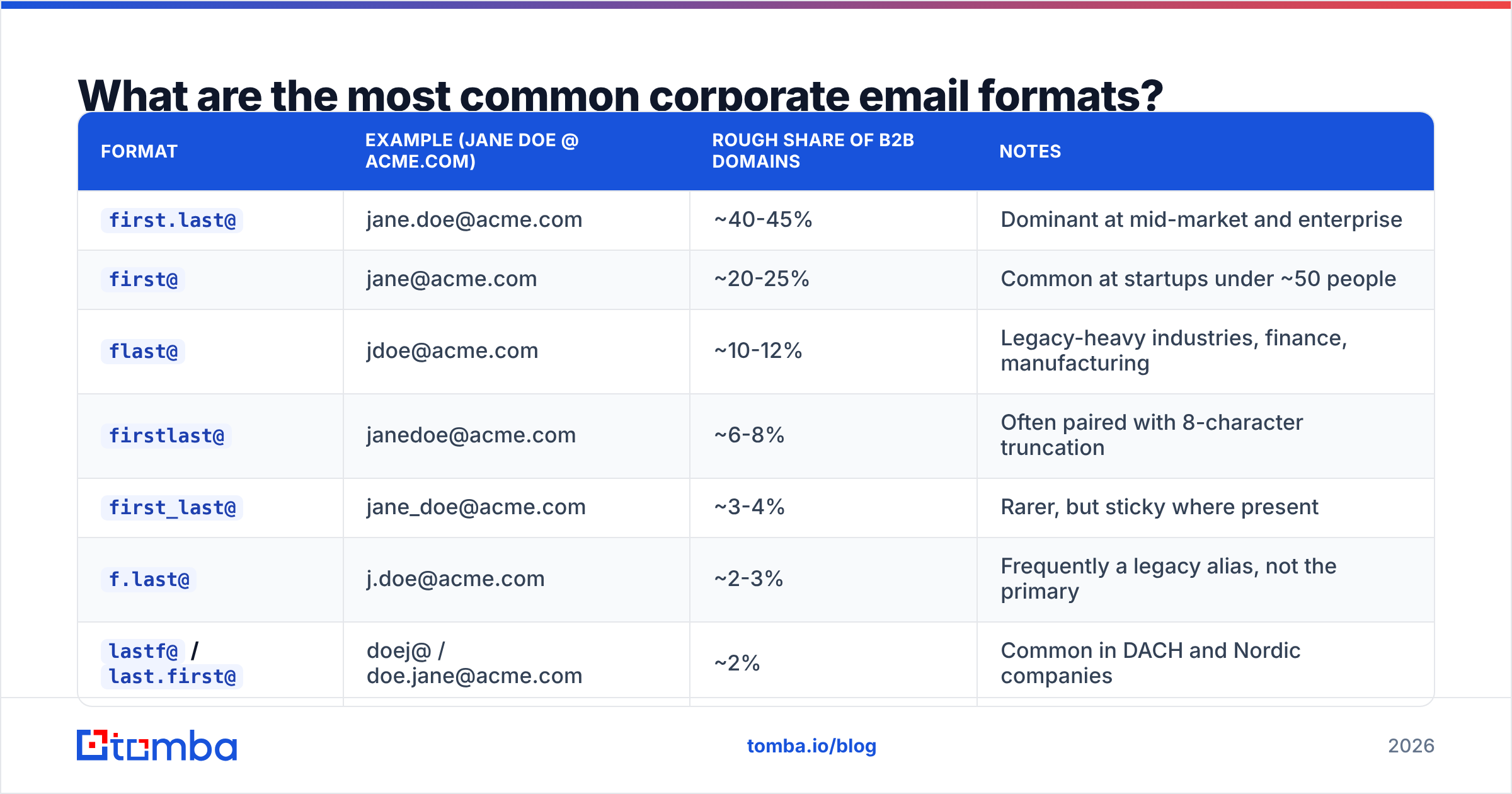
The distribution is heavily skewed. Published analyses from email-data vendors and independent studies of large B2B datasets consistently land in a similar range: the top two formats cover the majority of domains, and the long tail is genuinely long but thin.
| Format | Example (Jane Doe @ acme.com) | Rough share of B2B domains | Notes |
|---|---|---|---|
first.last@ |
jane.doe@acme.com | ~40-45% | Dominant at mid-market and enterprise |
first@ |
jane@acme.com | ~20-25% | Common at startups under ~50 people |
flast@ |
jdoe@acme.com | ~10-12% | Legacy-heavy industries, finance, manufacturing |
firstlast@ |
janedoe@acme.com | ~6-8% | Often paired with 8-character truncation |
first_last@ |
jane_doe@acme.com | ~3-4% | Rarer, but sticky where present |
f.last@ |
j.doe@acme.com | ~2-3% | Frequently a legacy alias, not the primary |
lastf@ / last.first@ |
doej@ / doe.jane@acme.com | ~2% | Common in DACH and Nordic companies |
| Non-derivable | j.d.2891@acme.com | ~5-10% | Numbered, randomized, or ID-based schemes |
Two things to take from this table. First, if you test the top three formats you cover roughly three-quarters of domains. Second, that last row is the killer: a meaningful slice of companies use schemes no permutator can ever reach. Universities, hospitals, government agencies, and large consultancies frequently issue employee-ID-based addresses. No amount of guessing recovers those.
How do you build a permutation list without wrecking your domain?#
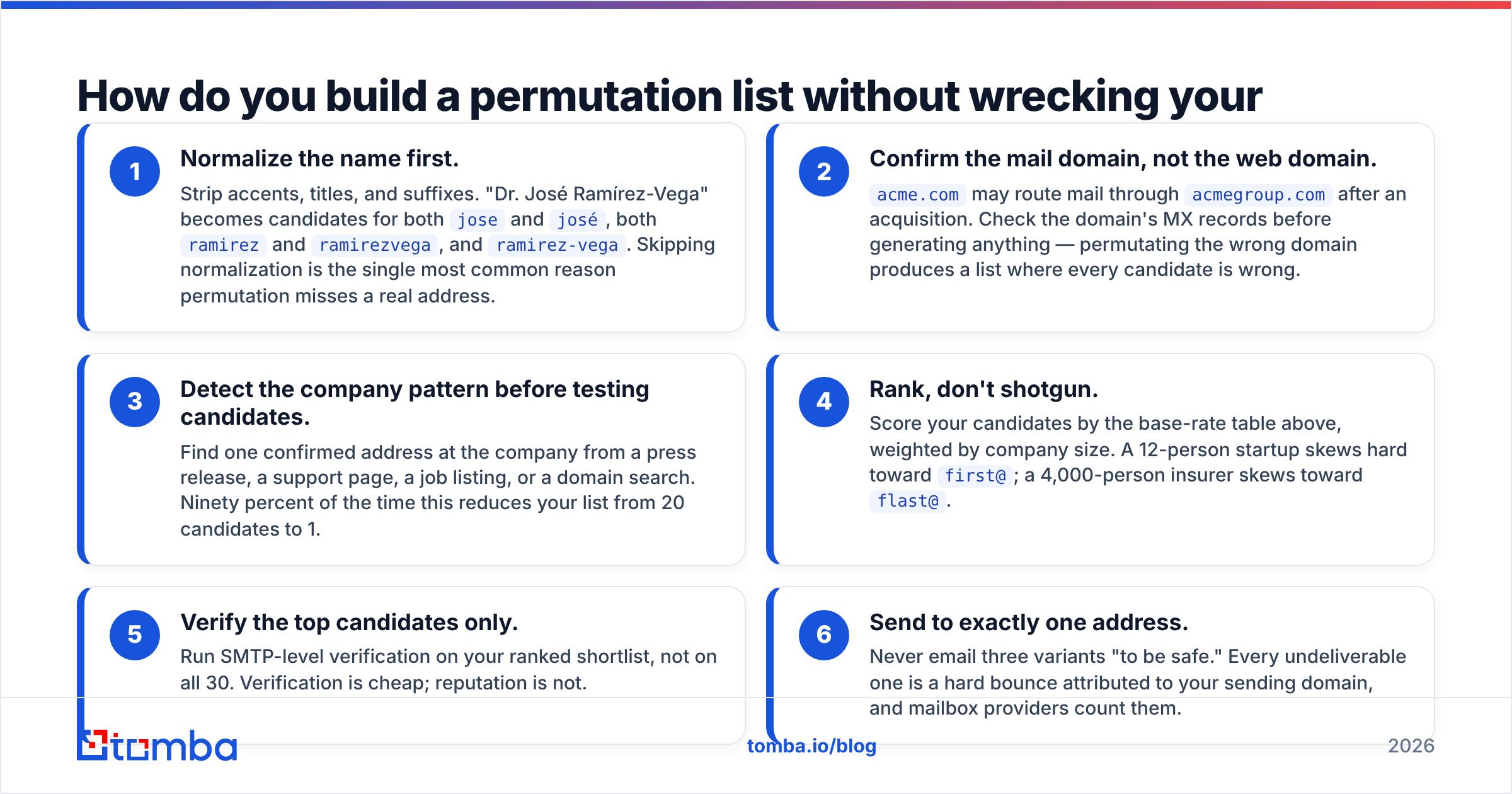
Order of operations matters more than the list itself. Run it in this sequence:
- Normalize the name first. Strip accents, titles, and suffixes. "Dr. José Ramírez-Vega" becomes candidates for both
joseandjosé, bothramirezandramirezvega, andramirez-vega. Skipping normalization is the single most common reason permutation misses a real address. - Confirm the mail domain, not the web domain.
acme.commay route mail throughacmegroup.comafter an acquisition. Check the domain's MX records before generating anything — permutating the wrong domain produces a list where every candidate is wrong. - Detect the company pattern before testing candidates. Find one confirmed address at the company from a press release, a support page, a job listing, or a domain search. Ninety percent of the time this reduces your list from 20 candidates to 1.
- Rank, don't shotgun. Score your candidates by the base-rate table above, weighted by company size. A 12-person startup skews hard toward
first@; a 4,000-person insurer skews towardflast@. - Verify the top candidates only. Run SMTP-level verification on your ranked shortlist, not on all 30. Verification is cheap; reputation is not.
- Send to exactly one address. Never email three variants "to be safe." Every undeliverable one is a hard bounce attributed to your sending domain, and mailbox providers count them.

That last rule gets broken constantly, and it's the difference between permutation as a legitimate research technique and permutation as a way to get your domain filtered.
Is permutation better than using an email finder?#
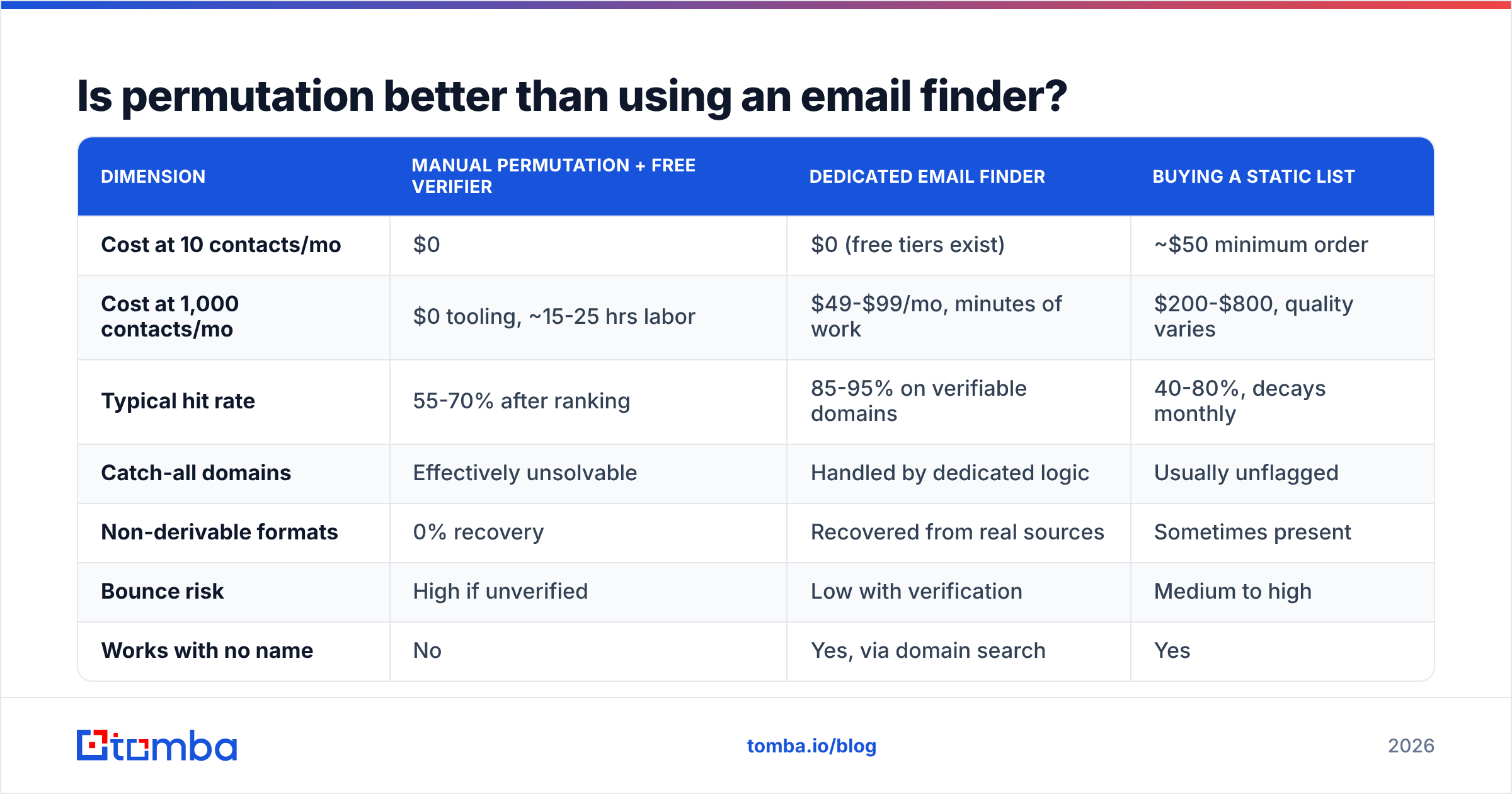
Depends entirely on volume and on how much your sender reputation is worth to you. Here's the honest comparison.
| Dimension | Manual permutation + free verifier | Dedicated email finder | Buying a static list |
|---|---|---|---|
| Cost at 10 contacts/mo | $0 | $0 (free tiers exist) | ~$50 minimum order |
| Cost at 1,000 contacts/mo | $0 tooling, ~15-25 hrs labor | $49-$99/mo, minutes of work | $200-$800, quality varies |
| Typical hit rate | 55-70% after ranking | 85-95% on verifiable domains | 40-80%, decays monthly |
| Catch-all domains | Effectively unsolvable | Handled by dedicated logic | Usually unflagged |
| Non-derivable formats | 0% recovery | Recovered from real sources | Sometimes present |
| Bounce risk | High if unverified | Low with verification | Medium to high |
| Works with no name | No | Yes, via domain search | Yes |
| Audit trail / GDPR source | None | Source attribution available | Often opaque |
Read that first row carefully: at low volume, permutation genuinely wins. If you need to reach eight specific people this quarter, spending $49 is silly. Open a free email checker, test your ranked candidates, and move on.
The economics flip fast. At 1,000 contacts a month, the labor cost of manual permutation is somewhere between $600 and $2,000 in loaded salary, against $49-$99 for tooling that also handles catch-alls and non-derivable formats. That's not a close call.
Static purchased lists are the worst option for most teams. B2B contact data decays at roughly 22-30% annually as people change jobs, so a list that was 85% accurate at export is materially worse six months later. Vendor review sites like G2 are useful for sanity-checking a provider's freshness claims against actual user complaints about bounce rates.
How do you verify permutations without triggering blocks?#
Verification is where permutation becomes safe. The mechanism is an SMTP conversation: your verifier connects to the recipient's mail server, begins a message envelope with RCPT TO:, reads the server's response code, and disconnects before sending any actual data. The server tells you whether the mailbox exists. Nobody receives anything.
This is standard behavior defined in the SMTP specification, not a hack. But three things break it in practice:
- Rate limiting. Hammering a mail server with 30
RCPT TOprobes from one IP gets that IP throttled or blocked. Proper verifiers distribute probes across IP pools and pace them. - Greylisting. Some servers deliberately return a temporary failure on first contact. A naive verifier reads that as "invalid" and discards a perfectly good address.
- Accept-all configuration. Some servers say yes to everything. That's the catch-all problem, and it deserves its own section.
Running this yourself with a raw SMTP client at any volume is how you get your office IP blacklisted. Use a purpose-built email verifier that handles pooling, retries, and greylisting, or use the free tier of one — the operational risk of DIY verification is far higher than the cost.
What happens when the domain is catch-all?#
Roughly one in five business domains is configured to accept mail to any address at that domain, valid or not. Send to asdfghjkl@catchall-company.com and the server accepts it cheerfully, then silently routes it to a junk folder or drops it.
For permutation, catch-all is the worst-case scenario. Your verifier returns "valid" for all 30 guesses, which tells you precisely nothing. If you then pick one at random and send, you'll see it as delivered — no bounce — while it lands nowhere. That's worse than a bounce, because you get no signal that anything went wrong. You'll conclude the prospect ignored you.

There are only three ways through a catch-all domain:
- Corroborate from a second source. If the address appears in a public source — a conference speaker page, a GitHub commit, a whitepaper byline — it's real regardless of what SMTP says.
- Infer from the domain pattern. If 40 known addresses at that company are all
first.last@, yourfirst.last@guess is very likely correct even on a catch-all. - Use a dedicated catch-all resolver. Tools like a catch-all verifier apply pattern analysis and cross-source corroboration rather than relying on the SMTP handshake alone.
If none of those apply, treat the address as unconfirmed and weight your expectations accordingly. Don't count it as a verified contact in your pipeline math.
Does email permutation hurt deliverability?#
Only if you send unverified guesses. The permutation itself is inert — generating a list of strings has no effect on anything.
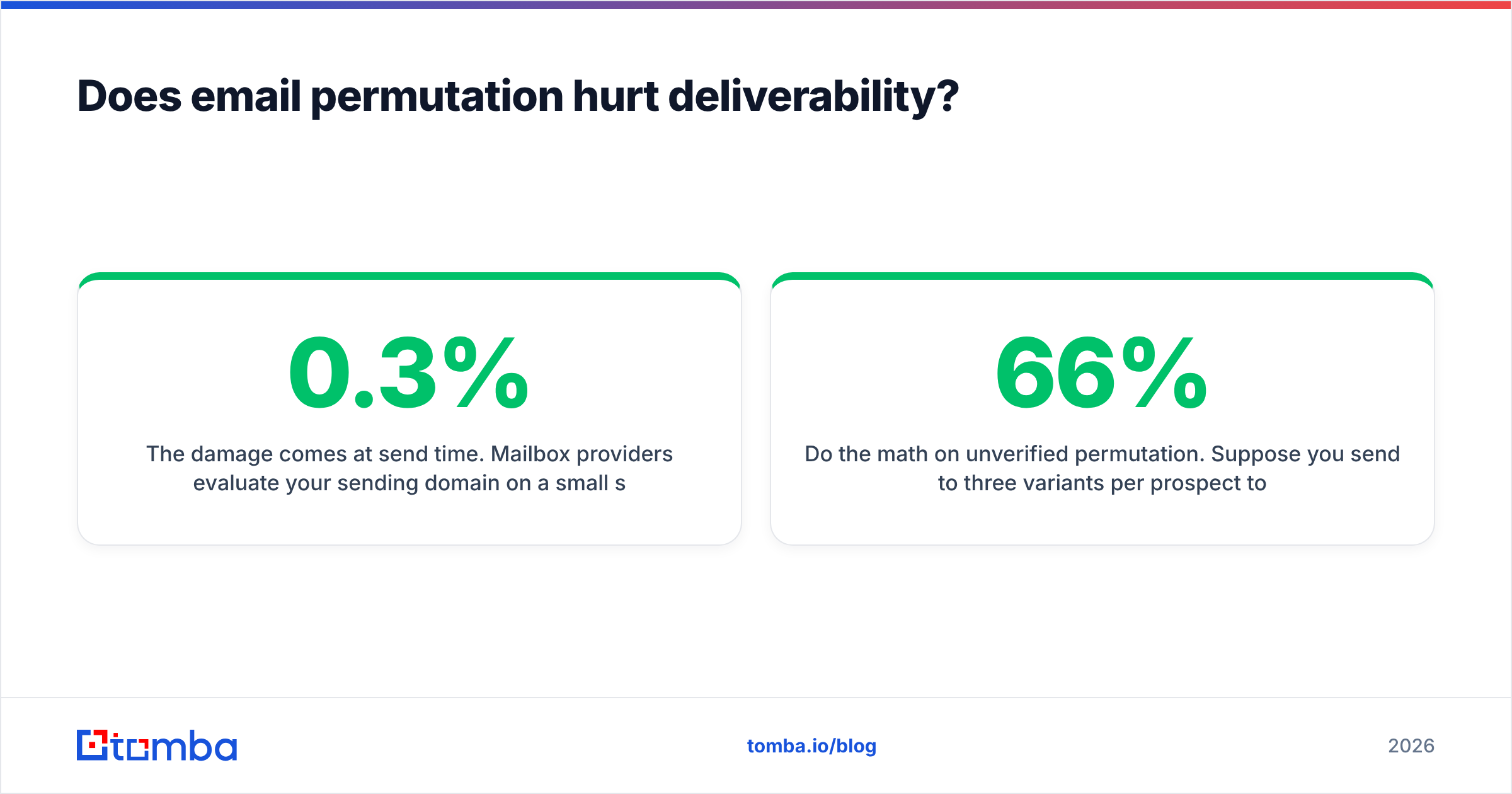
The damage comes at send time. Mailbox providers evaluate your sending domain on a small set of signals, and bounce rate is near the top. Google's bulk sender guidelines are explicit that senders should keep spam complaint rates below 0.3% and maintain valid recipient lists. Industry consensus puts the safe hard-bounce ceiling around 2%, with 5% being the point where filtering starts in earnest.
Do the math on unverified permutation. Suppose you send to three variants per prospect to maximize your chances. Two of the three are guaranteed invalid — that's a 66% bounce rate on those sends. Across a 200-contact campaign that's 400 hard bounces. Your domain won't survive that. Recovery takes weeks of reduced volume and warmup, if it happens at all.
The rule is absolute: one verified address per person, per send. No exceptions, no "just in case" duplicates.
When should you use permutation instead of a finder?#
Permutation earns its place in four specific situations:
- Very low volume. Under about 20 contacts a month, the manual workflow costs less than any subscription.
- Obscure or tiny domains. A 6-person agency in a niche vertical may simply not exist in any commercial database. Permutation plus verification is your only route.
- Fresh hires. Someone who started three weeks ago won't appear in most datasets yet, but their address already exists and follows the company pattern. Permutation gets there faster than waiting for a database refresh.
- Cross-checking a suspicious result. If a finder returns something that doesn't match the company's dominant pattern, permutating and verifying independently is a reasonable sanity check.
Outside those cases, permutation is a manual reimplementation of something a tool does better. A bulk email finder processes a CSV of names and domains and returns verified addresses with confidence scores, which is the same output your manual process aims at — minus the twelve hours.
What does a sane permutation workflow look like end to end?#
Put together, the whole thing is five steps and takes under two minutes per contact once you've done it a few times:
- Confirm the mail domain via MX lookup — not just the marketing website.
- Pull the company pattern from any known address on that domain.
- Generate ranked candidates using the pattern, with the base-rate table as a fallback when no pattern is available.
- Verify the top three, stop at the first valid result, and flag catch-all domains for corroboration.
- Log the source and date so you can audit where the address came from and refresh it before it decays.
Step five is the one everyone skips and later regrets. Contact data has a shelf life. An address you verified in March and never touched again is a coin flip by December.
Where should you start?#
If you're working a short list this week, run your names through a free permutator, check the top three candidates against a verifier, and send to one. That costs nothing and it works.
If you're running outbound at any real volume — dozens of new contacts a week, multiple sequences, a team that needs consistent data — stop guessing and let a tool do the pattern detection, verification, and catch-all resolution in one pass. Tomba Email Finder returns verified addresses from a name and domain with source attribution and a confidence score, so you know not just what the address is but why it's believed correct. The free tier covers 25 searches a month with no card, and paid plans start at $49/mo — see Tomba pricing for the full breakdown.
Permutation is a good technique to understand. It's a bad process to run by hand at scale.
Related guides#
Ready to find emails that actually work?
Join 150,000+ professionals who stopped guessing and started sending. Free credits on signup — no credit card required.
Get the Tomba newsletter
Practical outbound tactics and product updates — once every two weeks.
About the author