Email Sequencing in 2026: How to Build Sequences That Reply
Most email sequences fail for boring reasons: too many steps, wrong gaps, unverified lists. Here is what actually works in 2026, with cadence tables, tool comparisons, and the metrics that matter.
TL;DR
- Email sequencing is a planned series of emails sent to one contact over days or weeks, where each step is conditional on what the contact did (or did not do) with the previous one.
- Four to six steps over 14–21 business days is the range that holds up across most B2B teams. Nine-step monsters mostly generate unsubscribes and spam complaints.
- The single biggest driver of sequence performance is not copy. It is list quality: an unverified list bounces hard, tanks your sender reputation, and makes every downstream metric a lie.
- Reply-focused sequences beat open-focused ones now that Apple Mail Privacy Protection and Gmail image proxying have made open rates roughly decorative.
- Pick a sending tool for its conditional logic and inbox rotation, and a data tool for verified contacts. Very few products are genuinely excellent at both.
What is email sequencing?#
Email sequencing is the practice of mapping out a multi-step email series in advance, then letting software send each step on a schedule with branching rules based on recipient behaviour.
Think of it like a follow-up conversation you would have with a prospect at a conference. You do not walk up and deliver your entire pitch in one breath, and you do not repeat the same sentence five times. You open, you wait, you add something new, you change angle, and eventually you either book time or gracefully step back. A sequence is that conversation encoded as rules.
The mechanical parts of any sequence:
- Entry criteria — who gets enrolled, and from where (a list import, a CRM stage change, a form fill, a website visit).
- Steps — the individual emails, plus non-email tasks like a LinkedIn view or a call.
- Delays — the gap between steps, measured in business days, not calendar days.
- Exit conditions — reply, meeting booked, unsubscribe, bounce, or stage change. A sequence that does not stop on reply will burn a live deal.
- Branches — different next steps for openers vs non-openers, clickers vs non-clickers, or by persona.
- Sending identity — which mailbox, domain, and warmup pool the step goes out from.
Miss any one of those and you do not have a sequence. You have a mailing list with extra steps.
How is email sequencing different from drip campaigns and newsletters?#
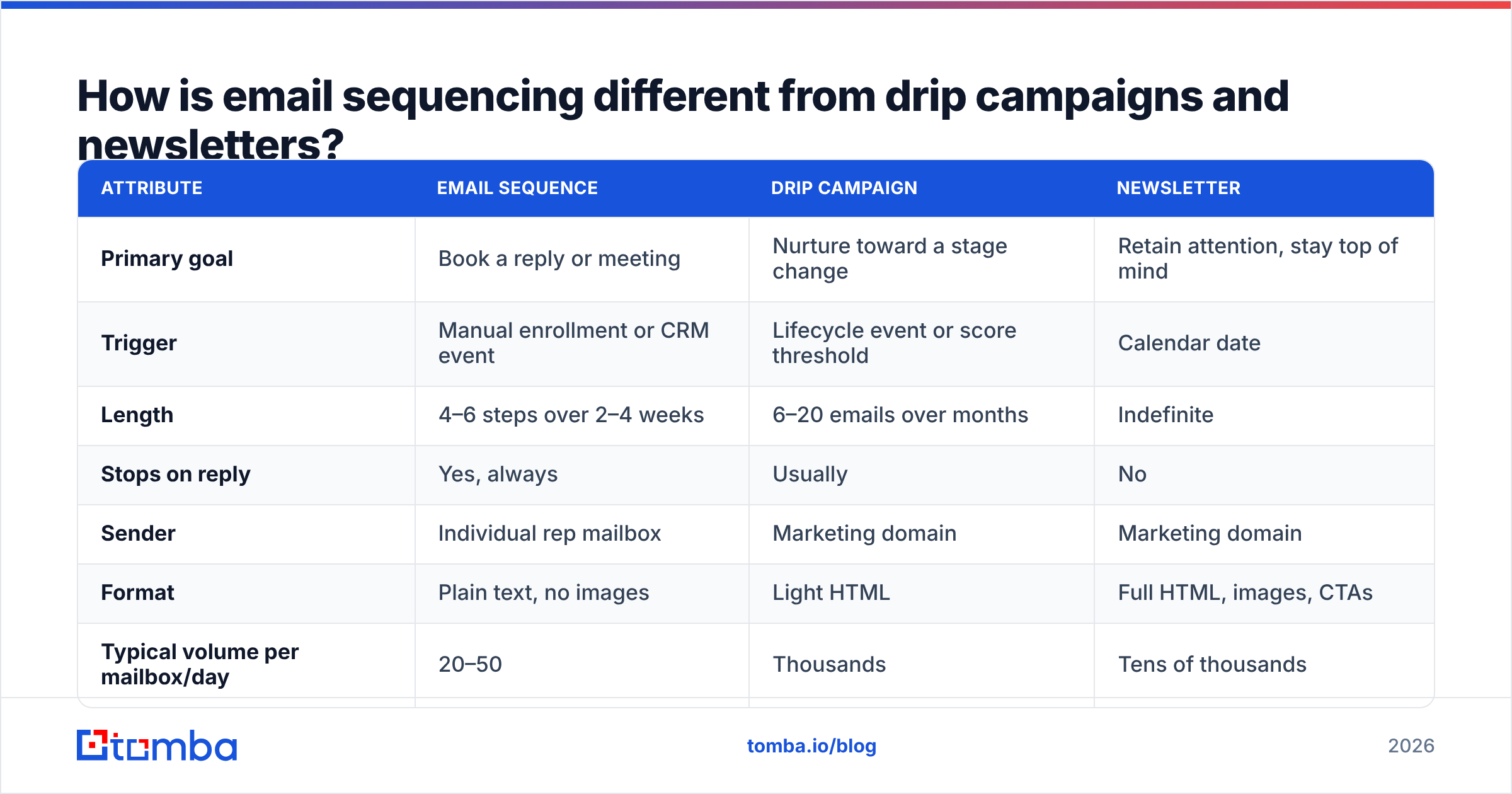
People use these terms interchangeably and then wonder why their metrics do not compare to benchmarks. They are different instruments.
| Attribute | Email sequence | Drip campaign | Newsletter |
|---|---|---|---|
| Primary goal | Book a reply or meeting | Nurture toward a stage change | Retain attention, stay top of mind |
| Trigger | Manual enrollment or CRM event | Lifecycle event or score threshold | Calendar date |
| Length | 4–6 steps over 2–4 weeks | 6–20 emails over months | Indefinite |
| Stops on reply | Yes, always | Usually | No |
| Sender | Individual rep mailbox | Marketing domain | Marketing domain |
| Format | Plain text, no images | Light HTML | Full HTML, images, CTAs |
| Typical volume per mailbox/day | 20–50 | Thousands | Tens of thousands |
| Success metric | Reply rate, meetings booked | Conversion to opportunity | Click rate, unsubscribe rate |
The practical takeaway: never run a sequence from your marketing domain, and never send a sequence with a header image and a footer full of social icons. Sequences work because they look like a person wrote them. The moment the email looks like a broadcast, the reply rate collapses and, worse, Gmail starts classifying you under bulk-sender rules.
How many steps should an email sequence have?#
Between four and six for cold outbound, and three to four for warm inbound follow-up. Beyond that, marginal replies drop off sharply while complaint rates keep climbing.
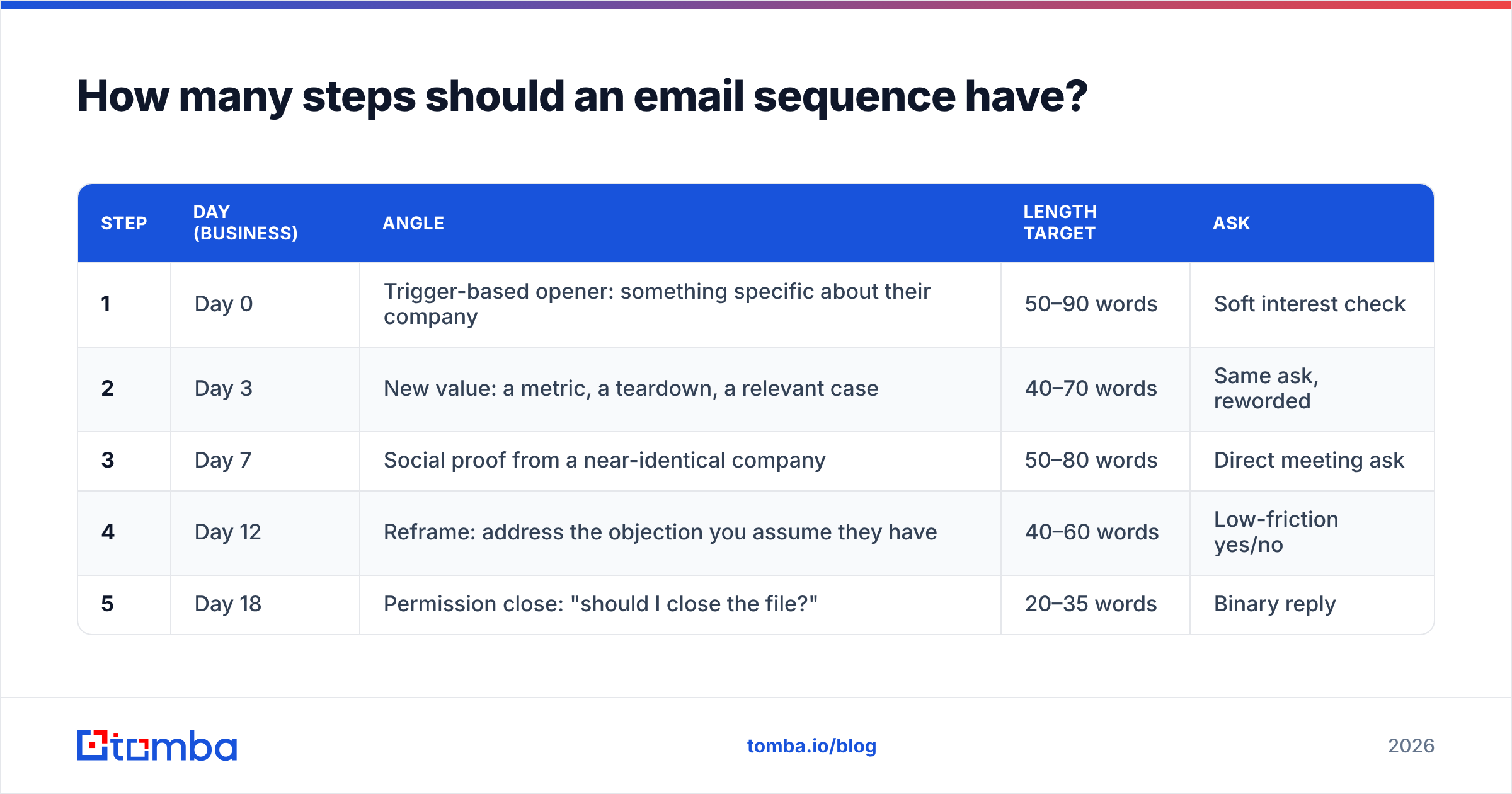
Here is a cadence structure that holds up well across mid-market B2B:
| Step | Day (business) | Angle | Length target | Ask |
|---|---|---|---|---|
| 1 | Day 0 | Trigger-based opener: something specific about their company | 50–90 words | Soft interest check |
| 2 | Day 3 | New value: a metric, a teardown, a relevant case | 40–70 words | Same ask, reworded |
| 3 | Day 7 | Social proof from a near-identical company | 50–80 words | Direct meeting ask |
| 4 | Day 12 | Reframe: address the objection you assume they have | 40–60 words | Low-friction yes/no |
| 5 | Day 18 | Permission close: "should I close the file?" | 20–35 words | Binary reply |
A few notes on that table. The gaps widen as the sequence progresses, because early density signals interest while late density signals desperation. Every step gets shorter. And step five works far better as a genuine offer to stop than as a fake breakup — recipients can tell the difference, and the fake version generates spam complaints.
If you are following up on an inbound demo request, compress everything: day 0, day 2, day 5, done. Inbound intent decays fast.
Why do most email sequences fail?#
Almost never because of the copy. In order of impact:
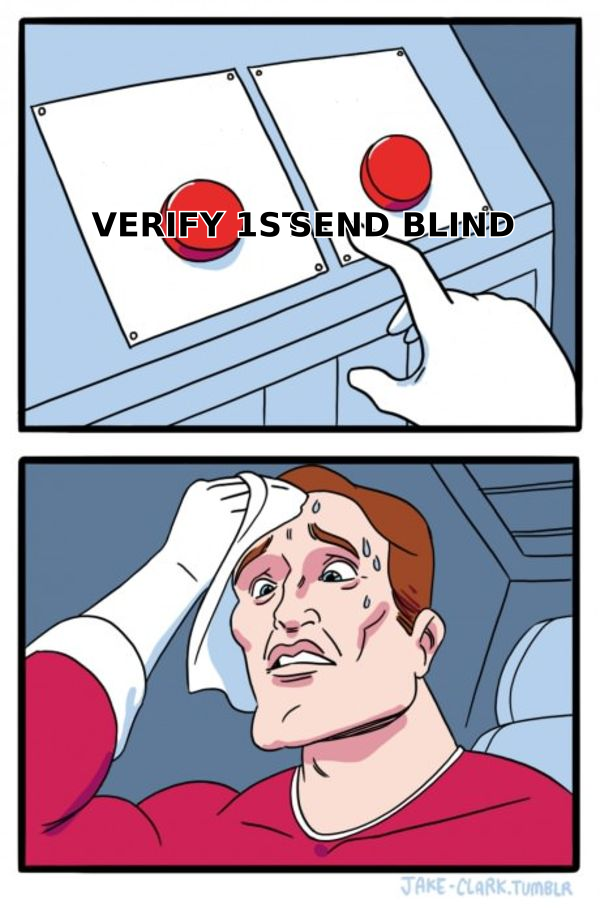
- Unverified contact data. A list with a 15% invalid rate does not just waste 15% of sends. Bounces above roughly 2–3% are read by mailbox providers as a spam signal, which suppresses inbox placement for the other 85%. Running the list through an email verifier before enrollment is the cheapest performance improvement available to you.
- No mailbox capacity planning. One mailbox sending 300 emails a day is a deliverability incident waiting to happen. Sequences need volume spread across multiple mailboxes and domains, each warmed and each capped at a sane daily figure.
- Sequence does not exit on reply. Nothing kills goodwill faster than a prospect who replies "sure, let's talk" and receives your step-4 breakup email three days later.
- Every step repeats the same idea. "Just bumping this to the top of your inbox" is not a step. If a step contains no new information, delete it and lengthen the gap on the surrounding steps.
- Personalisation that is obviously templated.
{{first_name}}, I loved what you're doing at {{company}}reads as automation to anyone who has received it twice. Either personalise on something specific enough that a template could not produce it, or drop the pretence and write a short, clearly-generic, genuinely useful note. - Targeting the wrong persona. No cadence rescues a sequence sent to people who cannot buy and would not care.
The through-line is that sequencing amplifies whatever you feed it. Good targeting plus clean data plus mediocre copy beats brilliant copy sent to a scraped list every single time.
What does the data layer of a sequence actually require?#
Before a single email sends, four data operations should have happened:
- Identify the accounts. Firmographic filters, technographic signals, or intent data — whatever gives you a defensible reason that these 400 companies are more likely to buy than a random 400.
- Find the right people. Titles, seniority, and function. This is where an email finder or a domain search across the target company earns its keep, because you want the actual buyer, not whoever's address happened to be on the website footer.
- Verify every address. Syntax, MX record, mailbox existence, and catch-all handling. Catch-all domains deserve special treatment — they accept everything at the SMTP layer, so a naive verifier marks them valid and you find out the truth from your bounce report.
- Enrich for personalisation tokens. Headcount, funding stage, tech stack, recent hires. These are the raw material for step-1 openers that do not read like mail merge.
Providers differ meaningfully here. Some, like BookYourData, lead with a large prebuilt database you can filter and export — useful when you want volume fast and known-good coverage in specific regions. Others, including Tomba, lean toward on-demand lookup and verification against live sources, which suits teams building tightly-targeted lists from an account plan they already have. Neither approach is universally correct; they solve different halves of the problem, and plenty of teams run both.
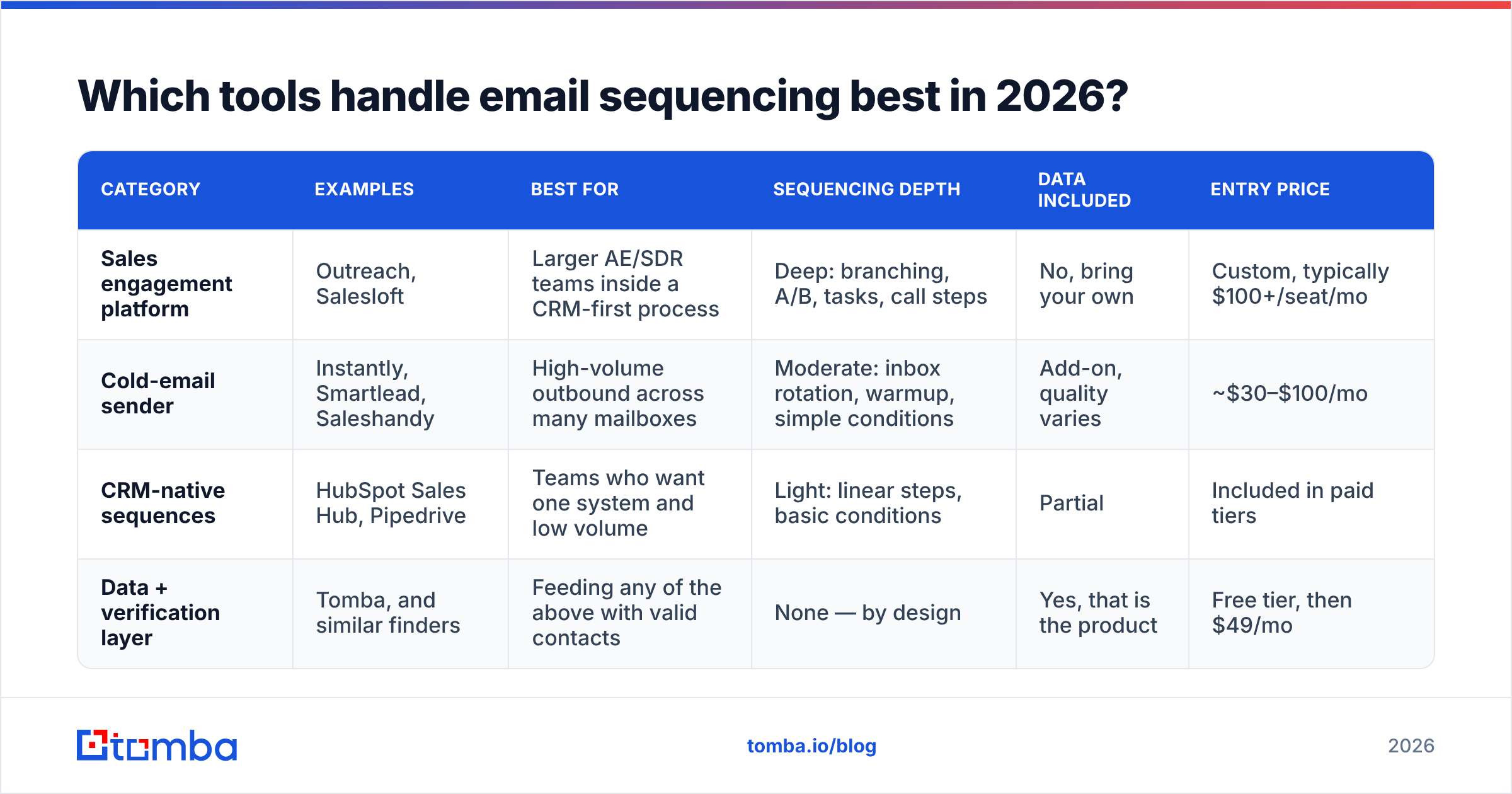
Which tools handle email sequencing best in 2026?#
Sequencing capability sits in three distinct product categories, and buying the wrong category is a common and expensive mistake.
| Category | Examples | Best for | Sequencing depth | Data included | Entry price |
|---|---|---|---|---|---|
| Sales engagement platform | Outreach, Salesloft | Larger AE/SDR teams inside a CRM-first process | Deep: branching, A/B, tasks, call steps | No, bring your own | Custom, typically $100+/seat/mo |
| Cold-email sender | Instantly, Smartlead, Saleshandy | High-volume outbound across many mailboxes | Moderate: inbox rotation, warmup, simple conditions | Add-on, quality varies | ~$30–$100/mo |
| CRM-native sequences | HubSpot Sales Hub, Pipedrive | Teams who want one system and low volume | Light: linear steps, basic conditions | Partial | Included in paid tiers |
| Data + verification layer | Tomba, and similar finders | Feeding any of the above with valid contacts | None — by design | Yes, that is the product | Free tier, then $49/mo |
Tomba sits deliberately in the last row. It does not send sequences and does not try to; it supplies the verified addresses, phone numbers, and enrichment fields that the sender consumes. Tomba pricing starts with a free tier at 25 searches per month, then $49/mo for Starter, $99/mo for Growth, and $249/mo for Pro, with Enterprise negotiated. If you are evaluating tools, be clear about which layer you are shopping for — the review sites make this muddier than it needs to be, since G2 groups senders and data providers under overlapping categories.
For the sending layer specifically, the questions that matter are: how many mailboxes can you rotate across, does warmup run natively, can a step branch on reply sentiment, and does the tool write activity back to your CRM without a Zapier hop.
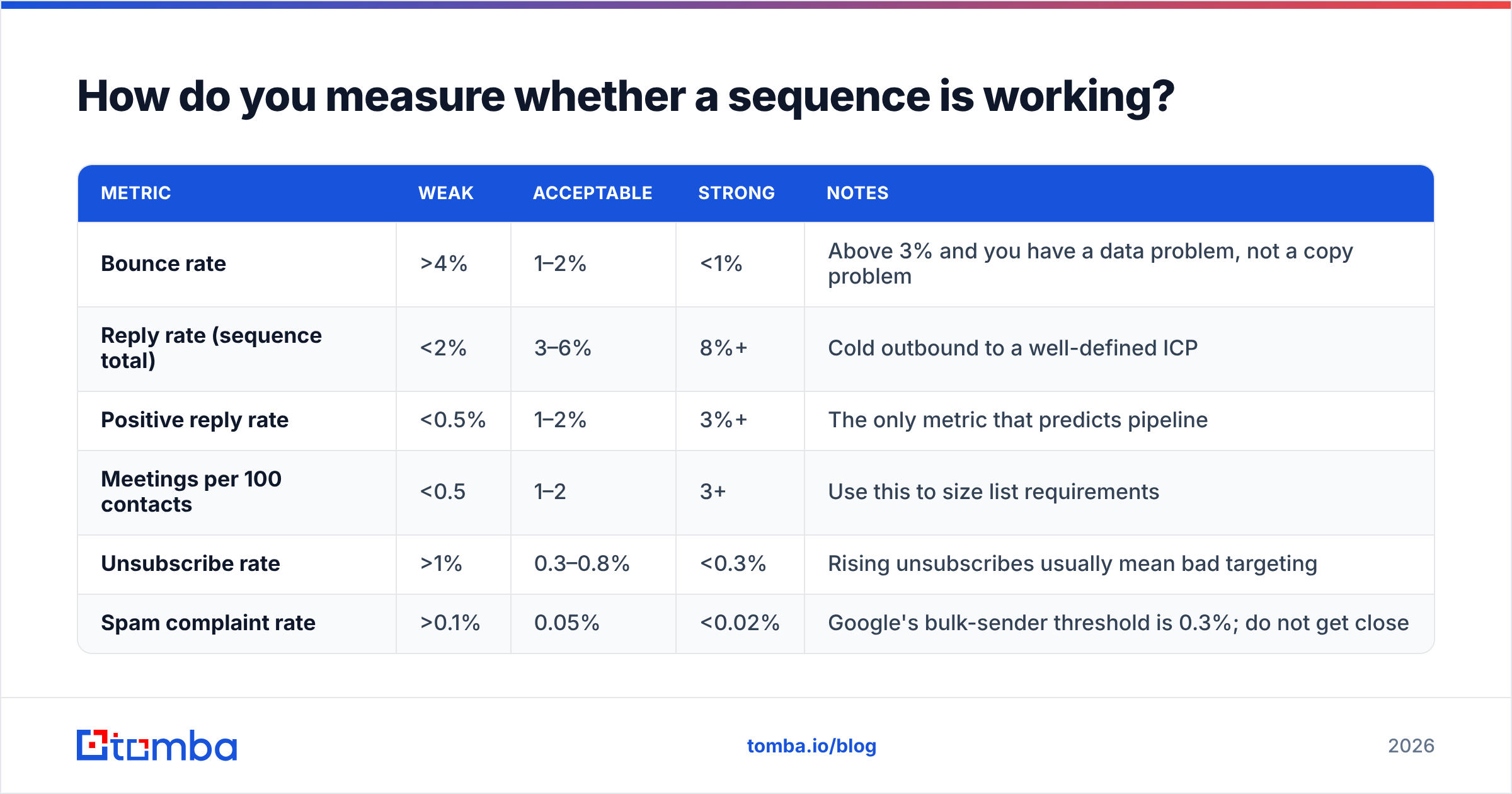
How do you measure whether a sequence is working?#
Stop looking at open rates. Apple Mail Privacy Protection pre-fetches images for a large share of consumer and increasingly business recipients, which inflates opens unpredictably. Treat opens as a directional smell test, nothing more.
| Metric | Weak | Acceptable | Strong | Notes |
|---|---|---|---|---|
| Bounce rate | >4% | 1–2% | <1% | Above 3% and you have a data problem, not a copy problem |
| Reply rate (sequence total) | <2% | 3–6% | 8%+ | Cold outbound to a well-defined ICP |
| Positive reply rate | <0.5% | 1–2% | 3%+ | The only metric that predicts pipeline |
| Meetings per 100 contacts | <0.5 | 1–2 | 3+ | Use this to size list requirements |
| Unsubscribe rate | >1% | 0.3–0.8% | <0.3% | Rising unsubscribes usually mean bad targeting |
| Spam complaint rate | >0.1% | 0.05% | <0.02% | Google's bulk-sender threshold is 0.3%; do not get close |
Run the maths backwards from your quota. If you need 10 meetings a month and you convert 2 meetings per 100 contacts, you need 500 well-targeted contacts entering sequences monthly — not 5,000 poorly-targeted ones. That reframing usually kills the impulse to buy the biggest list available.
How do you write each step so it earns a reply?#
Some concrete rules that survive contact with real inboxes:
- Subject lines: two to four words, lowercase, no punctuation. "quick question about onboarding" outperforms "Transform Your Onboarding Process Today!" by a wide margin. If you want to test systematically, a subject line generator is a reasonable starting point, but test your own variants against your own list.
- First line is about them, never about you. Delete any opener containing "I hope this finds you well" or "I'm reaching out because."
- One idea per email. If you need two paragraphs to explain the value, the value is not sharp enough yet.
- One link maximum, and only after step two. Multiple links in a cold first-touch is a well-known spam heuristic.
- Plain text only. No tracking pixel if you can live without it, no signature images, no HTML tables. Your email deliverability improves measurably when your cold email is structurally identical to a normal person's email.
- Ask for a reply, not a calendar booking, until step three. "Worth a look?" converts better than a Calendly link in a first touch, because it costs the recipient two seconds instead of a scheduling decision.
If you want structural starting points rather than blank-page paralysis, the cold email templates library and HubSpot's ongoing sales blog both publish frameworks worth adapting — adapting, not copying, since any template that circulates widely gets pattern-matched into the promotions tab eventually.
What should you fix first?#
If your sequences are underperforming, work in this order, because the earlier items dominate the later ones:
- Verify the list and remove risky and catch-all addresses.
- Cut the sequence from nine steps to five and widen the gaps.
- Rewrite step one so it could only have been sent to that one company.
- Split volume across more mailboxes and cap daily sends.
- Then, and only then, start A/B testing subject lines.
Most teams do this list backwards, which is why so many of them conclude that "cold email doesn't work anymore." It works fine. It just stopped tolerating sloppy inputs.
Start with the data layer. A sequence built on verified, correctly-targeted contacts outperforms a beautifully-written one built on a scraped export, every time. Use the Tomba Email Finder to source the right person at each target account and confirm the address is live before it ever enters a cadence — the free tier gives you 25 searches a month to test the difference against your current list, and paid plans start at $49/mo when you are ready to scale it.
Related guides#
Ready to find emails that actually work?
Join 150,000+ professionals who stopped guessing and started sending. Free credits on signup — no credit card required.
Get the Tomba newsletter
Practical outbound tactics and product updates — once every two weeks.
About the author