Email Subject Lines for B2B Sales: 60 That Get Replies
Open rates live or die in seven words. Here's what separates B2B subject lines that get replies from the ones that get archived, with 60 tested examples, a formula table, and the checks most reps skip.
TL;DR
- Short wins. B2B subject lines in the 3–7 word range consistently outperform long ones because mobile inboxes truncate around 35–40 characters.
- Specificity beats cleverness. "Question about your Q3 hiring plan" outperforms "Quick question" because it survives the two-second scan.
- Six formulas cover almost every situation: Referral, Observation, Question, Number, Peer Proof, and Direct Ask. Everything else is a remix.
- The subject line is a multiplier, not a fix. A great line on a stale list still lands in spam — verification and sender setup come first.
- Test one variable at a time on 100+ sends per variant. Anything smaller is noise, not data.
Your subject line does one job: earn the two seconds it takes someone to decide whether to open, archive, or report. It does not sell, qualify, or explain. Reps who treat it as a mini-pitch write 12-word headlines that get truncated at word six and read like a newsletter promo.
This guide covers what actually moves open rates in B2B, the formulas that hold up across industries, 60 lines you can adapt today, and the boring infrastructure work that makes any of it matter.
What makes an email subject line work in B2B sales?#
Four things, in order of impact.
- Relevance signal. The reader must see something that could only apply to them — their company, their role, a competitor, a recent event. Generic lines are pattern-matched to "bulk" in under a second.
- Length that survives truncation. Gmail on mobile shows roughly 35–40 characters. Outlook desktop shows more, but your prospect is probably on a phone. Front-load the meaning.
- Curiosity without a gap. A curiosity gap ("You won't believe this") reads as consumer marketing. Curiosity with substance ("Your careers page vs Datadog's") reads as research.
- Congruence with the body. If the subject promises a question and the body opens with a 90-word company boilerplate, you've trained that prospect to ignore you permanently.
What does not work in B2B, despite being everywhere: emoji, ALL CAPS urgency, "RE:" or "FWD:" fakery, and the word "free" in the first three words. The first three trigger skepticism; the fourth trips filters. Google's own bulk sender guidelines make it clear that engagement signals — opens, replies, and lack of complaints — feed reputation, so a line that manufactures a false open costs you more than it earns.
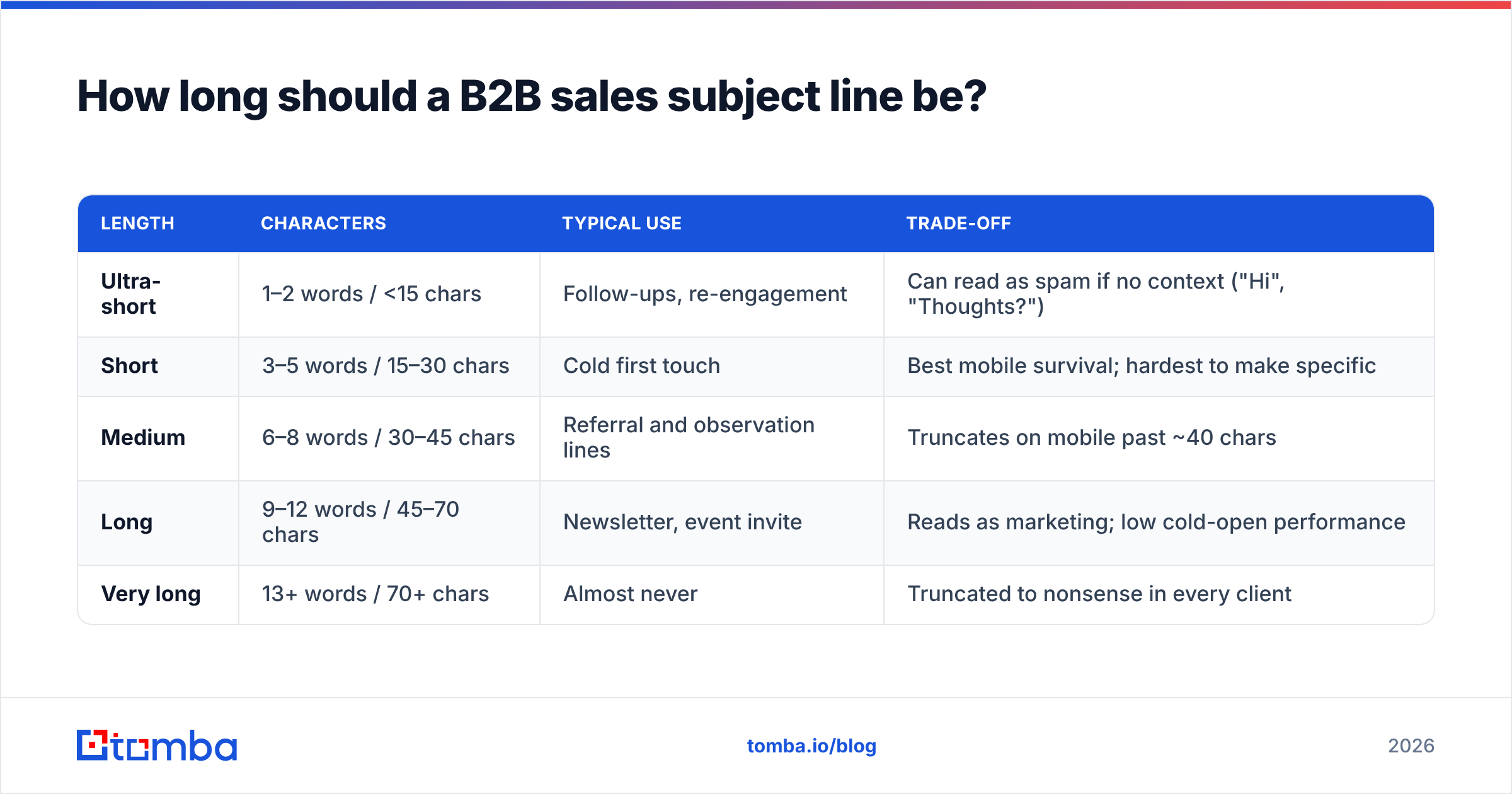
How long should a B2B sales subject line be?#
Shorter than you think, and shorter than what your marketing team sends.
| Length | Characters | Typical use | Trade-off |
|---|---|---|---|
| Ultra-short | 1–2 words / <15 chars | Follow-ups, re-engagement | Can read as spam if no context ("Hi", "Thoughts?") |
| Short | 3–5 words / 15–30 chars | Cold first touch | Best mobile survival; hardest to make specific |
| Medium | 6–8 words / 30–45 chars | Referral and observation lines | Truncates on mobile past ~40 chars |
| Long | 9–12 words / 45–70 chars | Newsletter, event invite | Reads as marketing; low cold-open performance |
| Very long | 13+ words / 70+ chars | Almost never | Truncated to nonsense in every client |
The practical rule: write the line, then read only the first 35 characters aloud. If that fragment still tells the prospect why the email concerns them, keep it. If it reads as "Quick question about your comp…", rewrite it.
One more constraint reps forget: the preview text. Most clients show 40–90 characters of body copy next to the subject. Your first body sentence is effectively a second subject line. Wasting it on "Hope this email finds you well" throws away half your inbox real estate.
What are the six B2B subject line formulas that actually work?#
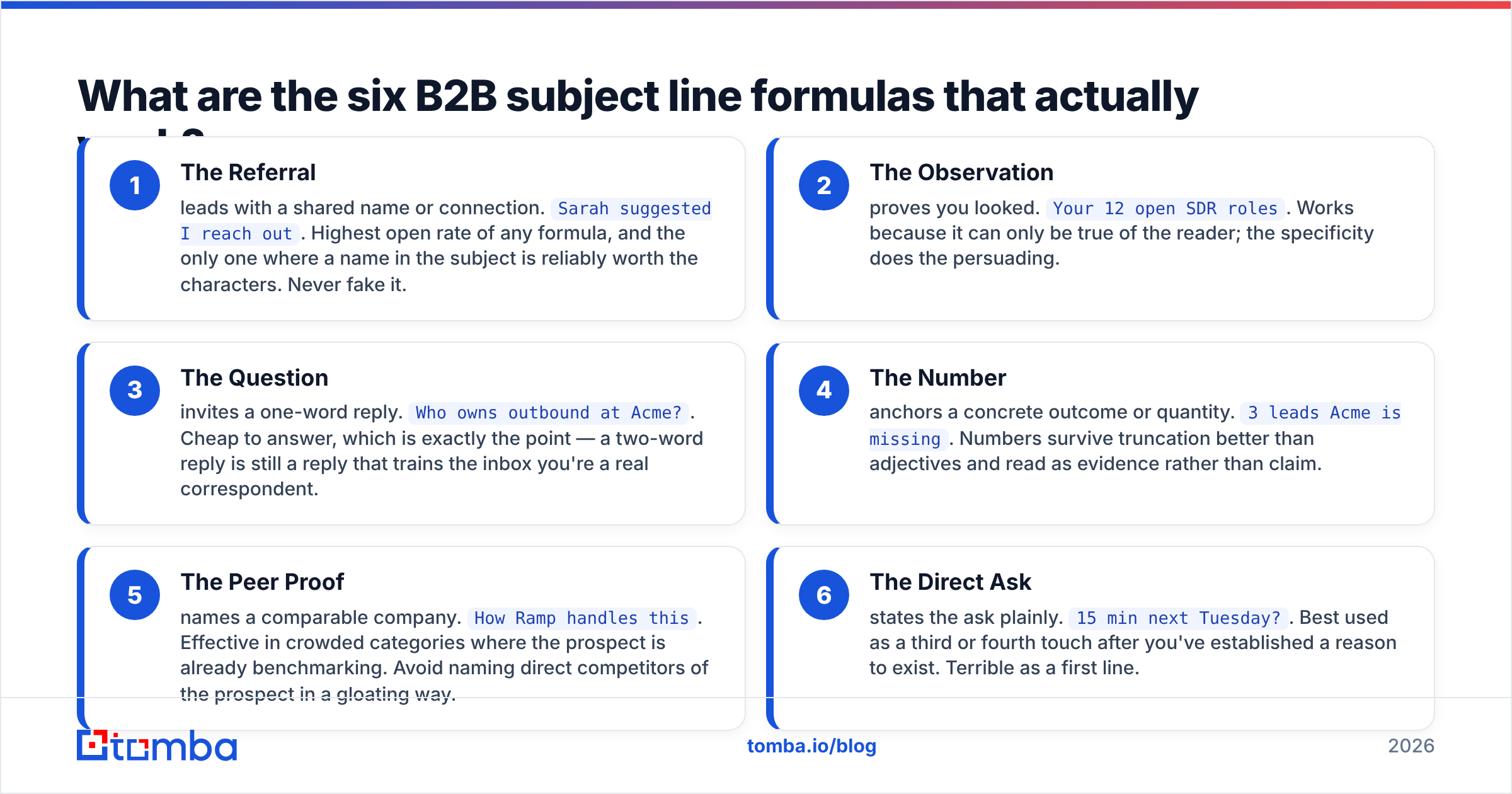
Almost every high-performing line in B2B collapses into one of six shapes. Learn the shapes, not the scripts.
- The Referral — leads with a shared name or connection.
Sarah suggested I reach out. Highest open rate of any formula, and the only one where a name in the subject is reliably worth the characters. Never fake it. - The Observation — proves you looked.
Your 12 open SDR roles. Works because it can only be true of the reader; the specificity does the persuading. - The Question — invites a one-word reply.
Who owns outbound at Acme?. Cheap to answer, which is exactly the point — a two-word reply is still a reply that trains the inbox you're a real correspondent. - The Number — anchors a concrete outcome or quantity.
3 leads Acme is missing. Numbers survive truncation better than adjectives and read as evidence rather than claim. - The Peer Proof — names a comparable company.
How Ramp handles this. Effective in crowded categories where the prospect is already benchmarking. Avoid naming direct competitors of the prospect in a gloating way. - The Direct Ask — states the ask plainly.
15 min next Tuesday?. Best used as a third or fourth touch after you've established a reason to exist. Terrible as a first line.
Mix formulas across a sequence rather than repeating one. If touch one is an Observation and touch two is another Observation, the second reads as a rerun.
Which subject lines fit each stage of the sequence?#
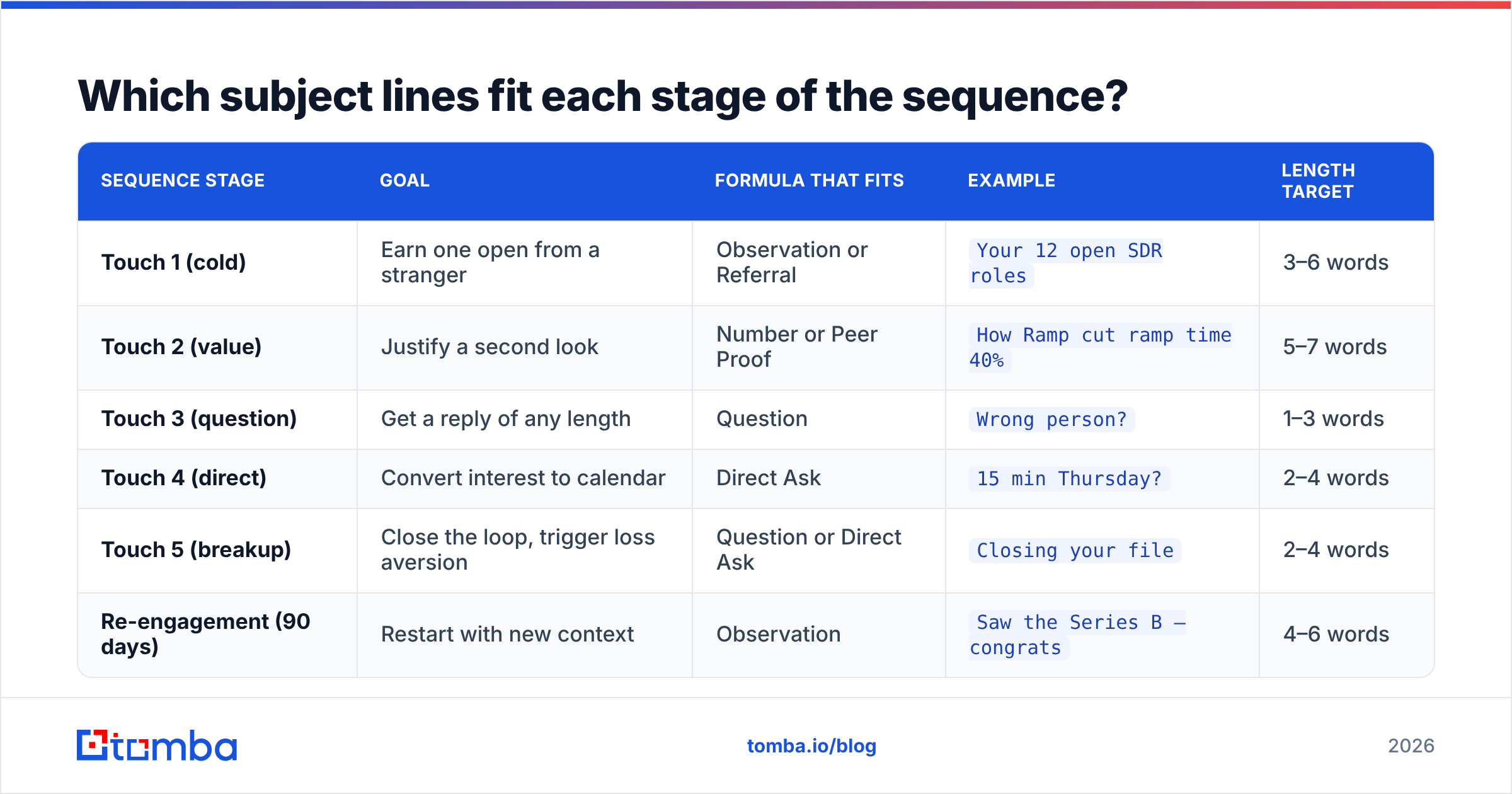
A first-touch line and a fourth-touch line have different jobs. The first has to earn attention from a stranger; the fourth has to be so low-friction that ignoring it feels rude.
| Sequence stage | Goal | Formula that fits | Example | Length target |
|---|---|---|---|---|
| Touch 1 (cold) | Earn one open from a stranger | Observation or Referral | Your 12 open SDR roles |
3–6 words |
| Touch 2 (value) | Justify a second look | Number or Peer Proof | How Ramp cut ramp time 40% |
5–7 words |
| Touch 3 (question) | Get a reply of any length | Question | Wrong person? |
1–3 words |
| Touch 4 (direct) | Convert interest to calendar | Direct Ask | 15 min Thursday? |
2–4 words |
| Touch 5 (breakup) | Close the loop, trigger loss aversion | Question or Direct Ask | Closing your file |
2–4 words |
| Re-engagement (90 days) | Restart with new context | Observation | Saw the Series B — congrats |
4–6 words |
Notice how lines get shorter as the sequence progresses. By touch three, the prospect has your name in their history; you no longer need to reintroduce context in the subject line. HubSpot's sales blog has documented the same pattern across its own outbound tests — later-stage brevity outperforms because the reader already has the thread.
What are 60 email subject lines for B2B sales worth stealing?#
Adapt these; don't paste them. Every bracket is a variable you must actually fill with real research.
Referral and connection (10)
[Name] suggested I reach out[Name] said you'd knowReferred by [Name][Name] mentioned your [team] workFellow [University] gradWe both know [Name]Following up on [Name]'s intro[Name] → youIntro from the [Event] panel[Name] thought this was relevant
Observation and trigger (12)
11. Your [N] open [role] roles
12. Noticed your new [tool] stack
13. [Company]'s pricing page change
14. Saw the [Series X] — congrats
15. Your careers page vs [Competitor]'s
16. [Company] + [Integration]?
17. New [job title] at [Company]
18. Question about your [Q3] plan
19. Your [conference] talk
20. Read your post on [topic]
21. [Company]'s expansion into [market]
22. Your team doubled — now what?
Question (10)
23. Who owns [function] at [Company]?
24. Wrong person?
25. Worth a look?
26. Bad timing?
27. Still a priority?
28. Is [problem] on your roadmap?
29. How are you handling [problem]?
30. Open to a different approach?
31. Should I close your file?
32. Any interest in [outcome]?
Number and outcome (10)
33. 3 leads [Company] is missing
34. [N]% more [metric] in 60 days
35. 2 ideas for [team]
36. $[N]k in wasted [spend]
37. [N] minutes, one idea
38. Cut [process] from 6 weeks to 4
39. 1 change, [N]% lift
40. [N] competitors already did this
41. Your [metric] vs the [industry] median
42. [N] questions about [initiative]
Peer proof (8)
43. How [Peer] handles [problem]
44. What [Peer] did last quarter
45. [Peer], [Peer], and [Company]?
46. [Industry] teams are switching
47. Borrowed this from [Peer]
48. [Peer]'s playbook, short version
49. Why [Peer] moved off [Tool]
50. [Peer] case study — relevant?
Direct ask and breakup (10)
51. 15 min Thursday?
52. Calendar link inside
53. Quick call next week?
54. Yes, no, or later?
55. Closing your file
56. Last one from me
57. Should I stop emailing?
58. Permission to close out
59. One-line reply is fine
60. Not the right time?
What kills a B2B subject line?#
The failure modes are more consistent than the wins. Avoid these:
- Fake threading. "RE:" or "FWD:" on a first touch. It gets opens and destroys trust in the same second.
- Company-first framing. "Introducing [Your Company]" tells the reader the email is about you. Nobody opens that.
- Vague urgency. "Time sensitive" without a real deadline. Repeated use trains the reader to discount everything you send.
- Merge-tag failure. "Hi {{first_name}}" shipped to 800 people is the single fastest way to burn a domain's credibility.
- Two ideas in one line. "Cutting costs and improving retention at Acme" splits attention and truncates badly.
- Copying a consumer playbook. Emoji, countdown language, and "🔥 last chance" belong in ecommerce. B2B buyers filter them as promotional.
How do you test subject lines without burning your list?#
Treat it like an experiment, not a vibe check.
Sample size. You need at least 100 sends per variant before an open-rate difference means anything. At 50 sends, a 6-point gap is noise. If your daily send volume is 40 emails per mailbox, that's a multi-day test — plan for it.
One variable. Change the subject line and nothing else. Same body, same CTA, same send window, same segment. If you change the subject and the first sentence together, you learn nothing about either.
The metric that matters. Open rate is now a lossy signal — Apple Mail Privacy Protection inflates it, and pixel blocking distorts it further. Judge subject lines on reply rate per thousand sends, with open rate as a secondary directional read. A subject line that lifts opens 8 points and drops replies is a worse line, not a better one. If you're unclear on how to benchmark this, the response rate definition is a useful starting point.
Iterate on formulas, not words. Testing "Quick question" against "Fast question" is a waste of a week. Test Observation against Question — different shapes produce different outcomes. Once a shape wins, refine the wording inside it.
A subject line tester will catch mechanical problems — length, spam trigger words, truncation points — before you send. Use it as a pre-flight check, not as a substitute for real inbox data. If you're stuck for angles, a subject line generator is a reasonable way to break a blank-page block, as long as you rewrite the output with real research.
Does the subject line matter more than the list?#
No, and this is where most subject-line advice quietly misleads people.
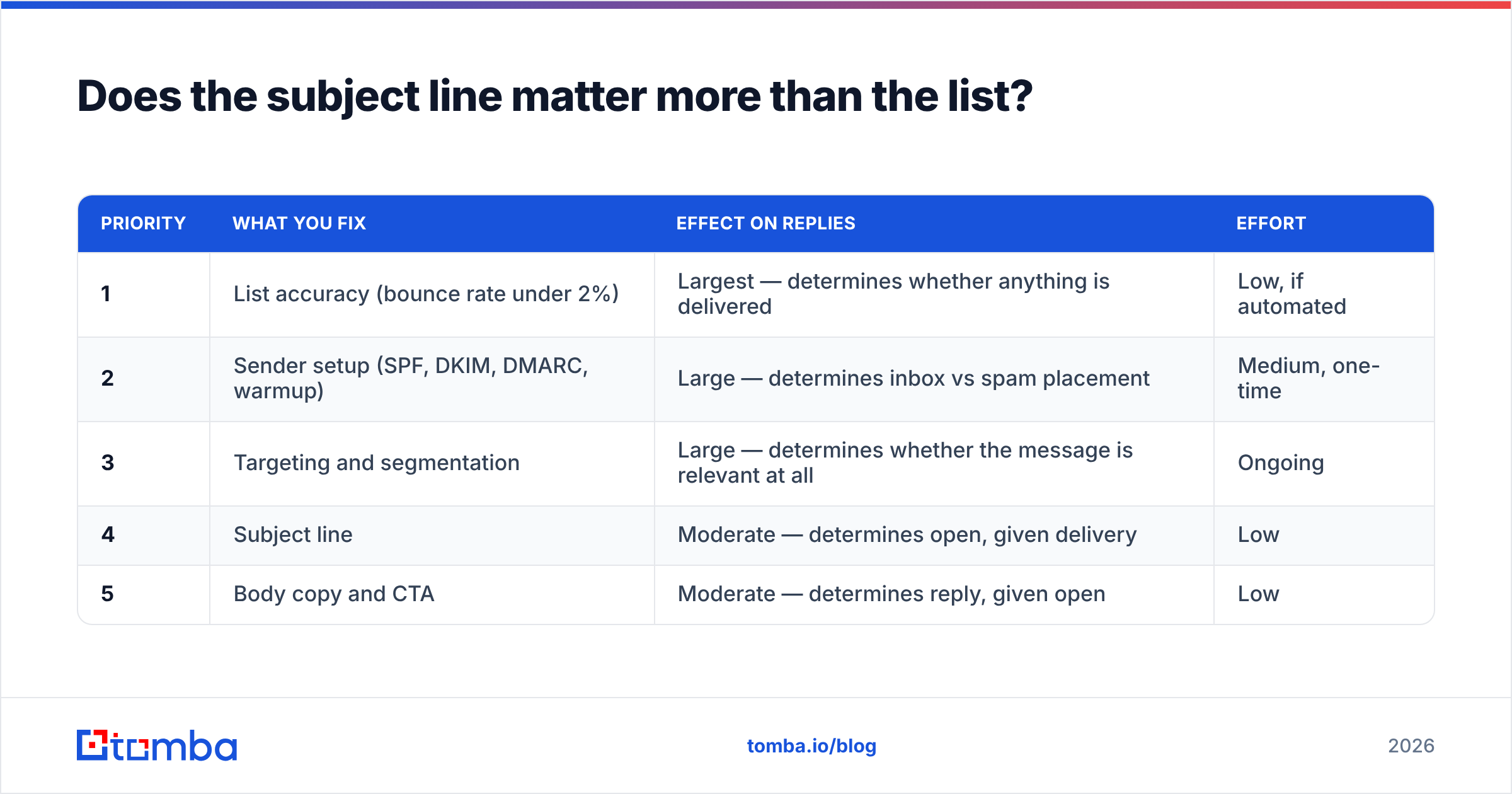
A subject line only affects emails that reach the inbox. If 22% of your list is invalid, your bounce rate spikes, your domain reputation drops, and your next campaign lands in Promotions or Spam regardless of how good the copy is. At that point you're optimizing the paint job on a car with no engine.
The order of operations that actually works:
| Priority | What you fix | Effect on replies | Effort |
|---|---|---|---|
| 1 | List accuracy (bounce rate under 2%) | Largest — determines whether anything is delivered | Low, if automated |
| 2 | Sender setup (SPF, DKIM, DMARC, warmup) | Large — determines inbox vs spam placement | Medium, one-time |
| 3 | Targeting and segmentation | Large — determines whether the message is relevant at all | Ongoing |
| 4 | Subject line | Moderate — determines open, given delivery | Low |
| 5 | Body copy and CTA | Moderate — determines reply, given open | Low |
Run an email verifier pass over every list before it enters a sequence. It removes hard bounces, flags role accounts, and separates catch-all domains that need different handling. Reviews across the sales engagement category on G2 show a consistent pattern: teams that blame copy for low reply rates usually have a data problem sitting one layer underneath.
Frequently asked questions#
Should I personalize the subject line with the prospect's first name? Usually not. First-name personalization in the subject is so common that it no longer signals effort, and it costs you 6–10 of your ~35 usable characters. Company name or a specific detail about their business carries far more weight.
Do questions in the subject line perform better? They perform well at touch three and beyond, when the prospect already has context. As a first touch, questions can feel presumptuous unless they're genuinely low-friction ("Who owns outbound at Acme?").
Is it okay to use the same subject line across a whole sequence? Keeping the same subject keeps the thread together in Gmail, which some teams prefer. The trade-off is that later emails look like reruns. A reasonable compromise: keep the thread for touches two and three, then change the subject for the breakup.
How many subject lines should I test per campaign? Two, sometimes three. Four or more variants split your volume into samples too small to read. Run a clean A/B, pick a winner, then test the winner against a new challenger.
Where to go from here#
Pick two formulas from the six above, write four variants of each against a real segment, and run them at 100+ sends per variant. Kill the losers by reply rate, not open rate. That single discipline will do more for your numbers than another list of "proven" lines.
Then fix the layer underneath. Great subject lines sent to guessed addresses produce bounces, not meetings. Tomba Email Finder verifies addresses at the point of discovery, so the contacts entering your sequence are deliverable before your copy ever gets tested. The free tier includes 25 searches a month, and paid plans start at $49/mo — enough to validate whether your reply-rate problem is copy or data.
Related guides#
Ready to find emails that actually work?
Join 150,000+ professionals who stopped guessing and started sending. Free credits on signup — no credit card required.
Get the Tomba newsletter
Practical outbound tactics and product updates — once every two weeks.
About the author