Email Unsubscribe Requirements: The 2026 Compliance Guide
CAN-SPAM, GDPR, CASL, and the Gmail/Yahoo one-click rules all want something different from your unsubscribe link. Here is the 2026 checklist that keeps you out of the spam folder and out of court.
TL;DR
- Every commercial email you send needs a working, free, no-login opt-out. CAN-SPAM gives you 10 business days to honor it; Gmail and Yahoo give you 2 days.
- If you send more than 5,000 messages a day to Gmail, Yahoo, or Outlook consumer inboxes, RFC 8058 one-click unsubscribe headers are mandatory, not optional.
- GDPR and CASL are consent laws, not footer laws — a perfect unsubscribe link does not fix a list you had no right to mail.
- The expensive failure is almost never the missing link. It is the suppression list that leaks across tools, subdomains, and sending accounts.
- Verified, permission-appropriate data is the cheapest compliance control you can buy. A clean list produces fewer complaints, and complaints are what actually kill your domain.
Unsubscribe compliance looks like a solved problem until you audit it. Then you find the sequencer that suppresses by contact ID instead of email address, the transactional receipt that quietly carries a promotional upsell, the "manage preferences" page that demands a password, and the EU contact who opted out in 2024 and got re-imported from a CSV last month.
This guide covers what the law requires, what the mailbox providers require on top of the law, and how to build the plumbing so a single opt-out sticks everywhere.
What are email unsubscribe requirements?#
Email unsubscribe requirements are the set of legal and technical obligations that let a recipient stop your email permanently, easily, and at no cost. They come from three separate directions, and they do not overlap cleanly.
- Statutory rules — CAN-SPAM in the US, CASL in Canada, GDPR and ePrivacy in the EU, PECR in the UK, the Spam Act in Australia. These define who may be mailed, what the opt-out must look like, and how fast you must act.
- Mailbox provider rules — Google, Yahoo, and Microsoft publish sender requirements that are stricter than the law in some places (two-day honoring, header-based unsubscribe) and enforce them with filtering rather than fines.
- Contractual rules — your ESP's acceptable use policy. Most will terminate you for complaint rates long before a regulator writes to you.
Compliance means satisfying all three. The strictest rule wins, and the strictest rule is rarely the statute.
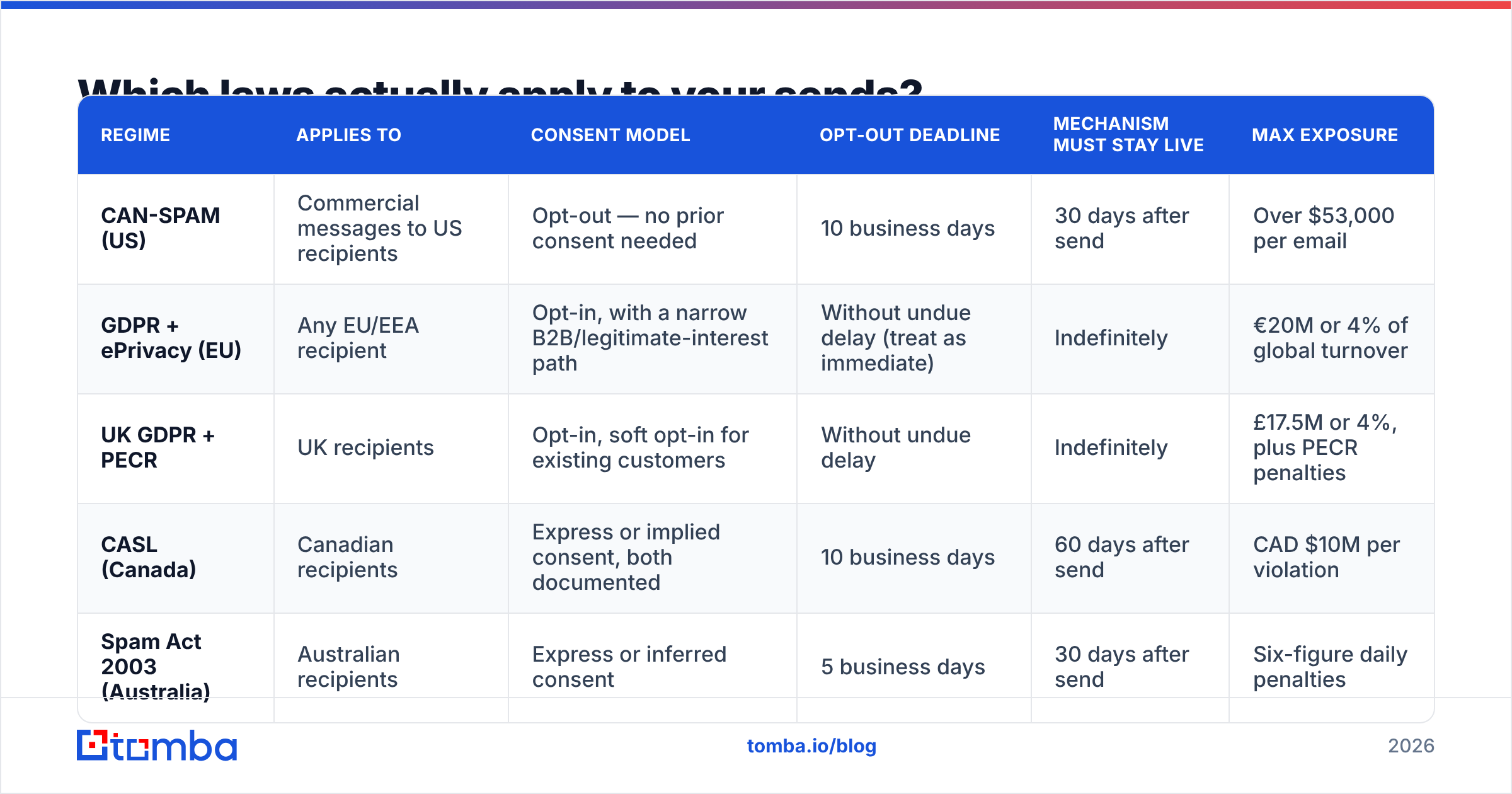
Which laws actually apply to your sends?#
Jurisdiction follows the recipient, not your office. One send to a mixed list can trigger four regimes at once.
| Regime | Applies to | Consent model | Opt-out deadline | Mechanism must stay live | Max exposure |
|---|---|---|---|---|---|
| CAN-SPAM (US) | Commercial messages to US recipients | Opt-out — no prior consent needed | 10 business days | 30 days after send | Over $53,000 per email |
| GDPR + ePrivacy (EU) | Any EU/EEA recipient | Opt-in, with a narrow B2B/legitimate-interest path | Without undue delay (treat as immediate) | Indefinitely | €20M or 4% of global turnover |
| UK GDPR + PECR | UK recipients | Opt-in, soft opt-in for existing customers | Without undue delay | Indefinitely | £17.5M or 4%, plus PECR penalties |
| CASL (Canada) | Canadian recipients | Express or implied consent, both documented | 10 business days | 60 days after send | CAD $10M per violation |
| Spam Act 2003 (Australia) | Australian recipients | Express or inferred consent | 5 business days | 30 days after send | Six-figure daily penalties |
Two things fall out of that table immediately. First, the US is the outlier: CAN-SPAM lets you mail a stranger once, provided you identify yourself, use a truthful subject line, include a physical postal address, and offer an opt-out. The FTC's compliance guide is the primary source and is worth reading in full — it is about 1,500 words. Second, every other regime cares far more about how you got the address than about your footer markup.
The per-email structure of CAN-SPAM penalties is what makes people flinch. The figure is adjusted for inflation each year and applies to each non-compliant message, not each campaign. A 20,000-record blast with a broken unsubscribe link is not one violation.
What is one-click unsubscribe and who has to support it?#
One-click unsubscribe is defined by RFC 8058. It lets the mailbox provider render a native "Unsubscribe" control next to your sender name, and lets the recipient use it without ever opening your message or loading your page.
It requires two headers working together:
List-Unsubscribe— carries an HTTPS URL, optionally amailto:as well. This header alone is old and widely supported.List-Unsubscribe-Post: List-Unsubscribe=One-Click— declares that the URL accepts an HTTP POST and will process the opt-out with no further interaction.
A correct pair looks like this:
List-Unsubscribe: <https://links.example.com/u/8f2a1c>, <mailto:unsubscribe@example.com?subject=unsub:8f2a1c>
List-Unsubscribe-Post: List-Unsubscribe=One-Click
Three failure modes are common. The POST endpoint returns a confirmation page that requires a second click — that is not one-click. The URL is a redirect chain through a click tracker that strips the POST body. Or List-Unsubscribe-Post is present while the endpoint only accepts GET, which means every provider-initiated unsubscribe silently fails.
Since February 2024, Google's bulk sender requirements have mandated one-click unsubscribe for anyone sending more than 5,000 messages a day to Gmail, along with honoring within two days. Yahoo matched it. Microsoft extended comparable requirements to high-volume senders reaching Outlook and Hotmail addresses in 2025. The 5,000/day threshold counts across your entire sending domain, so a marketing team at 3,000/day plus a product team at 2,500/day crosses it together.
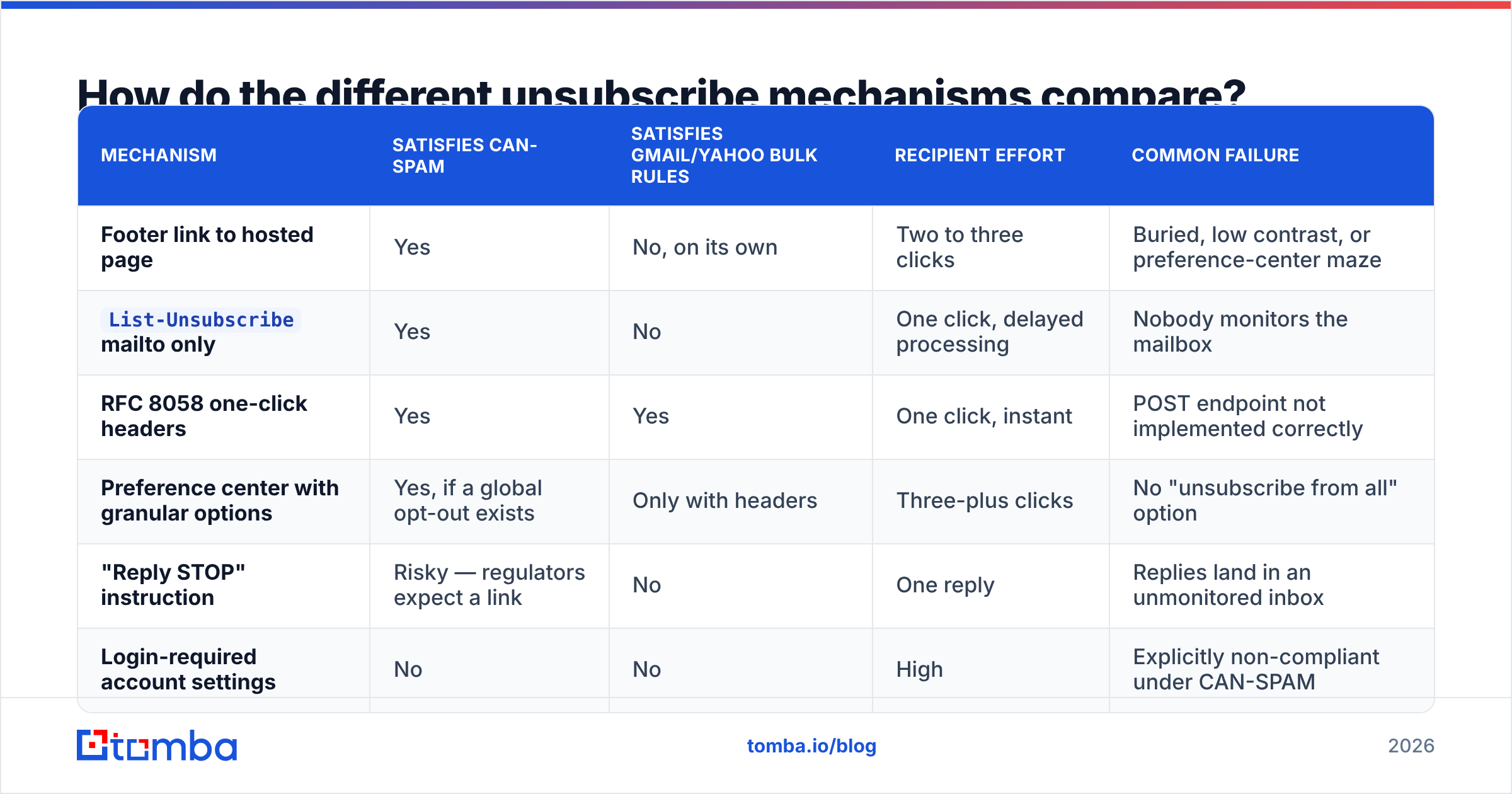
How do the different unsubscribe mechanisms compare?#
You will usually ship several at once. They are not interchangeable.
| Mechanism | Satisfies CAN-SPAM | Satisfies Gmail/Yahoo bulk rules | Recipient effort | Common failure |
|---|---|---|---|---|
| Footer link to hosted page | Yes | No, on its own | Two to three clicks | Buried, low contrast, or preference-center maze |
List-Unsubscribe mailto only |
Yes | No | One click, delayed processing | Nobody monitors the mailbox |
| RFC 8058 one-click headers | Yes | Yes | One click, instant | POST endpoint not implemented correctly |
| Preference center with granular options | Yes, if a global opt-out exists | Only with headers | Three-plus clicks | No "unsubscribe from all" option |
| "Reply STOP" instruction | Risky — regulators expect a link | No | One reply | Replies land in an unmonitored inbox |
| Login-required account settings | No | No | High | Explicitly non-compliant under CAN-SPAM |
The pattern that fails audits most often is the fifth row. Plain-text cold email with "just reply and I'll take you off the list" reads as human and courteous, and it is genuinely better than nothing — but it puts the burden on the recipient and it leaves you with no auditable record. Add real headers even to one-to-one-looking sends.
How fast do you have to honor an opt-out?#
Fast enough that the answer is always "immediately," because tracking four different clocks is how mistakes happen.
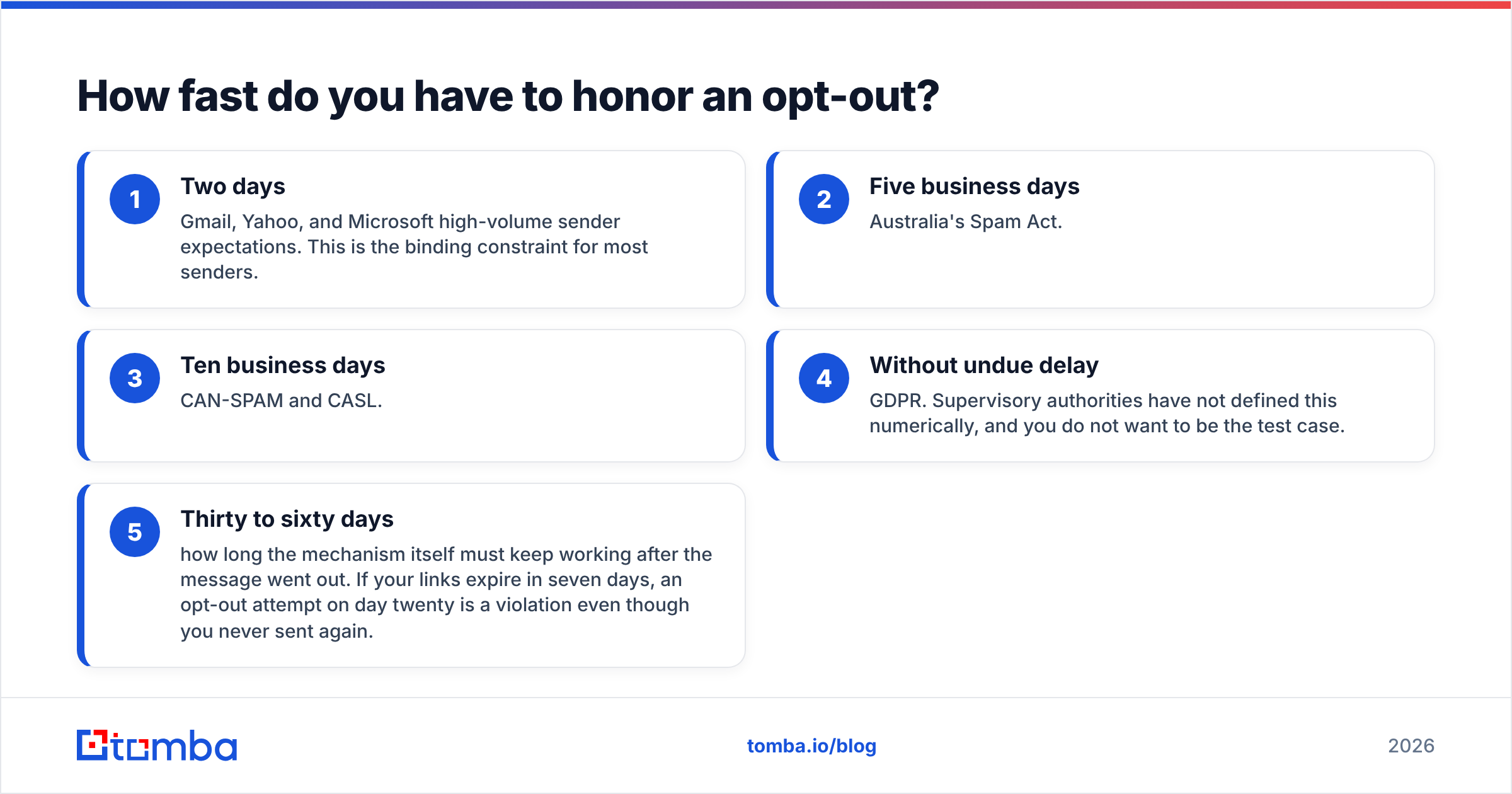
- Two days — Gmail, Yahoo, and Microsoft high-volume sender expectations. This is the binding constraint for most senders.
- Five business days — Australia's Spam Act.
- Ten business days — CAN-SPAM and CASL.
- Without undue delay — GDPR. Supervisory authorities have not defined this numerically, and you do not want to be the test case.
- Thirty to sixty days — how long the mechanism itself must keep working after the message went out. If your links expire in seven days, an opt-out attempt on day twenty is a violation even though you never sent again.
Build for the two-day rule and every other deadline takes care of itself. In practice that means synchronous suppression at the moment of the request, not a nightly batch job that skips weekends.
Do cold B2B emails need an unsubscribe link?#
Yes — and the interesting question is not whether, but which regime you are under.
Under CAN-SPAM, a cold outbound email whose primary purpose is commercial is a commercial message. Being one-to-one, plain text, and personalized changes nothing. You need the postal address and the opt-out.
Under GDPR, the opt-out is the easy part. The hard part is your lawful basis. B2B prospecting to a role-based or corporate address can sometimes rest on legitimate interest, but that requires a documented balancing test, a clear privacy notice, and an unconditional right to object. Several member states apply ePrivacy more strictly to any electronic marketing. If your list includes EU contacts you cannot justify, no footer saves you.
Under CASL, sending to a Canadian address without express or implied consent is the violation. Implied consent covers conspicuously published business addresses where the message relates to the recipient's role — a real and useful carve-out, but one you must be able to evidence per contact, with the source and date.
The operational takeaway is that provenance is a compliance control. Knowing where each address came from — a published company page, a form fill, a purchased file — determines which rules apply and whether you can defend the send. That is also why data quality and legal exposure are the same conversation: sources you cannot document are sources you cannot defend. Tomba publishes its data sources for exactly this reason, and running addresses through an email verifier before a send removes the dead and risky records that generate the complaints regulators eventually hear about.

What are the most common unsubscribe mistakes?#
These are the findings that show up over and over in deliverability audits.
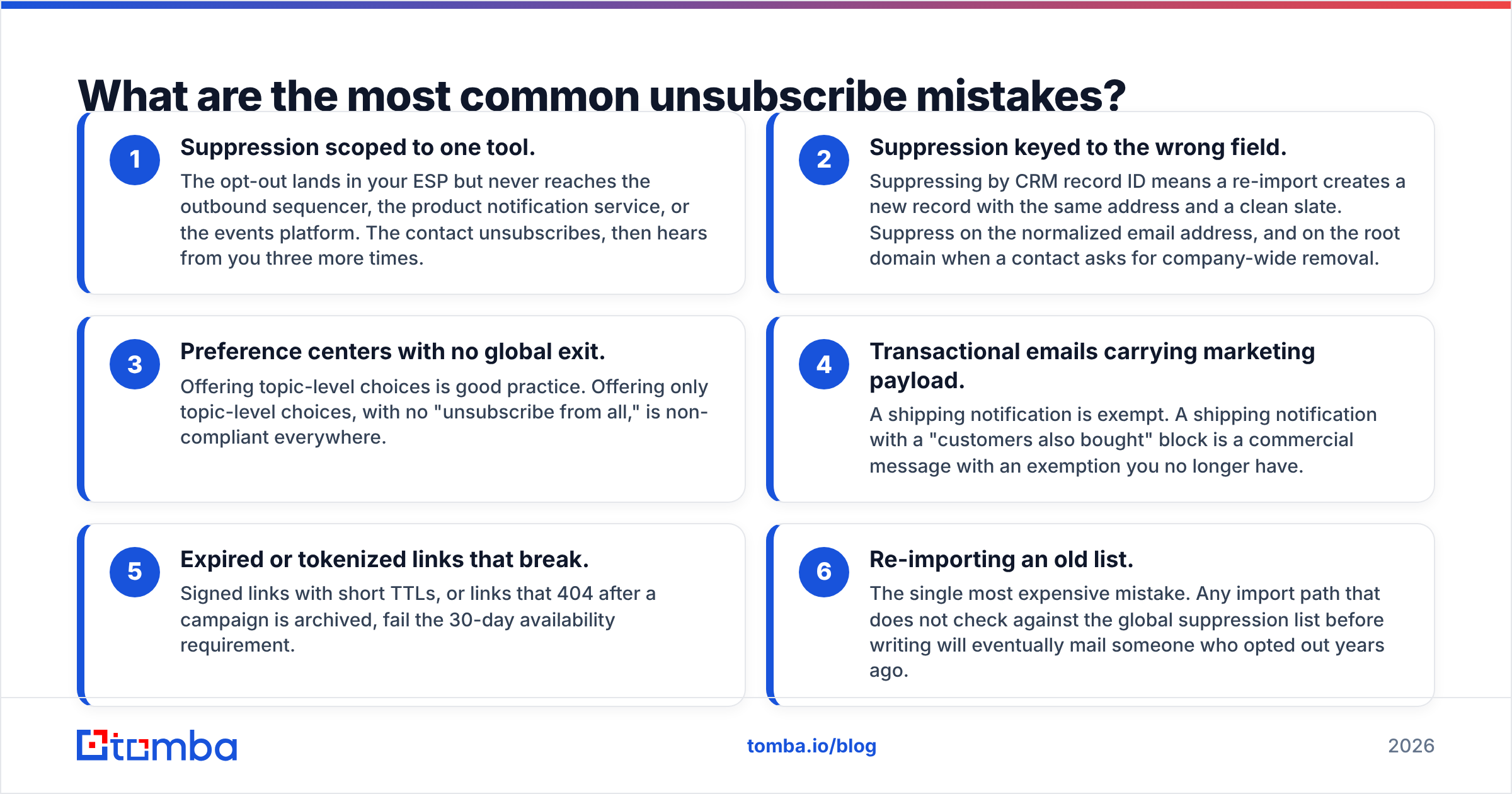
- Suppression scoped to one tool. The opt-out lands in your ESP but never reaches the outbound sequencer, the product notification service, or the events platform. The contact unsubscribes, then hears from you three more times.
- Suppression keyed to the wrong field. Suppressing by CRM record ID means a re-import creates a new record with the same address and a clean slate. Suppress on the normalized email address, and on the root domain when a contact asks for company-wide removal.
- Preference centers with no global exit. Offering topic-level choices is good practice. Offering only topic-level choices, with no "unsubscribe from all," is non-compliant everywhere.
- Transactional emails carrying marketing payload. A shipping notification is exempt. A shipping notification with a "customers also bought" block is a commercial message with an exemption you no longer have.
- Expired or tokenized links that break. Signed links with short TTLs, or links that 404 after a campaign is archived, fail the 30-day availability requirement.
- Re-importing an old list. The single most expensive mistake. Any import path that does not check against the global suppression list before writing will eventually mail someone who opted out years ago.
Fix number one and number six first. They cause the most complaints per unit of effort.
How do unsubscribe rules affect deliverability?#
Directly, and more harshly than any fine.
Gmail's threshold is a spam complaint rate below 0.3%, with 0.1% as the target you should actually operate at. That is three complaints per thousand delivered messages before filtering degrades. A hard-to-find unsubscribe link does not reduce opt-outs; it converts them into complaints. The recipient who cannot find your link presses "Report spam," which is a far worse signal for your email deliverability than a clean list removal ever was.
Three practical consequences:
- Make the unsubscribe link obvious. Underlined, readable size, real contrast. A visible link is a complaint you did not receive.
- Watch complaint rate per segment, not per account. One bad list can be diluted to an acceptable aggregate while it poisons your domain reputation.
- Treat bounces as part of the same hygiene problem. High bounce rates and high complaint rates travel together, because both come from stale data. Run a bulk verify pass before large sends, and check message construction with a spam checker so a broken footer never ships.
Reviewers on G2 consistently rank list hygiene above template design when explaining recovered inbox placement. That matches what the provider guidelines say: they are measuring recipient reactions, and recipients react to whether they wanted the mail.
How do you build a suppression list that holds?#
Treat suppression as a single service, not a feature of whichever tool sent the message.
Centralize. One suppression store, one API, consulted by every system that can send email. If a tool cannot query it before sending, that tool should not be sending.
Normalize on write. Lowercase, trim, strip Gmail dots and plus-addressing where appropriate, and store the root domain alongside the address so domain-level requests are enforceable.
Never delete. Suppression records are permanent and append-only. Deleting one because a contact was "cleaned up" is how a 2023 opt-out becomes a 2026 violation.
Log the evidence. Timestamp, source (footer link, header POST, reply, manual request, regulator complaint), and the message that triggered it. Under GDPR and CASL, you are expected to demonstrate compliance, not merely assert it.
Gate every import. Every CSV upload, every CRM sync, every enrichment job checks suppression before it writes. Make it impossible to bypass.
Test quarterly. Send yourself a real campaign. Click the footer link. Trigger the header unsubscribe from Gmail's native control. Confirm both land in the same store within minutes, and that a subsequent send to that address is blocked.
That last step catches more real problems than any policy document.
What should you check before your next send?#
- Physical postal address present and current
- Unsubscribe link visible without scrolling past a wall of footer text
List-UnsubscribeandList-Unsubscribe-Postheaders both set, POST endpoint tested- Opt-out processed in under two days, ideally in seconds
- No login, no fee, no required form fields beyond confirmation
- Mechanism live for at least 60 days after send
- Suppression checked at send time by every sending system
- Consent basis documented per contact for EU, UK, and Canadian recipients
- Complaint rate under 0.1% for every segment, not just the aggregate
If all nine are true, you are ahead of most senders, including large ones.
Where should you start?#
Start upstream. Most unsubscribe problems are data problems wearing a legal costume: addresses you cannot source, records that duplicate on import, and dead mailboxes inflating your complaint denominator. Fix the input and the footer stops being a liability.
If you are rebuilding your prospecting list on a defensible footing, the Tomba Email Finder returns verified professional addresses with a confidence score and a documented source per result, so you know which regime a contact falls under before you send. The free tier covers 25 searches a month, Starter is $49/mo, and Growth is $99/mo — see Tomba pricing for the full breakdown. Pair it with verification and a centralized suppression list, and unsubscribe compliance becomes a checkbox rather than a quarterly fire.
Related guides#
Ready to find emails that actually work?
Join 150,000+ professionals who stopped guessing and started sending. Free credits on signup — no credit card required.
Get the Tomba newsletter
Practical outbound tactics and product updates — once every two weeks.
About the author