Emailable Pricing Reviews Pros and Cons: 2026 Buyer Guide
A neutral breakdown of Emailable's credit pricing, what reviewers actually praise and complain about, and when a finder-plus-verifier stack costs you less per usable contact.
Looking for an honest Emailable pricing reviews pros and cons breakdown? Here it is. Emailable cleans email lists fast. It does not find new contacts. That one gap drives most of the buyer regret below.
TL;DR
- Emailable is a dedicated email verification tool. It cleans lists you already have. It does not find new contacts, and that is the thing buyers misread most often.
- Pricing is credit-based: a small free allotment to test, pay-as-you-go credits that never expire, and monthly tiers with a lower rate per credit but a balance that resets.
- Reviewers praise the speed of bulk uploads, the clean UI, and the API. The steady complaints are catch-all ambiguity, credits burned on "unknown" results, and monthly credits expiring unused.
- The real cost is never the sticker price. It is the cost per usable contact after unknowns, duplicates, and role addresses come out.
- If your workflow is "find contacts, then verify them," a finder plus verifier stack usually beats buying verification on its own.
What is Emailable, and what does it actually do?#
Emailable is a hosted email verification service. You upload a list, or call its API, and it returns a status for each address: deliverable, undeliverable, risky, or unknown. Think of it as a bouncer at the door of your sending domain. It checks IDs before anyone gets into your campaign, so your bounce rate stays low and your sender reputation stays intact.
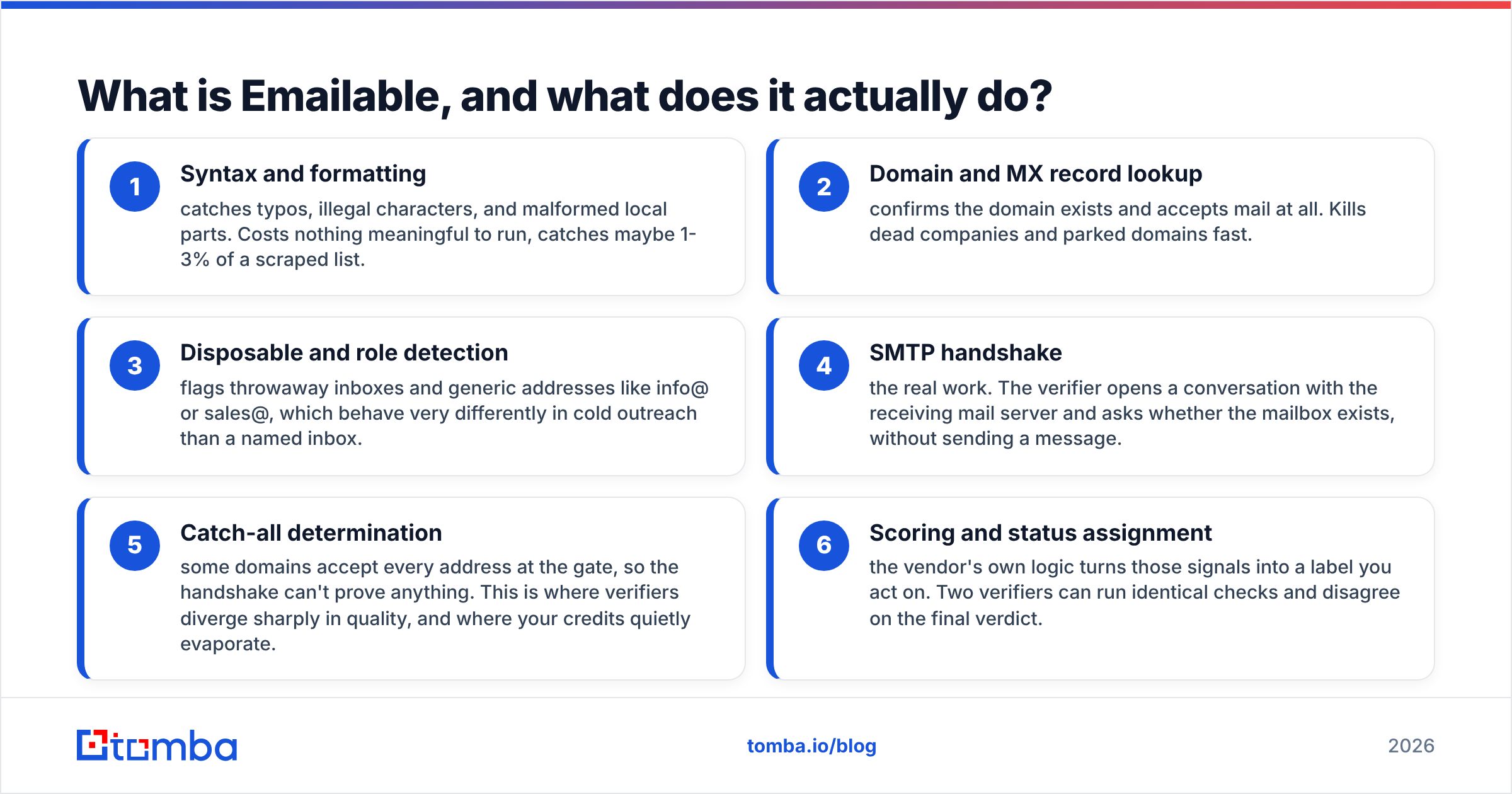
Verification tools like Emailable run a stack of checks in order. Learn the stack and you can judge any verifier's pricing. You pay per check, even when the answer is a shrug.
- Syntax and formatting — catches typos, illegal characters, and broken address parts. It is cheap to run and clears 1-3% of a scraped list.
- Domain and MX record lookup — confirms the domain exists and accepts mail at all. This kills dead companies and parked domains fast.
- Disposable and role detection — flags throwaway inboxes and generic addresses like info@ or sales@. Those behave nothing like a named inbox in cold outreach.
The last three steps set both your accuracy and your bill.
- SMTP handshake — the real work. The verifier opens a conversation with the mail server and asks whether the mailbox exists. No message is sent.
- Catch-all determination — some domains accept every address at the gate, so the handshake proves nothing. This is where verifiers differ most, and where credits quietly vanish.
- Scoring and status assignment — the vendor's own logic turns those signals into a label. Two verifiers can run the same checks and still disagree.
That last point matters for the pros and cons below. When people call a verifier "accurate," they usually mean its labels matched a list they already knew.
How much does Emailable pricing cost in 2026?#
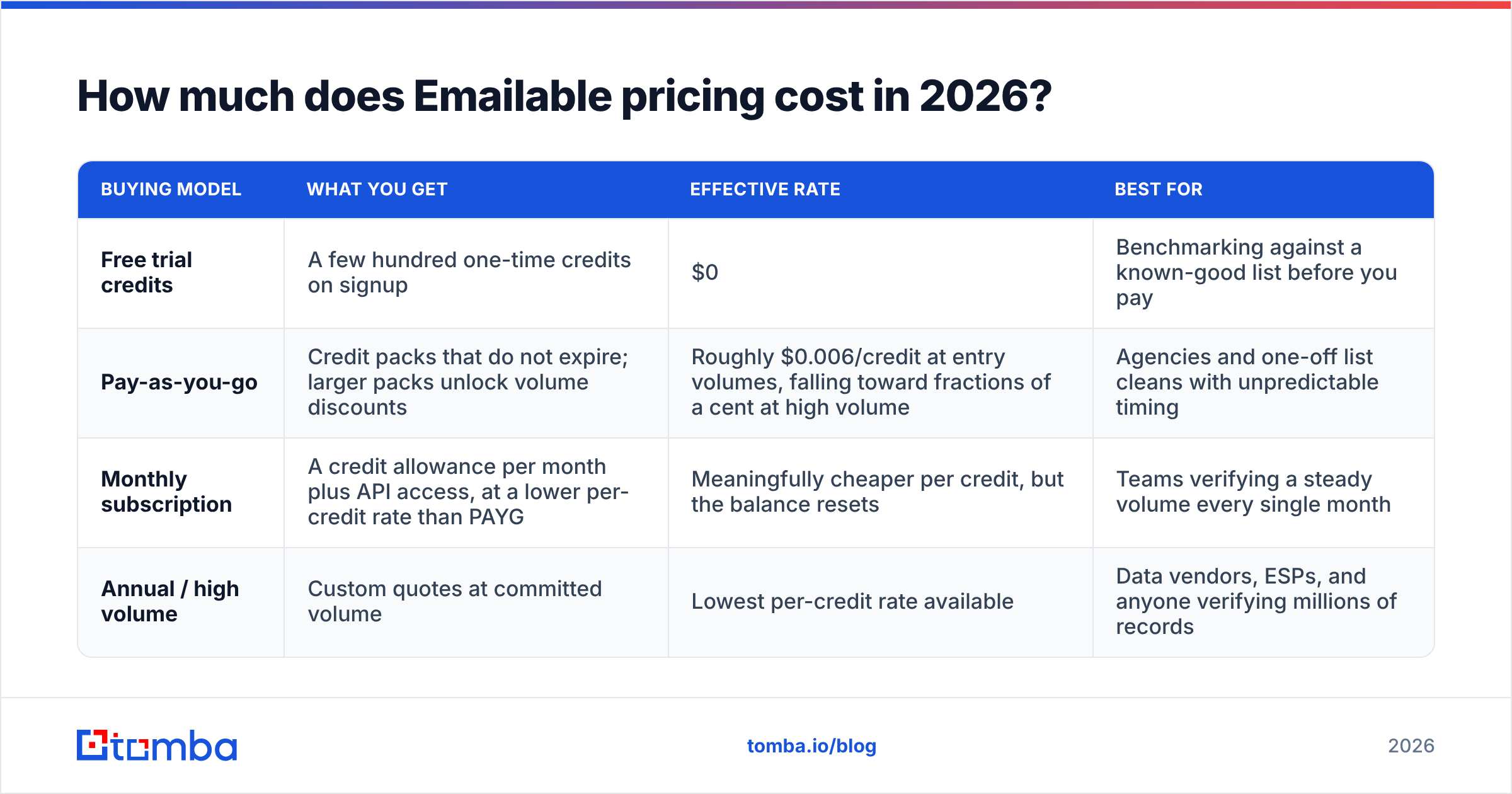
Emailable sells credits, not seats. One credit equals one address verified. There are three ways to buy them. The right one depends on whether your volume is spiky or steady.
| Buying model | What you get | Effective rate | Best for |
|---|---|---|---|
| Free trial credits | A few hundred one-time credits on signup | $0 | Benchmarking against a known-good list before you pay |
| Pay-as-you-go | Credit packs that do not expire; larger packs unlock volume discounts | Roughly $0.006/credit at entry volumes, falling toward fractions of a cent at high volume | Agencies and one-off list cleans with unpredictable timing |
| Monthly subscription | A credit allowance per month plus API access, at a lower per-credit rate than PAYG | Meaningfully cheaper per credit, but the balance resets | Teams verifying a steady volume every single month |
| Annual / high volume | Custom quotes at committed volume | Lowest per-credit rate available | Data vendors, ESPs, and anyone verifying millions of records |
List prices move. Treat these figures as a rough guide and check Emailable's own pricing page before you budget. The shape of the deal stays the same: subscriptions look cheaper per credit and often cost more per year. Unused monthly credits vanish. Pay-as-you-go packs cost more per credit and waste nothing.
Most Emailable pricing reviews pros and cons debates end right there, because the sticker rate is not the real cost.
Run this test first. Pull your last six months of volume. Find the median month, not the peak. Size a subscription to that median, then buy pay-as-you-go packs for the spikes. Teams that size to their busiest month often overpay by 30-40% without noticing.

What do Emailable reviews say about accuracy?#
Review sites like G2 show one pattern across the whole category, not just Emailable. Scores run high on ease of use and support. They dip on pricing clarity and edge-case accuracy.
Happy reviews name the same three strengths: bulk upload speed, a clear dashboard, and a reliable API. Critical reviews name the same weak spot: catch-all domains.
That is not really a vendor failure. Some domains accept mail for every address. The server says yes to everything, so no outside verifier can prove one mailbox exists. Vendors then pick a side. They can label the address risky or unknown and stay honest, or guess and pad their accuracy claim. Emailable leans toward labeling. That is good engineering and annoying billing, because you spent a credit to hear "we can't tell."

Any vendor claiming 99% accuracy is leaving catch-alls out of the math. Split your test list into three buckets: known-good, known-bounced, and catch-all. Score each bucket on its own. Vendor numbers are rarely built that way. Your own test on 500 addresses you already know beats any review page.
What are the pros of Emailable?#
- Fast bulk processing. Large CSV uploads clear in minutes, not hours. On a deadline before a send, that speed is worth real money.
- A clean, simple UI. A marketer with no technical background can upload, verify, and export without training. That matters more than it sounds.
- Solid API and docs. Real-time checks on signup forms work well, with quick responses and clear status codes. It holds up in production.
The billing terms have upsides too.
- PAYG credits do not expire. For agencies with lumpy client work, that beats a slightly lower subscription rate.
- Honest labels on unclear results. "Unknown" is more useful than a confident lie you then email 2,000 times.
- Handy integrations. Common ESPs and marketing platforms connect directly, so you shuffle fewer CSV files.
What are the cons of Emailable?#
- It does not find emails. This is the big limit. Emailable cleans what you bring it. If you need new contacts, you buy a second tool and pay two bills for one workflow.
- You pay for unknowns. Credits are spent on catch-all and unknown results. Enterprise-heavy lists are full of catch-alls, so part of your budget buys a shrug.
- Subscription credits reset. Guess low and you pay overage. Guess high and you burn unused credits. Either way you find out on the invoice.
- Pricing takes arithmetic. Comparing pack sizes, monthly tiers, and annual deals is not a five-second call. The cheapest headline rate rarely wins.
- No sourcing, enrichment, or phone data. For full outbound you will bolt on data enrichment and contact discovery from elsewhere.
How does Emailable compare to the alternatives?#
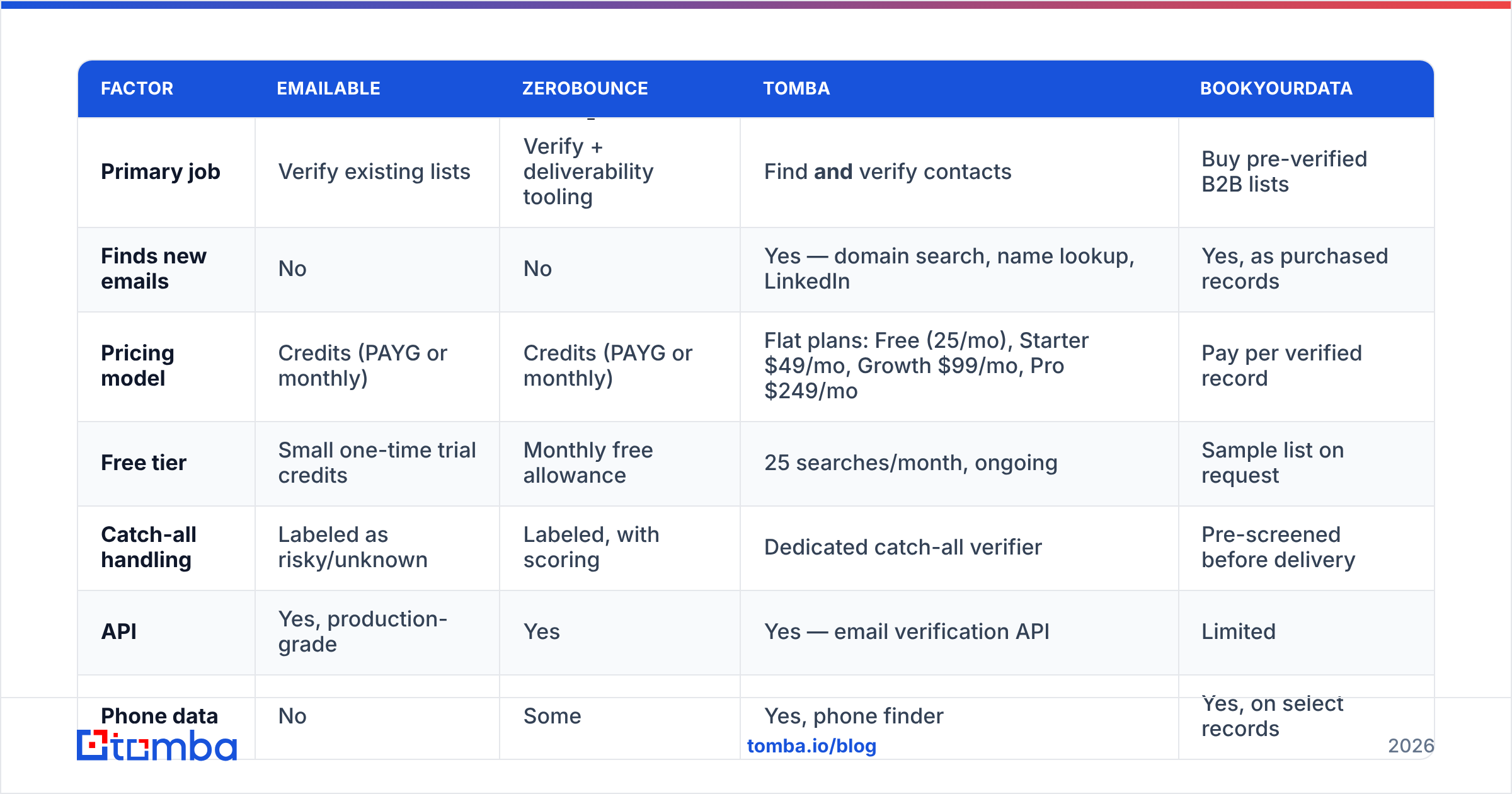
The real question is not which verifier claims the best accuracy. It is what one usable, contactable lead costs you end to end. A verifier-only tool wins on price per check. It loses on total cost when you also have to source the contacts.
| Factor | Emailable | ZeroBounce | Tomba | BookYourData |
|---|---|---|---|---|
| Primary job | Verify existing lists | Verify + deliverability tooling | Find and verify contacts | Buy pre-verified B2B lists |
| Finds new emails | No | No | Yes — domain search, name lookup, LinkedIn | Yes, as purchased records |
| Pricing model | Credits (PAYG or monthly) | Credits (PAYG or monthly) | Flat plans: Free (25/mo), Starter $49/mo, Growth $99/mo, Pro $249/mo | Pay per verified record |
| Free tier | Small one-time trial credits | Monthly free allowance | 25 searches/month, ongoing | Sample list on request |
| Catch-all handling | Labeled as risky/unknown | Labeled, with scoring | Dedicated catch-all verifier | Pre-screened before delivery |
| API | Yes, production-grade | Yes | Yes — email verification API | Limited |
| Phone data | No | Some | Yes, phone finder | Yes, on select records |
| Best for | Marketers cleaning owned lists | ESP-adjacent deliverability teams | Outbound teams needing sourcing + verification in one bill | Teams that want a list handed to them |

Two notes on that table. BookYourData is a different kind of buy. You get records, not a checking service, and that is a fast path to a verified file. Tomba's flat plans are not always cheaper either. They win when you also need to find the addresses, since sourcing and verification share one Tomba pricing tier instead of two invoices.
What hidden costs should you budget for?#
Verification spend leaks in four predictable places. Ten minutes of prep closes all four.
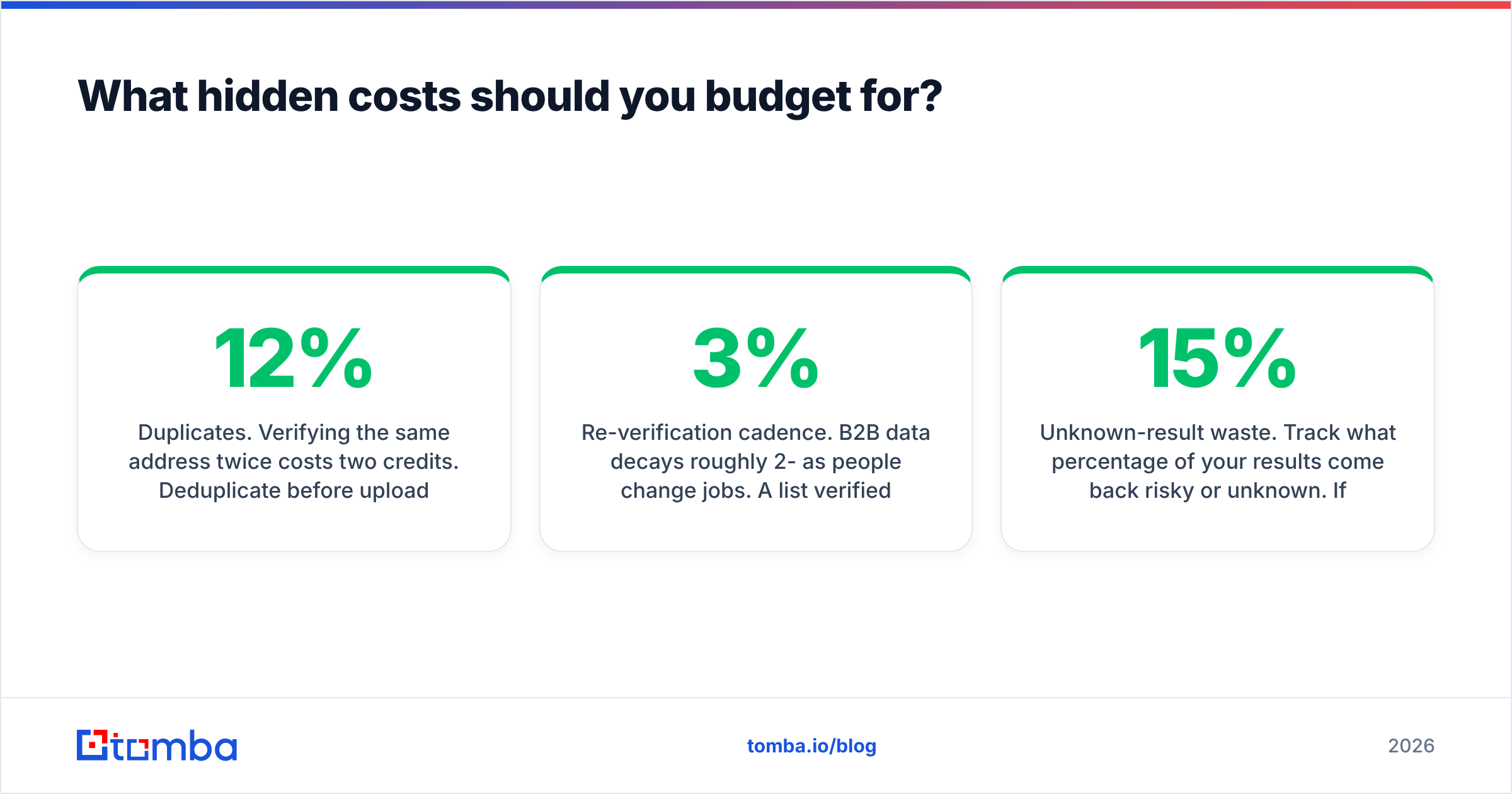
- Duplicates. The same address twice costs two credits. Run a remove duplicates pass first. On a messy 50,000-row export it usually strips 5-12%.
- Role addresses. info@, support@, and billing@ verify as deliverable and convert like a brick wall. Filter them out before you spend credits.
- Re-verification cadence. B2B data decays 2-3% per month as people change jobs. A list cleaned in January is stale by June. Budget for a quarterly pass, not a one-time clean.
- Unknown-result waste. Track how many results come back risky or unknown. Above 15%, your sourcing is the problem, not your verifier.
That last one is the leverage point. Verification is a tax on bad sourcing. Cut the guessing at the front of the funnel and the bill drops on its own.
Emailable pricing reviews pros and cons: is it worth it in 2026?#
Yes, for one kind of buyer. Say you own a big list you did not source yourself: event signups, a legacy CRM export, a newsletter database. Your only job is to keep it from wrecking your email deliverability. Emailable is fast, capable, and fairly priced for that. Buy pay-as-you-go credits, clean the list, and move on. Do not take a monthly plan for a one-time job.
It is the wrong buy when verification is only half the job. Teams building outbound from scratch have to find addresses, confirm them, and enrich them. Paying for a finder plan and a verifier plan to do that is waste. Consolidate. A low per-credit rate means little if you write a second check every month for sourcing. That is the short version of the Emailable pricing reviews pros and cons question: strong cleaner, no finder.
Whatever you pick, test it first. Take 500 addresses whose status you already know. Run them through two or three vendors on free credits and compare bucket by bucket. The vendor that wins on your data beats the one that wins on a review page.
Want sourcing and verification on one bill? The Tomba Email Finder finds verified professional addresses by domain, name, or company. Every result runs through the same verification and catch-all logic before it reaches you, so you are not paying one vendor to guess and another to check the guess. Start on the free tier with 25 searches a month, then move to Starter at $49/mo when the pipeline justifies it. If you only need cleaning, the standalone email verifier and bulk verify tools handle lists you already own.
Related guides#
Ready to find emails that actually work?
Join 150,000+ professionals who stopped guessing and started sending. Free credits on signup — no credit card required.
Get the Tomba newsletter
Practical outbound tactics and product updates — once every two weeks.
About the author