Emailchaser vs Enrichley 2026: Which Tool Actually Wins?
Emailchaser bundles sending with finding. Enrichley leans on enrichment and waterfall data. Here's how the two stack up on accuracy, billing model, and workflow fit — plus when neither is the right call.
TL;DR
- Emailchaser is a sending-first platform: the email finder exists to feed its own cold outreach sequencer. Good if you want one login for finding and sending.
- Enrichley sits on the enrichment side: it takes a partial record (name, domain, LinkedIn URL) and fills in the gaps, usually through a waterfall of upstream providers.
- They are not really the same product. Choosing between them is mostly a question of whether your bottleneck is sending or data completeness.
- Neither is the cheapest way to buy raw verified emails at volume. A dedicated finder with a flat credit model — Tomba's free tier starts at 25 searches/month, paid at $49/mo — usually wins on cost-per-valid-contact.
- The decision rule: if you already own a sequencer you like, don't buy another one to get its data. Buy the data.
What are Emailchaser and Enrichley?#
Emailchaser is a cold email outreach tool built around simplicity and account limits that don't punish you for scaling. Its pitch has consistently been "connect unlimited mailboxes, write a sequence, send" — with a built-in email finder attached so you don't have to buy a separate lookup tool just to populate a list. The finder is a supporting act. The sequencer is the product.
Enrichley approaches the same problem from the opposite end. It's an enrichment layer: you feed it what you already have — a company domain, a first/last name, a LinkedIn profile — and it returns a completed contact record. Enrichment tools in this class typically chain multiple data sources together (the "waterfall" pattern), stopping as soon as one returns a hit so you only pay once per successful lookup.
That architectural difference explains almost every practical difference between them. A sending platform optimizes for throughput and inbox placement. An enrichment platform optimizes for fill rate on hard records. If you buy the wrong one for your bottleneck, you'll be annoyed within a week.

How do Emailchaser and Enrichley compare at a glance?#
Here's the honest side-by-side. Note that both vendors iterate on packaging frequently — treat the pricing row as directional and confirm on their own pages before you commit budget.
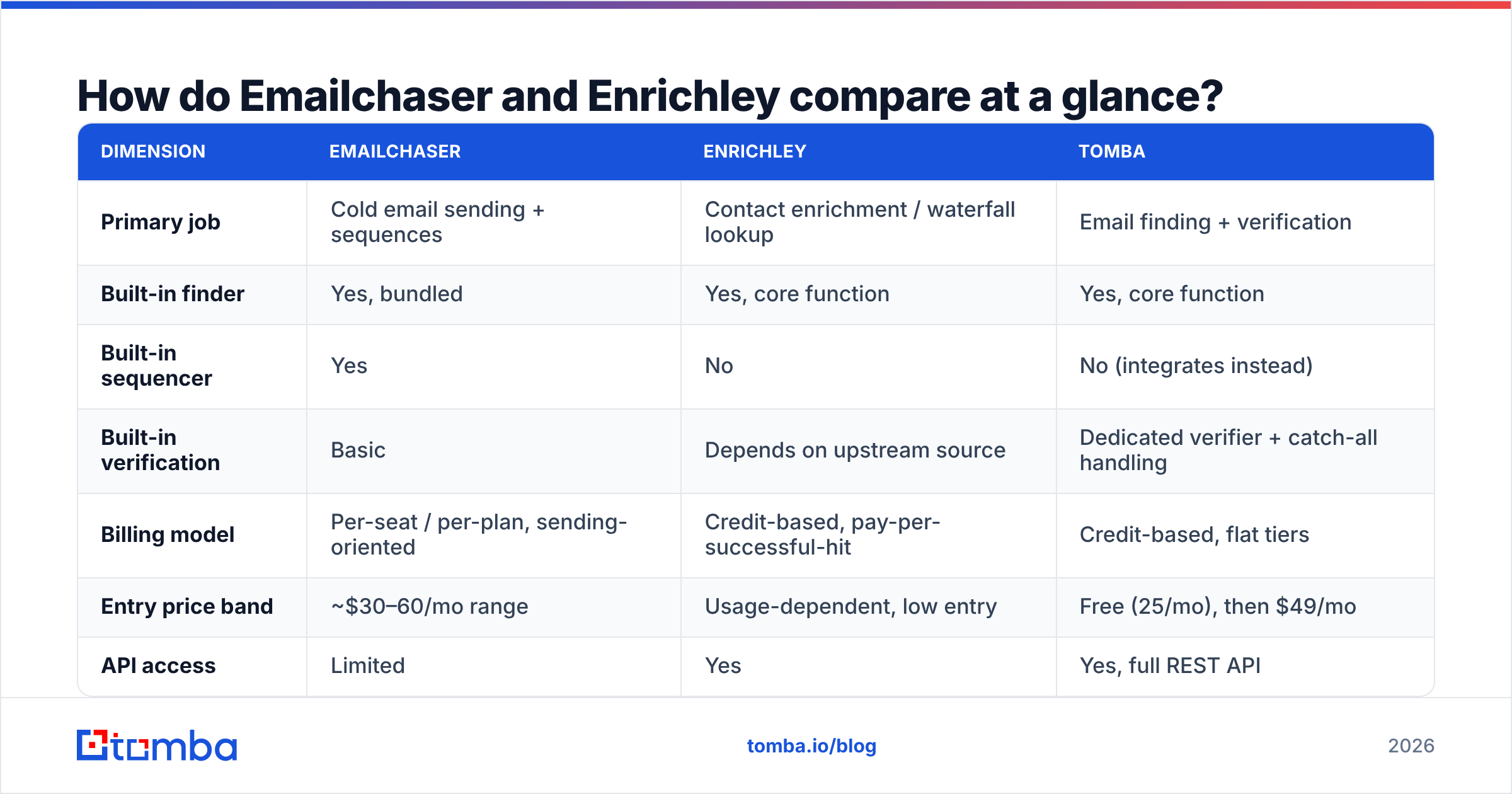
| Dimension | Emailchaser | Enrichley | Tomba |
|---|---|---|---|
| Primary job | Cold email sending + sequences | Contact enrichment / waterfall lookup | Email finding + verification |
| Built-in finder | Yes, bundled | Yes, core function | Yes, core function |
| Built-in sequencer | Yes | No | No (integrates instead) |
| Built-in verification | Basic | Depends on upstream source | Dedicated verifier + catch-all handling |
| Billing model | Per-seat / per-plan, sending-oriented | Credit-based, pay-per-successful-hit | Credit-based, flat tiers |
| Entry price band | ~$30–60/mo range | Usage-dependent, low entry | Free (25/mo), then $49/mo |
| API access | Limited | Yes | Yes, full REST API |
| Bulk CSV enrichment | Yes | Yes | Yes |
| Best for | Solo founders and small teams who want one tool | RevOps filling gaps in an existing CRM | Teams who need clean emails at volume |
The pattern you should read out of that table: Emailchaser and Enrichley barely overlap except in the "we can find an email address" row. Most head-to-head searches for emailchaser vs enrichley come from people who haven't yet decided whether they're buying an outreach engine or a data layer.
Which one finds more valid emails?#
This is the question that actually matters, and it deserves a careful answer rather than a scoreboard.
Bundled finders inside sending platforms are almost always thinner than dedicated ones. That isn't a knock on Emailchaser specifically — it's structural. A sequencer's engineering budget goes into deliverability, warmup scheduling, and mailbox rotation. The finder is a checkbox feature that keeps users from churning to a competitor, so it typically wraps a single upstream provider and passes results through with light validation.
Waterfall enrichment tools like Enrichley usually post higher raw fill rates, because they're querying several sources and returning whichever one hits first. The catch is that fill rate and accuracy are different metrics. A waterfall that returns something 85% of the time but hasn't independently verified the result will still hand you addresses that bounce. If the vendor doesn't publish a separate bounce-rate guarantee alongside the fill rate, assume verification is your problem.

Three things to test before you trust any of these numbers:
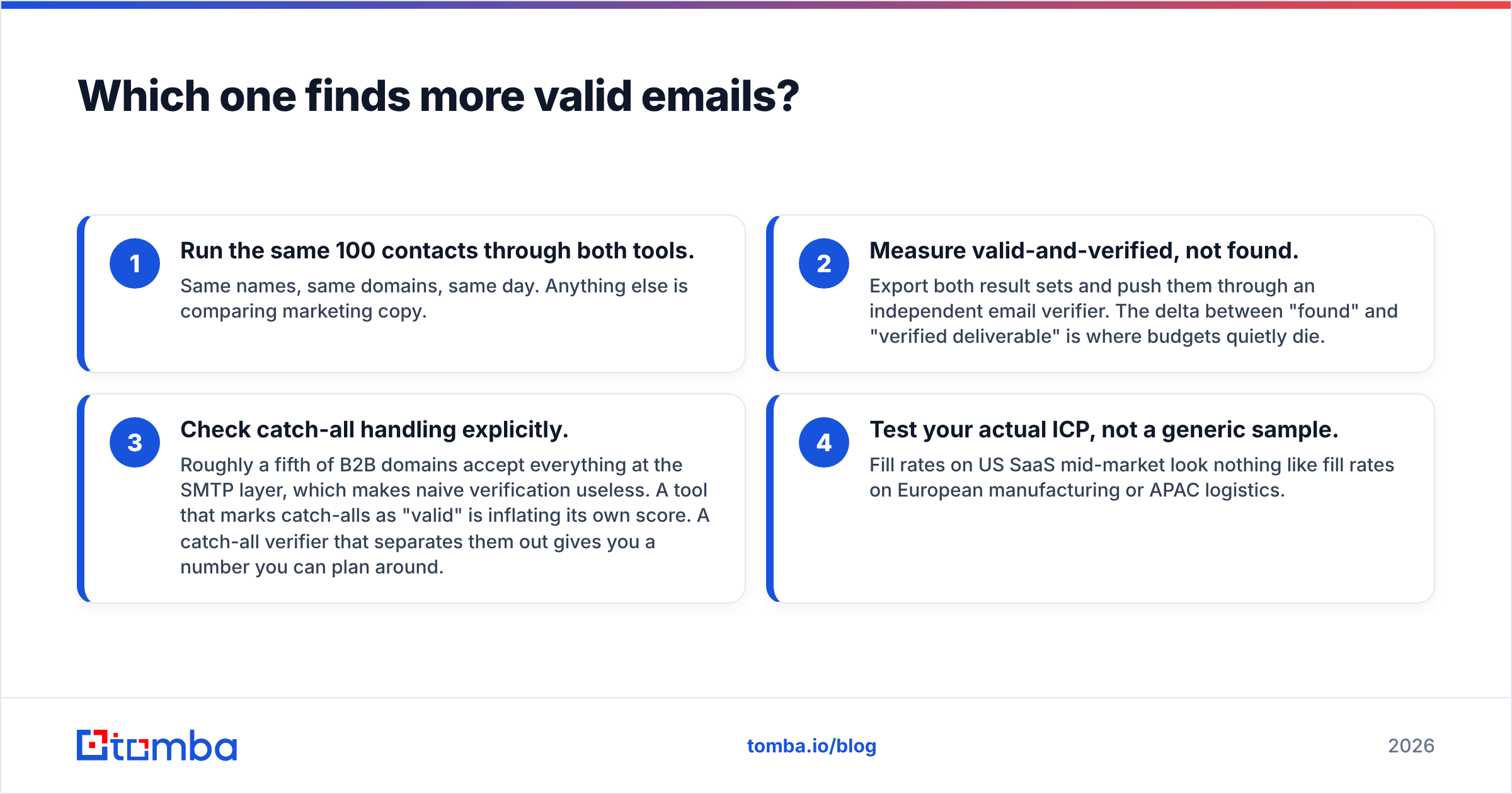
- Run the same 100 contacts through both tools. Same names, same domains, same day. Anything else is comparing marketing copy.
- Measure valid-and-verified, not found. Export both result sets and push them through an independent email verifier. The delta between "found" and "verified deliverable" is where budgets quietly die.
- Check catch-all handling explicitly. Roughly a fifth of B2B domains accept everything at the SMTP layer, which makes naive verification useless. A tool that marks catch-alls as "valid" is inflating its own score. A catch-all verifier that separates them out gives you a number you can plan around.
- Test your actual ICP, not a generic sample. Fill rates on US SaaS mid-market look nothing like fill rates on European manufacturing or APAC logistics.
Do this and you'll usually find the gap between vendors is smaller than the gap between segments.
How do the pricing models differ?#
The sticker price is rarely the real cost. What matters is what triggers a charge.
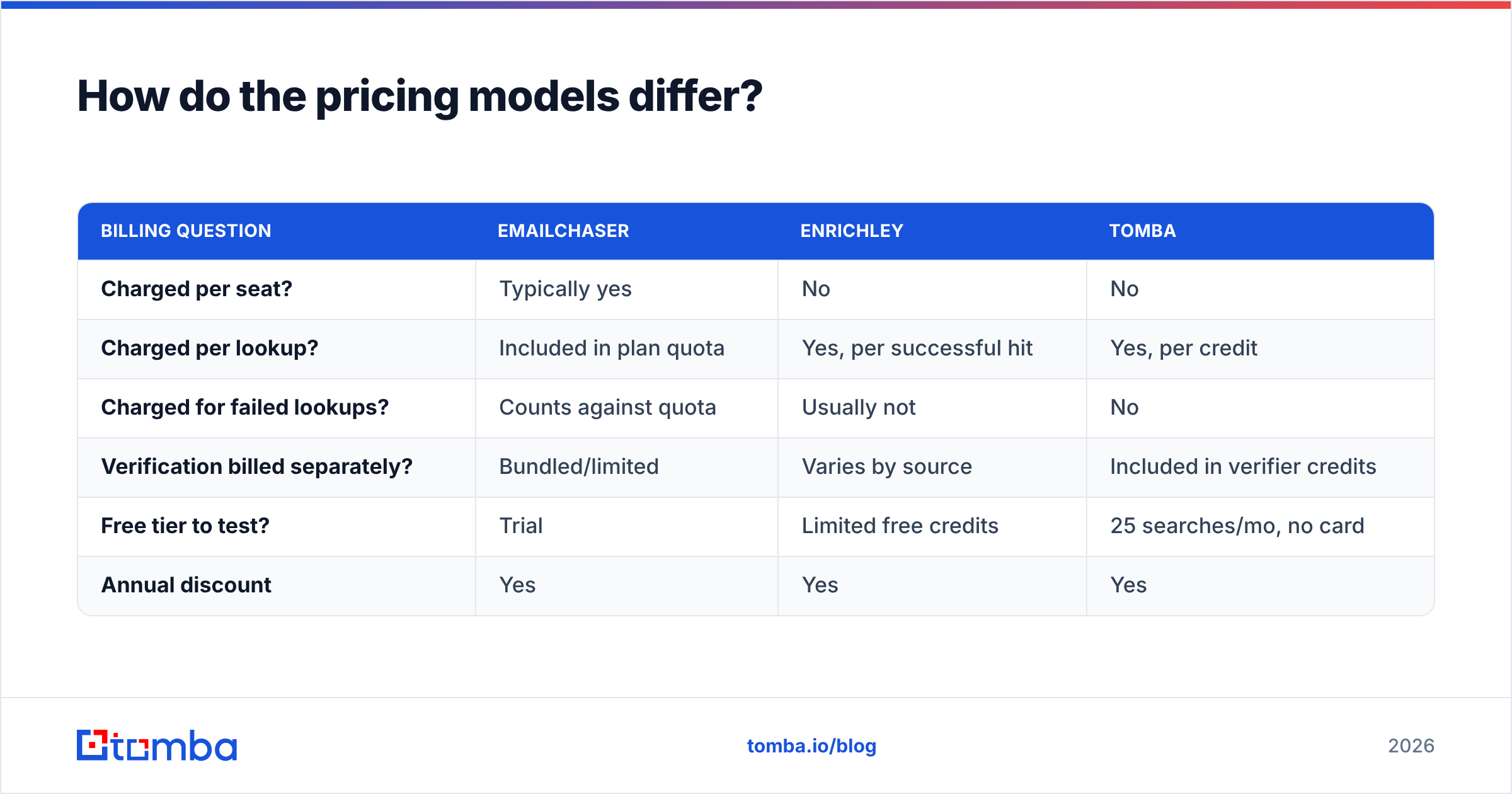
| Billing question | Emailchaser | Enrichley | Tomba |
|---|---|---|---|
| Charged per seat? | Typically yes | No | No |
| Charged per lookup? | Included in plan quota | Yes, per successful hit | Yes, per credit |
| Charged for failed lookups? | Counts against quota | Usually not | No |
| Verification billed separately? | Bundled/limited | Varies by source | Included in verifier credits |
| Free tier to test? | Trial | Limited free credits | 25 searches/mo, no card |
| Annual discount | Yes | Yes | Yes |
Pay-per-hit sounds obviously better than pay-per-attempt, and for hard-to-find contacts it is. But it inverts on easy lists: if 90% of your targets are findable, a waterfall charges you 90 times, while a flat-credit finder charges the same regardless and gives you a predictable monthly ceiling. Model it against your own list, not against a vendor's example.
Per-seat pricing is the trap that catches growing teams. A tool at $49/user/month is fine at two SDRs and painful at twelve — and the data quality didn't improve when you hired ten people. That's the single most common reason teams unbundle their finder from their sequencer. Tomba's pricing runs Free (25 searches/mo), Starter $49/mo, Growth $99/mo, Pro $249/mo, and Enterprise custom, with credits pooled across the account rather than fenced per user.

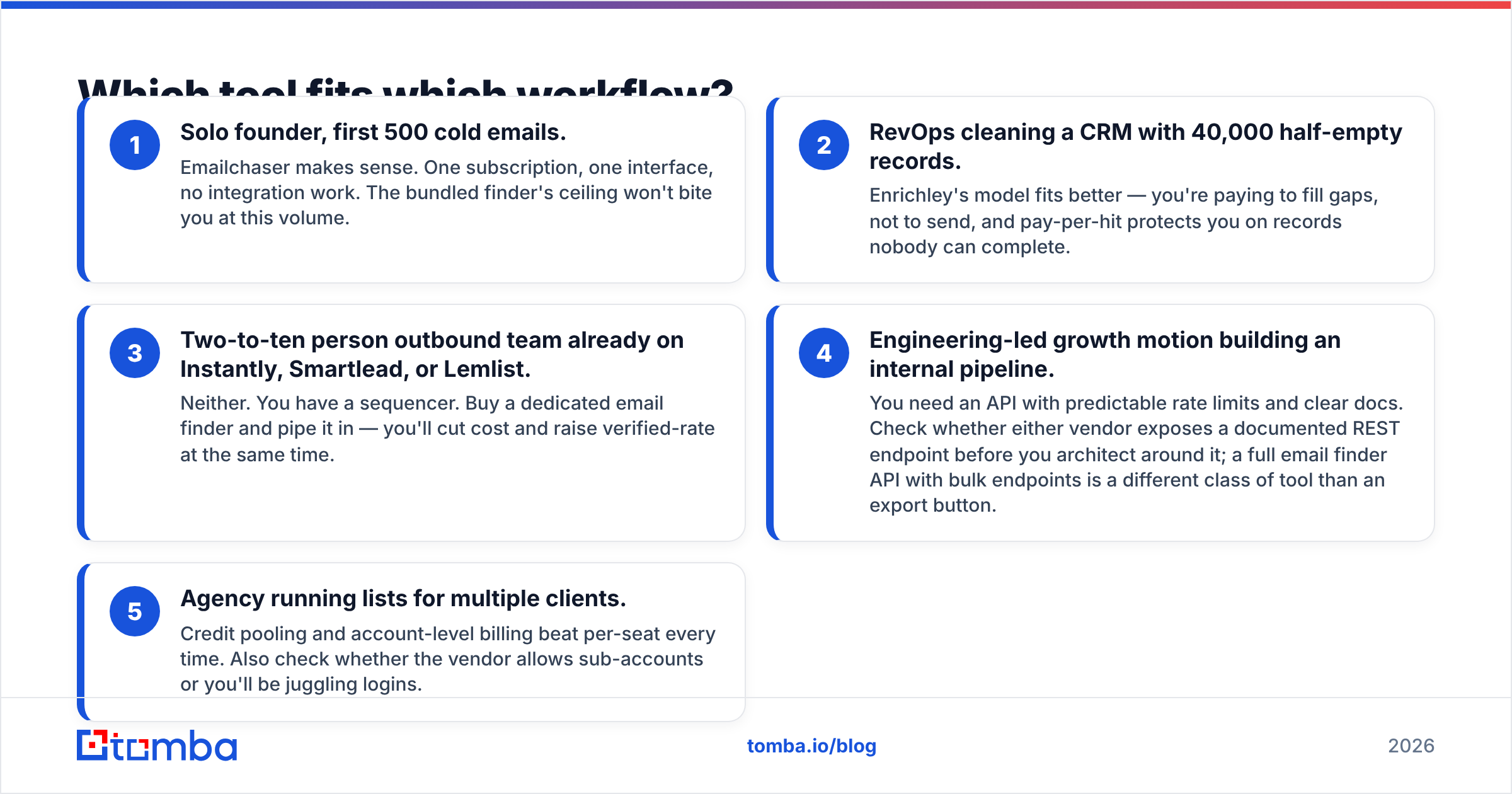
Which tool fits which workflow?#
Match the tool to the shape of your process, not to a feature count.
- Solo founder, first 500 cold emails. Emailchaser makes sense. One subscription, one interface, no integration work. The bundled finder's ceiling won't bite you at this volume.
- RevOps cleaning a CRM with 40,000 half-empty records. Enrichley's model fits better — you're paying to fill gaps, not to send, and pay-per-hit protects you on records nobody can complete.
- Two-to-ten person outbound team already on Instantly, Smartlead, or Lemlist. Neither. You have a sequencer. Buy a dedicated email finder and pipe it in — you'll cut cost and raise verified-rate at the same time.
- Engineering-led growth motion building an internal pipeline. You need an API with predictable rate limits and clear docs. Check whether either vendor exposes a documented REST endpoint before you architect around it; a full email finder API with bulk endpoints is a different class of tool than an export button.
- Agency running lists for multiple clients. Credit pooling and account-level billing beat per-seat every time. Also check whether the vendor allows sub-accounts or you'll be juggling logins.
Where does each tool fall short?#
Emailchaser's honest weaknesses. The finder depth is the main one — if your ICP sits outside well-indexed tech companies, expect gaps. Second, bundling sending and finding means a single vendor outage takes out your whole motion. Third, if you ever want to switch sequencers, you lose the finder too, which raises switching cost artificially. That's a feature for the vendor, not for you.
Enrichley's honest weaknesses. Waterfall pricing is unpredictable at the start of a month, which finance teams dislike. Result provenance can be opaque — when you get an address, you often can't tell which upstream source produced it, which makes debugging bad data hard. And enrichment tools generally assume you already have a list; they don't help you discover who to contact at a company in the first place. For that you want domain search, which enumerates the people at a domain rather than completing a record you already have.
The shared weakness. Neither is primarily a verification product. Verification is a genuinely separate discipline involving SMTP handshakes, greylisting detection, role-account filtering, and catch-all inference. If you're sending at any real volume, treat verification as its own line item. Google and Microsoft both tightened bulk-sender requirements in recent years, and a bounce rate above roughly 2–3% now degrades sender reputation fast enough to notice within a single campaign.
How do these compare to the broader market?#
Zoom out and the email-data market splits into three layers: discovery (who exists at this company), completion (what's this specific person's address), and validation (will it bounce). Most tools claim all three and are genuinely good at one.

Worth knowing about the adjacent options:
- Apollo, ZoomInfo, and similar databases sell a static contact database plus filters. Great for discovery, weaker on freshness — records decay roughly 25–30% per year as people change jobs.
- BookYourData takes a purchase-a-list approach with an accuracy guarantee, which suits teams that want a clean file up front rather than an ongoing API relationship. It's a legitimately different model, and for one-off campaigns it can be the simpler buy.
- Dedicated finder/verifier stacks (Tomba, Hunter, and peers) sit in the middle: real-time lookup plus verification, priced on credits, designed to be wired into whatever CRM or sequencer you already run.
Check current buyer sentiment on G2 before committing — review recency matters more than star ratings in this category, because data quality genuinely drifts quarter to quarter. And if you want to understand why SMTP-level verification can't be perfect, the SMTP protocol overview explains why some servers deliberately refuse to confirm whether a mailbox exists.
How should you actually decide?#
Run this checklist in order and stop at the first clear answer:
- Do you already have a sequencer you're happy with? If yes, eliminate Emailchaser from consideration — you'd be paying twice for sending.
- Is your list mostly empty rows, or do you not have a list at all? Empty rows → enrichment. No list → discovery tool.
- Will your headcount grow past five users this year? If yes, avoid per-seat pricing on anything data-related.
- What's your current bounce rate? Above 3% means verification is your bottleneck, not finding. Fix that first; it's cheaper than any new lookup tool.
- Do you need this inside code? If yes, API quality and rate limits outrank every feature-list comparison.
- Can you test both free? Always run a 100-row bake-off. Vendors will happily extend trial credits if you tell them you're comparing.
Most teams that arrive at this comparison discover midway through that the real question wasn't Emailchaser or Enrichley — it was whether to bundle or unbundle. Bundling saves setup time. Unbundling saves money and raises data quality, at the cost of one integration you'll set up once and never touch again.
Ready to test the data layer on its own?#
If your bottleneck is verified addresses rather than sending mechanics, start with the piece that actually moves reply rates. The Tomba Email Finder returns addresses with a confidence score and sources, verification is built in rather than bolted on, and credits pool across your whole account instead of being fenced per seat. The free tier gives you 25 searches a month with no card — enough to run the 100-row bake-off described above across a real slice of your ICP and see the numbers for yourself before anyone signs a contract.
Related guides#
Ready to find emails that actually work?
Join 150,000+ professionals who stopped guessing and started sending. Free credits on signup — no credit card required.
Get the Tomba newsletter
Practical outbound tactics and product updates — once every two weeks.
About the author