Emailchaser vs Finder.io (2026): Which Email Finder Wins?
Emailchaser bundles sending with lookups. Finder.io sells cheap bulk credits inside a 500apps suite. Here is how the two actually compare on accuracy, verification, pricing, and API access in 2026 — and when neither is the right pick.
Emailchaser vs Finder.io comes down to one question. Do you want a sender with a finder built in, or a finder that feeds the sender you already pay for? This guide compares Emailchaser vs Finder.io on accuracy, verification, pricing, and API access in 2026.
TL;DR
- Emailchaser is a cold email sending platform that happens to include an email finder. Finder.io is a lookup-and-enrichment tool sold inside the 500apps bundle. They overlap, but they are not the same kind of product.
- If you want one login for finding and sending, Emailchaser is the tighter fit. If you want cheap bulk credits and nothing else, Finder.io is cheaper per lookup.
- Neither tool leads on verification depth. Both hand you results with limited signal on catch-all domains. That is where most cold email bounce damage starts.
On cost and alternatives:
- Pricing models differ structurally: Emailchaser charges for sending seats and volume; Finder.io charges per credit inside a suite subscription. Compare cost-per-verified-email, not cost-per-lookup.
- If your bottleneck is data quality rather than sequencing, a dedicated finder with a paired verifier — Tomba, Hunter, Findymail — will beat both on deliverable-address rate.
Emailchaser vs Finder.io: what are these two tools?#
They solve adjacent problems, and that difference explains almost every trade-off below.
Emailchaser (emailchaser.com) positions itself as a simple cold outreach platform: connect a mailbox, load a list, write a sequence, send. Its email finder exists so you don't have to leave the tool to build the list you're about to email. The finder is a feature, not the product.
Finder.io (finder.io) comes from the 500apps stable — a suite that sells dozens of business apps under one subscription. Its job is lookups: find an email by name and domain, pull all emails on a domain, verify a list, enrich a contact. There is no sending engine attached.
So the honest framing of Emailchaser vs Finder.io is not "which finder is better." It's:
- Do you need a sender with a built-in finder (Emailchaser), or
- Do you need a data source that feeds a sender you already pay for (Finder.io)?
Teams that get this wrong end up paying twice: a suite subscription for lookups, plus a separate sequencer. Or they settle for a weaker finder because it came bundled with the sequencer they liked.

Emailchaser vs Finder.io: head-to-head comparison#
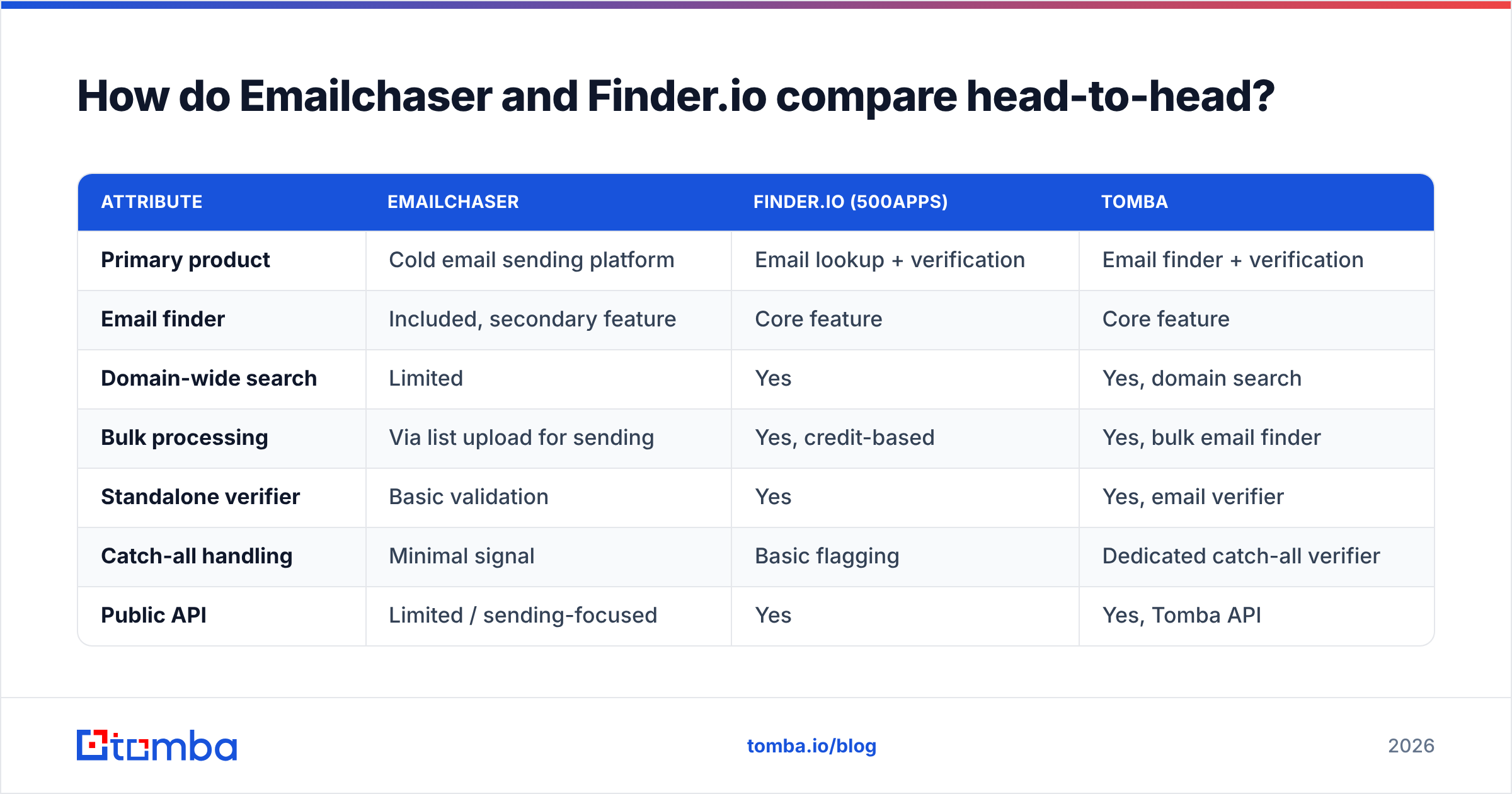
Here is the side-by-side. Treat all pricing as directional. Both vendors adjust plans, so confirm on their own pricing pages before you buy.
| Attribute | Emailchaser | Finder.io (500apps) | Tomba |
|---|---|---|---|
| Primary product | Cold email sending platform | Email lookup + verification | Email finder + verification |
| Email finder | Included, secondary feature | Core feature | Core feature |
| Domain-wide search | Limited | Yes | Yes, domain search |
| Bulk processing | Via list upload for sending | Yes, credit-based | Yes, bulk email finder |
| Standalone verifier | Basic validation | Yes | Yes, email verifier |
| Catch-all handling | Minimal signal | Basic flagging | Dedicated catch-all verifier |
| Public API | Limited / sending-focused | Yes | Yes, Tomba API |
| Sequencing + inbox | Yes — the main draw | No | No (integrates instead) |
| Free tier | Trial | Suite trial | 25 searches/mo, no card |
| Entry paid price | ~$49/mo range, seat-based | Bundled into 500apps suite | $49/mo Starter |
| Best for | Solo founders and small teams who want one tool | Cost-sensitive teams already in 500apps | Teams that need deliverable data at volume |

Two things jump out of that table.
First, Emailchaser's finder is a convenience layer. It exists to shorten the path from "I have a company list" to "I have a sequence running." It is not built to be your enrichment backbone, and it doesn't try to be.
Second, Finder.io's value is bundling in the other direction. You are not buying a best-in-class finder. You are buying acceptable lookups at a price that only makes sense because you pay for the suite anyway. Cancel the suite and the economics change completely.
Emailchaser vs Finder.io: how accurate is each tool's data?#
Accuracy is the only metric that survives contact with a real campaign. It is also the hardest one to get honest numbers on.

Every vendor quotes accuracy differently. That is how you end up with a market where everyone claims 95%+ and everyone's users report bounces. Three numbers actually matter:
- Hit rate — of 1,000 first-name/last-name/domain rows, how many return any address? A tool can look great here by guessing patterns and returning low-confidence results.
- Deliverable rate — of the addresses returned, how many actually accept mail? This is the number that decides whether your domain survives the month.
- Catch-all share — what percentage of results land on domains that accept everything and confirm nothing? On some B2B segments this is 20-30% of the list, and tools that count catch-alls as "found" inflate hit rate at your expense.
Emailchaser's finder skews toward pattern inference. That works on well-known company domains, and gets weaker on mid-market and non-US companies with irregular formats. Finder.io does more explicit verification, which you'd expect given lookups are its actual product. But its confidence signalling on catch-all domains is thin.
Neither publishes an independently audited benchmark, so run your own. Take 200 contacts you already have confirmed addresses for, run them through each trial, and score hit rate and false-positive rate yourself. Two hours of work saves a quarter of deliverability damage. For a public reference point on how the broader field behaves, G2's email-finder category is the least-biased source of user-reported bounce complaints.
What does each one actually cost?#
Cost comparisons break down here because the two tools bill on different units. Emailchaser sells sending capacity with lookups attached. Finder.io sells lookup credits inside a suite fee.
| Cost dimension | Emailchaser | Finder.io | Tomba |
|---|---|---|---|
| Billing unit | Seat + sending volume | Lookup credits (suite subscription) | Search/verification credits |
| Free option | Trial only | Suite trial | 25 searches/mo, ongoing |
| Entry tier | ~$49/mo | Low per-credit inside suite | $49/mo Starter |
| Mid tier | Scales with mailboxes | Higher credit packs | $99/mo Growth |
| High tier | Team/agency plans | Suite enterprise | $249/mo Pro |
| Hidden cost | Separate verifier still needed | Suite fee if you only want the finder | None — verification included |
| Cost per verified email | Higher (bounces not filtered) | Medium | Lower (verified at source) |
The line that matters is the last one. A tool at half the credit price is more expensive if a third of its output bounces. You pay again in domain reputation, in reply-rate collapse, and in the hours your SDR spends re-researching accounts.
Do this math before you sign anything:
- Take the credit price. Say $0.02 per lookup.
- Multiply by your hit rate. 70% hit rate → $0.029 per address returned.
- Multiply by deliverable rate. 80% deliverable → $0.036 per usable address.
- Add re-verification cost if the finder doesn't verify at source.
- Compare that number, not the sticker price. Full Tomba pricing is public so you can run the same calculation against it.
A $0.01 tool with a 55% deliverable rate costs more per usable contact than a $0.02 tool at 90%. That gap is the entire ballgame.
Which tool fits which team?#
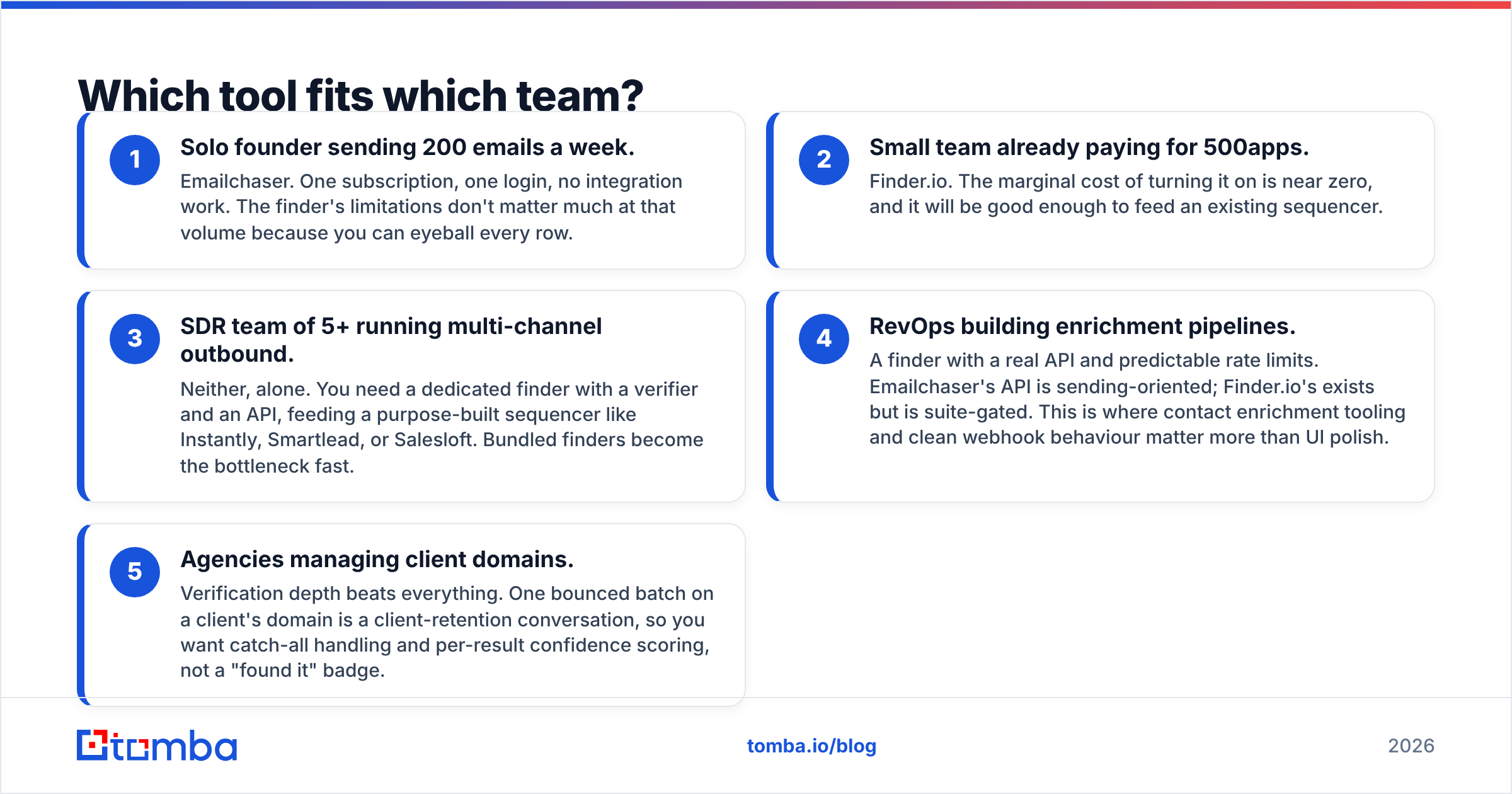
Rather than crown a universal winner, match the tool to the constraint you actually have.
- Solo founder sending 200 emails a week. Emailchaser. One subscription, one login, no integration work. The finder's limits don't matter much at that volume, because you can eyeball every row.
- Small team already paying for 500apps. Finder.io. The marginal cost of turning it on is near zero, and it will be good enough to feed an existing sequencer.
- SDR team of 5+ running multi-channel outbound. Neither, alone. You need a dedicated finder with a verifier and an API, feeding a purpose-built sequencer like Instantly, Smartlead, or Salesloft. Bundled finders become the bottleneck fast.
- RevOps building enrichment pipelines. A finder with a real API and predictable rate limits. Emailchaser's API is sending-oriented; Finder.io's exists but is suite-gated. This is where contact enrichment tooling and clean webhook behaviour matter more than UI polish.
- Agencies managing client domains. Verification depth beats everything. One bounced batch on a client's domain is a client-retention conversation. You want catch-all handling and per-result confidence scoring, not a "found it" badge.
Where does each tool fall short?#
Both are honest products with real limits. Naming them saves you a refund request.
Emailchaser's weak points:
- The finder is shallow on domain-wide discovery — you can find a person, less easily everyone in a department.
- Verification is validation-grade (syntax, MX, obvious traps), not the multi-step SMTP-plus-heuristics check a dedicated verifier runs.
- If you outgrow its sequencer, you lose the finder too, because they're the same subscription.
- Non-US and non-English company coverage thins out noticeably.
Finder.io's weak points:
- The suite model. You're evaluating one app but buying a platform, and support quality is spread across dozens of products.
- Confidence scoring is coarse — you often can't tell a verified address from a pattern guess without re-verifying externally.
- No sending layer, so it's always one piece of a stack, never the stack.
- Integration depth with mainstream CRMs is lighter than category leaders like Apollo or Clearbit offer.
The shared weak point: neither treats catch-all domains as a first-class problem. When a domain accepts all mail, standard SMTP verification returns "valid" for addresses that don't exist. That is how a list that tested clean produces an 18% bounce rate. A dedicated catch-all verifier exists precisely because this failure mode is invisible until it isn't.

Does bundling finding and sending actually help?#
Sometimes — and it's a real argument in Emailchaser's favour, so let's not wave it away.
The case for bundling: fewer tools, one bill, no CSV shuffling between systems, and no API glue to maintain. For a team of one to three, the operational savings are genuine. Most outbound programs die from friction, not from a 4% accuracy gap.
The case against: bundled finders are always the weaker half of the bundle. Vendors invest where their differentiation lives. For a sending platform that means deliverability, warmup, and inbox rotation — not data acquisition. You get a finder that's good enough for a good-enough list, and your reply rate reflects it.
Most scaling teams land in the middle. Keep the sender you like, and feed it from a dedicated data layer through an API or a native integration. A HubSpot integration or a Zapier hop takes a few minutes to set up. It also decouples "where my data comes from" from "where my emails go" for good. HubSpot's own sales prospecting guidance makes the same argument from the process side: research quality and outreach cadence are separate disciplines, and tooling that conflates them tends to under-serve both.
How does Tomba compare to both?#
Directly: Tomba competes with Finder.io, not with Emailchaser. It is a data tool, not a sequencer.
Where it lands differently from Finder.io:
- Verification is part of the pipeline, not an add-on. Every result carries a status, and catch-all domains get their own treatment rather than a shrug.
- Free tier is ongoing, not a trial. 25 searches per month with no card, which is enough to run the 200-row accuracy test described above.
- API-first. The email finder API is the same surface the UI uses, plus a CLI and MCP server if you're wiring lookups into agent workflows.
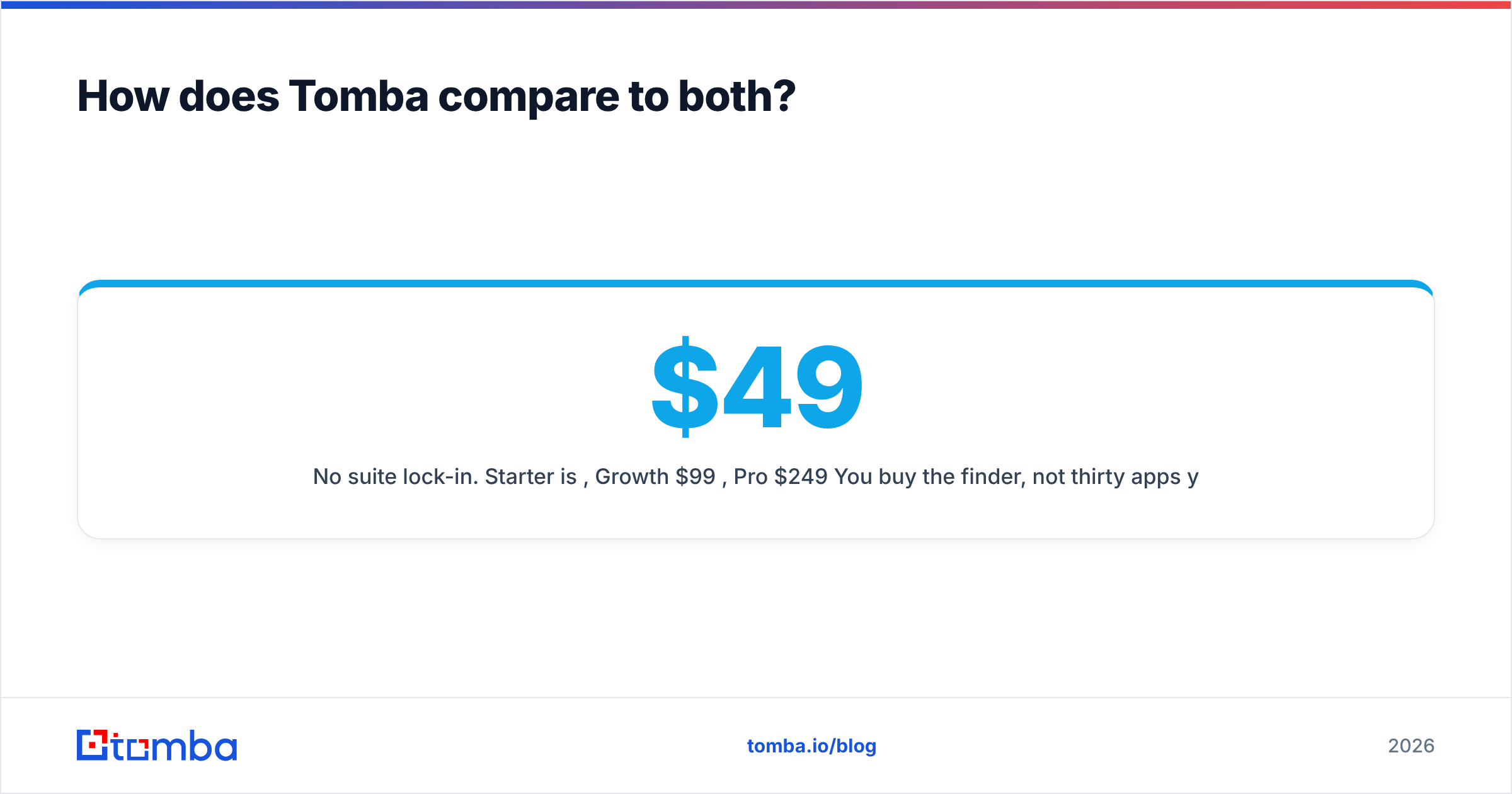
- No suite lock-in. Starter is $49/mo, Growth $99/mo, Pro $249/mo. You buy the finder, not thirty apps you'll never open.
Where Tomba is not the answer: if you want sending, sequencing, warmup, and inbox rotation in the same product, Tomba won't give you that. Pair it with a sender. That's the intended shape.
A fair note on the wider market, too. Tools like BookYourData take a different and legitimate approach, selling pre-built verified lists rather than on-demand lookups. If your motion is "buy a targeted list, load it, send," that model can beat any per-lookup finder, including this one.
Emailchaser vs Finder.io: what's the verdict?#
Choose Emailchaser if you want one tool that finds and sends, you're under roughly 2,000 emails a month, and simplicity beats precision for you right now.
Choose Finder.io if you already pay for 500apps, need bulk lookups, and have a sequencer elsewhere. The marginal economics are hard to argue with.
Choose neither if data quality is your actual bottleneck. That means a bounce rate above 3%, SDRs who re-research half the contacts they're handed, or an enrichment pipeline that has to run unattended. At that point a bundled or suite-gated finder is the constraint, and swapping it out is the highest-leverage change available to you.
Run the 200-row test. Whatever it tells you will be more useful than any comparison post, including this one.
Try it against your own list. Tomba's Email Finder gives you 25 free searches a month with no card. That is enough to benchmark it head-to-head in the Emailchaser vs Finder.io matchup, using contacts you already have confirmed. Every result comes back with a verification status and catch-all flag, so you're comparing deliverable addresses, not raw hits. If the numbers hold up, Starter is $49/mo. If they don't, you've lost nothing but an afternoon.
Related guides#
Ready to find emails that actually work?
Join 150,000+ professionals who stopped guessing and started sending. Free credits on signup — no credit card required.
Get the Tomba newsletter
Practical outbound tactics and product updates — once every two weeks.
About the author