Emailchaser vs Findymail (2026): Which Tool Should You Use?
Emailchaser sends cold email. Findymail finds it. Most buyers compare them as rivals and end up paying twice for half a stack. Here is the honest breakdown of pricing, data quality, and which one you actually need in 2026.
TL;DR
- Emailchaser and Findymail are not really competitors. Emailchaser is a cold email sending platform (sequences, inboxes, reply detection). Findymail is a B2B data tool (email finding, verification, Sales Navigator exports).
- If you already have a list and need to send it, Emailchaser is the relevant purchase. If you have a target account list and no contacts, Findymail is the relevant purchase.
- Findymail's reputation rests on bounce protection and LinkedIn/Sales Navigator scraping. Emailchaser's rests on simplicity and per-seat pricing that does not punish you for adding inboxes.
- Buying both is common and reasonable, but it is also where budgets quietly double. A dedicated finder plus verifier (Tomba, for example, starts at $49/mo) often covers the data half at lower cost per contact.
- Whichever you pick, verification is the non-negotiable step. Deliverability collapses somewhere north of a 3% bounce rate, and no sending tool can rescue a bad list.
What are Emailchaser and Findymail, exactly?#
Start here, because the entire comparison hinges on it.
Emailchaser is cold outreach software. You connect your Google Workspace or Microsoft 365 inboxes, upload a contact list, build a sequence of steps with delays, and it sends and follows up on your behalf until someone replies. It handles the mechanics of outbound sending: throttling, spintax-style personalization, reply detection, unsubscribe handling, and campaign reporting. It also bundles a lead-finding feature so you are not forced to buy data elsewhere on day one.
Findymail is a data provider. You give it a name and a company, a LinkedIn profile, a Sales Navigator search, or a domain, and it returns a verified business email address. Its selling point has always been that it will not hand you an address it cannot stand behind — it verifies before it delivers and markets itself around bounce protection. It plugs into sending tools via native integrations, Zapier, or its API. It does not send campaigns.
So the honest framing of Emailchaser vs Findymail is not "which is better." It is "which layer of your outbound stack are you currently missing."
Why do people compare these two at all?#
Three reasons, and each one tells you something about the buyer.
1. Feature overlap at the edges. Emailchaser includes lead finding. Findymail integrates with sending platforms. From a pricing page, they can look like they solve the same problem. They do not — one does sending well and finding adequately, the other does finding well and sending not at all.
2. Budget pressure. A founder with $150/month for outbound cannot buy a sending tool, a data tool, a verifier, and a warmup tool. So the search becomes "which single subscription gets me furthest," which puts unlike tools on the same shortlist.
3. Bounce trauma. Someone runs a campaign, sees a 12% bounce rate, and starts researching. Half the results are about data quality (Findymail's territory), half are about sending infrastructure (Emailchaser's territory). Both look like the fix.
If you recognize reason three, the data layer is almost always your actual problem. Sending platforms do not create invalid addresses; they just deliver whatever you loaded.
How do Emailchaser and Findymail compare feature by feature?#
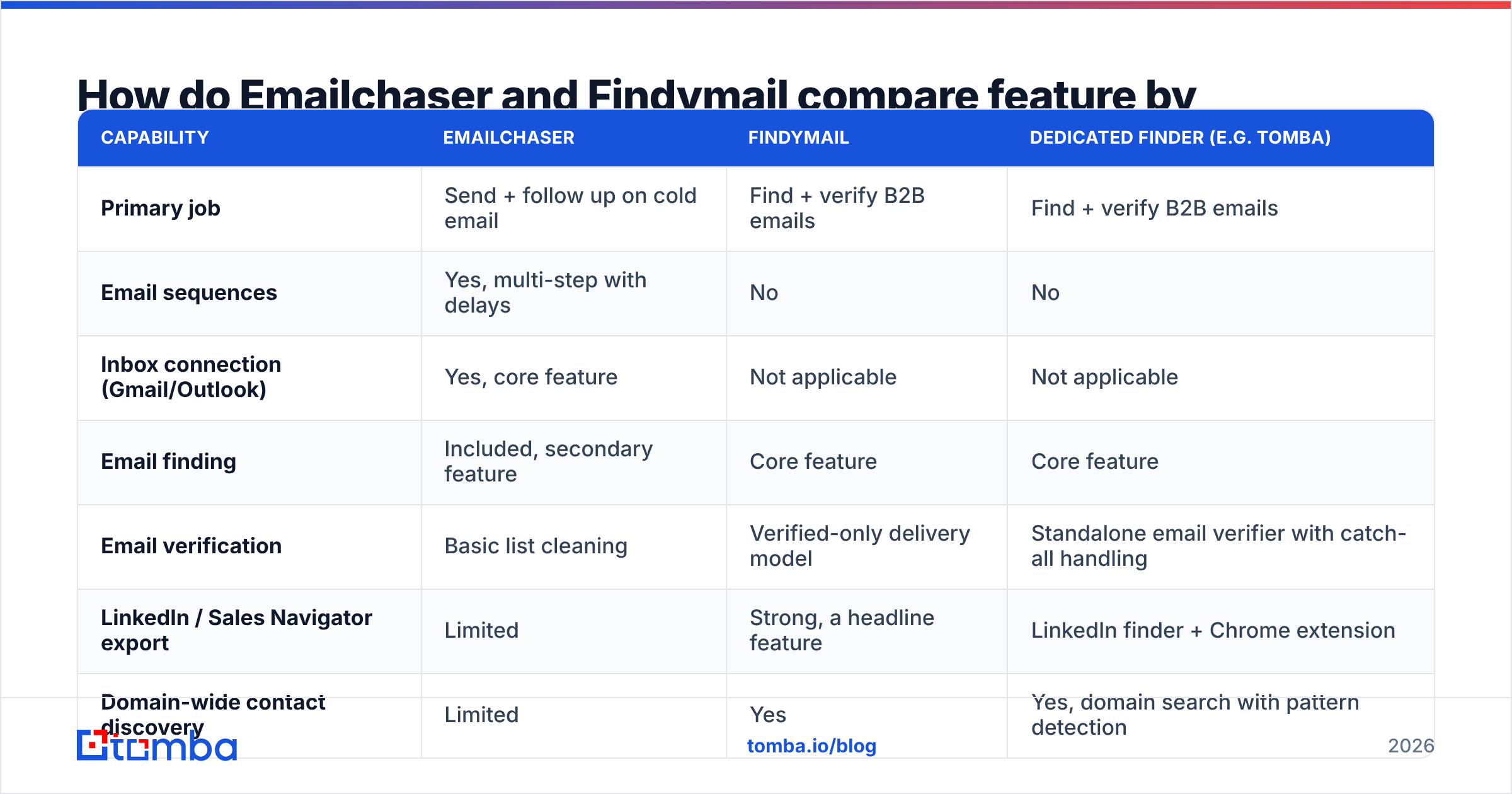
| Capability | Emailchaser | Findymail | Dedicated finder (e.g. Tomba) |
|---|---|---|---|
| Primary job | Send + follow up on cold email | Find + verify B2B emails | Find + verify B2B emails |
| Email sequences | Yes, multi-step with delays | No | No |
| Inbox connection (Gmail/Outlook) | Yes, core feature | Not applicable | Not applicable |
| Email finding | Included, secondary feature | Core feature | Core feature |
| Email verification | Basic list cleaning | Verified-only delivery model | Standalone email verifier with catch-all handling |
| LinkedIn / Sales Navigator export | Limited | Strong, a headline feature | LinkedIn finder + Chrome extension |
| Domain-wide contact discovery | Limited | Yes | Yes, domain search with pattern detection |
| Bulk enrichment of an existing CSV | Basic | Yes | Yes, bulk + API |
| API access | Limited | Yes | Yes, on all paid plans |
| Free tier | Trial | Limited free credits | 25 searches/month, no card |
| Best for | Teams who have a list and need to send it | Teams who need clean contacts for any sender | Teams who want finding, verification, and enrichment in one line item |
The table makes the split obvious. There is exactly one row where both tools score well — email finding — and it is Emailchaser's side feature and Findymail's entire product.
Which one has better email data accuracy?#
Findymail, on the data axis, and it is not a close call against a bundled finder inside a sending tool.
Here is why the gap exists structurally rather than because one engineering team is smarter. A dedicated data company's whole cost base goes into crawling, pattern inference, SMTP validation infrastructure, and catch-all handling. A sending platform's cost base goes into deliverability engineering, inbox rotation, and campaign UX; its finder is a retention feature funded by whatever is left over.
That said, treat every vendor's accuracy claim with the skepticism it deserves. Almost everyone in this category advertises "95%+ accuracy" or "99% deliverability," and those numbers are measured on the vendor's own test list — usually large, well-documented companies where every provider performs well. Your ICP is probably 40-person companies in a niche vertical, where hit rates diverge sharply.
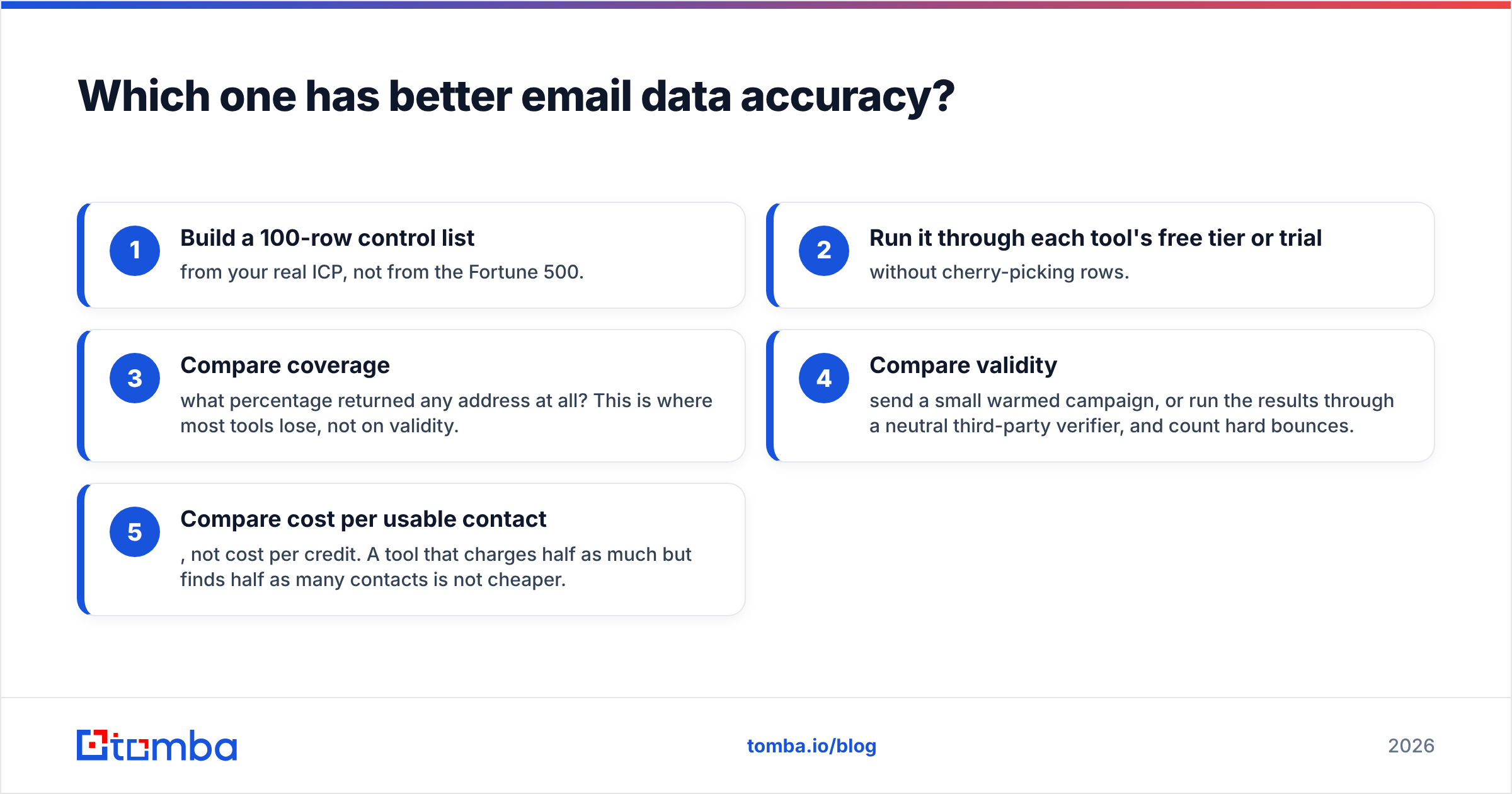
The only accuracy test that means anything:
- Build a 100-row control list from your real ICP, not from the Fortune 500.
- Run it through each tool's free tier or trial without cherry-picking rows.
- Compare coverage — what percentage returned any address at all? This is where most tools lose, not on validity.
- Compare validity — send a small warmed campaign, or run the results through a neutral third-party verifier, and count hard bounces.
- Compare cost per usable contact, not cost per credit. A tool that charges half as much but finds half as many contacts is not cheaper.
That last point catches almost everyone. Vendors price per credit because credits are cheap to sell; you should price per usable contact because that is what generates a meeting.
What do Emailchaser and Findymail cost in 2026?#
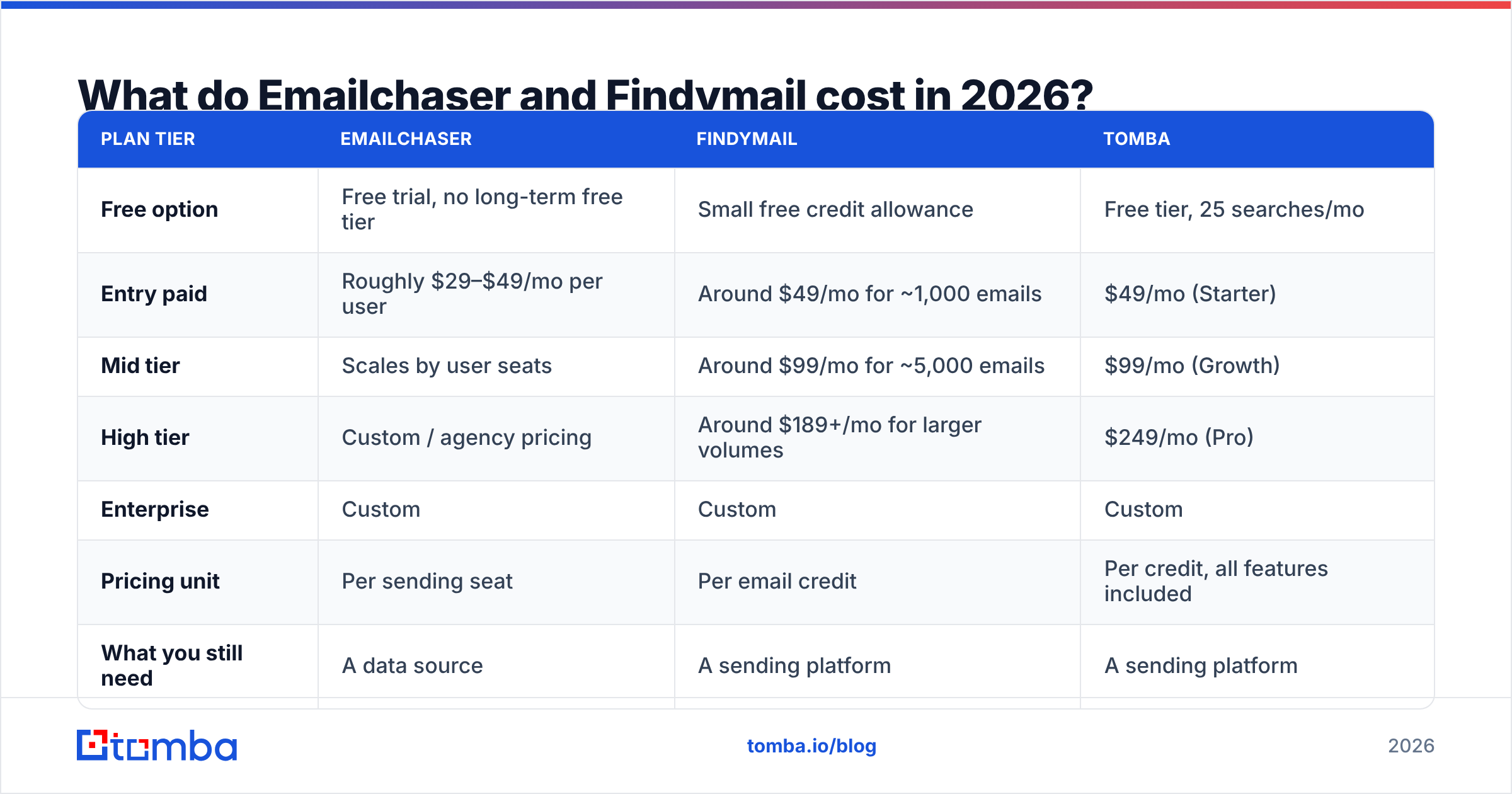
Pricing in this category changes often, and both vendors have restructured plans in the past. Verify on the official pages before you commit. As a directional guide:
| Plan tier | Emailchaser | Findymail | Tomba |
|---|---|---|---|
| Free option | Free trial, no long-term free tier | Small free credit allowance | Free tier, 25 searches/mo |
| Entry paid | Roughly $29–$49/mo per user | Around $49/mo for ~1,000 emails | $49/mo (Starter) |
| Mid tier | Scales by user seats | Around $99/mo for ~5,000 emails | $99/mo (Growth) |
| High tier | Custom / agency pricing | Around $189+/mo for larger volumes | $249/mo (Pro) |
| Enterprise | Custom | Custom | Custom |
| Pricing unit | Per sending seat | Per email credit | Per credit, all features included |
| What you still need | A data source | A sending platform | A sending platform |
Read the bottom row twice. Neither Emailchaser nor Findymail is a complete outbound stack on its own, so the real comparison is not $49 vs $49 — it is "sending tool + data tool" vs "sending tool + data tool," and the only question is which vendor fills which slot at what cost per usable contact.
A realistic 2026 stack for a two-person outbound team looks like: one sending platform ($50–100/mo), one data provider ($49–99/mo), domain and inbox costs (~$30/mo), and a warmup solution (often bundled). Anyone quoting you a single $49 line item for all of that is leaving something out. If you want to sanity-check the data half of that budget, Tomba pricing lists credits per tier openly, and there is a genuine free tier for testing before you commit.
Is Findymail worth it if your sending tool already finds emails?#
Usually yes, with one honest exception.
Buy the dedicated data tool when:
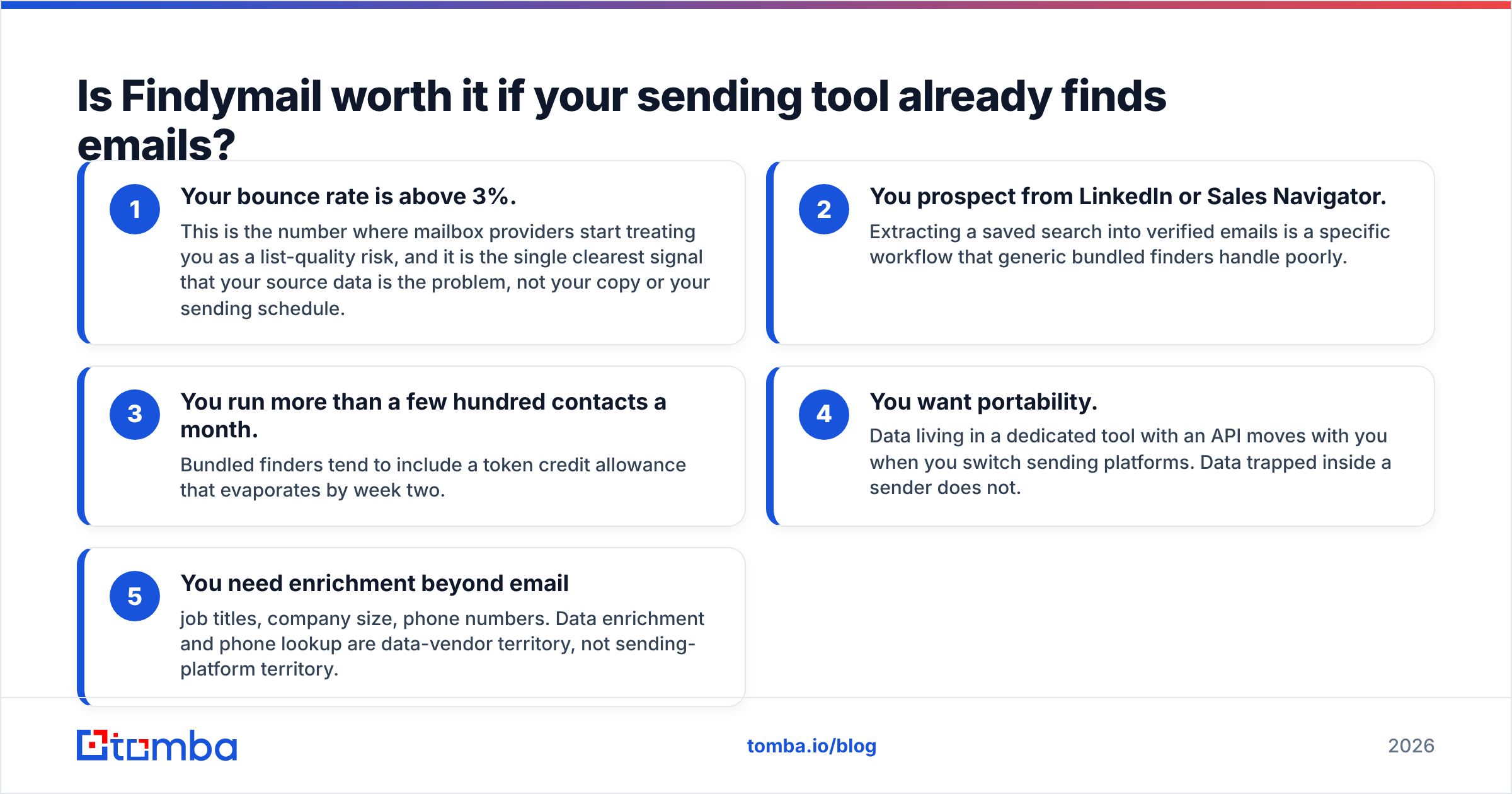
- Your bounce rate is above 3%. This is the number where mailbox providers start treating you as a list-quality risk, and it is the single clearest signal that your source data is the problem, not your copy or your sending schedule.
- You prospect from LinkedIn or Sales Navigator. Extracting a saved search into verified emails is a specific workflow that generic bundled finders handle poorly.
- You run more than a few hundred contacts a month. Bundled finders tend to include a token credit allowance that evaporates by week two.
- You want portability. Data living in a dedicated tool with an API moves with you when you switch sending platforms. Data trapped inside a sender does not.
- You need enrichment beyond email — job titles, company size, phone numbers. Data enrichment and phone lookup are data-vendor territory, not sending-platform territory.
Skip it — for now — when: you send fewer than ~100 cold emails a month, your ICP is large well-indexed companies where any tool performs adequately, and cash is genuinely tight. In that case, use the bundled finder, watch your bounce rate weekly, and upgrade the moment it crosses 3%.

What does a complete outbound stack actually look like?#
Four layers. Most people buy two and wonder why results are inconsistent.
Layer 1 — Targeting. A defined account list. No tool fixes a bad ICP. This is a spreadsheet and an hour of thinking, not a subscription.
Layer 2 — Data. Finding contacts and verifying them before they touch a sequence. This is Findymail's slot, and where a dedicated email finder plus verifier belongs. The output of this layer should be a list you would personally bet money on.
Layer 3 — Infrastructure. Domains, inboxes, SPF/DKIM/DMARC, warmup. Cheap relative to its impact and routinely skipped. Google and Microsoft tightened bulk-sender requirements in recent years, and authentication is now table stakes rather than an optimization.
Layer 4 — Sending. Sequences, follow-ups, reply handling, reporting. This is Emailchaser's slot, alongside the many alternatives you will find on G2's outbound category.
Emailchaser covers layer 4 and gestures at layer 2. Findymail covers layer 2 completely and ignores layer 4. Neither covers layer 3, which is why so many campaigns with good tools and good data still land in spam.
Which should you choose: Emailchaser or Findymail?#
The decision collapses into three cases.
Case 1 — You have a clean list and no way to send it. Buy Emailchaser (or any sending platform whose UX you like). Do not buy Findymail yet. Your bottleneck is delivery, not data.
Case 2 — You have target accounts and no contacts. Buy the data tool. Findymail is a solid choice, particularly for Sales Navigator workflows. If cost per usable contact matters more than the LinkedIn-specific workflow, compare it against a general-purpose finder first — that comparison is laid out in detail on the Findymail alternative page, and running the same 100-row control list through both takes an afternoon.
Case 3 — You have neither. Sequence the purchases. Data first, sending second. A great sequencer with a bad list produces bounces; a good list sent manually from one inbox still produces meetings. Prove the list works on 50 manual sends before you automate.
One more thing worth saying plainly: the tool you enjoy using is the tool you will actually use daily. Both vendors offer trials. Two afternoons of hands-on testing beats two weeks of reading comparison posts — including this one.
Ready to fix the data half of your stack?#
If your bounce rate is the thing keeping you up at night, start where the bounces come from. The Tomba Email Finder returns verified business emails from a name and domain, a company website, or a LinkedIn profile, with catch-all handling and confidence scores so you know what you are sending to before you send it. The free tier gives you 25 searches a month with no card required — enough to run that 100-row control test against whatever you are using today. Paid plans start at $49/mo, and every tier includes API access, bulk processing, and the verifier, so the data layer stays one line item instead of three.
Run the test. Keep whichever tool wins on cost per usable contact, and spend the savings on more domains.
Related guides#
Ready to find emails that actually work?
Join 150,000+ professionals who stopped guessing and started sending. Free credits on signup — no credit card required.
Get the Tomba newsletter
Practical outbound tactics and product updates — once every two weeks.
About the author