Emailchaser vs Lead411 (2026): Which Tool Actually Wins?
Emailchaser bundles email finding with cold email sending. Lead411 sells a full B2B database with direct dials and intent. Here is where each one earns its price — and where neither is the right buy.
TL;DR
- Emailchaser is a cold email sending platform with an email finder attached. Lead411 is a B2B contact database with intent data and direct dials attached to a prospecting workflow. They overlap on one thing only: getting you a work email address.
- If you already have a list and need sequences, Emailchaser is the cheaper, simpler buy. If you need to build lists by title, revenue band, tech stack, or hiring signal, Lead411 is the only one of the two that can do it.
- Lead411's pricing is per-seat and typically annual — budget roughly $99/user/month, often with export caps. Emailchaser sits in the sub-$50 range for most small teams.
- Neither tool is a great standalone email-verification layer. Both push verified-ish data, and both leave you re-checking risky and catch-all addresses before you send.
- The most common real-world stack is not "one or the other." It is a database or finder for the addresses, a verifier for the bounce risk, and a separate sender for the sequencing.
What are Emailchaser and Lead411?#
They solve different halves of the same problem, and that is the whole comparison in one sentence.
Emailchaser is cold email software. Its center of gravity is sending: connect a mailbox, load contacts, build a multi-step sequence, auto-stop on reply, track opens and clicks. The email finder is a supporting feature — you feed it a name and a domain, it returns a likely address. It is built for founders and small agencies who want one subscription instead of three.
Lead411 is sales intelligence. Its center of gravity is the database: millions of contacts with emails, verified direct-dial mobile numbers, company firmographics, technographics, and Bombora-powered intent signals. You search by filters — "VP of Marketing, SaaS, 50-200 employees, using HubSpot, hiring for demand gen" — and export the list. It has a light cadence feature (Reach), but nobody buys Lead411 for the sender.
So "Emailchaser vs Lead411" is really "sending tool with a finder bolted on" vs "data provider with a sender bolted on." Once you see it that way, the buying decision gets a lot easier.
How do Emailchaser and Lead411 compare feature by feature?#
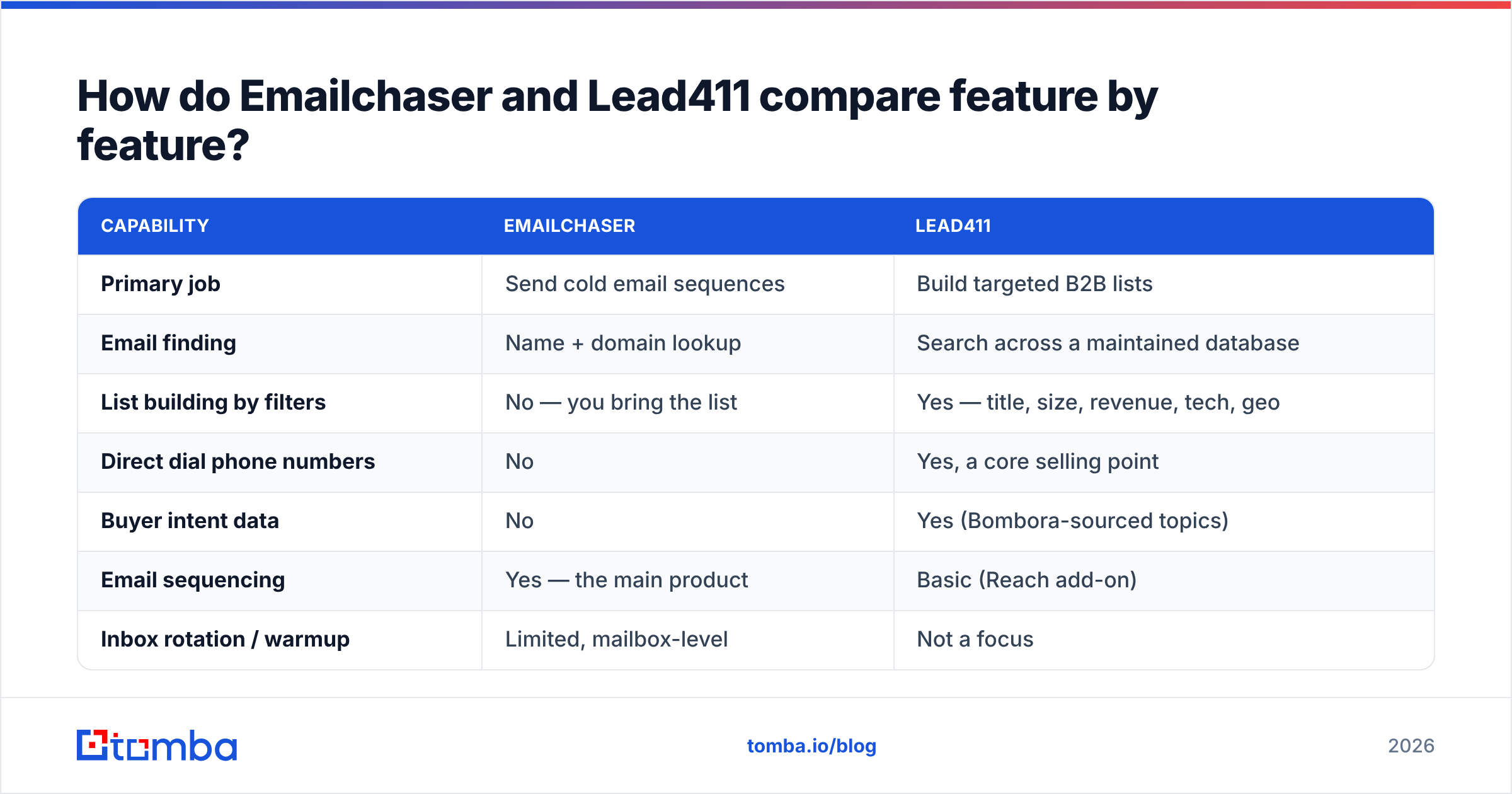
| Capability | Emailchaser | Lead411 |
|---|---|---|
| Primary job | Send cold email sequences | Build targeted B2B lists |
| Email finding | Name + domain lookup | Search across a maintained database |
| List building by filters | No — you bring the list | Yes — title, size, revenue, tech, geo |
| Direct dial phone numbers | No | Yes, a core selling point |
| Buyer intent data | No | Yes (Bombora-sourced topics) |
| Email sequencing | Yes — the main product | Basic (Reach add-on) |
| Inbox rotation / warmup | Limited, mailbox-level | Not a focus |
| CRM sync | Native + Zapier | Salesforce, HubSpot, Pipedrive, Zoho |
| API access | Limited | Available on higher tiers |
| Typical buyer | Founder, solo SDR, small agency | SDR team with a defined ICP |
| Contract shape | Monthly, self-serve | Per-seat, commonly annual |
The pattern in that table repeats across every review site: these tools are complements far more often than substitutes. Teams that churn from one to the other usually discover they bought the wrong half of the stack.
Which one gives you more accurate email data?#
Accuracy is the question everyone actually cares about, and it splits into two different failure modes.
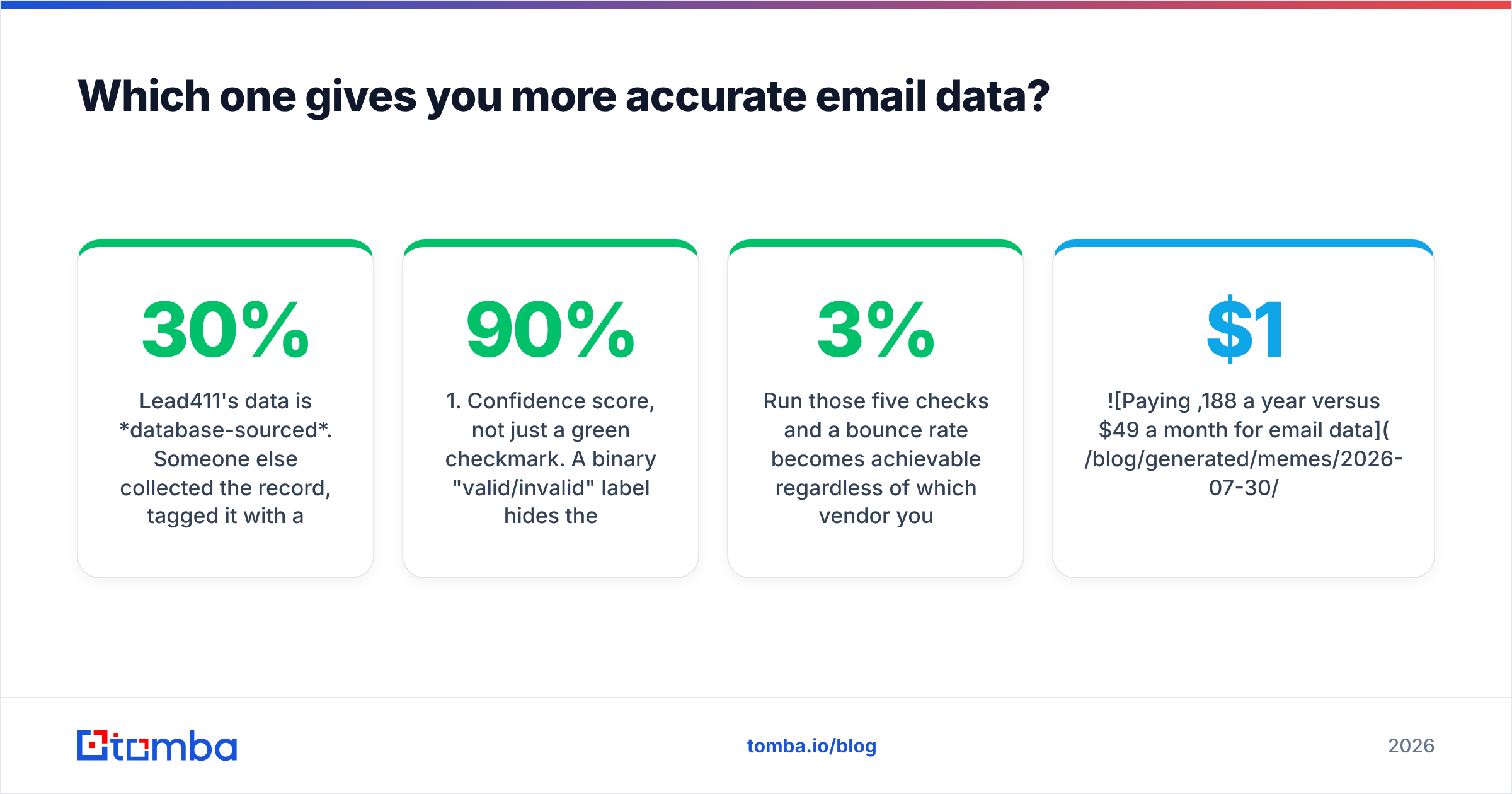
Lead411's data is database-sourced. Someone else collected the record, tagged it with a job title and a company, and put a "verified" stamp on it. That model is fast — you export 500 rows in ten seconds — but records decay. B2B contact data goes stale at roughly 25-30% per year as people change jobs, according to widely cited industry estimates. A record verified nine months ago is a coin flip. Lead411 re-verifies on a cycle, but "verified in our last sweep" is not the same as "valid right now."
Emailchaser's finder is pattern-and-check based. It infers the company's format (first.last@, flast@, first@) and validates a candidate. That model is fresher by design — the check happens when you ask — but it is only as good as its coverage of the domain. Small companies, custom domains, and catch-all servers all degrade the result, and the tool will happily hand you a "likely" address with thin evidence behind it.

Neither approach removes the need for a verification pass. Practically, here is what to check before you trust any address from either tool:
- Confidence score, not just a green checkmark. A binary "valid/invalid" label hides the risky middle. Anything under roughly 90% confidence deserves a second look.
- Catch-all status. Catch-all domains accept every address at the SMTP layer, so "no bounce" proves nothing. Use a dedicated catch-all verifier rather than assuming the record is fine.
- Record age. If the tool exposes a last-verified date, treat anything older than 90 days as unverified.
- Role-based addresses. info@, sales@, and support@ inflate your list size and tank your reply rate. Strip them.
- Domain health. A contact at a domain with no MX record or a parked site is dead weight no matter how confident the score.
Run those five checks and a 3% bounce rate becomes achievable regardless of which vendor you bought from. Skip them and both tools will burn your sending domain equally well.

What do Emailchaser and Lead411 actually cost?#
Pricing changes, so treat these as directional and confirm on each vendor's page before you sign anything.
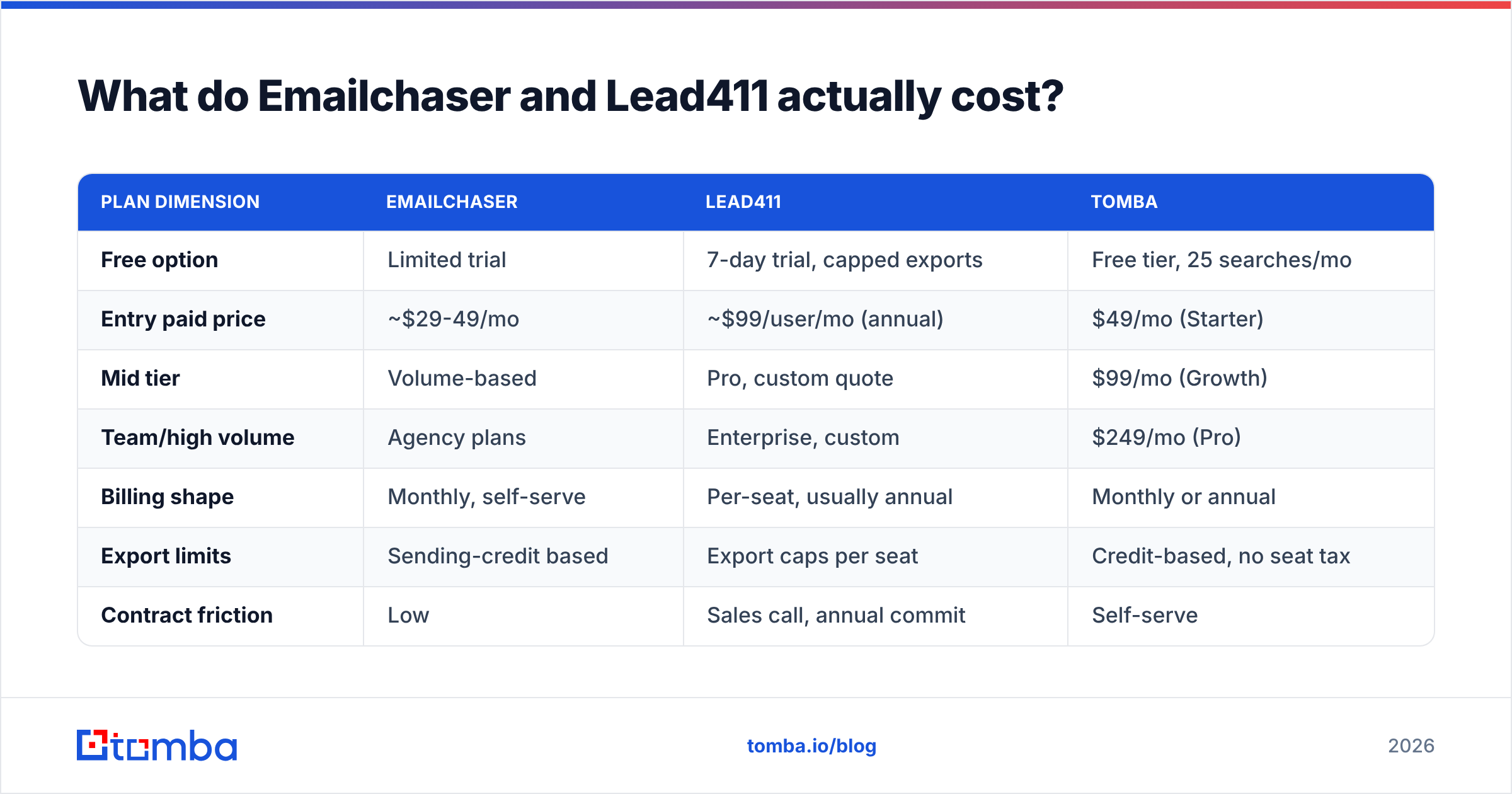
| Plan dimension | Emailchaser | Lead411 | Tomba |
|---|---|---|---|
| Free option | Limited trial | 7-day trial, capped exports | Free tier, 25 searches/mo |
| Entry paid price | ~$29-49/mo | ~$99/user/mo (annual) | $49/mo (Starter) |
| Mid tier | Volume-based | Pro, custom quote | $99/mo (Growth) |
| Team/high volume | Agency plans | Enterprise, custom | $249/mo (Pro) |
| Billing shape | Monthly, self-serve | Per-seat, usually annual | Monthly or annual |
| Export limits | Sending-credit based | Export caps per seat | Credit-based, no seat tax |
| Contract friction | Low | Sales call, annual commit | Self-serve |
Two cost traps are worth naming out loud.
The per-seat trap. Lead411 charges per user. A five-person SDR team is a five-figure annual line item before you have sent a single email. If only two reps genuinely need database search, you are subsidizing three logins.
The export-cap trap. "Unlimited" in sales-intelligence marketing usually means unlimited views, not unlimited exports. Read the export allowance on the tier you are quoted, because that number — not the seat price — is what determines your real cost per contact. Compare it against straightforward Tomba pricing or any credit-based finder to see whether the premium is buying you anything.
Who should buy Emailchaser?#
Buy Emailchaser if your bottleneck is sending, not sourcing.
It fits when you already know exactly who you want to reach — conference attendee lists, podcast guests, inbound signups, a scraped list of agencies in your city — and you need a reliable way to run a four-touch sequence without paying enterprise sequencer prices. The finder covers the "I have a name and a company, get me the address" case well enough for low volumes.
It does not fit when your ICP is defined by attributes rather than names. If your target is "companies between $10M and $50M revenue that just hired a Head of RevOps," Emailchaser has no mechanism to produce that list. You would be building it manually in LinkedIn and pasting it in, which is exactly the work a database is supposed to eliminate.
Who should buy Lead411?#
Buy Lead411 if your bottleneck is sourcing, and phone matters.
Lead411's real differentiator against most email-first tools is the direct-dial coverage plus intent. If your motion is call-then-email, or if you run account-based plays where "this company is researching our category right now" changes your priority order, that is genuinely hard to replicate with a finder. Reviews on G2 consistently praise the direct dials and the responsiveness of support; the recurring complaints are about export limits and annual contracts rather than data quality.
It does not fit when you are one person sending 200 emails a week. The per-seat annual structure is designed for teams with a quota, and the intent data only pays for itself if someone is actually acting on the signals daily. Solo operators routinely pay for a year, use two months of it, and then look for an alternative.
Where do both tools fall short?#
Three gaps show up in almost every honest review of either product.
Verification depth. Both tools tell you an address is good. Neither gives you the forensic detail — SMTP response, MX validity, catch-all classification, disposable-domain flag — that lets you make a judgment call on the ambiguous 15% of a list. If deliverability is a live concern, you will end up running exports through a dedicated email verifier anyway.
Programmatic access. Emailchaser's API surface is thin. Lead411's is gated to higher tiers. If you want enrichment to happen automatically when a lead enters your CRM, or you are building an internal tool, neither is a natural fit compared with a finder that exposes a proper email finder API on entry-level plans.
Coverage outside North America. Both skew heavily toward US and Western European data. If you sell into APAC, LATAM, or MENA, test your specific segment during the trial rather than trusting aggregate coverage claims. This is where credit-based tools have an advantage: you can test cheaply instead of committing a year to find out.

How do they compare against dedicated email finders?#
If the only thing you need from either tool is a verified work email, you are overpaying for capabilities you will not touch.

| Need | Emailchaser | Lead411 | Dedicated finder (e.g. Tomba) | Database-first (e.g. BookYourData) |
|---|---|---|---|---|
| Find one email from a name | Good | Good | Excellent | Good |
| Build a filtered list from scratch | No | Excellent | Partial (domain search) | Excellent |
| Verify a list you already own | Basic | Basic | Excellent | Good |
| Direct dial phone numbers | No | Excellent | Available | Varies |
| Send sequences | Excellent | Basic | No — pairs with a sender | No |
| API-first workflows | Limited | Tier-gated | Excellent | Varies |
| Entry price | ~$29-49/mo | ~$99/seat/mo | $49/mo, free tier | Pay-as-you-go options |
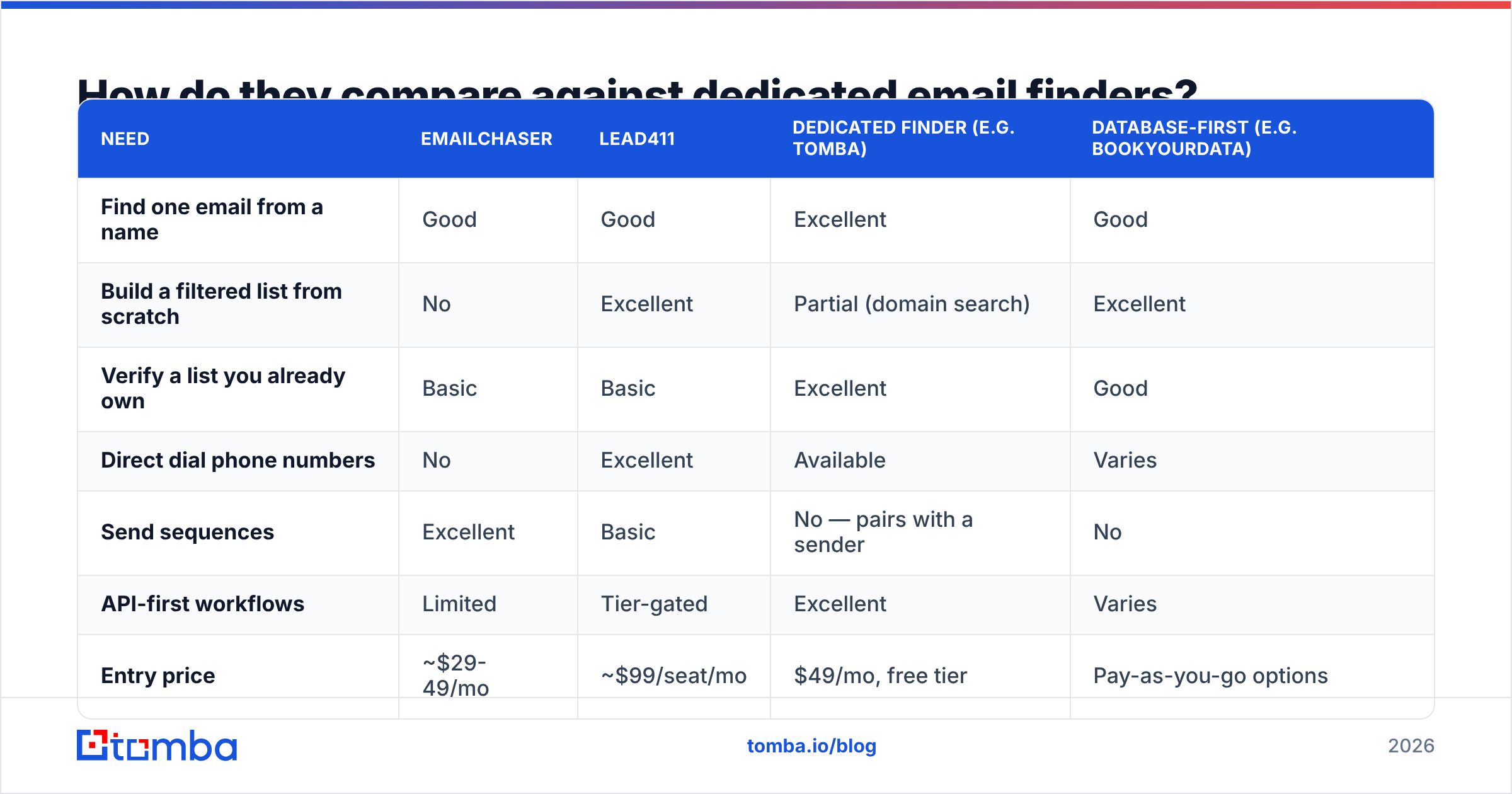
The honest read: Emailchaser wins on sending, Lead411 wins on list building and phones, and a dedicated finder wins on cost-per-verified-address and on anything you want to automate. BookYourData is a reasonable third option if you prefer buying pre-built lists outright rather than searching a subscription database.
Most teams that get this right run a three-part stack rather than one all-in-one: a source for contacts, a verifier before send, and a sender they trust. When your source is a domain search that returns every public address at a company with confidence scores attached, you stop paying seat fees for search you use twice a week.
Which should you pick — Emailchaser or Lead411?#
Answer three questions.
Do you know who you want to email by name? If yes, you do not need a database. Emailchaser or a standalone finder covers you at a fraction of the cost.
Does phone outreach drive your pipeline? If yes, Lead411 earns its price. Direct dials at that quality level are expensive to source anywhere else, and the intent layer makes call prioritization defensible.
Are you automating any of this? If yes, check the API tier before you buy. Both tools will frustrate you here, and an API-first finder plus your existing sequencer is usually cheaper and more flexible than either.
For a solo founder or a two-person team doing outbound email only, neither tool is the obvious buy. You need addresses that are correct on the day you send, a verification pass that catches catch-alls, and a sender you probably already have. That is a $49/month problem, not a $1,200-per-seat-per-year problem.
Ready to stop overpaying for email data?#
If your real need is accurate work emails — not a per-seat intelligence subscription and not a bundled sequencer you will outgrow — start with the Tomba Email Finder. The free tier gives you 25 searches a month to test coverage on your actual ICP before you spend anything, Starter is $49/month, and every plan includes verification, domain search, and full API access instead of gating them behind an enterprise quote. Run twenty of your hardest target accounts through it and compare the hit rate against whatever you are paying for today. That test takes ten minutes and tends to settle the argument.
Related guides#
Ready to find emails that actually work?
Join 150,000+ professionals who stopped guessing and started sending. Free credits on signup — no credit card required.
Get the Tomba newsletter
Practical outbound tactics and product updates — once every two weeks.
About the author