Emailchaser vs Tami AI (2026): Which Cold Email Tool Wins
Emailchaser keeps cold email simple and cheap. Tami AI leans on AI agents to write and route replies. Here is where each one actually wins — and where both fail without clean data.
TL;DR
- Emailchaser is the simpler, cheaper sending tool: unlimited-ish inbox connections, straightforward sequences, per-user pricing, minimal AI. Best for small teams that want to send follow-ups without learning a platform.
- Tami AI sits on the AI-SDR side: it drafts messages, classifies replies, and tries to automate the parts a human normally does. Best for teams that want volume without adding headcount.
- Neither tool fixes a bad list. Both will happily send 5,000 emails to addresses that bounce and torch your domain reputation in a week.
- The real cost difference shows up in wasted sends, not in the monthly invoice. A 12% bounce rate on either platform costs more than the price gap between them.
- Pick Emailchaser for control and cost. Pick Tami AI for automation depth. Feed either one verified contacts from a dedicated email finder before you compare reply rates.
Cold email tooling split into two camps somewhere around 2024, and the split has only widened since. On one side you have lean senders — cheap, fast, opinionated, built around sequences and inbox rotation. On the other you have AI agents that promise to research, write, send, and triage on your behalf.
Emailchaser and Tami AI land on opposite sides of that line. That makes the comparison useful, because you are not really choosing between two versions of the same product. You are choosing a philosophy about how much of outbound you want a machine to own.
What is Emailchaser?#
Emailchaser is a cold email outreach platform built around a deliberately narrow idea: connect your mailboxes, upload a list, write a sequence, send follow-ups until someone replies. It grew out of the frustration many teams had with enterprise sales engagement suites that cost four figures a month and require an admin to operate.
The product's identity is simplicity plus predictable pricing. You are not paying per credit, per enriched record, or per AI generation. You are paying for seats and sending capacity. Its own product site leans hard into that positioning — no forecasting module, no dialer, no revenue intelligence layer.
What you get:
- Multi-inbox sending with rotation so no single mailbox carries the whole volume
- Sequence builder with delays, conditions, and reply detection
- Basic personalization via merge fields and spintax-style variation
- Unified inbox for replies
- CSV import, simple CRM syncs
What you do not get: a research agent, native lead sourcing worth relying on, or deep intent signals. Emailchaser assumes you already know who you are emailing.
What is Tami AI?#
Tami AI belongs to the AI-SDR generation of tools. Instead of asking you to write a sequence, it asks you to describe an ideal customer profile and an offer, then generates the outreach itself — drafting variants, adapting tone per prospect, and handling inbound replies with classification and suggested responses.
The pitch is leverage. One operator supervising an AI agent should, in theory, cover the ground of three SDRs. In practice, the quality of that leverage depends almost entirely on the input data and how tightly you constrain the agent's prompts.
AI-SDR products in this category typically bundle:
- ICP definition and prospect scoring
- Automatic message generation per contact, using scraped context
- Reply classification (interested / not now / referral / unsubscribe)
- Meeting booking handoff
- Some level of built-in contact data, usually resold from a larger provider
That last point matters more than the marketing suggests, and we will come back to it.
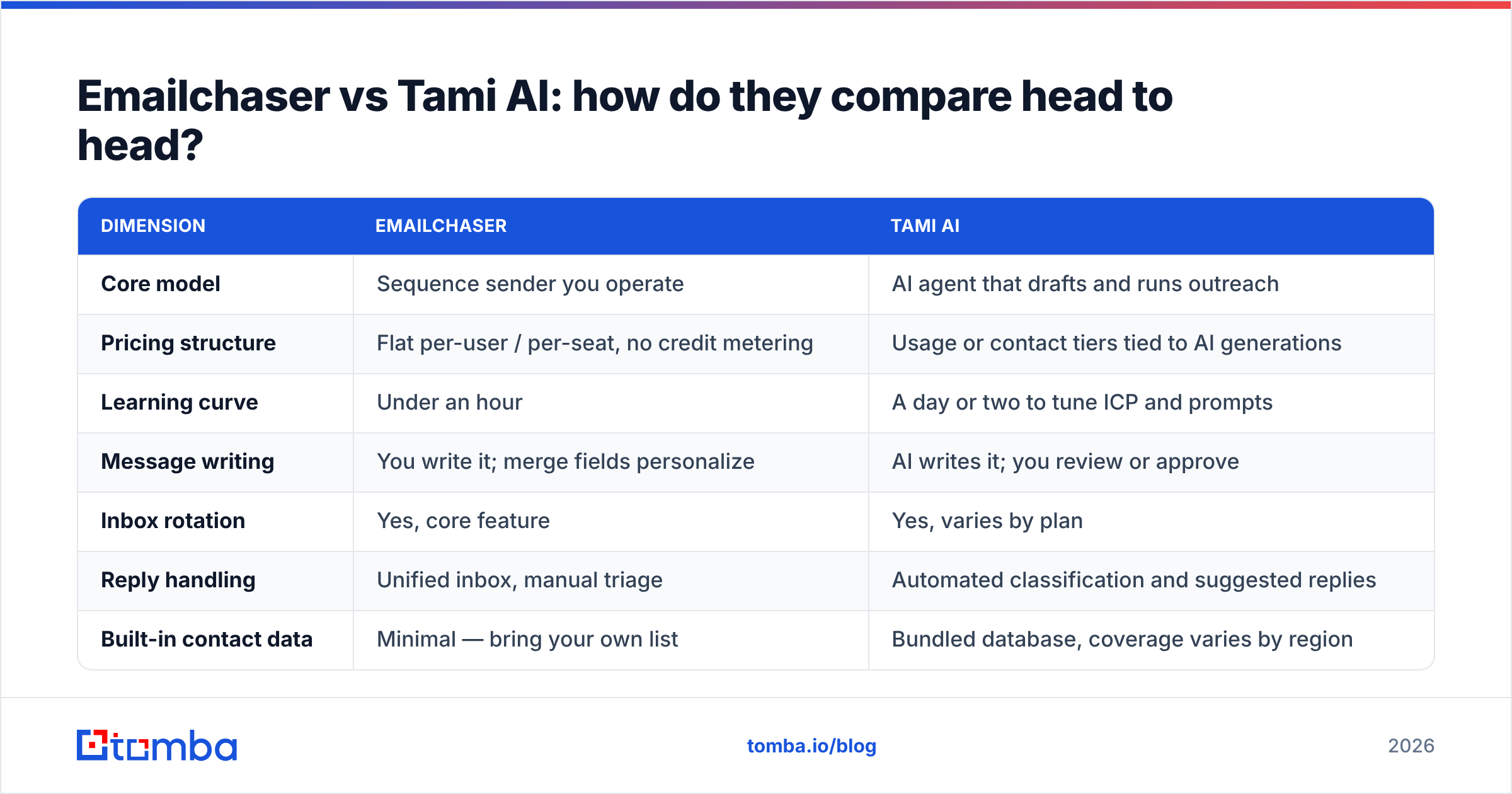
Emailchaser vs Tami AI: how do they compare head to head?#
Verify current plans on each vendor's site before you buy — both companies have changed packaging more than once, and the numbers below describe the shape of the pricing rather than a permanent quote.
| Dimension | Emailchaser | Tami AI |
|---|---|---|
| Core model | Sequence sender you operate | AI agent that drafts and runs outreach |
| Pricing structure | Flat per-user / per-seat, no credit metering | Usage or contact tiers tied to AI generations |
| Learning curve | Under an hour | A day or two to tune ICP and prompts |
| Message writing | You write it; merge fields personalize | AI writes it; you review or approve |
| Inbox rotation | Yes, core feature | Yes, varies by plan |
| Reply handling | Unified inbox, manual triage | Automated classification and suggested replies |
| Built-in contact data | Minimal — bring your own list | Bundled database, coverage varies by region |
| Email verification | Basic or third-party | Partial, usually not a full SMTP verify |
| Best fit | Founders, agencies, 1-5 seat teams | Teams wanting SDR-style output without SDR headcount |
| Main risk | Manual work scales linearly | Generic AI copy at scale; data quality opaque |
Two rows in that table decide most purchases: pricing structure and built-in contact data.
Flat per-seat pricing is easy to forecast, which is why lean teams gravitate to Emailchaser. Usage pricing on AI tools looks cheap at 500 contacts and gets uncomfortable at 15,000 — especially when a chunk of those generations get spent on contacts who were never reachable in the first place.
Which one has better deliverability?#
Neither. Deliverability is not a feature you buy; it is a consequence of three things the tool only partially controls:
- Domain and inbox setup. SPF, DKIM, DMARC, dedicated sending domains, gradual warmup. Both platforms support the mechanics. Both will let you skip them and get burned.
- Volume pacing per mailbox. Rotation helps, but 40+ cold sends per mailbox per day still draws attention from Google and Microsoft filters regardless of vendor.
- List hygiene. This is the one people underestimate, and it is the single biggest lever.
Google and Microsoft both weight bounce rate and spam complaints heavily in sender reputation. Once you cross roughly 2-3% hard bounces, mailbox providers start throttling. Cross 5% and you are in remediation territory — which means weeks of reduced sending while you rebuild trust.

That is why the honest answer to "which tool has better deliverability" is: the one you feed cleaner data into. An email verifier run before import does more for your inbox placement than any sending-side feature either platform ships. If you are unsure about pacing, a warmup calculator will give you a sane ramp schedule for new domains.
For the underlying mechanics, the email deliverability definition covers what actually gets measured on the receiving end.
Does AI personalization actually lift reply rates?#
Sometimes. The lift is real but narrower than vendors claim, and it decays.
Here is the pattern most teams observe. AI-generated openers referencing a prospect's recent funding round, blog post, or job change do outperform generic templates — for a while. Then the technique saturates. When every third cold email opens with "Saw you just closed your Series A," the signal stops working, because recipients now recognize the pattern as automated rather than researched.
What holds up better:
- Relevance over flattery. A line that names a specific problem their role owns beats a compliment about their company blog. AI does this well only when you give it a tight ICP and a real pain hypothesis.
- Brevity. Sub-90-word emails still win. AI tools default to longer output unless you constrain them hard.
- Offer clarity. No amount of personalization rescues a vague ask. "Worth a 15-minute call Thursday?" outperforms "Would love to connect and explore synergies."
- Follow-up count. Three to five touches is where most replies land. Emailchaser makes this trivially easy; Tami AI automates it but you should still audit what it sends on touch four.
- Sender identity. Emails from a named human with a real signature beat noreply-style branding by a wide margin.
Tami AI can execute all five if configured well. Emailchaser can execute all five if you write well. The difference is whether the effort sits in setup or in ongoing authorship.
What breaks both tools — and how do you fix it?#
The data layer breaks both tools. Every cold email platform, AI or not, inherits the quality of the contacts you load into it.
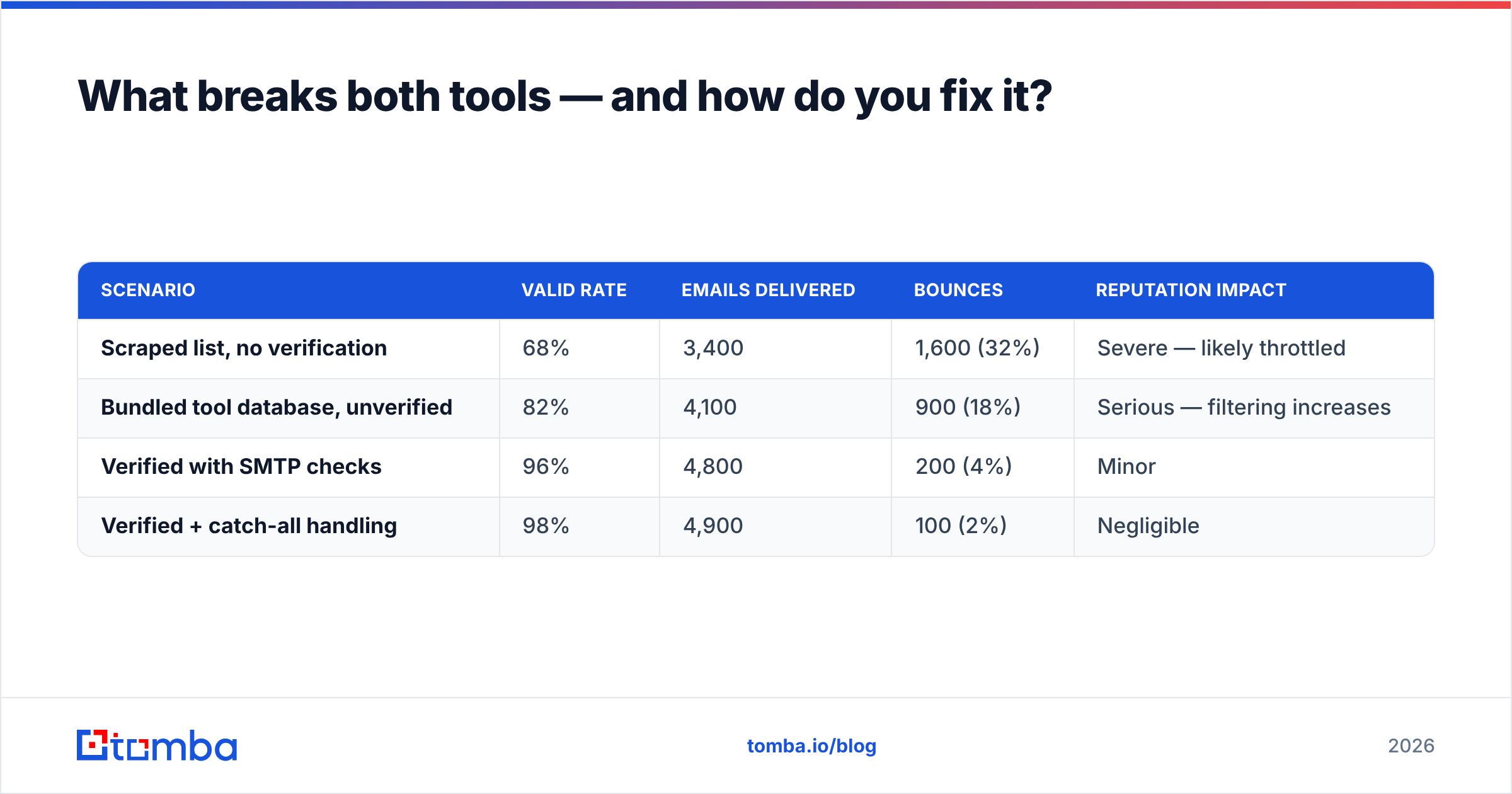
Consider the arithmetic on a 5,000-contact campaign:
| Scenario | Valid rate | Emails delivered | Bounces | Reputation impact |
|---|---|---|---|---|
| Scraped list, no verification | 68% | 3,400 | 1,600 (32%) | Severe — likely throttled |
| Bundled tool database, unverified | 82% | 4,100 | 900 (18%) | Serious — filtering increases |
| Verified with SMTP checks | 96% | 4,800 | 200 (4%) | Minor |
| Verified + catch-all handling | 98% | 4,900 | 100 (2%) | Negligible |
Two things jump out. First, the difference between an unverified bundled database and a properly verified list is roughly 700 additional delivered emails per 5,000 — which at a 2% reply rate is 14 extra conversations you simply did not have. Second, the bounce column is what determines whether your next campaign lands at all.
This is also where the AI-SDR pricing model gets expensive in a way the pricing page does not show. If Tami AI charges per generation and 18% of your contacts are invalid, you are paying the AI to write personalized emails to addresses that do not exist.

The fix is unglamorous: source and verify contacts before they touch the sending tool.
- Use a domain search to pull every reachable address at a target company, then filter by role rather than guessing at patterns.
- Run a bulk verify pass on the full list, not a sample.
- Handle catch-all domains explicitly instead of dumping them into the "risky" bucket and hoping.
Tomba's own data sources page documents how addresses are sourced and re-validated, which is worth reading before you trust any vendor's accuracy claim — including ours.
Which should you choose in 2026?#
Pick based on where your constraint actually sits.
Choose Emailchaser if your constraint is budget or control. Two to five people, a list you already own, and a message you know converts. You will spend an hour setting it up and never think about it again. Per-seat pricing means a 10x volume increase does not 10x your bill.
Choose Tami AI if your constraint is human hours. You have more accounts to work than people to work them, and you accept some quality variance in exchange for coverage. Budget setup time for ICP tuning — the default configuration produces mediocre copy in every AI-SDR tool, without exception.
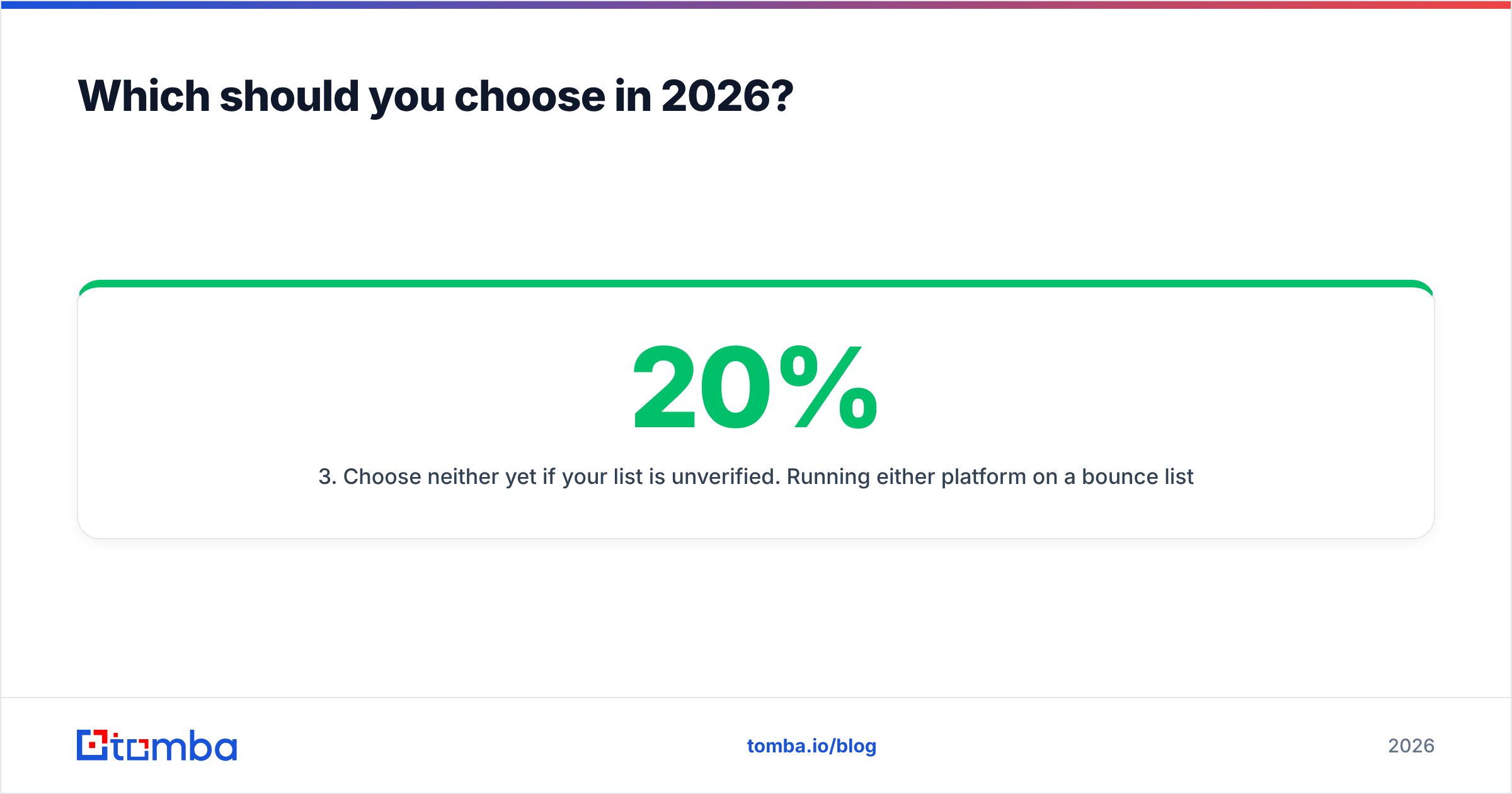
Choose neither yet if your list is unverified. Running either platform on a 20% bounce list is the most expensive mistake in this entire comparison. Fix the data first; the tool choice becomes much less consequential.
Consider running both if you have distinct segments. Emailchaser for a hand-crafted top-100 account list where you write every line yourself. Tami AI for the long tail where volume matters more than craft. This is more common than vendors like to admit.
Revisit in six months regardless. This category is moving fast. Read current user reviews on G2 rather than trusting any single comparison post — including this one — as a permanent verdict.
How do you set up either tool properly?#
The setup sequence is identical across both platforms:
Week 1 — infrastructure. Buy two or three secondary domains. Configure SPF, DKIM, and DMARC on each. Create two to three mailboxes per domain. Start warmup. Do not send anything cold yet. If you need a refresher on the record types, the SPF record reference covers the basics, and standard email authentication practice is well documented.
Week 2 — data. Define your ICP narrowly enough that you could name 200 companies. Source contacts. Verify every address. Remove catch-alls you cannot confirm, or route them to a separate low-volume segment.
Week 3 — copy and pilot. Write or generate three sequence variants. Send to 100 contacts per variant. Measure reply rate, not open rate — open tracking is increasingly unreliable and can hurt deliverability.
Week 4 — scale the winner. Ramp volume 20-30% per week per mailbox. Watch bounce rate weekly. If it crosses 3%, stop and re-verify the list rather than pushing through.
Teams that skip weeks one and two and start at week three are the ones who conclude, six weeks later, that "cold email doesn't work anymore." It works. Their infrastructure and data did not.
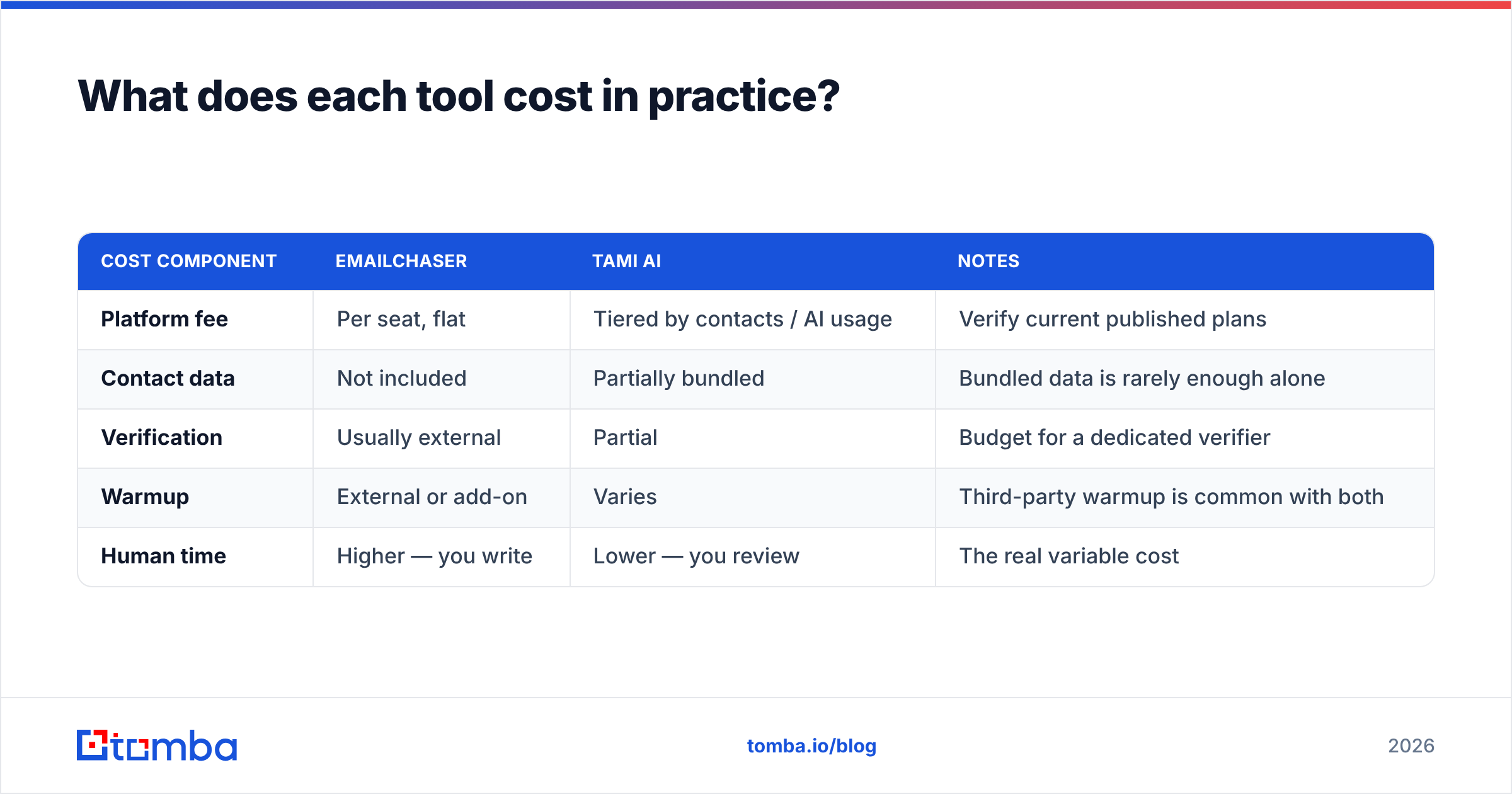
What does each tool cost in practice?#
| Cost component | Emailchaser | Tami AI | Notes |
|---|---|---|---|
| Platform fee | Per seat, flat | Tiered by contacts / AI usage | Verify current published plans |
| Contact data | Not included | Partially bundled | Bundled data is rarely enough alone |
| Verification | Usually external | Partial | Budget for a dedicated verifier |
| Warmup | External or add-on | Varies | Third-party warmup is common with both |
| Human time | Higher — you write | Lower — you review | The real variable cost |
For the data layer, Tomba pricing starts with a free tier at 25 searches per month, then Starter at $49/mo, Growth at $99/mo, and Pro at $249/mo, with Enterprise custom. That sits alongside whichever sender you pick rather than replacing it — which is the correct architecture. Sending tools should send. Data tools should find and verify.
If you are also evaluating all-in-one platforms that bundle both, expect to trade data quality for convenience. Bundled databases are optimized for volume and coverage claims, not for the SMTP-level accuracy that keeps your bounce rate under 3%.
The bottom line#
Emailchaser and Tami AI are both defensible choices, and the gap between them is smaller than the gap between a verified list and an unverified one. Emailchaser wins on cost predictability, speed to first send, and control over what actually goes out. Tami AI wins on coverage per operator and reply triage. Sending mechanics are close enough that they should not decide your purchase.
What should decide it: how many hours per week you can spend writing, and how tolerant you are of AI-drafted copy going out under your name.
Before you commit to either, fix the input. Start with the Tomba Email Finder to build a list of real, reachable contacts at the companies you actually want — free for your first 25 searches, no card required. Verify the results, then load them into whichever sender you choose. Your reply rate will move more from that one change than from any feature comparison in this post.
Related guides#
Ready to find emails that actually work?
Join 150,000+ professionals who stopped guessing and started sending. Free credits on signup — no credit card required.
Get the Tomba newsletter
Practical outbound tactics and product updates — once every two weeks.
About the author